
Review advisories and affected agents
The Security page lists the advisories that currently apply to your products and shows how much of your fleet each one affects. Use it to find agents that need an upgrade, read the details of an advisory, and confirm that exposure drops to zero after a rollout.
Available with Telegraf Enterprise
Security advisories are available with Telegraf Enterprise. If you are interested in learning more about Telegraf Enterprise, contact us.
- The Security page at a glance
- Filter, search, and sort advisories
- View advisory details
- View affected agents
- Find affected agents on the Agents page
- Check your Telegraf Controller version
- Acknowledge new advisories
- Query advisories with the API
The Security page at a glance
Click Security in the left navigation. The overview card at the top of the page shows:
- Advisories: the number of active advisories in the applied advisory files, across both products.
- Fleet Exposure: a segmented bar with the share of agents that are Not affected, affected at each severity (Low, Medium, High, Critical), and Unknown. Each agent is counted once, under the highest severity among the advisories that affect it. When no advisory matches, the bar reads No advisories currently match your fleet.
- Feed status: when each advisory file was last checked and applied, and where it came from. See View feed status.
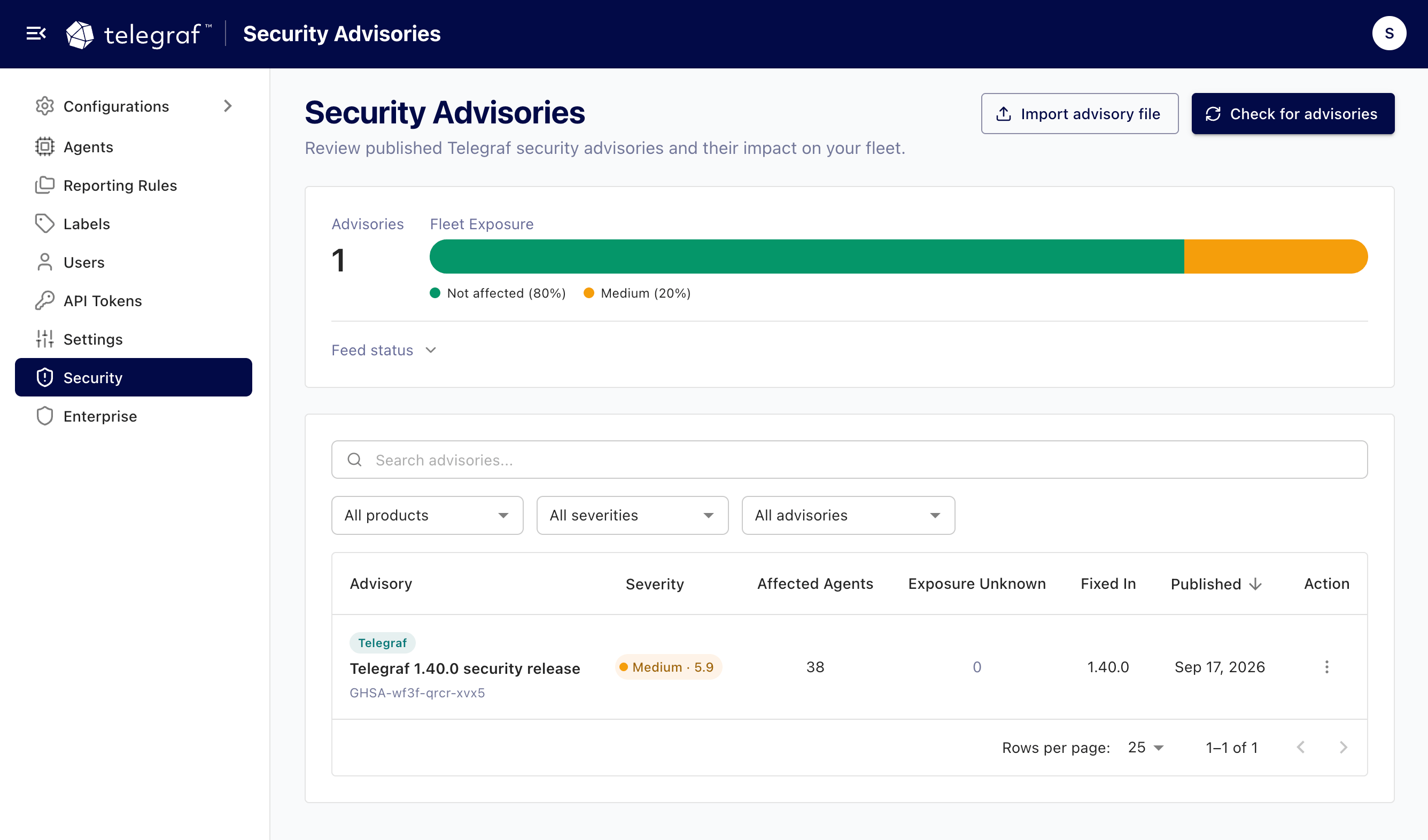
Users with write permission also see the Import advisory file and Check for advisories buttons. See Import an advisory file and Check for advisories on demand.
Filter, search, and sort advisories
The list below the overview shows every active advisory. Each row shows the product, the advisory title, its identifier and CVE, a severity chip with the CVSS score, the number of Affected Agents, the number of agents whose exposure is unknown (Exposure Unknown), the version the advisory is Fixed In, and the Published date.
Use the controls above the list to narrow it:
- Search (): matches the advisory title, identifier, or CVE.
- Product: All products, Telegraf, or Telegraf Controller.
- Severity: All severities, Critical, High, Medium, or Low.
- Affecting: All advisories, Affecting (advisories with at least one affected agent, or a Telegraf Controller advisory that affects this installation), or Not affecting.
Click the Severity or Published column header to sort by that column. Click it again to reverse the order. By default, the list is sorted by publication date, newest first.
Advisories for Telegraf Controller aren’t matched against agents, so their
agent counts show —.
Instead, they are compared with the version of Telegraf Controller you are
running.
See Check your Telegraf Controller version.
View advisory details
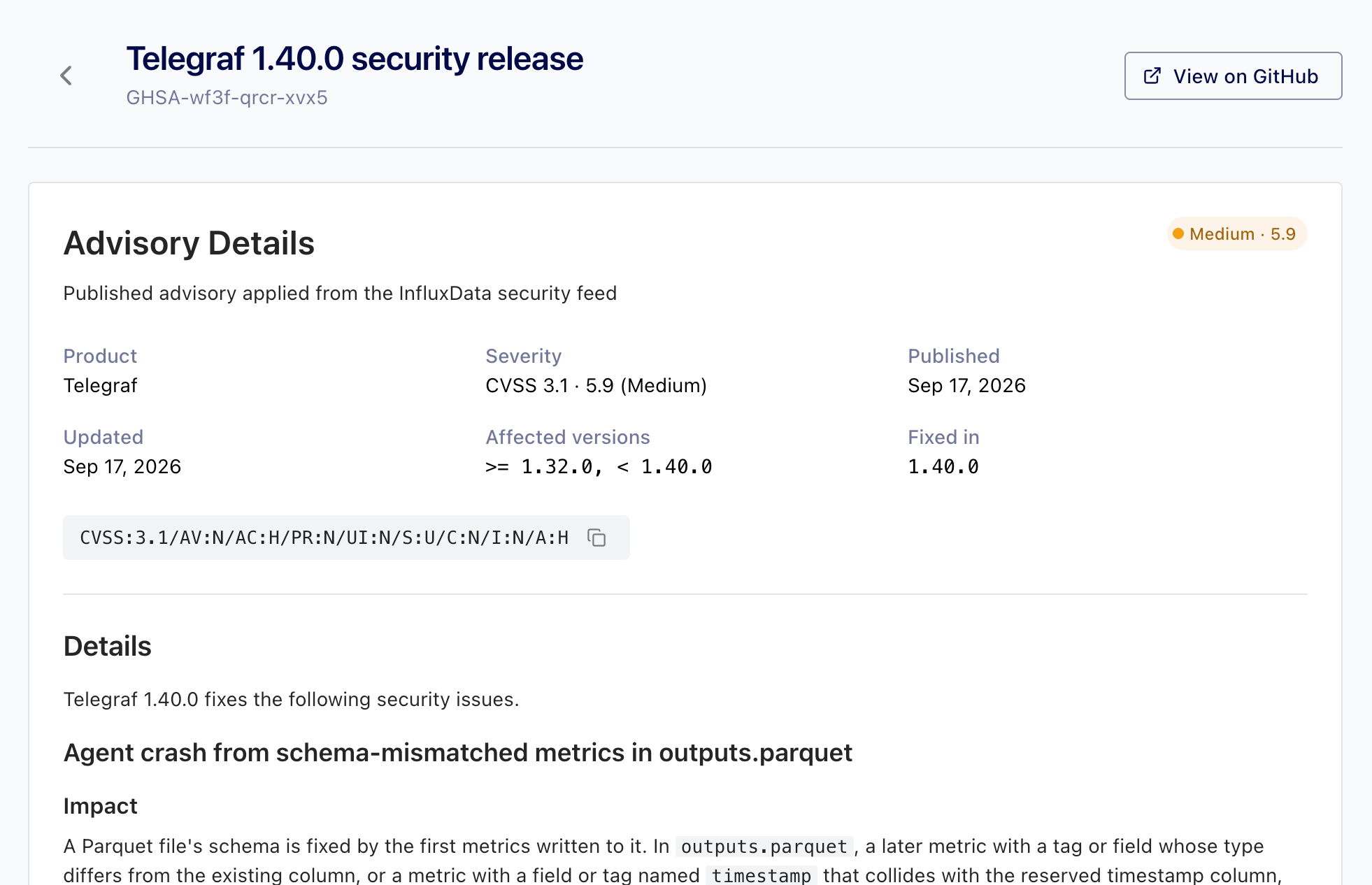
Click an advisory’s title, or click the More button () on its row and select View Details. The advisory page shows:
- Product, Severity (with the CVSS version and score), Published, and Updated.
- Affected versions: the version ranges the advisory applies to, for
example
>= 1.30.0, < 1.39.2. - Fixed in: the first version that includes the fix.
- The CVSS vector, with a button to copy it.
- Details: the advisory text as published by InfluxData.
- Weaknesses: the CWE identifiers associated with the advisory, linked to the MITRE CWE database.
Click View on GitHub to open the published advisory on GitHub. The same link is available from the row menu in the advisory list.
If InfluxData withdraws an advisory after you open it, the page reports Advisory Not Found.
View affected agents
Below the advisory details, the Affected Agents card lists each agent the advisory affects and each agent with unknown exposure, with its Telegraf version, exposure, status, and when it last reported. Click a row to open the agent’s detail page.
Click View in Agents to open the Agents page filtered to that advisory, where you can combine the filter with the other agent filters and select agents for bulk actions.
From the advisory list, View Affected Agents in the row menu jumps straight to this card.
Find affected agents on the Agents page
On the Agents page, the Advisories column shows each agent’s exposure:
- A severity chip with the highest severity and the number of matching advisories, for example High (2).
- Unknown when the agent’s Telegraf version is missing or can’t be parsed.
—when no active advisory affects the agent.
In the compact list view, the column shows a colored dot instead, and the matching advisories appear in a tooltip.
Use the Advisory exposure filter to show only agents that are Affected, Unknown, or Not affected, or only agents whose highest matching severity is Critical, High, Medium, or Low. The fleet summary at the top of the page reflects the filter, so you can check the status of affected agents on their own.
Active advisory filters appear as chips above the list, for example Advisory exposure: High or Affected by: GHSA-xxxx-xxxx-xxxx. The Affected by chip appears when you arrive from an advisory page. Click the icon on a chip to remove that filter. See Filter the agent list.
On an agent’s detail page, the Security Advisories card lists each advisory that affects the agent, with its severity and a link to the advisory. When no advisory applies, the card reports that no known advisories affect the agent, or that the agent’s exposure is unknown. See The agent detail page.
Check your Telegraf Controller version
Telegraf Controller compares the advisories published for Telegraf Controller with the version it is running. If the running version falls inside an affected range, users with write permission for security advisories see a banner () at the top of every page: This Telegraf Controller is affected. The banner names the running version, the number of matching advisories, and the highest severity, for example Version 1.2.0 matches 1 security advisory (highest severity: High). Upgrade Telegraf Controller to a fixed version. Click View advisory to open the advisory, or View advisories when more than one matches.
The banner can’t be dismissed. It disappears after you upgrade to a version that no advisory affects.
The detail page of a Telegraf Controller advisory includes a Telegraf Controller card that reports whether this installation is Affected, with the version to upgrade to, Not affected, or Unknown when the running version can’t be determined.
From the API, the controller object in the overview response reports the
running version and its exposure.
See Query advisories with the API.
Acknowledge new advisories
When an advisory file is applied, automatically or by import, and at least one agent is affected, Telegraf Controller shows a banner at the top of every page: New advisories affect your fleet. The banner names the date of the advisory file and the number of affected agents by severity, for example Security advisories updated Oct 14, 2026 match 12 agents (2 Critical, 10 High); 2 agents have unknown exposure.
The banner is visible to users with write permission for security advisories. Click Acknowledge to dismiss it for everyone. The acknowledgement applies to that version of the Telegraf advisory file, and the banner returns when a newer file is applied that still affects agents.
The banner tracks the advisory file, not individual agents. An agent that becomes affected after the acknowledgement, for example a new agent running an old Telegraf version, doesn’t bring the banner back. Check the Advisories column on the Agents page as part of onboarding new agents.
When audit logging is enabled, each
acknowledgement is recorded as advisory.feed.acknowledged.
To acknowledge from the API, send the feedTimestamp reported in
banner.feedTimestamp by the overview endpoint:
curl --request POST \
  --header "Authorization: Bearer $TOKEN" \
  --header "Content-Type: application/json" \
  --data '{"product": "telegraf", "feedTimestamp": "2026-10-14T18:00:00.000Z"}' \
  https://telegraf_controller.example.com/api/security-advisories/acknowledge
The response is {"acknowledged": true}.
It is false when the timestamp doesn’t match the applied advisory file, for
example because a newer file was applied in the meantime.
Query advisories with the API
All advisory endpoints require a valid Telegraf Enterprise license and an API token with read permission for security advisories. Checking, importing, and acknowledging require write permission.
| Endpoint | Description |
|---|---|
GET /api/security-advisories | List active advisories with their affected-agent counts. |
GET /api/security-advisories/overview | Fleet exposure, the running Telegraf Controller version and its exposure, feed status, and banner state. |
GET /api/security-advisories/{advisoryId} | One advisory, including its description, affected ranges, and CWEs. |
GET /api/security-advisories/{advisoryId}/agents | Agents affected by an advisory or with unknown exposure. |
POST /api/security-advisories/feed/check | Check for advisories on demand. |
POST /api/security-advisories/feed/import | Import an advisory file. |
POST /api/security-advisories/acknowledge | Acknowledge new advisories. |
GET /api/agents | Each agent includes an advisoryExposure object, and the advisoryExposure and advisory query parameters filter the list. |
GET /api/agents/{id} | The agent’s details include its advisoryExposure object. |
The list endpoint accepts the following query parameters:
| Parameter | Values | Default |
|---|---|---|
product | telegraf, telegraf_controller | all products |
severity | critical, high, medium, low | all severities |
affecting | all, affecting, not_affecting | all |
search | Text to match against the title, identifier, or CVE | |
sortBy | published, severity | published |
sortOrder | asc, desc | desc |
page, limit | Page number and page size (up to 100) | 1, 25 |
For example, to list critical advisories that affect at least one agent:
curl --header "Authorization: Bearer $TOKEN" \
  "https://telegraf_controller.example.com/api/security-advisories?severity=critical&affecting=affecting"
{
"data": [
{
"advisoryId": "GHSA-xxxx-xxxx-xxxx",
"product": "telegraf",
"summary": "Credential exposure in inputs.http debug logs",
"cve": "CVE-2026-12345",
"severity": { "label": "critical", "score": 9.8, "vector": "CVSS:3.1/AV:N/AC:L/PR:N/UI:N/S:U/C:H/I:H/A:H" },
"fixedIn": "1.39.2",
"published": "2026-10-14T16:00:00.000Z",
"modified": "2026-10-14T16:00:00.000Z",
"affectedAgents": 12,
"exposureUnknown": 2,
"advisoryUrl": "https://github.com/influxdata/security-advisories/security/advisories/GHSA-xxxx-xxxx-xxxx"
}
],
"total": 1,
"page": 1,
"limit": 25
}The agents endpoints accept the exposure (affected or unknown) and
search parameters, plus page and limit.
To list affected agents across all advisories, filter the agents list:
curl --header "Authorization: Bearer $TOKEN" \
  "https://telegraf_controller.example.com/api/agents?advisoryExposure=affected"
advisoryExposure accepts affected, not_affected, unknown, or a
severity (critical, high, medium, low).
The advisory parameter accepts an advisory identifier and returns the agents
that advisory affects.
Each agent in the response includes an advisoryExposure object:
{
  "advisoryExposure": {
    "state": "affected",
    "highestSeverity": "high",
    "count": 2,
    "advisories": [
      { "advisoryId": "GHSA-xxxx-xxxx-xxxx", "summary": "Credential exposure in inputs.http debug logs", "severity": "high" },
      { "advisoryId": "GHSA-yyyy-yyyy-yyyy", "summary": "Denial of service in inputs.statsd", "severity": "medium" }
    ]
  }
}
The overview response includes a controller object with the running
Telegraf Controller version and its exposure, in the same shape:
{
  "controller": {
    "version": "1.2.0",
    "state": "affected",
    "highestSeverity": "high",
    "count": 1,
    "advisories": [
      { "advisoryId": "GHSA-zzzz-zzzz-zzzz", "summary": "Example Telegraf Controller advisory", "severity": "high" }
    ]
  }
}
For request and response schemas, see the API reference.
Was this page helpful?
Thank you for your feedback!
Support and feedback
Thank you for being part of our community! We welcome and encourage your feedback and bug reports for Telegraf Controller and this documentation. To find support, use the following resources:
Customers with an annual or support contract can contact InfluxData Support.