
Import an advisory file
If Telegraf Controller can’t reach the InfluxData advisory feed, import the advisory file manually. Download the signed advisory file and its detached signature on any machine with Internet access, transfer them to a machine that can reach Telegraf Controller, and upload both through the UI or API. Telegraf Controller verifies the signature offline before it applies the file, so a manual import is as trustworthy as an automatic check.
Available with Telegraf Enterprise
Security advisories are available with Telegraf Enterprise. If you are interested in learning more about Telegraf Enterprise, contact us.
- Prerequisites
- Download the advisory file and signature
- Import from the UI
- Import from the API
- Roll back to an older advisory file
- Verification and audit
Prerequisites
- A valid Telegraf Enterprise license applied to your Telegraf Controller instance.
- The Owner or Administrator role, which carries write permission for security advisories.
- The advisory file (
.json) and its signature (.asc) for the product you want to update. Both files are required, and each product’s file is imported separately.
Download the advisory file and signature
Download the current advisory file and its signature for each product. The signature belongs to exactly one version of the advisory file, so always download the two files together.
Telegraf
Telegraf advisory file Telegraf advisory signature
Telegraf Controller
Telegraf Controller advisory file Telegraf Controller advisory signature
To download the files from a terminal instead, use the curl commands in
Use an internal feed mirror.
The file names don’t matter to Telegraf Controller. If your browser renames a download, the import still works as long as you upload the advisory file and the signature that was published with it.
Import from the UI
- Go to Security and click Import advisory file.
- Under Advisory file, click Choose file and select the
.jsonadvisory file. - Under Signature, click Choose file and select the matching
.ascfile. - Click Import.
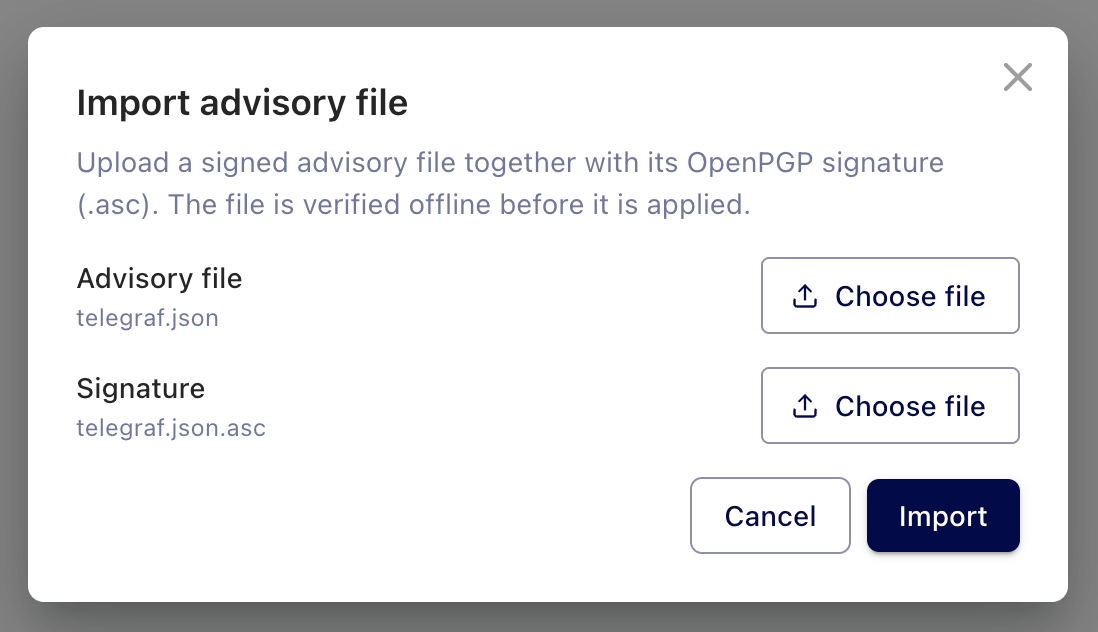
Telegraf Controller verifies the signature, parses the file, and compares its timestamp with the file already applied:
- If the file is newer, it’s applied immediately and every agent’s exposure is re-evaluated. A notification reports the result, for example Advisory file imported: 3 advisories, 12 affected agents.
- If the file is already applied, the notification reports This advisory file is already applied and nothing changes.
- If the file is older than the one already applied, the import is rejected and a Roll back to this older advisory file checkbox appears. See Roll back to an older advisory file.
- If the signature doesn’t verify or the file is malformed, the dialog shows the error and nothing is applied.
Import from the API
Send a POST request to /api/security-advisories/feed/import with both
files base64-encoded in a JSON body.
Base64 encoding delivers the files to signature verification byte for byte.
| Field | Type | Description |
|---|---|---|
feedBase64 | string | The base64-encoded advisory file. Required. |
signatureBase64 | string | The base64-encoded .asc signature. Required. |
allowRollback | boolean | Apply the file even if it’s older than the applied file. Default is false. |
dryRun | boolean | Report what the import would do without applying the file. Default is false. |
The following example builds the request body from the two files and imports them:
printf '{"feedBase64":"%s","signatureBase64":"%s","allowRollback":false,"dryRun":false}' \
  "$(base64 < telegraf.json | tr -d '\n')" \
  "$(base64 < telegraf.json.asc | tr -d '\n')" \
  > import.json

curl --request POST \
  --header "Authorization: Bearer $TOKEN" \
  --header "Content-Type: application/json" \
  --data-binary @import.json \
  https://telegraf_controller.example.com/api/security-advisories/feed/import
A successful import returns the outcome and the resulting fleet exposure:
{
  "outcome": "updated",
  "wouldApply": true,
  "reason": null,
  "product": "telegraf",
  "feedTimestamp": "2026-10-14T18:00:00.000Z",
  "advisoryCount": 3,
  "source": "imported",
  "matchedAgents": 12,
  "exposureUnknown": 2
}
outcome | Meaning |
|---|---|
updated | The file was applied. |
unchanged | The file is already applied. Nothing changed. |
preview | The request set dryRun to true. wouldApply reports whether the file would be applied, and reason is stale when the file is older than the applied file. |
A preview is useful for checking a file before you apply it. It verifies the signature, parses the file, and reports the number of advisories and the agents that would be affected, without changing anything.
A failed import returns one of the following errors:
| Status | error | Cause |
|---|---|---|
400 | advisory_feed_invalid_signature | The signature doesn’t verify against the InfluxData public key, or it doesn’t belong to this advisory file. |
400 | advisory_feed_malformed | The file isn’t a valid advisory file, or a file exceeds its size limit. |
409 | advisory_feed_stale | The file is older than the applied file and allowRollback is false. |
The advisory file is limited to 10 MB and the signature to 8 KB. The request body, including base64 overhead, is limited to 16 MB.
Roll back to an older advisory file
Telegraf Controller rejects an advisory file whose timestamp is older than the applied file. This prevents an outdated file from silently replacing newer advisories. If you need to revert deliberately, for example because a newer file was applied by mistake, roll back explicitly:
- From the UI: when the import is rejected as stale, select Roll back to this older advisory file and click Import again.
- From the API: set
allowRollbacktotrue.
A rollback is recorded in the audit log as advisory.feed.rollback followed
by advisory.feed.imported.
If automatic checks are enabled, the next check that finds a newer file at
the feed URL applies it again.
Verification and audit
Every import is verified with the InfluxData public key built into Telegraf Controller. There is nothing to install or trust manually, and a file whose signature doesn’t match is rejected before it’s applied.
When audit logging is enabled, Telegraf Controller records the following events for advisory files:
advisory.feed.imported: a manual import that applied a file, with the actor, product, feed timestamp, and advisory count. A rejected import (invalid signature or malformed file) is recorded with a Failure outcome.advisory.feed.rollback: an import that replaced a newer file with an older one.advisory.feed.applied: an automatic check that applied a newer file.advisory.feed.acknowledged: a user acknowledged the advisory notification banner.
Was this page helpful?
Thank you for your feedback!
Support and feedback
Thank you for being part of our community! We welcome and encourage your feedback and bug reports for Telegraf Controller and this documentation. To find support, use the following resources:
Customers with an annual or support contract can contact InfluxData Support.