---
title: Assign and use labels
description: Assign labels to Telegraf configurations, agents, and configuration groups, remove them, and filter lists by label.
url: https://docs.influxdata.com/telegraf/controller/labels/assign/
estimated_tokens: 866
publisher: InfluxData
canonical: https://docs.influxdata.com/telegraf/controller/labels/assign/
date: '2026-09-25T10:34:59-06:00'
lastmod: '2026-09-25T10:34:59-06:00'
---
Assign labels to configurations, agents, and configuration groups,
remove them, and filter lists by label.
* [Assign and remove labels on a resource](#assign-and-remove-labels-on-a-resource)
* [Assign and remove labels in bulk](#assign-and-remove-labels-in-bulk)
* [Filter lists by label](#filter-lists-by-label)
* [Assign and remove labels with the API](#assign-and-remove-labels-with-the-api)
Assigning a label to a resource or removing one requires write
permission on that resource.
## Assign and remove labels on a resource
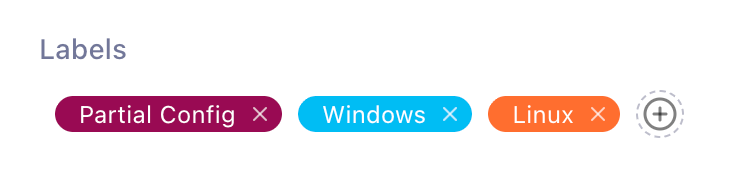
Each configuration, agent, and configuration group detail page has a**Labels** box:
* To assign labels, click in the**Labels** box, select the labels, and confirm.
* To remove a label, click on its chip.
 ## Assign and remove labels in bulk
The configuration, agent, and configuration group lists all support
bulk label changes:
1. Select the rows to change with the checkboxes.
2. Click **Manage Labels**.
3. Use the **Assign** tab to add labels to every selected resource, or
the **Remove** tab to remove them, and confirm.
## Filter lists by label
The **Configurations** and **Configuration Groups** lists filter by
label: select labels in the filter control, and each active label
appears as a removable chip above the list.
The **Agents** list does not filter by label.
Use its **Show labels** toggle to display each agent’s labels in the
list.
## Assign and remove labels with the API
Assignment endpoints require an API token with **write** permission on
the resource’s API.
| Resource | Assign one | Remove one |
|--------------------|----------------------------------------------------|------------------------------------------------------|
| Agents | `PUT /api/agents/:agentId/labels/:labelId` | `DELETE /api/agents/:agentId/labels/:labelId` |
| Configurations | `POST /api/configs/:configId/assign/:labelId` | `DELETE /api/configs/:configId/labels/:labelId` |
|Configuration groups|`POST /api/config-groups/:idOrAlias/assign/:labelId`|`DELETE /api/config-groups/:idOrAlias/labels/:labelId`|
Each resource also has bulk endpoints,`PUT /api//bulk/labels/assign` and`PUT /api//bulk/labels/remove`, which take the resource IDs
and label IDs to change:
```bash
curl -X PUT "https://telegraf-controller.example.com/api/agents/bulk/labels/assign" \
-H "Authorization: Bearer API_TOKEN" \
-H "Content-Type: application/json" \
-d '{"ids": ["AGENT_ID_1", "AGENT_ID_2"], "labelIds": ["LABEL_ID"]}'
```
For request and response details, see the API reference at `/api/docs`on your Telegraf Controller server.
#### Related
* [Create and manage labels](/telegraf/controller/labels/manage/)
* [Create and manage configuration groups](/telegraf/controller/config-groups/manage/)
| Resource | Assign one | Remove one |
| --- | --- | --- |
| Resource | Assign one | Remove one |
| Agents | PUT /api/agents/:agentId/labels/:labelId | DELETE /api/agents/:agentId/labels/:labelId |
| Configurations | POST /api/configs/:configId/assign/:labelId | DELETE /api/configs/:configId/labels/:labelId |
| Configuration groups | POST /api/config-groups/:idOrAlias/assign/:labelId | DELETE /api/config-groups/:idOrAlias/labels/:labelId |
## Assign and remove labels in bulk
The configuration, agent, and configuration group lists all support
bulk label changes:
1. Select the rows to change with the checkboxes.
2. Click **Manage Labels**.
3. Use the **Assign** tab to add labels to every selected resource, or
the **Remove** tab to remove them, and confirm.
## Filter lists by label
The **Configurations** and **Configuration Groups** lists filter by
label: select labels in the filter control, and each active label
appears as a removable chip above the list.
The **Agents** list does not filter by label.
Use its **Show labels** toggle to display each agent’s labels in the
list.
## Assign and remove labels with the API
Assignment endpoints require an API token with **write** permission on
the resource’s API.
| Resource | Assign one | Remove one |
|--------------------|----------------------------------------------------|------------------------------------------------------|
| Agents | `PUT /api/agents/:agentId/labels/:labelId` | `DELETE /api/agents/:agentId/labels/:labelId` |
| Configurations | `POST /api/configs/:configId/assign/:labelId` | `DELETE /api/configs/:configId/labels/:labelId` |
|Configuration groups|`POST /api/config-groups/:idOrAlias/assign/:labelId`|`DELETE /api/config-groups/:idOrAlias/labels/:labelId`|
Each resource also has bulk endpoints,`PUT /api//bulk/labels/assign` and`PUT /api//bulk/labels/remove`, which take the resource IDs
and label IDs to change:
```bash
curl -X PUT "https://telegraf-controller.example.com/api/agents/bulk/labels/assign" \
-H "Authorization: Bearer API_TOKEN" \
-H "Content-Type: application/json" \
-d '{"ids": ["AGENT_ID_1", "AGENT_ID_2"], "labelIds": ["LABEL_ID"]}'
```
For request and response details, see the API reference at `/api/docs`on your Telegraf Controller server.
#### Related
* [Create and manage labels](/telegraf/controller/labels/manage/)
* [Create and manage configuration groups](/telegraf/controller/config-groups/manage/)
| Resource | Assign one | Remove one |
| --- | --- | --- |
| Resource | Assign one | Remove one |
| Agents | PUT /api/agents/:agentId/labels/:labelId | DELETE /api/agents/:agentId/labels/:labelId |
| Configurations | POST /api/configs/:configId/assign/:labelId | DELETE /api/configs/:configId/labels/:labelId |
| Configuration groups | POST /api/config-groups/:idOrAlias/assign/:labelId | DELETE /api/config-groups/:idOrAlias/labels/:labelId |