
Assign and use labels
Assign labels to configurations, agents, and configuration groups, remove them, and filter lists by label.
- Assign and remove labels on a resource
- Assign and remove labels in bulk
- Filter lists by label
- Assign and remove labels with the API
Assigning a label to a resource or removing one requires write permission on that resource.
Assign and remove labels on a resource
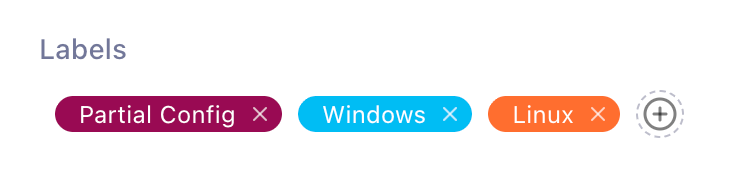
Each configuration, agent, and configuration group detail page has a Labels box:
- To assign labels, click in the Labels box, select the labels, and confirm.
- To remove a label, click on its chip.
Assign and remove labels in bulk
The configuration, agent, and configuration group lists all support bulk label changes:
- Select the rows to change with the checkboxes.
- Click Manage Labels.
- Use the Assign tab to add labels to every selected resource, or the Remove tab to remove them, and confirm.
Filter lists by label
The Configurations and Configuration Groups lists filter by label: select labels in the filter control, and each active label appears as a removable chip above the list.
The Agents list does not filter by label. Use its Show labels toggle to display each agent’s labels in the list.
Assign and remove labels with the API
Assignment endpoints require an API token with write permission on the resource’s API.
| Resource | Assign one | Remove one |
|---|---|---|
| Agents | PUT /api/agents/:agentId/labels/:labelId | DELETE /api/agents/:agentId/labels/:labelId |
| Configurations | POST /api/configs/:configId/assign/:labelId | DELETE /api/configs/:configId/labels/:labelId |
| Configuration groups | POST /api/config-groups/:idOrAlias/assign/:labelId | DELETE /api/config-groups/:idOrAlias/labels/:labelId |
Each resource also has bulk endpoints,
PUT /api/<resource>/bulk/labels/assign and
PUT /api/<resource>/bulk/labels/remove, which take the resource IDs
and label IDs to change:
curl -X PUT "https://telegraf-controller.example.com/api/agents/bulk/labels/assign" \
  -H "Authorization: Bearer API_TOKEN" \
  -H "Content-Type: application/json" \
  -d '{"ids": ["AGENT_ID_1", "AGENT_ID_2"], "labelIds": ["LABEL_ID"]}'
For request and response details, see the API reference at /api/docs
on your Telegraf Controller server.
Was this page helpful?
Thank you for your feedback!
Support and feedback
Thank you for being part of our community! We welcome and encourage your feedback and bug reports for Telegraf Controller and this documentation. To find support, use the following resources:
Customers with an annual or support contract can contact InfluxData Support.