---
title: Configure LDAP authentication
description: Authenticate Telegraf Controller users against an LDAP or Active Directory server, provision accounts from directory data, and map LDAP groups to Telegraf Controller roles.
url: https://docs.influxdata.com/telegraf/controller/authentication/ldap/
estimated_tokens: 3961
publisher: InfluxData
canonical: https://docs.influxdata.com/telegraf/controller/authentication/ldap/
date: '2026-06-24T05:47:49-07:00'
lastmod: '2026-06-24T05:47:49-07:00'
---
LDAP authentication signs users in by binding their credentials against an
LDAP or Active Directory server. Telegraf Controller can read user
attributes and group membership from the directory and use them to assign
roles and provision accounts.
#### Available with Telegraf Enterprise
LDAP authentication is only available with Telegraf Enterprise. If you are interested in learning more about Telegraf Enterprise,[contact us](https://www.influxdata.com/products/telegraf-enterprise/).
[ Upgrade to Enterprise](https://www.influxdata.com/products/telegraf-enterprise/)
* [Prerequisites](#prerequisites)
* [Configure LDAP at startup](#configure-ldap-at-startup)
* [Configure provisioning](#configure-provisioning)
* [Configure group-to-role mapping](#configure-group-to-role-mapping)
* [Bootstrap the owner against LDAP](#bootstrap-the-owner-against-ldap)
* [Provider examples](#provider-examples)
* [Disable LDAP](#disable-ldap)
* [Audit events](#audit-events)
## Prerequisites
* A valid [Telegraf Enterprise license](/telegraf/enterprise/)applied to your Telegraf Controller instance.
* A reachable LDAP server (`ldap://` or `ldaps://`) and a service-account
bind DN that can search the user subtree.
* Permission to modify the Telegraf Controller startup environment.
* The **Owner** role to change LDAP settings from the **Settings** page.
#### LDAP transport settings change only at startup
Server URL, bind credentials, search base and filter, TLS options, and
attribute mappings are read at startup and cannot be changed at runtime.
Provisioning, default role, allowed domains, and group-to-role mappings
are runtime-editable from the **Settings** page.
#### MFA is enforced by your LDAP server
Telegraf Controller does not implement multi-factor authentication
directly for LDAP. If your LDAP or Active Directory server requires MFA
during bind, users complete that challenge as part of the LDAP sign-in
flow. Configure MFA in your directory server, not in
Telegraf Controller.
## Configure LDAP at startup
Set the LDAP environment variables before starting Telegraf Controller.
The variables in the following table are the minimum required to enable
LDAP authentication.
| Variable | Description |Required|
|-------------------------------|---------------------------------------------------------|--------|
| `AUTH_LDAP_ENABLED` | Set to `true` to enable LDAP authentication. | Yes |
| `AUTH_LDAP_URL` | LDAP server URL (`ldap://` or `ldaps://`). | Yes |
| `AUTH_LDAP_BIND_DN` | Service account distinguished name used for searches. | Yes |
| `AUTH_LDAP_BIND_PASSWORD` | Password for the service account. | Yes |
| `AUTH_LDAP_USER_SEARCH_BASE` | Base DN under which user entries live. | Yes |
|`AUTH_LDAP_USER_SEARCH_FILTER` | LDAP filter with `{{username}}` placeholder. | No |
| `AUTH_LDAP_START_TLS` |If `true`, upgrade an `ldap://` connection with StartTLS.| No |
| `AUTH_LDAP_CA_CERT_PATH` | Path to a CA certificate that signs the LDAP server. | No |
|`AUTH_LDAP_REJECT_UNAUTHORIZED`| If `false`, skip TLS verification (development only). | No |
| `AUTH_LDAP_ATTR_USERNAME` | Directory attribute for the user’s login name. | No |
| `AUTH_LDAP_ATTR_EMAIL` | Directory attribute for the user’s email address. | No |
| `AUTH_LDAP_ATTR_DISPLAY_NAME` | Directory attribute for the user’s display name. | No |
| `AUTH_LDAP_ATTR_GROUPS` | Directory attribute containing group memberships. | No |
For the full description of each variable, including defaults, see[Authentication and security configuration options](/telegraf/controller/reference/config-options/#authentication-and-security).
### Apply the configuration
#### systemd ####
Add the LDAP variables to your systemd unit file (typically`/etc/systemd/system/telegraf-controller.service`):
```ini
[Service]
Environment=AUTH_LDAP_ENABLED=true
Environment=AUTH_LDAP_URL=ldaps://ldap.example.com:636
Environment=AUTH_LDAP_BIND_DN=cn=svc-controller,ou=services,dc=example,dc=com
Environment=AUTH_LDAP_BIND_PASSWORD=changeme
Environment=AUTH_LDAP_USER_SEARCH_BASE=ou=people,dc=example,dc=com
Environment=AUTH_LDAP_USER_SEARCH_FILTER=(uid={{username}})
```
Reload systemd and restart the service:
```bash
sudo systemctl daemon-reload
sudo systemctl restart telegraf-controller
```
Export the variables, or pass equivalent flags on the command line:
```bash
export AUTH_LDAP_ENABLED=true
export AUTH_LDAP_URL=ldaps://ldap.example.com:636
export AUTH_LDAP_BIND_DN='cn=svc-controller,ou=services,dc=example,dc=com'
export AUTH_LDAP_BIND_PASSWORD=changeme
export AUTH_LDAP_USER_SEARCH_BASE='ou=people,dc=example,dc=com'
export AUTH_LDAP_USER_SEARCH_FILTER='(uid={{username}})'
telegraf_controller --no-interactive
```
Set the variables in PowerShell, or pass equivalent flags on the command line:
```powershell
$env:AUTH_LDAP_ENABLED="true"
$env:AUTH_LDAP_URL="ldaps://ldap.example.com:636"
$env:AUTH_LDAP_BIND_DN="cn=svc-controller,ou=services,dc=example,dc=com"
$env:AUTH_LDAP_BIND_PASSWORD="changeme"
$env:AUTH_LDAP_USER_SEARCH_BASE="ou=people,dc=example,dc=com"
$env:AUTH_LDAP_USER_SEARCH_FILTER="(uid={{username}})"
./telegraf_controller.exe --no-interactive
```
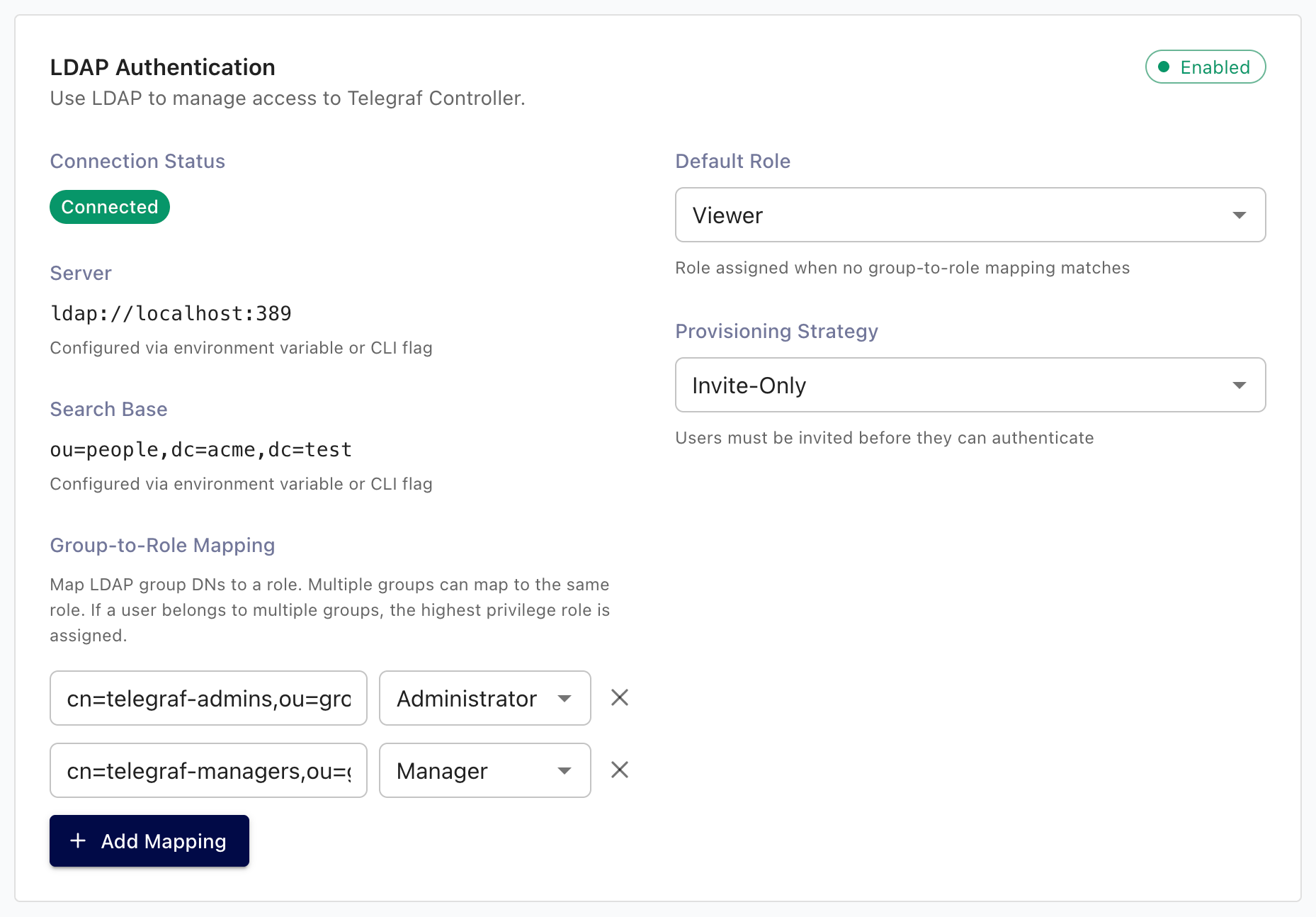
After Telegraf Controller starts, sign in as an owner and confirm:
* **Settings \> LDAP Authentication** shows the redacted connection details.
* The sign-in page offers an **LDAP** option.
Call the public status endpoint to confirm the provider is registered:
```bash
curl -s http://localhost:8888/api/auth/status
```
 ## Configure provisioning
Provisioning rules decide what happens the first time an LDAP user signs in.
Configure them on the **Settings \> LDAP Authentication** panel.
| Setting | Description | Default |
|-------------------------------|--------------------------------------------------------------------------------------------------------------------------------------------------|------------------|
| **Provisioning strategy** |`invite_only`, `domain_restricted`, or `auto_create`. See [Provisioning strategies](/telegraf/controller/authentication/#provisioning-strategies).| `invite_only` |
| **Default role** | Role assigned when no group mapping matches the user. | `viewer` |
| **Allowed email domains** | Comma-separated list, required when the strategy is `domain_restricted`. | *(none)* |
|**Auto-link by verified email**| When enabled, link an LDAP user to an existing local user whose email matches. | Disabled |
| **On no group match** | `use_default_role` admits the user with the default role; `reject` denies the sign-in. |`use_default_role`|
To update provisioning settings:
1. Sign in as an **Owner** or **Administrator**.
2. Navigate to the **Settings** page.
3. In the **LDAP Authentication** section, update the values.
4. Click **Save**.
The new values take effect on the next sign-in attempt.
## Configure group-to-role mapping
Group-to-role mappings translate directory group membership into
Telegraf Controller roles.
1. On the **Settings** page, scroll to **LDAP Authentication \>
Group role mappings**.
2. Click **Add mapping** and provide:
* **Provider ID**: a label that identifies the LDAP instance. Use the
default `default` unless you run multiple directories.
* **Group name**: the value Telegraf Controller receives in the`AUTH_LDAP_ATTR_GROUPS` attribute (for example `cn=telegraf-admins,ou=groups,dc=example,dc=com`or the bare `telegraf-admins`, depending on your directory).
* **Role**: `administrator`, `manager`, or `viewer`.
3. Click **Save**.
When a user signs in, Telegraf Controller matches each of their groups
against the mappings and assigns the highest matching role. Users without a
matching group fall back to **Default role** or are rejected, depending on**On no group match**.
#### Owner role is not assignable through mappings
The Owner role is reserved for the bootstrap owner and accounts created
by [Transfer ownership](/telegraf/controller/users/transfer-ownership/).
Group mappings cannot promote a user to Owner.
## Bootstrap the owner against LDAP
You only need to bootstrap an LDAP-backed owner if you plan to disable
local authentication. Otherwise, the default local owner can administer
LDAP from the Settings page without limitation.
On first startup, set both of the following alongside the standard owner
variables:
```bash
export OWNER_AUTH_PROVIDER=ldap
export OWNER_EXTERNAL_ID='uid=alice,ou=people,dc=example,dc=com'
```
| Variable | Description |
|---------------------|---------------------------------------------------------------------------------------------------------------|
|`OWNER_AUTH_PROVIDER`| Set to `ldap` to bootstrap the owner with LDAP as the primary provider. |
| `OWNER_EXTERNAL_ID` |The user’s LDAP distinguished name (DN). This must match the DN the LDAP server returns when the user signs in.|
The owner can sign in through LDAP and also retains a local password hash
as a recovery credential. See[Configure local authentication](/telegraf/controller/authentication/local/#disable-local-authentication)for the disable-local procedure.
## Provider examples
[](#active-directory)
Active Directory
```bash
export AUTH_LDAP_ENABLED=true
export AUTH_LDAP_URL=ldaps://ad.example.com:636
export AUTH_LDAP_BIND_DN='CN=svc-controller,OU=Service Accounts,DC=example,DC=com'
export AUTH_LDAP_BIND_PASSWORD=''
export AUTH_LDAP_USER_SEARCH_BASE='OU=Users,DC=example,DC=com'
export AUTH_LDAP_USER_SEARCH_FILTER='(sAMAccountName={{username}})'
export AUTH_LDAP_ATTR_USERNAME=sAMAccountName
export AUTH_LDAP_ATTR_EMAIL=mail
export AUTH_LDAP_ATTR_DISPLAY_NAME=displayName
export AUTH_LDAP_ATTR_GROUPS=memberOf
```
In Active Directory, the `memberOf` attribute returns the full DN of each
group. Use the full DN (such as`CN=Telegraf Admins,OU=Groups,DC=example,DC=com`) when adding group-to-role
mappings.
[](#openldap)
OpenLDAP
```bash
export AUTH_LDAP_ENABLED=true
export AUTH_LDAP_URL=ldaps://ldap.example.com:636
export AUTH_LDAP_BIND_DN='cn=svc-controller,ou=services,dc=example,dc=com'
export AUTH_LDAP_BIND_PASSWORD=''
export AUTH_LDAP_USER_SEARCH_BASE='ou=people,dc=example,dc=com'
export AUTH_LDAP_USER_SEARCH_FILTER='(uid={{username}})'
export AUTH_LDAP_ATTR_USERNAME=uid
export AUTH_LDAP_ATTR_EMAIL=mail
export AUTH_LDAP_ATTR_DISPLAY_NAME=cn
export AUTH_LDAP_ATTR_GROUPS=memberOf
```
If your OpenLDAP deployment does not maintain `memberOf` automatically,
enable the `memberof` overlay on the server, or query group membership
through `groupOfNames`/`groupOfUniqueNames` lookups before configuring
Telegraf Controller.
[](#freeipa)
FreeIPA
```bash
export AUTH_LDAP_ENABLED=true
export AUTH_LDAP_URL=ldaps://ipa.example.com:636
export AUTH_LDAP_BIND_DN='uid=svc-controller,cn=users,cn=accounts,dc=example,dc=com'
export AUTH_LDAP_BIND_PASSWORD=''
export AUTH_LDAP_USER_SEARCH_BASE='cn=users,cn=accounts,dc=example,dc=com'
export AUTH_LDAP_USER_SEARCH_FILTER='(uid={{username}})'
export AUTH_LDAP_ATTR_USERNAME=uid
export AUTH_LDAP_ATTR_EMAIL=mail
export AUTH_LDAP_ATTR_DISPLAY_NAME=displayName
export AUTH_LDAP_ATTR_GROUPS=memberOf
export AUTH_LDAP_CA_CERT_PATH=/etc/ipa/ca.crt
```
FreeIPA uses self-signed certificates by default. Mount or copy the
FreeIPA CA certificate to a path Telegraf Controller can read, and point`AUTH_LDAP_CA_CERT_PATH` at it.
## Disable LDAP
To disable LDAP authentication, remove `AUTH_LDAP_ENABLED` (or set it to
a value other than `true`) and restart Telegraf Controller.
* `POST /api/auth/login/ldap` returns `403 Forbidden` after restart.
* Existing LDAP-provisioned user accounts remain in the database. They
cannot sign in through LDAP until LDAP is re-enabled, but they continue
to appear in the **Users** list.
* API tokens issued to LDAP users continue to work until the owning user
is disabled or deleted.
## Audit events
LDAP sign-in and sign-out emit the following audit events. They appear in
the audit log when audit logging is enabled.
| Event | Description |
|-------------|-----------------------------------------|
|`user.login` |Recorded after a successful LDAP sign-in.|
|`user.logout`| Recorded when a user signs out. |
For details on enabling and reviewing audit events, see[Audit logs](/telegraf/controller/audit-logs/).
#### Related
* [Authentication](/telegraf/controller/authentication/)
* [Telegraf Enterprise](/telegraf/enterprise/)
* [Manage settings](/telegraf/controller/settings/)
| Variable | Description | Required |
| --- | --- | --- |
| Variable | Description | Required |
| AUTH_LDAP_ENABLED | Set to true to enable LDAP authentication. | Yes |
| AUTH_LDAP_URL | LDAP server URL ( ldap:// or ldaps:// ). | Yes |
| AUTH_LDAP_BIND_DN | Service account distinguished name used for searches. | Yes |
| AUTH_LDAP_BIND_PASSWORD | Password for the service account. | Yes |
| AUTH_LDAP_USER_SEARCH_BASE | Base DN under which user entries live. | Yes |
| AUTH_LDAP_USER_SEARCH_FILTER | LDAP filter with {{username}} placeholder. | No |
| AUTH_LDAP_START_TLS | If true , upgrade an ldap:// connection with StartTLS. | No |
| AUTH_LDAP_CA_CERT_PATH | Path to a CA certificate that signs the LDAP server. | No |
| AUTH_LDAP_REJECT_UNAUTHORIZED | If false , skip TLS verification (development only). | No |
| AUTH_LDAP_ATTR_USERNAME | Directory attribute for the user’s login name. | No |
| AUTH_LDAP_ATTR_EMAIL | Directory attribute for the user’s email address. | No |
| AUTH_LDAP_ATTR_DISPLAY_NAME | Directory attribute for the user’s display name. | No |
| AUTH_LDAP_ATTR_GROUPS | Directory attribute containing group memberships. | No |
| Setting | Description | Default |
| --- | --- | --- |
| Setting | Description | Default |
| Provisioning strategy | invite_only , domain_restricted , or auto_create . See Provisioning strategies . | invite_only |
| Default role | Role assigned when no group mapping matches the user. | viewer |
| Allowed email domains | Comma-separated list, required when the strategy is domain_restricted . | (none) |
| Auto-link by verified email | When enabled, link an LDAP user to an existing local user whose email matches. | Disabled |
| On no group match | use_default_role admits the user with the default role; reject denies the sign-in. | use_default_role |
| Variable | Description |
| --- | --- |
| Variable | Description |
| OWNER_AUTH_PROVIDER | Set to ldap to bootstrap the owner with LDAP as the primary provider. |
| OWNER_EXTERNAL_ID | The user’s LDAP distinguished name (DN). This must match the DN the LDAP server returns when the user signs in. |
| Event | Description |
| --- | --- |
| Event | Description |
| user.login | Recorded after a successful LDAP sign-in. |
| user.logout | Recorded when a user signs out. |
## Configure provisioning
Provisioning rules decide what happens the first time an LDAP user signs in.
Configure them on the **Settings \> LDAP Authentication** panel.
| Setting | Description | Default |
|-------------------------------|--------------------------------------------------------------------------------------------------------------------------------------------------|------------------|
| **Provisioning strategy** |`invite_only`, `domain_restricted`, or `auto_create`. See [Provisioning strategies](/telegraf/controller/authentication/#provisioning-strategies).| `invite_only` |
| **Default role** | Role assigned when no group mapping matches the user. | `viewer` |
| **Allowed email domains** | Comma-separated list, required when the strategy is `domain_restricted`. | *(none)* |
|**Auto-link by verified email**| When enabled, link an LDAP user to an existing local user whose email matches. | Disabled |
| **On no group match** | `use_default_role` admits the user with the default role; `reject` denies the sign-in. |`use_default_role`|
To update provisioning settings:
1. Sign in as an **Owner** or **Administrator**.
2. Navigate to the **Settings** page.
3. In the **LDAP Authentication** section, update the values.
4. Click **Save**.
The new values take effect on the next sign-in attempt.
## Configure group-to-role mapping
Group-to-role mappings translate directory group membership into
Telegraf Controller roles.
1. On the **Settings** page, scroll to **LDAP Authentication \>
Group role mappings**.
2. Click **Add mapping** and provide:
* **Provider ID**: a label that identifies the LDAP instance. Use the
default `default` unless you run multiple directories.
* **Group name**: the value Telegraf Controller receives in the`AUTH_LDAP_ATTR_GROUPS` attribute (for example `cn=telegraf-admins,ou=groups,dc=example,dc=com`or the bare `telegraf-admins`, depending on your directory).
* **Role**: `administrator`, `manager`, or `viewer`.
3. Click **Save**.
When a user signs in, Telegraf Controller matches each of their groups
against the mappings and assigns the highest matching role. Users without a
matching group fall back to **Default role** or are rejected, depending on**On no group match**.
#### Owner role is not assignable through mappings
The Owner role is reserved for the bootstrap owner and accounts created
by [Transfer ownership](/telegraf/controller/users/transfer-ownership/).
Group mappings cannot promote a user to Owner.
## Bootstrap the owner against LDAP
You only need to bootstrap an LDAP-backed owner if you plan to disable
local authentication. Otherwise, the default local owner can administer
LDAP from the Settings page without limitation.
On first startup, set both of the following alongside the standard owner
variables:
```bash
export OWNER_AUTH_PROVIDER=ldap
export OWNER_EXTERNAL_ID='uid=alice,ou=people,dc=example,dc=com'
```
| Variable | Description |
|---------------------|---------------------------------------------------------------------------------------------------------------|
|`OWNER_AUTH_PROVIDER`| Set to `ldap` to bootstrap the owner with LDAP as the primary provider. |
| `OWNER_EXTERNAL_ID` |The user’s LDAP distinguished name (DN). This must match the DN the LDAP server returns when the user signs in.|
The owner can sign in through LDAP and also retains a local password hash
as a recovery credential. See[Configure local authentication](/telegraf/controller/authentication/local/#disable-local-authentication)for the disable-local procedure.
## Provider examples
[](#active-directory)
Active Directory
```bash
export AUTH_LDAP_ENABLED=true
export AUTH_LDAP_URL=ldaps://ad.example.com:636
export AUTH_LDAP_BIND_DN='CN=svc-controller,OU=Service Accounts,DC=example,DC=com'
export AUTH_LDAP_BIND_PASSWORD=''
export AUTH_LDAP_USER_SEARCH_BASE='OU=Users,DC=example,DC=com'
export AUTH_LDAP_USER_SEARCH_FILTER='(sAMAccountName={{username}})'
export AUTH_LDAP_ATTR_USERNAME=sAMAccountName
export AUTH_LDAP_ATTR_EMAIL=mail
export AUTH_LDAP_ATTR_DISPLAY_NAME=displayName
export AUTH_LDAP_ATTR_GROUPS=memberOf
```
In Active Directory, the `memberOf` attribute returns the full DN of each
group. Use the full DN (such as`CN=Telegraf Admins,OU=Groups,DC=example,DC=com`) when adding group-to-role
mappings.
[](#openldap)
OpenLDAP
```bash
export AUTH_LDAP_ENABLED=true
export AUTH_LDAP_URL=ldaps://ldap.example.com:636
export AUTH_LDAP_BIND_DN='cn=svc-controller,ou=services,dc=example,dc=com'
export AUTH_LDAP_BIND_PASSWORD=''
export AUTH_LDAP_USER_SEARCH_BASE='ou=people,dc=example,dc=com'
export AUTH_LDAP_USER_SEARCH_FILTER='(uid={{username}})'
export AUTH_LDAP_ATTR_USERNAME=uid
export AUTH_LDAP_ATTR_EMAIL=mail
export AUTH_LDAP_ATTR_DISPLAY_NAME=cn
export AUTH_LDAP_ATTR_GROUPS=memberOf
```
If your OpenLDAP deployment does not maintain `memberOf` automatically,
enable the `memberof` overlay on the server, or query group membership
through `groupOfNames`/`groupOfUniqueNames` lookups before configuring
Telegraf Controller.
[](#freeipa)
FreeIPA
```bash
export AUTH_LDAP_ENABLED=true
export AUTH_LDAP_URL=ldaps://ipa.example.com:636
export AUTH_LDAP_BIND_DN='uid=svc-controller,cn=users,cn=accounts,dc=example,dc=com'
export AUTH_LDAP_BIND_PASSWORD=''
export AUTH_LDAP_USER_SEARCH_BASE='cn=users,cn=accounts,dc=example,dc=com'
export AUTH_LDAP_USER_SEARCH_FILTER='(uid={{username}})'
export AUTH_LDAP_ATTR_USERNAME=uid
export AUTH_LDAP_ATTR_EMAIL=mail
export AUTH_LDAP_ATTR_DISPLAY_NAME=displayName
export AUTH_LDAP_ATTR_GROUPS=memberOf
export AUTH_LDAP_CA_CERT_PATH=/etc/ipa/ca.crt
```
FreeIPA uses self-signed certificates by default. Mount or copy the
FreeIPA CA certificate to a path Telegraf Controller can read, and point`AUTH_LDAP_CA_CERT_PATH` at it.
## Disable LDAP
To disable LDAP authentication, remove `AUTH_LDAP_ENABLED` (or set it to
a value other than `true`) and restart Telegraf Controller.
* `POST /api/auth/login/ldap` returns `403 Forbidden` after restart.
* Existing LDAP-provisioned user accounts remain in the database. They
cannot sign in through LDAP until LDAP is re-enabled, but they continue
to appear in the **Users** list.
* API tokens issued to LDAP users continue to work until the owning user
is disabled or deleted.
## Audit events
LDAP sign-in and sign-out emit the following audit events. They appear in
the audit log when audit logging is enabled.
| Event | Description |
|-------------|-----------------------------------------|
|`user.login` |Recorded after a successful LDAP sign-in.|
|`user.logout`| Recorded when a user signs out. |
For details on enabling and reviewing audit events, see[Audit logs](/telegraf/controller/audit-logs/).
#### Related
* [Authentication](/telegraf/controller/authentication/)
* [Telegraf Enterprise](/telegraf/enterprise/)
* [Manage settings](/telegraf/controller/settings/)
| Variable | Description | Required |
| --- | --- | --- |
| Variable | Description | Required |
| AUTH_LDAP_ENABLED | Set to true to enable LDAP authentication. | Yes |
| AUTH_LDAP_URL | LDAP server URL ( ldap:// or ldaps:// ). | Yes |
| AUTH_LDAP_BIND_DN | Service account distinguished name used for searches. | Yes |
| AUTH_LDAP_BIND_PASSWORD | Password for the service account. | Yes |
| AUTH_LDAP_USER_SEARCH_BASE | Base DN under which user entries live. | Yes |
| AUTH_LDAP_USER_SEARCH_FILTER | LDAP filter with {{username}} placeholder. | No |
| AUTH_LDAP_START_TLS | If true , upgrade an ldap:// connection with StartTLS. | No |
| AUTH_LDAP_CA_CERT_PATH | Path to a CA certificate that signs the LDAP server. | No |
| AUTH_LDAP_REJECT_UNAUTHORIZED | If false , skip TLS verification (development only). | No |
| AUTH_LDAP_ATTR_USERNAME | Directory attribute for the user’s login name. | No |
| AUTH_LDAP_ATTR_EMAIL | Directory attribute for the user’s email address. | No |
| AUTH_LDAP_ATTR_DISPLAY_NAME | Directory attribute for the user’s display name. | No |
| AUTH_LDAP_ATTR_GROUPS | Directory attribute containing group memberships. | No |
| Setting | Description | Default |
| --- | --- | --- |
| Setting | Description | Default |
| Provisioning strategy | invite_only , domain_restricted , or auto_create . See Provisioning strategies . | invite_only |
| Default role | Role assigned when no group mapping matches the user. | viewer |
| Allowed email domains | Comma-separated list, required when the strategy is domain_restricted . | (none) |
| Auto-link by verified email | When enabled, link an LDAP user to an existing local user whose email matches. | Disabled |
| On no group match | use_default_role admits the user with the default role; reject denies the sign-in. | use_default_role |
| Variable | Description |
| --- | --- |
| Variable | Description |
| OWNER_AUTH_PROVIDER | Set to ldap to bootstrap the owner with LDAP as the primary provider. |
| OWNER_EXTERNAL_ID | The user’s LDAP distinguished name (DN). This must match the DN the LDAP server returns when the user signs in. |
| Event | Description |
| --- | --- |
| Event | Description |
| user.login | Recorded after a successful LDAP sign-in. |
| user.logout | Recorded when a user signs out. |