
Monitor agents
The Agents page summarizes the health of your Telegraf fleet at a glance and lets you search the agent list and filter it by status, configuration, and reporting rule. The same data is available from the fleet summary API for dashboards and automation.
- The Agents page at a glance
- View fleet summary details
- Filter the agent list
- Search the agent list
- Refresh the list
- Query the fleet summary API
The Agents page at a glance
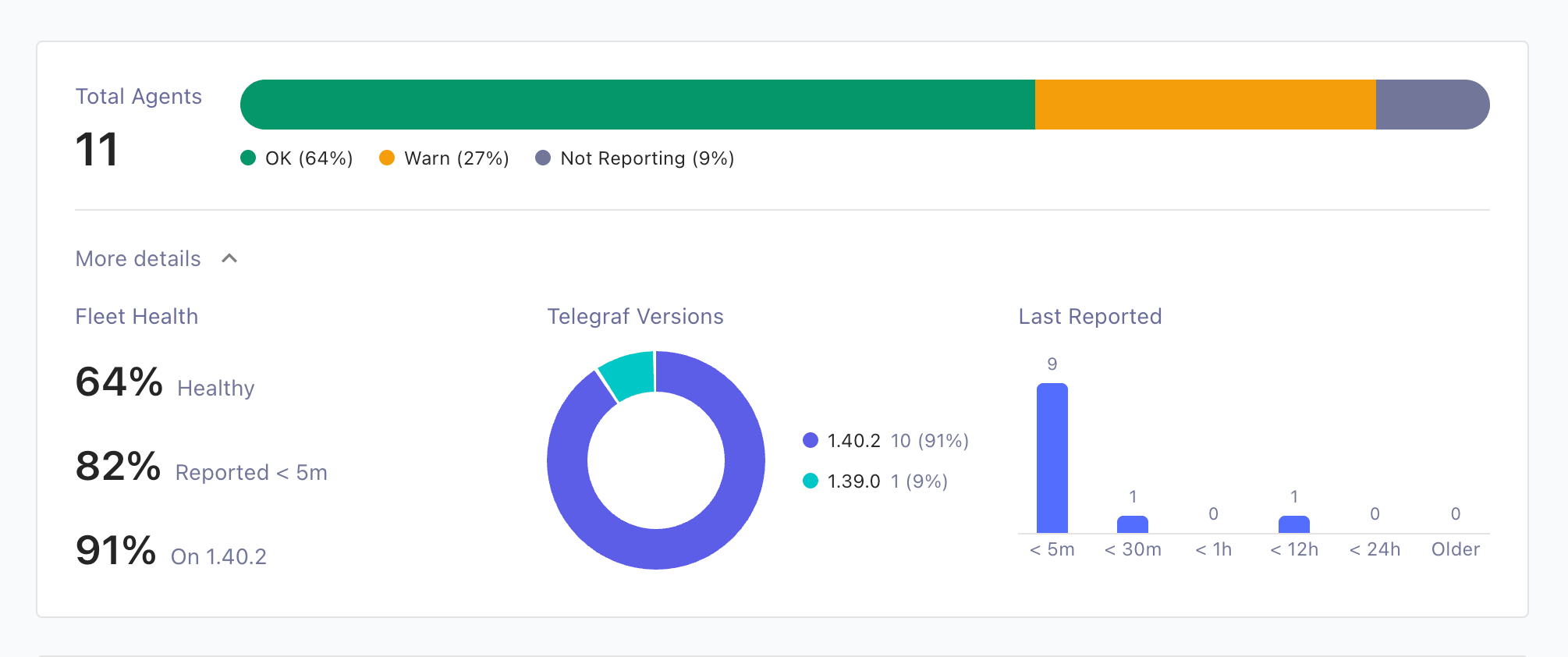
The top of the Agents page shows the total number of agents and a segmented status bar with the share of agents in each status: OK, Warn, Fail, Undefined, and Not Reporting. Statuses with no agents are hidden from the bar.
For what each status means and how statuses are set, see Set agent statuses.
Agent list columns
The agent list has the following columns:
- Agent Details: the agent’s instance ID, or its hostname when the agent did not report an instance ID. Click Show labels above the list to show each agent’s labels beside its ID.
- Telegraf Version: the Telegraf version the agent reported.
- Advisories: the agent’s security advisory exposure. Requires a Telegraf Enterprise license. See Find affected agents on the Agents page.
- Status: the agent’s current status.
- Last Reported: when the agent last sent a heartbeat.
Switch between two row layouts with the toggle above the list:
- Compact View () shows the version number and the status as a colored dot.
- Detailed View () adds the agent’s IP address under its ID, shows the full version string the agent reported, and shows the status as a labeled chip.
Sort the list by Agent Details, Status, or Last Reported by clicking a column header. Click the header again to reverse the sort order.
View fleet summary details
Expand More details below the status bar to show three summary visualizations:
- Fleet Health: percentage tiles for Healthy agents, agents that
Reported < 5m ago, and agents on the newest reported Telegraf version.
Tiles show
—when no agents match the current filters. - Telegraf Versions: a donut chart of reported Telegraf versions. The chart shows up to six slices and folds the smallest shares into Other. Agents that don’t report a version appear as Unknown.
- Last Reported: a histogram of when agents last reported, in the bands < 5m, < 30m, < 1h, < 12h, < 24h, and Older. Each band counts agents whose most recent heartbeat falls in that window. The Older band also includes agents that have never reported.
The summary reflects the current filters, so you can inspect the health of a subset of the fleet, for example, all agents using one configuration.
Filter the agent list
Use the controls above the agent list to filter it:
- Search (): matches the agent’s ID, hostname, IP address, or Telegraf version. Toggles inside the search box switch on regular expression and case-sensitive matching. See Search the agent list.
- Status: show only agents in the selected status.
- Configuration: show only agents assigned a specific configuration.
- Reporting rule: show only agents assigned a specific reporting rule.
- Advisory exposure: show only agents that are Affected, Unknown, or Not affected by security advisories, or only agents whose highest matching severity is Critical, High, Medium, or Low. This filter and the Advisories column require a Telegraf Enterprise license. See Find affected agents on the Agents page.
Active filters appear as chips above the list, for example, Status: Not reporting or Config: web-servers. Click the icon on a chip to remove that filter.
Search the agent list
Type in the search box above the agent list to find agents.
The search matches the agent’s ID, hostname, IP address, or Telegraf version.
By default, the search finds the text anywhere in those fields and ignores
case. For example, prod matches the hostnames prod-web-01 and PROD-DB-02.
Two toggles inside the search box change how the search matches:
- Use regular expression ():
treat the search text as a regular expression instead of plain text.
For example,
^web-0[1-3]$matches the hostnamesweb-01,web-02, andweb-03, but notweb-04orprod-web-01. A pattern can be up to 512 characters long. If the pattern is invalid, Telegraf Controller shows the error below the search box. - Match case ():
match uppercase and lowercase letters exactly as typed.
For example,
WebmatchesWeb-01but notweb-01.
A toggle is highlighted while it’s on. Turn both toggles off to return to the default plain-text search that ignores case.
Regular expression syntax depends on the database
Telegraf Controller evaluates the pattern in its database, so the supported syntax depends on which database your instance uses:
- PostgreSQL: POSIX regular expressions
- SQLite: Rust regular expression syntax
Common constructs such as anchors, character classes, alternation, and quantifiers behave the same in both.
The search text and both toggles are part of the page URL, so you can bookmark or share a filtered view of the agent list. The same search is available on the Agents tab of a configuration or a configuration group.
Refresh the list
Click Refresh to reload the list and summary on demand, or open the attached menu to select an auto-refresh interval.
Query the fleet summary API
The GET /api/agents/summary endpoint returns the data behind the summary
visualizations. It requires an API token with read permission on the
Agents API.
All query parameters are optional:
| Parameter | Description |
|---|---|
status | Agent status code to filter by |
search | Text to match against the agent ID, hostname, IP address, or Telegraf version |
regex | true to treat search as a regular expression |
caseSensitive | true to match search case-sensitively |
config | Configuration ID or alias |
group | Configuration group ID or alias |
reportingRule | Reporting rule ID |
The GET /api/agents endpoint that lists agents accepts the same search,
regex, and caseSensitive parameters.
curl "https://telegraf-controller.example.com/api/agents/summary?status=1" \
  -H "Authorization: Bearer API_TOKEN"
Replace API_TOKEN
with an API token that has read permission on the Agents API.
The response contains the total count, per-status counts, version distribution, and last-reported bands:
{
  "total": 42,
  "status": { "0": 35, "1": 4, "2": 3 },
  "telegrafVersion": [
    { "version": "1.39.0", "count": 30 },
    { "version": null, "count": 12 }
  ],
  "lastReported": {
    "lt5m": 30,
    "lt30m": 5,
    "lt1h": 2,
    "lt12h": 2,
    "lt24h": 1,
    "older": 2
  }
}
A version of null means the agent has not reported a Telegraf version.
The older band includes agents that have never reported.
Was this page helpful?
Thank you for your feedback!
Support and feedback
Thank you for being part of our community! We welcome and encourage your feedback and bug reports for Telegraf Controller and this documentation. To find support, use the following resources:
Customers with an annual or support contract can contact InfluxData Support.