
View agent heartbeat data
Each agent heartbeat can carry runtime statistics and a sample of recent Telegraf logs. Telegraf Controller stores this data in its database and displays it on the agent detail page, so you can inspect an agent’s recent behavior without shell access to the host running Telegraf.
- The agent detail page
- Heartbeat statistics
- Reported logs
- Include statistics with heartbeats
- Include logs with heartbeats
- Retrieve heartbeat data with the API
- How heartbeat data is stored
The agent detail page
To open an agent’s detail page, go to Agents, click the More button () on an agent row, and select View Details. The page shows:
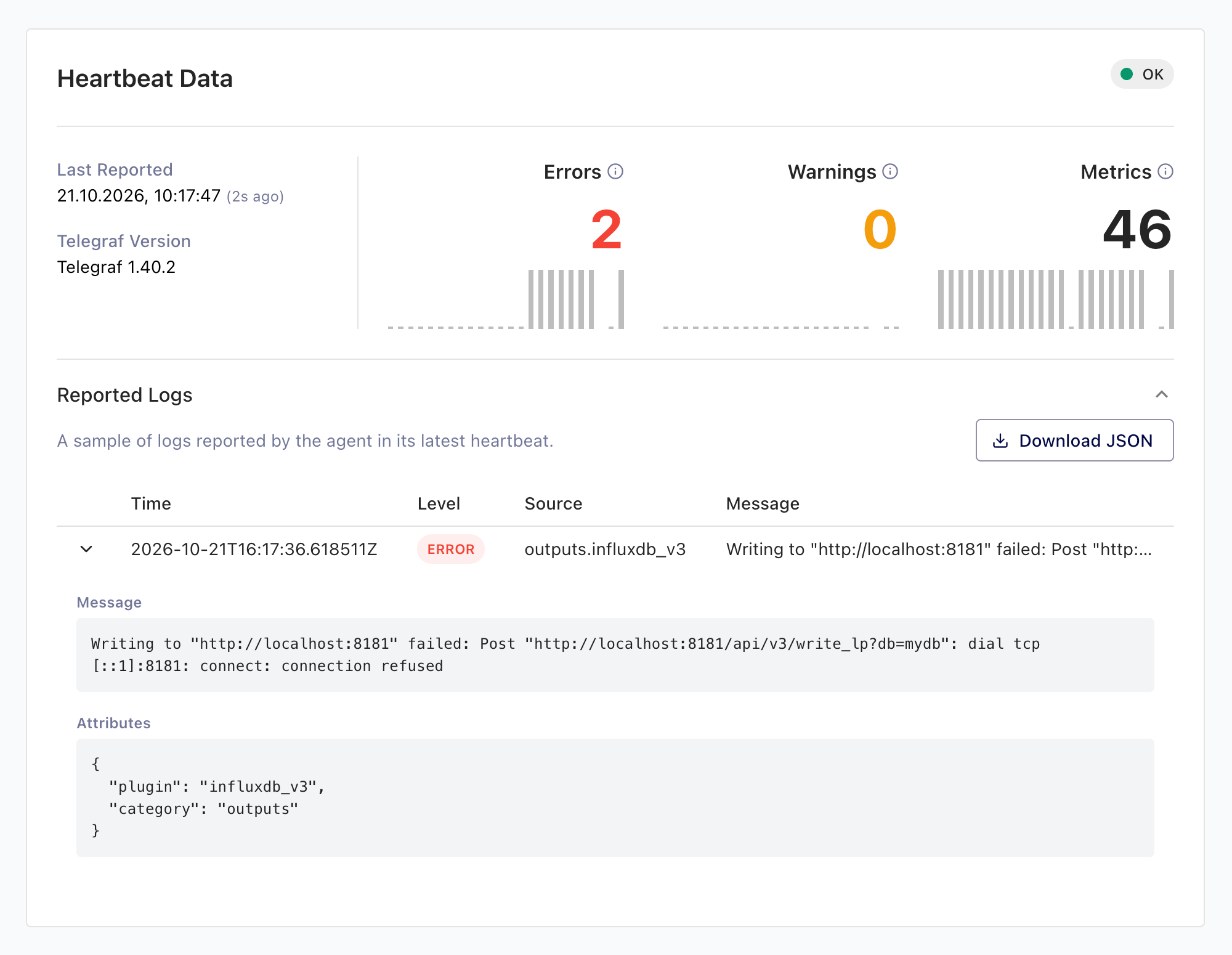
- Heartbeat Data: the agent’s status, when it last reported, its Telegraf version, and its recent heartbeat statistics.
- Security Advisories: with a Telegraf Enterprise license, the security advisories that affect the agent’s Telegraf version, or a note that none do.
- Agent Metadata: labels, creation time, hostname, and reported IP address.
- Reporting Rule: the assigned reporting rule and its thresholds, with a Change button to assign a different rule.
- Agent Configurations: managed configurations linked to their configuration pages, and external configurations with copyable paths.
- Reported Logs: a collapsible section with the agent’s most recently reported logs.
Click Refresh in the page header to reload all of it.
Heartbeat statistics
The Heartbeat Data card shows three counters from the agent’s latest heartbeat: Errors and Warnings logged, and Metrics written since the previous heartbeat. Hover the icon next to each counter for its definition.
Each counter includes a bar chart of up to the 24 most recent heartbeats. Hover a bar for the count it represents and the window it covers. A gap in the chart marks a missing heartbeat: Telegraf Controller infers the agent’s heartbeat interval from its recent history and renders a gap when the time between two heartbeats significantly exceeds it.
If the agent doesn’t send statistics, the card shows a notice instead. To fix it, see Include statistics with heartbeats.
Reported logs
The Reported Logs section shows a sample of Telegraf logs carried by the agent’s latest heartbeat. When the sample is smaller than what the agent reported, the caption shows how many entries are displayed out of the reported total.
The table lists each entry’s Time, Level (colored by severity),
Source, and Message. Click a row to expand the full message and the
entry’s attributes. A (truncated) marker means the message exceeded the
stored message size limit.
Click Download JSON to save the displayed entries as a JSON file.
If the agent doesn’t send logs, the section shows a notice instead. To fix it, see Include logs with heartbeats.
Include statistics with heartbeats
To send runtime statistics with each heartbeat, add statistics to the
include option of the agent’s
heartbeat output plugin:
[[outputs.heartbeat]]
  url = "http://telegraf_controller.example.com/agents/heartbeat"
  instance_id = "my-agent"
  include = ["hostname", "statistics", "configs"]
Include logs with heartbeats
To send a sample of recent Telegraf logs with each heartbeat, add logs to
the include option. Optionally tune the sample with the
[outputs.heartbeat.logs] subtable:
[[outputs.heartbeat]]
  url = "http://telegraf_controller.example.com/agents/heartbeat"
  instance_id = "my-agent"
  include = ["hostname", "statistics", "configs", "logs"]

  [outputs.heartbeat.logs]
    limit = 100
level = "warn"- limit: maximum number of log entries to send per heartbeat.
- level: minimum severity to include:
error,warn,info,debug, ortrace.
Retrieve heartbeat data with the API
Both endpoints identify the agent by its Telegraf Controller agent id,
the identifier returned by GET /api/agents, not by the agent ID the
heartbeat plugin reports.
They require an API token with read permission on the Agents API and
return 404 for an unknown id.
Latest heartbeat
GET /api/agents/:id/heartbeat/latest returns the most recent
heartbeat snapshot, or null if none exists: when it was received, the
reported statistics, how many log entries the agent reported and
Telegraf Controller stored, and the stored entries themselves.
curl "https://telegraf-controller.example.com/api/agents/AGENT_ID/heartbeat/latest" \
  -H "Authorization: Bearer API_TOKEN"
Statistics history
GET /api/agents/:id/heartbeat/logs returns the per-heartbeat statistics
series that backs the detail page’s bar charts, oldest first. Each record
carries a timestamp and the error, warning, and metric counts for that
heartbeat.
| Parameter | Description |
|---|---|
from | Start of the time range, in epoch milliseconds |
to | End of the time range, in epoch milliseconds |
limit | Maximum records to return: 1–5000. Default: 200 |
curl "https://telegraf-controller.example.com/api/agents/AGENT_ID/heartbeat/logs?limit=500" \
  -H "Authorization: Bearer API_TOKEN"
Replace the following:
API_TOKEN: an API token with read permission on the Agents APIAGENT_ID: the agent’sidin Telegraf Controller, as returned byGET /api/agents
Despite its path, the statistics history endpoint returns per-heartbeat counts, not log text. Log entries are available only from the latest heartbeat snapshot.
How heartbeat data is stored
Telegraf Controller stores heartbeat data in its database with fixed limits:
- Each heartbeat stores up to 200 log entries within a 64 KiB budget.
When an agent reports more, entries are kept by severity (
errorfirst) and then by recency. - A stored log message is capped at 8 KiB (marked
(truncated)in the UI) and an entry’s attributes at 2 KiB. - Only the latest heartbeat’s log entries are retained. Older heartbeat records keep their statistics only.
- Statistics records older than 24 hours are deleted, except each agent’s most recent record.
The logs-dir option was removed
Earlier versions of Telegraf Controller wrote agent logs to files in a
directory set with --logs-dir / LOGS_DIR. The database now stores this
data and the option no longer exists. Passing it has no effect.
Was this page helpful?
Thank you for your feedback!
Support and feedback
Thank you for being part of our community! We welcome and encourage your feedback and bug reports for Telegraf Controller and this documentation. To find support, use the following resources:
Customers with an annual or support contract can contact InfluxData Support.