Documentation

Scraping and discovery

Data can be pulled from a dynamic list of remote targets with the discovery and scraping features of Kapacitor. Use those features with TICKscripts to monitor targets, process the data, and write data to InfluxDB. Currently, Kapacitor supports only Prometheus style targets.

Note: Scraping and discovery is currently under technical preview. There may be changes to the configuration and behavior in subsequent releases.

Content

Overview

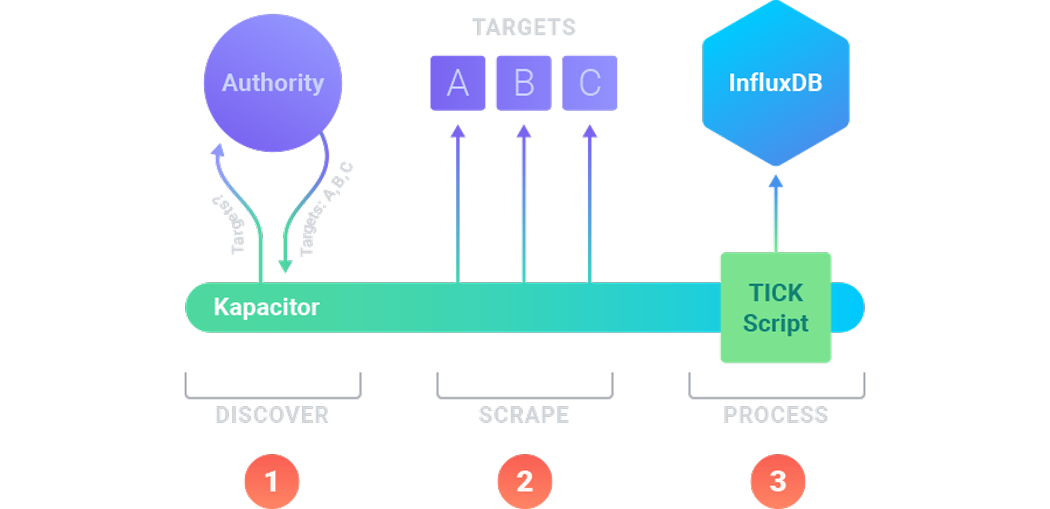
The diagram below outlines the infrastructure for discovering and scraping data with Kapacitor.

Image 1 – Scrapping and Discovery work flow
configuration-open
  1. First, Kapacitor implements the discovery process to identify the available targets in your infrastructure. It requests that information at regular intervals and receives that information from an authority. In the diagram, the authority informs Kapacitor of three targets: A, B, and C.
  2. Next, Kapacitor implements the scraping process to pull metrics data from the existing targets. It runs the scraping process at regular intervals. Here, Kapacitor requests metrics from targets A, B, and C. The application running on A, B, and C exposes a /metrics endpoint on its HTTP API which returns application-specific statistics.
  3. Finally, Kapacitor processes the data according to configured TICKscripts. Use TICKscripts to filter, transform, and perform other tasks on the metrics data. In addition, if the data should be stored, configure a TICKscript to send it to InfluxDB.

Pushing vs. Pulling Metrics

By combining discovery with scraping, Kapacitor enables a metrics gathering infrastructure to pull metrics off of targets instead of requiring them to push metrics out to InfluxDB. Pulling metrics has several advantages in dynamic environments where a target may have a short lifecycle.

Configuring Scrapers and Discoverers

A single scraper scrapes the targets from a single discoverer. Configuring both scrapers and discoverers comes down to configuring each individually and then informing the scraper about the discoverer.

Below are all the configuration options for a scraper.

Example 1 – Scrapper Configuration

[[scraper]]
  enabled = false
  name = "myscraper"
  # ID of the discoverer to use
  discoverer-id = ""
  # The kind of discoverer to use
  discoverer-service = ""
  db = "mydb"
  rp = "myrp"
  type = "prometheus"
  scheme = "http"
  metrics-path = "/metrics"
  scrape-interval = "1m0s"
  scrape-timeout = "10s"
  username = ""
  password = ""
  bearer-token = ""
  ssl-ca = ""
  ssl-cert = ""
  ssl-key = ""
  ssl-server-name = ""
  insecure-skip-verify = false

Available Discoverers

Kapacitor supports the following services for discovery:

NameDescription
azureDiscover targets hosted in Azure.
consulDiscover targets using Consul service discovery.
dnsDiscover targets via DNS queries.
ec2Discover targets hosted in AWS EC2.
file-discoveryDiscover targets listed in files.
gceDiscover targets hosted in GCE.
kubernetesDiscover targets hosted in Kubernetes.
marathonDiscover targets using Marathon service discovery.
nerveDiscover targets using Nerve service discovery.
serversetDiscover targets using Serversets service discovery.
static-discoveryStatically list targets.
tritonDiscover targets using Triton service discovery.

See the example configuration file for details on configuring each discoverer.


Was this page helpful?

Thank you for your feedback!


InfluxDB OSS 2.9.0: API tokens are hashed by default

Stronger token security in InfluxDB OSS 2.9.0 — tokens are hashed on disk by default. Existing tokens are hashed on first startup and can’t be recovered afterward. Capture any plaintext tokens you still need before you upgrade.

View InfluxDB OSS 2.9.0 release notes

Hashed tokens authenticate exactly like unhashed tokens — clients and integrations keep working.

Also new in 2.9.0:

  • Configurable backup compression
  • Restore support for backups containing hashed tokens
  • Tighter Edge Data Replication queue validation
  • Flux upgrade
  • Compaction reliability improvements

Key enhancements in Explorer 1.9

Explorer 1.9 is now available with InfluxQL support, an AI-assisted Flux to SQL converter (beta), and new live sample data simulators.

View Explorer 1.9 release notes

Explorer 1.9 includes new features and improvements that make it easier to query, visualize, and manage data.

Highlights:

  • Flux to SQL converter (beta): Convert Flux queries to SQL with an AI-assisted converter.
  • InfluxQL support: Query data with InfluxQL in the Data Explorer and dashboards, and save and load InfluxQL queries.
  • InfluxQL visualizations: Render line and bar charts from InfluxQL results with per-tag series grouping.
  • Query error history: Review a history of query errors in the query tool.
  • Live sample data simulators: Generate continuous live sample data with new bird data and signal generator simulators.

For more details, see Explorer 1.9 release notes

InfluxDB 3.10 is now available

InfluxDB 3 Core 3.10 adds an automatic catalog format upgrade, a configurable query-concurrency limit, and processing engine improvements.

Key updates in InfluxDB 3 Core 3.10:

  • Catalog format upgrade: the on-disk catalog automatically upgrades from format v2 to v3 on first 3.10 startup. Migration is one-way—back up your catalog before upgrading.
  • --max-concurrent-queries: limit concurrent queries (adjustable at runtime).
  • GET /ready endpoint for readiness probes.
  • Processing engine: cross-database queries and trigger lockdown flags.

For more information, see the InfluxDB 3 Core release notes.

InfluxDB 3.10 is now available

InfluxDB 3 Enterprise 3.10 adds automated backup and restore, row-level deletions, and user management, with an automatic catalog format upgrade and performance preview improvements.

Key updates in InfluxDB 3 Enterprise 3.10:

  • Catalog format upgrade: the on-disk catalog automatically upgrades from format v2 to v3 on first 3.10 startup. Migration is one-way—back up your catalog before upgrading.
  • Automated backup and restore (beta)
  • Row-level deletions
  • User management (authentication and RBAC) — preview
  • Performance preview improvements

Backup and restore, row-level deletions, and the performance preview require the Enterprise storage engine upgrade (opt-in beta). Beta and preview features are subject to breaking changes and aren’t recommended for production use.

For more information, see the InfluxDB 3 Enterprise release notes

Telegraf Enterprise is now generally available

Telegraf Enterprise is now generally available, along with Telegraf Controller v1.0.

Telegraf Enterprise combines Telegraf Controller, a centralized management console for Telegraf, with official support from InfluxData. Manage configurations, monitor fleet health, and operate tens of thousands of Telegraf agents from a single system.

InfluxDB Docker latest tag changing to InfluxDB 3 Core

On September 15, 2026, the latest tag for InfluxDB Docker images will point to InfluxDB 3 Core. To avoid unexpected upgrades, use specific version tags in your Docker deployments.

If using Docker to install and run InfluxDB, the latest tag will point to InfluxDB 3 Core. To avoid unexpected upgrades, use specific version tags in your Docker deployments. For example, if using Docker to run InfluxDB v2, replace the latest version tag with a specific version tag in your Docker pull command–for example:

docker pull influxdb:2