
InfluxDB 3 Core internals
How data flows through InfluxDB 3 Core
When data is written to InfluxDB 3 Core, it progresses through multiple stages to ensure durability, optimize performance, and enable efficient querying. Configuration options at each stage affect system behavior, balancing reliability and resource usage.
Data flow for writes
As written data moves through InfluxDB 3 Core, it follows a structured path to ensure durability, efficient querying, and optimized storage.
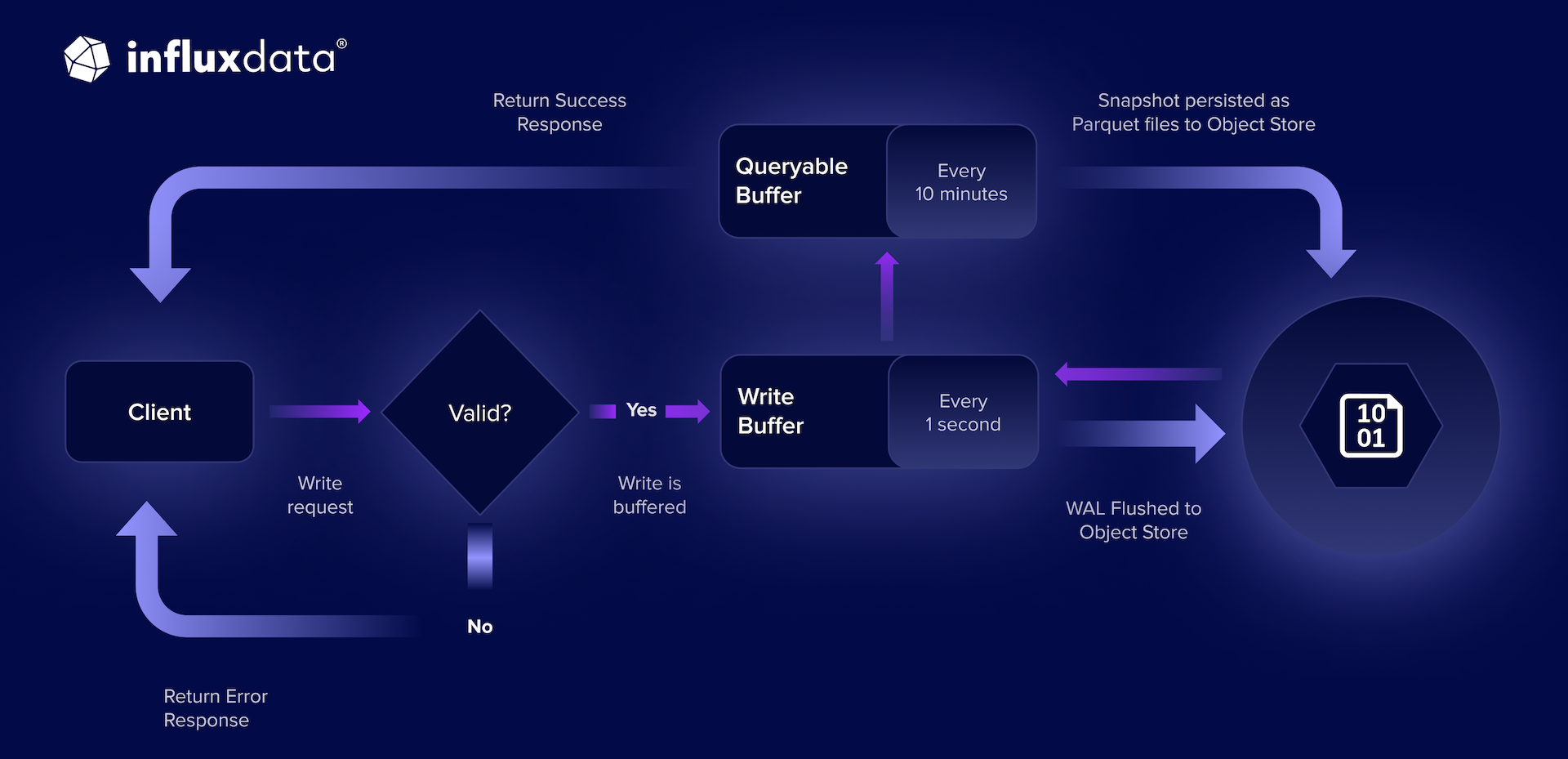 Figure: Write request, response, and ingest flow for InfluxDB 3 Core and Enterprise
- Write validation and memory buffer
- Write-ahead log (WAL) persistence
- Query availability
- Parquet storage
- In-memory cache
Write validation and memory buffer
- Process: InfluxDB validates incoming data before accepting it into the system.
- Impact: Prevents malformed or unsupported data from entering the database.
- Details: The database validates incoming data and stores it in the write buffer (in memory). If
no_sync=true, the server sends a response to acknowledge the write without waiting for persistence.
Write-ahead log (WAL) persistence
- Process: The database flushes the write buffer to the WAL every second (default).
- Impact: Ensures durability by persisting data to object storage.
- Tradeoff: More frequent flushing improves durability but increases I/O overhead.
- Details: Every second (default), the database flushes the write buffer to the Write-Ahead Log (WAL) for persistence in the object store. If
no_sync=false(default), the server sends a response to acknowledge the write.
Query availability
- Process: The system moves data to the queryable buffer after WAL persistence.
- Impact: Enables fast queries on recent data.
- Tradeoff: A larger buffer speeds up queries but increases memory usage.
- Details: After WAL persistence completes, data moves to the queryable buffer where it becomes available for queries. By default, the server keeps up to 900 WAL files (15 minutes of data) buffered.
Parquet storage
- Process: Every ten minutes (default), data is persisted to Parquet files in object storage.
- Impact: Provides durable, long-term storage.
- Tradeoff: More frequent persistence reduces reliance on the WAL but increases I/O costs.
- Memory usage: The persistence process uses memory from the configured memory pool (
exec-mem-pool-size) when converting data to Parquet format. For write-heavy workloads, ensure adequate memory is allocated. - Details: Every ten minutes (default), InfluxDB 3 Core persists the oldest data from the queryable buffer to the object store in Parquet format, and keeps the remaining data (the most recent 5 minutes) in memory.
WAL tail
The WAL tail is the most recent data in the WAL that InfluxDB 3 Core has not yet durably persisted beyond the WAL. Because InfluxDB 3 Core flushes the WAL to object storage every second, the WAL tail is durable, but it remains in the WAL until the next Parquet persistence captures it.
In-memory cache
- Process: Recently persisted Parquet files are cached in memory.
- Impact: Reduces query latency by minimizing object storage access.
- Details: InfluxDB 3 Core puts Parquet files into an in-memory cache so that queries against the most recently persisted data don’t have to go to object storage.
Was this page helpful?
Thank you for your feedback!
Support and feedback
Thank you for being part of our community! We welcome and encourage your feedback and bug reports for InfluxDB 3 Core and this documentation. To find support, use the following resources:
Customers with an annual or support contract can contact InfluxData Support.