---
title: Use the Admin UI to query data
description: Use the Query page in the InfluxDB 3 Cloud Admin UI to run SQL queries, browse your database schema, and export results as CSV.
url: https://docs.influxdata.com/influxdb3/cloud/query-data/execute-queries/admin-ui/
estimated_tokens: 943
product: InfluxDB 3 Cloud
version: cloud
publisher: InfluxData
canonical: https://docs.influxdata.com/influxdb3/cloud/query-data/execute-queries/admin-ui/
date: '2026-10-29T08:28:54-04:00'
lastmod: '2026-10-29T08:28:54-04:00'
---
Use the **Query** page in the InfluxDB 3 Cloud Admin UI to run SQL queries
against your databases without installing a client.
The page includes a SQL editor, a schema browser, and a result preview.
* [Open the Query page](#open-the-query-page)
* [Browse the schema](#browse-the-schema)
* [Run a query](#run-a-query)
* [Export results](#export-results)
* [Query limits and access](#query-limits-and-access)
## Open the Query page
In the Admin UI, select your instance, and then select **Query**in the left navigation.
The Query page is SQL-only.
To query with InfluxQL, use the[`influxdb3` CLI](/influxdb3/cloud/query-data/execute-queries/influxdb3-cli/) or the[HTTP API](/influxdb3/cloud/query-data/execute-queries/influxdb-v1-api/).
## Browse the schema
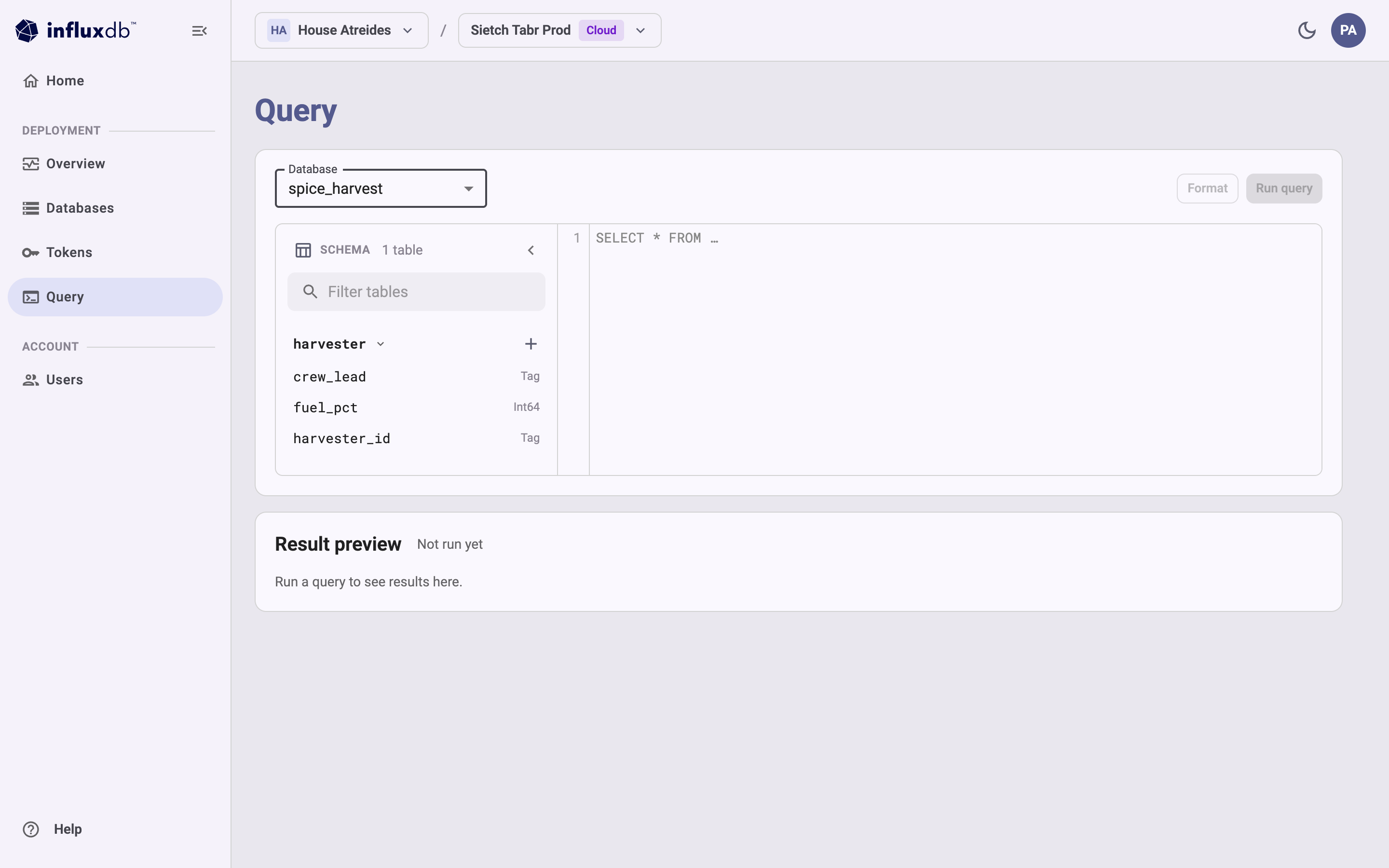
Use the **Database** list to select the database to query.
The schema browser, labeled **SCHEMA**, shows the number of tables in the
selected database and the tables themselves.
* Enter text in **Filter tables** to narrow the list of tables.
* Select a table to expand it and show its columns and their data types,
such as `Tag` or `Int64`.
* Select the **+** button next to a table to insert the table name
at the cursor in the editor.
Select a column to insert the column name.
* Select the arrow in the schema header to hide the schema browser,
and select it again to show the schema browser.
 ## Run a query
1. In the **Database** list, select the database to query.
2. Enter a SQL query in the editor.
For example:
```
SELECT
date_bin(INTERVAL '1 hour', time) AS hour,
sector,
round(sum(spice_kg), 1) AS spice_kg,
round(avg(melange_purity), 3) AS purity
FROM harvester
WHERE time >= now() - INTERVAL '6 hours'
GROUP BY 1, 2
ORDER BY 1 DESC, 2
```
3. *(Optional)* Select **Format** to reformat the query.
4. Select **Run query** or press `Ctrl+Enter`.
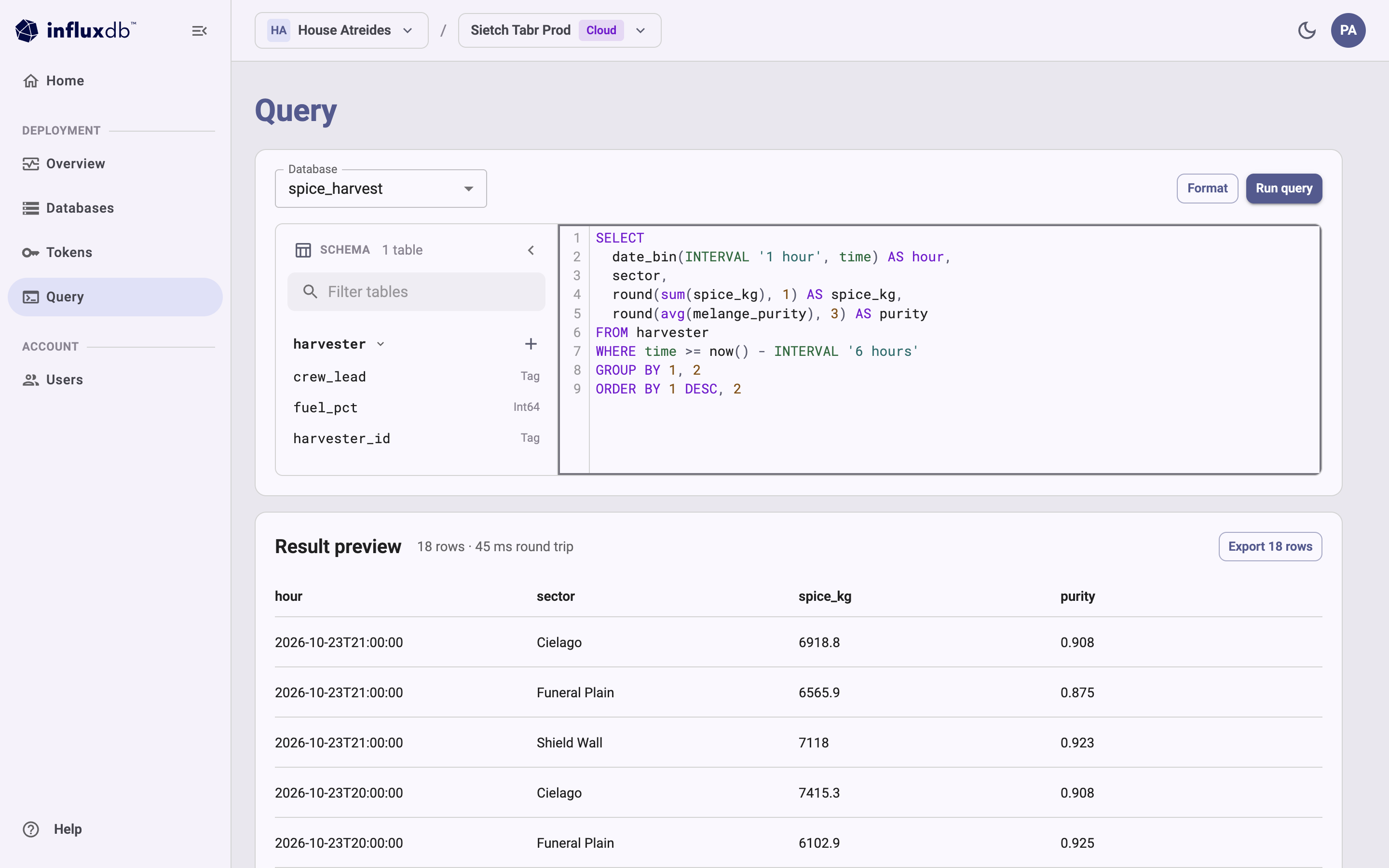
**Result preview** shows the number of rows returned and the round-trip time
for the query, followed by a table of results.
## Run a query
1. In the **Database** list, select the database to query.
2. Enter a SQL query in the editor.
For example:
```
SELECT
date_bin(INTERVAL '1 hour', time) AS hour,
sector,
round(sum(spice_kg), 1) AS spice_kg,
round(avg(melange_purity), 3) AS purity
FROM harvester
WHERE time >= now() - INTERVAL '6 hours'
GROUP BY 1, 2
ORDER BY 1 DESC, 2
```
3. *(Optional)* Select **Format** to reformat the query.
4. Select **Run query** or press `Ctrl+Enter`.
**Result preview** shows the number of rows returned and the round-trip time
for the query, followed by a table of results.
 For SQL syntax and functions, see the [SQL reference](/influxdb3/cloud/reference/sql/).
## Export results
To save the results, select **Export *N* rows** in the **Result preview**section.
The Admin UI downloads the results as a CSV file.
## Query limits and access
* The Admin UI returns at most 10,000 rows.
If a query returns more, the page shows
“Showing the first 10,000 rows. Add a LIMIT or narrow the query to see the rest.”
* The databases in the **Database** list are the databases your account can access.
If you don’t have access to any databases on the instance, the page shows
“You do not have access to any databases on this instance.”
Ask an account administrator for access.
Roles that can only describe databases, such as the Auditor role,
can’t read data from them.
## Other ways to query
To query programmatically or retrieve more than 10,000 rows, use one of the following:
* [`influxdb3` CLI](/influxdb3/cloud/query-data/execute-queries/influxdb3-cli/)
* [InfluxDB v3 HTTP API](/influxdb3/cloud/query-data/execute-queries/influxdb-v3-api/)
* [InfluxDB v1 HTTP API](/influxdb3/cloud/query-data/execute-queries/influxdb-v1-api/)
#### Related
* [Use the influxdb3 CLI to query data](/influxdb3/cloud/query-data/execute-queries/influxdb3-cli/)
* [Use the InfluxDB v3 HTTP query API](/influxdb3/cloud/query-data/execute-queries/influxdb-v3-api/)
For SQL syntax and functions, see the [SQL reference](/influxdb3/cloud/reference/sql/).
## Export results
To save the results, select **Export *N* rows** in the **Result preview**section.
The Admin UI downloads the results as a CSV file.
## Query limits and access
* The Admin UI returns at most 10,000 rows.
If a query returns more, the page shows
“Showing the first 10,000 rows. Add a LIMIT or narrow the query to see the rest.”
* The databases in the **Database** list are the databases your account can access.
If you don’t have access to any databases on the instance, the page shows
“You do not have access to any databases on this instance.”
Ask an account administrator for access.
Roles that can only describe databases, such as the Auditor role,
can’t read data from them.
## Other ways to query
To query programmatically or retrieve more than 10,000 rows, use one of the following:
* [`influxdb3` CLI](/influxdb3/cloud/query-data/execute-queries/influxdb3-cli/)
* [InfluxDB v3 HTTP API](/influxdb3/cloud/query-data/execute-queries/influxdb-v3-api/)
* [InfluxDB v1 HTTP API](/influxdb3/cloud/query-data/execute-queries/influxdb-v1-api/)
#### Related
* [Use the influxdb3 CLI to query data](/influxdb3/cloud/query-data/execute-queries/influxdb3-cli/)
* [Use the InfluxDB v3 HTTP query API](/influxdb3/cloud/query-data/execute-queries/influxdb-v3-api/)