# InfluxDB 3 Cloud — full Markdown corpus
> Generated 2026-11-17T23:22:51.733Z from https://docs.influxdata.com/influxdb3/cloud/
> See https://docs.influxdata.com/llms.txt for the cross-product table of contents.
> Publisher: InfluxData (https://www.influxdata.com)
> sameAs: https://github.com/influxdata, https://hub.docker.com/u/influxdata, https://www.crunchbase.com/organization/influxdb, https://www.linkedin.com/company/influxdb, https://twitter.com/influxdb, https://www.youtube.com/@InfluxData, https://www.facebook.com/influxdb/
---
# InfluxDB 3 Cloud documentation
Source: https://docs.influxdata.com/influxdb3/cloud/
InfluxDB 3 Cloud is the fully managed, cloud-hosted version of[InfluxDB 3 Enterprise](/influxdb3/enterprise/).
It provides the performance and scalability of InfluxDB 3’s diskless
architecture as a managed service, so you can write and query time series data
without provisioning or operating your own infrastructure.
## [Install the influxdb3 CLI for InfluxDB 3 Cloud](/influxdb3/cloud/install/)
Install the `influxdb3` CLI to administer, write data to, and query InfluxDB 3 Cloud.
## [Get started with InfluxDB 3 Cloud](/influxdb3/cloud/get-started/)
InfluxDB 3 Cloud is the fully managed, cloud-hosted version of InfluxDB 3 Enterprise. Learn how to get started writing and querying time series data with InfluxDB 3 Cloud.
## [Write data](/influxdb3/cloud/write-data/)
Collect and write time series data to InfluxDB 3 Cloud.
## [Query data in InfluxDB 3 Cloud](/influxdb3/cloud/query-data/)
Learn to query data in InfluxDB 3 Cloud using SQL and InfluxQL.
## [Administer InfluxDB 3 Cloud](/influxdb3/cloud/admin/)
Perform administrative tasks in InfluxDB 3 Cloud such as creating and managing databases and tokens.
## [InfluxDB 3 Cloud reference documentation](/influxdb3/cloud/reference/)
Reference documentation for InfluxDB 3 Cloud including API documentation, tools, syntaxes, and glossary.
## [InfluxDB HTTP API](/influxdb3/cloud/api/)
Use the InfluxDB HTTP API to write data, query data, and manage databases, tables, and tokens.
> [!Important]
> #### InfluxDB 3 Cloud is in early access
>
> InfluxDB 3 Cloud is currently an early access release offered to select
> customers as we continue to expand availability.
>
> Interested in trying InfluxDB 3 Cloud?
> See the[InfluxDB 3 Cloud product page](https://www.influxdata.com/products/influxdb3-cloud/)to request access.
---
# Administer InfluxDB 3 Cloud
Source: https://docs.influxdata.com/influxdb3/cloud/admin/
The following articles provide information about managing your
InfluxDB 3 Cloud resources:
> [!Important]
> #### Use the Admin UI, not InfluxDB 3 Explorer
>
> Use the InfluxDB 3 Cloud [Admin UI](https://console.influxdata.com) at`console.influxdata.com` rather than[InfluxDB 3 Explorer](/influxdb3/explorer/), the standalone UI for[InfluxDB 3 Core](/influxdb3/core/) and[InfluxDB 3 Enterprise](/influxdb3/enterprise/).
> [!Note]
> #### Replicating data from the edge?
>
> [EDR (Edge Data Replication) for InfluxDB 3 Enterprise](/influxdb3/enterprise/edr/)replicates time series data from InfluxDB 3 Enterprise to another
> Enterprise instance, to InfluxDB 3 Cloud, or to AWS Timestream for
> InfluxDB 3–over connections that may be intermittent or
> bandwidth-constrained. See[Get started with EDR](/influxdb3/enterprise/edr/get-started/).
### [Identify InfluxDB 3 Cloud version](/influxdb3/cloud/admin/identify-version/)
Learn how to identify your InfluxDB 3 Cloud instance using command-line tools, HTTP endpoints, and other methods.
### [Manage users](/influxdb3/cloud/admin/users/)
Manage users and access to resources in your InfluxDB 3 Cloud instance. Use the Admin UI for self-service user management or contact support for advanced operations.
### [Manage tables](/influxdb3/cloud/admin/tables/)
Tables in InfluxDB 3 Cloud are synonymous with measurements and contain time series data. Each table has a defined schema with tag and field columns.
### [Manage databases](/influxdb3/cloud/admin/databases/)
An InfluxDB 3 Cloud database is a named location where time series data is stored. Each database can contain multiple tables.
### [Manage tokens](/influxdb3/cloud/admin/tokens/)
Manage tokens to authenticate and authorize access to actions, resources, and data in your InfluxDB 3 Cloud instance.
### [Monitor your instance](/influxdb3/cloud/admin/monitor-instance/)
Use the instance Overview page in the InfluxDB 3 Cloud Admin UI to view instance details, size, CPU and memory metrics, ingest and query rates, storage used, and object storage request counts.
### [Availability zones](/influxdb3/cloud/admin/availability-zones/)
Learn how the number of availability zones that your InfluxDB 3 Cloud instance uses affects its resilience to a zone failure.
### [AWS PrivateLink and Azure Private Link](/influxdb3/cloud/admin/private-link/)
Learn how to use AWS PrivateLink or Azure Private Link to connect to your InfluxDB 3 Cloud instance from your own cloud network.
### [Customer-managed encryption keys](/influxdb3/cloud/admin/customer-managed-keys/)
Learn how to encrypt your InfluxDB 3 Cloud instance’s object storage with a key that you own in AWS Key Management Service (KMS) or Azure Key Vault.
---
# Availability zones
Source: https://docs.influxdata.com/influxdb3/cloud/admin/availability-zones/
Each InfluxDB 3 Cloud instance runs in one or more availability zones of
its cloud provider region.
The number of zones that your instance uses affects its resilience to a zone
failure.
What an availability zone is, and the uptime commitments that apply to it,
depend on your cloud provider:
* **AWS**: [Availability Zones](https://docs.aws.amazon.com/AWSEC2/latest/UserGuide/using-regions-availability-zones.html#concepts-availability-zones)and the [Amazon Compute Service Level Agreement](https://aws.amazon.com/compute/sla/)
* **Azure**: [Azure availability zones](https://learn.microsoft.com/azure/reliability/availability-zones-overview)and the [Azure service level agreements](https://www.microsoft.com/licensing/docs/view/Service-Level-Agreements-SLA-for-Online-Services)
These agreements cover the cloud provider’s infrastructure, not
InfluxDB 3 Cloud.
Not all cloud provider regions are available for InfluxDB 3 Cloud.
For the available regions and how to request one, see[Supported regions](/influxdb3/cloud/reference/regions/).
* [View your instance’s availability zones](#view-your-instances-availability-zones)
* [Single-zone and multi-zone instances](#single-zone-and-multi-zone-instances)
## View your instance’s availability zones
To see the zones that your instance uses, open the instance **Overview** page
in the Admin UI and find **Availability Zones** on the **Instance Details** card.
For more information, see[View instance details](/influxdb3/cloud/admin/monitor-instance/#view-instance-details).
## Single-zone and multi-zone instances
* **Single-zone instance**: All of the instance’s components run in one zone.
A failure in that zone can make the instance unavailable, and the instance
doesn’t fail over to another zone.
* **Multi-zone instance**: The instance’s components are spread across multiple
zones, which improves resilience to a zone failure.
If **Availability Zones** shows a dash (—), the instance isn’t restricted to
specific zones.
> [!Important]
> #### Connect using the instance URL
>
> Use the instance URL in your clients, not an IP address that it resolves to.
> The addresses behind the URL can change.
#### Related
* [Monitor your instance](/influxdb3/cloud/admin/monitor-instance/)
* [Supported regions](/influxdb3/cloud/reference/regions/)
---
# Customer-managed encryption keys
Source: https://docs.influxdata.com/influxdb3/cloud/admin/customer-managed-keys/
Use a customer-managed key to encrypt your instance’s object storage with a key
that you own:
* **AWS**: A key in AWS Key Management Service (KMS)
* **Azure**: A key in Azure Key Vault
You can revoke InfluxData’s access to the data at any time.
To set up a customer-managed key, contact your InfluxData representative.
| | AWS | Azure |
|---------------------------|-----------------------------------------------------|-------------------------------------------------------|
| **Encrypts** | Amazon S3 objects | Azure Blob Storage |
|**Where the key is stored**|AWS Key Management Service (KMS), in your AWS account| Azure Key Vault, in your Microsoft Entra tenant |
| **Existing data** |Only objects written after you enable the key use it |All existing data uses the key as soon as you enable it|
> [!Warning]
> #### Deleting or disabling the key makes your data unusable
>
> If you delete or disable the key, neither you nor InfluxData can use the data
> in your instance’s object storage.
| | AWS | Azure |
| --- | --- | --- |
| | AWS | Azure |
| Encrypts | Amazon S3 objects | Azure Blob Storage |
| Where the key is stored | AWS Key Management Service (KMS), in your AWS account | Azure Key Vault, in your Microsoft Entra tenant |
| Existing data | Only objects written after you enable the key use it | All existing data uses the key as soon as you enable it |
---
# Manage databases
Source: https://docs.influxdata.com/influxdb3/cloud/admin/databases/
An InfluxDB 3 Cloud database is a named location where time series data is
stored. Each database can contain multiple tables.
> [!Note]
> **If coming from InfluxDB v1**, the concepts of databases and retention policies
> have been combined into a single concept–database. Retention policies are no
> longer part of the InfluxDB data model.
> However, InfluxDB 3 Cloud does
> support InfluxQL, which requires databases and retention policies.
> See [InfluxQL DBRP naming convention](/influxdb3/cloud/admin/databases/create/#influxql-dbrp-naming-convention).
>
> **If coming from InfluxDB v2, InfluxDB Cloud (TSM), or InfluxDB Cloud Serverless**,*database* and *bucket* are synonymous.
## Retention periods
A database **retention period** is the maximum age of data stored in the database.
The age of data is determined by the timestamp associated with each point.
When a point’s timestamp is beyond the retention period (relative to now), the
point is marked for deletion and is removed from the database the next time the
retention enforcement service runs.
By default, data does not expire. When you [create a database](/influxdb3/cloud/admin/databases/create/),
you can optionally set a retention period.
The minimum practical retention period is 1 hour (`1h`).
Database retention periods can be [updated after creation](/influxdb3/cloud/reference/cli/influxdb3/update/database/).
For tables within a database, you can [set table-specific retention periods](/influxdb3/cloud/admin/tables/create/#retention-period)that override the database retention period.
For complete details about retention periods, including duration formats, precedence
rules, and deletion behavior, see[Data retention in InfluxDB 3 Cloud](/influxdb3/cloud/reference/internals/data-retention/).
### Set a retention period
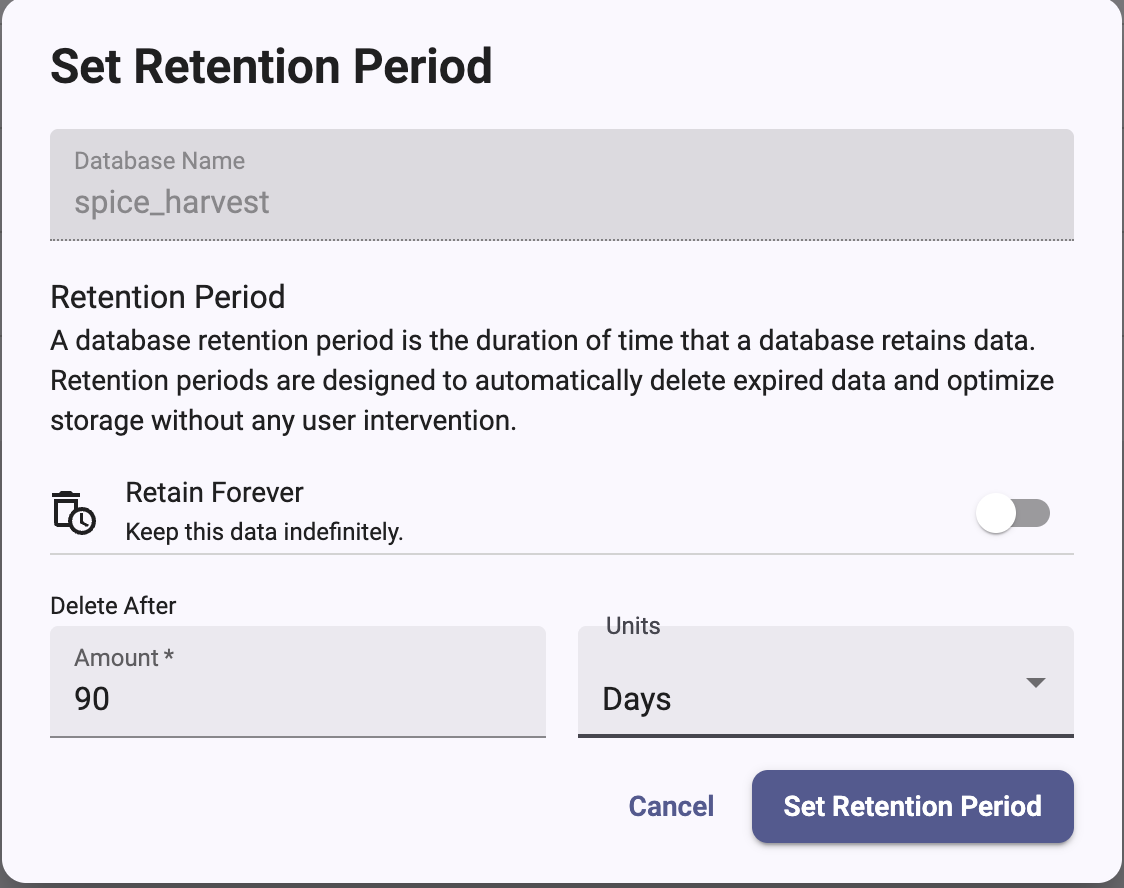
To set or change the retention period of an existing database in the InfluxDB 3 Cloud Admin UI:
1. In the Admin UI, select your instance, and then click **Databases**.
2. In the row for the database, click the options menu (**⋮**)
and select **Set Retention Period**.
3. In the **Set Retention Period** dialog, do one of the following:
* To keep data indefinitely, turn on **Retain Forever**.
* To delete data after a set time, leave **Retain Forever** off.
Under **Delete After**, enter an **Amount** and select the **Units**(**Weeks**, **Days**, **Hours**, or **Minutes**).
4. Click **Set Retention Period**.
 ## Database, table, and column limits
InfluxDB 3 Cloud places the following limits on databases, tables, and columns:
### Database limit
**Maximum number of databases**: 100
### Table limit
**Maximum number of tables across all databases**: 10000
InfluxDB 3 Cloud limits the number of tables you can have across *all*databases to 10000
.
InfluxDB doesn’t limit how many tables you can have in an individual database,
as long as the total across all databases is below the limit.
Having more tables affects your InfluxDB 3 Cloud installation in the
following ways:
[](#may-improve-query-performance-view-more-info)
**May improve query performance** *View more info*
Schemas with many tables that contain[focused sets of tags and fields](/influxdb3/cloud/write-data/best-practices/schema-design/#design-for-performance)can make it easier for the query engine to identify what Parquet files contain
the queried data, resulting in better query performance.
[](#more-puts-into-object-storage-view-more-info)
**More PUTs into object storage** *View more info*
When using cloud-based object storage as your data backend, the more tables you
have, the more `PUT` requests there are into your object store as InfluxDB
persists data to Parquet files. Each `PUT` request incurs a monetary cost and
increases the operating cost of InfluxDB 3 Cloud.
### Column limit
**Maximum number of columns per table**: 500
Each row must include a time column, with the remaining columns representing
tags and fields.
As a result,
a table can
have one time column and up to 499*combined* field and tag columns.
If you attempt to write to a table and exceed the column limit, the write
request fails and InfluxDB returns an error.
Higher numbers of columns has the following side-effects:
[](#may-adversely-affect-system-performance)
May adversely affect system performance
InfluxData identified 500 columns as the safe limit
for maintaining system performance and stability.
Exceeding this threshold can result in[wide schemas](/influxdb3/cloud/write-data/best-practices/schema-design/#avoid-wide-schemas),
which can negatively impact performance and resource use,
depending on your queries, the shape of your schema, and data types in the schema.
## [Create a database](/influxdb3/cloud/admin/databases/create/)
Use the influxdb3 CLI or HTTP API to create a new database in InfluxDB 3 Cloud.
```
# influxdb3 CLI
influxdb3 create database \
--retention-period 30d \
DATABASE_NAME
# HTTP API
curl --request POST "https://instance-id.enterprise.influxdb.io/api/v3/configure/database" \
--header "Content-Type: application/json" \
--header "Authorization: Bearer AUTH_TOKEN" \
--data '{
"db": "DATABASE_NAME",
"retention_period": "30d"
}'
```
[Read more ](/influxdb3/cloud/admin/databases/create/)
## [List databases](/influxdb3/cloud/admin/databases/list/)
Use the influxdb3 CLI or HTTP API to list databases in InfluxDB 3 Cloud.
```sh
# influxdb3 CLI
influxdb3 show databases
# HTTP API
curl --request GET "https://instance-id.enterprise.influxdb.io/api/v3/configure/database" \
--header "Authorization: Bearer AUTH_TOKEN"
```
[Read more ](/influxdb3/cloud/admin/databases/list/)
## [Delete a database](/influxdb3/cloud/admin/databases/delete/)
Use the influxdb3 CLI or HTTP API to delete a database from InfluxDB 3 Cloud.
```sh
# influxdb3 CLI
influxdb3 delete database DATABASE_NAME
# HTTP API
curl --request DELETE "https://instance-id.enterprise.influxdb.io/api/v3/configure/database?db=DATABASE_NAME" \
--header "Authorization: Bearer AUTH_TOKEN"
```
[Read more ](/influxdb3/cloud/admin/databases/delete/)
#### Related
* [influxdb3 CLI](/influxdb3/cloud/reference/cli/influxdb3/)
* [Database API reference](/influxdb3/cloud/api/v3/#tag/Database)
---
# Create a database
Source: https://docs.influxdata.com/influxdb3/cloud/admin/databases/create/
Use the [`influxdb3 create database` command](/influxdb3/cloud/reference/cli/influxdb3/create/database/),
the [HTTP API](/influxdb3/cloud/api/v3/), or the Admin UI
to create a database in InfluxDB 3 Cloud.
* [Create a database using the influxdb3 CLI](#create-a-database-using-the-influxdb3-cli)
* [Create a database using the HTTP API](#create-a-database-using-the-http-api)
* [Create a database using the Admin UI](#create-a-database-using-the-admin-ui)
* [Retention period](#retention-period)
* [Schema mode](#schema-mode)
* [Database naming restrictions](#database-naming-restrictions)
* [InfluxQL DBRP naming convention](#influxql-dbrp-naming-convention)
* [Database limit](#database-limit)
## Create a database using the influxdb3 CLI
Use the [`influxdb3 create database` command](/influxdb3/cloud/reference/cli/influxdb3/create/database/)to create a database. Provide the following:
* Database name *(see [Database naming restrictions](#database-naming-restrictions))*
* InfluxDB 3 Cloud [admin token](/influxdb3/cloud/admin/tokens/admin)
* *(Optional)* [Retention period](#retention-period). If omitted, data doesn’t expire.
* *(Optional)* [Schema mode](#schema-mode). If omitted, the database uses `implicit` schema mode.
```sh
# Create a database with a 30-day retention period
influxdb3 create database --retention-period 30d DATABASE_NAME
# Create a database with a 90-day retention period using authentication
influxdb3 create database \
--retention-period 90d \
--token AUTH_TOKEN \
DATABASE_NAME
# Create a database with infinite retention (default)
influxdb3 create database DATABASE_NAME
```
Replace the following:
* `DATABASE_NAME`: the name of the database to create
* `AUTH_TOKEN`: your [admin token](/influxdb3/cloud/admin/tokens/)
## Create a database using the HTTP API
To create a database using the HTTP API, send a `POST` request to the `/api/v3/configure/database` endpoint:
```
POST https://instance-id.enterprise.influxdb.io/api/v3/configure/database
```
Include the following in your request:
* **Headers**:
* `Content-Type: application/json`
* `Authorization: Bearer` with your [admin token](/influxdb3/cloud/admin/tokens/)
* **Request body** (JSON object):
* `db` *(string, required)*: Database name
* `retention_period` *(string, optional)*: [Retention period](#retention-period). If omitted, data doesn’t expire.
* `schema_mode` *(string, optional)*: [Schema mode](#schema-mode)
. Defaults to `implicit`.
```bash
# Create a database with a 30-day retention period
curl --request POST "https://instance-id.enterprise.influxdb.io/api/v3/configure/database" \
--header "Content-Type: application/json" \
--header "Authorization: Bearer AUTH_TOKEN" \
--data '{
"db": "DATABASE_NAME",
"retention_period": "30d"
}'
# Create a database with a 90-day retention period
curl --request POST "https://instance-id.enterprise.influxdb.io/api/v3/configure/database" \
--header "Content-Type: application/json" \
--header "Authorization: Bearer AUTH_TOKEN" \
--data '{
"db": "DATABASE_NAME",
"retention_period": "90d"
}'
# Create a database with infinite retention (default)
curl --request POST "https://instance-id.enterprise.influxdb.io/api/v3/configure/database" \
--header "Content-Type: application/json" \
--header "Authorization: Bearer AUTH_TOKEN" \
--data '{
"db": "DATABASE_NAME"
}'
```
Replace the following:
* `DATABASE_NAME`: the name of the database to create
* `AUTH_TOKEN`: your [admin token](/influxdb3/cloud/admin/tokens/)
### Response
A successful request returns HTTP status `200` with the database configuration.
## Create a database using the Admin UI
Use the InfluxDB 3 Cloud Admin UI to create a database:
1. In the Admin UI, select your instance, and then click **Databases**.
2. Click **Add Database**.
3. In the **Create Database** dialog, enter a **Database Name**.
To view the naming rules, hover over the help icon next to the field.
For more information, see [Database naming restrictions](#database-naming-restrictions).
4. Under **Retention Period**, do one of the following:
* To keep data indefinitely, turn on **Retain Forever**.
* To delete data after a set time, leave **Retain Forever** off.
Under **Delete After**, enter an **Amount** and select the **Units**(**Weeks**, **Days**, **Hours**, or **Minutes**).
For more information, see [Retention period](#retention-period).
5. Click **Create Database**.
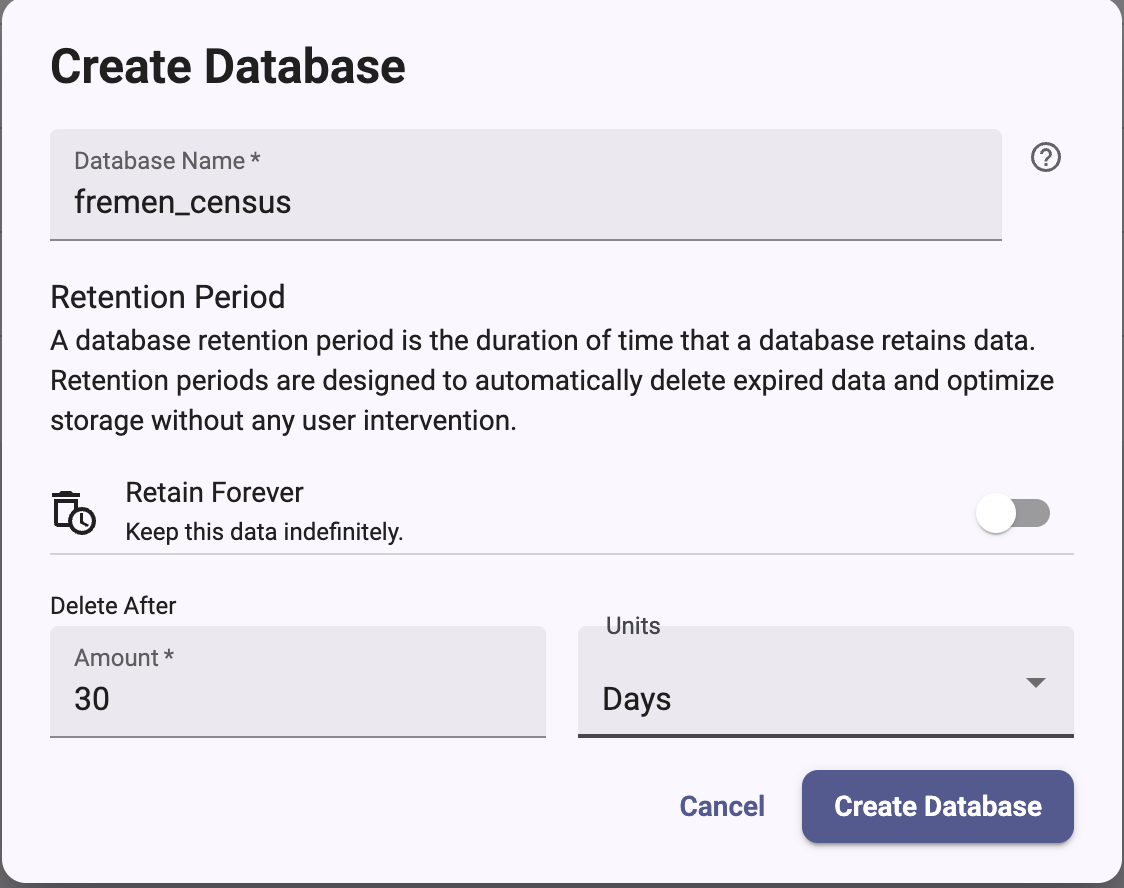 The new database appears in the **Databases** list.
* [Retention period](#retention-period)
* [Schema mode](#schema-mode)
* [Database naming restrictions](#database-naming-restrictions)
* [InfluxQL DBRP naming convention](#influxql-dbrp-naming-convention)
* [Database limit](#database-limit)
## Retention period
By default, data does not expire. When creating a database, set a *retention period* to automatically delete expired data and optimize storage.
### Retention period syntax
The retention period value is a time duration value made up of a numeric value
plus a duration unit.
For example, `30d` means 30 days.
The retention period value cannot be negative or contain whitespace.
#### Valid durations units include
* **m**: minute
* **h**: hour
* **d**: day
* **w**: week
* **mo**: month
* **y**: year
> [!Warning]
> #### Retention period constraints
>
> * **Minimum for data retention**: The practical minimum retention period is 1 hour (`1h`).
> * **Zero-duration periods**: Setting a retention period to `0` (for example,`0d` or `0h`) is allowed but marks all data for immediate deletion at query time.*This differs from InfluxDB 1.x and 2.x where `0d` meant infinite retention.*
> * **Infinite retention**: Use `none` to set an infinite retention period.
For more information about retention periods, see [Data retention](/influxdb3/cloud/reference/internals/data-retention/).
## Schema mode
## Database naming restrictions
Database names must adhere to the following naming restrictions:
* **Length**: Maximum 511 ASCII characters
* **Allowed characters**: ASCII alphanumeric characters (a-z, A-Z, 0-9), underscore (`_`), and dash (`-`).
Multibyte (non-ASCII) characters are not allowed.
* **Forward slash**: At most one forward slash (`/`), which separates the database name from a v1 retention policy name (for example, `mydb/autogen`).
The slash can’t be the first or last character.
* **Prohibited characters**: Whitespace and characters other than those listed above
* **Starting character**: Must start with an ASCII letter or number
* **Case sensitivity**: Database names are case-sensitive
### Valid database name examples
```text
mydb
sensor_data
prod-metrics
logs/application
webserver123
```
### Invalid database name examples
```text
my database # Contains whitespace
sensor.data # Contains period
app@server # Contains special character
_internal # Starts with underscore
/mydb # Starts with a slash
mydb/rp/extra # Contains more than one slash
```
For comprehensive information about naming restrictions for all InfluxDB identifiers,
see [Naming restrictions and conventions](/influxdb3/cloud/reference/naming-restrictions/).
## InfluxQL DBRP naming convention
In InfluxDB 1.x, data is stored in [databases](/influxdb/v1/concepts/glossary/#database)and [retention policies](/influxdb/v1/concepts/glossary/#retention-policy-rp).
In InfluxDB 3 Cloud, databases and retention policies have been merged into*databases*, where databases have a retention period, but retention policies
are no longer part of the data model.
Because InfluxQL uses the 1.x data model, a database must be mapped to a v1
database and retention policy (DBRP) to be queryable with InfluxQL.
**When naming a database that you want to query with InfluxQL**, use the following
naming convention to automatically map v1 DBRP combinations to an InfluxDB 3 Cloud database:
```text
database_name/retention_policy_name
```
### Database naming examples
|v1 Database name|v1 Retention Policy name| New database name |
|----------------|------------------------|-------------------------|
| db | rp | db/rp |
| telegraf | autogen | telegraf/autogen |
| webmetrics | 1w-downsampled |webmetrics/1w-downsampled|
## Database limit
*For more information about InfluxDB 3 Cloud database, table, and column limits,
see [Database, table, and column limits](/influxdb3/cloud/admin/databases/#database-table-and-column-limits).*
#### Related
* [influxdb3 create database](/influxdb3/cloud/reference/cli/influxdb3/create/database/)
* [Create database API](/influxdb3/cloud/api/database/#operation/PostConfigureDatabase)
* [Naming restrictions and conventions](/influxdb3/cloud/reference/naming-restrictions/)
| v1 Database name | v1 Retention Policy name | New database name |
| --- | --- | --- |
| v1 Database name | v1 Retention Policy name | New database name |
| db | rp | db/rp |
| telegraf | autogen | telegraf/autogen |
| webmetrics | 1w-downsampled | webmetrics/1w-downsampled |
---
# Delete a database
Source: https://docs.influxdata.com/influxdb3/cloud/admin/databases/delete/
Use the [`influxdb3 delete database` command](/influxdb3/cloud/reference/cli/influxdb3/delete/database/),
the [HTTP API](/influxdb3/cloud/api/v3/), or the Admin UI
to delete a database from InfluxDB 3 Cloud.
> [!Caution]
> #### Deleting a database cannot be undone
>
> Deleting a database is a destructive action.
> Once a database is deleted, data stored in that database cannot be recovered.
* [Delete a database using the influxdb3 CLI](#delete-a-database-using-the-influxdb3-cli)
* [Delete a database using the HTTP API](#delete-a-database-using-the-http-api)
* [Delete a database using the Admin UI](#delete-a-database-using-the-admin-ui)
## Delete a database using the influxdb3 CLI
Provide the following:
* Name of the database to delete
* * InfluxDB 3 Cloud [admin token](/influxdb3/cloud/admin/tokens/admin)
```sh
influxdb3 delete database DATABASE_NAME
```
Replace the following:
* `DATABASE_NAME`: the name of the database to delete
Enter `yes` to confirm that you want to delete the database.
## Delete a database using the HTTP API
To delete a database using the HTTP API, send a `DELETE` request to the `/api/v3/configure/database` endpoint:
```
DELETE https://instance-id.enterprise.influxdb.io/api/v3/configure/database
```
Include the following in your request:
* **Query parameters**:
* `db`: Database name to delete
* **Headers**:
* `Authorization: Bearer` with your [admin token](/influxdb3/cloud/admin/tokens/)
```bash
curl --request DELETE "https://instance-id.enterprise.influxdb.io/api/v3/configure/database?db=DATABASE_NAME" \
--header "Authorization: Bearer AUTH_TOKEN"
```
Replace the following:
* `DATABASE_NAME`: the name of the database to delete
* `AUTH_TOKEN`: your [admin token](/influxdb3/cloud/admin/tokens/)
### Response
A successful deletion returns HTTP status `200` with no content body.
## Delete a database using the Admin UI
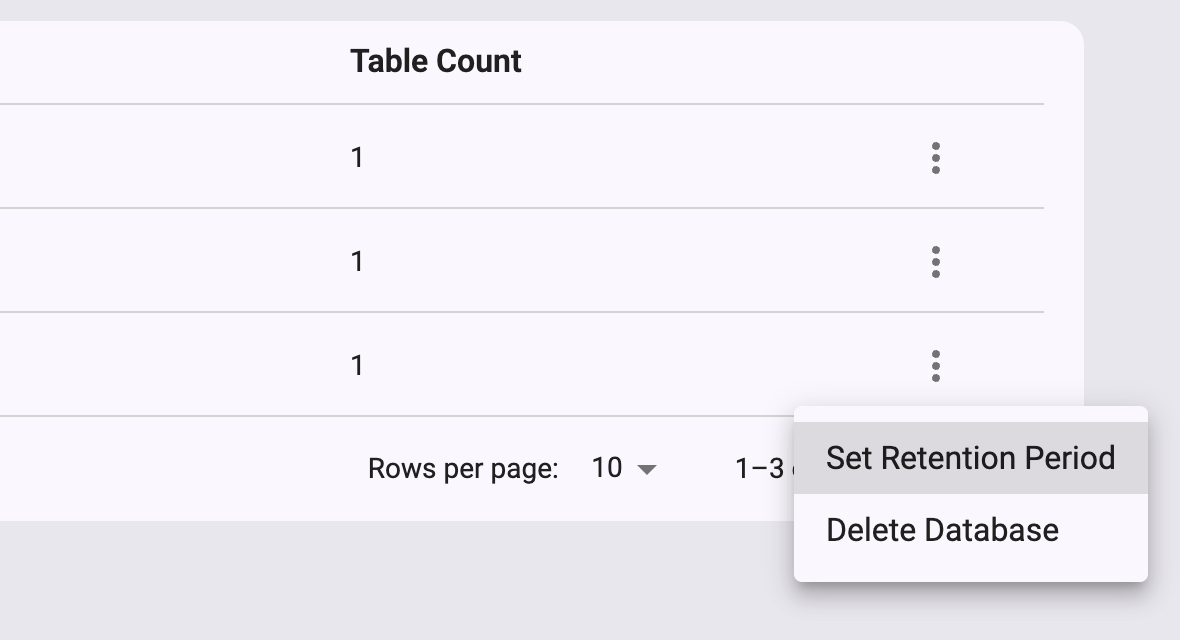
Use the InfluxDB 3 Cloud Admin UI to delete a database:
1. In the Admin UI, select your instance, and then click **Databases**.
2. In the row for the database you want to delete, click the options menu (**⋮**)
and select **Delete Database**.
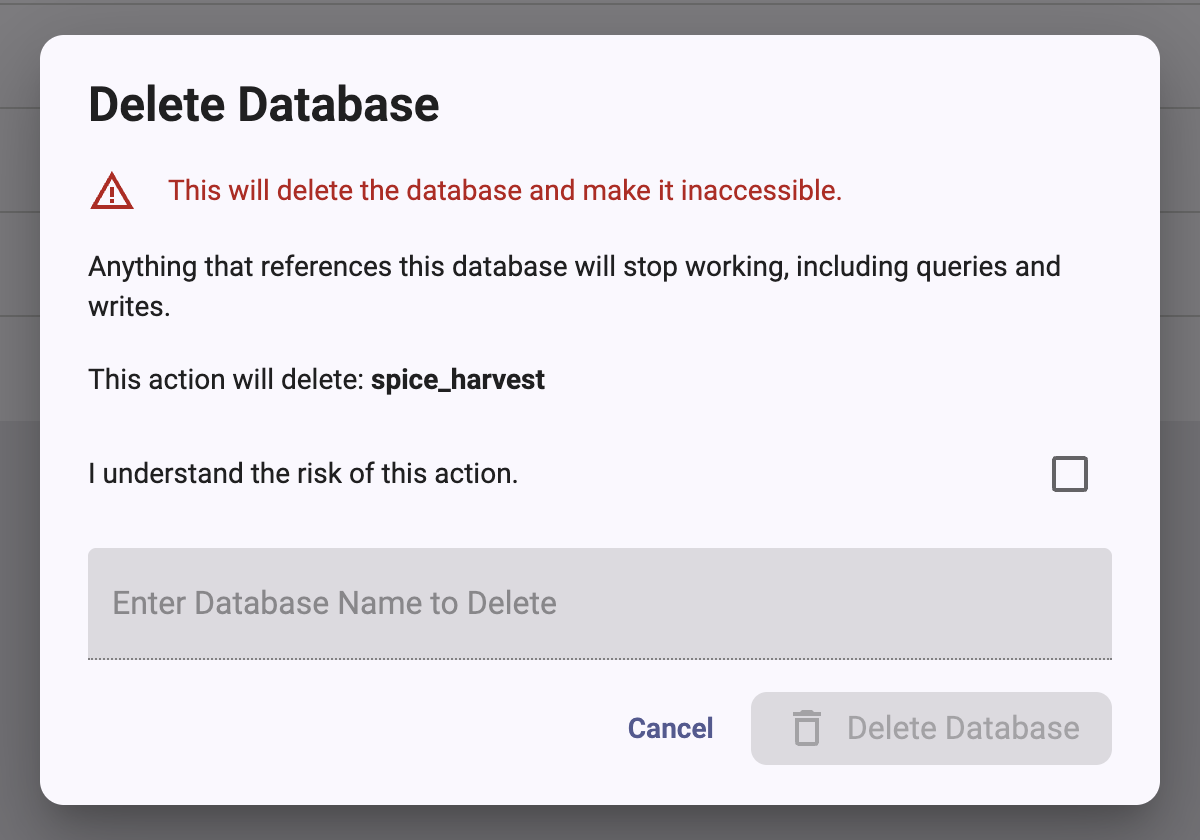
3. In the **Delete Database** dialog, read the warning.
4. Select **I understand the risk of this action**.
5. In **Enter Database Name to Delete**, enter the name of the database.
6. Click **Delete Database**.
 #### Related
* [influxdb3 delete database](/influxdb3/cloud/reference/cli/influxdb3/delete/database/)
* [Delete database API](/influxdb3/cloud/api/database/#operation/DeleteConfigureDatabase)
---
# List databases
Source: https://docs.influxdata.com/influxdb3/cloud/admin/databases/list/
Use the [`influxdb3 show databases` command](/influxdb3/cloud/reference/cli/influxdb3/show/databases/),
the [`/api/v3/configure/database`](/influxdb3/cloud/api/v3/) HTTP API endpoint
, or the Admin UI
to list databases in InfluxDB 3 Cloud.
* [List databases using the influxdb3 CLI](#list-databases-using-the-influxdb3-cli)
* [List databases using the HTTP API](#list-databases-using-the-http-api)
* [List databases using the Admin UI](#list-databases-using-the-admin-ui)
## List databases using the influxdb3 CLI
Provide the following:
* *(Optional)* [Output format](#output-formats) with the `--format` option
* *(Optional)* [Show deleted databases](#list-deleted-databases) with the`--show-deleted` option
* InfluxDB 3 Cloud [admin token](/influxdb3/cloud/admin/tokens/admin)with the `-t`, `--token` option
```sh
influxdb3 show databases
```
### Output formats
The `influxdb3 show databases` command supports output formats:
* `pretty` *(default)*
* `json`
* `jsonl`
* `csv`
* `parquet` *(must [output to a file](#output-to-a-parquet-file))*
Use the `--format` flag to specify the output format:
```sh
influxdb3 show databases --format json
```
#### Example output
[](#view-example-pretty-formatted-output)
View example pretty-formatted output
```
+---------------+
| iox::database |
+---------------+
| home |
| home_actions |
| noaa |
+---------------+
```
[](#view-example-json-formatted-output)
View example JSON-formatted output
```json
[{"iox::database":"home"},{"iox::database":"home_actions"},{"iox::database":"noaa"}]
```
[](#view-example-json-line-formatted-output)
View example JSON-line-formatted output
```jsonl
{"iox::database":"home"}
{"iox::database":"home_actions"}
{"iox::database":"noaa"}
```
[](#view-example-csv-formatted-output)
View example CSV-formatted output
```csv
iox::database
home
home_actions
noaa
```
#### Output to a Parquet file
[Parquet](https://parquet.apache.org/) is a binary format.
Use the `--output` option to specify the file where you want to save the Parquet data.
```sh
influxdb3 show databases \
--format parquet \
--output databases.parquet
```
Alternatively, use the `influxdb3 query` command to query system tables:
```sh
influxdb3 query \
--database _internal \
--format parquet \
--output databases.parquet \
"SELECT * FROM system.databases"
```
### List deleted databases
To list deleted databases, include the `--show-deleted` option with your`influxdb3 show databases` command:
```sh
influxdb3 show databases --show-deleted
```
## List databases using the HTTP API
To list databases using the HTTP API, send a `GET` request to the `/api/v3/configure/database` endpoint.
```
GET https://instance-id.enterprise.influxdb.io/api/v3/configure/database?format=pretty
```
Include the `format` query parameter and specify one of the following formats:
* `pretty`
* `json`
* `jsonl`
* `csv`
* `parquet`
[Pretty output](#pretty-output)[JSON output](#json-output)[Parquet output](#parquet-output)
Include the following in your request:
* **Headers**:
* `Authorization: Bearer` with your [token](/influxdb3/cloud/admin/tokens/)
* **Query Parameters**:
* `format=pretty`
```bash
curl --request GET "https://instance-id.enterprise.influxdb.io/api/v3/configure/database?format=pretty" \
--header "Authorization: Bearer AUTH_TOKEN"
```
The response body contains a table of database names:
```text
+---------------------+
| iox::database |
+---------------------+
| _internal |
| home |
| home_actions |
| noaa |
+---------------------+
```
Include the following in your request:
* **Headers**:
* `Authorization: Bearer` with your [token](/influxdb3/cloud/admin/tokens/)
* **Query Parameters**:
* `format=json`
```bash
curl --request GET "https://instance-id.enterprise.influxdb.io/api/v3/configure/database?format=json" \
--header "Authorization: Bearer AUTH_TOKEN"
```
The response body contains a JSON array of database objects whose keys are `iox::database`:
```json
[
{
"iox::database": "home"
},
{
"iox::database": "home_actions"
},
{
"iox::database": "noaa"
}
]
```
Include the following in your request:
* **Headers**:
* `Authorization: Bearer` with your [token](/influxdb3/cloud/admin/tokens/)
* **Query Parameters**:
* `format=parquet`
* An output destination for the Parquet file
```bash
curl "https://instance-id.enterprise.influxdb.io/api/v3/configure/database?format=parquet" \
-o databases.parquet \
--header "Authorization: Bearer AUTH_TOKEN"
```
For Parquet responses, you must provide an output destination because the format is binary.
The response contains the databases list.
A successful request returns HTTP status `200`.
## List databases using the Admin UI
To view databases in the InfluxDB 3 Cloud Admin UI,
select your instance, and then click **Databases**.
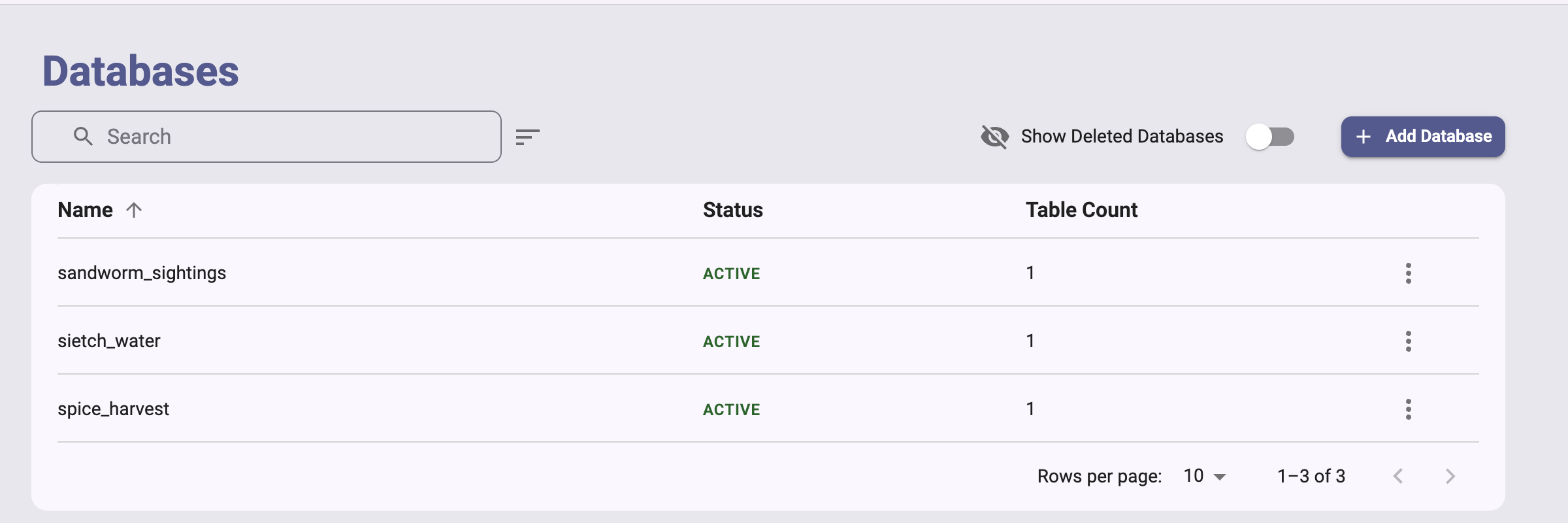 The **Databases** page lists each database with the following columns:
* **Name**
* **Status**
* **Table Count**
To find a database, enter text in the **Search** box.
To include deleted databases in the list, turn on **Show Deleted Databases**.
#### Related
* [influxdb3 show databases](/influxdb3/cloud/reference/cli/influxdb3/show/databases/)
* [List databases API](/influxdb3/cloud/api/database/#operation/GetConfigureDatabase)
---
# Identify InfluxDB 3 Cloud version
Source: https://docs.influxdata.com/influxdb3/cloud/admin/identify-version/
Identifying which InfluxDB product and version you’re using is essential for accessing the correct documentation, troubleshooting issues, and planning upgrades.
> [!Note]
> #### Identify your InfluxDB version
>
> If you are unsure which InfluxDB product you are using, use our interactive version detector to help identify it:
>
> [Detect my InfluxDB version](#)
> *(Interactive feature in HTML: Opens version detector modal)*
## Quick detection methods
> [!Note]
> #### SQL version() function
>
> The SQL `version()` function returns the[DataFusion](https://datafusion.apache.org/) query engine version, not the
> InfluxDB product version. Use the methods above to identify your InfluxDB
> version.
### InfluxDB 3 Cloud detection
**URL pattern**: `*.enterprise.influxdb.io`
* Example: `instance-id.enterprise.influxdb.io`
**Administration interface**: Manage instances through [console.influxdata.com](https://console.influxdata.com).
**CLI**: InfluxDB 3 Cloud workflows use the `influxdb3` CLI rather than `influxctl`.
The following command reports the installed CLI version:
```bash
influxdb3 --version
```
InfluxDB 3 Cloud is in early access.[Request access](https://www.influxdata.com/products/influxdb3-cloud/).
## Understanding InfluxDB products
For a complete comparison of InfluxDB versions and deployment options, see the [InfluxDB platform overview](/platform/).
## Troubleshooting
### Can’t access your InfluxDB instance?
If you can’t directly access your InfluxDB instance:
1. Use the [interactive version detector](#identify-your-influxdb-version) above or [Ask InfluxData AI](#)
2. Answer questions about your setup:
* License type (paid or free)
* Hosting model (cloud or self-hosted)
* Server age
* Query language preferences
3. Get product recommendations based on your answers
### Still not sure?
If you’re still uncertain, see the [Support and feedback](#bug-reports-and-feedback) options.
#### Related
* [Get started with InfluxDB 3 Cloud](/influxdb3/cloud/get-started/)
* [Administer InfluxDB 3 Cloud](/influxdb3/cloud/admin/)
* [influxdb3 CLI](/influxdb3/cloud/reference/cli/influxdb3/)
---
# Monitor your instance
Source: https://docs.influxdata.com/influxdb3/cloud/admin/monitor-instance/
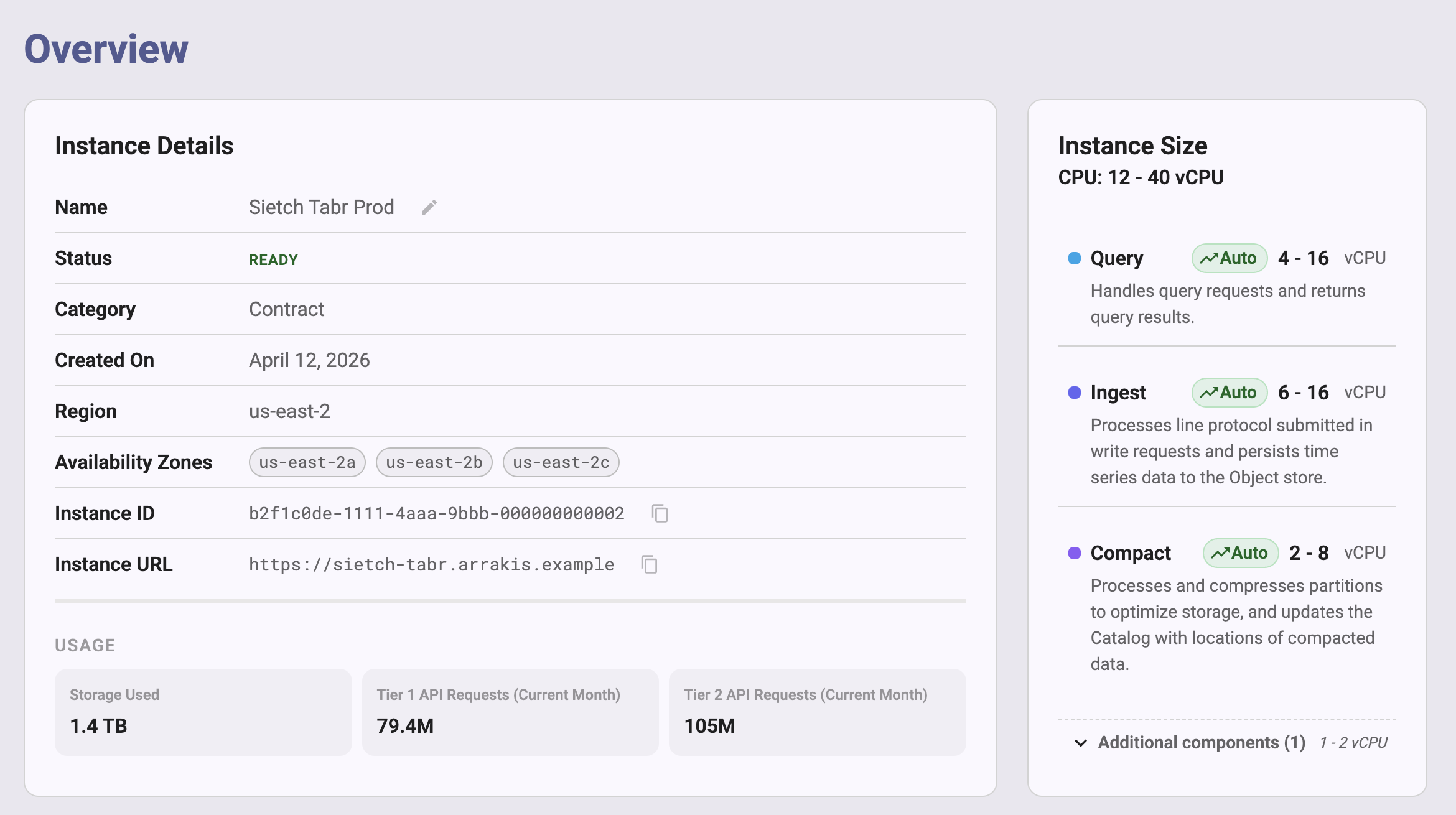
Use the instance **Overview** page in the InfluxDB 3 Cloud Admin UI to
monitor the health, size, and usage of your instance.
The page shows instance details, the compute resources allocated to each
component, CPU and memory metrics, ingest and query rates, storage used,
and object storage request counts.
* [Open the Overview page](#open-the-overview-page)
* [View instance details](#view-instance-details)
* [View instance size](#view-instance-size)
* [View instance metrics](#view-instance-metrics)
* [View storage and usage](#view-storage-and-usage)
* [Backups](#backups)
## Open the Overview page
1. Go to [console.influxdata.com](https://console.influxdata.com) and sign in.
2. Select your instance.
3. In the navigation, select **Overview**.
 Users with the account **Admin**, **Member**, or **Auditor** role can view the
Overview page.
If you don’t have access to an instance, ask an account **Admin** to[update your roles](/influxdb3/cloud/admin/users/admin-ui/#user-roles-and-permissions).
## View instance details
The **Instance Details** card lists the following properties:
* **Name**: The instance name.
To rename the instance, click the pencil icon next to the name, enter a new
name, and then save it.
Renaming an instance requires the account **Admin** role.
* **Status**: The instance state.
The Admin UI displays one of the following:
* **Starting**: The instance is starting up.
* **Ready**: The instance is running.
* **Pending deletion**: The instance is scheduled for deletion.
* **Deleted**: The instance is deleted.
* **Category**: The instance category, such as **Contract** or **POC**.
* **Created On**: The date the instance was created.
* **Region**: The cloud provider region where the instance runs.
* **Availability Zones**: The[availability zones](/influxdb3/cloud/admin/availability-zones/) that the
instance uses.
* **Instance ID**: The unique identifier of the instance.
Click the copy icon to copy it.
* **Instance URL**: The URL of the instance.
Click the copy icon to copy it.
Use this URL as the host when you[write](/influxdb3/cloud/write-data/) or[query](/influxdb3/cloud/query-data/) data.
If usage data is available for the instance, the card also shows a **Usage**section with the following tiles for the current month:
* **Storage Used**: The amount of object storage that the instance uses.
* **Tier 1 API Requests (Current Month)**: The number of tier 1 object storage
requests.
* **Tier 2 API Requests (Current Month)**: The number of tier 2 object storage
requests.
A tile displays an em dash (—) when no value is available.
> [!Important]
> #### Tier 1 and tier 2 counts are object storage requests
>
> The **Tier 1 API Requests** and **Tier 2 API Requests** tiles, and the**API Calls** chart described in [View storage and usage](#view-storage-and-usage),
> count requests that your instance makes to the cloud provider’s object
> storage service, such as Amazon S3 or Azure Blob Storage.
> They *don’t* count InfluxDB HTTP API calls, such as the write or query
> requests that your applications send to the instance.
> To monitor write and query request rates, use the[**Ingest Request Rate** and **Query Request Rate** charts](#view-instance-metrics).
## View instance size
The **Instance Size** card shows the total CPU allocated to the instance, in
vCPUs, and the CPU allocated to each component.
For a component that scales automatically, the card shows an **Auto** label
and the component’s vCPU range, and the total is shown as a range.
The card lists the following components:
* **Ingest**: Processes line protocol submitted in write requests and persists
time series data to object storage.
* **Query**: Handles query requests and returns query results.
* **Compaction**: Processes and compresses partitions to optimize storage, and
updates the catalog with the locations of compacted data.
The card lists components that run scheduled tasks, such as the processing
engine, under **Additional components**.
Click **Additional components** to expand the list.
If the card can’t retrieve component information, it displays
“Component information is currently unavailable.”
The Instance Size card is read-only.
To change the size of your instance, [contact InfluxData support](https://support.influxdata.com).
## View instance metrics
The **Instance Metrics** panel charts CPU, memory, and request metrics for the
instance and for each component.
### Change the time range
By default, the charts show the last hour.
Use the time range menu in the upper right of the panel to change the range:
* Under **Quick ranges**, select **Last Minute**, **Last 5 Minutes**,**Last 30 Minutes**, **Last Hour**, **Last 12 Hours**, **Last Day**, or**Last Month**.
* Under **Absolute range**, enter **From** and **To** times.
Metrics are available for the last 30 days.
To refresh the charts automatically, turn on **Live Updates**.
Live updates are available only for ranges of one hour or less.
### Chart reference
The panel groups charts by category.
CPU is measured in vCPUs, and memory is shown as a percentage of the memory
allocated.
| Group | Chart | Unit |
|---------------|-----------------------------|------------|
|Instance Totals| **CPU Usage** | vCPUs |
|Instance Totals| **Memory Usage** | Usage % |
| Ingest | **Ingest CPU** | vCPUs |
| Ingest | **Ingest Memory** | Usage % |
| Ingest |**Ingest Line Protocol Rate**| Lines/sec |
| Ingest | **Ingest Bytes Rate** | MB/s |
| Ingest | **Ingest Request Rate** |Requests/sec|
| Query | **Query CPU** | vCPUs |
| Query | **Query Memory** | Usage % |
| Query | **Query Request Rate** |Requests/sec|
| Compaction | **Compaction CPU** | vCPUs |
| Compaction | **Compaction Memory** | Usage % |
### Use the charts
Use the charts to understand how your workload uses the instance:
* **Instance Totals**: Compare **CPU Usage** with the total vCPUs on the[Instance Size card](#view-instance-size) to see how much headroom the
instance has.
* **Ingest charts**: Track write volume.**Ingest Line Protocol Rate** shows lines written per second,**Ingest Bytes Rate** shows the volume of data written, and**Ingest Request Rate** shows the number of write requests per second.
Use these charts to confirm that a change in your writers, such as a new
Telegraf agent or a larger batch size, has the effect that you expect.
* **Query charts**: Track read load.**Query Request Rate** shows the number of query requests per second.
Compare it with **Query CPU** and **Query Memory** to find periods when
queries drive resource use.
* **Compaction charts**: Track background work that optimizes stored data.
Brief increases in **Compaction CPU** after heavy writes are normal.
If **Compaction CPU** or **Compaction Memory** stays high for a sustained
period, compaction might not be keeping up with your write volume.
Compare the chart with the ingest charts to see whether a rise in write
volume matches the increase, and [contact InfluxData support](https://support.influxdata.com)if the usage doesn’t return to normal.
## View storage and usage
The **Storage & Usage** section charts the following over time:
* Storage used by data files
* Object storage request counts
Each chart has its own time range menu with the following options:**1 Week**, **30 Days**, **60 Days**, **90 Days**, and **1 Year**.
The default is **30 Days**.
* **Total Instance File Size**: The total storage used by the instance’s data files.
* **API Calls**: A bar chart of the number of requests the instance makes to
object storage, with a series for **Tier 1** and a series for **Tier 2**.
Turn on **Show Total** to add a series with their combined count.
These counts exclude InfluxDB HTTP API requests, such as write and query requests.
## Backups
The Overview page also includes a **Backups** card for managing instance
backups.
#### Related
* [Manage databases](/influxdb3/cloud/admin/databases/)
* [Manage tokens](/influxdb3/cloud/admin/tokens/)
* [Manage users in the Admin UI](/influxdb3/cloud/admin/users/admin-ui/)
* [Use the Admin UI to query data](/influxdb3/cloud/query-data/execute-queries/admin-ui/)
| Group | Chart | Unit |
| --- | --- | --- |
| Group | Chart | Unit |
| Instance Totals | CPU Usage | vCPUs |
| Instance Totals | Memory Usage | Usage % |
| Ingest | Ingest CPU | vCPUs |
| Ingest | Ingest Memory | Usage % |
| Ingest | Ingest Line Protocol Rate | Lines/sec |
| Ingest | Ingest Bytes Rate | MB/s |
| Ingest | Ingest Request Rate | Requests/sec |
| Query | Query CPU | vCPUs |
| Query | Query Memory | Usage % |
| Query | Query Request Rate | Requests/sec |
| Compaction | Compaction CPU | vCPUs |
| Compaction | Compaction Memory | Usage % |
---
# AWS PrivateLink and Azure Private Link
Source: https://docs.influxdata.com/influxdb3/cloud/admin/private-link/
Use AWS PrivateLink or Azure Private Link to connect to an instance from your
own AWS or Azure network without going over the public internet.
Use AWS PrivateLink for an instance on AWS, and Azure Private Link for an
instance on Azure.
Your instance’s public endpoint is unaffected.
To set up AWS PrivateLink or Azure Private Link, contact your InfluxData
representative.
| | AWS PrivateLink | Azure Private Link |
|--------------------|--------------------------------------------|---------------------------------------------------------------|
|**What you provide**| Principal ARN | Subscription ID |
|**What you create** | Interface VPC endpoint | Private endpoint |
| **Private DNS** |Enable **Private DNS names** on the endpoint|Create an A record in a DNS zone linked to your virtual network|
Create the endpoint in the same region as your instance.
| | AWS PrivateLink | Azure Private Link |
| --- | --- | --- |
| | AWS PrivateLink | Azure Private Link |
| What you provide | Principal ARN | Subscription ID |
| What you create | Interface VPC endpoint | Private endpoint |
| Private DNS | Enable Private DNS names on the endpoint | Create an A record in a DNS zone linked to your virtual network |
---
# Manage tables
Source: https://docs.influxdata.com/influxdb3/cloud/admin/tables/
Tables are synonymous with measurements in InfluxDB 3 Cloud.
They are typically created automatically when you write line protocol data,
but you can also manually create them to define custom schemas or apply settings.
before writing data.
### [Create a table](/influxdb3/cloud/admin/tables/create/)
Use the influxdb3 CLI or HTTP API to create a table in a specified database in InfluxDB 3 Cloud.
```sh
# influxdb3 CLI
influxdb3 create table \
--tags tag1,tag2,tag3 \
--retention-period 7d \
--database DATABASE_NAME \
--token AUTH_TOKEN \
TABLE_NAME
# HTTP API
curl --request POST "https://instance-id.enterprise.influxdb.io/api/v3/configure/table" \
--header "Content-Type: application/json" \
--header "Authorization: Bearer AUTH_TOKEN" \
--data '{
"db": "DATABASE_NAME",
"table": "TABLE_NAME",
"tags": ["tag1", "tag2", "tag3"],
"retention_period": "7d"
}'
```
### [List tables](/influxdb3/cloud/admin/tables/list/)
Use the influxdb3 CLI or HTTP API to list tables in a specified database in InfluxDB 3 Cloud. Use SQL SHOW TABLES or InfluxQL SHOW MEASUREMENTS statements.
```sh
# influxdb3 CLI
influxdb3 query \
--database DATABASE_NAME \
--token AUTH_TOKEN \
"SHOW TABLES"
# HTTP API
curl --get "https://instance-id.enterprise.influxdb.io/api/v3/query_sql" \
--header "Authorization: Bearer AUTH_TOKEN" \
--data-urlencode "db=DATABASE_NAME" \
--data-urlencode "q=SHOW TABLES"
```
### [Delete a table](/influxdb3/cloud/admin/tables/delete/)
Use the [`influxdb3 delete table` command](/influxdb3/cloud/reference/cli/influxdb3/delete/table/) or the [HTTP API](/influxdb3/cloud/api/v3/) to delete a table from a specified database in InfluxDB 3 Cloud. Supports both soft delete and hard delete operations.
```sh
# CLI
influxdb3 delete table \
--database DATABASE_NAME \
--token AUTH_TOKEN \
TABLE_NAME
# HTTP API
curl -X DELETE "https://instance-id.enterprise.influxdb.io/api/v3/configure/table?db=DATABASE_NAME&table=TABLE_NAME" \
--header "Authorization: Bearer AUTH_TOKEN"
```
#### Related
* [influxdb3 CLI](/influxdb3/cloud/reference/cli/influxdb3/)
* [Table API reference](/influxdb3/cloud/api/v3/#tag/Table)
* [Naming restrictions and conventions](/influxdb3/cloud/reference/naming-restrictions/)
---
# Create a table
Source: https://docs.influxdata.com/influxdb3/cloud/admin/tables/create/
Use the [`influxdb3 create table` command](/influxdb3/cloud/reference/cli/influxdb3/create/table/)or the [HTTP API](/influxdb3/cloud/api/v3/) to create a table in a specified database in InfluxDB 3 Cloud.
With InfluxDB 3 Cloud, tables and measurements are synonymous.
Typically, tables are created automatically on write using the table name
specified in line protocol written to InfluxDB.
However, you can manually create tables to define a custom schema or apply custom settings before writing data.
* [Create a table using the influxdb3 CLI](#create-a-table-using-the-influxdb3-cli)
* [Create a table using the HTTP API](#create-a-table-using-the-http-api)
* [Retention period](#retention-period)
* [Table naming restrictions](#table-naming-restrictions)
> [!Important]
> #### Tables with no fields can’t be queried
>
> A query on a table that has tags but no fields returns HTTP `500` with `field_family_projections is required`.
> Define at least one field when you create a table.
## Create a table using the influxdb3 CLI
Use the `influxdb3 create table` command and provide the following:
* *Required*: The name of the database to create the table in
* *Required*: The name of the table to create (see [Table naming restrictions](#table-naming-restrictions))
* *Required*: Tag columns to include in the table (must have at least one tag column)
* *Optional*: Field columns and their data types to include in the table
* *Optional*: [Retention period](#retention-period). If omitted, uses database retention period.
> [!Note]
> Tables must include at least one tag column.
> Field columns are optional and can be added later when you write data.
> [!Important]
> #### Tag order affects query performance
>
> When considering your schema and creating your table, order your tags by query priority.
> Place the most commonly queried tags first.
> Columns that appear earlier are typically faster to filter and access during query execution.
>
> For more information, see [Optimize writes](/influxdb3/cloud/write-data/best-practices/optimize-writes/#sort-tags-by-query-priority).
```bash
# Create a table with tag columns
influxdb3 create table \
--tags tag1,tag2,tag3 \
--database DATABASE_NAME \
--token AUTH_TOKEN \
TABLE_NAME
# Create a table with tag and field columns
influxdb3 create table \
--tags room,sensor_id \
--fields temp:float64,hum:float64,co:int64 \
--database DATABASE_NAME \
--token AUTH_TOKEN \
TABLE_NAME
```
```bash
# Create a table with a 7-day retention period
influxdb3 create table \
--tags room,sensor_id \
--fields temp:float64,hum:float64 \
--retention-period 7d \
--database DATABASE_NAME \
--token AUTH_TOKEN \
TABLE_NAME
# Create a table with database default retention (omit --retention-period)
influxdb3 create table \
--tags room,sensor_id \
--database DATABASE_NAME \
--token AUTH_TOKEN \
TABLE_NAME
```
Replace the following:
* `DATABASE_NAME`: the name of the database to create the table in
* `TABLE_NAME`: the name of the table to create
* `AUTH_TOKEN`: your [admin token](/influxdb3/cloud/admin/tokens/)
## Create a table using the HTTP API
To create a table using the HTTP API, send a `POST` request to the `/api/v3/configure/table` endpoint:
```
POST https://instance-id.enterprise.influxdb.io/api/v3/configure/table
```
Include the following in your request:
* **Headers**:
* `Authorization: Bearer` with your authentication token
* `Content-Type: application/json`
* **Request body**: JSON object with table configuration
* `db` *(string, required)*: Database name
* `table` *(string, required)*: Table name
* `tags` *(array, required)*: Tag column names
* `fields` *(array, required)*: Field definitions with name and type. Provide an empty array if no fields are defined.
* `retention_period` *(string, optional)*: [Retention period](#retention-period). If omitted, uses database retention period.
```bash
# Create a table with tag columns
curl -X POST "https://instance-id.enterprise.influxdb.io/api/v3/configure/table" \
--header "Authorization: Bearer AUTH_TOKEN" \
--header "Content-Type: application/json" \
--data '{
"db": "DATABASE_NAME",
"table": "TABLE_NAME",
"tags": ["tag1", "tag2", "tag3"],
"fields": []
}'
# Create a table with tag and field columns
curl -X POST "https://instance-id.enterprise.influxdb.io/api/v3/configure/table" \
--header "Authorization: Bearer AUTH_TOKEN" \
--header "Content-Type: application/json" \
--data '{
"db": "DATABASE_NAME",
"table": "TABLE_NAME",
"tags": ["room", "sensor_id"],
"fields": [
{"name": "temp", "type": "float64"},
{"name": "hum", "type": "float64"},
{"name": "co", "type": "int64"}
]
}'
```
```bash
# Create a table with a 7-day retention period
curl -X POST "https://instance-id.enterprise.influxdb.io/api/v3/configure/table" \
--header "Authorization: Bearer AUTH_TOKEN" \
--header "Content-Type: application/json" \
--data '{
"db": "DATABASE_NAME",
"table": "TABLE_NAME",
"tags": ["room", "sensor_id"],
"fields": [
{"name": "temp", "type": "float64"},
{"name": "hum", "type": "float64"}
],
"retention_period": "7d"
}'
# Create a table with database default retention (omit retention_period)
curl -X POST "https://instance-id.enterprise.influxdb.io/api/v3/configure/table" \
--header "Authorization: Bearer AUTH_TOKEN" \
--header "Content-Type: application/json" \
--data '{
"db": "DATABASE_NAME",
"table": "TABLE_NAME",
"tags": ["room", "sensor_id"],
"fields": []
}'
```
Replace the following:
* `DATABASE_NAME`: the name of the database to create the table in
* `TABLE_NAME`: the name of the table to create
* `AUTH_TOKEN`: your [admin token](/influxdb3/cloud/admin/tokens/)
## Retention period
By default, tables use the database retention period. When creating a table, set a table-specific *retention period* to automatically delete expired data and optimize storage for that table.
A table retention period overrides the database retention period for that specific table.
This allows you to maintain different retention policies for different types of data within the same database.
### Retention period syntax
The retention period value is a time duration value made up of a numeric value
plus a duration unit.
For example, `7d` means 7 days.
The retention period value cannot be negative or contain whitespace.
#### Valid durations units include
* **m**: minute
* **h**: hour
* **d**: day
* **w**: week
* **mo**: month
* **y**: year
> [!Warning]
> #### Retention period constraints
>
> * **Minimum for data retention**: The practical minimum retention period is 1 hour (`1h`).
> * **Zero-duration periods**: Setting a retention period to `0` (for example,`0d` or `0h`) is allowed but marks all data for immediate deletion at query time.*This differs from InfluxDB 1.x and 2.x where `0d` meant infinite retention.*
> * **Infinite retention**: Use `none` to set an infinite retention period.
### Retention period precedence
When both a database and a table have retention periods defined, the **table retention
period takes precedence** for that specific table.
**Example scenarios:**
* **Short-term data in long-term database**: Store high-volume sensor data with 7-day
retention in a database with 90-day retention
* **Long-term data in short-term database**: Store audit logs with 1-year retention in
a database with 30-day retention
* **Mixed retention requirements**: Maintain both real-time metrics (7 days) and
aggregated metrics (1 year) in the same database
For complete details about retention period precedence and behavior, see[Data retention in InfluxDB 3 Cloud](/influxdb3/cloud/reference/internals/data-retention/#retention-period-precedence).
## Table naming restrictions
Table names in InfluxDB 3 Cloud must adhere to the following naming restrictions:
* **Allowed characters**: Alphanumeric characters (a-z, A-Z, 0-9), underscore (`_`), dash (`-`)
* **Starting character**: Should start with a letter or number and should not start with underscore (`_`)
* **Case sensitivity**: Table names are case-sensitive
* **Quoting**: Use double quotes when names contain special characters or whitespace
> [!Caution]
> #### Underscore prefix reserved for system use
>
> Names starting with an underscore (`_`) may be reserved for InfluxDB system use.
> While InfluxDB 3 Cloud might not explicitly reject these names, using them risks
> conflicts with current or future system features and may result in
> unexpected behavior or data loss.
#### Related
* [influxdb3 create table](/influxdb3/cloud/reference/cli/influxdb3/create/table/)
* [Create table API](/influxdb3/cloud/api/table/#operation/PostConfigureTable)
* [Naming restrictions and conventions](/influxdb3/cloud/reference/naming-restrictions/)
---
# Delete a table
Source: https://docs.influxdata.com/influxdb3/cloud/admin/tables/delete/
Use the [`influxdb3 delete table` command](/influxdb3/cloud/reference/cli/influxdb3/delete/table/)or the [HTTP API](/influxdb3/cloud/api/v3/) to delete a table from a specified database in InfluxDB 3 Cloud.
With InfluxDB 3 Cloud, tables and measurements are synonymous.
By default, InfluxDB 3 Cloud performs a soft delete, which schedules the table for deletion and makes it unavailable for querying.
You can also schedule a hard deletion to permanently remove the table and its data.
> [!Caution]
> #### Deleting a table cannot be undone
>
> Deleting a table is a destructive action.
> Once a table is deleted, data stored in that table cannot be recovered.
* [Delete a table using the influxdb3 CLI](#delete-a-table-using-the-influxdb3-cli)
* [Delete a table using the HTTP API](#delete-a-table-using-the-http-api)
## Delete a table using the influxdb3 CLI
Use the `influxdb3 delete table` command to delete a table:
```sh
influxdb3 delete table \
--database DATABASE_NAME \
--token AUTH_TOKEN \
TABLE_NAME
```
Replace the following:
* `DATABASE_NAME`: the name of the database containing the table
* `TABLE_NAME`: the name of the table to delete
* `AUTH_TOKEN`: your [admin token](/influxdb3/cloud/admin/tokens/)
### Hard delete a table immediately
To permanently delete a table and its data immediately, use the `--hard-delete now` flag:
```sh
influxdb3 delete table \
--database DATABASE_NAME \
--token AUTH_TOKEN \
--hard-delete now \
TABLE_NAME
```
### Schedule a hard deletion
To schedule a table for hard deletion at a specific time, use the `--hard-delete` flag with a timestamp:
```sh
influxdb3 delete table \
--database DATABASE_NAME \
--token AUTH_TOKEN \
--hard-delete "2025-12-31T23:59:59Z" \
TABLE_NAME
```
## Delete a table using the HTTP API
To delete a table using the HTTP API, send a `DELETE` request to the `/api/v3/configure/table` endpoint:
```
DELETE https://instance-id.enterprise.influxdb.io/api/v3/configure/table
```
Include the following in your request:
* **Query parameters**:
* `db`: Database name
* `table`: Table name to delete
* `hard_delete_at`: *(Optional)* Timestamp for hard deletion
* **Headers**:
* `Authorization: Bearer` with your authentication token
### Soft delete a table
```bash
curl -X DELETE "https://instance-id.enterprise.influxdb.io/api/v3/configure/table?db=DATABASE_NAME&table=TABLE_NAME" \
--header "Authorization: Bearer AUTH_TOKEN"
```
Replace the following:
* `DATABASE_NAME`: the name of the database containing the table
* `TABLE_NAME`: the name of the table to delete
* `AUTH_TOKEN`: your [admin token](/influxdb3/cloud/admin/tokens/)
### Schedule a hard deletion
To schedule a hard deletion at a specific time, include the `hard_delete_at` parameter with an ISO 8601 timestamp:
```bash
curl -X DELETE "https://instance-id.enterprise.influxdb.io/api/v3/configure/table?db=DATABASE_NAME&table=TABLE_NAME&hard_delete_at=2025-12-31T23:59:59Z" \
--header "Authorization: Bearer AUTH_TOKEN"
```
### Response
A successful deletion returns HTTP status `200` with no content body.
#### Example error response
If the table doesn’t exist, the API returns HTTP status `404`:
```json
{
"error": "Table not found"
}
```
#### Related
* [influxdb3 delete table](/influxdb3/cloud/reference/cli/influxdb3/delete/table/)
* [Delete table API](/influxdb3/cloud/api/table/#operation/DeleteConfigureTable)
---
# List tables
Source: https://docs.influxdata.com/influxdb3/cloud/admin/tables/list/
Use the [`influxdb3 query` command](/influxdb3/cloud/reference/cli/influxdb3/query/)or the [HTTP API](/influxdb3/cloud/api/v3/) to list tables in a specified database in InfluxDB 3 Cloud.
With InfluxDB 3 Cloud, tables and measurements are synonymous.
This guide shows how to retrieve a list of all tables (measurements) in a database.
* [List tables using the influxdb3 CLI](#list-tables-using-the-influxdb3-cli)
* [List tables using the HTTP API](#list-tables-using-the-http-api)
## List tables using the influxdb3 CLI
Use the `influxdb3 query` command with the `SHOW TABLES` SQL statement:
```sh
influxdb3 query \
--database DATABASE_NAME \
--token AUTH_TOKEN \
"SHOW TABLES"
```
Replace the following:
* `DATABASE_NAME`: the name of the database to list tables from
* `AUTH_TOKEN`: your [admin token](/influxdb3/cloud/admin/tokens/)
### Example output
```
+---------------+---------------+------------+------------+
| table_catalog | table_schema | table_name | table_type |
+---------------+---------------+------------+------------+
| public | iox | home | BASE TABLE |
| public | iox | sensors | BASE TABLE |
+---------------+---------------+------------+------------+
```
### Alternative: List tables using InfluxQL
You can also use InfluxQL syntax to list measurements (tables):
```sh
influxdb3 query \
--language influxql \
--database DATABASE_NAME \
--token AUTH_TOKEN \
"SHOW MEASUREMENTS"
```
## List tables using the HTTP API
To list tables using the HTTP API, send a `GET` request to the `/api/v3/query_sql` endpoint with a `SHOW TABLES` query:
```
GET https://instance-id.enterprise.influxdb.io/api/v3/query_sql
```
Include the following in your request:
* **Query parameters**:
* `db`: Database name
* `q`: The SQL query (`SHOW TABLES`)
* `format`: Response format (optional, defaults to `json`)
* **Headers**:
* `Authorization: Bearer` with your authentication token
```bash
curl --get "https://instance-id.enterprise.influxdb.io/api/v3/query_sql" \
--header "Authorization: Bearer AUTH_TOKEN" \
--data-urlencode "db=DATABASE_NAME" \
--data-urlencode "q=SHOW TABLES" \
--data-urlencode "format=json"
```
Replace the following:
* `DATABASE_NAME`: the name of the database to list tables from
* `AUTH_TOKEN`: your [admin token](/influxdb3/cloud/admin/tokens/)
### Example response
```json
{
"results": [
{
"series": [
{
"name": "tables",
"columns": ["table_catalog", "table_schema", "table_name", "table_type"],
"values": [
["public", "iox", "home", "BASE TABLE"],
["public", "iox", "sensors", "BASE TABLE"]
]
}
]
}
]
}
```
### Get response in CSV format
To get the response in CSV format, set the `format` parameter to `csv`:
```bash
curl --get "https://instance-id.enterprise.influxdb.io/api/v3/query_sql" \
--header "Authorization: Bearer AUTH_TOKEN" \
--data-urlencode "db=DATABASE_NAME" \
--data-urlencode "q=SHOW TABLES" \
--data-urlencode "format=csv"
```
#### Related
* [influxdb3 query](/influxdb3/cloud/reference/cli/influxdb3/query/)
* [Query API](/influxdb3/cloud/api/query-data/#operation/GetExecuteQuerySQL)
---
# Manage tokens
Source: https://docs.influxdata.com/influxdb3/cloud/admin/tokens/
InfluxDB 3 Cloud uses token-based authorization to authenticate and
authorize actions in your instance.
> [!Note]
> #### Choose a token-management method
>
> Manage tokens in the InfluxDB 3 Cloud Admin UI at[console.influxdata.com](https://console.influxdata.com), with the[`influxdb3` CLI](/influxdb3/cloud/reference/cli/influxdb3/), or through the
> InfluxDB HTTP API.
> The CLI procedures on this page use your instance host URL and login.
> In the Admin UI, select your instance and open **Tokens**.
> Access to the **Tokens** page requires the account **Admin** role.
> The Admin UI calls database tokens *resource tokens*.
## Token types
InfluxDB 3 Cloud supports the following token types:
* **Admin tokens**: Grant full administrative access to all actions and
resources in the instance.
* **Operator token**: The first admin token on an instance. InfluxData
manages the operator token for your InfluxDB 3 Cloud instance.
Customers cannot access or use the operator token.
* Never expires
* Cannot be edited or deleted
* **Named admin tokens**: Additional admin tokens that you create and manage.
* Can be created and deleted
* Long-lived by default and expire only if you set an expiration
* Cannot modify or remove the operator token
* **Database tokens**: Grant scoped read and write access to specific
databases. Use database tokens to authorize applications that write or query
data.
* Grant `read`, `write`, or both to one or more databases
* Cannot perform administrative actions
> [!Important]
> #### Management tokens aren’t admin tokens
>
> If your account also has InfluxDB Cloud Dedicated clusters, the Admin UI
> lists **Management Tokens** under **Account**.
> Management tokens are account-level tokens.
> They’re separate from the instance admin and database tokens on this page.
> [!Note]
> #### Store secure tokens in a secret store
>
> Token strings are returned *only* when you create the token.
> Store tokens in a **secure secret store**.
> Anyone with access to an admin token has full control over your
> InfluxDB 3 Cloud instance.
> If you lose a token string, recreate the token.
## Create a token
Use the Admin UI or the `influxdb3` CLI to create a token.
[Admin UI](#admin-ui)[influxdb3 CLI](#influxdb3-cli)
Creating tokens in the Admin UI requires the account **Admin** role.
1. Go to [console.influxdata.com](https://console.influxdata.com), select your
instance, and then select **Tokens**.
The **Tokens** page lists the tokens for the instance.
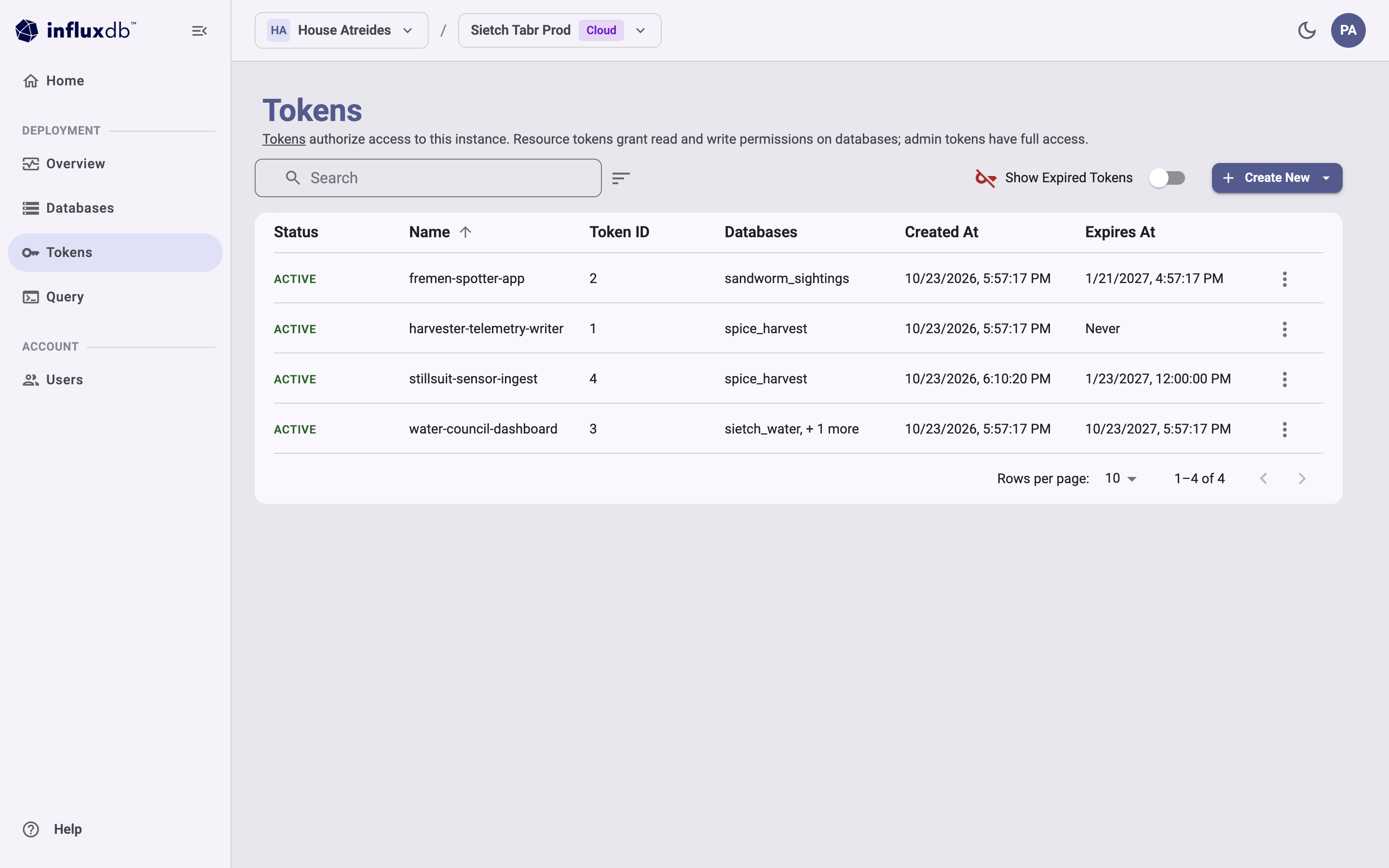 2. Click **Create New**, and then select the type of token to create:**Resource token** (a database token) or **Admin token**.
After you create either type of token, [save the token secret](#save-the-token-secret).
### Create a database (resource) token
1. Select **Resource token**.
The **Create Resource Token** dialog opens.
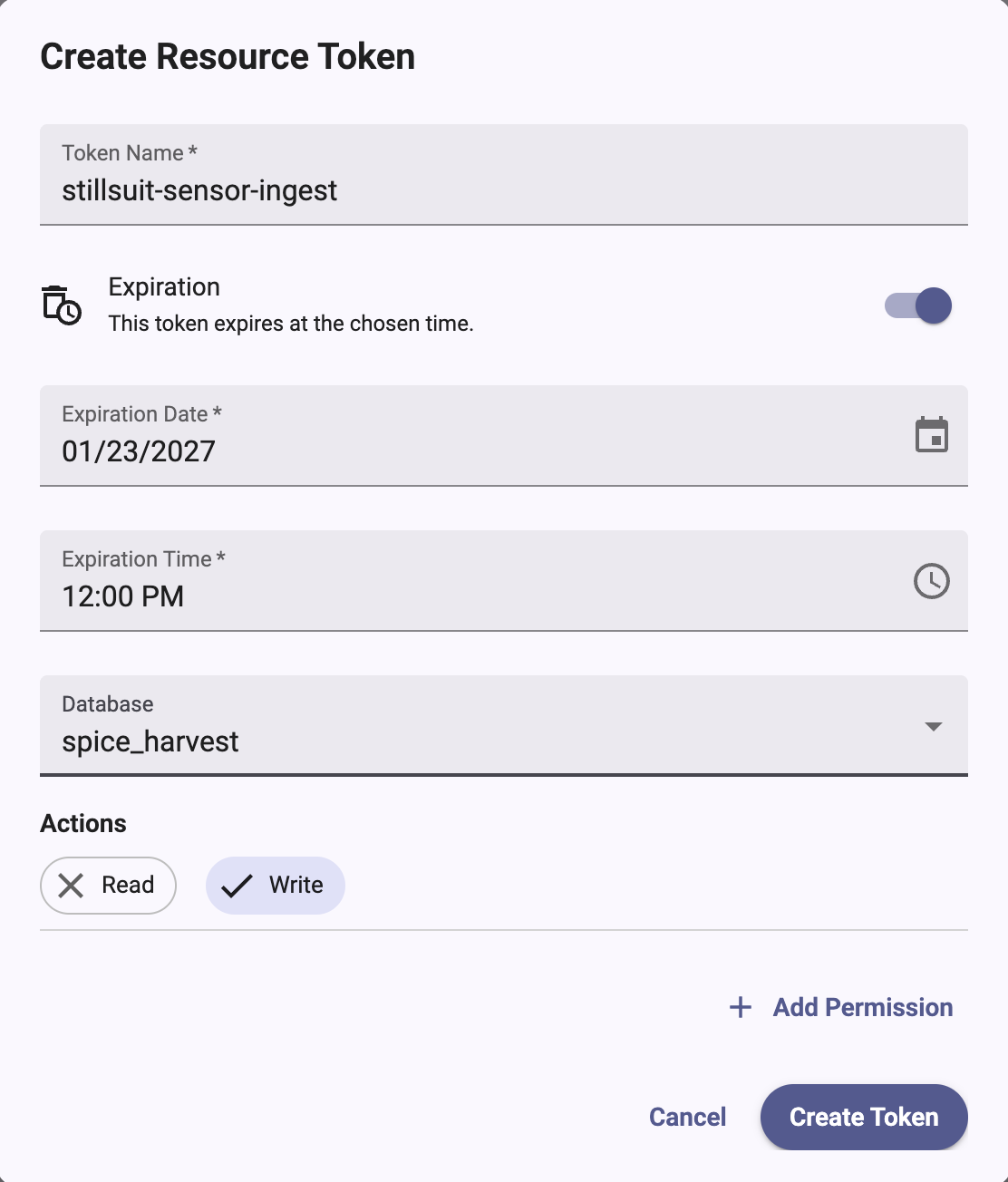 2. Enter a **Token Name**.
3. Choose an expiration.
The **Expiration** toggle is on by default.
* To create a token that expires, enter an **Expiration Date** and**Expiration Time**.
The expiration must be in the future.
* To create a token that never expires, turn off the **Expiration** toggle.
The dialog displays “This token will not expire.”
4. Under **Database**, select a database, or select **All Databases**.
5. Under **Actions**, select **Read**, **Write**, or both.
6. *Optional*: To grant permissions on more databases, click**Add Permission** and repeat the previous two steps.
You can’t combine **All Databases** with other databases in the same token.
7. Click **Create Token**.
### Create an admin token
1. Select **Admin token**.
The **Create Admin Token** dialog opens.
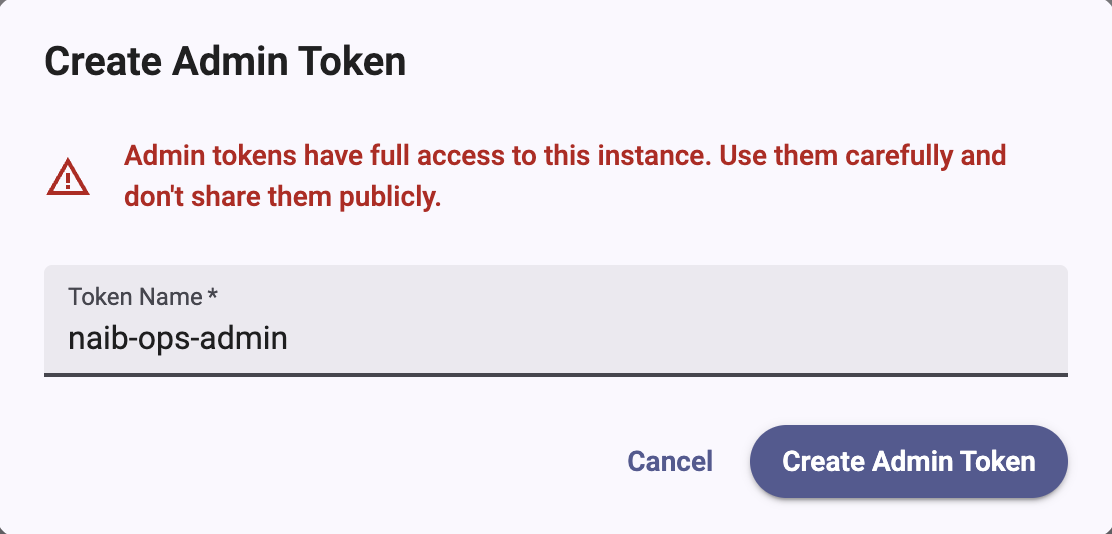 2. Enter a **Token Name**.
Admin tokens have full access to the instance.
Use them carefully and don’t share them publicly.
3. Click **Create Admin Token**.
### Save the token secret
After you create a token, the **Token Created** dialog displays the**Token Name** and **Token Secret**.
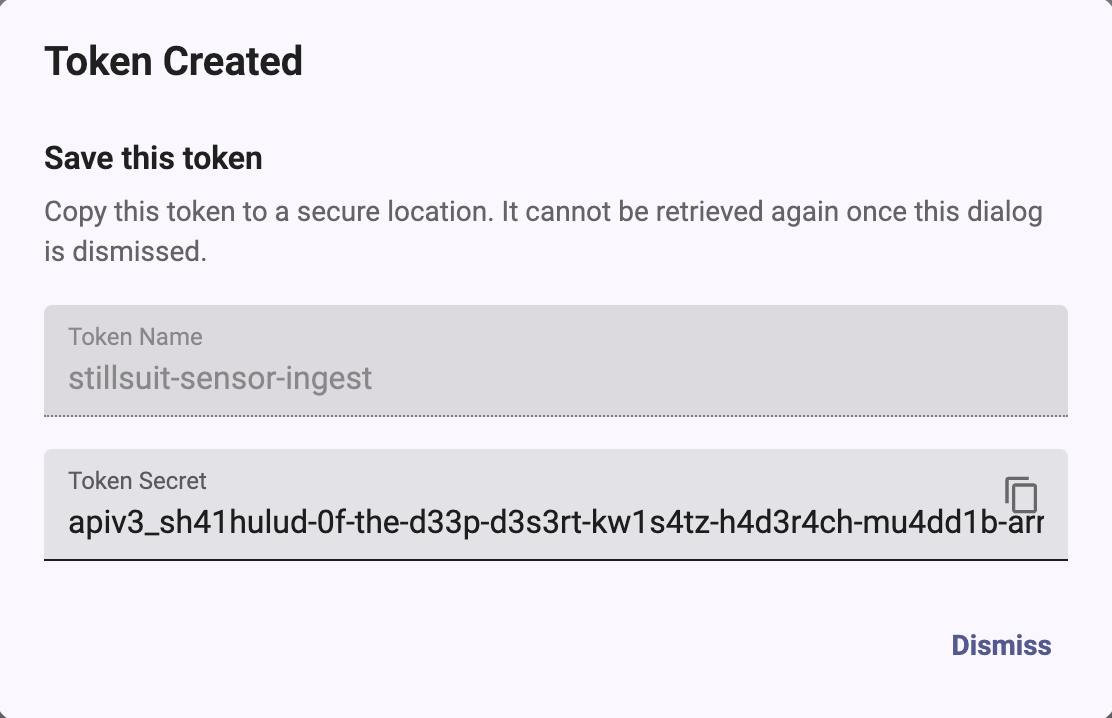 Click the copy button to copy the token secret, and then store it in a secure
secret store.
You can’t retrieve the token secret after you click **Dismiss**.
If you lose the secret, create a new token.
Before you create tokens:
* [Configure the `influxdb3` CLI](/influxdb3/cloud/get-started/setup/#configure-the-influxdb3-cli)and [log in to your instance](/influxdb3/cloud/get-started/setup/#log-in-to-your-instance).
* Make sure you have admin privileges. Creating tokens requires admin access.
If your user doesn’t have admin access, ask an administrator to create a token
for you.
Create a **named admin token**:
```sh
influxdb3 create token --admin --name "support-2026"
```
To set an expiration, add `--expiry` with a duration (for example, `90d` or`1y`):
```sh
influxdb3 create token --admin --name "temp-90d" --expiry 90d
```
Create a **database token** with scoped read and write permissions:
```sh
influxdb3 create token \
--permission "db:DATABASE_NAME:read,write" \
--name "Read/write token for DATABASE_NAME"
```
Copy the raw token string immediately and store it securely.
It’s shown only once.
## List tokens
[Admin UI](#admin-ui-2)[influxdb3 CLI](#influxdb3-cli-2)
In the Admin UI, select your instance and then select **Tokens**.
The table lists each token’s **Status**, **Name**, **Token ID**, **Databases**,**Created At**, and **Expires At**.
Token secrets aren’t shown.
* To find a token, enter text in the **Search** box.
* Expired tokens are hidden by default.
To include them, enable **Show Expired Tokens**.
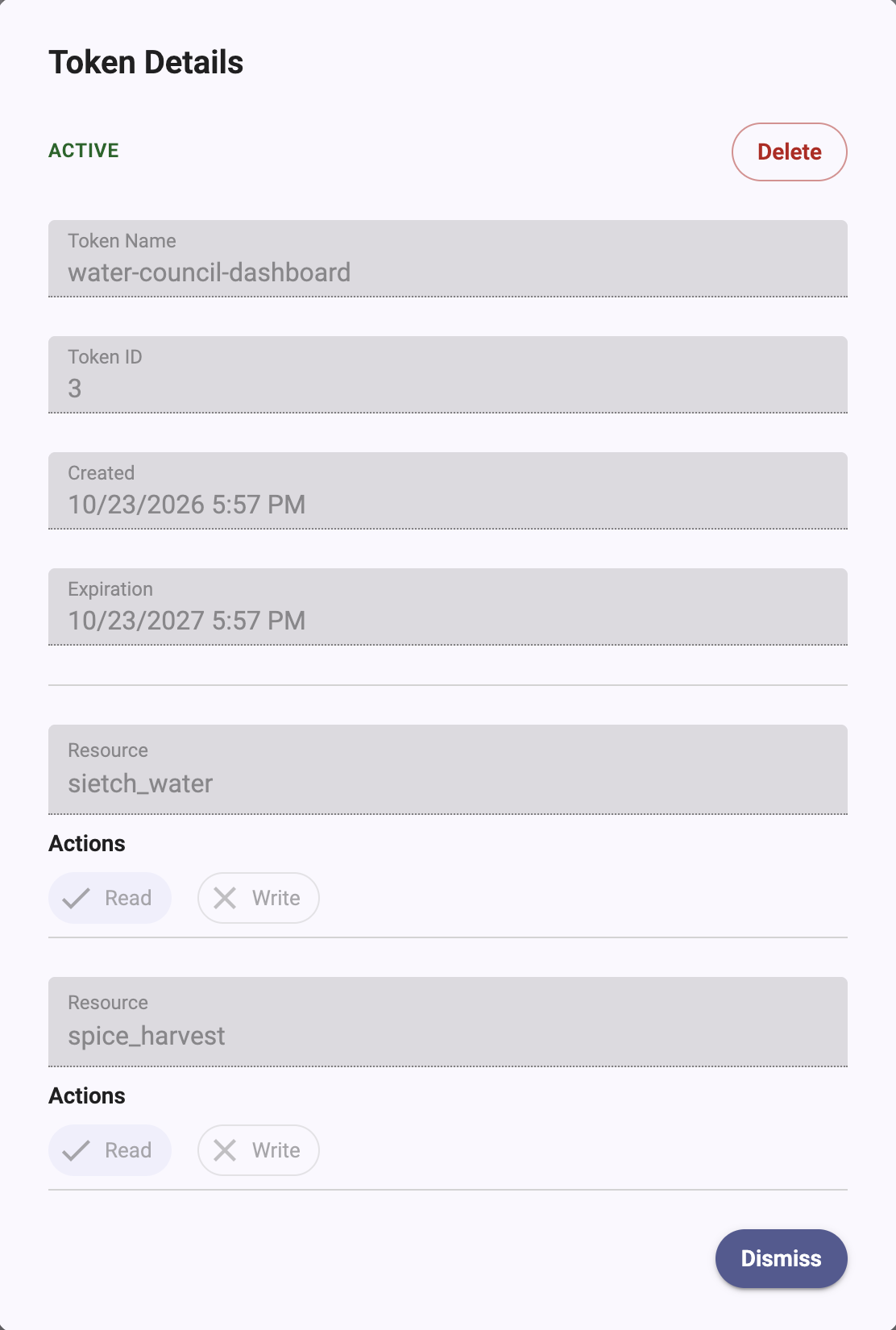
* To view a token’s permissions, click its row.
The **Token Details** dialog shows the token’s status, **Token Name**,**Token ID**, **Created** and **Expiration** times, and each **Resource**with its **Read** and **Write** actions.
 List token names, types, and expirations (token strings aren’t shown):
```sh
influxdb3 show tokens
```
## Delete a token
[Admin UI](#admin-ui-3)[influxdb3 CLI](#influxdb3-cli-3)
> [!Warning]
> Deleting a token stops applications and services that use it to authenticate.
> You can’t undo the deletion.
1. In the Admin UI, select your instance and then select **Tokens**.
2. Delete the token in one of the following ways:
* In the token’s row, open the **Actions** (⋮) menu and select**Delete Token**.
* Click the token’s row to open **Token Details**, and then click**Delete**.
3. In the **Delete Token** dialog, select **I understand the risk of this
action**, and then click **Delete Token**.
The Actions menu also includes **Copy Token ID**.
```sh
influxdb3 delete token --token-name "TOKEN_NAME"
```
For all command options, see the[`influxdb3 create token`](/influxdb3/cloud/reference/cli/influxdb3/create/token/),[`influxdb3 show tokens`](/influxdb3/cloud/reference/cli/influxdb3/show/tokens/),
and [`influxdb3 delete token`](/influxdb3/cloud/reference/cli/influxdb3/delete/token/)CLI references.
#### Related
* [Set up InfluxDB 3 Cloud](/influxdb3/cloud/get-started/setup/)
* [influxdb3 CLI](/influxdb3/cloud/reference/cli/influxdb3/)
---
# Manage users
Source: https://docs.influxdata.com/influxdb3/cloud/admin/users/
Manage users and access to resources in your InfluxDB 3 Cloud instance.
Assign users roles based on the level of access they need, to minimize
unnecessary access and reduce the risk of inadvertent actions.
Roles were previously called *user groups*.
* [Roles](#roles)
* [User management methods](#user-management-methods)
## Roles
In InfluxDB 3 Cloud, users have management responsibilities, such as creating and
deleting [databases](/influxdb3/cloud/admin/databases/) and provisioning[database tokens](/influxdb3/cloud/admin/tokens/) for reading and writing data.
Every account starts with the following default roles:
* **Admin**: Full access to account and instance resources.
* **Member**: Create, describe, read, write, and delete permissions on
databases, and view, create, and delete permissions on database
(resource) tokens.
Members can’t create admin tokens and can only view users and instances.
Members can’t use the Admin UI **Tokens** page, which requires the **Admin** role.
To create database tokens, members use the `influxdb3` CLI or the HTTP API.
* **Auditor**: View permission on users, instances, and invitations,
and describe permission on databases.
Auditors can see databases and schemas and view database tokens,
but can’t query or write data or modify resources.
You can also [create custom roles](/influxdb3/cloud/admin/users/create-custom-role/)that grant only the access you choose.
When you invite a user, you choose one or more roles for them.
For more information, see [Understand roles](/influxdb3/cloud/admin/users/roles/)and the [permissions reference](/influxdb3/cloud/admin/users/permissions/).
## User management methods
Use the Admin UI to perform the following user management tasks:
* **View users and invitations** - View existing users, and view each invitation’s recipient, status, sent date, and expiration date
* **Invite new users** - Send invitations with role assignment
* **Revoke pending invitations** - Cancel invitations that haven’t been accepted
* **Create and edit roles** - Create custom roles, grant permissions, and assign roles to users
> [!Note]
> #### Role permissions
>
> The tasks you can perform depend on your roles.
> By default, **Admin** can perform all of these tasks.**Auditor** can view the invite list but can’t send or revoke invitations.**Member** can’t access the invite list.
For more information, see [Manage users in the Admin UI](/influxdb3/cloud/admin/users/admin-ui/).
### [Manage users in the Admin UI](/influxdb3/cloud/admin/users/admin-ui/)
Use the InfluxDB 3 Cloud Admin UI to view users, send invitations, assign roles, and manage user access to your instance. Learn how to invite new users, revoke invitations, and understand role-based permissions.
### [Understand roles](/influxdb3/cloud/admin/users/roles/)
Learn how roles control what users can do in InfluxDB 3 Cloud, the difference between default and custom roles, and how account and instance permissions apply.
### [Role permissions reference](/influxdb3/cloud/admin/users/permissions/)
Reference for the account and instance permissions that you can grant to a role in InfluxDB 3 Cloud, and the permissions that each default role starts with.
### [Create a custom role](/influxdb3/cloud/admin/users/create-custom-role/)
Create a custom role in the InfluxDB 3 Cloud Admin UI, grant it permissions, assign it to users, and edit or delete it.
#### Related
* [Manage tokens](/influxdb3/cloud/admin/tokens/)
* [Understand roles](/influxdb3/cloud/admin/users/roles/)
* [Role permissions reference](/influxdb3/cloud/admin/users/permissions/)
---
# Manage users in the Admin UI
Source: https://docs.influxdata.com/influxdb3/cloud/admin/users/admin-ui/
Use the InfluxDB 3 Cloud Admin UI to manage users and control access to your instance through a web-based interface. The Admin UI provides self-service user management, allowing administrators to invite new users, assign roles, and manage invitations.
* [Access the Users page](#access-the-users-page)
* [View existing users](#view-existing-users)
* [Invite a user](#invite-a-user)
* [Manage invitations](#manage-invitations)
* [User roles and permissions](#user-roles-and-permissions)
* [Manage users](#manage-users)
* [Limitations](#limitations)
## Access the Users page
Access the InfluxDB 3 Cloud Admin UI at[console.influxdata.com](https://console.influxdata.com).
If you don’t have login credentials,[contact InfluxData support](https://support.influxdata.com).
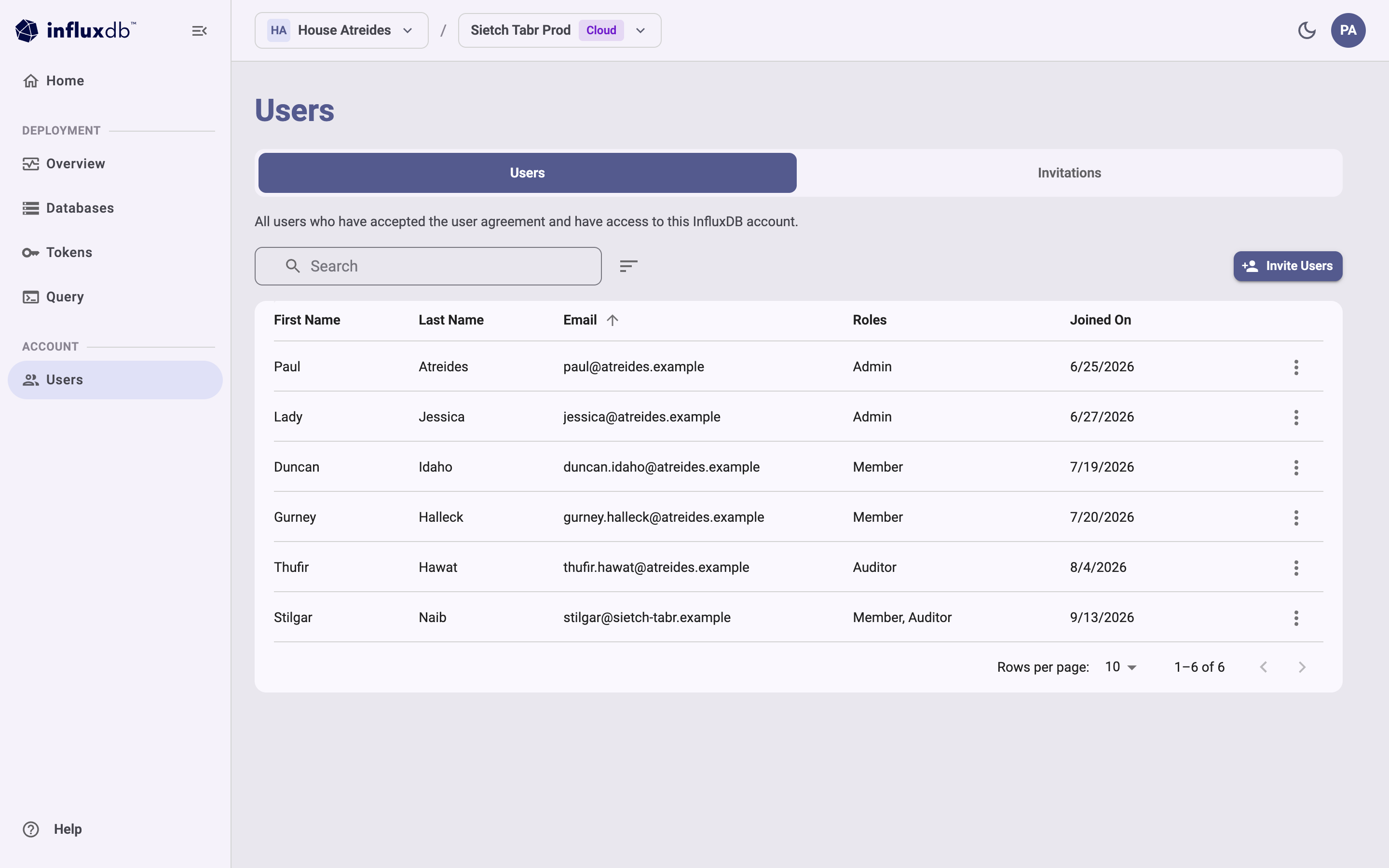 The **Users** page displays your account information and a table of existing users and invitations. Use it to manage access to your InfluxDB account:
* View all users who have accepted the user agreement and have access to the account
* Invite new users to the account
* View user roles, email addresses, and join dates
* Manage user permissions and access
* Toggle between Users and Invitations tabs
## View existing users
The **Users** tab lists users who have accepted the user agreement and have
access to the account. It displays the following information:
* **First Name** and **Last Name**
* **Email**
* **Roles**
* **Joined On**
* An **Actions** menu for each user
To view invitations, select **Invitations**.
The **Invitations** tab displays the following information:
* **Recipient**
* **Status** (`Pending`, `Accepted`, `Revoked`, or `Expired`)
* **Invitation Sent**
* **Invitation Expires**
* An **Actions** menu for each invitation
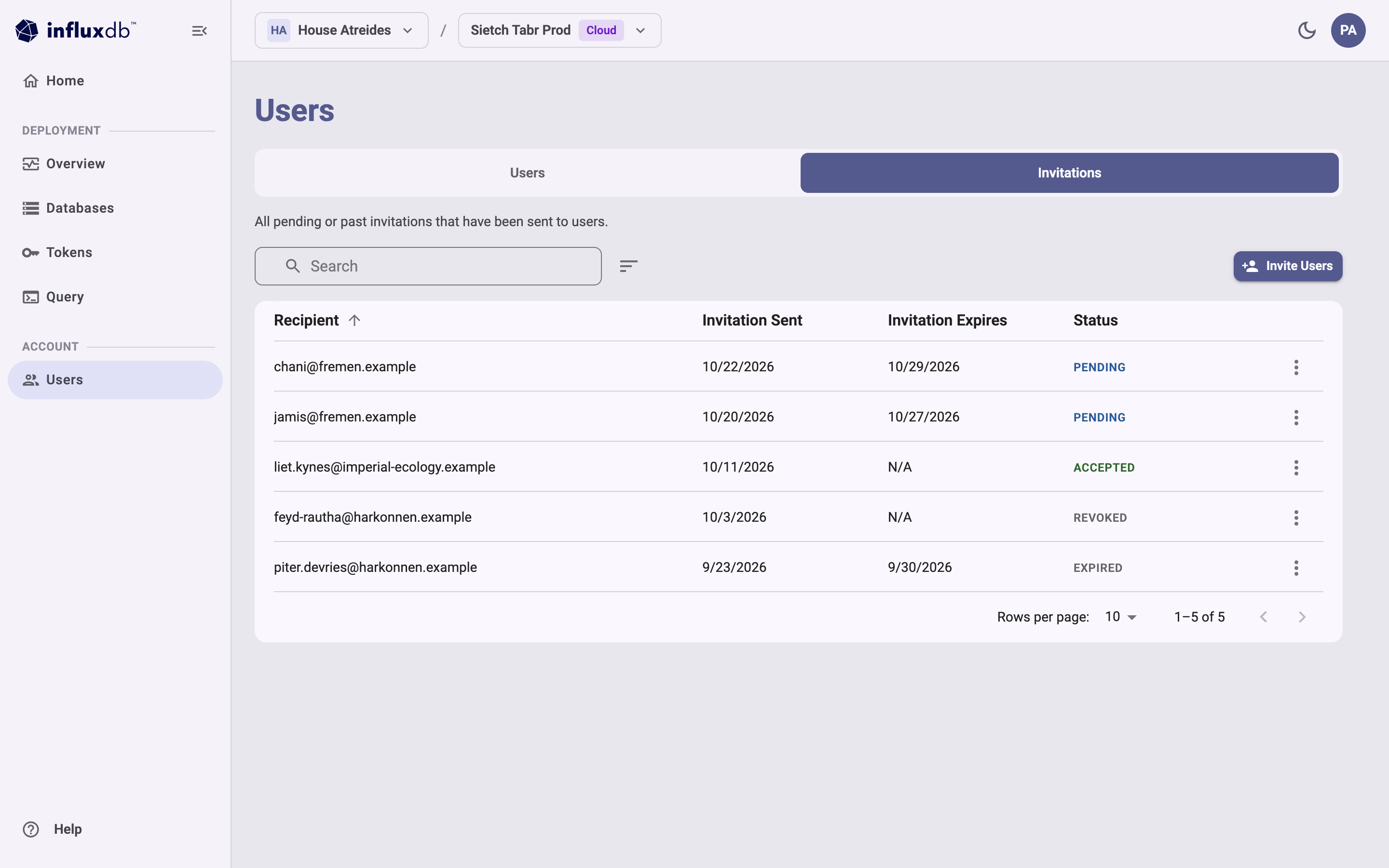 ## Invite a user
To send invitations, you need the **Manage** permission on **Invitations**.
The **Admin** role includes this permission.
1. On the Users page, click **Invite Users**.
2. In the **Invite User** dialog:
* Enter the **email address** of the user you want to invite
* In the **Roles** list, select one or more roles, including any[custom roles](/influxdb3/cloud/admin/users/create-custom-role/).
You must select at least one role to send the invitation.
* **Admin**: Full management of account resources and users
* **Member**: Database access and database token management
* **Auditor**: Read-only access to account resources
3. Click **Send Invitation**.
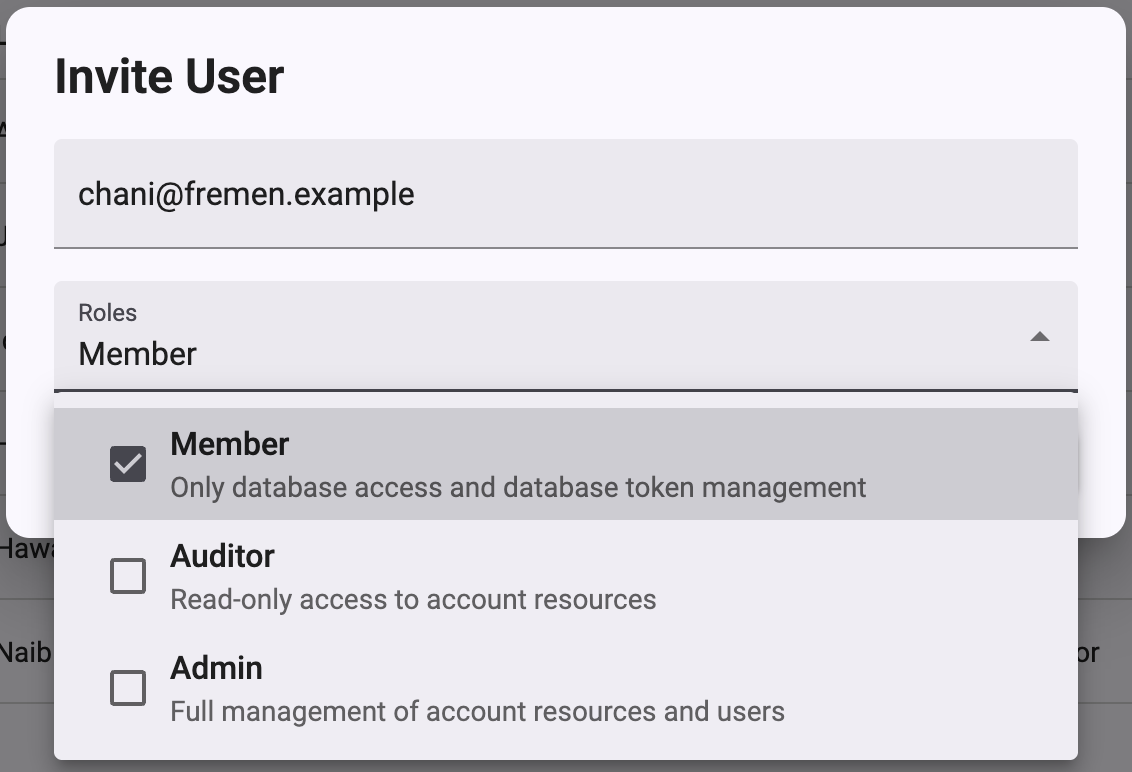 An invitation email with an activation link is sent to the specified email address.
The user must accept the invitation to gain access to your InfluxDB 3 Cloud instance.
To accept, the invitee signs in or signs up with the invited email address,
enters a **First Name** and **Last Name**,
accepts the subscription terms, and then selects **Join Account**.
> [!Note]
> #### Invitation expiration
>
> Invitations expire after 7 days.
> If an invitation expires, send a new invitation to the user.
## Manage invitations
### Revoke an invitation
You can revoke pending invitations that haven’t been accepted yet:
1. Select the **Invitations** tab.
2. Locate the invitation you want to revoke.
3. Click the **Actions** menu (three vertical dots) for that invitation.
4. Select **Revoke Invitation**.
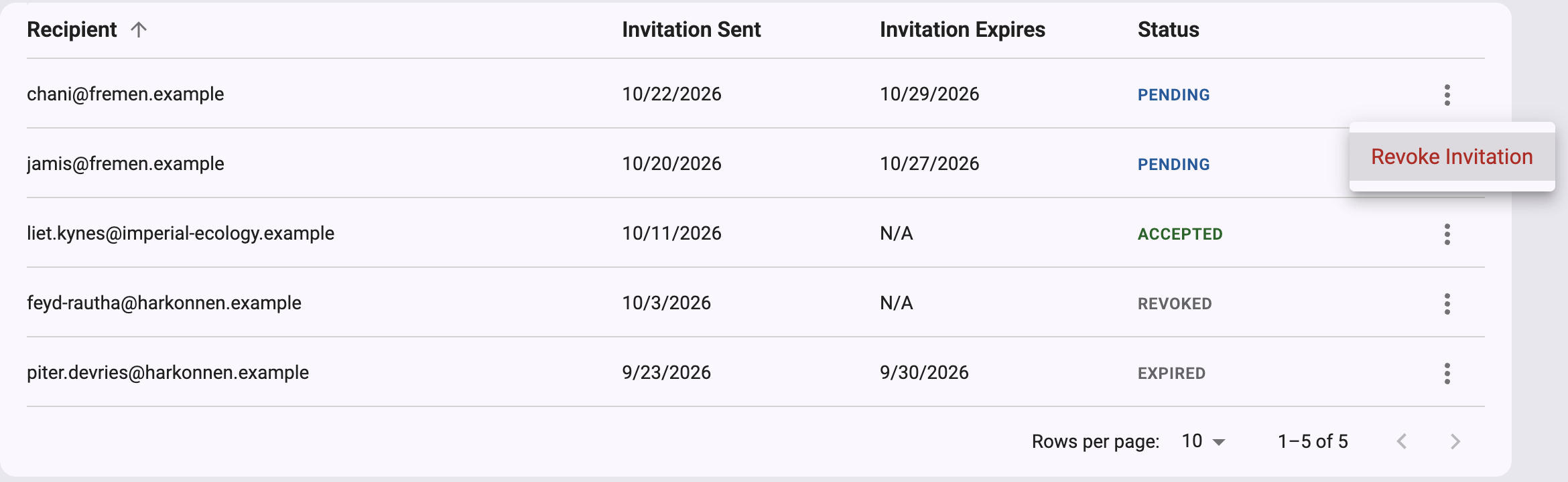 The revocation takes effect immediately, without a confirmation prompt.
Revoked invitations can no longer be used to access your instance.
The invitation status changes to `Revoked`.
## User roles and permissions
InfluxDB 3 Cloud uses role-based access control to manage user permissions.
Every account starts with the **Admin**, **Member**, and **Auditor** roles, and
you can create custom roles.
* To learn how roles work, see [Understand roles](/influxdb3/cloud/admin/users/roles/).
* For each permission and what the default roles include, see the[permissions reference](/influxdb3/cloud/admin/users/permissions/).
* To create a role, see [Create a custom role](/influxdb3/cloud/admin/users/create-custom-role/).
The **Tokens** page in the Admin UI requires the **Admin** role.
Other users create database tokens with the[`influxdb3` CLI](/influxdb3/cloud/reference/cli/influxdb3/)(after `influxdb3 auth login --oauth`) or the HTTP API, if their role allows it.
> [!Note]
> #### Role assignment
>
> Assign a role when inviting a user, and[change a user’s roles](#change-a-users-roles) after the invitation is accepted.
## Manage users
To change a user’s roles, you need the **Update** permission on **Account Users**.
To remove a user, you need the **Delete** permission on **Account Users**.
The **Admin** role includes both permissions.
### Change a user’s roles
1. On the **Users** tab, locate the user.
2. Click the **Actions** menu (three vertical dots) for that user.
3. Select **Edit Roles**.
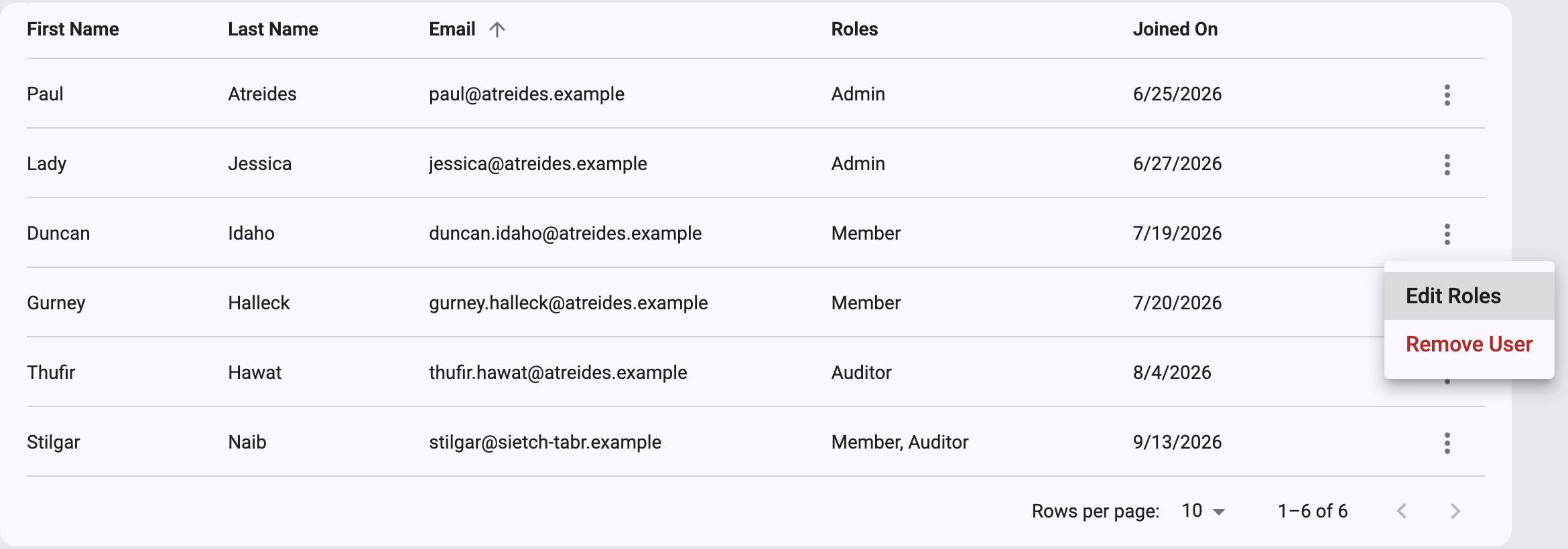 4. In the **Roles** list, select one or more roles.
A user must have at least one role.
5. Click **Save Changes**.
### Remove a user
1. On the **Users** tab, locate the user.
2. Click the **Actions** menu (three vertical dots) for that user.
3. Select **Remove User**.
4. In the **Remove User** dialog, verify the displayed email address, and then
click **Remove User**.
## Limitations
* **Historical records**: Invitation records remain even after user removal.
#### Related
* [Manage users](/influxdb3/cloud/admin/users/)
* [Manage tokens](/influxdb3/cloud/admin/tokens/)
---
# Create a custom role
Source: https://docs.influxdata.com/influxdb3/cloud/admin/users/create-custom-role/
Use the Admin UI to create a custom role, grant it permissions, and assign it to
users.
To create and edit roles, you need the **Manage** permission on **Roles**.
The **Admin** role includes this permission.
* [Create a role](#create-a-role)
* [Grant permissions](#grant-permissions)
* [Assign a role to users](#assign-a-role-to-users)
* [Edit a role](#edit-a-role)
* [Delete a role](#delete-a-role)
## Create a role
1. Go to [console.influxdata.com](https://console.influxdata.com) and sign in.
2. In the navigation, under **Account**, select **Roles**.
3. Click **Create role**.
4. In the **Create role** dialog, enter the following:
* **Role name**: A name that’s unique in the account.
* **Description**: What the role is for.
* **Copy permissions from**: *Optional.* To start from an existing role’s
permissions, including its access on each instance, select that role.
Otherwise, select **None**.
5. Click **Create role**.
The role’s page opens.
It shows the role’s **Account permissions**, **Instance permissions**, and**Users**.
For example, the following dialog creates a role for users who query the`arrakis` database:
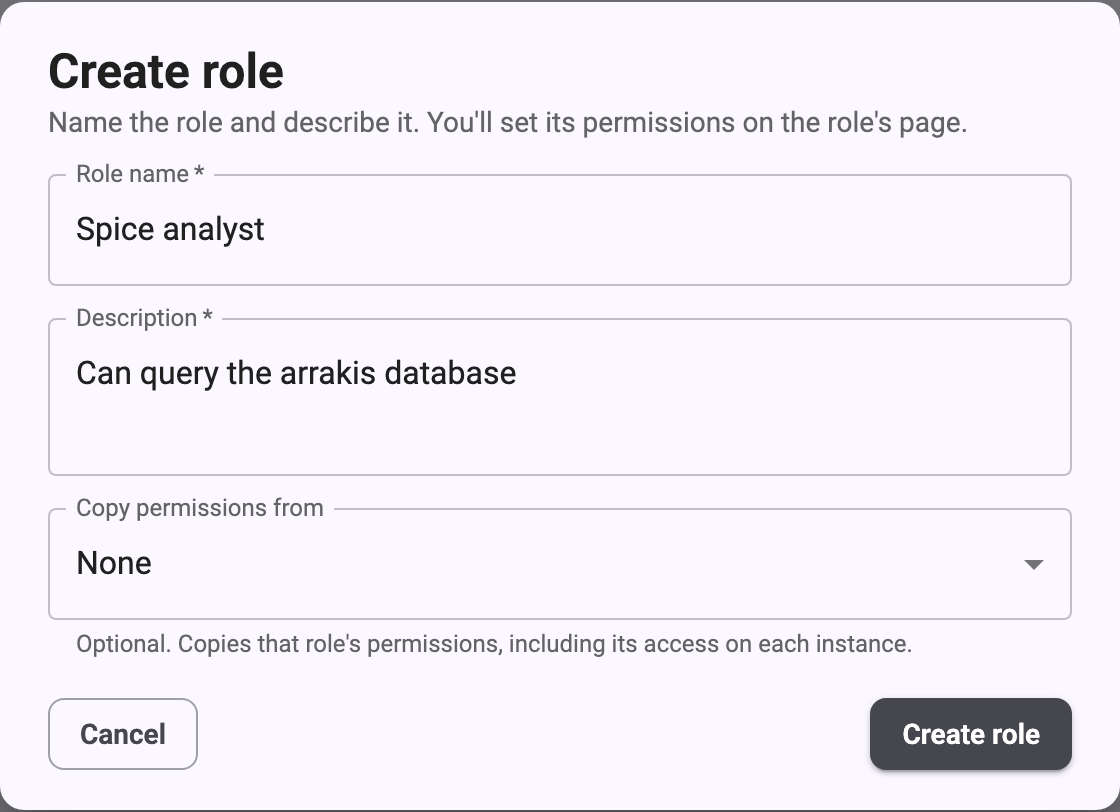 For name and description limits, see[Role limits](/influxdb3/cloud/admin/users/roles/#role-limits).
## Grant permissions
A new role starts with no permissions unless you copied them from another role.
For a description of each permission, see the[permissions reference](/influxdb3/cloud/admin/users/permissions/).
1. On the role’s page, click **Edit**.
2. Under **Account permissions**, select the permissions that apply to the whole
account.
3. Under **Instance permissions**, find the instance you want to grant access to.
4. Under **Instance-wide**, select the token and system endpoint permissions.
5. Under **Database permissions**, do one or both of the following:
* To grant access to every database on the instance, including databases
created later, select permissions in the **All databases** row.
* To grant access to specific databases, select each database in the**Add Databases** field, and then select permissions in its row.
6. Click **Save changes**.
7. Review the summary of changes, and then click **Save changes** to confirm.
To go back without saving, click **Keep editing**.
For example, the following permissions let users query the `arrakis` database.**Read** lets them query the database, and **Describe** lets them list the
database and view its schema:
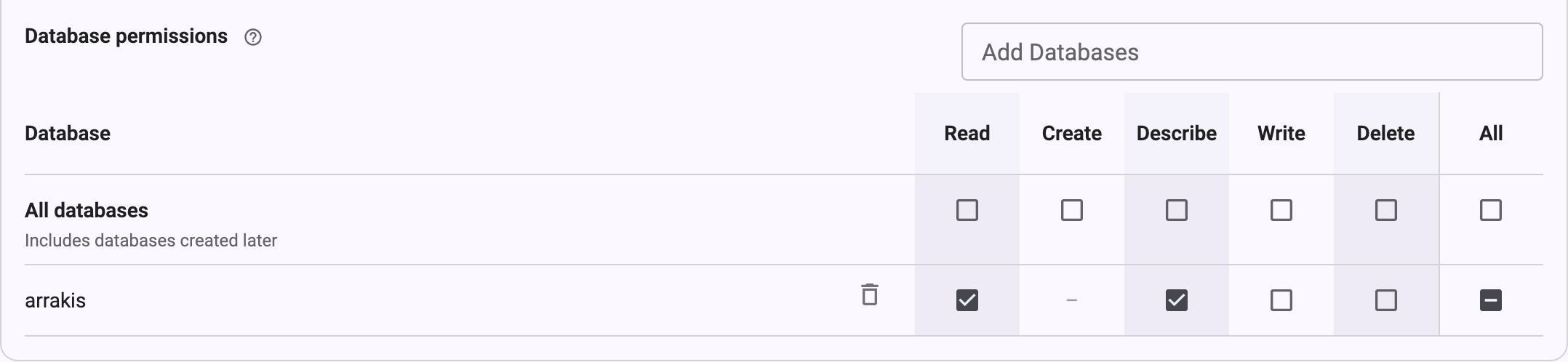 > [!Warning]
> #### Token permissions can exceed a role’s database access
>
> A user who can create resource tokens can create a token with broader database
> access than their role grants.
> Only grant **Create** on **Resource tokens** to users you trust with that access.
## Assign a role to users
1. On the role’s page, in the **Users** section, click **Edit users**.
2. Select the users to give this role.
To remove the role from a user, clear the selection for that user.
3. Click **Save users**.
Changes to a role’s users apply as soon as you save them.
If you’re editing the role’s permissions, save or discard those changes first.
You can also assign roles when you [invite a user](/influxdb3/cloud/admin/users/admin-ui/#invite-a-user)or [change a user’s roles](/influxdb3/cloud/admin/users/admin-ui/#change-a-users-roles)on the **Users** page.
> [!Note]
> A user must hold at least one role.
> To remove a user’s only role, give them another role first.
## Edit a role
1. In the navigation, under **Account**, select **Roles**, and then select the
role.
2. Click **Edit**.
3. Change the role’s name, description, or permissions.
4. Click **Save changes**, review the summary, and then click **Save changes** to
confirm.
To cancel your edits, click **Discard**.
Permission changes apply immediately to everyone who holds the role.
You can’t edit the **Admin** role.
> [!Note]
> You can only change a role’s access on an instance that’s available.
> If an instance is starting or deleted, its permissions are read-only.
## Delete a role
1. In the navigation, under **Account**, select **Roles**, and then select the
role.
2. At the bottom of the role’s page, click **Delete this role**.
3. Confirm the deletion.
Deleting a role can’t be undone.
Users who hold the role lose its access, and keep any other roles they hold.
You can’t delete the **Admin** role.
#### Related
* [Understand roles](/influxdb3/cloud/admin/users/roles/)
* [Role permissions reference](/influxdb3/cloud/admin/users/permissions/)
* [Manage users in the Admin UI](/influxdb3/cloud/admin/users/admin-ui/)
---
# Role permissions reference
Source: https://docs.influxdata.com/influxdb3/cloud/admin/users/permissions/
Use this reference to choose the permissions for a[role](/influxdb3/cloud/admin/users/roles/).
The tables use the same names as the role page in the Admin UI.
* [Account permissions](#account-permissions)
* [Instance permissions](#instance-permissions)
* [Default role permissions](#default-role-permissions)
## Account permissions
Account permissions apply to the whole account.
| Resource |Permission| Allows the user to |
|-------------------|----------|---------------------------------------------------|
|Account Permissions| Update | Rename the account |
| Roles | Manage | Create, edit, and delete roles |
| Account Users | View | View the users in the account |
| Account Users | Create | Add users to the account |
| Account Users | Update |Change a user in the account, including their roles|
| Account Users | Delete | Remove users from the account |
| Instances | View | View instances in the account |
| Instances | Update | Change instance settings |
| Management Tokens | View | View management tokens |
| Management Tokens | Create | Create management tokens |
| Management Tokens | Update | Change or revoke management tokens |
| Invitations | View | View invitations |
| Invitations | Manage | Send and revoke invitations |
[Management tokens](/influxdb3/cloud/admin/tokens/#token-types) are
account-level tokens.
They’re separate from the instance admin and resource tokens described in[Instance-wide permissions](#instance-wide-permissions).
## Instance permissions
Instance permissions apply to one instance.
A role has no access to an instance until you grant it.
### Database permissions
Grant database permissions on **All databases**, which includes databases created
later, or on specific databases.
|Permission| Allows the user to | Applies to |
|----------|------------------------------------------------------------|----------------------|
| Read | Query data | All or specific |
| Create | Create databases |**All databases** only|
| Describe |List databases and view their schemas, but not read the data| All or specific |
| Write | Write data | All or specific |
| Delete | Delete databases | All or specific |
### Instance-wide permissions
Instance-wide permissions apply to tokens and system endpoints on the instance.
| Resource |Permission| Allows the user to |
|----------------|----------|---------------------------------------|
|Resource tokens | View | View resource (database) tokens |
|Resource tokens | Create | Create resource tokens |
|Resource tokens | Delete | Delete resource tokens |
| Admin tokens | Create | Create admin tokens |
| Admin tokens | Delete | Delete admin tokens |
|System endpoints| Health |Access the instance `/health` endpoint |
|System endpoints| Metrics |Access the instance `/metrics` endpoint|
|System endpoints| Ping | Access the instance `/ping` endpoint |
|System endpoints| Ready | Access the instance `/ready` endpoint |
The **Tokens** page in the Admin UI requires the **Admin** role.
A user with token permissions in a custom role can manage tokens using the[`influxdb3` CLI](/influxdb3/cloud/reference/cli/influxdb3/) or the HTTP API.
> [!Warning]
> #### Token permissions can exceed a role’s database access
>
> A user who can create resource tokens can create a token with broader database
> access than their role grants.
> Only grant **Create** on **Resource tokens** to users you trust with that access.
## Default role permissions
The following tables show the permissions that each default role starts with.**Admin** has full access and you can’t change it.
If you’ve edited the **Member** or **Auditor** role for your account, your
permissions might differ.
### Default account permissions
| Resource |Admin|Member|Auditor|
|-------------------|-----|------|-------|
|Account Permissions| All | None | None |
| Roles | All | None | None |
| Account Users | All | View | View |
| Instances | All | View | View |
| Management Tokens | All | None | View |
| Invitations | All | None | View |
### Default instance permissions
| Resource |Admin| Member | Auditor |
|----------------|-----|-------------------------------------|-------------|
| All databases | All |Read, Create, Describe, Write, Delete|Describe only|
|Resource tokens | All | View, Create, Delete | View |
| Admin tokens | All | None | None |
|System endpoints| All | None | None |
Only the **Admin** role can query the `_internal` database.
#### Related
* [Understand roles](/influxdb3/cloud/admin/users/roles/)
* [Create a custom role](/influxdb3/cloud/admin/users/create-custom-role/)
* [Manage tokens](/influxdb3/cloud/admin/tokens/)
| Resource | Permission | Allows the user to |
| --- | --- | --- |
| Resource | Permission | Allows the user to |
| Account Permissions | Update | Rename the account |
| Roles | Manage | Create, edit, and delete roles |
| Account Users | View | View the users in the account |
| Account Users | Create | Add users to the account |
| Account Users | Update | Change a user in the account, including their roles |
| Account Users | Delete | Remove users from the account |
| Instances | View | View instances in the account |
| Instances | Update | Change instance settings |
| Management Tokens | View | View management tokens |
| Management Tokens | Create | Create management tokens |
| Management Tokens | Update | Change or revoke management tokens |
| Invitations | View | View invitations |
| Invitations | Manage | Send and revoke invitations |
| Permission | Allows the user to | Applies to |
| --- | --- | --- |
| Permission | Allows the user to | Applies to |
| Read | Query data | All or specific |
| Create | Create databases | All databases only |
| Describe | List databases and view their schemas, but not read the data | All or specific |
| Write | Write data | All or specific |
| Delete | Delete databases | All or specific |
| Resource | Permission | Allows the user to |
| --- | --- | --- |
| Resource | Permission | Allows the user to |
| Resource tokens | View | View resource (database) tokens |
| Resource tokens | Create | Create resource tokens |
| Resource tokens | Delete | Delete resource tokens |
| Admin tokens | Create | Create admin tokens |
| Admin tokens | Delete | Delete admin tokens |
| System endpoints | Health | Access the instance /health endpoint |
| System endpoints | Metrics | Access the instance /metrics endpoint |
| System endpoints | Ping | Access the instance /ping endpoint |
| System endpoints | Ready | Access the instance /ready endpoint |
| Resource | Admin | Member | Auditor |
| --- | --- | --- | --- |
| Resource | Admin | Member | Auditor |
| Account Permissions | All | None | None |
| Roles | All | None | None |
| Account Users | All | View | View |
| Instances | All | View | View |
| Management Tokens | All | None | View |
| Invitations | All | None | View |
| Resource | Admin | Member | Auditor |
| --- | --- | --- | --- |
| Resource | Admin | Member | Auditor |
| All databases | All | Read, Create, Describe, Write, Delete | Describe only |
| Resource tokens | All | View, Create, Delete | View |
| Admin tokens | All | None | None |
| System endpoints | All | None | None |
---
# Understand roles
Source: https://docs.influxdata.com/influxdb3/cloud/admin/users/roles/
A role is a named set of permissions.
Assign roles to users to control what they can do in your InfluxDB 3 Cloud
account and on each instance.
* [Default roles](#default-roles)
* [Custom roles](#custom-roles)
* [Account and instance permissions](#account-and-instance-permissions)
* [Users with multiple roles](#users-with-multiple-roles)
* [Role limits](#role-limits)
## Default roles
Every account starts with the following roles:
* **Admin**: Full access to account and instance resources.
You can’t edit or delete the **Admin** role.
* **Member**: Can create, query, write to, and delete databases, and can manage
resource tokens.
* **Auditor**: Can view account resources and database schemas, but can’t query
or write data or change resources.
You can edit or delete the **Member** and **Auditor** roles for your account.
For the permissions that each role starts with, see[Default role permissions](/influxdb3/cloud/admin/users/permissions/#default-role-permissions).
## Custom roles
Create a custom role when the default roles grant too much or too little access.
For example, you can create a role that can only query one database on one
instance.
To create and edit roles, you need the **Manage** permission on **Roles**.
The **Admin** role includes this permission.
To get started, see [Create a custom role](/influxdb3/cloud/admin/users/create-custom-role/).
## Account and instance permissions
Each role has two sets of permissions:
* **Account permissions** apply to the whole account, independent of any
instance permission.
For example, they control who can view users or send invitations.
* **Instance permissions** apply to one instance.
They control access to the instance’s databases, tokens, and system endpoints.
Set them separately for each instance in the account.
Database permissions can apply to **All databases**, which includes databases
created later, or to specific databases that you select.
## Users with multiple roles
A user can hold more than one role, and must hold at least one.
A user who holds multiple roles has the combined permissions of those roles.
When you change a role’s permissions, the change applies immediately to everyone
who holds the role.
## Role limits
* An account can have up to 20 roles, including the 3 default roles.
* A role name can have up to 64 characters and can contain letters, numbers,
spaces, hyphens (`-`), and underscores (`_`).
Role names must be unique in the account.
* A role description is required and can have up to 512 characters.
#### Related
* [Role permissions reference](/influxdb3/cloud/admin/users/permissions/)
* [Create a custom role](/influxdb3/cloud/admin/users/create-custom-role/)
* [Manage users in the Admin UI](/influxdb3/cloud/admin/users/admin-ui/)
* [Manage tokens](/influxdb3/cloud/admin/tokens/)
---
# InfluxDB HTTP API
Source: https://docs.influxdata.com/influxdb3/cloud/api/
[Download InfluxDB 3 Cloud API Spec](/openapi/influxdb3-cloud-openapi.yml)
Use the InfluxDB 3 Cloud HTTP API to write data, query data, and manage databases, tables, and tokens.
### [Quick start](/influxdb3/cloud/api/quick-start/)
Authenticate, write, and query with the API:
### [Authentication](/influxdb3/cloud/api/authentication/)
Use one of the following schemes to authenticate to the InfluxDB 3 Cloud API:
### [Auth token](/influxdb3/cloud/api/auth-token/)
Create and manage tokens used for authenticating and authorizing access to InfluxDB 3 Cloud resources.
### [Database](/influxdb3/cloud/api/database/)
Create, list, and delete databases in InfluxDB 3 Cloud.
### [Query data](/influxdb3/cloud/api/query-data/)
Query data stored in InfluxDB 3 Cloud using SQL or InfluxQL.
### [Server information](/influxdb3/cloud/api/server-information/)
Retrieve health status and version information for your InfluxDB 3 Cloud instance.
### [Table](/influxdb3/cloud/api/table/)
Manage table schemas in an InfluxDB 3 Cloud database.
### [Write data](/influxdb3/cloud/api/write-data/)
Write data to InfluxDB 3 Cloud using line protocol format.
---
# All endpoints
Source: https://docs.influxdata.com/influxdb3/cloud/api/all-endpoints/
[Download InfluxDB 3 Cloud API Spec](/openapi/influxdb3-cloud-openapi.yml)
All InfluxDB 3 Cloud API endpoints, sorted by path.
## v3 API
[DELETE`/api/v3/configure/database`Delete a database](/influxdb3/cloud/api/database/#operation/DeleteConfigureDatabase)[GET`/api/v3/configure/database`List databases](/influxdb3/cloud/api/database/#operation/GetConfigureDatabase)[POST`/api/v3/configure/database`Create a database](/influxdb3/cloud/api/database/#operation/PostConfigureDatabase)[DELETE`/api/v3/configure/table`Delete a table](/influxdb3/cloud/api/table/#operation/DeleteConfigureTable)[POST`/api/v3/configure/table`Create a table](/influxdb3/cloud/api/table/#operation/PostConfigureTable)[DELETE`/api/v3/configure/token`Delete token](/influxdb3/cloud/api/auth-token/#operation/DeleteToken)[POST`/api/v3/configure/token/named_admin`Create named admin token](/influxdb3/cloud/api/auth-token/#operation/PostCreateNamedAdminToken)[POST`/api/v3/enterprise/configure/token`Create a resource token](/influxdb3/cloud/api/auth-token/#operation/PostCreateResourceToken)[GET`/api/v3/query_influxql`Execute InfluxQL query](/influxdb3/cloud/api/query-data/#operation/GetExecuteInfluxQLQuery)[POST`/api/v3/query_influxql`Execute InfluxQL query](/influxdb3/cloud/api/query-data/#operation/PostExecuteQueryInfluxQL)[GET`/api/v3/query_sql`Execute SQL query](/influxdb3/cloud/api/query-data/#operation/GetExecuteQuerySQL)[POST`/api/v3/query_sql`Execute SQL query](/influxdb3/cloud/api/query-data/#operation/PostExecuteQuerySQL)[POST`/api/v3/write_lp`Write line protocol](/influxdb3/cloud/api/write-data/#operation/PostWriteLP)
## v1-compatible API
[GET`/ping`Ping the server](/influxdb3/cloud/api/server-information/#operation/GetPing)
---
# Auth token
Source: https://docs.influxdata.com/influxdb3/cloud/api/auth-token/
[Download InfluxDB 3 Cloud API Spec](/openapi/influxdb3-cloud-openapi.yml)
Create and manage tokens used for authenticating and authorizing access to InfluxDB 3 Cloud resources.
DELETE`/api/v3/configure/token`
### Delete token
Deletes a token.
#### Parameters
##### Query parameters
`token_name`requiredstring
The name of the token to delete.
Example request[Ask AI about this](#)
```sh
curl --request DELETE \
"https://cluster-host.a.influxdb.io/api/v3/configure/token?token_name=TOKEN_NAME" \
--header "Authorization: Bearer INFLUX_TOKEN"
```
#### Responses
200Success. The token has been deleted.
401Unauthorized access.
`data`object
`error`string
404Token not found.
POST`/api/v3/configure/token/named_admin`
### Create named admin token
Creates a named admin token.
A named admin token is a special type of admin token with a custom name for identification and management.
#### Request bodyrequired
Content-Type:`application/json`
`expiry_secs`integer
Optional expiration time in seconds. If not provided, the token does not expire.
`token_name`requiredstring
The name for the admin token.
Example request[Ask AI about this](#)
```sh
curl --request POST \
"https://cluster-host.a.influxdb.io/api/v3/configure/token/named_admin" \
--header "Authorization: Bearer INFLUX_TOKEN" \
--header "Content-Type: application/json" \
--data-raw '{
"expiry_secs": 0,
"token_name": "TOKEN_NAME"
}'
```
#### Responses
201Success. The named admin token has been created.
The response body contains the token string and metadata.
`created_at`string \
`expiry`string \
`hash`string
`id`integer
`name`string
`token`string
Example request body
```json
{
"created_at": "2025-04-18T14:02:45.331Z",
"expiry": null,
"hash": "00xx0Xx0xx00XX0x0",
"id": 0,
"name": "_admin",
"token": "apiv3_00xx0Xx0xx00XX0x0"
}
```
401Unauthorized access.
`data`object
`error`string
409A token with this name already exists.
POST`/api/v3/enterprise/configure/token`
### Create a resource token
Creates a resource (fine-grained permissions) token.
A resource token is a token that has access to specific resources in the system.
Resource tokens are available in InfluxDB 3 Enterprise and InfluxDB 3 Cloud.
They are not available in InfluxDB 3 Core.
#### Request bodyrequired
Content-Type:`application/json`
`expiry_secs`integer
Optional expiration time in seconds.
`permissions`requiredobject[]
List of permissions to grant to the token.
`actions`requiredstring[]
List of actions to grant.
`resource_names`requiredstring[]
List of resource names. Use “\*” for all resources.
`resource_type`requiredstring
The type of resource.
Allowed:`system`, `db`
`token_name`requiredstring
The name for the resource token.
Example request[Ask AI about this](#)
```sh
curl --request POST \
"https://cluster-host.a.influxdb.io/api/v3/enterprise/configure/token" \
--header "Authorization: Bearer INFLUX_TOKEN" \
--header "Content-Type: application/json" \
--data-raw '{
"expiry_secs": 0,
"permissions": [
{
"actions": [],
"resource_names": [],
"resource_type": "system"
}
],
"token_name": "TOKEN_NAME"
}'
```
#### Responses
201Success. The resource token has been created.
The response body contains the token string and metadata.
`expiry_secs`integer
The expiration time in seconds.
`permissions`object[]
`actions`string[]
`resource_names`string[]
List of resource names. Use “\*” for all resources.
`resource_type`string
Allowed:`system`, `db`
`token_name`string
Example request body
```json
{
"expiry_secs": 300000,
"permissions": [
{
"actions": [
"read"
],
"resource_names": [
"*"
],
"resource_type": "system"
}
],
"token_name": "All system information"
}
```
401Unauthorized access.
`data`object
`error`string
#### Related
* [Manage tokens](/influxdb3/cloud/admin/tokens/)
* [InfluxDB 3 API client libraries](/influxdb3/cloud/reference/client-libraries/v3/)
---
# Authentication
Source: https://docs.influxdata.com/influxdb3/cloud/api/authentication/
[Download InfluxDB 3 Cloud API Spec](/openapi/influxdb3-cloud-openapi.yml)
Use one of the following schemes to authenticate to the InfluxDB 3 Cloud API:
* Token authentication
* Bearer authentication
* Basic authentication
* Querystring authentication
## Basic Authentication
Use the `Authorization` header with the `Basic` scheme to authenticate v1 API requests.
Works with v1 compatibility [`/write`](#operation/PostV1Write) and [`/query`](#operation/GetV1ExecuteQuery) endpoints in InfluxDB 3.
When authenticating requests, InfluxDB 3 checks that the `password` part of the decoded credential is an authorized token
and ignores the `username` part of the decoded credential.
### Syntax
```http
Authorization: Basic
```
### Example
```bash
curl "http://localhost:8181/write?db=DATABASE_NAME&precision=s" \
--user "":"AUTH_TOKEN" \
--header "Content-type: text/plain; charset=utf-8" \
--data-binary 'home,room=kitchen temp=72 1641024000'
```
Replace the following:
* **`DATABASE_NAME`**: your InfluxDB 3 Cloud database
* **`AUTH_TOKEN`**: an admin token or database token authorized for the database
## Bearer Authentication
Use the OAuth Bearer authentication
scheme to provide an authorization token to InfluxDB 3.
Bearer authentication works with all endpoints.
In your API requests, send an `Authorization` header.
For the header value, provide the word `Bearer` followed by a space and a database token.
### Syntax
```http
Authorization: Bearer AUTH_TOKEN
```
### Example
```bash
curl http://localhost:8181/api/v3/query_influxql \
--header "Authorization: Bearer AUTH_TOKEN"
```
## Query String Authentication
Use InfluxDB 1.x API parameters to provide credentials through the query string for v1 API requests.
Querystring authentication works with v1-compatible [`/write`](#operation/PostV1Write) and [`/query`](#operation/GetV1ExecuteQuery) endpoints.
When authenticating requests, InfluxDB 3 checks that the `p` (*password*) query parameter is an authorized token
and ignores the `u` (*username*) query parameter.
### Syntax
```http
https://localhost:8181/query/?[u=any]&p=AUTH_TOKEN
https://localhost:8181/write/?[u=any]&p=AUTH_TOKEN
```
### Examples
```bash
curl "http://localhost:8181/write?db=DATABASE_NAME&precision=s&p=AUTH_TOKEN" \
--header "Content-type: text/plain; charset=utf-8" \
--data-binary 'home,room=kitchen temp=72 1641024000'
```
Replace the following:
* **`DATABASE_NAME`**: your InfluxDB 3 Cloud database
* **`AUTH_TOKEN`**: an admin token or database token authorized for the database
```bash
#######################################
# Use an InfluxDB 1.x compatible username and password
# to query the InfluxDB v1 HTTP API
#######################################
# Use authentication query parameters:
# ?p=AUTH_TOKEN
#######################################
curl --get "http://localhost:8181/query" \
--data-urlencode "p=AUTH_TOKEN" \
--data-urlencode "db=DATABASE_NAME" \
--data-urlencode "q=SELECT * FROM MEASUREMENT"
```
Replace the following:
* **`DATABASE_NAME`**: the database to query
* **`AUTH_TOKEN`**: a database token with sufficient permissions to the database
## Token Authentication
Use InfluxDB v2 Token authentication to provide an authorization token to InfluxDB 3.
The v2 Token scheme works with v1 and v2 compatibility endpoints in InfluxDB 3.
In your API requests, send an `Authorization` header.
For the header value, provide the word `Token` followed by a space and a database token.
The word `Token` is case-sensitive.
### Syntax
```http
Authorization: Token AUTH_TOKEN
```
### Example
```sh
########################################################
# Use the Token authentication scheme with /api/v2/write
# to write data.
########################################################
curl --request post "http://localhost:8181/api/v2/write?bucket=DATABASE_NAME&precision=s" \
--header "Authorization: Token AUTH_TOKEN" \
--data-binary 'home,room=kitchen temp=72 1463683075'
```
---
# Quick start
Source: https://docs.influxdata.com/influxdb3/cloud/api/quick-start/
[Download InfluxDB 3 Cloud API Spec](/openapi/influxdb3-cloud-openapi.yml)
Authenticate, write, and query with the API:
1. Check the status of your InfluxDB 3 Cloud instance.
```
curl "https://cluster-host.a.influxdb.io/ping" \
--header "Authorization: Bearer AUTH_TOKEN"
```
2. Write data to a database.
```
curl "https://cluster-host.a.influxdb.io/api/v3/write_lp?db=sensors&precision=auto" \
--header "Authorization: Bearer AUTH_TOKEN" \
--data-raw "home,room=Kitchen temp=72.0
home,room=Living\ room temp=71.5"
```
If all data is written, the response is `204 No Content`.
3. Query data from a database.
```
curl -G "https://cluster-host.a.influxdb.io/api/v3/query_sql" \
--header "Authorization: Bearer AUTH_TOKEN" \
--data-urlencode "db=sensors" \
--data-urlencode "q=SELECT * FROM home WHERE room='Living room'" \
--data-urlencode "format=jsonl"
```
Output:
```
{"room":"Living room","temp":71.5,"time":"2025-02-25T20:19:34.984098"}
```
For more information, see the [Get started](/influxdb3/cloud/get-started/) guide.
---
# Server information
Source: https://docs.influxdata.com/influxdb3/cloud/api/server-information/
[Download InfluxDB 3 Cloud API Spec](/openapi/influxdb3-cloud-openapi.yml)
Retrieve health status and version information for your InfluxDB 3 Cloud instance.
>
>
> **Note**: InfluxDB 3 Cloud doesn’t support the `/health` endpoint
> available in InfluxDB 3 Core and Enterprise. Requests to `/health`return `404 Not Found`. Use `/ping` instead.
>
>
GET`/ping`
### Ping the server
Returns version information for the server.
**Important**: Use a GET request. HEAD requests return `404 Not Found`.
>
>
> **Note**: Unlike InfluxDB 3 Core and Enterprise, InfluxDB 3 Cloud
> doesn’t support the `/health` endpoint. Requests to `/health`return `404 Not Found`. Use `/ping` to check instance reachability
> and retrieve version information.
>
>
The response includes version information in both headers and the JSON body:
* **Headers**: `x-influxdb-version` and `x-influxdb-build`
* **Body**: JSON object with `version`, `revision`, and `process_id`
>
>
> **Note**: This endpoint requires authentication by default in InfluxDB 3 Cloud.
>
>
Example request[Ask AI about this](#)
```sh
curl --request GET \
"https://cluster-host.a.influxdb.io/ping" \
--header "Authorization: Bearer INFLUX_TOKEN"
```
#### Responses
200Success. The response body contains server information.
`process_id`string
A unique identifier for the server process.
Example:`"b756d9e0-cecd-4f72-b6d0-19e2d4f8cbb7"`
`revision`string
The git revision hash for the build.
Example:`"83b589b883"`
`version`string
The InfluxDB version number.
Example:`"3.8.0"`
401Unauthorized. Authentication is required.
404Not Found. Returned for HEAD requests.
Use a GET request to retrieve version information.
#### Related
* [InfluxDB 3 API client libraries](/influxdb3/cloud/reference/client-libraries/v3/)
---
# Write data
Source: https://docs.influxdata.com/influxdb3/cloud/api/write-data/
[Download InfluxDB 3 Cloud API Spec](/openapi/influxdb3-cloud-openapi.yml)
Write data to InfluxDB 3 Cloud using line protocol format.
POST`/api/v3/write_lp`
### Write line protocol
Writes line protocol to the specified database.
This is the native InfluxDB 3 Cloud write endpoint that provides enhanced control
over write behavior with advanced parameters for high-performance and fault-tolerant operations.
Use this endpoint to send data in [line protocol](/influxdb3/cloud/reference/syntax/line-protocol/) format
to InfluxDB. Use query parameters to specify options for writing data.
#### Features
* **Partial writes**: Use `accept_partial=true` to allow partial success when some lines in a batch fail
* **Asynchronous writes**: Use `no_sync=true` to skip waiting for WAL synchronization, allowing faster response
times but sacrificing durability guarantees
* **Flexible precision**: Automatic timestamp precision detection with `precision=auto` (default)
#### Column families
InfluxDB 3 Cloud stores data using PachaTree. Assign fields to column
families using the `::` delimiter in field names. The portion before`::` is the family name; everything after is the field name.
```txt
metrics,host=sA cpu::usage_user=55.2,cpu::usage_sys=12.1,mem::free=2048i 1000000000
```
Fields in the same family are stored together on disk. For wide tables, this reduces I/O
by letting queries read only the families they need. Fields written without `::` are assigned
to auto-generated families.
#### Auto precision detection
When you use `precision=auto` or omit the precision parameter, InfluxDB 3 automatically detects
the timestamp precision based on the magnitude of the timestamp value:
* Timestamps \< 5e9 → Second precision (multiplied by 1,000,000,000 to convert to nanoseconds)
* Timestamps \< 5e12 → Millisecond precision (multiplied by 1,000,000)
* Timestamps \< 5e15 → Microsecond precision (multiplied by 1,000)
* Larger timestamps → Nanosecond precision (no conversion needed)
#### Related
* [Use the InfluxDB v3 write\_lp API to write data](/influxdb3/cloud/write-data/http-api/v3-write-lp/)
#### Parameters
##### Query parameters
`db`requiredstring
`precision`string
`accept_partial`boolean
`no_sync`boolean
#### Request body
Content-Type:`application/json`
Example request[Ask AI about this](#)
```sh
curl --request POST \
"https://cluster-host.a.influxdb.io/api/v3/write_lp?db=DB" \
--header "Authorization: Bearer INFLUX_TOKEN" \
--header "Content-Type: text/plain" \
--data-raw 'measurement,tag=value field=1 1234567890'
```
#### Responses
204Success (“No Content”). All data in the batch is written and queryable.
400Bad request.
401Unauthorized access.
`data`object
`error`string
403Access denied.
413Request entity too large.
422Unprocessable entity.
#### Related
* [Write data using HTTP APIs](/influxdb3/cloud/write-data/http-api/)
* [InfluxDB 3 API client libraries](/influxdb3/cloud/reference/client-libraries/v3/)
---
# Get started with InfluxDB 3 Cloud
Source: https://docs.influxdata.com/influxdb3/cloud/get-started/
InfluxDB 3 Cloud is the fully managed, cloud-hosted version of[InfluxDB 3 Enterprise](/influxdb3/enterprise/).
InfluxData provisions and operates the underlying infrastructure, so you can
write and query time series data without running or scaling servers yourself.
This guide walks through the basic steps of getting started with
InfluxDB 3 Cloud, including the following:
1. [Set up InfluxDB](/influxdb3/cloud/get-started/setup/)
2. [Write data](/influxdb3/cloud/get-started/write/)
3. [Query data](/influxdb3/cloud/get-started/query/)
> [!Important]
> #### InfluxDB 3 Cloud is in early access
>
> InfluxDB 3 Cloud is currently available to select customers through an
> early access program and isn’t yet generally available.
> Early access provides a focused subset of InfluxDB 3 Enterprise
> capabilities as a managed service.
> Availability, features, and workflows may change before general availability.
## Data model
The InfluxDB 3 Cloud server contains logical databases; databases contain
tables; and tables are comprised of columns.
Compared to previous versions of InfluxDB, you can think of a database as an
InfluxDB v2 `bucket` or an InfluxDB v1 `db/retention_policy`.
A `table` is equivalent to an InfluxDB v1 and v2 `measurement`.
Columns in a table represent time, tags, and fields. Columns can be one of the
following types:
* String dictionary (tag)
* `int64` (field)
* `float64` (field)
* `uint64` (field)
* `bool` (field)
* `string` (field)
* `time` (time with nanosecond precision)
In InfluxDB 3 Cloud, every table has a primary key–the ordered set of tags
and the time–for its data.
The primary key uniquely identifies each series and determines the sort order
for all Parquet files related to the table. When you create a table, either
through an explicit call or by writing data into a table for the first time, it
sets the primary key to the tags in the order they arrived.
Although InfluxDB is still a *schema-on-write* database, the tag column
definitions for a table are immutable.
Tags should hold unique identifying information like `sensor_id`, `building_id`,
or `trace_id`. All other data should be stored as fields.
[Set up InfluxDB](/influxdb3/cloud/get-started/setup/)
#### Related
* [Administer InfluxDB 3 Cloud](/influxdb3/cloud/admin/)
* [Write data to InfluxDB 3 Cloud](/influxdb3/cloud/write-data/)
* [Query data in InfluxDB 3 Cloud](/influxdb3/cloud/query-data/)
---
# Query data in InfluxDB 3 Cloud
Source: https://docs.influxdata.com/influxdb3/cloud/get-started/query/
InfluxDB 3 Cloud supports both native SQL and InfluxQL for querying data. InfluxQL is
an SQL-like query language designed for InfluxDB v1 and customized for time
series queries.
> [!Note]
> Flux, the language introduced in InfluxDB v2, is **not** supported in InfluxDB 3.
* [Query data with the influxdb3 CLI](#query-data-with-the-influxdb3-cli)
* [Example queries](#example-queries)
* [Other tools for executing queries](#other-tools-for-executing-queries)
* [SQL vs InfluxQL](#sql-vs-influxql)
* [SQL](#sql)
* [InfluxQL](#influxql)
## Query data with the influxdb3 CLI
To get started querying data in InfluxDB 3 Cloud, use the[`influxdb3 query` command](/influxdb3/cloud/reference/cli/influxdb3/query/)and provide the following:
* `-H`, `--host`: The host URL of the server *(default is `http://127.0.0.1:8181`)*
* `-d`, `--database`: *(Required)* The name of the database to query
* `-l`, `--language`: The query language of the provided query string
* `sql` *(default)*
* `influxql`
* SQL or InfluxQL query as a string
> [!Important]
> If the `INFLUXDB3_AUTH_TOKEN` environment variable defined in[Set up InfluxDB 3 Cloud](/influxdb3/cloud/get-started/setup/#set-your-token-for-authorization)isn’t set in your environment, set it or provide your token using
> the `-t, --token` option in your command.
To query the home sensor sample data you wrote in[Write data to InfluxDB 3 Cloud](/influxdb3/cloud/get-started/write/#write-data-using-the-cli),
run the following command:
[SQL](#sql-2)[InfluxQL](#influxql-2)
```bash
influxdb3 query \
--database DATABASE_NAME \
"SELECT * FROM home ORDER BY time"
```
```bash
influxdb3 query \
--database DATABASE_NAME \
--language influxql \
"SELECT * FROM home"
```
*Replace `DATABASE_NAME`with the name of the database to query.*
To query from a specific time range, use the `WHERE` clause to designate the
boundaries of your time range.
[SQL](#sql-3)[InfluxQL](#influxql-3)
```bash
influxdb3 query \
--database DATABASE_NAME \
"SELECT * FROM home WHERE time >= now() - INTERVAL '7 days' ORDER BY time"
```
```bash
influxdb3 query \
--database DATABASE_NAME \
--language influxql \
"SELECT * FROM home WHERE time >= now() - 7d"
```
### Example queries
[](#list-tables-in-a-database)
List tables in a database
[SQL](#sql-4)[InfluxQL](#influxql-4)
```sql
SHOW TABLES
```
```sql
SHOW MEASUREMENTS
```
[](#return-the-average-temperature-of-all-rooms)
Return the average temperature of all rooms
[SQL](#sql-5)[InfluxQL](#influxql-5)
```sql
SELECT avg(temp) AS avg_temp FROM home
```
```sql
SELECT MEAN(temp) AS avg_temp FROM home
```
[](#return-the-average-temperature-of-the-kitchen)
Return the average temperature of the kitchen
[SQL](#sql-6)[InfluxQL](#influxql-6)
```sql
SELECT avg(temp) AS avg_temp FROM home WHERE room = 'Kitchen'
```
```sql
SELECT MEAN(temp) AS avg_temp FROM home WHERE room = 'Kitchen'
```
[](#query-data-from-an-absolute-time-range)
Query data from an absolute time range
[SQL](#sql-7)[InfluxQL](#influxql-7)
```sql
SELECT
*
FROM
home
WHERE
time >= '2022-01-01T12:00:00Z'
AND time <= '2022-01-01T18:00:00Z'
```
```sql
SELECT
*
FROM
home
WHERE
time >= '2022-01-01T12:00:00Z'
AND time <= '2022-01-01T18:00:00Z'
```
[](#query-data-from-a-relative-time-range)
Query data from a relative time range
[SQL](#sql-8)[InfluxQL](#influxql-8)
```sql
SELECT
*
FROM
home
WHERE
time >= now() - INTERVAL '7 days'
```
```sql
SELECT
*
FROM
home
WHERE
time >= now() - 7d
```
[](#calculate-average-humidity-in-3-hour-windows-per-room)
Calculate average humidity in 3-hour windows per room
[SQL](#sql-9)[InfluxQL](#influxql-9)
```sql
SELECT
date_bin(INTERVAL '3 hours', time) AS time,
room,
avg(hum) AS avg_hum
FROM
home
GROUP BY
1,
room
ORDER BY
room,
1
```
```sql
SELECT
MEAN(hum) AS avg_hum
FROM
home
WHERE
time >= '2022-01-01T08:00:00Z'
AND time <= '2022-01-01T20:00:00Z'
GROUP BY
time(3h),
room
```
## Other tools for executing queries
To run SQL queries in your browser, use the **Query** page in the Admin UI.
For more information, see [Use the Admin UI to query data](/influxdb3/cloud/query-data/execute-queries/admin-ui/).
Other tools are available for querying data in InfluxDB 3 Cloud, including
the following:
[](#query-using-the-api)
Query using the API
#### Query using the API
InfluxDB 3 supports Flight (gRPC) APIs and an HTTP API.
To query your database using the HTTP API, send a request to the `/api/v3/query_sql` or `/api/v3/query_influxql` endpoints.
In the request, specify the database name in the `db` parameter
and a query in the `q` parameter.
You can pass parameters in the query string or inside a JSON object.
Use the `format` parameter to specify the response format: `pretty`, `jsonl`, `parquet`, `csv`, and `json`. Default is `json`.
##### Example: Query passing URL-encoded parameters
The following example sends an HTTP `GET` request with a URL-encoded SQL query:
```bash
curl -G "https://instance-id.enterprise.influxdb.io/api/v3/query_sql" \
--header 'Authorization: Bearer AUTH_TOKEN' \
--data-urlencode "db=DATABASE_NAME" \
--data-urlencode "q=select * from cpu limit 5"
```
Replace the following placeholders with your values:
* `DATABASE_NAME`: the name of the database to query
* `AUTH_TOKEN`: your [database token](/influxdb3/cloud/admin/tokens/)with permission to query the specified database
##### Example: Query passing JSON parameters
The following example sends an HTTP `POST` request with parameters in a JSON payload:
```bash
curl https://instance-id.enterprise.influxdb.io/api/v3/query_sql \
--data '{"db": "DATABASE_NAME", "q": "select * from cpu limit 5"}'
```
Replace the following placeholders with your values:
* `DATABASE_NAME`: the name of the database to query
* `AUTH_TOKEN`: your [database token](/influxdb3/cloud/admin/tokens/)with permission to query the specified database
[](#query-using-the-python-client)
Query using the Python client
#### Query using the Python client
Use the InfluxDB 3 Python library to interact with the database and integrate with your application.
We recommend installing the required packages in a Python virtual environment for your specific project.
To get started, install the `influxdb3-python` package.
```bash
pip install influxdb3-python
```
From here, you can connect to your database with the client library using just the **host** and \*\*database name:
```python
from influxdb_client_3 import InfluxDBClient3
client = InfluxDBClient3(
token='AUTH_TOKEN',
host='https://instance-id.enterprise.influxdb.io',
database='DATABASE_NAME'
)
```
Replace the following placeholders with your values:
* `DATABASE_NAME`: the name of the database to query
* `AUTH_TOKEN`: your [database token](/influxdb3/cloud/admin/tokens/)with permission to query the specified database
The following example shows how to query using SQL, and then
use PyArrow to explore the schema and process results.
To authorize the query, the example retrieves the [database token](/influxdb3/cloud/admin/tokens/)
from the `INFLUXDB3_AUTH_TOKEN` environment variable.
```python
from influxdb_client_3 import InfluxDBClient3
import os
client = InfluxDBClient3(
token=os.environ.get('INFLUXDB3_AUTH_TOKEN'),
host='https://instance-id.enterprise.influxdb.io',
database='servers'
)
# Execute the query and return an Arrow table
table = client.query(
query="SELECT * FROM cpu LIMIT 10",
language="sql"
)
print("\n#### View Schema information\n")
print(table.schema)
print("\n#### Use PyArrow to read the specified columns\n")
print(table.column('usage_active'))
print(table.select(['host', 'usage_active']))
print(table.select(['time', 'host', 'usage_active']))
print("\n#### Use PyArrow compute functions to aggregate data\n")
print(table.group_by('host').aggregate([]))
print(table.group_by('cpu').aggregate([('time_system', 'mean')]))
```
For more information about the Python client library, see the[`influxdb3-python` repository](https://github.com/InfluxCommunity/influxdb3-python)in GitHub.
## SQL vs InfluxQL
InfluxDB 3 Cloud supports two query languages–SQL and InfluxQL.
While these two query languages are similar, there are important differences to
consider.
### SQL
The InfluxDB 3 SQL implementation provides a full-featured SQL query engine
powered by [Apache DataFusion](https://datafusion.apache.org/). InfluxDB extends
DataFusion with additional time series-specific functionality and supports the
complex SQL queries, including queries that use joins, unions, window functions,
and more.
* [SQL query guides](/influxdb3/cloud/query-data/sql/)
* [SQL reference](/influxdb3/cloud/reference/sql/)
* [Apache DataFusion SQL reference](https://datafusion.apache.org/user-guide/sql/index.html)
### InfluxQL
InfluxQL is a SQL-like query language built for InfluxDB v1 and supported in
InfluxDB 3 Cloud. Its syntax and functionality is similar SQL, but specifically
designed for querying time series data. InfluxQL does not offer the full range
of query functionality that SQL does.
If you are migrating from previous versions of InfluxDB, you can continue to use
InfluxQL and the established InfluxQL-related APIs you have been using.
* [InfluxQL query guides](/influxdb3/cloud/query-data/influxql/)
* [InfluxQL reference](/influxdb3/cloud/reference/influxql/)
* [InfluxQL feature support](/influxdb3/cloud/reference/influxql/feature-support/)
[Write data](/influxdb3/cloud/get-started/write/)
#### Related
* [Query data in InfluxDB 3 Cloud](/influxdb3/cloud/query-data/)
* [SQL reference documentation](/influxdb3/cloud/reference/sql/)
* [Apache DataFusion SQL reference](https://datafusion.apache.org/user-guide/sql/index.html)
* [InfluxQL reference documentation](/influxdb3/cloud/reference/influxql/)
---
# Set up InfluxDB 3 Cloud
Source: https://docs.influxdata.com/influxdb3/cloud/get-started/setup/
InfluxDB 3 Cloud is the fully managed, cloud-hosted version of[InfluxDB 3 Enterprise](/influxdb3/enterprise/).
InfluxData provisions and operates the InfluxDB 3 servers for you, so you don’t
install, run, or scale servers yourself.
To get started, get your instance host from InfluxData, configure the`influxdb3` CLI, log in, and then create a database.
* [Get your instance](#get-your-instance)
* [Configure the influxdb3 CLI](#configure-the-influxdb3-cli)
* [Install the influxdb3 CLI](#install-the-influxdb3-cli)
* [Connect to your instance](#connect-to-your-instance)
* [Log in to your instance](#log-in-to-your-instance)
* [Create a database](#create-a-database)
* [Create a token for applications](#create-a-token-for-applications)
## Get your instance
During early access, InfluxData provisions InfluxDB 3 Cloud instances for
you. You can’t sign up for the service yourself.
To request early access, see the[InfluxDB 3 Cloud product page](https://www.influxdata.com/products/influxdb3-cloud/).
After your instance is provisioned, InfluxData provides your instance**host URL**, which is the endpoint you connect to.
You authenticate with your InfluxData account in the following steps.
You don’t copy or store a token for interactive use.
You can also manage your instance in the InfluxDB 3 Cloud Admin UI at[console.influxdata.com](https://console.influxdata.com).
Sign in with the same InfluxData account to view your instance.
Depending on your role, you can manage databases,[tokens](/influxdb3/cloud/admin/tokens/), and[users](/influxdb3/cloud/admin/users/admin-ui/).
This guide uses the `influxdb3` CLI.
## Configure the influxdb3 CLI
The [`influxdb3` CLI](/influxdb3/cloud/reference/cli/influxdb3/) lets you
administer your instance and write and query data from the command line.
Because InfluxDB 3 Cloud is fully managed, you don’t install or run
anything for the service itself. You point the `influxdb3` CLI at your hosted
instance and log in with your InfluxData account.
### Install the influxdb3 CLI
The `influxdb3` CLI is distributed in the InfluxDB 3 Enterprise binary.
For InfluxDB 3 Cloud, you install the Enterprise binary to get the CLI—you don’t run the server.
To install it on **Linux** or **macOS**, download and run the quick installer
script:
```bash
curl -O https://www.influxdata.com/d/install_influxdb3.sh \
&& sh install_influxdb3.sh enterprise --version 3.12.2
```
The installer script defaults to an older version of the CLI.
Use the `--version` option to install version 3.10.0 or later.
InfluxDB 3 Cloud requires `influxdb3` 3.10.0 or later because`influxdb3 auth login`, which you use to authenticate, was introduced in 3.10.0.
When the installer prompts you, make the following choices:
* At **Select Installation Type**, enter `2` (**Simple Download**).
Don’t choose `1` (**Docker Image**), which pulls an image but doesn’t install the CLI on your host.
* Skip the prompts to start a server.
InfluxDB 3 Cloud is fully managed, so you only need the CLI.
To verify the installed version, run `influxdb3 --version`.
For Windows binaries and other CLI installation options,
see [Install the influxdb3 CLI for InfluxDB 3 Cloud](/influxdb3/cloud/install/).
### Connect to your instance
Set the `INFLUXDB3_HOST_URL` environment variable for the `influxdb3` CLI to connect to your instance host URL:
[macOS and Linux](#macos-and-linux)[PowerShell](#powershell)[CMD](#cmd)
```sh
export INFLUXDB3_HOST_URL=https://instance-id.enterprise.influxdb.io
```
```powershell
$env:INFLUXDB3_HOST_URL = "https://instance-id.enterprise.influxdb.io"
```
```
set INFLUXDB3_HOST_URL=https://instance-id.enterprise.influxdb.io
# Make sure to include a space character at the end of this command.
```
### Log in to your instance
Log in to your instance with the OAuth device-code flow.
InfluxDB 3 Cloud authenticates you with your InfluxData account, so you
don’t need a token to use the CLI interactively.
Run the following command and follow the printed instructions:
```sh
influxdb3 auth login --oauth
```
The output is a URL and a one-time user code.
Open the URL in a browser, enter the code, and approve the request.
After you approve, the CLI saves your credentials to`~/.influxdb3/credentials.json` and uses them automatically for later
commands, so you don’t need to pass a token.
> [!Note]
> Don’t set the `INFLUXDB3_AUTH_TOKEN` environment variable for interactive use.
> If it’s set, the `influxdb3` CLI uses that token instead of your logged-in
> session. Run `influxdb3 auth login --oauth` again when your session expires.
List your databases to verify that you’re authenticated:
```sh
influxdb3 show databases
```
A successful response confirms that your host URL and login are configured
correctly.
## Create a database
Use the[`influxdb3 create database` command](/influxdb3/cloud/reference/cli/influxdb3/)to create a database.
You can use an existing database or create a new one specifically for this
getting started tutorial.*Examples in this tutorial assume a database named `get-started`.*
Provide the following:
* The database name
* *Optional:* a database[retention period](/influxdb3/cloud/admin/databases/#retention-periods)as a duration value. If no retention period is specified, the default is
infinite.
```sh
influxdb3 create database \
--retention-period 1y \
get-started
```
Replace the following:
* `get-started`:
the name of the database to create
* `1y`:
the database retention period as a duration
> [!Note]
> A newly created database can take a few seconds to appear in`influxdb3 show databases`.
## Create a token for applications
Logging in authenticates you for interactive use with the `influxdb3` CLI.
For applications and automated clients, create a **database token** scoped to
only the databases and permissions it needs.
Creating tokens requires admin privileges. If your user doesn’t have admin
access, ask an administrator to create a token for you.
Use the[`influxdb3 create token` command](/influxdb3/cloud/reference/cli/influxdb3/)with the `--permission` option to create a token with read and write access to
your database.
Provide the following:
* `--permission`: A resource permission string in the format`db:DATABASE_NAME:read,write`
* `--name`: A unique name for the token
```sh
influxdb3 create token \
--permission "db:get-started:read,write" \
--name "Read/write token for get-started database"
```
Replace `get-started`with the name of the database to grant the token access to.
The command returns the token string.
> [!Important]
> #### Store your token securely
>
> InfluxDB displays the token string only when you create it.
> Store your token securely—you cannot retrieve it from the database later.
Applications can authenticate with the token by setting the`INFLUXDB3_AUTH_TOKEN` environment variable or passing the `--token` option.
> [!Note]
> #### Authentication in InfluxDB 3 Cloud
>
> For interactive use, you authenticate as a user with`influxdb3 auth login --oauth` — no token required.
> For applications, create and manage tokens in the Admin UI, with the`influxdb3` CLI, or through the HTTP API. This guide uses the CLI:
>
> * **Database tokens**: Grant scoped read and/or write access to specific
> databases.
> * **Admin tokens**: Grant full administrative access. Create named admin
> tokens with `influxdb3 create token --admin --name "NAME"`.
>
> For more information, see[Manage tokens](/influxdb3/cloud/admin/tokens/).
[Get started](/influxdb3/cloud/get-started/)[Write data](/influxdb3/cloud/get-started/write/)
#### Related
* [Manage databases](/influxdb3/cloud/admin/databases/)
* [Manage tokens](/influxdb3/cloud/admin/tokens/)
* [influxdb3 CLI](/influxdb3/cloud/reference/cli/influxdb3/)
---
# Write data to InfluxDB 3 Cloud
Source: https://docs.influxdata.com/influxdb3/cloud/get-started/write/
InfluxDB 3 Cloud is designed for high write-throughput and uses an efficient,
human-readable write syntax called *[line protocol](#line-protocol)*. InfluxDB
is a schema-on-write database, meaning you can start writing data and InfluxDB
creates the logical database, tables, and their schemas automatically, without
any required intervention. Once InfluxDB creates the schema, it validates future
write requests against the schema before accepting new data.
Both new tags and fields can be added later as your schema changes.
* [Line protocol](#line-protocol)
* [Construct line protocol](#construct-line-protocol)
* [Write data using the CLI](#write-data-using-the-cli)
* [Other tools for writing data](#other-tools-for-writing-data)
## Line protocol
InfluxDB 3 Cloud accepts data in[line protocol](/influxdb3/cloud/reference/syntax/line-protocol/) syntax.
Line protocol consists of the following elements:
\* Required
* \* **table**: A string that identifies the[table](/influxdb3/cloud/reference/glossary/#table) to store the data in.
* **tag set**: Comma-delimited list of key value pairs, each representing a tag.
Tag keys and values are unquoted strings. *Spaces, commas, and equal characters
must be escaped.*
* \* **field set**: Comma-delimited list of key value pairs, each
representing a field.
Field keys are unquoted strings. *Spaces and commas must be escaped.*Field values can be one of the following types:
* [strings](/influxdb3/clustered/reference/syntax/line-protocol/#string) (quoted)
* [floats](/influxdb3/clustered/reference/syntax/line-protocol/#float)
* [integers](/influxdb3/clustered/reference/syntax/line-protocol/#integer)
* [unsigned integers](/influxdb3/clustered/reference/syntax/line-protocol/#uinteger)
* [booleans](/influxdb3/clustered/reference/syntax/line-protocol/#boolean)
* **timestamp**: [Unix timestamp](/influxdb3/clustered/reference/syntax/line-protocol/#unix-timestamp)associated with the data. InfluxDB supports up to nanosecond precision.
[](#how-are-influxdb-line-protocol-elements-parsed)
How are InfluxDB line protocol elements parsed?
* **table**: Everything before the *first unescaped comma before the first
whitespace*.
* **tag set**: Key-value pairs between the *first unescaped comma* and the *first
unescaped whitespace*.
* **field set**: Key-value pairs between the *first and second unescaped whitespaces*.
* **timestamp**: Integer value after the *second unescaped whitespace*.
* Lines are separated by the newline character (`\n`). Line protocol is
whitespace sensitive.
*For schema design recommendations, see[InfluxDB schema design recomendations](/influxdb3/cloud/write-data/best-practices/schema-design/).*
myTable,tag1=val1,tag2=val2 field1="v1",field2=1i 0000000000000000000
## Construct line protocol
With a basic understanding of line protocol, you can now construct line protocol
and write data to InfluxDB 3 Cloud.
Consider a use case where you collect data from sensors in your home.
Each sensor collects temperature, humidity, and carbon monoxide readings.
To collect this data, use the following schema:
* **table**: `home`
* **tags**
* `room`: Living Room or Kitchen
* **fields**
* `temp`: temperature in °C (float)
* `hum`: percent humidity (float)
* `co`: carbon monoxide in parts per million (integer)
* **timestamp**: Unix timestamp in *second* precision
The following line protocol sample represents data collected hourly beginning at**2022-01-01T08:00:00Z (UTC)** until **2022-01-01T20:00:00Z (UTC)**.*These timestamps are dynamic and can be updated by clicking the icon in the bottom right corner.*
##### Home sensor data line protocol
```text
home,room=Living\ Room temp=21.1,hum=35.9,co=0i 1641024000
home,room=Kitchen temp=21.0,hum=35.9,co=0i 1641024000
home,room=Living\ Room temp=21.4,hum=35.9,co=0i 1641027600
home,room=Kitchen temp=23.0,hum=36.2,co=0i 1641027600
home,room=Living\ Room temp=21.8,hum=36.0,co=0i 1641031200
home,room=Kitchen temp=22.7,hum=36.1,co=0i 1641031200
home,room=Living\ Room temp=22.2,hum=36.0,co=0i 1641034800
home,room=Kitchen temp=22.4,hum=36.0,co=0i 1641034800
home,room=Living\ Room temp=22.2,hum=35.9,co=0i 1641038400
home,room=Kitchen temp=22.5,hum=36.0,co=0i 1641038400
home,room=Living\ Room temp=22.4,hum=36.0,co=0i 1641042000
home,room=Kitchen temp=22.8,hum=36.5,co=1i 1641042000
home,room=Living\ Room temp=22.3,hum=36.1,co=0i 1641045600
home,room=Kitchen temp=22.8,hum=36.3,co=1i 1641045600
home,room=Living\ Room temp=22.3,hum=36.1,co=1i 1641049200
home,room=Kitchen temp=22.7,hum=36.2,co=3i 1641049200
home,room=Living\ Room temp=22.4,hum=36.0,co=4i 1641052800
home,room=Kitchen temp=22.4,hum=36.0,co=7i 1641052800
home,room=Living\ Room temp=22.6,hum=35.9,co=5i 1641056400
home,room=Kitchen temp=22.7,hum=36.0,co=9i 1641056400
home,room=Living\ Room temp=22.8,hum=36.2,co=9i 1641060000
home,room=Kitchen temp=23.3,hum=36.9,co=18i 1641060000
home,room=Living\ Room temp=22.5,hum=36.3,co=14i 1641063600
home,room=Kitchen temp=23.1,hum=36.6,co=22i 1641063600
home,room=Living\ Room temp=22.2,hum=36.4,co=17i 1641067200
home,room=Kitchen temp=22.7,hum=36.5,co=26i 1641067200
```
## Write data using the CLI
To quickly get started writing data, use the[`influxdb3 write` command](/influxdb3/cloud/reference/cli/influxdb3/write/).
Include the following:
* `--database` option that identifies the target database
* `--token` option that specifies the token to use *(unless the `INFLUXDB3_AUTH_TOKEN`environment variable is already set)*
* Quoted line protocol data via standard input (stdin)
```bash
influxdb3 write \
--database DATABASE_NAME \
--token AUTH_TOKEN \
--precision s \
'home,room=Living\ Room temp=21.1,hum=35.9,co=0i 1641024000
home,room=Kitchen temp=21.0,hum=35.9,co=0i 1641024000
home,room=Living\ Room temp=21.4,hum=35.9,co=0i 1641027600
home,room=Kitchen temp=23.0,hum=36.2,co=0i 1641027600
home,room=Living\ Room temp=21.8,hum=36.0,co=0i 1641031200
home,room=Kitchen temp=22.7,hum=36.1,co=0i 1641031200
home,room=Living\ Room temp=22.2,hum=36.0,co=0i 1641034800
home,room=Kitchen temp=22.4,hum=36.0,co=0i 1641034800
home,room=Living\ Room temp=22.2,hum=35.9,co=0i 1641038400
home,room=Kitchen temp=22.5,hum=36.0,co=0i 1641038400
home,room=Living\ Room temp=22.4,hum=36.0,co=0i 1641042000
home,room=Kitchen temp=22.8,hum=36.5,co=1i 1641042000
home,room=Living\ Room temp=22.3,hum=36.1,co=0i 1641045600
home,room=Kitchen temp=22.8,hum=36.3,co=1i 1641045600
home,room=Living\ Room temp=22.3,hum=36.1,co=1i 1641049200
home,room=Kitchen temp=22.7,hum=36.2,co=3i 1641049200
home,room=Living\ Room temp=22.4,hum=36.0,co=4i 1641052800
home,room=Kitchen temp=22.4,hum=36.0,co=7i 1641052800
home,room=Living\ Room temp=22.6,hum=35.9,co=5i 1641056400
home,room=Kitchen temp=22.7,hum=36.0,co=9i 1641056400
home,room=Living\ Room temp=22.8,hum=36.2,co=9i 1641060000
home,room=Kitchen temp=23.3,hum=36.9,co=18i 1641060000
home,room=Living\ Room temp=22.5,hum=36.3,co=14i 1641063600
home,room=Kitchen temp=23.1,hum=36.6,co=22i 1641063600
home,room=Living\ Room temp=22.2,hum=36.4,co=17i 1641067200
home,room=Kitchen temp=22.7,hum=36.5,co=26i 1641067200'
```
In the code samples, replace the following placeholders with your values:
* `DATABASE_NAME`:
the name of the [database](/influxdb3/cloud/admin/databases/) to write to
* `AUTH_TOKEN`:
your [database token](/influxdb3/cloud/admin/tokens/)with permission
to write to the specified database
### Write data from a file
To write line protocol you have saved to a file, pass the `--file` option–for example, save the[sample line protocol](#home-sensor-data-line-protocol) to a file named `sensor_data`and then enter the following command:
```
influxdb3 write \
--database DATABASE_NAME \
--token AUTH_TOKEN \
--precision s \
--accept-partial \
--file path/to/sensor_data
```
Replace the following placeholders with your values:
* `DATABASE_NAME`: the name of the [database](/influxdb3/cloud/admin/databases/) to write to.
* `AUTH_TOKEN`: your [database token](/influxdb3/cloud/admin/tokens/)with permission to write to the specified database
## Other tools for writing data
There are many ways to write data to your InfluxDB 3 Cloud database, including:
* [InfluxDB HTTP API](/influxdb3/cloud/write-data/http-api/): Recommended for
batching and higher-volume write workloads.
* [InfluxDB client libraries](/influxdb3/cloud/write-data/client-libraries/):
Client libraries that integrate with your code to construct data as time
series points and write the data as line protocol to your
InfluxDB 3 Cloud database.
* [Telegraf](/telegraf/v1/): A data collection agent with over 300 plugins for
collecting, processing, and writing data.
For more information, see [Write data to InfluxDB 3 Cloud](/influxdb3/cloud/write-data/).
[Set up InfluxDB](/influxdb3/cloud/get-started/setup/)[Query data](/influxdb3/cloud/get-started/query/)
#### Related
* [Write data to InfluxDB 3 Cloud](/influxdb3/cloud/write-data/)
* [Line protocol reference](/influxdb3/cloud/reference/line-protocol/)
---
# Install the influxdb3 CLI for InfluxDB 3 Cloud
Source: https://docs.influxdata.com/influxdb3/cloud/install/
InfluxDB 3 Cloud is fully managed, so you don’t install or run an InfluxDB server.
To administer your InfluxDB 3 Cloud instance and write and query data, install the `influxdb3` CLI.
The `influxdb3` CLI is distributed in the InfluxDB 3 Enterprise binary.
Install the Enterprise binary using one of the following methods.
* [Quick install for Linux and macOS](#quick-install-for-linux-and-macos)
* [Download the CLI binary](#download-the-cli-binary)
* [Verify the installation](#verify-the-installation)
## Quick install for Linux and macOS
To install the CLI on **Linux** or **macOS**, download and run the InfluxDB 3
Enterprise quick installer:
```bash
curl -O https://www.influxdata.com/d/install_influxdb3.sh \
&& sh install_influxdb3.sh enterprise --version 3.12.2
```
The installer script defaults to an older version of the CLI.
Use the `--version` option to install version 3.10.0 or later.
InfluxDB 3 Cloud requires `influxdb3` 3.10.0 or later because`influxdb3 auth login`, which you use to authenticate, was introduced in 3.10.0.
When the installer prompts you, make the following choices:
* At **Select Installation Type**, enter `2` (**Simple Download**).
Don’t choose `1` (**Docker Image**), which pulls an image but doesn’t install the CLI on your host.
* Skip the prompts to start a server.
InfluxDB 3 Cloud is fully managed, so you only need the CLI.
## Download the CLI binary
Download an InfluxDB 3 Enterprise archive for your operating system.
The archive includes the `influxdb3` CLI.
[](#linux-binaries)
Linux binaries
* [Linux | AMD64 (x86\_64) | GNU](https://dl.influxdata.com/influxdb/releases/influxdb3-enterprise-3.12.2_linux_amd64.tar.gz)•[sha256](https://dl.influxdata.com/influxdb/releases/influxdb3-enterprise-3.12.2_linux_amd64.tar.gz.sha256)
* [Linux | ARM64 (AArch64) | GNU](https://dl.influxdata.com/influxdb/releases/influxdb3-enterprise-3.12.2_linux_arm64.tar.gz)•[sha256](https://dl.influxdata.com/influxdb/releases/influxdb3-enterprise-3.12.2_linux_arm64.tar.gz.sha256)
[](#macos-binaries)
macOS binaries
* [macOS | Silicon (ARM64)](https://dl.influxdata.com/influxdb/releases/influxdb3-enterprise-3.12.2_darwin_arm64.tar.gz)•[sha256](https://dl.influxdata.com/influxdb/releases/influxdb3-enterprise-3.12.2_darwin_arm64.tar.gz.sha256)
[](#windows-binaries)
Windows binaries
* [Windows (AMD64, x86\_64) binary](https://dl.influxdata.com/influxdb/releases/influxdb3-enterprise-3.12.2-windows_amd64.zip)•[sha256](https://dl.influxdata.com/influxdb/releases/influxdb3-enterprise-3.12.2-windows_amd64.zip.sha256)
Extract the archive and add the directory that contains the `influxdb3` binary
to your `PATH`.
## Verify the installation
Run the following command to verify that the CLI is installed:
```bash
influxdb3 --version
```
Confirm that the version is 3.10.0 or later.
If your shell can’t locate `influxdb3` after a [quick install](#quick-install-for-linux-and-macos),
reload your shell configuration–for example:
```zsh
source ~/.zshrc
```
To connect the CLI to your InfluxDB 3 Cloud instance, continue to[set up InfluxDB 3 Cloud](/influxdb3/cloud/get-started/setup/).
#### Related
* [Set up InfluxDB 3 Cloud](/influxdb3/cloud/get-started/setup/)
* [influxdb3 CLI](/influxdb3/cloud/reference/cli/influxdb3/)
---
# Query data in InfluxDB 3 Cloud
Source: https://docs.influxdata.com/influxdb3/cloud/query-data/
Learn to query data in InfluxDB 3 Cloud.
### [Execute queries](/influxdb3/cloud/query-data/execute-queries/)
Use tools and libraries to query data from InfluxDB 3 Cloud.
### [Query data with SQL](/influxdb3/cloud/query-data/sql/)
Learn to query data in InfluxDB 3 Cloud using SQL.
### [Query data with InfluxQL](/influxdb3/cloud/query-data/influxql/)
Learn to use InfluxQL to query data in InfluxDB 3 Cloud.
---
# Execute queries
Source: https://docs.influxdata.com/influxdb3/cloud/query-data/execute-queries/
Use tools and libraries to query data from an InfluxDB 3 Cloud database.
InfluxDB client libraries and Flight clients can use the Flight+gRPC protocol to
query with SQL or InfluxQL and retrieve data in the[Arrow in-memory format](https://arrow.apache.org/docs/format/Columnar.html).
HTTP clients can use the InfluxDB v1 `/query` REST API to query with InfluxQL
and retrieve data in JSON format.
Learn how to connect to InfluxDB and query your data using the following tools:
## [Use the Admin UI](/influxdb3/cloud/query-data/execute-queries/admin-ui/)
Use the Query page in the InfluxDB 3 Cloud Admin UI to run SQL queries, browse your database schema, and export results as CSV.
## [Use the v3 query API](/influxdb3/cloud/query-data/execute-queries/influxdb-v3-api/)
Use SQL or InfluxQL and the InfluxDB v3 HTTP query API to query data in InfluxDB 3 Cloud.
```sh
curl --get https://instance-id.enterprise.influxdb.io/api/v3/query_sql \
--header "Authorization: Token DATABASE_TOKEN" \
--data-urlencode "db=DATABASE_NAME" \
--data-urlencode "q=SELECT * FROM home"
```
[Read more ](/influxdb3/cloud/query-data/execute-queries/influxdb-v3-api/)
## [Use the influxdb3 CLI](/influxdb3/cloud/query-data/execute-queries/influxdb3-cli/)
Use the `influxdb3 query` command to query data in InfluxDB 3 Cloud with SQL.
```sh
influxdb3 query \
--database DATABASE_NAME \
"SELECT * FROM home"
```
[Read more ](/influxdb3/cloud/query-data/execute-queries/influxdb3-cli/)
## [Use the v1 query API and InfluxQL](/influxdb3/cloud/query-data/execute-queries/influxdb-v1-api/)
Use the InfluxDB v1 HTTP query API to query data in InfluxDB 3 Cloud with InfluxQL.
```sh
curl --get https://instance-id.enterprise.influxdb.io/query \
--header "Authorization: Token DATABASE_TOKEN" \
--data-urlencode "db=DATABASE_NAME" \
--data-urlencode "q=SELECT * FROM home"
```
[Read more ](/influxdb3/cloud/query-data/execute-queries/influxdb-v1-api/)
---
# Use the Admin UI to query data
Source: https://docs.influxdata.com/influxdb3/cloud/query-data/execute-queries/admin-ui/
Use the **Query** page in the InfluxDB 3 Cloud Admin UI to run SQL queries
against your databases without installing a client.
The page includes a SQL editor, a schema browser, and a result preview.
* [Open the Query page](#open-the-query-page)
* [Browse the schema](#browse-the-schema)
* [Run a query](#run-a-query)
* [Export results](#export-results)
* [Query limits and access](#query-limits-and-access)
## Open the Query page
In the Admin UI, select your instance, and then select **Query**in the left navigation.
The Query page is SQL-only.
To query with InfluxQL, use the[`influxdb3` CLI](/influxdb3/cloud/query-data/execute-queries/influxdb3-cli/) or the[HTTP API](/influxdb3/cloud/query-data/execute-queries/influxdb-v1-api/).
## Browse the schema
Use the **Database** list to select the database to query.
The schema browser, labeled **SCHEMA**, shows the number of tables in the
selected database and the tables themselves.
* Enter text in **Filter tables** to narrow the list of tables.
* Select a table to expand it and show its columns and their data types,
such as `Tag` or `Int64`.
* Select the **+** button next to a table to insert the table name
at the cursor in the editor.
Select a column to insert the column name.
* Select the arrow in the schema header to hide the schema browser,
and select it again to show the schema browser.
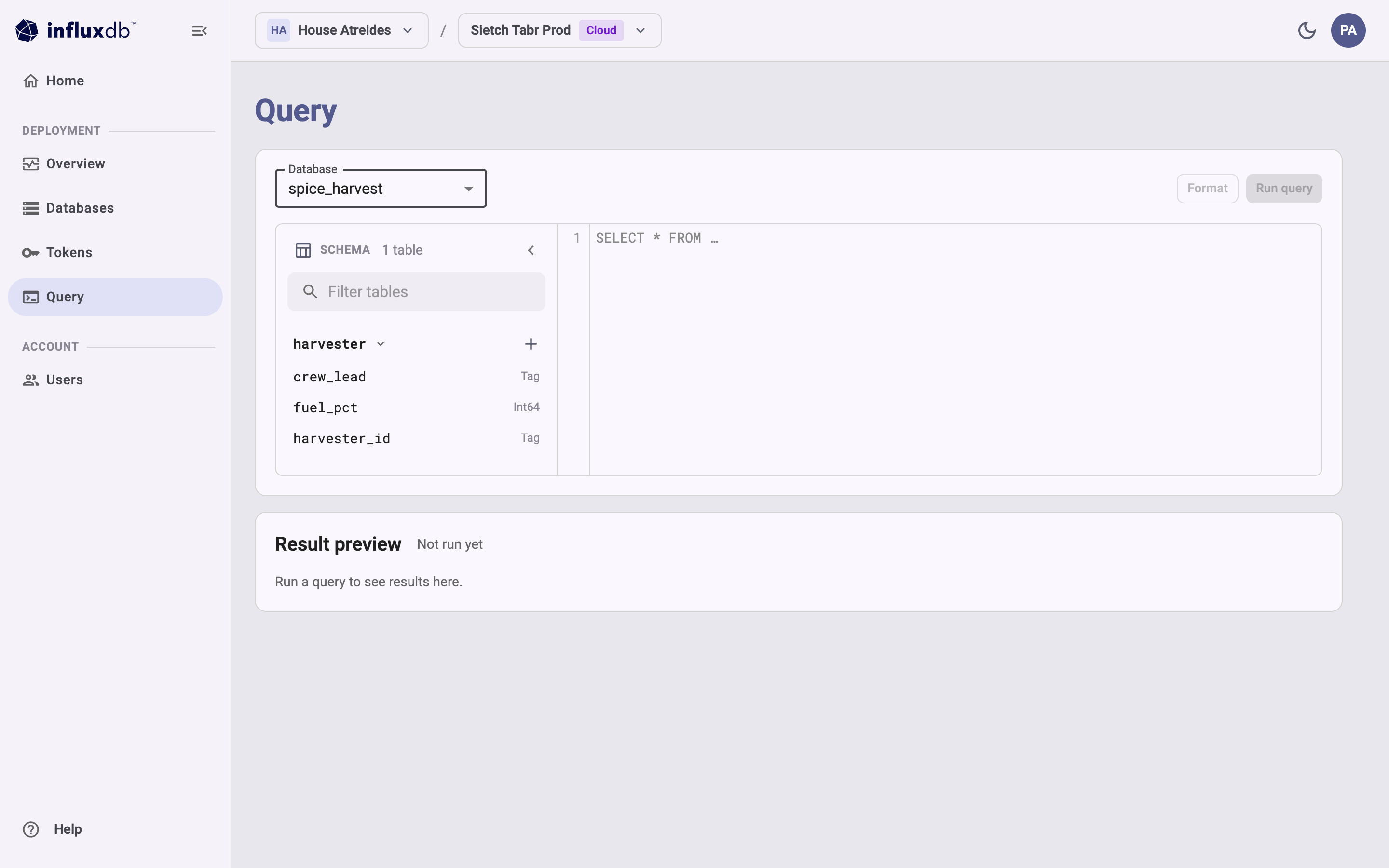 ## Run a query
1. In the **Database** list, select the database to query.
2. Enter a SQL query in the editor.
For example:
```
SELECT
date_bin(INTERVAL '1 hour', time) AS hour,
sector,
round(sum(spice_kg), 1) AS spice_kg,
round(avg(melange_purity), 3) AS purity
FROM harvester
WHERE time >= now() - INTERVAL '6 hours'
GROUP BY 1, 2
ORDER BY 1 DESC, 2
```
3. *(Optional)* Select **Format** to reformat the query.
4. Select **Run query** or press `Ctrl+Enter`.
**Result preview** shows the number of rows returned and the round-trip time
for the query, followed by a table of results.
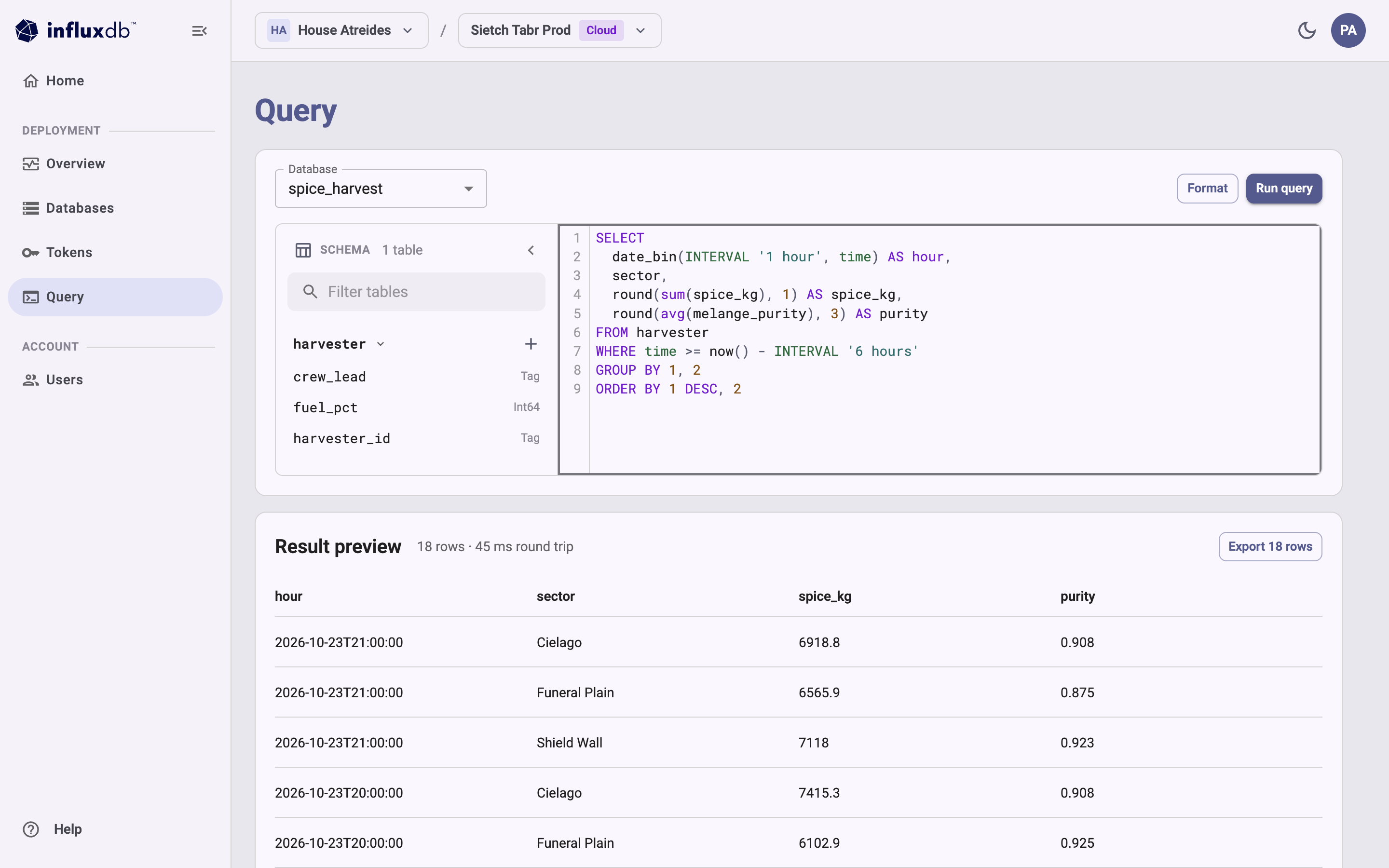 For SQL syntax and functions, see the [SQL reference](/influxdb3/cloud/reference/sql/).
## Export results
To save the results, select **Export *N* rows** in the **Result preview**section.
The Admin UI downloads the results as a CSV file.
## Query limits and access
* The Admin UI returns at most 10,000 rows.
If a query returns more, the page shows
“Showing the first 10,000 rows. Add a LIMIT or narrow the query to see the rest.”
* The databases in the **Database** list are the databases your account can access.
If you don’t have access to any databases on the instance, the page shows
“You do not have access to any databases on this instance.”
Ask an account administrator for access.
Roles that can only describe databases, such as the Auditor role,
can’t read data from them.
## Other ways to query
To query programmatically or retrieve more than 10,000 rows, use one of the following:
* [`influxdb3` CLI](/influxdb3/cloud/query-data/execute-queries/influxdb3-cli/)
* [InfluxDB v3 HTTP API](/influxdb3/cloud/query-data/execute-queries/influxdb-v3-api/)
* [InfluxDB v1 HTTP API](/influxdb3/cloud/query-data/execute-queries/influxdb-v1-api/)
#### Related
* [SQL reference documentation](/influxdb3/cloud/reference/sql/)
* [Use the influxdb3 CLI to query data](/influxdb3/cloud/query-data/execute-queries/influxdb3-cli/)
* [Use the InfluxDB v3 HTTP query API](/influxdb3/cloud/query-data/execute-queries/influxdb-v3-api/)
---
# Use the InfluxDB v1 HTTP query API and InfluxQL to query data
Source: https://docs.influxdata.com/influxdb3/cloud/query-data/execute-queries/influxdb-v1-api/
* InfluxQL
Use the InfluxDB v1 HTTP query API to query data in InfluxDB 3 Cloud
with InfluxQL.
The examples below use **cURL** to send HTTP requests to the InfluxDB v1 HTTP API,
but you can use any HTTP client.
> [!Warning]
> #### InfluxQL feature support
>
> InfluxQL is being rearchitected to work with the InfluxDB 3 storage engine.
> This process is ongoing and some InfluxQL features are still being implemented.
> For information about the current implementation status of InfluxQL features,
> see [InfluxQL feature support](/influxdb3/cloud/reference/influxql/feature-support/).
Use the v1 `/query` endpoint and the `GET` request method to query data with InfluxQL:
```
GET https://instance-id.enterprise.influxdb.io/query
```
## Authenticate API requests
InfluxDB 3 Cloud requires each API request to be authenticated with a[token](/influxdb3/cloud/admin/tokens/).
With InfluxDB v1-compatible endpoints in InfluxDB 3, you can use database tokens in InfluxDB 1.x username and password
schemes, in the InfluxDB v2 `Authorization: Token` scheme, or in the OAuth `Authorization: Bearer` scheme.
* [Authenticate with a username and password scheme](#authenticate-with-a-username-and-password-scheme)
* [Authenticate with a token scheme](#authenticate-with-a-token-scheme)
### Authenticate with a username and password scheme
With InfluxDB v1-compatible endpoints in InfluxDB 3, you can use the InfluxDB 1.x convention of
username and password to authenticate database reads by passing a [token](/influxdb3/cloud/admin/tokens/)
as the `password` credential.
When authenticating requests to the v1 API `/query` endpoint, InfluxDB 3 Cloud checks that the `password` (`p`) value is an authorized [token](/influxdb3/cloud/admin/tokens/)
.
InfluxDB 3 Cloud ignores the `username` (`u`) parameter in the request.
Use one of the following authentication schemes with clients that support Basic authentication or query parameters:
* [Basic authentication](#basic-authentication)
* [Query string authentication](#query-string-authentication)
#### Basic authentication
Use the `Authorization` header with the `Basic` scheme to authenticate v1 API `/query` requests.
When authenticating requests, InfluxDB 3 Cloud checks that the `password` part of the decoded credential is an authorized [token](/influxdb3/cloud/admin/tokens/)
.
InfluxDB 3 Cloud ignores the `username` part of the decoded credential.
##### Syntax
```http
Authorization: Basic
```
Encode the `[USERNAME]:DATABASE_TOKEN` credential using base64 encoding, and then append the encoded string to the `Authorization: Basic` header.
##### Example
The following example shows how to use cURL with the `Basic` authentication scheme:
```sh
curl --get "https://instance-id.enterprise.influxdb.io/query" \
--user "any:DATABASE_TOKEN" \
--data-urlencode "db=DATABASE_NAME" \
--data-urlencode "q=SELECT * FROM home"
```
#### Query string authentication
In the URL, pass the `p` query parameter to authenticate `/query` requests.
When authenticating requests, InfluxDB 3 Cloud checks that the `p` (*password*) value is an authorized [token](/influxdb3/cloud/admin/tokens/)
and ignores the `u` (*username*) parameter.
##### Syntax
```sh
https://instance-id.enterprise.influxdb.io/query/?u=any&p=DATABASE_TOKEN
```
##### Example
The following example shows how to use cURL with query string authentication:
```sh
curl --get "https://instance-id.enterprise.influxdb.io/query" \
--data-urlencode "p=DATABASE_TOKEN" \
--data-urlencode "db=DATABASE_NAME" \
--data-urlencode "q=SELECT * FROM home"
```
### Authenticate with a token scheme
Use the `Authorization: Bearer` or the `Authorization: Token` scheme to pass a [token](/influxdb3/cloud/admin/tokens/)
for authenticating
v1 API `/query` requests.
`Bearer` and `Token` are equivalent in InfluxDB 3 Cloud.
The `Token` scheme is used in the InfluxDB 2.x API.`Bearer` is defined by the [OAuth 2.0 Framework](https://www.rfc-editor.org/rfc/rfc6750#page-14).
Support for one or the other may vary across InfluxDB API clients.
#### Syntax
```http
Authorization: Bearer DATABASE_TOKEN
```
```http
Authorization: Token DATABASE_TOKEN
```
#### Examples
Use `Bearer` to authenticate a query request:
```sh
curl --get "https://instance-id.enterprise.influxdb.io/query" \
--header "Authorization: Bearer DATABASE_TOKEN" \
--data-urlencode "db=DATABASE_NAME" \
--data-urlencode "q=SELECT * FROM home"
```
Use `Token` to authenticate a query request:
```sh
curl --get "https://instance-id.enterprise.influxdb.io/query" \
--header "Authorization: Token DATABASE_TOKEN" \
--data-urlencode "db=DATABASE_NAME" \
--data-urlencode "q=SELECT * FROM home"
```
## Query parameters
For InfluxDB 3 Cloud v1 API `/query` requests, set parameters as listed in the following table:
| Parameter | Allowed in |Ignored| Value |
|--------------|------------|-------|----------------------------------------------------------------------------------------------------------------------------------------------------------------------------|
| `chunked` |Query string|Honored|Returns points in streamed batches instead of in a single response. If set to `true`, InfluxDB chunks responses by series or by every 10,000 points, whichever occurs first.|
|`chunked_size`|Query string|Honored| **Requires `chunked` to be set to `true`**. If set to a specific value, InfluxDB chunks responses by series or by this number of points. |
| `db` \* |Query string|Honored| Database name |
| `epoch` |Query string|Honored| [Timestamp precision](#timestamp-precision) |
| `p` |Query string|Honored| For [query string authentication](#query-string-authentication), a [token](/influxdb3/cloud/admin/tokens/) |
`pretty` | Query string | Ignored | N/A`q` \* | Query string | Honored | URL-encoded InfluxQL query`rp` | Query string | Honored, but discouraged | Retention policy`u` | Query string | Ignored | For [query string authentication](#query-string-authentication), any arbitrary string`Authorization` | Header | Honored | `Bearer DATABASE_TOKEN`, `Token DATABASE_TOKEN`, or `Basic `
\* = Required
### Timestamp precision
Use one of the following values for timestamp precision:
* `ns`: nanoseconds
* `us`: microseconds
* `ms`: milliseconds
* `s`: seconds
* `m`: minutes
* `h`: hours
Replace the following configuration values:
* `DATABASE_NAME`:
the name of the [database](/influxdb3/cloud/admin/databases/) to query
* `DATABASE_TOKEN`:
your InfluxDB 3 Cloud [token](/influxdb3/cloud/admin/tokens/)
## Return results as JSON or CSV
By default, the `/query` endpoint returns results in **JSON**, but it can also
return results in **CSV**. To return results as CSV, include the `Accept` header
with the `application/csv` or `text/csv` MIME type:
```sh
curl --get https://instance-id.enterprise.influxdb.io/query \
--header "Authorization: Bearer DATABASE_TOKEN" \
--header "Accept: application/csv" \
--data-urlencode "db=DATABASE_NAME" \
--data-urlencode "q=SELECT * FROM home"
```
#### Related
| Parameter | Allowed in | Ignored | Value |
| --- | --- | --- | --- |
| Parameter | Allowed in | Ignored | Value |
| chunked | Query string | Honored | Returns points in streamed batches instead of in a single response. If set to true , InfluxDB chunks responses by series or by every 10,000 points, whichever occurs first. |
| chunked_size | Query string | Honored | Requires chunked to be set to true . If set to a specific value, InfluxDB chunks responses by series or by this number of points. |
| db * | Query string | Honored | Database name |
| epoch | Query string | Honored | Timestamp precision |
| p | Query string | Honored | For query string authentication , a token |
---
# Use the InfluxDB v3 HTTP query API
Source: https://docs.influxdata.com/influxdb3/cloud/query-data/execute-queries/influxdb-v3-api/
* InfluxQL
* SQL
Use the InfluxDB 3 HTTP query API to query data in InfluxDB 3 Cloud.
The API provides `GET` and `POST` endpoints for querying data and system information using SQL or InfluxQL.
> [!Note]
> #### Query using gRPC or HTTP
>
> InfluxDB 3 supports HTTP and Flight (gRPC) query APIs.
> For more information about using Flight, see the [InfluxDB 3 (`influxdb3-`) client libraries](https://github.com/InfluxCommunity/).
The examples below use **cURL** to send HTTP requests to the InfluxDB 3 HTTP API,
but you can use any HTTP client.
* [Query using SQL and the HTTP API](#query-using-sql-and-the-http-api)
* [Query using InfluxQL and the HTTP API](#query-using-influxql-and-the-http-api)
## Query using SQL and the HTTP API
Use the `/api/v3/query_sql` endpoint with the `GET` or `POST` request methods.
* `GET`: Pass parameters in the URL query string (for simple queries)
* `POST`: Pass parameters in a JSON object (for complex queries and readability in your code)
Include the following parameters:
* `q`: *(Required)* The **SQL** query to execute.
* `db`: *(Required)* The database to execute the query against.
* `params`: A JSON object containing parameters to be used in a *parameterized query*.
* `format`: The format of the response (`json`, `jsonl`, `csv`, `pretty`, or `parquet`).
JSONL (`jsonl`) is preferred because it streams results back to the client.`pretty` is for human-readable output. Default is `json`.
### Example: Query passing URL-encoded parameters
The following example sends an HTTP `GET` request with a URL-encoded SQL query:
```bash
curl "https://instance-id.enterprise.influxdb.io/api/v3/query_sql?db=servers&q=select+*+from+cpu+limit+5" \
--header "Authorization: Bearer AUTH_TOKEN"
```
### Example: Query passing JSON parameters
The following example sends an HTTP `POST` request with parameters in a JSON payload:
```
curl https://instance-id.enterprise.influxdb.io/api/v3/query_sql \
--header "Authorization: Bearer AUTH_TOKEN"
--json '{"db": "server", "q": "select * from cpu limit 5"}'
```
### Query system information
Use the HTTP API `/api/v3/query_sql` endpoint to retrieve system information
about your database server and table schemas in InfluxDB 3 Cloud.
#### Examples
> [!Note]
> #### system\_ sample data
>
> In examples, tables with `"table_name":"system_` are user-created tables for CPU, memory, disk,
> network, and other resource statistics collected and written
> by the user–for example, using the `psutil` Python library or[Telegraf](/telegraf/v1/get-started/) to collect
> and write system metrics to an InfluxDB 3 database.
##### Show tables
The following example sends a `GET` request that executes a `show tables` query
to retrieve all user-created
tables (`"table_schema":"iox"`), system tables, and information schema tables
for a database:
```bash
curl "https://instance-id.enterprise.influxdb.io/api/v3/query_sql?db=mydb&format=jsonl&q=show%20tables" \
--header "Authorization: Bearer AUTH_TOKEN"
```
The response body contains the following JSONL:
```jsonl
{"table_catalog":"public","table_schema":"iox","table_name":"system_cpu","table_type":"BASE TABLE"}
{"table_catalog":"public","table_schema":"iox","table_name":"system_cpu_cores","table_type":"BASE TABLE"}
{"table_catalog":"public","table_schema":"iox","table_name":"system_memory","table_type":"BASE TABLE"}
{"table_catalog":"public","table_schema":"iox","table_name":"system_swap","table_type":"BASE TABLE"}
{"table_catalog":"public","table_schema":"iox","table_name":"system_memory_faults","table_type":"BASE TABLE"}
{"table_catalog":"public","table_schema":"iox","table_name":"system_disk_usage","table_type":"BASE TABLE"}
{"table_catalog":"public","table_schema":"iox","table_name":"system_disk_io","table_type":"BASE TABLE"}
{"table_catalog":"public","table_schema":"iox","table_name":"system_disk_performance","table_type":"BASE TABLE"}
{"table_catalog":"public","table_schema":"iox","table_name":"system_network","table_type":"BASE TABLE"}
{"table_catalog":"public","table_schema":"system","table_name":"distinct_caches","table_type":"BASE TABLE"}
{"table_catalog":"public","table_schema":"system","table_name":"last_caches","table_type":"BASE TABLE"}
{"table_catalog":"public","table_schema":"system","table_name":"parquet_files","table_type":"BASE TABLE"}
{"table_catalog":"public","table_schema":"system","table_name":"processing_engine_plugins","table_type":"BASE TABLE"}
{"table_catalog":"public","table_schema":"system","table_name":"processing_engine_triggers","table_type":"BASE TABLE"}
{"table_catalog":"public","table_schema":"system","table_name":"queries","table_type":"BASE TABLE"}
{"table_catalog":"public","table_schema":"information_schema","table_name":"tables","table_type":"VIEW"}
{"table_catalog":"public","table_schema":"information_schema","table_name":"views","table_type":"VIEW"}
{"table_catalog":"public","table_schema":"information_schema","table_name":"columns","table_type":"VIEW"}
{"table_catalog":"public","table_schema":"information_schema","table_name":"df_settings","table_type":"VIEW"}
{"table_catalog":"public","table_schema":"information_schema","table_name":"schemata","table_type":"VIEW"}
```
A table has one of the following `table_schema` values:
* `iox`: tables created by the user of the database.
* `system`: tables used by the system to show information about the running database server.
Some of these tables show stored information such as configurations,
while others, such as the `queries` table, hold ephemeral state in memory.
* `information_schema`: views that show schema information for tables in the database.
#### View column information for a table
The following query sends a `POST` request that executes an SQL query to
retrieve information about columns in the sample `system_swap` table schema:
*Note: when you send a query in JSON, you must escape single quotes
that surround field names.*
```bash
curl "https://instance-id.enterprise.influxdb.io/api/v3/query_sql" \
--header "Authorization: Bearer AUTH_TOKEN" \
--json '{
"db": "mydb",
"q": "SELECT * FROM information_schema.columns WHERE table_schema = '"'iox'"' AND table_name = '"'system_swap'"'",
"format": "jsonl"
}'
```
The output is similar to the following:
```jsonl
{"table_catalog":"public","table_schema":"iox","table_name":"system_swap","column_name":"free","ordinal_position":0,"is_nullable":"YES","data_type":"UInt64"}
{"table_catalog":"public","table_schema":"iox","table_name":"system_swap","column_name":"host","ordinal_position":1,"is_nullable":"NO","data_type":"Dictionary(Int32, Utf8)"}
{"table_catalog":"public","table_schema":"iox","table_name":"system_swap","column_name":"percent","ordinal_position":2,"is_nullable":"YES","data_type":"Float64","numeric_precision":24,"numeric_precision_radix":2}
{"table_catalog":"public","table_schema":"iox","table_name":"system_swap","column_name":"sin","ordinal_position":3,"is_nullable":"YES","data_type":"UInt64"}
{"table_catalog":"public","table_schema":"iox","table_name":"system_swap","column_name":"sout","ordinal_position":4,"is_nullable":"YES","data_type":"UInt64"}
{"table_catalog":"public","table_schema":"iox","table_name":"system_swap","column_name":"time","ordinal_position":5,"is_nullable":"NO","data_type":"Timestamp(Nanosecond, None)"}
{"table_catalog":"public","table_schema":"iox","table_name":"system_swap","column_name":"total","ordinal_position":6,"is_nullable":"YES","data_type":"UInt64"}
{"table_catalog":"public","table_schema":"iox","table_name":"system_swap","column_name":"used","ordinal_position":7,"is_nullable":"YES","data_type":"UInt64"}
```
#### Recently executed queries
To view recently executed queries, query the `queries` system table:
```bash
curl "https://instance-id.enterprise.influxdb.io/api/v3/query_sql" \
--header "Authorization: Bearer AUTH_TOKEN" \
--json '{
"db": "mydb",
"q": "SELECT * FROM system.queries LIMIT 2",
"format": "jsonl"
}'
```
The output is similar to the following:
```jsonl
{"id":"cdd63409-1822-4e65-8e3a-d274d553dbb3","phase":"success","issue_time":"2025-01-20T17:01:40.690067","query_type":"sql","query_text":"show tables","partitions":0,"parquet_files":0,"plan_duration":"PT0.032689S","permit_duration":"PT0.000202S","execute_duration":"PT0.000223S","end2end_duration":"PT0.033115S","compute_duration":"P0D","max_memory":0,"success":true,"running":false,"cancelled":false}
{"id":"47f8d312-5e75-4db2-837a-6fcf94c09927","phase":"success","issue_time":"2025-01-20T17:02:32.627782","query_type":"sql","query_text":"show tables","partitions":0,"parquet_files":0,"plan_duration":"PT0.000583S","permit_duration":"PT0.000015S","execute_duration":"PT0.000063S","end2end_duration":"PT0.000662S","compute_duration":"P0D","max_memory":0,"success":true,"running":false,"cancelled":false}
```
## Query using InfluxQL and the HTTP API
Use the `/api/v3/query_influxql` endpoint with the `GET` or `POST` request methods.
* `GET`: Pass parameters in the URL query string (for simple queries)
* `POST`: Pass parameters in a JSON object (for complex queries and readability in your code)
Include the following parameters:
* `q`: *(Required)* The **InfluxQL** query to execute.
* `db`: *(Required)* The database to execute the query against.
* `params`: A JSON object containing parameters to be used in a *parameterized query*.
* `format`: The format of the response (`json`, `jsonl`, `csv`, `pretty`, or `parquet`).
JSONL (`jsonl`) is preferred because it streams results back to the client.`pretty` is for human-readable output. Default is `json`.
### Example: Query passing URL-encoded parameters
The following example sends an HTTP `GET` request with a URL-encoded InfluxQL query:
```bash
curl "https://instance-id.enterprise.influxdb.io/api/v3/query_influxql?db=servers&q=select+*+from+cpu+limit+5" \
--header "Authorization: Bearer AUTH_TOKEN"
```
### Example: Query passing JSON parameters
The following example sends an HTTP `POST` request with parameters in a JSON payload:
```
curl https://instance-id.enterprise.influxdb.io/api/v3/query_influxql \
--header "Authorization: Bearer AUTH_TOKEN" \
--json '{"db": "server", "q": "select * from cpu limit 5"}'
```
#### Related
---
# Use the influxdb3 CLI to query data
Source: https://docs.influxdata.com/influxdb3/cloud/query-data/execute-queries/influxdb3-cli/
Use the [`influxdb3 query` command](/influxdb3/cloud/reference/cli/influxdb3/query/)to query data in InfluxDB 3 Cloud with SQL or InfluxQL.
Provide the following with your command:
* **Authorization token**: Your InfluxDB 3 Cloud [admin token](/influxdb3/cloud/admin/tokens/admin)
with read permissions on the database.
Provide this using one of the following:
* `--token` command option
* `INFLUXDB3_AUTH_TOKEN` environment variable
* **Database name**: The name of the database to query.
Provide this using one of the following:
* `-d`, `--database` command option
* `INFLUXDB3_DATABASE_NAME` environment variable
* **Query language** *(Optional)*: The query language of the query.
Use the `-l`, `--language` option to specify one of the following query languages:
* `sql` *(default)*
* `influxql`
* **Query**: SQL or InfluxQL query to execute. Provide the query in one of the
following ways:
* a string
* the `--file` option and the path to a file that contains the query
* from stdin
[SQL](#sql)[InfluxQL](#influxql)
[string](#string)[file](#file)[stdin](#stdin)
```bash
influxdb3 query \
--token AUTH_TOKEN \
--database DATABASE_NAME \
"SELECT * FROM home"
```
```bash
influxdb3 query \
--token AUTH_TOKEN \
--database DATABASE_NAME \
--file ./query.sql
```
```bash
cat ./query.sql | influxdb3 query --token AUTH_TOKEN --database DATABASE_NAME
```
[string](#string-2)[file](#file-2)[stdin](#stdin-2)
```bash
influxdb3 query \
--token AUTH_TOKEN \
--language influxql \
--database DATABASE_NAME \
"SELECT * FROM home"
```
```bash
influxdb3 query \
--token AUTH_TOKEN \
--language influxql \
--file ./query.influxql
```
```bash
cat ./query.influxql | influxdb3 query \
--token AUTH_TOKEN \
--language influxql \
--database DATABASE_NAME
```
In the examples above and below, replace the following:
* `DATABASE_NAME`:
Name of the database to query
## Output format
The `influxdb3 query` command supports the following output formats:
* `pretty` *(default)*
* `json`
* `jsonl`
* `csv`
* `parquet` *(must [output to a file](#output-query-results-to-a-parquet-file))*
Use the `--format` flag to specify the output format:
```sh
influxdb3 query \
--token AUTH_TOKEN \
--database DATABASE_NAME \
--format json \
"SELECT * FROM home WHERE time >= '2022-01-01T08:00:00Z' LIMIT 5"
```
[](#view-example-pretty-formatted-results)
View example pretty-formatted results
```
+----+------+-------------+------+---------------------+
| co | hum | room | temp | time |
+----+------+-------------+------+---------------------+
| 0 | 35.9 | Living Room | 21.1 | 2022-01-01T08:00:00 |
| 0 | 35.9 | Kitchen | 21.0 | 2022-01-01T08:00:00 |
| 0 | 35.9 | Living Room | 21.4 | 2022-01-01T09:00:00 |
| 0 | 36.2 | Kitchen | 23.0 | 2022-01-01T09:00:00 |
| 0 | 36.0 | Living Room | 21.8 | 2022-01-01T10:00:00 |
+----+------+-------------+------+---------------------+
```
[](#view-example-json-formatted-results)
View example JSON-formatted results
```json
[{"co":0,"hum":35.9,"room":"Living Room","temp":21.1,"time":"2022-01-01T08:00:00"},{"co":0,"hum":35.9,"room":"Kitchen","temp":21.0,"time":"2022-01-01T08:00:00"},{"co":0,"hum":35.9,"room":"Living Room","temp":21.4,"time":"2022-01-01T09:00:00"},{"co":0,"hum":36.2,"room":"Kitchen","temp":23.0,"time":"2022-01-01T09:00:00"},{"co":0,"hum":36.0,"room":"Living Room","temp":21.8,"time":"2022-01-01T10:00:00"}]
```
[](#view-example-json-line-formatted-results)
View example JSON-line-formatted results
```jsonl
{"co":0,"hum":35.9,"room":"Living Room","temp":21.1,"time":"2022-01-01T08:00:00"}
{"co":0,"hum":35.9,"room":"Kitchen","temp":21.0,"time":"2022-01-01T08:00:00"}
{"co":0,"hum":35.9,"room":"Living Room","temp":21.4,"time":"2022-01-01T09:00:00"}
{"co":0,"hum":36.2,"room":"Kitchen","temp":23.0,"time":"2022-01-01T09:00:00"}
{"co":0,"hum":36.0,"room":"Living Room","temp":21.8,"time":"2022-01-01T10:00:00"}
```
[](#view-example-csv-formatted-results)
View example CSV-formatted results
```csv
co,hum,room,temp,time
0,35.9,Living Room,21.1,2022-01-01T08:00:00
0,35.9,Kitchen,21.0,2022-01-01T08:00:00
0,35.9,Living Room,21.4,2022-01-01T09:00:00
0,36.2,Kitchen,23.0,2022-01-01T09:00:00
0,36.0,Living Room,21.8,2022-01-01T10:00:00
```
## Output query results to a Parquet file
To output query results to a Parquet file, provide the following options with
the `influxdb3 query` command:
* `--format`: `parquet`
* `-o`, `--output`: the filepath to the Parquet file to store results in
```sh
influxdb3 query \
--token AUTH_TOKEN \
--database DATABASE_NAME \
--format parquet \
--output path/to/results.parquet \
"SELECT * FROM home WHERE time >= '2022-01-01T08:00:00Z' LIMIT 5"
```
#### Related
* [influxdb3 query](/influxdb3/cloud/reference/cli/influxdb3/query/)
* [SQL reference documentation](/influxdb3/cloud/reference/sql/)
* [InfluxQL reference documentation](/influxdb3/cloud/reference/influxql/)
---
# Query data with InfluxQL
Source: https://docs.influxdata.com/influxdb3/cloud/query-data/influxql/
Learn to query data in InfluxDB 3 Cloud using InfluxQL.
* [Explore your schema with InfluxQL](#explore-your-schema-with-influxql)
* [Perform a basic InfluxQL query](#perform-a-basic-influxql-query)
* [Aggregate data with InfluxQL](#aggregate-data-with-influxql)
* [Troubleshoot InfluxQL errors](#troubleshoot-influxql-errors)
* [Use parameterized queries with InfluxQL](#use-parameterized-queries-with-influxql)
### [Explore your schema with InfluxQL](/influxdb3/cloud/query-data/influxql/explore-schema/)
Use InfluxQL `SHOW` statements to return information about your data schema.
##### List measurements
```sql
SHOW MEASUREMENTS
```
##### List field keys in a measurement
```sql
SHOW FIELD KEYS FROM "measurement"
```
##### List tag keys in a measurement
```sql
SHOW TAG KEYS FROM "measurement"
```
##### List tag values for a specific tag key
```sql
SHOW TAG VALUES FROM "measurement" WITH KEY = "tag-key" WHERE time > now() - 1d
```
[Read more ](/influxdb3/cloud/query-data/influxql/explore-schema/)
### [Perform a basic InfluxQL query](/influxdb3/cloud/query-data/influxql/basic-query/)
A basic InfluxQL query that queries data from InfluxDB most commonly includes `SELECT`, `FROM`, and `WHERE` clauses.
```sql
SELECT temp, room FROM home WHERE time >= now() - 1d
```
[Read more ](/influxdb3/cloud/query-data/influxql/basic-query/)
### [Aggregate data with InfluxQL](/influxdb3/cloud/query-data/influxql/aggregate-select/)
Use InfluxQL aggregate and selector functions to perform aggregate operations on your time series data.
##### Aggregate fields by groups
```sql
SELECT
MEAN(temp) AS mean,
FIRST(hum) as first,
FROM home
GROUP BY tag
```
##### Aggregate by time-based intervals
```sql
SELECT
MEAN(temp),
sum(hum),
FROM home
WHERE time >= now() - 24h
GROUP BY time(1h),room
```
[Read more ](/influxdb3/cloud/query-data/influxql/aggregate-select/)
### [Troubleshoot InfluxQL errors](/influxdb3/cloud/query-data/influxql/troubleshoot/)
Learn how to troubleshoot and fix common InfluxQL errors.
### [Use parameterized queries with InfluxQL](/influxdb3/cloud/query-data/influxql/parameterized-queries/)
Use parameterized queries to prevent injection attacks and make queries more reusable.
```sql
SELECT * FROM home
WHERE time >= $min_time
AND temp >= $min_temp
AND room = $room
```
[Read more ](/influxdb3/cloud/query-data/influxql/parameterized-queries/)
---
# Aggregate data with InfluxQL
Source: https://docs.influxdata.com/influxdb3/cloud/query-data/influxql/aggregate-select/
An InfluxQL query that aggregates data includes the following clauses:
\* Required
* \* `SELECT`: Specify fields and calculations to output from a
measurement or use the wildcard alias (`*`) to select all fields and tags
from a measurement.
* \* `FROM`: Specify the measurement to query data from.
* `WHERE`: Only retrieve data that meets the specified conditions–for example,
time is in a time range, contains specific tag values, or contains a field
value outside specified thresholds.
* `GROUP BY`: Group data by tag values and time intervals.
> [!Note]
> For simplicity, the term *“aggregate”* in this guide refers to applying
> both aggregate and selector functions to a dataset.
Learn how to apply aggregate operations to your queried data:
* [Aggregate and selector functions](#aggregate-and-selector-functions)
* [Aggregate functions](#aggregate-functions)
* [Selector functions](#selector-functions)
* [Example aggregate queries](#example-aggregate-queries)
> [!Note]
> #### InfluxDB v1 to InfluxDB 3 data model
>
> InfluxQL was designed around the InfluxDB v1 data model, but can still be used
> to query data from InfluxDB 3 Cloud. When using the InfluxDB 3 Cloud
> InfluxQL implementation, the data model is different in the following ways:
>
> * an InfluxDB v1 **database and retention policy** combination is combined
> into a single InfluxDB 3 **database** entity.
> * an InfluxDB v1 **measurement** is equivalent to an InfluxDB 3 **table**.
## Aggregate and selector functions
Both aggregate and selector functions return a limited number of rows from each group.
Aggregate functions return a single row, whereas some selector functions let you
specify the number of rows to return from each group.
For example, if you `GROUP BY room` and perform an aggregate operation
in your `SELECT` clause, results include an aggregate value for each unique
value of `room`.
### Aggregate functions
Use **aggregate functions** to aggregate values in a specified field for each
group and return a single row per group containing the aggregate field value.
[View InfluxQL aggregate functions](/influxdb3/cloud/reference/influxql/functions/aggregates/)
##### Basic aggregate query
```sql
SELECT MEAN(co) from home
```
### Selector functions
Use **selector functions** to “select” a value from a specified field.
[View InfluxQL selector functions](/influxdb3/cloud/reference/influxql/functions/selectors/)
##### Basic selector query
```sql
SELECT TOP(co, 3) from home
```
## Example aggregate queries
* [Perform an ungrouped aggregation](#perform-an-ungrouped-aggregation)
* [Group and aggregate data](#group-and-aggregate-data)
* [Downsample data by applying interval-based aggregates](#downsample-data-by-applying-interval-based-aggregates)
> [!Note]
> #### Sample data
>
> The following examples use the [Home sensor data](/influxdb3/cloud/reference/sample-data/#home-sensor-data).
> To run the example queries and return results,[write the sample data](/influxdb3/cloud/reference/sample-data/#write-the-home-sensor-data-to-influxdb)to your InfluxDB 3 Cloud database before running the example queries.
### Perform an ungrouped aggregation
To aggregate *all* queried values in a specified field:
* Use aggregate or selector functions in your `SELECT` statement.
* Do not include a `GROUP BY` clause to leave your data ungrouped.
```sql
SELECT MEAN(co) AS "average co" FROM home
```
[](#view-example-results)
View example results
name: home
|time| average co |
|----|-----------------|
| 0 |5.269230769230769|
### Group and aggregate data
To apply aggregate or selector functions to grouped data:
* Use aggregate or selector functions in your `SELECT` statement.
* Include a `GROUP BY` clause with a comma-delimited list of tags to group by.
Keep the following in mind when using `GROUP BY`:
* `GROUP BY` can use column aliases that are defined in the `SELECT` clause.
```sql
SELECT
MEAN(temp) AS "average temp"
FROM home
GROUP BY room
```
[](#view-example-results)
View example results
name: home
tags: room=Kitchen
|time| average temp |
|----|------------------|
| 0 |22.623076923076926|
name: home
tags: room=Living Room
|time| average temp |
|----|-----------------|
| 0 |22.16923076923077|
#### Downsample data by applying interval-based aggregates
A common use case when querying time series is downsampling data by applying
aggregates to time-based groups. To group and aggregate data into time-based
groups:
* In your `SELECT` clause, apply [aggregate](/influxdb3/cloud/reference/influxql/functions/aggregates/)or [selector](/influxdb3/cloud/reference/influxql/functions/selectors/)functions to queried fields.
* In your `WHERE` clause, include time bounds for the query.
Interval-based aggregates produce a row for each specified time interval.
If no time bounds are specified in the `WHERE` clause, the query uses the
default time range (1970-01-01T00:00:00Z to now) and returns a row for each
interval in that time range.
* In your `GROUP BY` clause:
* Use the [`time()` function](/influxdb3/cloud/reference/influxql/functions/date-time/#time)to specify the time interval to group by.
* *Optional*: Specify other tags to group by.
The following example retrieves unique combinations of time intervals and rooms with their minimum, maximum, and average temperatures.
```sql
SELECT
MAX(temp) AS "max temp",
MIN(temp) AS "min temp",
MEAN(temp) AS "average temp"
FROM home
WHERE
time >= '2022-01-01T08:00:00Z'
AND time < '2022-01-01T20:00:00Z'
GROUP BY time(2h), room
```
[](#view-example-results-1)
View example results
name: home
tags: room=Kitchen
| time |max temp|min temp| average temp |
|--------------------|--------|--------|------------------|
|2022-01-01T08:00:00Z| 23 | 21 | 22 |
|2022-01-01T10:00:00Z| 22.7 | 22.4 |22.549999999999997|
|2022-01-01T12:00:00Z| 22.8 | 22.5 | 22.65 |
|2022-01-01T14:00:00Z| 22.8 | 22.7 | 22.75 |
|2022-01-01T16:00:00Z| 22.7 | 22.4 |22.549999999999997|
|2022-01-01T18:00:00Z| 23.3 | 23.1 |23.200000000000003|
|2022-01-01T20:00:00Z| 22.7 | 22.7 | 22.7 |
name: home
tags: room=Living Room
| time |max temp|min temp| average temp |
|--------------------|--------|--------|------------------|
|2022-01-01T08:00:00Z| 21.4 | 21.1 | 21.25 |
|2022-01-01T10:00:00Z| 22.2 | 21.8 | 22 |
|2022-01-01T12:00:00Z| 22.4 | 22.2 |22.299999999999997|
|2022-01-01T14:00:00Z| 22.3 | 22.3 | 22.3 |
|2022-01-01T16:00:00Z| 22.6 | 22.4 | 22.5 |
|2022-01-01T18:00:00Z| 22.8 | 22.5 | 22.65 |
|2022-01-01T20:00:00Z| 22.2 | 22.2 | 22.2 |
#### Related
* [InfluxQL aggregate functions](/influxdb3/cloud/reference/influxql/functions/aggregates/)
* [InfluxQL selector functions](/influxdb3/cloud/reference/influxql/functions/selectors/)
| time | average co |
| --- | --- |
| time | average co |
| 0 | 5.269230769230769 |
| time | average temp |
| --- | --- |
| time | average temp |
| 0 | 22.623076923076926 |
| time | average temp |
| --- | --- |
| time | average temp |
| 0 | 22.16923076923077 |
| time | max temp | min temp | average temp |
| --- | --- | --- | --- |
| time | max temp | min temp | average temp |
| 2022-01-01T08:00:00Z | 23 | 21 | 22 |
| 2022-01-01T10:00:00Z | 22.7 | 22.4 | 22.549999999999997 |
| 2022-01-01T12:00:00Z | 22.8 | 22.5 | 22.65 |
| 2022-01-01T14:00:00Z | 22.8 | 22.7 | 22.75 |
| 2022-01-01T16:00:00Z | 22.7 | 22.4 | 22.549999999999997 |
| 2022-01-01T18:00:00Z | 23.3 | 23.1 | 23.200000000000003 |
| 2022-01-01T20:00:00Z | 22.7 | 22.7 | 22.7 |
| time | max temp | min temp | average temp |
| --- | --- | --- | --- |
| time | max temp | min temp | average temp |
| 2022-01-01T08:00:00Z | 21.4 | 21.1 | 21.25 |
| 2022-01-01T10:00:00Z | 22.2 | 21.8 | 22 |
| 2022-01-01T12:00:00Z | 22.4 | 22.2 | 22.299999999999997 |
| 2022-01-01T14:00:00Z | 22.3 | 22.3 | 22.3 |
| 2022-01-01T16:00:00Z | 22.6 | 22.4 | 22.5 |
| 2022-01-01T18:00:00Z | 22.8 | 22.5 | 22.65 |
| 2022-01-01T20:00:00Z | 22.2 | 22.2 | 22.2 |
---
# Perform a basic InfluxQL query
Source: https://docs.influxdata.com/influxdb3/cloud/query-data/influxql/basic-query/
InfluxQL (Influx Query Language) is an SQL-like query language used to interact
with InfluxDB and work with times series data.
> [!Note]
> #### InfluxDB v1 to InfluxDB 3 data model
>
> InfluxQL was designed around the InfluxDB v1 data model, but can still be used
> to query data from InfluxDB 3 Cloud. When using the InfluxDB 3 Cloud
> InfluxQL implementation, the data model is different in the following ways:
>
> * an InfluxDB v1 **database and retention policy** combination is combined
> into a single InfluxDB 3 **database** entity.
> * an InfluxDB v1 **measurement** is equivalent to an InfluxDB 3 **table**.
A basic InfluxQL query that queries data from InfluxDB most commonly includes the
following clauses:
\* Required
* \* `SELECT`: Specify fields, tags, and calculations to return
from a [table](/influxdb3/cloud/reference/glossary/#table) or use the
wildcard alias (`*`) to select all fields and tags from a table. It requires
at least one[field key](/influxdb3/cloud/reference/glossary/#field-key) or the
wildcard alias (`*`). For more information, see[Notable SELECT statement behaviors](/influxdb3/cloud/reference/influxql/select/#notable-select-statement-behaviors).
* \* `FROM`: Specify the[table](/influxdb3/cloud/reference/glossary/#table) to query from.
It requires one or more comma-delimited[measurement expressions](/influxdb3/cloud/reference/influxql/select/#measurement_expression).
* `WHERE`: Filter data based on[field values](/influxdb3/cloud/reference/glossary/#field),[tag values](/influxdb3/cloud/reference/glossary/#tag), or[timestamps](/influxdb3/cloud/reference/glossary/#timestamp). Only
return data that meets the specified conditions–for example, falls within a
time range, contains specific tag values, or contains a field value outside a
specified range.
```sql
SELECT
temp,
hum,
room
FROM home
WHERE
time >= '2022-01-01T08:00:00Z'
AND time <= '2022-01-01T20:00:00Z'
```
## Result set
If at least one row satisfies the query, InfluxDB 3 Cloud returns row data
in the query result set.
If a query uses a `GROUP BY` clause, the result set
includes the following:
* Columns listed in the query’s `SELECT` clause
* A `time` column that contains the timestamp for the record or the group
* An `iox::measurement` column that contains the record’s[table](/influxdb3/cloud/reference/glossary/#table) name
* Columns listed in the query’s `GROUP BY` clause; each row in the result set
contains the values used for grouping
### GROUP BY result columns
If a query uses `GROUP BY` and the `WHERE` clause doesn’t filter by time, then
groups are based on the[default time range](/influxdb3/cloud/reference/influxql/group-by/#default-time-range).
## Basic query examples
* [Query data within time boundaries](#query-data-within-time-boundaries)
* [Query data without time boundaries](#query-data-without-time-boundaries)
* [Query specific fields and tags](#query-specific-fields-and-tags)
* [Query fields based on tag values](#query-fields-based-on-tag-values)
* [Query points based on field values](#query-points-based-on-field-values)
* [Alias queried fields and tags](#alias-queried-fields-and-tags)
> [!Note]
> #### Sample data
>
> The following examples use the [Home sensor data](/influxdb3/cloud/reference/sample-data/#home-sensor-data).
> To run the example queries and return results,[write the sample data](/influxdb3/cloud/reference/sample-data/#write-the-home-sensor-data-to-influxdb)to your InfluxDB 3 Cloud database before running the example queries.
### Query data within time boundaries
* Use the `SELECT` clause to specify what tags and fields to return.
Specify at least one field key.
To return all tags and fields, use the wildcard alias (`*`).
* Specify the [table](/influxdb3/cloud/reference/glossary/#table) to
query in the `FROM` clause.
* Specify time boundaries in the `WHERE` clause. Include time-based predicates
that compare the value of the `time` column to a timestamp.
Use the `AND` logical operator to chain multiple predicates together.
```sql
SELECT *
FROM home
WHERE
time >= '2022-01-01T08:00:00Z'
AND time <= '2022-01-01T12:00:00Z'
```
Query time boundaries can be relative or absolute.
[](#query-with-relative-time-boundaries)
Query with relative time boundaries
To query data from relative time boundaries, compare the value of the `time`column to a timestamp calculated by subtracting an interval from a timestamp.
Use `now()` to return the timestamp for the current time (UTC).
##### Query all data from the last month
```sql
SELECT * FROM home WHERE time >= now() - 30d
```
##### Query one day of data from a week ago
```sql
SELECT *
FROM home
WHERE
time >= now() - 7d
AND time <= now() - 6d
```
[](#query-with-absolute-time-boundaries)
Query with absolute time boundaries
To query data from absolute time boundaries, compare the value of the `time`column to a timestamp literal.
Use the `AND` logical operator to chain together
multiple predicates and define both start and stop boundaries for the query.
```sql
SELECT
*
FROM
home
WHERE
time >= '2022-01-01T08:00:00Z'
AND time <= '2022-01-01T20:00:00Z'
```
### Query data without time boundaries
To query data without time boundaries, do not include any time-based predicates
in your `WHERE` clause.
If a time range is not defined in the `WHERE` clause,
the default time range is the Unix epoch (`1970-01-01T00:00:00Z`) to *now*.
> [!Warning]
> Querying data *without time bounds* can return an unexpected amount of data.
> The query may take a long time to complete and results may be truncated.
```sql
SELECT * FROM home
```
### Query specific fields and tags
To query specific fields, include them in the `SELECT` clause.
If querying multiple fields or tags, comma-delimit each.
If a field or tag key includes special characters or spaces or is
case-sensitive, wrap the key in *double-quotes*.
```sql
SELECT time, room, temp, hum FROM home
```
### Query fields based on tag values
* In the `SELECT` clause, include fields you want to query and tags you want to
base conditions on.
* In the `WHERE` clause, include predicates that compare the tag identifier to a
string literal. Use[logical operators](/influxdb3/cloud/reference/influxql/where/#logical-operators)to chain multiple predicates together and apply multiple conditions.
```sql
SELECT * FROM home WHERE room = 'Kitchen'
```
### Query points based on field values
* In the `SELECT` clause, include fields you want to query.
* In the `WHERE` clause, include predicates that compare the field identifier to
a value or expression.
Use[logical operators](/influxdb3/cloud/reference/influxql/where/#logical-operators)(`AND`, `OR`) to chain multiple predicates together and apply multiple
conditions.
```sql
SELECT co, time FROM home WHERE co >= 10 OR co <= -10
```
### Alias queried fields and tags
To alias or rename fields and tags that you query, use the `AS` clause.
After the tag, field, or expression you want to alias, pass `AS` followed by the
alias name as an identifier (wrap in double quotes (`"`) if the alias includes
spaces or special characters)–for example:
```sql
SELECT temp AS temperature, hum AS "humidity (%)" FROM home
```
> [!Note]
> When aliasing columns in **InfluxQL**, use the `AS` clause and an[identifier](/influxdb3/cloud/reference/influxql/#identifiers). When[aliasing columns in **SQL**](/influxdb3/cloud/query-data/sql/basic-query/#alias-queried-fields-and-tags),
> you can use the `AS` clause to define the alias, but it isn’t necessary.
---
# Explore your schema with InfluxQL
Source: https://docs.influxdata.com/influxdb3/cloud/query-data/influxql/explore-schema/
Use InfluxQL `SHOW` statements to return information about your data schema.
> [!Note]
> #### InfluxDB v1 to InfluxDB 3 data model
>
> InfluxQL was designed around the InfluxDB v1 data model, but can still be used
> to query data from InfluxDB 3 Cloud. When using the InfluxDB 3 Cloud
> InfluxQL implementation, the data model is different in the following ways:
>
> * an InfluxDB v1 **database and retention policy** combination is combined
> into a single InfluxDB 3 **database** entity.
> * an InfluxDB v1 **measurement** is equivalent to an InfluxDB 3 **table**.
* [List measurements in a database](#list-measurements-in-a-database)
* [List measurements that contain specific tag key-value pairs](#list-measurements-that-contain-specific-tag-key-value-pairs)
* [List measurements that match a regular expression](#list-measurements-that-match-a-regular-expression)
* [List field keys in a measurement](#list-field-keys-in-a-measurement)
* [List tag keys in a measurement](#list-tag-keys-in-a-measurement)
* [List tag keys in measurements that contain a specific tag key-value pair](#list-tag-keys-in-measurements-that-contain-a-specific-tag-key-value-pair)
* [List tag values for a specific tag key](#list-tag-values-for-a-specific-tag-key)
* [List tag values for multiple tags](#list-tag-values-for-multiple-tags)
* [List tag values for tags that match a regular expression](#list-tag-values-for-tags-that-match-a-regular-expression)
* [List tag values associated with a specific tag key-value pair](#list-tag-values-associated-with-a-specific-tag-key-value-pair)
> [!Note]
> #### Sample data
>
> The following examples use data provided in [sample data sets](/influxdb3/cloud/reference/sample-data/).
> To run the example queries and return identical results, follow the instructions
> provided for each sample data set to write the data to your InfluxDB 3 Cloud
> database.
## List measurements in a database
Use [`SHOW MEASUREMENTS`](/influxdb3/cloud/reference/influxql/show/#show-measurements)to list measurements in your InfluxDB database.
```sql
SHOW MEASUREMENTS
```
[](#view-example-output)
View example output
name: measurements
| name |
|-------------|
| bitcoin |
| home |
|home\_actions|
| numbers |
| weather |
### List measurements that contain specific tag key-value pairs
To return only measurements with specific tag key-value pairs, include a `WHERE`clause with tag key-value pairs to query for.
```sql
SHOW MEASUREMENTS WHERE room = 'Kitchen'
```
[](#view-example-output-1)
View example output
name: measurements
| name |
|-------------|
| home |
|home\_actions|
### List measurements that match a regular expression
To return only measurements with names that match a[regular expression](/influxdb3/cloud/reference/influxql/regular-expressions/),
include a `WITH` clause that compares the `MEASUREMENT` to a regular expression.
```sql
SHOW MEASUREMENTS WITH MEASUREMENT =~ /^home/
```
[](#view-example-output-2)
View example output
name: measurements
| name |
|-------------|
| home |
|home\_actions|
## List field keys in a measurement
Use [`SHOW FIELD KEYS`](/influxdb3/cloud/reference/influxql/show/#show-field-keys)to return all field keys in a measurement.
Include a `FROM` clause to specify the measurement.
If no measurement is specified, the query returns all field keys in the database.
```sql
SHOW FIELD KEYS FROM home
```
[](#view-example-output-3)
View example output
name: home
|fieldKey|fieldType|
|--------|---------|
| co | integer |
| hum | float |
| temp | float |
## List tag keys in a measurement
Use [`SHOW TAG KEYS`](/influxdb3/cloud/reference/influxql/show/#show-tag-keys)to return all tag keys in a measurement.
Include a `FROM` clause to specify the measurement.
If no measurement is specified, the query returns all tag keys in the database.
```sql
SHOW TAG KEYS FROM home_actions
```
[](#view-example-output-4)
View example output
name: home\_actions
|tagKey|
|------|
|action|
|level |
| room |
### List tag keys in measurements that contain a specific tag key-value pair
To return all tag keys measurements that contain specific tag key-value pairs,
include a `WHERE` clause with the tag key-value pairs to query for.
```sql
SHOW TAG KEYS WHERE room = 'Kitchen'
```
[](#view-example-output-5)
View example output
name: home
|tagKey|
|------|
| room |
name: home\_actions
|tagKey|
|------|
|action|
|level |
| room |
## List tag values for a specific tag key
Use [`SHOW TAG VALUES`](/influxdb3/cloud/reference/influxql/show/#show-tag-values)to return all values for specific tags in a measurement.
* Include a `FROM` clause to specify one or more measurements to query.
* Use the `WITH` clause to compare `KEY` to tag keys to list the values of.
* Use the `WHERE` clause to restrict the search to a specific time range
(default time range is the last day).
```sql
SHOW TAG VALUES FROM weather WITH KEY = location
```
> [!Note]
> #### Include a FROM clause
>
> We strongly recommend including a `FROM` clause with the `SHOW TAG VALUES`statement that specifies 1-50 tables to query.
> Without a `FROM` clause, the InfluxDB query engine must read data from all
> tables and return unique tag values from each.
>
> Depending on the number of tables in your database and the number of unique tag
> values in each table, excluding a `FROM` clause can result in poor query performance,
> query timeouts, or unnecessary resource allocation that may affect other queries.
[](#view-example-output-5)
View example output
name: weather
| key | value |
|--------|-------------|
|location| Concord |
|location| Hayward |
|location|San Francisco|
### List tag values for multiple tags
To return tag values for multiple specific tag keys, use the `IN` operator in
the `WITH` clause to compare `KEY` to a list of tag keys.
```sql
SHOW TAG VALUES FROM home_actions WITH KEY IN ("level", "action")
```
[](#view-example-output-6)
View example output
name: home\_actions
| key |value|
|------|-----|
|action|alert|
|action|cool |
|level | ok |
|level |warn |
### List tag values for tags that match a regular expression
To return only tag values from tags keys that match a regular expression, use
regular expression comparison operators in your `WITH` clause to compare `KEY`to the regular expression.
```sql
SHOW TAG VALUES FROM home, home_actions WITH KEY =~ /oo/
```
[](#view-example-output-7)
View example output
name: home
|key | value |
|----|-----------|
|room| Kitchen |
|room|Living Room|
name: home\_actions
|key | value |
|----|-----------|
|room| Kitchen |
|room|Living Room|
### List tag values associated with a specific tag key-value pair
To list tag values for tags associated with a specific tag key-value pair:
* Use the `WITH` clause to identify what tag keys to return values for.
* Include a `WHERE` clause that identifies the tag key-value pair to query for.
The following example returns tag values for the `action` and `level` tags for
points where the `room` tag value is `Kitchen`.
```sql
SHOW TAG VALUES FROM home_actions WITH KEY IN ("action", "level") WHERE room = 'Kitchen'
```
[](#view-example-output-8)
View example output
name: home\_actions
| key |value|
|------|-----|
|action|alert|
|action|cool |
|level | ok |
|level |warn |
#### Related
* [InfluxQL SHOW statements](/influxdb3/cloud/reference/influxql/show/)
| name |
| --- |
| name |
| bitcoin |
| home |
| home_actions |
| numbers |
| weather |
| name |
| --- |
| name |
| home |
| home_actions |
| name |
| --- |
| name |
| home |
| home_actions |
| fieldKey | fieldType |
| --- | --- |
| fieldKey | fieldType |
| co | integer |
| hum | float |
| temp | float |
| tagKey |
| --- |
| tagKey |
| action |
| level |
| room |
| tagKey |
| --- |
| tagKey |
| room |
| tagKey |
| --- |
| tagKey |
| action |
| level |
| room |
| key | value |
| --- | --- |
| key | value |
| location | Concord |
| location | Hayward |
| location | San Francisco |
| key | value |
| --- | --- |
| key | value |
| action | alert |
| action | cool |
| level | ok |
| level | warn |
| key | value |
| --- | --- |
| key | value |
| room | Kitchen |
| room | Living Room |
| key | value |
| --- | --- |
| key | value |
| room | Kitchen |
| room | Living Room |
| key | value |
| --- | --- |
| key | value |
| action | alert |
| action | cool |
| level | ok |
| level | warn |
---
# Use parameterized queries with InfluxQL
Source: https://docs.influxdata.com/influxdb3/cloud/query-data/influxql/parameterized-queries/
Parameterized queries in InfluxDB 3 Cloud let you dynamically and safely change values in a query.
If your application code allows user input to customize values or expressions in a query, use a parameterized query to make sure untrusted input is processed strictly as data and not executed as code.
Parameterized queries:
* help prevent injection attacks, which can occur if input is executed as code
* help make queries more reusable
> [!Note]
> #### Prevent injection attacks
>
> For more information on security and query parameterization,
> see the [OWASP SQL Injection Prevention Cheat Sheet](https://cheatsheetseries.owasp.org/cheatsheets/\> SQL\_Injection\_Prevention\_Cheat\_Sheet.html#defense-option-1-prepared-statements-with-parameterized-queries).
In InfluxDB 3, a parameterized query is an InfluxQL or SQL query that contains one or more named parameter placeholders–variables that represent input data.
* [Use parameters in `WHERE` expressions](#use-parameters-in-where-expressions)
* [Parameter data types](#parameter-data-types)
* [Data type examples](#data-type-examples)
* [Time expressions](#time-expressions)
* [Not compatible with parameters](#not-compatible-with-parameters)
* [Parameterize an SQL query](#parameterize-an-sql-query)
* [Execute parameterized InfluxQL queries](#execute-parameterized-influxql-queries)
* [Use InfluxDB Flight RPC clients](#use-influxdb-flight-rpc-clients)
* [Client support for parameterized queries](#client-support-for-parameterized-queries)
* [Not supported](#not-supported)
> [!Note]
> #### Parameters only supported in `WHERE` expressions
>
> InfluxDB 3 supports parameters in `WHERE` clause **predicate expressions**.
> Parameter values must be one of the [allowed parameter data types](#parameter-data-types).
>
> If you use parameters in other expressions or clauses,
> such as function arguments, `SELECT`, or `GROUP BY`, then your query might not work as you expect.
## Use parameters in `WHERE` expressions
You can use parameters in `WHERE` clause **predicate expressions**-–for example, the following query contains a `$temp` parameter:
```sql
SELECT * FROM measurement WHERE temp > $temp
```
When executing a query, you specify parameter name-value pairs.
The value that you assign to a parameter must be one of the [parameter data types](#parameter-data-types).
```go
{"temp": 22.0}
```
The InfluxDB Querier parses the query text with the parameter placeholders, and then generates query plans that replace the placeholders with the values that you provide.
This separation of query structure from input data ensures that input is treated as one of the allowed [data types](#parameter-data-types) and not as executable code.
## Parameter data types
A parameter value can be one of the following data types:
* Null
* Boolean
* Unsigned integer (`u_int64`)
* Integer (`int64`)
* Double (`float64`)
* String
### Data type examples
```js
{
"string": "Living Room",
"double": 3.14,
"unsigned_integer": 1234,
"integer": -1234,
"boolean": false,
"null": Null,
}
```
### Time expressions
To parameterize time bounds, substitute a parameter for a timestamp literal–for example:
```sql
SELECT *
FROM home
WHERE time >= $min_time
```
For the parameter value, specify the timestamp literal as a string–for example:
```go
// Assign a timestamp string literal to the min_time parameter.
parameters := influxdb3.QueryParameters{
"min_time": "2022-01-01 00:00:00.00",
}
```
InfluxDB executes the query as the following:
```sql
SELECT *
FROM home
WHERE time >= '2022-01-01 00:00:00.00'
```
### Not compatible with parameters
If you use parameters for the following, your query might not work as you expect:
* In clauses other than `WHERE`, such as `SELECT` or `GROUP BY`
* As function arguments, such as `avg($temp)`
* In place of identifiers, such as column or table names
* In place of duration literals, such as `time > now() - $min_duration`
## Parameterize an SQL query
> [!Note]
> #### Sample data
>
> The following examples use the [Home sensor sample data](/influxdb3/cloud/reference/sample-data/#home-sensor-data).
> To run the example queries and return results,[write the sample data](/influxdb3/cloud/reference/sample-data/#write-the-home-sensor-data-to-influxdb)to your InfluxDB 3 Cloud database before running the example queries.
To use a parameterized query, do the following:
1. In your query text, use the `$parameter` syntax to reference a parameter name–for example,
the following query contains `$room` and `$min_temp` parameter placeholders:
```
SELECT *
FROM home
WHERE time > now() - 7d
AND temp >= $min_temp
AND room = $room
```
2. Provide a value for each parameter name.
If you don’t assign a value for a parameter, InfluxDB returns an error.
The syntax for providing parameter values depends on the client you use–for example:
[Go](#go)
```
// Define a QueryParameters struct--a map of parameters to input values.
parameters := influxdb3.QueryParameters{
"room": "Kitchen",
"min_temp": 20.0,
}
```
After InfluxDB receives your request and parses the query, it executes the query as
```sql
SELECT *
FROM home
WHERE time > now() - 7d
AND temp >= 20.0
AND room = 'Kitchen'
```
## Execute parameterized InfluxQL queries
> [!Note]
> #### Sample data
>
> The following examples use the [Home sensor sample data](/influxdb3/cloud/reference/sample-data/#home-sensor-data).
> To run the example queries and return results,[write the sample data](/influxdb3/cloud/reference/sample-data/#write-the-home-sensor-data-to-influxdb)to your InfluxDB 3 Cloud database before running the example queries.
### Use InfluxDB Flight RPC clients
Using the InfluxDB 3 native Flight RPC protocol and supported clients, you can send a parameterized query and a list of parameter name-value pairs.
InfluxDB Flight clients that support parameterized queries pass the parameter name-value pairs in a Flight ticket `params` field.
The following examples show how to use client libraries to execute parameterized InfluxQL queries:
[Go](#go-2)
```go
import (
"context"
"fmt"
"io"
"os"
"text/tabwriter"
"time"
"github.com/InfluxCommunity/influxdb3-go/v2/influxdb3"
)
func Query(query string, parameters influxdb3.QueryParameters,
options influxdb3.QueryOptions) error {
url := os.Getenv("INFLUX_HOST")
token := os.Getenv("INFLUX_TOKEN")
database := os.Getenv("INFLUX_DATABASE")
// Instantiate the influxdb3 client.
client, err := influxdb3.New(influxdb3.ClientConfig{
Host: url,
Token: token,
Database: database,
})
if err != nil {
panic(err)
}
// Ensure the client is closed after the Query function finishes.
defer func(client *influxdb3.Client) {
err := client.Close()
if err != nil {
panic(err)
}
}(client)
// Call the client's QueryWithParameters function.
// Provide the query, parameters, and the InfluxQL QueryType option.
iterator, err := client.QueryWithParameters(context.Background(), query,
parameters, influxdb3.WithQueryType(options.QueryType))
// Create a buffer for storing rows as you process them.
w := tabwriter.NewWriter(io.Discard, 4, 4, 1, ' ', 0)
w.Init(os.Stdout, 0, 8, 0, '\t', 0)
fmt.Fprintf(w, "time\troom\tco\thum\ttemp\n")
// Format and write each row to the buffer.
// Process each row as key-value pairs.
for iterator.Next() {
row := iterator.Value()
// Use Go time package to format unix timestamp
// as a time with timezone layout (RFC3339 format)
time := (row["time"].(time.Time)).
Format(time.RFC3339)
fmt.Fprintf(w, "%s\t%s\t%d\t%.1f\t%.1f\n",
time, row["room"], row["co"], row["hum"], row["temp"])
}
w.Flush()
return nil
}
func main() {
// Use the $placeholder syntax in a query to reference parameter placeholders
// for input data.
// The following InfluxQL query contains the placeholders $room and $min_temp.
query := `
SELECT *
FROM home
WHERE time > now() - 7d
AND temp >= $min_temp
AND room = $room`
// Define a QueryParameters struct--a map of placeholder names to input values.
parameters := influxdb3.QueryParameters{
"room": "Kitchen",
"min_temp": 20.0,
}
Query(query, parameters, influxdb3.QueryOptions{
QueryType: influxdb3.InfluxQL,
})
}
```
## Client support for parameterized queries
* Not all [InfluxDB 3 Flight clients](/influxdb3/cloud/reference/client-libraries/v3/) support parameterized queries.
* InfluxDB doesn’t currently support parameterized queries or DataFusion prepared statements for Flight SQL or Flight SQL clients.
* InfluxDB 3 SQL and InfluxQL parameterized queries aren’t supported in InfluxDB v1 and v2 clients.
## Not supported
Currently, parameterized queries in InfluxDB 3 Cloud don’t provide the following:
* support for DataFusion prepared statements
* query caching, optimization, or performance benefits
---
# Troubleshoot InfluxQL errors
Source: https://docs.influxdata.com/influxdb3/cloud/query-data/influxql/troubleshoot/
Learn how to troubleshoot and fix common InfluxQL errors.
> [!Note]
> **Disclaimer:** This document does not contain an exhaustive list of all
> possible InfluxQL errors.
* [error: database name required](#error-database-name-required)
* [error parsing query: found …, expected identifier at …](#error-parsing-query-found--expected-identifier-at-)
* [error parsing query: mixing aggregate and non-aggregate queries is not supported](#error-parsing-query-mixing-aggregate-and-non-aggregate-queries-is-not-supported)
* [invalid operation: time and \*influxql.VarRef are not compatible](#invalid-operation-time-and-influxqlvarref-are-not-compatible)
> [!Note]
> #### InfluxDB v1 to InfluxDB 3 data model
>
> InfluxQL was designed around the InfluxDB v1 data model, but can still be used
> to query data from InfluxDB 3 Cloud. When using the InfluxDB 3 Cloud
> InfluxQL implementation, the data model is different in the following ways:
>
> * an InfluxDB v1 **database and retention policy** combination is combined
> into a single InfluxDB 3 **database** entity.
> * an InfluxDB v1 **measurement** is equivalent to an InfluxDB 3 **table**.
## error: database name required
```
error: database name required
```
### Cause
The `database name required` error occurs when certain[`SHOW` queries](/influxdb3/cloud/reference/influxql/show/)do not specify a [database](/influxdb3/cloud/reference/glossary/#database)in the query or with the query request.
For example, the following `SHOW` query doesn’t specify the database and assumes
the `db` is not specified in the `/query` API request:
```sql
SHOW MEASUREMENTS
```
### Solution
To resolve this error, specify a database with your query request by doing one
of the following:
* Include an `ON` clause with the `SHOW` statement that specifies the database
to query:
```
SHOW MEASUREMENTS ON DATABASE_NAME
```
* If using the [InfluxDB v1 query API](/influxdb3/cloud/api/query-data/#operation/GetV1ExecuteQuery),
Include the `db` query parameter in your request:
```
curl --get https://instance-id.enterprise.influxdb.io/query \
--header "Authorization: Bearer DATABASE_TOKEN" \
--data-urlencode "db=DATABASE_NAME" \
--data-urlencode "q=SHOW MEASUREMENTS"
```
**Related:**[InfluxQL `SHOW` statements](/influxdb3/cloud/reference/influxql/show/),[Explore your schema with InfluxQL](/influxdb3/cloud/query-data/influxql/explore-schema/)
## error parsing query: found …, expected identifier at …
```
error parsing query: found EXAMPLE, expected identifier at line 1, char 14
```
### Causes
This error occurs when InfluxDB anticipates an identifier in a query but doesn’t find it.
Identifiers are tokens that refer to database names, retention policy names,
measurement names, field keys, and tag keys.
This error is generally caused by one of the following:
* [A required identifier is missing](#a-required-identifier-is-missing)
* [A string literal is used instead of an identifier](#a-string-literal-is-used-instead-of-an-identifier)
* [An InfluxQL keyword is used as an unquoted identifier](#an-influxql-keyword-is-used-as-an-unquoted-identifier)
#### A required identifier is missing
Some InfluxQL statements and clauses require identifiers to identify databases,
measurements, tags, or fields. If the statement is missing a required identifier,
the query returns the `expected identifier` error.
For example, the following query omits the measurement name from the[`FROM` clause](/influxdb3/cloud/reference/influxql/select/#from-clause):
```sql
SELECT * FROM WHERE color = 'blue'
```
##### Solution
Update the query to include the expected identifier in the `FROM` clause that
identifies the measurement to query:
```sql
SELECT * FROM measurement_name WHERE color = 'blue'
```
#### A string literal is used instead of an identifier
In InfluxQL, string literals are wrapped in single quotes (`''`) while character
sequences wrapped in double quotes (`""`) are parsed as identifiers. If you use
single quotes to wrap an identifier, the identifier is parsed as a string
literal and returns the `expected identifier` error.
For example, the following query wraps the measurement name in single quotes:
```sql
SELECT * FROM 'measurement-name' WHERE color = 'blue'
```
Results in the following error:
```
error parsing query: found measurement-name, expected identifier at line 1, char 14
```
##### Solution
Update single-quoted identifiers to use double quotes so they are parsed as
identifiers and not as string literals.
```sql
SELECT * FROM "measurement-name" WHERE color = 'blue'
```
#### An InfluxQL keyword is used as an unquoted identifier
[InfluxQL keyword](/influxdb3/cloud/reference/influxql/#keywords)are character sequences reserved for specific functionality in the InfluxQL syntax.
It is possible to use a keyword as an identifier, but the identifier must be
wrapped in double quotes (`""`).
> [!Note]
> While wrapping identifiers that are InfluxQL keywords in double quotes is an
> acceptable workaround, for simplicity, you should avoid using[InfluxQL keywords](/influxdb3/cloud/reference/influxql/#keywords)as identifiers.
```sql
SELECT duration FROM runs
```
Returns the following error:
```
error parsing query: found DURATION, expected identifier, string, number, bool at line 1, char 8
```
##### Solution
Double quote [InfluxQL keywords](/influxdb3/cloud/reference/influxql/#keywords)when used as identifiers:
```sql
SELECT "duration" FROM runs
```
**Related:**[InfluxQL keywords](/influxdb3/cloud/reference/influxql/#keywords)
## error parsing query: mixing aggregate and non-aggregate queries is not supported
```
error parsing query: mixing aggregate and non-aggregate queries is not supported
```
### Cause
The `mixing aggregate and non-aggregate` error occurs when a `SELECT` statement
includes both an [aggregate function](/influxdb3/cloud/reference/influxql/functions/aggregates/)and a standalone [field key](/influxdb3/cloud/reference/glossary/#field-key) or[tag key](/influxdb3/cloud/reference/glossary/#tag-key).
Aggregate functions return a single calculated value per group and column and
there is no obvious single value to return for any un-aggregated fields or tags.
For example, the following example queries two fields from the `home`measurement–`temp` and `hum`. However, it only applies the aggregate function,`MEAN` to the `temp` field.
```sql
SELECT MEAN(temp), hum FROM home
```
### Solution
To fix this error, apply an aggregate or selector function to each of the queried
fields:
```sql
SELECT MEAN(temp), MAX(hum) FROM home
```
**Related:**[InfluxQL functions](/influxdb3/cloud/reference/influxql/functions/),[Aggregate data with InfluxQL](/influxdb3/cloud/query-data/influxql/aggregate-select/)
## invalid operation: time and \*influxql.VarRef are not compatible
```
invalid operation: time and *influxql.VarRef are not compatible
```
### Cause
The `time and \*influxql.VarRef are not compatible` error occurs when
date-time strings are double-quoted in a query.
Date-time strings should be formatted as string literals and wrapped in single quotes (`''`).
For example:
```sql {lint="false"}
SELECT temp
FROM home
WHERE
time \>= "2022-01-01T08:00:00Z"
AND time \<= "2022-01-01T20:00:00Z"
```
Returns the following error:
```
invalid operation: time and *influxql.VarRef are not compatible
```
### Solution
To fix the error, wrap RFC3339 timestamps in single quotes rather than double quotes.
```sql
SELECT temp
FROM home
WHERE
time \>= '2022-01-01T08:00:00Z'
AND time \<= '2022-01-01T20:00:00Z'
```
**Related:**[Query data within time boundaries](/influxdb3/cloud/query-data/influxql/basic-query/#query-data-within-time-boundaries),[`WHERE` clause–Time ranges](/influxdb3/cloud/reference/influxql/where/#time-ranges),[InfluxQL time syntax](/influxdb3/cloud/reference/influxql/time-and-timezone/#time-syntax)
---
# Query data with SQL
Source: https://docs.influxdata.com/influxdb3/cloud/query-data/sql/
Learn to query data in InfluxDB 3 Cloud using SQL.
* [Explore your schema with SQL](#explore-your-schema-with-sql)
* [Perform a basic SQL query](#perform-a-basic-sql-query)
* [Aggregate data with SQL](#aggregate-data-with-sql)
* [Cast values to different types](#cast-values-to-different-types)
* [Compare values in SQL queries](#compare-values-in-sql-queries)
* [Fill gaps in data](#fill-gaps-in-data)
* [Use parameterized queries with SQL](#use-parameterized-queries-with-sql)
### [Explore your schema with SQL](/influxdb3/cloud/query-data/sql/explore-schema/)
Use SQL to explore your data schema in your InfluxDB 3 Cloud database.
##### List tables
```sql
SHOW TABLES
```
##### List columns in a table
```sql
SHOW COLUMNS IN table
```
[Read more ](/influxdb3/cloud/query-data/sql/explore-schema/)
### [Perform a basic SQL query](/influxdb3/cloud/query-data/sql/basic-query/)
A basic SQL query in InfluxDB 3 Cloud most commonly includes `SELECT`, `FROM`, and `WHERE` clauses.
```sql
SELECT temp, room FROM home WHERE time >= now() - INTERVAL '1 day'
```
[Read more ](/influxdb3/cloud/query-data/sql/basic-query/)
### [Aggregate data with SQL](/influxdb3/cloud/query-data/sql/aggregate-select/)
Use aggregate and selector functions to perform aggregate operations on your time series data.
##### Aggregate fields by groups
```sql
SELECT
mean(field1) AS mean,
selector_first(field2)['value'] as first,
tag1
FROM home
GROUP BY tag
```
##### Aggregate by time-based intervals
```sql
SELECT
DATE_BIN(INTERVAL '1 hour', time, '2022-01-01T00:00:00Z'::TIMESTAMP) AS time,
mean(field1),
sum(field2),
tag1
FROM home
GROUP BY 1, tag1
```
[Read more ](/influxdb3/cloud/query-data/sql/aggregate-select/)
### [Cast values to different types](/influxdb3/cloud/query-data/sql/cast-types/)
Use the `CAST` function or double-colon `::` casting shorthand syntax to cast a value to a specific type.
```sql
-- CAST clause
SELECT CAST(1234.5 AS BIGINT)
-- Double-colon casting shorthand
SELECT 1234.5::BIGINT
```
[Read more ](/influxdb3/cloud/query-data/sql/cast-types/)
### [Compare values in SQL queries](/influxdb3/cloud/query-data/sql/compare-values/)
Use SQL window functions to compare values across different rows in your time series data. Learn how to calculate differences, percentage changes, and compare values at specific time intervals.
##### Calculate difference from previous value
```sql
SELECT
time,
room,
temp,
temp - LAG(temp) OVER (
PARTITION BY room
ORDER BY time
) AS temp_change
FROM home
ORDER BY room, time
```
[Read more ](/influxdb3/cloud/query-data/sql/compare-values/)
### [Fill gaps in data](/influxdb3/cloud/query-data/sql/fill-gaps/)
Use [`date_bin_gapfill`](/influxdb3/cloud/reference/sql/functions/time-and-date/#date_bin_gapfill) with [`interpolate`](/influxdb3/cloud/reference/sql/functions/misc/#interpolate) or [`locf`](/influxdb3/cloud/reference/sql/functions/misc/#locf) to fill gaps of time where no data is returned.
```sql
SELECT
date_bin_gapfill(INTERVAL '30 minutes', time) as time,
room,
interpolate(avg(temp))
FROM home
WHERE
time >= '2022-01-01T08:00:00Z'
AND time <= '2022-01-01T10:00:00Z'
GROUP BY 1, room
```
[Read more ](/influxdb3/cloud/query-data/sql/fill-gaps/)
### [Use parameterized queries with SQL](/influxdb3/cloud/query-data/sql/parameterized-queries/)
Use parameterized queries to prevent injection attacks and make queries more reusable.
```sql
SELECT * FROM home
WHERE time >= $min_time
AND temp >= $min_temp
AND room = $room
```
[Read more ](/influxdb3/cloud/query-data/sql/parameterized-queries/)
---
# Aggregate data with SQL
Source: https://docs.influxdata.com/influxdb3/cloud/query-data/sql/aggregate-select/
An SQL query that aggregates data includes the following clauses:
\* Required
* \* `SELECT`: Specify fields, tags, and calculations to output from a
table or use the wildcard alias (`*`) to select all fields and tags
from a table.
* \* `FROM`: Specify the table to query data from.
* `WHERE`: Only return rows that meets the specified conditions–for example,
the time is within a time range, a tag has a specific value, or a field value
is above or below a specified threshold.
* `GROUP BY`: Group data that have the same values for specified columns and
expressions (for example, an aggregate function result).
> [!Note]
> For simplicity, the verb, **“aggregate,”** in this guide refers to applying
> both aggregate and selector functions to a dataset.
Learn how to apply aggregate operations to your queried data:
* [Aggregate and selector functions](#aggregate-and-selector-functions)
* [Aggregate functions](#aggregate-functions)
* [Selector functions](#selector-functions)
* [Example aggregate queries](#example-aggregate-queries)
## Aggregate and selector functions
Both aggregate and selector functions return a single row from each SQL group.
For example, if you `GROUP BY room` and perform an aggregate operation
in your `SELECT` clause, results include an aggregate value for each unique
value of `room`.
### Aggregate functions
Use **aggregate functions** to aggregate values in a specified column for each
group and return a single row per group containing the aggregate value.
[View SQL aggregate functions](/influxdb3/cloud/reference/sql/functions/aggregate/)
##### Basic aggregate query
```sql
SELECT AVG(co) from home
```
### Selector functions
Use **selector functions** to “select” a value from a specified column.
The available selector functions are designed to work with time series data.
[View SQL selector functions](/influxdb3/cloud/reference/sql/functions/selector/)
Each selector function returns a Rust *struct* (similar to a JSON object)
representing a single time and value from the specified column in the each group.
What time and value get returned depend on the logic in the selector function.
For example, `selector_first` returns the value of specified column in the first
row of the group. `selector_max` returns the maximum value of the specified
column in the group.
#### Selector struct schema
The struct returned from a selector function has two properties:
* **time**: `time` value in the selected row
* **value**: value of the specified column in the selected row
```js
{time: 2023-01-01T00:00:00Z, value: 72.1}
```
#### Use selector functions
Each selector function has two arguments:
* The first is the column to operate on.
* The second is the time column to use in the selection logic.
In your `SELECT` statement, execute a selector function and use bracket notation
to reference properties of the [returned struct](#selector-struct-schema) to
populate the column value:
```sql
SELECT
selector_first(temp, time)['time'] AS time,
selector_first(temp, time)['value'] AS temp,
room
FROM home
GROUP BY room
```
## Example aggregate queries
* [Perform an ungrouped aggregation](#perform-an-ungrouped-aggregation)
* [Group and aggregate data](#group-and-aggregate-data)
* [Downsample data by applying interval-based aggregates](#downsample-data-by-applying-interval-based-aggregates)
* [Query rows based on aggregate values](#query-rows-based-on-aggregate-values)
> [!Note]
> #### Sample data
>
> The following examples use the[Home sensor sample data](/influxdb3/cloud/reference/sample-data/#home-sensor-data).
> To run the example queries and return results,[write the sample data](/influxdb3/cloud/reference/sample-data/#write-home-sensor-data-to-influxdb)to your InfluxDB 3 Cloud database before running the example queries.
### Perform an ungrouped aggregation
To aggregate *all* queried values in a specified column:
* Use aggregate or selector functions in your `SELECT` statement.
* Do not include a `GROUP BY` clause to leave your data ungrouped.
```sql
SELECT avg(co) AS 'average co' from home
```
[](#view-example-results)
View example results
| average co |
|-----------------|
|5.269230769230769|
### Group and aggregate data
To apply aggregate or selector functions to grouped data:
* Use aggregate or selector functions in your `SELECT` statement.
* Include columns to group by in your `SELECT` statement.
* Include a `GROUP BY` clause with a comma-delimited list of columns and
expressions to group by.
Keep the following in mind when using `GROUP BY`:
* `GROUP BY` can use column aliases that are defined in the `SELECT` clause.
* `GROUP BY` won’t use an aliased value if the alias is the same as the original
column name. `GROUP BY` will use the original value of the column, not the
transformed, aliased value.
```sql
SELECT
room,
avg(temp) AS 'average temp'
FROM home
GROUP BY room
```
[](#view-example-results)
View example results
| room | average temp |
|-----------|------------------|
|Living Room|22.16923076923077 |
| Kitchen |22.623076923076926|
#### Downsample data by applying interval-based aggregates
A common use case when querying time series is downsampling data by applying
aggregates to time-based groups. To group and aggregate data into time-based
groups:
* In your `SELECT` clause:
* Use the [`DATE_BIN` function](/influxdb3/cloud/reference/sql/functions/time-and-date/#date_bin)to calculate time intervals and output a column that contains the start of
the interval nearest to the `time` timestamp in each row–for example, the
following clause calculates two-hour intervals (originating at the Unix epoch)
and returns a new `time` column that contains the start of the interval
nearest to `home.time`:
```
SELECT
DATE_BIN(INTERVAL '2 hours', time) AS time
FROM home
...
```
Given a `time` value`2022-01-01T13:00:50.000Z`,
the output `time` column contains`2022-01-01T12:00:00.000Z`.
* Use [aggregate](/influxdb3/cloud/reference/sql/functions/aggregate/) or[selector](/influxdb3/cloud/reference/sql/functions/selector/) functions on
specified columns.
* In your `GROUP BY` clause:
* Specify the `DATE_BIN(...)` column ordinal reference (`1`).
This lets you group by the transformed `time` value and maintain the `time`column name.
* Specify other columns (for example, `room`) that are specified in the`SELECT` clause and aren’t used in a selector function.
```
SELECT
DATE_BIN(INTERVAL '2 hours', time) AS time
...
GROUP BY 1, room
...
```
To reference the `DATE_BIN(...)` result column by *name* in the `GROUP BY`clause, assign an alias other than “time” in the `SELECT` clause–for example:
```
SELECT
DATE_BIN(INTERVAL '2 hours', time) AS _time
FROM home
...
GROUP BY _time, room
```
* Include an `ORDER BY` clause with columns to sort by.
The following example retrieves unique combinations of time intervals and rooms
with their minimum, maximum, and average temperatures:
```sql
SELECT
DATE_BIN(INTERVAL '2 hours', time) AS time,
room,
selector_max(temp, time)['value'] AS 'max temp',
selector_min(temp, time)['value'] AS 'min temp',
avg(temp) AS 'average temp'
FROM home
GROUP BY 1, room
ORDER BY room, 1
```
[](#view-example-results)
View example results
| time | room |max temp|min temp| average temp |
|--------------------|-----------|--------|--------|------------------|
|2022-01-01T08:00:00Z| Kitchen | 23 | 21 | 22 |
|2022-01-01T10:00:00Z| Kitchen | 22.7 | 22.4 |22.549999999999997|
|2022-01-01T12:00:00Z| Kitchen | 22.8 | 22.5 | 22.65 |
|2022-01-01T14:00:00Z| Kitchen | 22.8 | 22.7 | 22.75 |
|2022-01-01T16:00:00Z| Kitchen | 22.7 | 22.4 |22.549999999999997|
|2022-01-01T18:00:00Z| Kitchen | 23.3 | 23.1 |23.200000000000003|
|2022-01-01T20:00:00Z| Kitchen | 22.7 | 22.7 | 22.7 |
|2022-01-01T08:00:00Z|Living Room| 21.4 | 21.1 | 21.25 |
|2022-01-01T10:00:00Z|Living Room| 22.2 | 21.8 | 22 |
|2022-01-01T12:00:00Z|Living Room| 22.4 | 22.2 |22.299999999999997|
|2022-01-01T14:00:00Z|Living Room| 22.3 | 22.3 | 22.3 |
|2022-01-01T16:00:00Z|Living Room| 22.6 | 22.4 | 22.5 |
|2022-01-01T18:00:00Z|Living Room| 22.8 | 22.5 | 22.65 |
|2022-01-01T20:00:00Z|Living Room| 22.2 | 22.2 | 22.2 |
> [!Note]
> #### GROUP BY time
>
> In the `GROUP BY` clause, the name “time” always refers to the `time` column
> in the source table. If you want to reference a calculated time column by name,
> use an alias different from “time” or use the column ordinal–for example:
>
> [Column alias](#column-alias)[Column ordinal](#column-ordinal)
>
> ```
> SELECT
> DATE_BIN(INTERVAL '2 hours', time) AS _time,
> room,
> selector_max(temp, time)['value'] AS 'max temp',
> selector_min(temp, time)['value'] AS 'min temp',
> avg(temp) AS 'average temp'
> FROM home
> GROUP BY _time, room
> ORDER BY room, _time
> ```
>
> ```
> SELECT
> DATE_BIN(INTERVAL '2 hours', time) AS time,
> room,
> selector_max(temp, time)['value'] AS 'max temp',
> selector_min(temp, time)['value'] AS 'min temp',
> avg(temp) AS 'average temp'
> FROM home
> GROUP BY 1, room
> ORDER BY room, 1
> ```
### Query rows based on aggregate values
To query data based on values after an aggregate operation, include a `HAVING`clause with defined predicate conditions such as a value threshold.
Predicates in the `WHERE` clause are applied *before* data is aggregated.
Predicates in the `HAVING` clause are applied *after* data is aggregated.
```sql
SELECT
room,
avg(co) AS 'average co'
FROM home
GROUP BY room
HAVING "average co" > 5
```
[](#view-example-results)
View example results
| room | average co |
|-------|------------------|
|Kitchen|6.6923076923076925|
#### Related
* [SQL aggregate functions](/influxdb3/cloud/reference/sql/functions/aggregate/)
* [SQL selector functions](/influxdb3/cloud/reference/sql/functions/selector/)
* [GROUP BY clause](/influxdb3/cloud/reference/sql/group-by/)
| average co |
| --- |
| average co |
| 5.269230769230769 |
| room | average temp |
| --- | --- |
| room | average temp |
| Living Room | 22.16923076923077 |
| Kitchen | 22.623076923076926 |
| time | room | max temp | min temp | average temp |
| --- | --- | --- | --- | --- |
| time | room | max temp | min temp | average temp |
| 2022-01-01T08:00:00Z | Kitchen | 23 | 21 | 22 |
| 2022-01-01T10:00:00Z | Kitchen | 22.7 | 22.4 | 22.549999999999997 |
| 2022-01-01T12:00:00Z | Kitchen | 22.8 | 22.5 | 22.65 |
| 2022-01-01T14:00:00Z | Kitchen | 22.8 | 22.7 | 22.75 |
| 2022-01-01T16:00:00Z | Kitchen | 22.7 | 22.4 | 22.549999999999997 |
| 2022-01-01T18:00:00Z | Kitchen | 23.3 | 23.1 | 23.200000000000003 |
| 2022-01-01T20:00:00Z | Kitchen | 22.7 | 22.7 | 22.7 |
| 2022-01-01T08:00:00Z | Living Room | 21.4 | 21.1 | 21.25 |
| 2022-01-01T10:00:00Z | Living Room | 22.2 | 21.8 | 22 |
| 2022-01-01T12:00:00Z | Living Room | 22.4 | 22.2 | 22.299999999999997 |
| 2022-01-01T14:00:00Z | Living Room | 22.3 | 22.3 | 22.3 |
| 2022-01-01T16:00:00Z | Living Room | 22.6 | 22.4 | 22.5 |
| 2022-01-01T18:00:00Z | Living Room | 22.8 | 22.5 | 22.65 |
| 2022-01-01T20:00:00Z | Living Room | 22.2 | 22.2 | 22.2 |
| room | average co |
| --- | --- |
| room | average co |
| Kitchen | 6.6923076923076925 |
---
# Perform a basic SQL query
Source: https://docs.influxdata.com/influxdb3/cloud/query-data/sql/basic-query/
The InfluxDB SQL implementation is powered by the [Apache Arrow DataFusion](https://arrow.apache.org/datafusion/)query engine which provides an SQL syntax similar to other relational query languages.
A basic SQL query that queries data from InfluxDB 3 Cloud most commonly
includes the following clauses:
\* Required
* \* `SELECT`: Specify fields, tags, and calculations to output
from a table or use the wildcard alias (`*`) to select all fields and tags
from a table.
* \* `FROM`: Specify the table to query data from.
* `WHERE`: Only return rows that meets the specified conditions–for example,
the time is within a time range, a tag has a specific value, or a field value
is above or below a specified threshold.
```sql
SELECT
temp,
hum,
room
FROM home
WHERE
time \>= '2022-01-01T08:00:00Z'
AND time \<= '2022-01-01T20:00:00Z'
```
## Result set
If at least one row satisfies the query, InfluxDB 3 Cloud returns row data
in the query result set. An SQL query result set includes columns listed in the
query’s `SELECT` statement.
## Basic query examples
* [Query data within time boundaries](#query-data-within-time-boundaries)
* [Query data without time boundaries](#query-data-without-time-boundaries)
* [Query specific fields and tags](#query-specific-fields-and-tags)
* [Query fields based on tag values](#query-fields-based-on-tag-values)
* [Query points based on field values](#query-points-based-on-field-values)
* [Alias queried fields and tags](#alias-queried-fields-and-tags)
> [!Note]
> #### Sample data
>
> The following examples use the[Home sensor sample data](/influxdb3/cloud/reference/sample-data/#home-sensor-data).
> To run the example queries and return results,[write the sample data](/influxdb3/cloud/reference/sample-data/#write-home-sensor-data-to-influxdb)to your InfluxDB 3 Cloud database before running the example queries.
### Query data within time boundaries
* Use the `SELECT` clause to specify what tags and fields to return.
To return all tags and fields, use the wildcard alias (`*`).
* Specify the table to query in the `FROM` clause.
* Specify time boundaries in the `WHERE` clause.
Include time-based predicates that compare the value of the `time` column to a timestamp.
Use the `AND` logical operator to chain multiple predicates together.
```sql
SELECT \*
FROM home
WHERE
time \>= '2022-01-01T08:00:00Z'
AND time \<= '2022-01-01T12:00:00Z'
```
Query time boundaries can be relative or absolute.
[](#query-with-relative-time-boundaries)
Query with relative time boundaries
To query data from relative time boundaries, compare the value of the `time`column to a timestamp calculated by subtracting an interval from a timestamp.
Use `now()` to return the timestamp for the current time (UTC).
##### Query all data from the last month
```sql
SELECT * FROM home WHERE time >= now() - INTERVAL '1 month'
```
##### Query one day of data data from a week ago
```sql
SELECT *
FROM home
WHERE
time >= now() - INTERVAL '7 days'
AND time <= now() - INTERVAL '6 days'
```
[](#query-with-absolute-time-boundaries)
Query with absolute time boundaries
To query data from absolute time boundaries, compare the value of the `time` column
to a timestamp literal.
Use the `AND` logical operator to chain together multiple predicates and define
both start and stop boundaries for the query.
```sql
SELECT
*
FROM
home
WHERE
time >= '2022-01-01T08:00:00Z'
AND time <= '2022-01-01T20:00:00Z'
```
[](#query-data-using-a-time-zone-offset)
Query data using a time zone offset
To query data using a time zone offset, use the[`AT TIME ZONE` operator](/influxdb3/cloud/reference/sql/operators/other/#at-time-zone)to apply a time zone offset to timestamps in the `WHERE` clause.
> [!Note]
> Timestamp types in InfluxDB always represent a UTC time. `AT TIME ZONE` returns
> a UTC timestamp adjusted for the offset of the specified time zone.
> Timestamps in the `time` column are not updated.
> If you need to display the timestamps in your current timezone, this should be
> handled client-side.
```sql
SELECT
*
FROM
home
WHERE
time >= '2022-01-01 00:00:00'::TIMESTAMP AT TIME ZONE 'America/Los_Angeles'
AND time <= '2022-01-01 12:00:00'::TIMESTAMP AT TIME ZONE 'America/Los_Angeles'
```
### Query data without time boundaries
To query data without time boundaries, do not include any time-based predicates
in your `WHERE` clause.
> [!Warning]
> Querying data *without time bounds* can return an unexpected amount of data.
> The query may take a long time to complete and results may be truncated.
```sql
SELECT * FROM home
```
### Query specific fields and tags
To query specific fields, include them in the `SELECT` clause.
If querying multiple fields or tags, comma-delimit each.
If a field or tag key includes special characters or spaces or is case-sensitive,
wrap the key in *double-quotes*.
```sql
SELECT time, room, temp, hum FROM home
```
### Query fields based on tag values
* Include the fields you want to query and the tags you want to base conditions
on in the `SELECT` clause.
* Include predicates in the `WHERE` clause that compare the tag identifier to
a string literal.
Use [logical operators](/influxdb3/cloud/reference/sql/operators/logical/) to
chain multiple predicates together and apply multiple conditions.
```sql
SELECT * FROM home WHERE room = 'Kitchen'
```
### Query points based on field values
* In the `SELECT` clause, include fields you want to query.
* In the `WHERE` clause, include predicates that compare the field identifier to a value or expression.
Use [logical operators](/influxdb3/cloud/reference/sql/where/#logical-operators) (`AND`, `OR`) to chain multiple predicates together
and apply multiple conditions.
```sql
SELECT co, time FROM home WHERE co >= 10 OR co <= -10
```
### Alias queried fields and tags
To alias or rename fields and tags that you query, pass a string literal after
the field or tag identifier in the `SELECT` clause.
You can use the `AS` clause to define the alias, but it isn’t necessary.
The following queries are functionally the same:
```sql
SELECT temp 'temperature', hum 'humidity' FROM home
SELECT temp AS 'temperature', hum AS 'humidity' FROM home
```
---
# Cast values to different types
Source: https://docs.influxdata.com/influxdb3/cloud/query-data/sql/cast-types/
Use the `CAST` function or double-colon `::` casting shorthand syntax to cast a
value to a specific type.
```sql
-- CAST function
SELECT CAST(1234.5 AS BIGINT)
-- Double-colon casting shorthand
SELECT 1234.5::BIGINT
```
* [Cast to a string type](#cast-to-a-string-type)
* [Cast to numeric types](#cast-to-numeric-types)
* [Float](#cast-to-a-float)
* [Integer](#cast-to-an-integer)
* [Unsigned integer](#cast-to-an-unsigned-integer)
* [Cast to a boolean type](#cast-to-a-boolean-type)
* [Cast to a timestamp type](#cast-to-a-timestamp-type)
Casting operations can be performed on a column expression or a literal value.
For example, the following query uses the[Home sensor sample data](/influxdb3/cloud/reference/sample-data/#home-sensor-data)and:
* Casts all values in the `time` column to integers (Unix nanosecond timestamps).
* Casts the literal string value `'1234'` to a 64-bit float for each row.
[:: shorthand](#-shorthand)[CAST()](#cast)
```sql
SELECT
time::BIGINT AS unix_time,
'1234'::DOUBLE AS string_to_float
FROM home
LIMIT 5
```
```sql
SELECT
CAST(time AS BIGINT) AS unix_time,
CAST('1234' AS DOUBLE) AS string_to_float
FROM home
LIMIT 5
```
| unix\_time |string\_to\_float|
|-------------------|-----------------|
|1641024000000000000| 1234 |
|1641027600000000000| 1234 |
|1641031200000000000| 1234 |
|1641034800000000000| 1234 |
|1641038400000000000| 1234 |
## Cast to a string type
Use the `STRING`, `CHAR`, `VARCHAR`, or `TEXT` type in a casting operation to
cast a value to a string.
[:: shorthand](#-shorthand-2)[CAST()](#cast-2)
```sql
value::STRING
value::CHAR
value::VARCHAR
value::TEXT
```
```sql
CAST(value AS STRING)
CAST(value AS CHAR)
CAST(value AS VARCHAR)
CAST(value AS TEXT)
```
SQL supports casting the following to a string value:
* **Floats**
* **Integers**
* **Unsigned integers**
* **Booleans**
* **Timestamps**
## Cast to numeric types
The InfluxDB SQL implementation supports 64-bit floats (`DOUBLE`),
integers (`BIGINT`), and unsigned integers (`BIGINT UNSIGNED`).
### Cast to a float
Use the `DOUBLE` type in a casting operation to cast a value to a 64-bit float.
[:: shorthand](#-shorthand-3)[CAST()](#cast-3)
```sql
value::DOUBLE
```
```sql
CAST(value AS DOUBLE)
```
SQL supports casting the following to a float value:
* **Strings**: Returns the float equivalent of the numeric string (`[0-9]`).
The following string patterns are also supported:
* Scientific notation (`'123.4E+10'`)
* Infinity (`'±Inf'`)
* NaN (`'NaN'`)
* **Integers**
* **Unsigned integers**
### Cast to an integer
Use the `BIGINT` type in a casting operation to cast a value to a 64-bit signed integer.
[:: shorthand](#-shorthand-4)[CAST()](#cast-4)
```sql
value::BIGINT
```
```sql
CAST(value AS BIGINT)
```
SQL supports casting the following to an integer:
* **Strings**: Returns the integer equivalent of the numeric string (`[0-9]`).
* **Floats**: Truncates the float value at the decimal.
* **Unsigned integers**: Returns the signed integer equivalent of the unsigned integer.
* **Booleans**: Returns `1` for `true` and `0` for `false`.
* **Timestamps**: Returns the equivalent[nanosecond epoch timestamp](/influxdb3/cloud/reference/glossary/#unix-timestamp).
### Cast to an unsigned integer
Use the `BIGINT UNSIGNED` type in a casting operation to cast a value to a
64-bit unsigned integer.
[:: shorthand](#-shorthand-5)[CAST()](#cast-5)
```sql
value::BIGINT UNSIGNED
```
```sql
CAST(value AS BIGINT UNSIGNED)
```
SQL supports casting the following to an unsigned integer:
* **Strings**: Returns the unsigned integer equivalent of the numeric string (`[0-9]`).
* **Floats**: Truncates the float value at the decimal.
* **Integers**: Returns the unsigned integer equivalent of the signed integer.
* **Booleans**: Returns `1` for `true` and `0` for `false`.
* **Timestamps**: Returns the equivalent[nanosecond epoch timestamp](/influxdb3/cloud/reference/glossary/#unix-timestamp).
## Cast to a boolean type
Use the `BOOLEAN` type in a casting operation to cast a value to a boolean.
[:: shorthand](#-shorthand-6)[CAST()](#cast-6)
```sql
value::BOOLEAN
```
```sql
CAST(value AS BOOLEAN)
```
SQL supports casting the following to a boolean:
* **Strings**
* Return `true`:
* `'true'` *(case-insensitive)*
* `'t'`, *(case-insensitive)*
* `'1'`
* Return `false`:
* `'false'` *(case-insensitive)*
* `'f'` *(case-insensitive)*
* `'0'`
* **Integers**
* Returns `true`: positive non-zero integer
* Returns `false`: `0`
* **Unsigned integers**
* Returns `true`: non-zero unsigned integer
* Returns `false`: `0`
## Cast to a timestamp type
Use the `TIMESTAMP` type in a casting operation to cast a value to a timestamp.
[:: shorthand](#-shorthand-7)[CAST()](#cast-7)
```sql
value::TIMESTAMP
```
```sql
CAST(value AS TIMESTAMP)
```
SQL supports casting the following to a timestamp:
* **Strings**: Returns the timestamp equivalent of the string value.
The following RFC3339 and RFC339-like string patterns are supported:
* `YYYY-MM-DDT00:00:00.000Z`
* `YYYY-MM-DDT00:00:00.000-00:00`
* `YYYY-MM-DD 00:00:00.000-00:00`
* `YYYY-MM-DDT00:00:00Z`
* `YYYY-MM-DD 00:00:00.000`
* `YYYY-MM-DD 00:00:00`
* `YYYY-MM-DD`
* **Integers**: Parses the integer as a Unix *second* timestamp and returns
the equivalent timestamp.
* **Unsigned integers**: Parses the unsigned integer as a Unix nanosecond timestamp
and returns the equivalent timestamp.
> [!Note]
> #### Cast Unix nanosecond timestamps to a timestamp type
>
> To cast a Unix nanosecond timestamp to a timestamp type, first cast the numeric
> value to an unsigned integer (`BIGINT UNSIGNED`) and then a timestamp.
> You can also use the [`to_timestamp_nanos`](/influxdb3/cloud/reference/sql/functions/time-and-date/\> #to\_timestamp\_nanos)
> function.
>
> [:: shorthand](#-shorthand-8)[CAST()](#cast-8)[to\_timestamp\_nanos](#to_timestamp_nanos)
>
> ```
> 1704067200000000000::BIGINT UNSIGNED::TIMESTAMP
> ```
>
> ```
> CAST(CAST(1704067200000000000 AS BIGINT UNSIGNED) AS TIMESTAMP)
> ```
>
> ```
> to_timestamp_nanos(1704067200000000000)
> ```
### Timestamp functions
You can also use the following SQL functions to cast a value to a timestamp type:
* [`to_timestamp`](/influxdb3/cloud/reference/sql/functions/time-and-date/#to_timestamp)
* [`to_timestamp_millis`](/influxdb3/cloud/reference/sql/functions/time-and-date/#to_timestamp_millis)
* [`to_timestamp_micros`](/influxdb3/cloud/reference/sql/functions/time-and-date/#to_timestamp_micros)
* [`to_timestamp_nanos`](/influxdb3/cloud/reference/sql/functions/time-and-date/#to_timestamp_nanos)
* [`to_timestamp_seconds`](/influxdb3/cloud/reference/sql/functions/time-and-date/#to_timestamp_seconds)
* [to\_unixtime](/influxdb3/cloud/reference/sql/functions/time-and-date/#to_unixtime)
#### Related
* [SQL data types](/influxdb3/cloud/reference/sql/data-types/)
| unix_time | string_to_float |
| --- | --- |
| unix_time | string_to_float |
| 1641024000000000000 | 1234 |
| 1641027600000000000 | 1234 |
| 1641031200000000000 | 1234 |
| 1641034800000000000 | 1234 |
| 1641038400000000000 | 1234 |
---
# Compare values in SQL queries
Source: https://docs.influxdata.com/influxdb3/cloud/query-data/sql/compare-values/
Use [SQL window functions](/influxdb3/cloud/reference/sql/functions/window/) to compare values across different rows in your time series data.
Window functions like [`LAG`](/influxdb3/cloud/reference/sql/functions/window/#lag) and [`LEAD`](/influxdb3/cloud/reference/sql/functions/window/#lead) let you access values from previous or subsequent rows without using self-joins, making it easy to calculate changes over time.
Common use cases for comparing values include:
* Calculating the difference between the current value and a previous value
* Computing rate of change or percentage change
* Detecting significant changes or anomalies
* Comparing values at specific time intervals
* Handling counter metrics that reset to zero
**To compare values across rows:**
1. Use a [window function](/influxdb3/cloud/reference/sql/functions/window/) such as `LAG` or `LEAD` with an `OVER` clause.
2. Include a `PARTITION BY` clause to group data by tags (like `room` or `sensor_id`).
3. Include an `ORDER BY` clause to define the order for comparisons (typically by `time`).
4. Use arithmetic operators to calculate differences, ratios, or percentage changes.
## Examples of comparing values
> [!Note]
> #### Sample data
>
> The following examples use the[Home sensor sample data](/influxdb3/cloud/reference/sample-data/#home-sensor-data).
> To run the example queries and return results,[write the sample data](/influxdb3/cloud/reference/sample-data/#write-home-sensor-data-to-influxdb)to your InfluxDB 3 Cloud database before running the example queries.
* [Calculate the difference from the previous value](#calculate-the-difference-from-the-previous-value)
* [Calculate the percentage change](#calculate-the-percentage-change)
* [Compare values at regular intervals](#compare-values-at-regular-intervals)
* [Compare values with exact time offsets](#compare-values-with-exact-time-offsets)
* [Handle counter metrics and resets](#handle-counter-metrics-and-resets)
* [Calculate non-negative differences (counter rate)](#calculate-non-negative-differences-counter-rate)
* [Calculate cumulative counter increase](#calculate-cumulative-counter-increase)
* [Aggregate counter increases by time interval](#aggregate-counter-increases-by-time-interval)
### Calculate the difference from the previous value
Use the `LAG` function to access the value from the previous row and calculate the difference.
This is useful for detecting changes over time.
```sql
SELECT
time,
room,
temp,
temp - LAG(temp, 1) OVER (
PARTITION BY room
ORDER BY time
) AS temp_change
FROM home
WHERE
time >= '2022-01-01T08:00:00Z'
AND time < '2022-01-01T11:00:00Z'
ORDER BY room, time
```
| time | room |temp|temp\_change|
|-------------------|-----------|----|------------|
|2022-01-01T08:00:00| Kitchen |21.0| NULL |
|2022-01-01T09:00:00| Kitchen |23.0| 2.0 |
|2022-01-01T10:00:00| Kitchen |22.7| \-0.3 |
|2022-01-01T08:00:00|Living Room|21.1| NULL |
|2022-01-01T09:00:00|Living Room|21.4| 0.3 |
|2022-01-01T10:00:00|Living Room|21.8| 0.4 |
The first row in each partition returns `NULL` for `temp_change` because there’s no previous value.
To use a default value instead of `NULL`, provide a third argument to `LAG`:
```sql
LAG(temp, 1, 0) -- Returns 0 if no previous value exists
```
### Calculate the percentage change
Calculate the percentage change between the current value and a previous value by dividing the difference by the previous value.
```sql
SELECT
time,
room,
temp,
ROUND(
((temp - LAG(temp, 1) OVER (PARTITION BY room ORDER BY time)) /
LAG(temp, 1) OVER (PARTITION BY room ORDER BY time)) * 100,
2
) AS percent_change
FROM home
WHERE
time >= '2022-01-01T08:00:00Z'
AND time < '2022-01-01T11:00:00Z'
ORDER BY room, time
```
| time | room |temp|percent\_change|
|-------------------|-----------|----|---------------|
|2022-01-01T08:00:00| Kitchen |21.0| NULL |
|2022-01-01T09:00:00| Kitchen |23.0| 9.52 |
|2022-01-01T10:00:00| Kitchen |22.7| \-1.30 |
|2022-01-01T08:00:00|Living Room|21.1| NULL |
|2022-01-01T09:00:00|Living Room|21.4| 1.42 |
|2022-01-01T10:00:00|Living Room|21.8| 1.87 |
### Compare values at regular intervals
For regularly spaced time series data (like hourly readings), use `LAG` with an offset parameter to compare values from a specific number of rows back.
The following query compares each temperature reading with the reading from one hour earlier (assuming hourly data):
```sql
SELECT
time,
room,
temp,
LAG(temp, 1) OVER (
PARTITION BY room
ORDER BY time
) AS temp_1h_ago,
temp - LAG(temp, 1) OVER (
PARTITION BY room
ORDER BY time
) AS hourly_change
FROM home
WHERE
time >= '2022-01-01T08:00:00Z'
AND time < '2022-01-01T12:00:00Z'
ORDER BY room, time
```
| time | room |temp|temp\_1h\_ago|hourly\_change|
|-------------------|-----------|----|-------------|--------------|
|2022-01-01T08:00:00| Kitchen |21.0| NULL | NULL |
|2022-01-01T09:00:00| Kitchen |23.0| 21.0 | 2.0 |
|2022-01-01T10:00:00| Kitchen |22.7| 23.0 | \-0.3 |
|2022-01-01T11:00:00| Kitchen |22.4| 22.7 | \-0.3 |
|2022-01-01T08:00:00|Living Room|21.1| NULL | NULL |
|2022-01-01T09:00:00|Living Room|21.4| 21.1 | 0.3 |
|2022-01-01T10:00:00|Living Room|21.8| 21.4 | 0.4 |
|2022-01-01T11:00:00|Living Room|22.2| 21.8 | 0.4 |
### Compare values with exact time offsets
For irregularly spaced time series data or when you need to compare values from an exact time offset (like exactly 1 hour ago, not just the previous row), use a self-join with interval arithmetic.
```sql
SELECT
current.time,
current.room,
current.temp AS current_temp,
previous.temp AS temp_1h_ago,
current.temp - previous.temp AS hourly_diff
FROM home AS current
LEFT JOIN home AS previous
ON current.room = previous.room
AND previous.time = current.time - INTERVAL '1 hour'
WHERE
current.time >= '2022-01-01T08:00:00Z'
AND current.time < '2022-01-01T12:00:00Z'
ORDER BY current.room, current.time
```
| time | room |current\_temp|temp\_1h\_ago|hourly\_diff|
|-------------------|-----------|-------------|-------------|------------|
|2022-01-01T08:00:00| Kitchen | 21.0 | NULL | NULL |
|2022-01-01T09:00:00| Kitchen | 23.0 | 21.0 | 2.0 |
|2022-01-01T10:00:00| Kitchen | 22.7 | 23.0 | \-0.3 |
|2022-01-01T11:00:00| Kitchen | 22.4 | 22.7 | \-0.3 |
|2022-01-01T08:00:00|Living Room| 21.1 | NULL | NULL |
|2022-01-01T09:00:00|Living Room| 21.4 | 21.1 | 0.3 |
|2022-01-01T10:00:00|Living Room| 21.8 | 21.4 | 0.4 |
|2022-01-01T11:00:00|Living Room| 22.2 | 21.8 | 0.4 |
This self-join approach works when:
* Your data points don’t fall at regular intervals
* You need to compare against a specific time offset regardless of when the previous data point occurred
* You want to ensure the comparison is against a value from exactly 1 hour ago (or any other specific interval)
## Handle counter metrics and resets
Counter metrics track cumulative values that increase over time, such as total requests, bytes transferred, or errors.
Unlike gauge metrics (which can go up or down), counters typically only increase, though they may reset to zero when a service restarts.
Use [`GREATEST`](/influxdb3/cloud/reference/sql/functions/conditional/#greatest) with `LAG` to handle counter resets by treating negative differences as zero.
> [!Note]
> #### InfluxDB 3 SQL and counter metrics
>
> InfluxDB 3 SQL doesn’t provide built-in equivalents to Flux’s `increase()`or InfluxQL’s `NON_NEGATIVE_DIFFERENCE()` functions.
> Use the patterns shown below to achieve similar results.
### Calculate non-negative differences (counter rate)
Calculate the increase between consecutive counter readings, treating negative differences (counter resets) as zero.
```sql
SELECT
time,
host,
requests,
LAG(requests) OVER (PARTITION BY host ORDER BY time) AS prev_requests,
GREATEST(
requests - LAG(requests) OVER (PARTITION BY host ORDER BY time),
0
) AS requests_increase
FROM metrics
WHERE host = 'server1'
ORDER BY time
```
| time | host |requests|prev\_requests|requests\_increase|
|-------------------|-------|--------|--------------|------------------|
|2024-01-01T00:00:00|server1| 1000 | NULL | 0 |
|2024-01-01T01:00:00|server1| 1250 | 1000 | 250 |
|2024-01-01T02:00:00|server1| 1600 | 1250 | 350 |
|2024-01-01T03:00:00|server1| 50 | 1600 | 0 |
|2024-01-01T04:00:00|server1| 300 | 50 | 250 |
`LAG(requests)` retrieves the previous counter value, `requests - LAG(requests)` calculates the difference, and `GREATEST(..., 0)` returns 0 for negative differences (counter resets).`PARTITION BY host` ensures comparisons are only within the same host.
### Calculate cumulative counter increase
Calculate the total increase in a counter over time, handling resets.
Use a Common Table Expression (CTE) to first calculate the differences, then sum them.
```sql
WITH counter_diffs AS (
SELECT
time,
host,
requests,
GREATEST(
requests - LAG(requests) OVER (PARTITION BY host ORDER BY time),
0
) AS requests_increase
FROM metrics
WHERE host = 'server1'
)
SELECT
time,
host,
requests,
SUM(requests_increase) OVER (PARTITION BY host ORDER BY time) AS cumulative_increase
FROM counter_diffs
ORDER BY time
```
| time | host |requests|cumulative\_increase|
|-------------------|-------|--------|--------------------|
|2024-01-01T00:00:00|server1| 1000 | 0 |
|2024-01-01T01:00:00|server1| 1250 | 250 |
|2024-01-01T02:00:00|server1| 1600 | 600 |
|2024-01-01T03:00:00|server1| 50 | 600 |
|2024-01-01T04:00:00|server1| 300 | 850 |
The CTE computes non-negative differences for each row, then `SUM(requests_increase) OVER (...)` creates a running total.
The cumulative increase continues to grow despite the counter reset at 03:00.
### Aggregate counter increases by time interval
Calculate the total increase in a counter for each time interval (for example, hourly totals).
```sql
WITH counter_diffs AS (
SELECT
DATE_BIN(INTERVAL '1 hour', time) AS time_bucket,
host,
requests,
GREATEST(
requests - LAG(requests) OVER (PARTITION BY host ORDER BY time),
0
) AS requests_increase
FROM metrics
)
SELECT
time_bucket,
host,
SUM(requests_increase) AS total_increase
FROM counter_diffs
WHERE requests_increase > 0
GROUP BY time_bucket, host
ORDER BY host, time_bucket
```
| time\_bucket | host |total\_increase|
|-------------------|-------|---------------|
|2024-01-01T01:00:00|server1| 250 |
|2024-01-01T02:00:00|server1| 350 |
|2024-01-01T04:00:00|server1| 250 |
|2024-01-01T01:00:00|server2| 400 |
|2024-01-01T02:00:00|server2| 500 |
|2024-01-01T03:00:00|server2| 300 |
|2024-01-01T04:00:00|server2| 400 |
The CTE calculates differences for each row.`DATE_BIN()` assigns each timestamp to a 1-hour interval, `SUM(requests_increase)` aggregates all increases within each interval, and `WHERE requests_increase > 0` filters out zero increases (first row and counter resets).
#### Related
* [SQL window functions](/influxdb3/cloud/reference/sql/functions/window/)
* [Aggregate data with SQL](/influxdb3/cloud/query-data/sql/aggregate-select/)
| time | room | temp | temp_change |
| --- | --- | --- | --- |
| time | room | temp | temp_change |
| 2022-01-01T08:00:00 | Kitchen | 21.0 | NULL |
| 2022-01-01T09:00:00 | Kitchen | 23.0 | 2.0 |
| 2022-01-01T10:00:00 | Kitchen | 22.7 | -0.3 |
| 2022-01-01T08:00:00 | Living Room | 21.1 | NULL |
| 2022-01-01T09:00:00 | Living Room | 21.4 | 0.3 |
| 2022-01-01T10:00:00 | Living Room | 21.8 | 0.4 |
| time | room | temp | percent_change |
| --- | --- | --- | --- |
| time | room | temp | percent_change |
| 2022-01-01T08:00:00 | Kitchen | 21.0 | NULL |
| 2022-01-01T09:00:00 | Kitchen | 23.0 | 9.52 |
| 2022-01-01T10:00:00 | Kitchen | 22.7 | -1.30 |
| 2022-01-01T08:00:00 | Living Room | 21.1 | NULL |
| 2022-01-01T09:00:00 | Living Room | 21.4 | 1.42 |
| 2022-01-01T10:00:00 | Living Room | 21.8 | 1.87 |
| time | room | temp | temp_1h_ago | hourly_change |
| --- | --- | --- | --- | --- |
| time | room | temp | temp_1h_ago | hourly_change |
| 2022-01-01T08:00:00 | Kitchen | 21.0 | NULL | NULL |
| 2022-01-01T09:00:00 | Kitchen | 23.0 | 21.0 | 2.0 |
| 2022-01-01T10:00:00 | Kitchen | 22.7 | 23.0 | -0.3 |
| 2022-01-01T11:00:00 | Kitchen | 22.4 | 22.7 | -0.3 |
| 2022-01-01T08:00:00 | Living Room | 21.1 | NULL | NULL |
| 2022-01-01T09:00:00 | Living Room | 21.4 | 21.1 | 0.3 |
| 2022-01-01T10:00:00 | Living Room | 21.8 | 21.4 | 0.4 |
| 2022-01-01T11:00:00 | Living Room | 22.2 | 21.8 | 0.4 |
| time | room | current_temp | temp_1h_ago | hourly_diff |
| --- | --- | --- | --- | --- |
| time | room | current_temp | temp_1h_ago | hourly_diff |
| 2022-01-01T08:00:00 | Kitchen | 21.0 | NULL | NULL |
| 2022-01-01T09:00:00 | Kitchen | 23.0 | 21.0 | 2.0 |
| 2022-01-01T10:00:00 | Kitchen | 22.7 | 23.0 | -0.3 |
| 2022-01-01T11:00:00 | Kitchen | 22.4 | 22.7 | -0.3 |
| 2022-01-01T08:00:00 | Living Room | 21.1 | NULL | NULL |
| 2022-01-01T09:00:00 | Living Room | 21.4 | 21.1 | 0.3 |
| 2022-01-01T10:00:00 | Living Room | 21.8 | 21.4 | 0.4 |
| 2022-01-01T11:00:00 | Living Room | 22.2 | 21.8 | 0.4 |
| time | host | requests | prev_requests | requests_increase |
| --- | --- | --- | --- | --- |
| time | host | requests | prev_requests | requests_increase |
| 2024-01-01T00:00:00 | server1 | 1000 | NULL | 0 |
| 2024-01-01T01:00:00 | server1 | 1250 | 1000 | 250 |
| 2024-01-01T02:00:00 | server1 | 1600 | 1250 | 350 |
| 2024-01-01T03:00:00 | server1 | 50 | 1600 | 0 |
| 2024-01-01T04:00:00 | server1 | 300 | 50 | 250 |
| time | host | requests | cumulative_increase |
| --- | --- | --- | --- |
| time | host | requests | cumulative_increase |
| 2024-01-01T00:00:00 | server1 | 1000 | 0 |
| 2024-01-01T01:00:00 | server1 | 1250 | 250 |
| 2024-01-01T02:00:00 | server1 | 1600 | 600 |
| 2024-01-01T03:00:00 | server1 | 50 | 600 |
| 2024-01-01T04:00:00 | server1 | 300 | 850 |
| time_bucket | host | total_increase |
| --- | --- | --- |
| time_bucket | host | total_increase |
| 2024-01-01T01:00:00 | server1 | 250 |
| 2024-01-01T02:00:00 | server1 | 350 |
| 2024-01-01T04:00:00 | server1 | 250 |
| 2024-01-01T01:00:00 | server2 | 400 |
| 2024-01-01T02:00:00 | server2 | 500 |
| 2024-01-01T03:00:00 | server2 | 300 |
| 2024-01-01T04:00:00 | server2 | 400 |
---
# Explore your schema with SQL
Source: https://docs.influxdata.com/influxdb3/cloud/query-data/sql/explore-schema/
Use SQL to explore your data schema in your InfluxDB 3 Cloud database.
## List tables in a database
Use `SHOW TABLES` to list tables in your InfluxDB database.
```sql
SHOW TABLES
```
[](#view-example-output)
View example output
Tables listed with the `table_schema` of `iox` are tables.
Tables with `system` or `information_schema` table schemas are system tables
that store internal metadata.
|table\_catalog| table\_schema |table\_name |table\_type|
|--------------|-------------------|------------|-----------|
| public | iox | home |BASE TABLE |
| public | iox | noaa |BASE TABLE |
| public | system | queries |BASE TABLE |
| public |information\_schema| tables | VIEW |
| public |information\_schema| views | VIEW |
| public |information\_schema| columns | VIEW |
| public |information\_schema|df\_settings| VIEW |
## List columns in a table
Use the `SHOW COLUMNS` statement to view what columns are in a table.
Use the `IN` clause to specify the table.
```sql
SHOW COLUMNS IN home
```
[](#view-example-output)
View example output
|table\_catalog|table\_schema|table\_name|column\_name| data\_type |is\_nullable|
|--------------|-------------|-----------|------------|---------------------------|------------|
| public | iox | home | co | Int64 | YES |
| public | iox | home | hum | Float64 | YES |
| public | iox | home | room | Dictionary(Int32, Utf8) | YES |
| public | iox | home | temp | Float64 | YES |
| public | iox | home | time |Timestamp(Nanosecond, None)| NO |
| table_catalog | table_schema | table_name | table_type |
| --- | --- | --- | --- |
| table_catalog | table_schema | table_name | table_type |
| public | iox | home | BASE TABLE |
| public | iox | noaa | BASE TABLE |
| public | system | queries | BASE TABLE |
| public | information_schema | tables | VIEW |
| public | information_schema | views | VIEW |
| public | information_schema | columns | VIEW |
| public | information_schema | df_settings | VIEW |
| table_catalog | table_schema | table_name | column_name | data_type | is_nullable |
| --- | --- | --- | --- | --- | --- |
| table_catalog | table_schema | table_name | column_name | data_type | is_nullable |
| public | iox | home | co | Int64 | YES |
| public | iox | home | hum | Float64 | YES |
| public | iox | home | room | Dictionary(Int32, Utf8) | YES |
| public | iox | home | temp | Float64 | YES |
| public | iox | home | time | Timestamp(Nanosecond, None) | NO |
---
# Fill gaps in data
Source: https://docs.influxdata.com/influxdb3/cloud/query-data/sql/fill-gaps/
Use [`date_bin_gapfill`](/influxdb3/cloud/reference/sql/functions/time-and-date/#date_bin_gapfill)with [`interpolate`](/influxdb3/cloud/reference/sql/functions/misc/#interpolate)or [`locf`](/influxdb3/cloud/reference/sql/functions/misc/#locf) to
fill gaps of time where no data is returned.
Gap-filling SQL queries handle missing data in time series data by filling in
gaps with interpolated values or by carrying forward the last available observation.
**To fill gaps in data:**
1. Use the `date_bin_gapfill` function to window your data into time-based groups
and apply an [aggregate function](/influxdb3/cloud/reference/sql/functions/aggregate/)to each window. If no data exists in a window, `date_bin_gapfill` inserts
a new row with the starting timestamp of the window, all columns in the`GROUP BY` clause populated, and null values for the queried fields.
2. Use either `interpolate` or `locf` to fill the inserted null values in the
specified column.
* **interpolate**: fills null values by interpolating values between non-null values.
* **locf**: fills null values by carrying the last observed value forward.
> [!Note]
> The expression passed to `interpolate` or `locf` must use an[aggregate function](/influxdb3/cloud/reference/sql/functions/aggregate/).
3. Include a `WHERE` clause that sets upper and lower time bounds.
For example:
```sql
WHERE time \>= '2022-01-01T08:00:00Z' AND time \<= '2022-01-01T10:00:00Z'
```
## Example of filling gaps in data
The following examples use the [Home sensor sample data](/influxdb3/cloud/reference/sample-data/#home-sensor-data)to show how to use `date_bin_gapfill` and the different results of `interplate`and `locf`.
[interpolate](#interpolate)[locf](#locf)
```sql
SELECT
date_bin_gapfill(INTERVAL '30 minutes', time) as time,
room,
interpolate(avg(temp))
FROM home
WHERE
time >= '2022-01-01T08:00:00Z'
AND time <= '2022-01-01T10:00:00Z'
GROUP BY 1, room
```
| time | room |AVG(home.temp)|
|--------------------|-----------|--------------|
|2022-01-01T08:00:00Z| Kitchen | 21 |
|2022-01-01T08:30:00Z| Kitchen | 22 |
|2022-01-01T09:00:00Z| Kitchen | 23 |
|2022-01-01T09:30:00Z| Kitchen | 22.85 |
|2022-01-01T10:00:00Z| Kitchen | 22.7 |
|2022-01-01T08:00:00Z|Living Room| 21.1 |
|2022-01-01T08:30:00Z|Living Room| 21.25 |
|2022-01-01T09:00:00Z|Living Room| 21.4 |
|2022-01-01T09:30:00Z|Living Room| 21.6 |
|2022-01-01T10:00:00Z|Living Room| 21.8 |
```sql
SELECT
date_bin_gapfill(INTERVAL '30 minutes', time) as time,
room,
locf(avg(temp))
FROM home
WHERE
time >= '2022-01-01T08:00:00Z'
AND time <= '2022-01-01T10:00:00Z'
GROUP BY 1, room
```
| time | room |AVG(home.temp)|
|--------------------|-----------|--------------|
|2022-01-01T08:00:00Z| Kitchen | 21 |
|2022-01-01T08:30:00Z| Kitchen | 21 |
|2022-01-01T09:00:00Z| Kitchen | 23 |
|2022-01-01T09:30:00Z| Kitchen | 23 |
|2022-01-01T10:00:00Z| Kitchen | 22.7 |
|2022-01-01T08:00:00Z|Living Room| 21.1 |
|2022-01-01T08:30:00Z|Living Room| 21.1 |
|2022-01-01T09:00:00Z|Living Room| 21.4 |
|2022-01-01T09:30:00Z|Living Room| 21.4 |
|2022-01-01T10:00:00Z|Living Room| 21.8 |
| time | room | AVG(home.temp) |
| --- | --- | --- |
| time | room | AVG(home.temp) |
| 2022-01-01T08:00:00Z | Kitchen | 21 |
| 2022-01-01T08:30:00Z | Kitchen | 22 |
| 2022-01-01T09:00:00Z | Kitchen | 23 |
| 2022-01-01T09:30:00Z | Kitchen | 22.85 |
| 2022-01-01T10:00:00Z | Kitchen | 22.7 |
| 2022-01-01T08:00:00Z | Living Room | 21.1 |
| 2022-01-01T08:30:00Z | Living Room | 21.25 |
| 2022-01-01T09:00:00Z | Living Room | 21.4 |
| 2022-01-01T09:30:00Z | Living Room | 21.6 |
| 2022-01-01T10:00:00Z | Living Room | 21.8 |
| time | room | AVG(home.temp) |
| --- | --- | --- |
| time | room | AVG(home.temp) |
| 2022-01-01T08:00:00Z | Kitchen | 21 |
| 2022-01-01T08:30:00Z | Kitchen | 21 |
| 2022-01-01T09:00:00Z | Kitchen | 23 |
| 2022-01-01T09:30:00Z | Kitchen | 23 |
| 2022-01-01T10:00:00Z | Kitchen | 22.7 |
| 2022-01-01T08:00:00Z | Living Room | 21.1 |
| 2022-01-01T08:30:00Z | Living Room | 21.1 |
| 2022-01-01T09:00:00Z | Living Room | 21.4 |
| 2022-01-01T09:30:00Z | Living Room | 21.4 |
| 2022-01-01T10:00:00Z | Living Room | 21.8 |
---
# Use parameterized queries with SQL
Source: https://docs.influxdata.com/influxdb3/cloud/query-data/sql/parameterized-queries/
Parameterized queries in InfluxDB 3 Cloud let you dynamically and safely change values in a query.
If your application code allows user input to customize values or expressions in a query, use a parameterized query to make sure untrusted input is processed strictly as data and not executed as code.
Parameterized queries:
* help prevent injection attacks, which can occur if input is executed as code
* help make queries more reusable
> [!Note]
> #### Prevent injection attacks
>
> For more information on security and query parameterization,
> see the [OWASP SQL Injection Prevention Cheat Sheet](https://cheatsheetseries.owasp.org/cheatsheets/SQL_Injection_Prevention_Cheat_Sheet.html#defense-option-1-prepared-statements-with-parameterized-queries).
In InfluxDB 3, a parameterized query is an InfluxQL or SQL query that contains one or more named parameter placeholders–variables that represent input data.
* [Use parameters in `WHERE` expressions](#use-parameters-in-where-expressions)
* [Parameter data types](#parameter-data-types)
* [Data type examples](#data-type-examples)
* [Time expressions](#time-expressions)
* [Not compatible with parameters](#not-compatible-with-parameters)
* [Parameterize an SQL query](#parameterize-an-sql-query)
* [Execute parameterized SQL queries](#execute-parameterized-sql-queries)
* [Use InfluxDB Flight RPC clients](#use-influxdb-flight-rpc-clients)
* [Client support for parameterized queries](#client-support-for-parameterized-queries)
* [Not supported](#not-supported)
> [!Note]
> #### Parameters only supported in `WHERE` expressions
>
> InfluxDB 3 supports parameters in `WHERE` clause **predicate expressions**.
> Parameter values must be one of the [allowed parameter data types](#parameter-data-types).
>
> If you use parameters in other expressions or clauses,
> such as function arguments, `SELECT`, or `GROUP BY`, then your query might not work as you expect.
## Use parameters in `WHERE` expressions
You can use parameters in `WHERE` clause **predicate expressions**-–for example, the following query contains a `$temp` parameter:
```sql
SELECT * FROM measurement WHERE temp > $temp
```
When executing a query, you specify parameter name-value pairs.
The value that you assign to a parameter must be one of the [parameter data types](#parameter-data-types).
```go
{"temp": 22.0}
```
The InfluxDB Querier parses the query text with the parameter placeholders, and then generates query plans that replace the placeholders with the values that you provide.
This separation of query structure from input data ensures that input is treated as one of the allowed [data types](#parameter-data-types) and not as executable code.
## Parameter data types
A parameter value can be one of the following data types:
* Null
* Boolean
* Unsigned integer (`u_int64`)
* Integer (`int64`)
* Double (`float64`)
* String
### Data type examples
```js
{
"string": "Living Room",
"double": 3.14,
"unsigned_integer": 1234,
"integer": -1234,
"boolean": false,
"null": Null,
}
```
### Time expressions
To parameterize time bounds, substitute a parameter for a timestamp literal–for example:
```sql
SELECT *
FROM home
WHERE time >= $min_time
```
For the parameter value, specify the timestamp literal as a string–for example:
```go
// Assign a timestamp string literal to the min_time parameter.
parameters := influxdb3.QueryParameters{
"min_time": "2022-01-01 00:00:00.00",
}
```
InfluxDB executes the query as the following:
```sql
SELECT *
FROM home
WHERE time >= '2022-01-01 00:00:00.00'
```
### Not compatible with parameters
If you use parameters for the following, your query might not work as you expect:
* In clauses other than `WHERE`, such as `SELECT` or `GROUP BY`
* As function arguments, such as `avg($temp)`
* In place of identifiers, such as column or table names
* In place of duration literals, such as `INTERVAL $minutes`
## Parameterize an SQL query
> [!Note]
> #### Sample data
>
> The following examples use the [Home sensor sample data](/influxdb3/cloud/reference/sample-data/#home-sensor-data).
> To run the example queries and return results,[write the sample data](/influxdb3/cloud/reference/sample-data/#write-the-home-sensor-data-to-influxdb)to your InfluxDB 3 Cloud database before running the example queries.
To use a parameterized query, do the following:
1. In your query text, use the `$parameter` syntax to reference a parameter name–for example,
the following query contains `$room` and `$min_temp` parameter placeholders:
```
SELECT *
FROM home
WHERE time > now() - INTERVAL '7 days'
AND temp >= $min_temp
AND room = $room
```
2. Provide a value for each parameter name.
If you don’t assign a value for a parameter, InfluxDB returns an error.
The syntax for providing parameter values depends on the client you use–for example:
[Go](#go)
```
// Define a QueryParameters struct--a map of parameters to input values.
parameters := influxdb3.QueryParameters{
"room": "Kitchen",
"min_temp": 20.0,
}
```
After InfluxDB receives your request and parses the query, it executes the query as
```sql
SELECT *
FROM home
WHERE time > now() - INTERVAL '7 days'
AND temp >= 20.0
AND room = 'Kitchen'
```
## Execute parameterized SQL queries
> [!Note]
> #### Sample data
>
> The following examples use the [Home sensor sample data](/influxdb3/cloud/reference/sample-data/#home-sensor-data).
> To run the example queries and return results,[write the sample data](/influxdb3/cloud/reference/sample-data/#write-the-home-sensor-data-to-influxdb)to your InfluxDB 3 Cloud database before running the example queries.
### Use InfluxDB Flight RPC clients
Using the InfluxDB 3 native Flight RPC protocol and supported clients, you can send a parameterized query and a list of parameter name-value pairs.
InfluxDB Flight clients that support parameterized queries pass the parameter name-value pairs in a Flight ticket `params` field.
The following examples show how to use client libraries to execute parameterized SQL queries:
[Go](#go-2)
```go
import (
"context"
"fmt"
"io"
"os"
"text/tabwriter"
"time"
"github.com/InfluxCommunity/influxdb3-go/v2/influxdb3"
)
func Query(query string, parameters influxdb3.QueryParameters) error {
url := os.Getenv("INFLUX_HOST")
token := os.Getenv("INFLUX_TOKEN")
database := os.Getenv("INFLUX_DATABASE")
// Instantiate the influxdb3 client.
client, err := influxdb3.New(influxdb3.ClientConfig{
Host: url,
Token: token,
Database: database,
})
if err != nil {
panic(err)
}
// Ensure the client is closed after the Query function finishes.
defer func(client *influxdb3.Client) {
err := client.Close()
if err != nil {
panic(err)
}
}(client)
// Call the client's QueryWithParameters function.
// Provide the query and parameters. The default QueryType is SQL.
iterator, err := client.QueryWithParameters(context.Background(), query,
parameters)
// Create a buffer for storing rows as you process them.
w := tabwriter.NewWriter(io.Discard, 4, 4, 1, ' ', 0)
w.Init(os.Stdout, 0, 8, 0, '\t', 0)
fmt.Fprintf(w, "time\troom\tco\thum\ttemp\n")
// Format and write each row to the buffer.
// Process each row as key-value pairs.
for iterator.Next() {
row := iterator.Value()
// Use Go time package to format unix timestamp
// as a time with timezone layout (RFC3339 format)
time := (row["time"].(time.Time)).
Format(time.RFC3339)
fmt.Fprintf(w, "%s\t%s\t%d\t%.1f\t%.1f\n",
time, row["room"], row["co"], row["hum"], row["temp"])
}
w.Flush()
return nil
}
func main() {
// Use the $placeholder syntax in a query to reference parameter placeholders
// for input data.
// The following SQL query contains the placeholders $room and $min_temp.
query := `
SELECT *
FROM home
WHERE time > now() - INTERVAL '7 days'
AND temp >= $min_temp
AND room = $room`
// Define a QueryParameters struct--a map of placeholder names to input values.
parameters := influxdb3.QueryParameters{
"room": "Kitchen",
"min_temp": 20.0,
}
}
```
## Client support for parameterized queries
* Not all [InfluxDB 3 Flight clients](/influxdb3/cloud/reference/client-libraries/v3/) support parameterized queries.
* InfluxDB doesn’t currently support parameterized queries or DataFusion prepared statements for Flight SQL or Flight SQL clients.
* InfluxDB 3 SQL and InfluxQL parameterized queries aren’t supported in InfluxDB v1 and v2 clients.
## Not supported
Currently, parameterized queries in InfluxDB 3 Cloud don’t provide the following:
* support for DataFusion prepared statements
* query caching, optimization, or performance benefits
---
# InfluxDB 3 Cloud reference documentation
Source: https://docs.influxdata.com/influxdb3/cloud/reference/
### [Line protocol reference](/influxdb3/cloud/reference/line-protocol/)
InfluxDB 3 Cloud uses line protocol to write data points. It is a text-based format that provides the table, tag set, field set, and timestamp of a data point.
### [SQL reference documentation](/influxdb3/cloud/reference/sql/)
Learn the SQL syntax and structure used to query InfluxDB.
### [influxdb3](/influxdb3/cloud/reference/cli/influxdb3/)
The `influxdb3` CLI writes and queries data and administers your InfluxDB 3 Cloud instance from the command line.
### [InfluxQL reference documentation](/influxdb3/cloud/reference/influxql/)
InfluxQL is an SQL-like query language for interacting with data in InfluxDB.
### [Naming restrictions and conventions](/influxdb3/cloud/reference/naming-restrictions/)
Learn about naming restrictions and conventions for databases, tables, tags, fields, and other identifiers in InfluxDB 3 Cloud.
### [Glossary](/influxdb3/cloud/reference/glossary/)
Terms related to InfluxData products and platforms.
### [Supported regions](/influxdb3/cloud/reference/regions/)
View the AWS and Azure regions where InfluxDB 3 Cloud is available, request a region, and find the region that your instance runs in.
### [Supported cloud providers](/influxdb3/cloud/reference/cloud-providers/)
Learn which cloud providers InfluxDB 3 Cloud runs on and which object storage service each one uses.
### [Sample data](/influxdb3/cloud/reference/sample-data/)
Sample datasets are used throughout the InfluxDB 3 Cloud documentation to demonstrate functionality. Use the following sample datasets to replicate provided examples.
---
# influxdb3 CLI
Source: https://docs.influxdata.com/influxdb3/cloud/reference/cli/influxdb3/
The `influxdb3` CLI writes and queries data and administers your
InfluxDB 3 Cloud instance from the command line.
Because InfluxDB 3 Cloud is fully managed, the CLI connects to your hosted
instance instead of running a local server.
## Connect and authenticate
The CLI connects to `http://127.0.0.1:8181` by default. Before you run commands,
set your instance host and authenticate:
* **Host**: Set the `INFLUXDB3_HOST_URL` environment variable, or pass `--host`,
to your instance host URL.
* **Authentication**:
* For interactive use, log in with the OAuth device-code flow:`influxdb3 auth login --oauth`. Don’t set `INFLUXDB3_AUTH_TOKEN` for
interactive use.
* For applications and automated clients, use a database token: set the`INFLUXDB3_AUTH_TOKEN` environment variable, or pass `--token`.
For setup steps, see[Set up InfluxDB 3 Cloud](/influxdb3/cloud/get-started/setup/#configure-the-influxdb3-cli).
## Commonly used commands
* `influxdb3 create database`: Create a database
* `influxdb3 create token --admin`: Create a named admin token
* `influxdb3 create token --permission`: Create a scoped database token
* `influxdb3 show tokens`: List tokens
* `influxdb3 delete token`: Delete a token
* `influxdb3 write`: Write data to a database
* `influxdb3 query`: Query data in a database
## Not available in InfluxDB 3 Cloud
InfluxDB 3 Cloud is built on the InfluxDB 3 Enterprise engine, but InfluxData
manages the server and exposes only a subset of the Enterprise API.
The CLI subcommands documented in this section are supported.
Other `influxdb3` subcommands that work with Enterprise might not work with
InfluxDB 3 Cloud.
The following commands don’t work or don’t apply:
| Command | Reason or alternative |
|--------------------------------------------------------------------------------------------------------------------------------|-------------------------------------------------------------------------------------------------------------------------|
| `influxdb3 serve` | InfluxData runs the server for you. |
| `influxdb3 stop node`, `influxdb3 remove node` | InfluxData manages cluster nodes. |
|`influxdb3 create user`, `influxdb3 update user`, `influxdb3 update user-roles`, `influxdb3 delete user`, `influxdb3 show users`| [Manage users and roles in the Admin UI](/influxdb3/cloud/admin/users/admin-ui/). |
| `influxdb3 install package` | Package installation is disabled. |
| `influxdb3 create trigger` with `--upload`, or with a `gh:` plugin path |You can’t upload plugins or fetch them from a plugin repository. Use `--path` with the filename of a preinstalled plugin.|
| `influxdb3 create trigger` with a `table:`, `all_tables`, or `request:` trigger spec | Only `every:` and `cron:` (schedule) triggers are allowed. |
| `influxdb3 create file_index`, `influxdb3 delete file_index` | The file index API isn’t available. |
| `influxdb3 create query_group`, `influxdb3 update query_group`, `influxdb3 delete query_group`, `influxdb3 show query_groups` | The query group API isn’t available. |
| `influxdb3 loadcap` commands | The load capture API isn’t available. |
#### Related
* [Set up InfluxDB 3 Cloud](/influxdb3/cloud/get-started/setup/)
| Command | Reason or alternative |
| --- | --- |
| Command | Reason or alternative |
| influxdb3 serve | InfluxData runs the server for you. |
| influxdb3 stop node , influxdb3 remove node | InfluxData manages cluster nodes. |
| influxdb3 create user , influxdb3 update user , influxdb3 update user-roles , influxdb3 delete user , influxdb3 show users | Manage users and roles in the Admin UI . |
| influxdb3 install package | Package installation is disabled. |
| influxdb3 create trigger with --upload , or with a gh: plugin path | You can’t upload plugins or fetch them from a plugin repository. Use --path with the filename of a preinstalled plugin. |
| influxdb3 create trigger with a table: , all_tables , or request: trigger spec | Only every: and cron: (schedule) triggers are allowed. |
| influxdb3 create file_index , influxdb3 delete file_index | The file index API isn’t available. |
| influxdb3 create query_group , influxdb3 update query_group , influxdb3 delete query_group , influxdb3 show query_groups | The query group API isn’t available. |
| influxdb3 loadcap commands | The load capture API isn’t available. |
---
# influxdb3 create
Source: https://docs.influxdata.com/influxdb3/cloud/reference/cli/influxdb3/create/
The `influxdb3 create` command creates a resource such as a database, table, or
authentication token.
## Usage
```bash
influxdb3 create
```
## Subcommands
| Subcommand | Description |
|---------------------------------------------------------------------|----------------------------------------------|
|[database](/influxdb3/cloud/reference/cli/influxdb3/create/database/)| Create a new database |
| [table](/influxdb3/cloud/reference/cli/influxdb3/create/table/) | Create a new table in a database |
| [token](/influxdb3/cloud/reference/cli/influxdb3/create/token/) | Create a new authentication token |
| help |Print command help or the help of a subcommand|
## Options
|Option| | Description |
|------|------------|-------------------------------|
| `-h` | `--help` | Print help information |
| |`--help-all`|Print detailed help information|
| Subcommand | Description |
| --- | --- |
| Subcommand | Description |
| database | Create a new database |
| table | Create a new table in a database |
| token | Create a new authentication token |
| help | Print command help or the help of a subcommand |
| Option | | Description |
| --- | --- | --- |
| Option | | Description |
| -h | --help | Print help information |
| | --help-all | Print detailed help information |
---
# influxdb3 create database
Source: https://docs.influxdata.com/influxdb3/cloud/reference/cli/influxdb3/create/database/
The `influxdb3 create database` command creates a new database in your InfluxDB 3 Cloud instance.
Provide a database name and, optionally, specify connection settings and authentication credentials using flags or environment variables.
## Usage
```bash
# Syntax
influxdb3 create database [OPTIONS]
```
## Arguments
* **`DATABASE_NAME`**: The name of the database to create. Valid database names are alphanumeric and start with a letter or number. Dashes (-) and underscores (\_) are allowed.
You can also set the database name using the `INFLUXDB3_DATABASE_NAME` environment variable.
## Options
|Option| | Description |
|------|--------------------|-------------------------------------------------------------------------------------------------------------------------------------------------------------------------------------|
| `-H` | `--host` | Host URL of the running InfluxDB 3 Cloud server (default is `http://127.0.0.1:8181`) |
| |`--retention-period`|Database [retention period](/influxdb3/cloud/reference/glossary/#retention-period) ([duration](/influxdb3/cloud/reference/glossary/#duration) value, for example: `30d`, `24h`, `1h`)|
| | `--schema-mode` | [Schema mode](#schema-mode) for tables in the database: `implicit` (default) or `explicit`. Fixed when the database is created |
| | `--token` | Authentication token |
| | `--tls-ca` | Path to a custom TLS certificate authority (for self-signed or internal certificates) |
| | `--tls-no-verify` | Disable TLS certificate verification. **Not recommended in production.** Useful for testing with self-signed certificates |
| `-h` | `--help` | Print help information |
| | `--help-all` | Print detailed help information |
### Option environment variables
You can use the following environment variables instead of providing CLI options directly:
| Environment Variable | Option |
|-------------------------|-----------------|
| `INFLUXDB3_HOST_URL` | `--host` |
| `INFLUXDB3_AUTH_TOKEN` | `--token` |
|`INFLUXDB3_TLS_NO_VERIFY`|`--tls-no-verify`|
## Examples
The following examples show how to create a database.
In the examples below, replace the following:
* `DATABASE_NAME`:
Database name
* `AUTH_TOKEN`:
Authentication token
### Create a database (default)
Creates a database using settings from environment variables and defaults.
```bash
influxdb3 create database DATABASE_NAME
```
### Create a database with an authentication token
Creates a database using the specified arguments.
Flags override their associated environment variables.
```bash
influxdb3 create database --token AUTH_TOKEN DATABASE_NAME
```
### Create a database with a retention period
Creates a database with a 30-day retention period.
Data older than 30 days will not be queryable.
```bash
influxdb3 create database --retention-period 30d DATABASE_NAME
```
### Create a database with infinite retention
Creates a database with no retention period (data never expires).
```bash
influxdb3 create database --retention-period none DATABASE_NAME
```
### Create a database with a 90-day retention period
Creates a database with a 90-day retention period using an authentication token.
```bash
influxdb3 create database \
--retention-period 90d \
--token AUTH_TOKEN \
DATABASE_NAME
```
### Create a database with a 1-year retention period
Creates a database with a 1-year retention period.
```bash
influxdb3 create database --retention-period 1y DATABASE_NAME
```
### Create a database with a combined duration
Creates a database with a retention period of 30 days and 12 hours.
```bash
influxdb3 create database --retention-period 30d12h DATABASE_NAME
```
### Create a database with explicit schema mode
```bash
influxdb3 create database --schema-mode explicit DATABASE_NAME
```
## Retention period duration formats
Retention periods are specified as [duration](/influxdb3/cloud/reference/glossary/#duration)values using a numeric value plus a duration unit.
### Valid duration units
|Unit| Description |
|----|---------------|
|`h` | hour |
|`d` | day |
|`w` | week |
|`mo`|month (30 days)|
|`y` |year (365 days)|
> [!Note]
> Minute (`m`) and second (`s`) units are not supported for retention periods.
> [!Warning]
> #### Retention period constraints
>
> * **Minimum for data retention**: The practical minimum retention period is 1 hour (`1h`).
> * **Zero-duration periods**: Setting a retention period to `0` (for example,`0d` or `0h`) is allowed but marks all data for immediate deletion at query time.*This differs from InfluxDB 1.x and 2.x where `0d` meant infinite retention.*
> * **Infinite retention**: Use `none` to set an infinite retention period.
### Example duration values
* `1h` - 1 hour
* `24h` - 24 hours
* `7d` - 7 days
* `4w` - 4 weeks
* `30d` - 30 days
* `1mo` - 1 month (30 days)
* `90d` - 90 days
* `1y` - 1 year (365 days)
* `none` - infinite (data never expires)
You can combine units: `30d12h` (30.5 days), `1y6mo` (545 days)
For complete details about retention periods, see[Data retention in InfluxDB 3 Cloud](/influxdb3/cloud/reference/internals/data-retention/).
## Schema mode
The `--schema-mode` option controls where table and column definitions come from:
* **`implicit`** *(default)*: Tables and columns are created automatically from
the line protocol you write.
* **`explicit`**: Tables and columns must be declared with the[`influxdb3 create table` command](/influxdb3/cloud/reference/cli/influxdb3/create/table/)or the `/api/v3/configure/table` API before you can write to them.
A write that names an undeclared table or column is rejected.
Schema mode applies to every table in the database and is fixed when you
create the database.
You can’t change a database’s schema mode afterward.
#### Related
* [Create a database](/influxdb3/cloud/admin/databases/create/)
* [Create database API](/influxdb3/cloud/api/database/#operation/PostConfigureDatabase)
| Option | | Description |
| --- | --- | --- |
| Option | | Description |
| -H | --host | Host URL of the running InfluxDB 3 Cloud server (default is http://127.0.0.1:8181 ) |
| | --retention-period | Database retention period ( duration value, for example: 30d , 24h , 1h ) |
| | --schema-mode | Schema mode for tables in the database: implicit (default) or explicit . Fixed when the database is created |
| | --token | Authentication token |
| | --tls-ca | Path to a custom TLS certificate authority (for self-signed or internal certificates) |
| | --tls-no-verify | Disable TLS certificate verification. Not recommended in production. Useful for testing with self-signed certificates |
| -h | --help | Print help information |
| | --help-all | Print detailed help information |
| Environment Variable | Option |
| --- | --- |
| Environment Variable | Option |
| INFLUXDB3_HOST_URL | --host |
| INFLUXDB3_AUTH_TOKEN | --token |
| INFLUXDB3_TLS_NO_VERIFY | --tls-no-verify |
| Unit | Description |
| --- | --- |
| Unit | Description |
| h | hour |
| d | day |
| w | week |
| mo | month (30 days) |
| y | year (365 days) |
---
# influxdb3 create table
Source: https://docs.influxdata.com/influxdb3/cloud/reference/cli/influxdb3/create/table/
The `influxdb3 create table` command creates a new table in a specified database. Tables must include at least one tag column and can optionally include field columns with defined data types.
> [!Note]
> InfluxDB automatically creates tables when you write line protocol data. Use this command
> only if you need to define a custom schema or apply a custom partition template before
> writing data.
## Usage
```bash
# Syntax
influxdb3 create table [OPTIONS] \
--tags [...] \
--database \
--token \
```
## Arguments
* **TABLE\_NAME**: The name of the table to create.
## Options
|Option| | Description |
|------|--------------------|--------------------------------------------------------------------------------------------------------------------------------------------------------------------------------------------------|
| `-H` | `--host` | Host URL of the running InfluxDB 3 Cloud server (default is `http://127.0.0.1:8181`) |
| `-d` | `--database` | *(Required)* Name of the database to operate on |
| |`--retention-period`|[Retention period](/influxdb3/cloud/reference/glossary/#retention-period) ([duration](/influxdb3/cloud/reference/glossary/#duration) value, for example: `30d`, `24h`, `1h`) for data in the table|
| | `--token` | *(Required)* Authentication token |
| | `--tags` | *(Required)* Comma-separated list of tag columns to include in the table |
| | `--fields` | Comma-separated list of field columns and their types to include in the table |
| | `--tls-ca` | Path to a custom TLS certificate authority (for self-signed or internal certificates) |
| | `--tls-no-verify` | Disable TLS certificate verification (**Not recommended in production**, useful for self-signed certificates) |
| `-h` | `--help` | Print help information |
| | `--help-all` | Print detailed help information |
> [!Important]
> #### Tag and field naming requirements
>
> Tag and field keys are alphanumeric and must start with a letter or number.
> They can contain dashes (`-`) and underscores (`_`).
### Field data types
Use the following data types when defining field columns with `--fields`:
| Type | Description |
|---------|----------------------------|
| `int64` | 64-bit signed integer |
|`uint64` | 64-bit unsigned integer |
|`float64`|64-bit floating point number|
| `utf8` | UTF-8 string |
| `bool` |Boolean (`true` or `false`) |
Provide each field as `NAME:TYPE`–for example, `temp:float64`.
Separate multiple fields with commas: `--fields temp:float64,hum:float64,co:int64`.
### Option environment variables
You can use the following environment variables to set options instead of passing them via CLI flags:
| Environment Variable | Option |
|-------------------------|-----------------|
| `INFLUXDB3_HOST_URL` | `--host` |
|`INFLUXDB3_DATABASE_NAME`| `--database` |
| `INFLUXDB3_AUTH_TOKEN` | `--token` |
|`INFLUXDB3_TLS_NO_VERIFY`|`--tls-no-verify`|
## Examples
In the examples below, replace the following:
* `DATABASE_NAME`:
The database name
* `AUTH_TOKEN`:
The authentication token
* `TABLE_NAME`:
A name for the new table
### Create an empty table
```bash
influxdb3 create table \
--tags tag1,tag2,tag3 \
--database DATABASE_NAME \
--token AUTH_TOKEN \
TABLE_NAME
```
> [!Important]
> A query on a table that has no fields returns HTTP `500`.
> Include at least one field with `--fields`.
### Create a table with tag and field columns
```bash
influxdb3 create table \
--tags room,sensor_id \
--fields temp:float64,hum:float64,co:int64 \
--database DATABASE_NAME \
--token AUTH_TOKEN \
TABLE_NAME
```
### Create a table with a retention period
```bash
influxdb3 create table \
--tags room,sensor_id \
--fields temp:float64,hum:float64 \
--retention-period 7d \
--database DATABASE_NAME \
--token AUTH_TOKEN \
TABLE_NAME
```
### Verification
Use the `SHOW TABLES` query to verify that the table was created successfully:
```bash
influxdb3 query \
--database my_test_db \
--token AUTH_TOKEN \
"SHOW TABLES"
Example output:
+---------------+--------------------+----------------------------+------------+
| table_catalog | table_schema | table_name | table_type |
+---------------+--------------------+----------------------------+------------+
| public | iox | my_sensor_table | BASE TABLE |
| public | system | distinct_caches | BASE TABLE |
| public | system | last_caches | BASE TABLE |
| public | system | parquet_files | BASE TABLE |
+---------------+--------------------+----------------------------+------------+
```
> [!Note]
> `SHOW TABLES` is an SQL query. It isn’t supported in InfluxQL.
## Relation to schema mode
InfluxDB 3 Cloud databases use one of two[schema modes](/influxdb3/cloud/reference/cli/influxdb3/create/database/#schema-mode),
set when you create the database:
* **`implicit`** *(default)*: `influxdb3 create table` is optional.
InfluxDB 3 Cloud creates tables and columns automatically from the line
protocol you write.
* **`explicit`**:`influxdb3 create table` is how you declare a table’s tag and field
columns before writing to it.
A write that names a table or column you haven’t declared is rejected.
Add columns to a declared table later with the[`influxdb3 update table` command](/influxdb3/cloud/reference/cli/influxdb3/update/table/).
In both modes, `influxdb3 create table` accepts the same options and defines
the table the same way.
The schema mode only changes what happens when a write references a table
or column that `create table` hasn’t defined.
#### Related
* [Create a table](/influxdb3/cloud/admin/tables/create/)
* [Create table API](/influxdb3/cloud/api/table/#operation/PostConfigureTable)
| Option | | Description |
| --- | --- | --- |
| Option | | Description |
| -H | --host | Host URL of the running InfluxDB 3 Cloud server (default is http://127.0.0.1:8181 ) |
| -d | --database | ( Required ) Name of the database to operate on |
| | --retention-period | Retention period ( duration value, for example: 30d , 24h , 1h ) for data in the table |
| | --token | ( Required ) Authentication token |
| | --tags | ( Required ) Comma-separated list of tag columns to include in the table |
| | --fields | Comma-separated list of field columns and their types to include in the table |
| | --tls-ca | Path to a custom TLS certificate authority (for self-signed or internal certificates) |
| | --tls-no-verify | Disable TLS certificate verification ( Not recommended in production , useful for self-signed certificates) |
| -h | --help | Print help information |
| | --help-all | Print detailed help information |
| Type | Description |
| --- | --- |
| Type | Description |
| int64 | 64-bit signed integer |
| uint64 | 64-bit unsigned integer |
| float64 | 64-bit floating point number |
| utf8 | UTF-8 string |
| bool | Boolean ( true or false ) |
| Environment Variable | Option |
| --- | --- |
| Environment Variable | Option |
| INFLUXDB3_HOST_URL | --host |
| INFLUXDB3_DATABASE_NAME | --database |
| INFLUXDB3_AUTH_TOKEN | --token |
| INFLUXDB3_TLS_NO_VERIFY | --tls-no-verify |
---
# influxdb3 create token
Source: https://docs.influxdata.com/influxdb3/cloud/reference/cli/influxdb3/create/token/
The `influxdb3 create token` command creates a new authentication token. This returns the raw token string. Use it to authenticate future CLI commands and API requests.
> [!Important]
> InfluxDB displays the raw token string only once. Be sure to copy and securely store it.
## Usage
```bash
influxdb3 create token
```
## Commands
| Command | Description | |
|-------------------------------------------------------------------------|------------------------------------------------------------------------|---|
|[`--admin`](/influxdb3/cloud/reference/cli/influxdb3/create/token/admin/)|Create an operator or named admin token for the InfluxDB 3 Cloud server.| |
Additional InfluxDB 3 Cloud command:
| Command | Description |
|-----------------------------------------------------------------------------------|-------------------------------------------------------------|
|[`--permission`](/influxdb3/cloud/reference/cli/influxdb3/create/token/permission/)|Create a resource token with fine-grained access permissions.|
## Options
|Option| | Description |
|------|------------|-------------------------------|
| | `--admin` | Create an admin token |
| `-h` | `--help` | Print help information |
| |`--help-all`|Print detailed help information|
| Command | Description | |
| --- | --- | --- |
| Command | Description | |
| --admin | Create an operator or named admin token for the InfluxDB 3 Cloud server. | |
| Command | Description |
| --- | --- |
| Command | Description |
| --permission | Create a resource token with fine-grained access permissions. |
| Option | | Description |
| --- | --- | --- |
| Option | | Description |
| | --admin | Create an admin token |
| -h | --help | Print help information |
| | --help-all | Print detailed help information |
---
# influxdb3 create token --admin
Source: https://docs.influxdata.com/influxdb3/cloud/reference/cli/influxdb3/create/token/admin/
Create a named administrator token.
Set `INFLUXDB3_HOST_URL` to your instance host URL or pass `--host` with each
command. The CLI defaults to `http://127.0.0.1:8181` if you omit both; it does
not discover your Cloud instance automatically.
For interactive use, [log in to your instance with OAuth](/influxdb3/cloud/get-started/setup/#log-in-to-your-instance).
An authenticated user with the **Admin** role can create a token without
passing `--token`. An explicit `--token` or `INFLUXDB3_AUTH_TOKEN` value takes
precedence over cached login credentials.
> [!Note]
> #### Operator tokens in InfluxDB 3 Cloud
>
> InfluxData manages the operator token for your InfluxDB 3 Cloud instance.
> Customers cannot access or use the operator token.
> The operator token never expires and cannot be edited or deleted.
## Usage
```
influxdb3 create token --admin [OPTIONS]
```
## Options
| Option | Description |
|--------------|-------------------------------------------------------------------------------------------------|
| `--name` | Name of the token |
| `--expiry` | Expires in `duration`–for example, 10d for 10 days or 1y for 1 year |
| `--host` | The host URL of your InfluxDB 3 Cloud instance [env: `INFLUXDB3_HOST_URL=`] |
| `--token` |An existing administrator token for your InfluxDB 3 Cloud instance [env: `INFLUXDB3_AUTH_TOKEN=`]|
| `--tls-ca` | An optional arg to use a custom CA for useful for testing with self-signed certs |
| `--format` | Output format for token [possible values: `json`, `text`] |
|`-h`, `--help`| Print help information |
| `--help-all` | Print more detailed help information |
## Examples
* [Create a named administrator token](#create-a-named-administrator-token)
* [Use the token to create a database](#use-the-token-to-create-a-database)
### Create a named administrator token
Use an existing administrator token to create a named administrator token.
```bash
influxdb3 create token \
--admin \
--token ADMIN_TOKEN \
--name TOKEN_NAME \
--expiry DURATION
```
Replace the following:
* `ADMIN_TOKEN`: Your InfluxDB administrator token
* `TOKEN_NAME`: Name for your new administrator token
* `DURATION`: Duration for the token to remain valid, in [humantime](https://docs.rs/humantime/latest/humantime/fn.parse_duration.html) format (for example, `10d` for 10 days or `1y` for 1 year).
### Use the token to create a database
```bash
influxdb3 create database \
--token ADMIN_TOKEN \
DATABASE_NAME
```
Replace the following:
* `ADMIN_TOKEN`: Your InfluxDB administrator token
* `DATABASE_NAME`: Name for your new database
> [!Note]
> #### Use CLI environment variables
>
> Set the token as an environment variable to simplify repeated CLI commands:
>
> ```
> export INFLUXDB3_AUTH_TOKEN=ADMIN_TOKEN
> ```
| Option | Description |
| --- | --- |
| Option | Description |
| --name | Name of the token |
| --expiry | Expires in duration –for example, 10d for 10 days or 1y for 1 year |
| --host | The host URL of your InfluxDB 3 Cloud instance [env: INFLUXDB3_HOST_URL= ] |
| --token | An existing administrator token for your InfluxDB 3 Cloud instance [env: INFLUXDB3_AUTH_TOKEN= ] |
| --tls-ca | An optional arg to use a custom CA for useful for testing with self-signed certs |
| --format | Output format for token [possible values: json , text ] |
| -h , --help | Print help information |
| --help-all | Print more detailed help information |
---
# influxdb3 create token --permission
Source: https://docs.influxdata.com/influxdb3/cloud/reference/cli/influxdb3/create/token/permission/
The `influxdb3 create token` command with the `--permission` option creates a
database token with fine-grained access permissions for specific resources in
InfluxDB 3 Cloud.
Fine-grained access permissions let you specify the exact actions, such as`read` and `write`, that a token can perform on a specific resource, such as a
database.
## Usage
```bash
influxdb3 create token --permission --name [OPTIONS]
```
## Options
| Option | | Description |
|------------------------------|---------------------------|-------------------------------------------------------------------------------------------------------------------------------------------|
| |`--permission `|Permissions in `RESOURCE_TYPE:RESOURCE_NAMES:ACTIONS` format—for example, `db:*:read,write`. `--permission` may be specified multiple times|
| | `--name ` | Name of the token |
| `-H` | `--host ` | The host URL of your InfluxDB 3 Cloud instance [env: INFLUXDB3\_HOST\_URL=] |
| | `--token ` | Your [token](/influxdb3/cloud/admin/tokens/) |
|[env: INFLUXDB3\_AUTH\_TOKEN=]| | |
| | `--expiry ` | The token expiration time as a duration (for example, 1h, 7d, 1y). If not set, the token does not expire until revoked |
| | `--format ` | Output format (`json` or `text` *(default)*) |
| `-h` | `--help` | Print help information |
| | `--help-all` | Print detailed help information |
## Permission format
The `--permission` option takes a value in the format`RESOURCE_TYPE:RESOURCE_NAMES:ACTIONS`.
* `RESOURCE_TYPE`: Use `db` for databases.
* `RESOURCE_NAMES`: A specific database name, a comma-separated list of names, or`*` to grant access to all databases.
* `ACTIONS`: A list of actions—`read`, `write`, or both.
## Examples
* [Create a token with read and write access to a database](#create-a-token-with-read-and-write-access-to-a-database)
* [Create a token with read-only access to a database](#create-a-token-with-read-only-access-to-a-database)
* [Create a token with access to multiple databases](#create-a-token-with-access-to-multiple-databases)
* [Create a token with access to all databases](#create-a-token-with-access-to-all-databases)
* [Create a token that expires in seven days](#create-a-token-that-expires-in-seven-days)
### Create a token with read and write access to a database
```bash
influxdb3 create token \
--permission "db:my_database:read,write" \
--name "Read/write token for my_database"
```
### Create a token with read-only access to a database
```bash
influxdb3 create token \
--permission "db:my_database:read" \
--name "Read-only token for my_database"
```
### Create a token with access to multiple databases
```bash
influxdb3 create token \
--permission "db:database1,database2:read,write" \
--name "Multi-database token"
```
### Create a token with access to all databases
```bash
influxdb3 create token \
--permission "db:*:read,write" \
--name "All databases token"
```
### Create a token that expires in seven days
```bash
influxdb3 create token \
--permission "db:my_database:read,write" \
--name "Expiring token" \
--expiry 7d
```
| Option | | Description |
| --- | --- | --- |
| Option | | Description |
| | --permission | Permissions in RESOURCE_TYPE:RESOURCE_NAMES:ACTIONS format—for example, db:*:read,write . --permission may be specified multiple times |
| | --name | Name of the token |
| -H | --host | The host URL of your InfluxDB 3 Cloud instance [env: INFLUXDB3_HOST_URL=] |
| | --token | Your token |
| [env: INFLUXDB3_AUTH_TOKEN=] | | |
| | --expiry | The token expiration time as a duration (for example, 1h, 7d, 1y). If not set, the token does not expire until revoked |
| | --format | Output format ( json or text (default) ) |
| -h | --help | Print help information |
| | --help-all | Print detailed help information |
---
# influxdb3 delete
Source: https://docs.influxdata.com/influxdb3/cloud/reference/cli/influxdb3/delete/
The `influxdb3 delete` command deletes a resource such as a database, table, or
authentication token.
## Usage
```bash
influxdb3 delete
```
## Subcommands
| Subcommand | Description |
|---------------------------------------------------------------------|-------------------------------------------------|
|[database](/influxdb3/cloud/reference/cli/influxdb3/delete/database/)| Delete a database |
| [table](/influxdb3/cloud/reference/cli/influxdb3/delete/table/) | Delete a table from a database |
| [token](/influxdb3/cloud/reference/cli/influxdb3/delete/token/) |Delete an authentication token from your instance|
| help | Print command help or the help of a subcommand |
## Options
|Option| | Description |
|------|------------|-------------------------------|
| `-h` | `--help` | Print help information |
| |`--help-all`|Print detailed help information|
| Subcommand | Description |
| --- | --- |
| Subcommand | Description |
| database | Delete a database |
| table | Delete a table from a database |
| token | Delete an authentication token from your instance |
| help | Print command help or the help of a subcommand |
| Option | | Description |
| --- | --- | --- |
| Option | | Description |
| -h | --help | Print help information |
| | --help-all | Print detailed help information |
---
# influxdb3 delete database
Source: https://docs.influxdata.com/influxdb3/cloud/reference/cli/influxdb3/delete/database/
The `influxdb3 delete database` command deletes a database.
## Usage
```bash
# Syntax
influxdb3 delete database [OPTIONS]
```
## Arguments
* **DATABASE\_NAME**: The name of the database to delete. Valid database names are alphanumeric and start with a letter or number. Dashes (`-`) and underscores (`_`) are allowed.
Environment variable: `INFLUXDB3_DATABASE_NAME`
## Options
|Option| | Description |
|------|-----------------|---------------------------------------------------------------------------------------------------------------------------------------------------------|
| `-H` | `--host` | Host URL of the running InfluxDB 3 Cloud server (default is `http://127.0.0.1:8181`) |
| | `--data-only` | Delete only data while preserving schemas and all associated resources (tokens, triggers, caches, etc.). Default behavior deletes everything |
| |`--remove-tables`|Used with `--data-only` to remove table resources (caches) while preserving database-level resources (tokens, triggers, processing engine configurations)|
| | `--hard-delete` | When to hard delete data (never/now/default/timestamp). Default behavior is a soft delete that allows recovery |
| | `--token` | Authentication token |
| | `--tls-ca` | Path to a custom TLS certificate authority (for self-signed or internal certificates) |
| |`--tls-no-verify`| Disable TLS certificate verification (**Not recommended in production**, useful for self-signed certificates) |
| `-h` | `--help` | Print help information |
| | `--help-all` | Print detailed help information |
### Option environment variables
You can use the following environment variables to set command options:
| Environment Variable | Option |
|-------------------------|-----------------|
| `INFLUXDB3_HOST_URL` | `--host` |
| `INFLUXDB3_AUTH_TOKEN` | `--token` |
|`INFLUXDB3_TLS_NO_VERIFY`|`--tls-no-verify`|
## Examples
* [Delete a database](#delete-a-database)
* [Delete a database while specifying the token inline](#delete-a-database-while-specifying-the-token-inline)
* [Delete database data only (preserve schema and resources)](#delete-database-data-only-preserve-schema-and-resources)
* [Delete database data and tables (preserve database resources)](#delete-database-data-and-tables-preserve-database-resources)
* [Hard delete a database immediately](#hard-delete-a-database-immediately)
* [Hard delete a database at a specific time](#hard-delete-a-database-at-a-specific-time)
In the examples below, replace the following:
* `DATABASE_NAME`:
Database name
* `AUTH_TOKEN`:
Authentication token
### Delete a database
```bash
influxdb3 delete database DATABASE_NAME
```
### Delete a database while specifying the token inline
```bash
influxdb3 delete database --token AUTH_TOKEN DATABASE_NAME
```
### Delete database data only (preserve schema and resources)
Delete all data from a database while preserving:
* Database schema (tables and columns)
* Authentication tokens
* Processing engine configurations and triggers
* Last value caches (LVC) and distinct value caches (DVC)
This is useful when you want to clear old data and re-write new data to the same schema without recreating resources.
```bash
influxdb3 delete database --data-only DATABASE_NAME
```
### Delete database data and tables (preserve database resources)
Delete all data and table resources (caches) while preserving database-level resources:
* Authentication tokens
* Processing engine triggers
* Processing engine configurations
This is useful when you want to start fresh with a new schema but keep existing authentication and trigger configurations.
```bash
influxdb3 delete database --data-only --remove-tables DATABASE_NAME
```
### Hard delete a database immediately
Permanently delete a database and all its data immediately without the ability to recover.
```bash
influxdb3 delete database --hard-delete now DATABASE_NAME
```
### Hard delete a database at a specific time
Schedule a database for permanent deletion at a specific timestamp.
```bash
influxdb3 delete database --hard-delete "2024-01-01T00:00:00Z" DATABASE_NAME
```
| Option | | Description |
| --- | --- | --- |
| Option | | Description |
| -H | --host | Host URL of the running InfluxDB 3 Cloud server (default is http://127.0.0.1:8181 ) |
| | --data-only | Delete only data while preserving schemas and all associated resources (tokens, triggers, caches, etc.). Default behavior deletes everything |
| | --remove-tables | Used with --data-only to remove table resources (caches) while preserving database-level resources (tokens, triggers, processing engine configurations) |
| | --hard-delete | When to hard delete data (never/now/default/timestamp). Default behavior is a soft delete that allows recovery |
| | --token | Authentication token |
| | --tls-ca | Path to a custom TLS certificate authority (for self-signed or internal certificates) |
| | --tls-no-verify | Disable TLS certificate verification ( Not recommended in production , useful for self-signed certificates) |
| -h | --help | Print help information |
| | --help-all | Print detailed help information |
| Environment Variable | Option |
| --- | --- |
| Environment Variable | Option |
| INFLUXDB3_HOST_URL | --host |
| INFLUXDB3_AUTH_TOKEN | --token |
| INFLUXDB3_TLS_NO_VERIFY | --tls-no-verify |
---
# influxdb3 delete table
Source: https://docs.influxdata.com/influxdb3/cloud/reference/cli/influxdb3/delete/table/
The `influxdb3 delete table` command deletes a table from a database.
## Usage
```bash
# Syntax
influxdb3 delete table [OPTIONS] --database
```
## Arguments
* **TABLE\_NAME**: The name of the table to delete.
## Options
|Option| | Description |
|------|-----------------|-----------------------------------------------------------------------------------------------------------------------------------|
| `-H` | `--host` | Host URL of the running InfluxDB 3 Cloud server (default is `http://127.0.0.1:8181`) |
| `-d` | `--database` | *(Required)* Name of the database to operate on |
| | `--data-only` |Delete only data while preserving the table schema and all associated resources (caches, etc.). Default behavior deletes everything|
| | `--hard-delete` | When to hard delete data (never/now/default/timestamp). Default behavior is a soft delete that allows recovery |
| | `--token` | *(Required)* Authentication token |
| | `--tls-ca` | Path to a custom TLS certificate authority (for self-signed or internal certificates) |
| |`--tls-no-verify`| Disable TLS certificate verification (**Not recommended in production**, useful for self-signed certificates) |
| `-h` | `--help` | Print help information |
| | `--help-all` | Print detailed help information |
### Option environment variables
You can use the following environment variables to set command options:
| Environment Variable | Option |
|-------------------------|-----------------|
| `INFLUXDB3_HOST_URL` | `--host` |
|`INFLUXDB3_DATABASE_NAME`| `--database` |
| `INFLUXDB3_AUTH_TOKEN` | `--token` |
|`INFLUXDB3_TLS_NO_VERIFY`|`--tls-no-verify`|
## Examples
In the examples below, replace the following:
* `DATABASE_NAME`:
Database name
* `AUTH_TOKEN`:
Authentication token
* `TABLE_NAME`:
Name of the table to delete
### Delete a table
```bash
influxdb3 delete table \
--database DATABASE_NAME \
--token AUTH_TOKEN \
TABLE_NAME
```
### Delete table data only (preserve schema and resources)
Delete all data from a table while preserving:
* Table schema (column definitions)
* Last value caches (LVC) and distinct value caches (DVC) associated with the table
This is useful when you want to clear old data and re-write new data to the same schema without recreating the table structure.
```bash
influxdb3 delete table \
--database DATABASE_NAME \
--token AUTH_TOKEN \
--data-only \
TABLE_NAME
```
### Hard delete a table immediately
Permanently delete a table and all its data immediately without the ability to recover.
```bash
influxdb3 delete table \
--database DATABASE_NAME \
--token AUTH_TOKEN \
--hard-delete now \
TABLE_NAME
```
| Option | | Description |
| --- | --- | --- |
| Option | | Description |
| -H | --host | Host URL of the running InfluxDB 3 Cloud server (default is http://127.0.0.1:8181 ) |
| -d | --database | ( Required ) Name of the database to operate on |
| | --data-only | Delete only data while preserving the table schema and all associated resources (caches, etc.). Default behavior deletes everything |
| | --hard-delete | When to hard delete data (never/now/default/timestamp). Default behavior is a soft delete that allows recovery |
| | --token | ( Required ) Authentication token |
| | --tls-ca | Path to a custom TLS certificate authority (for self-signed or internal certificates) |
| | --tls-no-verify | Disable TLS certificate verification ( Not recommended in production , useful for self-signed certificates) |
| -h | --help | Print help information |
| | --help-all | Print detailed help information |
| Environment Variable | Option |
| --- | --- |
| Environment Variable | Option |
| INFLUXDB3_HOST_URL | --host |
| INFLUXDB3_DATABASE_NAME | --database |
| INFLUXDB3_AUTH_TOKEN | --token |
| INFLUXDB3_TLS_NO_VERIFY | --tls-no-verify |
---
# influxdb3 delete token
Source: https://docs.influxdata.com/influxdb3/cloud/reference/cli/influxdb3/delete/token/
The `influxdb3 delete token` command deletes an authorization token from the InfluxDB 3 Cloud server.
## Usage
```bash
# Syntax
influxdb3 delete token [OPTIONS]
```
## Options
| Option | Description |Default| Environment |
|-----------------|-------------------------------------------------------------------------------------------------------------|-------|-------------------------|
| `--token` | *(Required)* The token for authentication with the InfluxDB 3 Cloud server | | `INFLUXDB3_AUTH_TOKEN` |
| `--token-name` | *(Required)* The name of the token to be deleted | | |
| `--tls-ca` | Path to a custom TLS certificate authority (for self-signed or internal certificates) | | `INFLUXDB3_TLS_CA` |
|`--tls-no-verify`|Disable TLS certificate verification (**Not recommended in production**, useful for self-signed certificates)| |`INFLUXDB3_TLS_NO_VERIFY`|
| `-h`, `--help` | Print help information | | |
| `--help-all` | Print detailed help information | | |
## Examples
In the examples below, replace the following:
* `AUTH_TOKEN`:
Authentication token with permission to delete tokens
* `TOKEN_TO_DELETE`:
Name of the token to delete
### Delete a token by name
```bash
influxdb3 delete token --token-name TOKEN_TO_DELETE --token AUTH_TOKEN
```
### Show help for the command
```bash
influxdb3 delete token --help
```
#### Related
* [Manage tokens](/influxdb3/cloud/admin/tokens/)
* [InfluxDB /api/v3 Token API reference](/influxdb3/cloud/api/v3/#tag/Token)
| Option | Description | Default | Environment |
| --- | --- | --- | --- |
| Option | Description | Default | Environment |
| --token | ( Required ) The token for authentication with the InfluxDB 3 Cloud server | | INFLUXDB3_AUTH_TOKEN |
| --token-name | ( Required ) The name of the token to be deleted | | |
| --tls-ca | Path to a custom TLS certificate authority (for self-signed or internal certificates) | | INFLUXDB3_TLS_CA |
| --tls-no-verify | Disable TLS certificate verification ( Not recommended in production , useful for self-signed certificates) | | INFLUXDB3_TLS_NO_VERIFY |
| -h , --help | Print help information | | |
| --help-all | Print detailed help information | | |
---
# influxdb3 query
Source: https://docs.influxdata.com/influxdb3/cloud/reference/cli/influxdb3/query/
The `influxdb3 query` command executes a query against a running
InfluxDB 3 Cloud server.
## Usage
```bash
influxdb3 query [OPTIONS] --database [QUERY]...
```
##### Aliases
`query`, `q`
## Arguments
* **QUERY**: The query to execute. Provide the query in one of the following ways:
* a string
* a path to a file that contains the query using the `--file` option
* from stdin
## Options
|Option| | Description |
|------|-----------------|-------------------------------------------------------------------------------------------------------------|
| `-H` | `--host` | Host URL of the running InfluxDB 3 Cloud server (default is `http://127.0.0.1:8181`) |
| `-d` | `--database` | *(Required)* Name of the database to operate on |
| | `--token` | *(Required)* Authentication token |
| `-l` | `--language` | Query language of the query string (`sql` *(default)* or `influxql`) |
| | `--format` | Output format (`pretty` *(default)*, `json`, `jsonl`, `csv`, `parquet`) |
| `-o` | `--output` | Output query results to the specified file |
| `-f` | `--file` | A file that contains the query to execute |
| | `--tls-ca` | Path to a custom TLS certificate authority (for testing or self-signed certificates) |
| |`--tls-no-verify`|Disable TLS certificate verification (**Not recommended in production**, useful for self-signed certificates)|
| `-h` | `--help` | Print help information |
| | `--help-all` | Print detailed help information |
### Option environment variables
You can use the following environment variables to set command options:
| Environment Variable | Option |
|-------------------------|-----------------|
| `INFLUXDB3_HOST_URL` | `--host` |
|`INFLUXDB3_DATABASE_NAME`| `--database` |
| `INFLUXDB3_AUTH_TOKEN` | `--token` |
|`INFLUXDB3_TLS_NO_VERIFY`|`--tls-no-verify`|
## Examples
* [Query data using SQL](#query-data-using-sql)
* [Query data using InfluxQL](#query-data-using-influxql)
* [Query data and return JSON-formatted results](#query-data-and-return-json-formatted-results)
* [Query data and write results to a file](#query-data-and-write-results-to-a-file)
In the examples below, replace`DATABASE_NAME`:
with the name of the database to query.
### Query data using SQL
[string](#string)[file](#file)[stdin](#stdin)
```bash
influxdb3 query \
--database DATABASE_NAME \
--token AUTH_TOKEN \
'SELECT * FROM home'
```
```bash
influxdb3 query \
--database DATABASE_NAME \
--token AUTH_TOKEN \
--file ./query.sql
```
```bash
cat ./query.sql | influxdb3 query \
--database DATABASE_NAME \
--token AUTH_TOKEN \
```
### Query data using InfluxQL
[string](#string-2)[file](#file-2)[stdin](#stdin-2)
```bash
influxdb3 query \
--language influxql \
--database DATABASE_NAME \
--token AUTH_TOKEN \
'SELECT * FROM home'
```
```bash
influxdb3 query \
--language influxql \
--database DATABASE_NAME \
--token AUTH_TOKEN \
--file ./query.influxql
```
```bash
cat ./query.influxql | influxdb3 query \
--language influxql \
--database DATABASE_NAME \
--token AUTH_TOKEN
```
### Query data and return JSON-formatted results
[string](#string-3)[file](#file-3)[stdin](#stdin-3)
```bash
influxdb3 query \
--format json \
--database DATABASE_NAME \
--token AUTH_TOKEN \
'SELECT * FROM home'
```
```bash
influxdb3 query \
--format json \
--database DATABASE_NAME \
--token AUTH_TOKEN \
--file ./query.sql
```
```bash
cat ./query.sql | influxdb3 query \
--format json \
--database DATABASE_NAME \
--token AUTH_TOKEN \
```
### Query data and write results to a file
[string](#string-4)[file](#file-4)[stdin](#stdin-4)
```bash
influxdb3 query \
--output /path/to/results.txt \
--database DATABASE_NAME \
--token AUTH_TOKEN \
'SELECT * FROM home'
```
```bash
influxdb3 query \
--output /path/to/results.txt \
--database DATABASE_NAME \
--token AUTH_TOKEN \
--file ./query.sql
```
```bash
cat ./query.sql | influxdb3 query \
--output /path/to/results.txt \
--database DATABASE_NAME \
--token AUTH_TOKEN
```
| Option | | Description |
| --- | --- | --- |
| Option | | Description |
| -H | --host | Host URL of the running InfluxDB 3 Cloud server (default is http://127.0.0.1:8181 ) |
| -d | --database | ( Required ) Name of the database to operate on |
| | --token | ( Required ) Authentication token |
| -l | --language | Query language of the query string ( sql (default) or influxql ) |
| | --format | Output format ( pretty (default) , json , jsonl , csv , parquet ) |
| -o | --output | Output query results to the specified file |
| -f | --file | A file that contains the query to execute |
| | --tls-ca | Path to a custom TLS certificate authority (for testing or self-signed certificates) |
| | --tls-no-verify | Disable TLS certificate verification ( Not recommended in production , useful for self-signed certificates) |
| -h | --help | Print help information |
| | --help-all | Print detailed help information |
| Environment Variable | Option |
| --- | --- |
| Environment Variable | Option |
| INFLUXDB3_HOST_URL | --host |
| INFLUXDB3_DATABASE_NAME | --database |
| INFLUXDB3_AUTH_TOKEN | --token |
| INFLUXDB3_TLS_NO_VERIFY | --tls-no-verify |
---
# influxdb3 show
Source: https://docs.influxdata.com/influxdb3/cloud/reference/cli/influxdb3/show/
The `influxdb3 show` command lists resources in your InfluxDB 3 Cloud
instance.
## Usage
```bash
influxdb3 show
```
## Subcommands
| Subcommand | Description |
|---------------------------------------------------------------------|----------------------------------------------|
|[databases](/influxdb3/cloud/reference/cli/influxdb3/show/databases/)| List databases |
| [tokens](/influxdb3/cloud/reference/cli/influxdb3/show/tokens/) | List authentication tokens |
| help |Print command help or the help of a subcommand|
## Options
|Option| | Description |
|------|------------|-------------------------------|
| `-h` | `--help` | Print help information |
| |`--help-all`|Print detailed help information|
| Subcommand | Description |
| --- | --- |
| Subcommand | Description |
| databases | List databases |
| tokens | List authentication tokens |
| help | Print command help or the help of a subcommand |
| Option | | Description |
| --- | --- | --- |
| Option | | Description |
| -h | --help | Print help information |
| | --help-all | Print detailed help information |
---
# influxdb3 show databases
Source: https://docs.influxdata.com/influxdb3/cloud/reference/cli/influxdb3/show/databases/
The `influxdb3 show databases` command lists databases in your
InfluxDB 3 Cloud server.
## Usage
```bash
influxdb3 show databases [OPTIONS]
```
## Options
|Option| | Description |
|------|-----------------|-------------------------------------------------------------------------------------------------------------|
| `-H` | `--host` | Host URL of the running InfluxDB 3 Cloud server (default is `http://127.0.0.1:8181`) |
| | `--token` | *(Required)* Authentication token |
| |`--show-deleted` | Include databases marked as deleted in the output |
| | `--format` | Output format (`pretty` *(default)*, `json`, `jsonl`, `csv`, or `parquet`) |
| | `--tls-ca` | Path to a custom TLS certificate authority (for testing or self-signed certificates) |
| |`--tls-no-verify`|Disable TLS certificate verification (**Not recommended in production**, useful for self-signed certificates)|
| `-h` | `--help` | Print help information |
| | `--help-all` | Print detailed help information |
### Option environment variables
You can use the following environment variables to set command options:
| Environment Variable | Option |
|-------------------------|-----------------|
| `INFLUXDB3_HOST_URL` | `--host` |
|`INFLUXDB3_DATABASE_NAME`| `--database` |
| `INFLUXDB3_AUTH_TOKEN` | `--token` |
|`INFLUXDB3_TLS_NO_VERIFY`|`--tls-no-verify`|
## Examples
* [List all databases](#list-all-databases)
* [List all databases, including deleted databases](#list-all-databases-including-deleted-databases)
* [List databases in JSON-formatted output](#list-databases-in-json-formatted-output)
### List all databases
```bash
influxdb3 show databases
```
### List all databases, including deleted databases
```bash
influxdb3 show databases --show-deleted
```
### List databases in JSON-formatted output
```bash
influxdb3 show databases --format json
```
### List databases in Parquet format output
[Parquet](https://parquet.apache.org/) is a binary format.
Use the `--output` option to specify the file where you want to save the Parquet data.
```
influxdb3 show databases
--format parquet \
--output /Users/me/databases.parquet
```
| Option | | Description |
| --- | --- | --- |
| Option | | Description |
| -H | --host | Host URL of the running InfluxDB 3 Cloud server (default is http://127.0.0.1:8181 ) |
| | --token | ( Required ) Authentication token |
| | --show-deleted | Include databases marked as deleted in the output |
| | --format | Output format ( pretty (default) , json , jsonl , csv , or parquet ) |
| | --tls-ca | Path to a custom TLS certificate authority (for testing or self-signed certificates) |
| | --tls-no-verify | Disable TLS certificate verification ( Not recommended in production , useful for self-signed certificates) |
| -h | --help | Print help information |
| | --help-all | Print detailed help information |
| Environment Variable | Option |
| --- | --- |
| Environment Variable | Option |
| INFLUXDB3_HOST_URL | --host |
| INFLUXDB3_DATABASE_NAME | --database |
| INFLUXDB3_AUTH_TOKEN | --token |
| INFLUXDB3_TLS_NO_VERIFY | --tls-no-verify |
---
# influxdb3 show tokens
Source: https://docs.influxdata.com/influxdb3/cloud/reference/cli/influxdb3/show/tokens/
The `influxdb3 show tokens` command lists authentication tokens in your
InfluxDB 3 Cloud server.
## Usage
```bash
influxdb3 show tokens [OPTIONS]
```
## Options
|Option| | Description |
|------|-----------------|-------------------------------------------------------------------------------------------------------------|
| `-H` | `--host` | Host URL of the running InfluxDB 3 Cloud server (default is `http://127.0.0.1:8181`) |
| | `--token` | *(Required)* Authentication token |
| | `--format` | Output format (`pretty` *(default)*, `json`, `jsonl`, `csv`, or `parquet`) |
| | `--output` | Path where to save output when using the `parquet` format |
| | `--tls-ca` | Path to a custom TLS certificate authority (for testing or self-signed certificates) |
| |`--tls-no-verify`|Disable TLS certificate verification (**Not recommended in production**, useful for self-signed certificates)|
| `-h` | `--help` | Print help information |
| | `--help-all` | Print detailed help information |
### Option environment variables
You can use the following environment variables to set command options:
| Environment Variable | Option |
|-------------------------|-----------------|
| `INFLUXDB3_HOST_URL` | `--host` |
| `INFLUXDB3_AUTH_TOKEN` | `--token` |
|`INFLUXDB3_TLS_NO_VERIFY`|`--tls-no-verify`|
## Examples
* [List all tokens](#list-all-tokens)
* [List tokens in different output formats](#list-tokens-in-different-output-formats)
* [Output tokens to a Parquet file](#output-tokens-to-a-parquet-file)
### List all tokens
```bash
influxdb3 show tokens
```
### List tokens in different output formats
You can specify the output format using the `--format` option:
```bash
# JSON format
influxdb3 show tokens --format json
# JSON Lines format
influxdb3 show tokens --format jsonl
# CSV format
influxdb3 show tokens --format csv
```
### Output tokens to a Parquet file
[Parquet](https://parquet.apache.org/) is a binary format.
Use the `--output` option to specify the file where you want to save the Parquet data.
```bash
influxdb3 show tokens \
--format parquet \
--output /Users/me/tokens.parquet
```
| Option | | Description |
| --- | --- | --- |
| Option | | Description |
| -H | --host | Host URL of the running InfluxDB 3 Cloud server (default is http://127.0.0.1:8181 ) |
| | --token | ( Required ) Authentication token |
| | --format | Output format ( pretty (default) , json , jsonl , csv , or parquet ) |
| | --output | Path where to save output when using the parquet format |
| | --tls-ca | Path to a custom TLS certificate authority (for testing or self-signed certificates) |
| | --tls-no-verify | Disable TLS certificate verification ( Not recommended in production , useful for self-signed certificates) |
| -h | --help | Print help information |
| | --help-all | Print detailed help information |
| Environment Variable | Option |
| --- | --- |
| Environment Variable | Option |
| INFLUXDB3_HOST_URL | --host |
| INFLUXDB3_AUTH_TOKEN | --token |
| INFLUXDB3_TLS_NO_VERIFY | --tls-no-verify |
---
# influxdb3 write
Source: https://docs.influxdata.com/influxdb3/cloud/reference/cli/influxdb3/write/
The `influxdb3 write` command writes data to your InfluxDB 3 Cloud server.
## Usage
```bash
influxdb3 write [OPTIONS] --database [LINE_PROTOCOL]...
```
##### Aliases
`write`, `w`
## Arguments
* **LINE\_PROTOCOL**: The line protocol to write to InfluxDB 3 Cloud.
Provide the line protocol in one of the following ways:
* a string
* a path to a file that contains the line protocol using the `--file` option
* from stdin
## Options
|Option| | Description |
|------|------------------|-------------------------------------------------------------------------------------------------------------|
| `-H` | `--host` | Host URL of the running InfluxDB 3 Cloud server (default is `http://127.0.0.1:8181`) |
| `-d` | `--database` | *(Required)* Name of the database to operate on |
| | `--token` | *(Required)* Authentication token |
| `-f` | `--file` | A file that contains line protocol to write |
| |`--accept-partial`| Accept partial writes |
| | `--no-sync` | Do not wait for WAL sync before acknowledging the write request |
| | `--precision` | Precision of data timestamps (`ns`, `us`, `ms`, or `s`) |
| | `--tls-ca` | Path to a custom TLS certificate authority (for testing or self-signed certificates) |
| |`--tls-no-verify` |Disable TLS certificate verification (**Not recommended in production**, useful for self-signed certificates)|
| `-h` | `--help` | Print help information |
| | `--help-all` | Print detailed help information |
### Option environment variables
You can use the following environment variables to set command options:
| Environment Variable | Option |
|-------------------------|-----------------|
| `INFLUXDB3_HOST_URL` | `--host` |
|`INFLUXDB3_DATABASE_NAME`| `--database` |
| `INFLUXDB3_AUTH_TOKEN` | `--token` |
|`INFLUXDB3_TLS_NO_VERIFY`|`--tls-no-verify`|
## Examples
* [Write line protocol to your InfluxDB 3 server](#write-line-protocol-to-your-influxdb-3-server)
* [Write line protocol and accept partial writes](#write-line-protocol-and-accept-partial-writes)
* [Write line protocol with specific timestamp precision](#write-line-protocol-with-specific-timestamp-precision)
* [Write line protocol and immediately return a response](#write-line-protocol-and-immediately-return-a-response)
In the examples below, replace the following:
* `DATABASE_NAME`:
the name of the database to query
* `AUTH_TOKEN`:
Authentication token
### Write line protocol to your InfluxDB 3 server
[string](#string)[file](#file)[stdin](#stdin)
```bash
influxdb3 write \
--database DATABASE_NAME \
--token AUTH_TOKEN \
'home,room=Living\ Room temp=21.1,hum=35.9,co=0i 1641024000'
```
```bash
influxdb3 write \
--database DATABASE_NAME \
--token AUTH_TOKEN \
--file ./data.lp
```
```bash
cat ./data.lp | influxdb3 write \
--database DATABASE_NAME \
--token AUTH_TOKEN
```
### Write line protocol and accept partial writes
[string](#string-2)[file](#file-2)[stdin](#stdin-2)
```bash
influxdb3 write \
--accept-partial \
--database DATABASE_NAME \
--token AUTH_TOKEN \
'home,room=Living\ Room temp=21.1,hum=35.9,co=0i 1641024000'
```
```bash
influxdb3 write \
--accept-partial \
--database DATABASE_NAME \
--token AUTH_TOKEN \
--file ./data.lp
```
```bash
cat ./data.lp | influxdb3 write \
--accept-partial \
--database DATABASE_NAME \
--token AUTH_TOKEN
```
### Write line protocol with specific timestamp precision
By default, in CLI and HTTP API write requests, InfluxDB 3 Cloud uses the
timestamp magnitude to auto-detect the precision.
To avoid any ambiguity, specify the `--precision {ns|us|ms|s}` option:
```bash
influxdb3 write \
--database DATABASE_NAME \
--token AUTH_TOKEN \
--precision s \
'home,room=Living\ Room temp=21.1,hum=35.9,co=0i 1641024000
home,room=Kitchen temp=21.0,hum=35.9,co=0i 1641024000
home,room=Living\ Room temp=21.4,hum=35.9,co=0i 1641027600
home,room=Kitchen temp=23.0,hum=36.2,co=0i 1641027600
'
```
### Write line protocol and immediately return a response
By default, InfluxDB 3 Cloud waits to respond to write requests until the
written data is flushed from the Write-Ahead Log (WAL) to object storage
(every 1s by default).
Use the `--no-sync` option to immediately return a response without waiting for
the WAL to flush. This improves perceived write response times, but may hide certain
types of write errors–for example: malformed line protocol or type conflicts.
> [!Tip]
> Only use `--no-sync` when low write latency is more important than guaranteed data durability.
> Avoid using this option for critical or irreplaceable data, as it increases the risk of silent data loss.
```bash
influxdb3 write \
--database DATABASE_NAME \
--token AUTH_TOKEN \
--no-sync \
'home,room=Living\ Room temp=21.1,hum=35.9,co=0i 1641024000'
```
| Option | | Description |
| --- | --- | --- |
| Option | | Description |
| -H | --host | Host URL of the running InfluxDB 3 Cloud server (default is http://127.0.0.1:8181 ) |
| -d | --database | ( Required ) Name of the database to operate on |
| | --token | ( Required ) Authentication token |
| -f | --file | A file that contains line protocol to write |
| | --accept-partial | Accept partial writes |
| | --no-sync | Do not wait for WAL sync before acknowledging the write request |
| | --precision | Precision of data timestamps ( ns , us , ms , or s ) |
| | --tls-ca | Path to a custom TLS certificate authority (for testing or self-signed certificates) |
| | --tls-no-verify | Disable TLS certificate verification ( Not recommended in production , useful for self-signed certificates) |
| -h | --help | Print help information |
| | --help-all | Print detailed help information |
| Environment Variable | Option |
| --- | --- |
| Environment Variable | Option |
| INFLUXDB3_HOST_URL | --host |
| INFLUXDB3_DATABASE_NAME | --database |
| INFLUXDB3_AUTH_TOKEN | --token |
| INFLUXDB3_TLS_NO_VERIFY | --tls-no-verify |
---
# Supported cloud providers
Source: https://docs.influxdata.com/influxdb3/cloud/reference/cloud-providers/
InfluxDB 3 Cloud runs on Amazon Web Services (AWS) and Microsoft Azure.
Each instance runs on one cloud provider, in one[region](/influxdb3/cloud/reference/regions/).
* [Object storage](#object-storage)
* [Private Link and customer-managed keys](#private-link-and-customer-managed-keys)
* [Pricing](#pricing)
## Object storage
Each instance stores its data in its cloud provider’s object storage service:
* **AWS**: An Amazon S3 bucket
* **Azure**: Azure Blob Storage
The object storage is in the same region as the instance, and is owned by
InfluxData’s cloud account, not yours.
## Private Link and customer-managed keys
The following are available for instances on each cloud provider:
| | AWS | Azure |
|-----------------------------------------|--------------------------------|------------------|
|**Private connections from your network**| AWS PrivateLink |Azure Private Link|
| **Customer-managed encryption keys** |AWS Key Management Service (KMS)| Azure Key Vault |
To set up either one, contact your InfluxData representative.
## Pricing
Pricing differs by region and cloud provider.
For pricing, contact your InfluxData representative.
#### Related
* [Supported regions](/influxdb3/cloud/reference/regions/)
* [Availability zones](/influxdb3/cloud/admin/availability-zones/)
| | AWS | Azure |
| --- | --- | --- |
| | AWS | Azure |
| Private connections from your network | AWS PrivateLink | Azure Private Link |
| Customer-managed encryption keys | AWS Key Management Service (KMS) | Azure Key Vault |
---
# Glossary
Source: https://docs.influxdata.com/influxdb3/cloud/reference/glossary/
[A](#a) | [B](#b) | [C](#c) | [D](#d) | [E](#e) | [F](#f) | [G](#g) | [H](#h) | [I](#i) | [J](#j) | [K](#k) | [L](#l) | [M](#m) | [N](#n) | [O](#o) | [P](#p) | [Q](#q) | [R](#r) | [S](#s) | [T](#t) | [U](#u) | [V](#v) | [W](#w) | X | Y | Z
A
----------
### abstract syntax tree (AST)
Tree representation of source code that shows the structure, content, and rules
of programming statements and discards additional syntax elements.
The tree is hierarchical, with elements of program statements broken down into their parts.
For more information about AST design, see [Abstract Syntax Tree on Wikipedia](https://en.wikipedia.org/wiki/Abstract_syntax_tree).
### agent
A background process started by (or on behalf of) a user that typically requires user input.
[Telegraf](/telegraf/v1/) is an agent that requires user input
(a configuration file) to gather metrics from declared input plugins and sends
metrics to declared output plugins, based on the plugins enabled for a configuration.
Related entries:[input plugin](#input-plugin),[output plugin](#output-plugin),[daemon](#daemon)
### aggregator plugin
Receives metrics from input plugins, creates aggregate metrics, and then passes aggregate metrics to configured output plugins.
Related entries:[input plugin](#input-plugin),[output plugin](#output-plugin),[processor plugin](#processor-plugin)
### aggregate
A function that returns an aggregated value across a set of points.
For a list of available aggregation functions,
see [SQL aggregate functions](/influxdb3/cloud/reference/sql/functions/aggregate/).
Related entries:[function](#function),[selector](#selector)
### API
Application programming interface that facilitates and standardizes communication
between two or more computer programs.
### argument
A value passed to a function or command that determines how the process operates.
Related entries:[parameter](#parameter)
B
----------
### batch
A collection of points in line protocol format, separated by newlines (`0x0A`).
Submitting a batch of points using a single HTTP request to the write endpoints
drastically increases performance by reducing the HTTP overhead.
InfluxData typically recommends batch sizes of 5,000-10,000 points.
In some use cases, performance may improve with significantly smaller or larger batches.
Related entries:[line protocol](#line-protocol-lp),[point](#point)
### batch size
The number of lines or individual data points in a line protocol batch.
The Telegraf agent sends metrics to output plugins in batches rather than individually.
Batch size controls the size of each write batch that Telegraf sends to the output plugins.
Related entries:[output plugin](#output-plugin)
### bin
In a cumulative histogram, a bin includes all data points less than or equal to a specified upper bound.
In a normal histogram, a bin includes all data points between the upper and lower bounds.
Histogram bins are also sometimes referred to as “buckets.”
### boolean
A data type with two possible values: true or false.
By convention, you can express `true` as the integer `1` and false as the integer `0` (zero).
### bucket
“Bucket” is the term used in InfluxDB 2.x and *InfluxDB Cloud Serverless* to refer
to a named location where time series data is stored.
Bucket is synonymous with “database” when using InfluxDB 3 Cloud.
Related entries:[database](#database)
C
----------
### CSV
Comma-separated values (CSV) delimits text between commas to separate values.
A CSV file stores tabular data (numbers and text) in plain text.
Each line of the file is a data row.
Each row consists of one or more columns, separated by commas.
CSV file format is not fully standardized.
### cardinality
Cardinality is the number of unique values in a set.
Series cardinality is the number of unique [series](#series) in a database as a whole.
With the InfluxDB 3 storage engine, high series cardinality *does not* affect performance.
### cluster
A collection of servers or processes that work together as a single unit.
An InfluxDB cluster is a collection of InfluxDB servers dedicated
to the workload of a single customer.
### collect
Collect and write time series data to InfluxDB using line protocol and any of the following tools:
* Telegraf
* the InfluxDB v1, v2, or v3 HTTP APIs
* `influxdb3` command line interface (CLI) for InfluxDB 3 Core and Enterprise
* InfluxDB 3 Processing engine with the `LineBuilder` and `influxdb3_local` shared API.
* v1 or v2 `influx` command line interface (CLI)
* InfluxDB v1, v2, or v3 client libraries
### collection interval
The default global interval for collecting data from each Telegraf input plugin.
The collection interval can be overridden by each individual input plugin’s configuration.
Related entries:[input plugin](#input-plugin)
### collection jitter
Collection jitter prevents every input plugin from collecting metrics simultaneously,
which can have a measurable effect on the system.
For each collection interval, every Telegraf input plugin sleeps for a random
time between zero and the collection jitter before collecting the metrics.
Related entries:[collection interval](#collection-interval),[input plugin](#input-plugin)
### column
InfluxDB data is stored in tables within rows and columns.
Columns store tag sets and fields sets, and time values.
The only required column is *time*, which stores timestamps and is included
in all InfluxDB tables.
### common log format (CLF)
A standardized text file format used by the InfluxDB server to create log
entries when generating server log files.
### compaction
Compressing time series data to optimize disk usage.
### continuous query (CQ)
Continuous queries are a feature of InfluxDB 1.x used to regularly downsample
or process time series data.
D
----------
### daemon
A background process that runs without user input.
### dashboard
A collection of data visualizations, charts, and panels organized in a single view to monitor and analyze time series data. Dashboards provide at-a-glance visualization of metrics and allow users to track trends, spot anomalies, and understand relationships between different data points over time.
Some versions of InfluxDB include built-in dashboarding features.
InfluxDB can integrate with third-party visualization and dashboard tools, such as[Grafana](https://grafana.com), [Apache Superset](https://superset.apache.org/),[Tableau](https://www.tableau.com/).
### data model
A data model organizes elements of data and standardizes how they relate to one
another and to properties of the real world entities.
### data service
Stores time series data and handles writes and queries.
### data source
A source of data that InfluxDB collects or queries data from.
Related entries:[database](#database)
### data type
A data type is defined by the values it can take, the programming language used,
or the operations that can be performed on it.
InfluxDB supports the following data types:
* string
* boolean
* float (64-bit)
* integer (64-bit)
* unsigned integer (64-bit)
* time
For more information about different data types, see:
* [line protocol](/influxdb3/cloud/reference/syntax/line-protocol/#data-types-and-format)
* [InfluxQL](/influxdb3/cloud/reference/influxql/#literals)
* [SQL](/influxdb3/cloud/reference/sql/data-types/#sql-and-arrow-data-types)
#### database
A named location where time series data is stored.
In InfluxDB 1.x, a database represented a logical container for users, retention
policies, continuous queries, and time series data.
In InfluxDB 2.x and InfluxDB Cloud Serverless, the equivalent of this concept is an InfluxDB [bucket](#bucket).
Related entries:[bucket](#bucket),[retention policy](#retention-policy-rp)
### date-time
InfluxDB stores the date-time format for each data point in a timestamp with
nanosecond-precision Unix time.
Specifying a timestamp is optional.
If a timestamp isn’t specified for a data point, InfluxDB uses the server’s
local nanosecond timestamp in UTC.
### downsample
Aggregating high resolution data into lower resolution data to preserve disk space.
### downstream (EDR)
In [Edge Data Replication (EDR) for InfluxDB 3 Enterprise](/influxdb3/enterprise/edr/),
the node an [upstream](#upstream-edr) node sends replicated data to. A node
can be downstream-only (a sink), or both upstream and downstream at once (a
regional relay).
Related entries:[upstream (EDR)](#upstream-edr),[sidecar agent](#sidecar-agent)
### duration
A data type that represents a duration of time–for example, `1s`, `1m`, `1h`, `1d`.
Retention periods are set using durations.
Related entries:[retention period](#retention-period)
E
----------
### event
Metrics gathered at irregular time intervals.
### expression
A combination of one or more constants, variables, operators, and functions.
In the following SQL example, `now() - INTERVAL '7 days'` is an expression that calculates the difference between the `now()` function expression and the duration represented by `INTERVAL '7 days`:
```sql
SELECT *
FROM home
WHERE
time >= now() - INTERVAL '7 days'
```
F
----------
### field
A key-value pair in InfluxDB’s data structure that records a data value.
Generally, field values change over time.
Fields are required in InfluxDB’s data structure.
Related entries:[field key](#field-key),[field set](#field-set),[field value](#field-value),[tag](#tag)
### field key
The key of the key-value pair.
Field keys are strings.
Related entries:[field](#field),[field set](#field-set),[field value](#field-value),[tag key](#tag-key)
### field set
The collection of field key-value pairs.
Related entries:[field](#field),[field key](#field-key),[field value](#field-value),[point](#point)
### field value
The value of a key-value pair.
Field values are the actual data; they can be strings, floats, integers, unsigned integers or booleans.
A field value is always associated with a timestamp.
Related entries:[field](#field),[field key](#field-key),[field set](#field-set),[tag set](#tag-set),[tag value](#tag-value),[timestamp](#timestamp)
### file block
A file block is a fixed-length chunk of data read into memory when requested by an application.
### float
A real number written with a decimal point dividing the integer and fractional parts (`1.0`, `3.14`, `-20.1`).
InfluxDB supports 64-bit float values.
### flush interval
The global interval for flushing data from each Telegraf output plugin to its destination.
This value should not be set lower than the collection interval.
Related entries:[collection interval](#collection-interval),[flush jitter](#flush-jitter),[output plugin](#output-plugin)
### flush jitter
Flush jitter prevents every Telegraf output plugin from sending writes
simultaneously, which can overwhelm some data sinks.
Each flush interval, every Telegraf output plugin sleeps for a random time
between zero and the flush jitter before emitting metrics.
Flush jitter smooths out write spikes when running a large number of Telegraf instances.
Related entries:[flush interval](#flush-interval),[output plugin](#output-plugin)
### function
A function is an operation that performs a specific task.
Functions take input, operate on that input, and then return output.
For complete lists of available query language functions, see:
* [InfluxQL functions](/influxdb3/cloud/reference/influxql/functions/)
* [SQL functions](/influxdb3/cloud/reference/sql/functions/).
Related entries:[aggregate](#aggregate),[selector](#selector)
G
----------
### gap fill (EDR)
In [Edge Data Replication (EDR) for InfluxDB 3 Enterprise](/influxdb3/enterprise/edr/),
the process that recovers a WAL file the replicator expected but that was
already deleted (snapshotted and evicted) before it could be sent–typically
after a long outage with short WAL retention. The agent detects the missing
WAL ID range, records it in a gap ledger, and recovers the data from
later-generation files.
Related entries:[historic fill (EDR)](#historic-fill-edr),[WAL replication (EDR)](#wal-replication-edr)
### gzip
gzip is a type of data compression that compress chunks of data, which is
restored by unzipping compressed gzip files.
The gzip file extension is `.gz`.
H
----------
### halted state (EDR)
In [Edge Data Replication (EDR) for InfluxDB 3 Enterprise](/influxdb3/enterprise/edr/),
the state an agent enters when the downstream persistently refuses data
that exists and could be delivered–for example, a schema conflict, an
authentication failure, or a malformed batch. Dispatch stops on every tier
until the cause is fixed; replication then auto-resumes without a restart.
Related entries:[downstream (EDR)](#downstream-edr)
### histogram
A visual representation of statistical information that uses rectangles to show
the frequency of data items in successive, equal intervals or bins.
### historic fill (EDR)
In [Edge Data Replication (EDR) for InfluxDB 3 Enterprise](/influxdb3/enterprise/edr/),
the process that replicates data that existed on the source before EDR was
deployed (or before a destination was added), backfilling from snapshot and
compacted files below the historic/live boundary.
Related entries:[gap fill (EDR)](#gap-fill-edr),[WAL replication (EDR)](#wal-replication-edr)
I
----------
### identifier
Identifiers are tokens that refer to specific database objects such as database
names, field keys, measurement names, tag keys, etc.
Related entries:[database](#database),[field key](#field-key),[measurement](#measurement),[tag key](#tag-key)
### influx
`influx` is a command line interface (CLI) that interacts with the InfluxDB v1.x and v2.x server.
### influxctl
[`influxctl`](/influxdb3/cloud-dedicated/reference/cli/influxctl/) is a CLI that
performs [administrative tasks](/influxdb3/cloud-dedicated/admin/) for an
InfluxDB Cloud Dedicated cluster.
### influxd
`influxd` is the InfluxDB OSS v1.x and v2.x daemon that runs the InfluxDB server
and other required processes.
### InfluxDB
An open source time series database (TSDB) developed by InfluxData, optimized for fast, high-availability storage and retrieval of
time series data in fields such as operations monitoring, application metrics,
Internet of Things sensor data, and real-time analytics.
### influxdb3
`influxdb3` is:
* the InfluxDB 3 Core and Enterprise daemon that runs the InfluxDB 3 server
* the InfluxDB 3 CLI that interacts with the server for InfluxDB 3 Core and Enterprise
### InfluxQL
The SQL-like query language used to query data in InfluxDB.
### input plugin
Telegraf input plugins actively gather metrics and deliver them to the core agent,
where aggregator, processor, and output plugins can operate on the metrics.
To activate an input plugin, enable and configure it in the
Telegraf configuration file.
Related entries:[aggregator plugin](#aggregator-plugin),[collection interval](#collection-interval),[output plugin](#output-plugin),[processor plugin](#processor-plugin)
### influxdb3 CLI
The command line interface for InfluxDB 3.
Use the `influxdb3` CLI to administer your instance–for example, to create and
manage databases, tables, and tokens–and to write and query data.
The `influxdb3` CLI is distributed in the InfluxDB 3 Enterprise binary
(the *Enterprise CLI*).
To use it with InfluxDB 3 Cloud,[install the CLI](/influxdb3/cloud/install/) and connect it to your[instance](#instance)–you don’t run a server.
### instance
Your provisioned, fully managed InfluxDB 3 Cloud service—the endpoint
that your host URL points to and that the `influxdb3` CLI and client
libraries connect to. InfluxData operates the underlying servers; you
interact with your instance, not with individual nodes or servers.
### integer
A whole number that is positive, negative, or zero (`0`, `-5`, `143`).
InfluxDB supports 64-bit integers (minimum: `-9223372036854775808`, maximum: `9223372036854775807`).
Related entries:[unsigned integer](#unsigned-integer)
### IOx
The IOx storage engine (InfluxDB 3 storage engine) is a real-time, columnar
database optimized for time series data built in Rust on top of[Apache Arrow](https://arrow.apache.org/) and[DataFusion](https://arrow.apache.org/datafusion/user-guide/introduction.html).
IOx replaces the [TSM (Time Structured Merge tree)](#tsm-time-structured-merge-tree) storage engine.
J
----------
### JWT
Typically, JSON web tokens (JWT) are used to authenticate users between an
identity provider and a service provider.
A server can generate a JWT to assert any business processes.
For example, an “admin” token sent to a client can prove the client is logged in as admin.
Tokens are signed by one party’s private key (typically, the server).
Private keys are used by both parties to verify that a token is legitimate.
JWT uses an open standard specified in [RFC 7519](https://tools.ietf.org/html/rfc7519).
### Jaeger
Open source tracing used in distributed systems to monitor and troubleshoot transactions.
### JSON
JavaScript Object Notation (JSON) is an open-standard file format that uses
human-readable text to transmit data objects consisting of attribute–value pairs
and array data types.
K
----------
### keyword
A keyword is reserved by a program because it has special meaning.
Every programming language has a set of keywords (reserved names) that cannot be used as identifiers–for example,
you can’t use `SELECT` (an SQL keyword) as a variable name in an SQL query.
See keyword lists:
* [SQL keywords](/influxdb3/cloud/reference/sql/#keywords)
* [InfluxQL keywords](/influxdb3/cloud/reference/influxql/#keywords)
L
----------
### literal
A literal is a value in an expression, a number, character, string, function, record, or array.
Literal values are interpreted as defined.
### load balancing
Improves workload distribution across multiple computing resources in a network.
Load balancing optimizes resource use, maximizes throughput, minimizes response
time, and avoids overloading a single resource.
Using multiple components with load balancing instead of a single component may
increase reliability and availability.
If requests to any server in a network increase, requests are forwarded to
another server with more capacity.
Load balancing can also refer to the communications channels themselves.
### logs
Logs record information.
Event logs describe system events and activity that help to describe and diagnose problems.
Transaction logs describe changes to stored data that help recover data if a
database crashes or other errors occur.
### line protocol (LP)
The text based format for writing points to InfluxDB.
See [line protocol](/influxdb3/cloud/reference/syntax/line-protocol/).
M
----------
### measurement
The part of InfluxDB’s data structure that describes the data stored in associated fields.
Measurements are strings.
Related entries:[field](#field), [series](#series)
### metric
Data tracked over time.
### metric buffer
The metric buffer caches individual metrics when writes are failing for an Telegraf output plugin.
Telegraf will attempt to flush the buffer upon a successful write to the output.
The oldest metrics are dropped first when this buffer fills.
Related entries:[output plugin](#output-plugin)
### missing values
Denoted by a null value.
Identifies missing information, which may be useful to include in an error message.
N
----------
### node
An independent process or server in a cluster.
Related entries:[cluster](#cluster),[server](#server)
### now
The local server’s nanosecond timestamp.
### null
A data type that represents a missing or unknown value.
Denoted by the `null` value.
Values of [tags](#tag) and [fields](#field) may be `null`, but timestamp values are never `null`.
O
----------
### operator
A symbol that usually represents an action or process.
For example: `+`, `-`, `>`.
Related entries:[operand](#operand)
### operand
The object or value on either side of an [operator](#operator).
Related entries:[operator](#operator)
### organization
An InfluxDB v2 concept that describes workspace for a group of users.
All InfluxDB v2 dashboards, tasks, buckets, members, and so on, belong to an organization.
Organizations are not part of InfluxDB 3 Cloud.
### owner
A type of role for a user.
Owners have read/write permissions.
Users can have owner roles for databases and other resources.
Role permissions are separate from API token permissions. For additional
information on API tokens, see [token](#token).
### output plugin
Telegraf output plugins deliver metrics to their configured destination.
To activate an output plugin, enable and configure the plugin in Telegraf’s configuration file.
Related entries:[aggregator plugin](#aggregator-plugin),[flush interval](#flush-interval),[input plugin](#input-plugin),[processor plugin](#processor-plugin)
P
----------
### parameter
A key-value pair used to pass information to a function that determines how the
function operates.
Related entries:[argument](#argument)
### pipe
Method for passing information from one process to another.
For example, an output parameter from one process is input to another process.
Information passed through a pipe is retained until the receiving process reads the information.
### plugin
A Python file with a specific function signature that corresponds to a[trigger](#trigger) type.
Plugins run in the InfluxDB 3 [Processing engine](#processing-engine) to process data,
respond to database events, and connect to external systems.
Related entries:[Processing engine](#processing-engine),[trigger](#trigger)
### point
Single data record identified by its *measurement*, *tag keys*, *tag values*,*field key*, and *timestamp*.
In a [series](#series), each point has a unique timestamp.
If you write a point to a series with a timestamp that matches an existing point,
the field set becomes a union of the old and new field set, where any ties go to
the new field set.
Related entries:[measurement](#measurement),[tag set](#tag-set),[field set](#field-set),[timestamp](#timestamp)
### primary key
With the InfluxDB 3 storage engine, the primary key is the list of columns
used to uniquely identify each row in a table.
Rows are uniquely identified by their timestamp and tag set.
A row’s primary key tag set does not include tags with null values.
### precision
The precision configuration setting determines the timestamp precision retained
for input data points.
All incoming timestamps are truncated to the specified precision.
Valid precisions are `ns`, `us` or `µs`, `ms`, and `s`.
In Telegraf, truncated timestamps are padded with zeros to create a nanosecond timestamp.
Telegraf output plugins emit timestamps in nanoseconds.
For example, if the precision is set to `ms`, the nanosecond epoch timestamp `1480000000123456789` is truncated to `1480000000123` in millisecond precision and padded with zeroes to make a new, less precise nanosecond timestamp of `1480000000123000000`.
Telegraf output plugins do not alter the timestamp further.
The precision setting is ignored for service input plugins.
Related entries:[aggregator plugin](#aggregator-plugin),[input plugin](#input-plugin),[output plugin](#output-plugin),[processor plugin](#processor-plugin),[service input plugin](#service-input-plugin)
### predicate expression
A predicate expression compares two values and returns `true` or `false` based on
the relationship between the two values.
A predicate expression is comprised of a left operand, a comparison operator, and a right operand.
### process
A set of predetermined rules.
A process can refer to instructions being executed by the computer processor or
refer to the act of manipulating data.
### Processing engine
The Processing engine is a Python virtual machine (VM) embedded within
InfluxDB 3 Core and Enterprise for automatically processing data and responding
to database events. It executes Python plugins in response to events defined by
triggers. The Processing engine runs Python code directly in your
database, allowing plugins to react to specific triggers without requiring external services.
Related entries:[plugin](#plugin),[trigger](#trigger)
### processor plugin
Telegraf processor plugins transform, decorate, and filter metrics collected by
input plugins, passing the transformed metrics to the output plugins.
Related entries:[aggregator plugin](#aggregator-plugin),[input plugin](#input-plugin),[output plugin](#output-plugin)
### Prometheus format
A simple text-based format for exposing metrics and ingesting them into Prometheus.
Q
----------
### query
A request for information.
An InfluxDB query returns time series data.
See [Query data in InfluxDB](/influxdb3/cloud/query-data/).
### query plan
A sequence of steps (*nodes*) that the InfluxDB Querier devises and executes to calculate the result of the query in the least amount of time.
A *logical plan* is a high level representation of a query and doesn’t consider cluster configuration or data organization.
A *physical plan* represents the query execution plan and data flow through plan nodes that read (*scan*), deduplicate, merge, filter, and sort data.
A physical plan is optimized for the cluster configuration and data organization.
R
----------
### REPL
A Read-Eval-Print Loop (REPL) is an interactive programming environment where
you type a command and immediately see the result.
### regular expressions
Regular expressions (regex or regexp) are patterns used to match character
combinations in strings.
### rejected points
In a batch of data, points that InfluxDB couldn’t write to a database.
Field type conflicts are a common cause of rejected points.
### retention period
The [duration](#duration) of time that a database retains data.
InfluxDB drops points with timestamps older than their database’s retention period
relative to [now](#now).
The minimum retention period is **one hour**.
In InfluxDB Cloud Serverless, *bucket* is synonymous with database.
Related entries:[bucket](#bucket)[database](#database)
### retention policy (RP)
A retention policy is part of the InfluxDB 1.x data model that describes how long
InfluxDB keeps data (duration), how many copies of the data to store when in a
in the cluster (replication factor), and the time range covered by shard groups
(shard group duration). RPs are unique per database and along with the measurement
and tag set define a series.
In InfluxDB 3 Cloud, the equivalent is [retention period](#retention-period),
however retention periods are not part of the data model.
The retention period describes the data persistence behavior of a database.
In InfluxDB Cloud Serverless, *bucket* is synonymous with database.
Related entries:[retention period](#retention-period),
### RFC3339 timestamp
A timestamp that uses the human-readable DateTime format proposed in[RFC 3339](https://tools.ietf.org/html/rfc3339) (for example: `2020-01-01T00:00:00.00Z`).
Related entries:[RFC3339Nano timestamp](#rfc3339nano-timestamp),[timestamp](#timestamp),[unix timestamp](#unix-timestamp)
### RFC3339Nano timestamp
A [Golang representation of the RFC 3339 DateTime format](https://go.dev/src/time/format.go)that uses nanosecond resolution–for example:`2006-01-02T15:04:05.999999999Z07:00`.
InfluxDB clients can return RFC3339Nano timestamps in log events and CSV-formatted
query results.
Related entries:[RFC3339 timestamp](#rfc3339-timestamp),[timestamp](#timestamp),[unix timestamp](#unix-timestamp)
### row
A row in a [table](#table) represents a specific record or instance of data.[Column](#column) values in a row represent specific attributes or properties of the instance.
Each row has a [primary key](#primary-key) that makes the row unique from other rows in the table.
Related entries:[column](#column),[primary key](#primary-key),[series](#series),[table](#table)
S
----------
### schema
How data is organized in InfluxDB.
The fundamentals of the InfluxDB schema are databases, measurements,
tag keys, tag values, and field keys.
Related entries:[bucket](#bucket),[database](#database),[field key](#field-key),[measurement](#measurement),[series](#series),[tag key](#tag-key),[tag value](#tag-value)
### secret
Secrets are key-value pairs that contain information you want to control access
to, such as API keys, passwords, or certificates.
### selector
A function that returns a single point from the range of specified points.
See [SQL selector functions](/influxdb3/cloud/reference/sql/functions/selector/)for a complete list of available SQL selector functions.
Related entries:[aggregate](#aggregate),[function](#function),[transformation](#transformation)
### series
In the InfluxDB 3 data structure, a collection of data that share a common*measurement* and *tag set*.
Related entries:[field set](#field-set),[measurement](#measurement),[tag set](#tag-set)
### series cardinality
The number of unique measurement, tag set, and field key combinations in an
InfluxDB 3 Cloud database.
For example, assume that an InfluxDB database has one measurement.
The single measurement has two tag keys: `email` and `status`.
If there are three different `email` tag values,
and each email address is associated with two
different `status` tag values, then the series cardinality for the measurement is 6
(3 × 2 = 6):
| email |status|
|--------------------|------|
|lorr@influxdata.com |start |
|lorr@influxdata.com |finish|
|marv@influxdata.com |start |
|marv@influxdata.com |finish|
|cliff@influxdata.com|start |
|cliff@influxdata.com|finish|
In some cases, performing this multiplication may overestimate series cardinality
because of the presence of dependent tags.
Dependent tags are scoped by another tag and do not increase series cardinality.
If we add the tag `firstname` to the preceding example, the series cardinality
would not be 18 (3 × 2 × 3 = 18).
The series cardinality would remain unchanged at 6, as `firstname` is already scoped by the `email` tag:
| email |status|firstname|
|--------------------|------|---------|
|lorr@influxdata.com |start |lorraine |
|lorr@influxdata.com |finish|lorraine |
|marv@influxdata.com |start | marvin |
|marv@influxdata.com |finish| marvin |
|cliff@influxdata.com|start |clifford |
|cliff@influxdata.com|finish|clifford |
Related entries:[field key](#field-key),[measurement](#measurement),[tag key](#tag-key),[tag set](#tag-set)
### series key
A series key identifies a particular series by measurement, tag set, and field key.
For example:
```text
# measurement, tag set, field key
h2o_level, location=santa_monica, h2o_feet
```
Related entries:[series](#series)
### server
A computer, virtual or physical, running InfluxDB.
### service input plugin
Telegraf input plugins that run in a passive collection mode while the Telegraf agent is running.
Service input plugins listen on a socket for known protocol inputs, or apply
their own logic to ingested metrics before delivering metrics to the Telegraf agent.
Related entries:[aggregator plugin](#aggregator-plugin),[input plugin](#input-plugin),[output plugin](#output-plugin),[processor plugin](#processor-plugin)
### sidecar agent
A process that runs alongside a primary application to extend it without
modifying it. [Edge Data Replication (EDR) for InfluxDB 3
Enterprise](/influxdb3/enterprise/edr/) runs as a sidecar agent (`influxdb3-edr`)
beside an unmodified InfluxDB 3 Enterprise instance, reading its object
store directly.
Related entries:[downstream (EDR)](#downstream-edr),[upstream (EDR)](#upstream-edr)
### string
A data type used to represent text.
T
----------
### TCP
Transmission Control Protocol.
### table
A collection of related data organized in a structured way with a predefined set
of columns and data types.
Each row in the table represents a specific record or instance of the data, and
each column represents a specific attribute or property of the data.
Related entries:[column](#column),[measurement](#measurement),[primary key](#primary-key),[row](#row)
### tag
The key-value pair in InfluxDB’s data structure that records metadata.
Tags are an optional part of InfluxDB’s data structure but they are useful for
storing commonly queried metadata.
Related entries:[field](#field),[tag key](#tag-key),[tag set](#tag-set),[tag value](#tag-value)
### tag key
The key of a tag key-value pair.
Tag keys are strings and store metadata.
Related entries:[field key](#field-key),[tag](#tag),[tag set](#tag-set),[tag value](#tag-value)
### tag set
The collection of tag keys and tag values on a point.
Related entries:[point](#point),[primary key](#primary-key),[series](#series),[tag](#tag),[tag key](#tag-key),[tag value](#tag-value)
### tag value
The value of a tag key-value pair.
Tag values are strings and they store metadata.
Related entries:[tag](#tag),[tag key](#tag-key),[tag set](#tag-set)
### Telegraf
A plugin-driven agent that collects, processes, aggregates, and writes metrics.
Related entries:[Telegraf plugins](/telegraf/v1/plugins/),[Use Telegraf to collect data](/influxdb3/cloud/write-data/use-telegraf/),
### time (data type)
A data type that represents a single point in time with nanosecond precision.
### time series data
Sequence of data points typically consisting of successive measurements made
from the same source over a time interval.
Time series data shows how data evolves over time.
On a time series data graph, one of the axes is always time.
Time series data may be regular or irregular.
Regular time series data changes in constant intervals.
Irregular time series data changes at non-constant intervals.
### timestamp
The date and time associated with a point.
Time in InfluxDB is in UTC.
To specify time when writing data, see[Elements of line protocol](/influxdb3/cloud/reference/syntax/line-protocol/#elements-of-line-protocol).
Related entries:[point](#point),[unix timestamp](#unix-timestamp),[RFC3339 timestamp](#rfc3339-timestamp)
### token
Tokens provide authorization to perform specific actions in InfluxDB.
For more information, see [Manage tokens](/influxdb3/cloud/admin/tokens/).
### transformation
Data transformation refers to the process of converting or modifying input data
from one format, value, or structure to another.
InfluxQL [transformation functions](/influxdb3/cloud/reference/influxql/functions/transformations/)modify and return values in each row of queried data, but do not return an
aggregated value across those rows.
Related entries: [aggregate](#aggregate), [function](#function), [selector](#selector)
### trigger
With InfluxDB 3 Core and Enterprise, a Processing engine trigger connects a
Processing engine plugin to a specific type of event.
A trigger has:
* a *trigger specification* that defines the event (data ingestion, a time interval or schedule, or an HTTP request) that runs the plugin.
* a plugin file that contains the code to run when the trigger fires.
* optional configuration parameters that are passed to the plugin.
Related entries:[plugin](#plugin),[Processing engine](#processing-engine)
### TSM (Time Structured Merge tree)
The InfluxDB v1 and v2 data storage format that allows greater compaction and
higher write and read throughput than B+ or LSM tree implementations.
The TSM storage engine has been replaced by the [InfluxDB 3 storage engine (IOx)](#iox).
Related entries:[IOx](#iox)
U
----------
### UDP
User Datagram Protocol is a packet of information.
When a request is made, a UDP packet is sent to the recipient.
The sender doesn’t verify the packet is received.
The sender continues to send the next packets.
This means computers can communicate more quickly.
This protocol is used when speed is desirable and error correction is not necessary.
### unix epoch
The date and time from which Unix system times are measured.
The Unix epoch is `1970-01-01T00:00:00Z`.
### unix timestamp
Counts time since **Unix Epoch (1970-01-01T00:00:00Z UTC)** in specified units ([precision](#precision)).
Specify timestamp precision when [writing data to InfluxDB](/influxdb3/cloud/write-data/).
InfluxDB supports the following unix timestamp precisions:
|Precision|Description | Example |
|---------|------------|---------------------|
| `ns` |Nanoseconds |`1577836800000000000`|
| `us` |Microseconds| `1577836800000000` |
| `ms` |Milliseconds| `1577836800000` |
| `s` | Seconds | `1577836800` |
*The examples above represent **2020-01-01T00:00:00Z UTC**.*
Related entries:[timestamp](#timestamp),[RFC3339 timestamp](#rfc3339-timestamp)
### unsigned integer
A whole number that is positive or zero (`0`, `143`). Also known as a “uinteger.”
InfluxDB supports 64-bit unsigned integers (minimum: `0`, maximum: `18446744073709551615`).
Related entries:[integer](#integer)
### upstream (EDR)
In [Edge Data Replication (EDR) for InfluxDB 3 Enterprise](/influxdb3/enterprise/edr/),
the source node that sends replicated data to a[downstream](#downstream-edr) node. The upstream initiates all data
transfer. A node can be upstream-only (a pure source), or both upstream and
downstream at once (a regional relay).
Related entries:[downstream (EDR)](#downstream-edr),[sidecar agent](#sidecar-agent)
### user
InfluxDB users are granted permission to access InfluxDB.
V
----------
### values per second
The preferred measurement of the rate at which data is persisted to InfluxDB.
Write speeds are generally quoted in values per second.
To calculate the values per second rate, multiply the number of points written
per second by the number of values stored per point.
For example, if the points have four fields each, and a batch of 5000 points is
written 10 times per second, the values per second rate is:
**4 field values per point** × **5000 points per batch** × **10 batches per second** = **200,000 values per second**
Related entries:[batch](#batch),[field](#field),[point](#point)
### variable
A storage location (identified by a memory address) paired with an associated
symbolic name (an identifier).
A variable contains some known or unknown quantity of information referred to as a value.
### variable assignment
A statement that sets or updates the value stored in a variable.
W
----------
### WAL (Write-Ahead Log)
The temporary cache for recently written points.
To reduce the frequency that permanent storage files are accessed, InfluxDB
caches new points in the WAL until their total size or age triggers a flush to
more permanent storage. This allows for efficient batching of the writes into
the storage engine.
Points in the WAL are queryable and persist through a system reboot.
On process start, all points in the WAL must be flushed before the system
accepts new writes.
### WAL replication (EDR)
In [Edge Data Replication (EDR) for InfluxDB 3 Enterprise](/influxdb3/enterprise/edr/),
the live replication path that discovers new [WAL](#wal-write-ahead-log)files as they appear on the source’s object store and ships them
downstream. WAL replication is EDR’s primary, most precise data source;[historic fill](#historic-fill-edr) and [gap fill](#gap-fill-edr) recover
data that outlives WAL retention from compacted files instead.
Related entries:[historic fill (EDR)](#historic-fill-edr),[gap fill (EDR)](#gap-fill-edr)
### windowing
Grouping data based on specified time intervals.
This is also referred to as “time binning” or “date binning.”
| email | status |
| --- | --- |
| email | status |
| lorr@influxdata.com | start |
| lorr@influxdata.com | finish |
| marv@influxdata.com | start |
| marv@influxdata.com | finish |
| cliff@influxdata.com | start |
| cliff@influxdata.com | finish |
| email | status | firstname |
| --- | --- | --- |
| email | status | firstname |
| lorr@influxdata.com | start | lorraine |
| lorr@influxdata.com | finish | lorraine |
| marv@influxdata.com | start | marvin |
| marv@influxdata.com | finish | marvin |
| cliff@influxdata.com | start | clifford |
| cliff@influxdata.com | finish | clifford |
| Precision | Description | Example |
| --- | --- | --- |
| Precision | Description | Example |
| ns | Nanoseconds | 1577836800000000000 |
| us | Microseconds | 1577836800000000 |
| ms | Milliseconds | 1577836800000 |
| s | Seconds | 1577836800 |
---
# InfluxQL reference documentation
Source: https://docs.influxdata.com/influxdb3/cloud/reference/influxql/
InfluxQL (Influx Query Language) is an SQL-like query language used to interact
with InfluxDB and work with times series data.
> [!Important]
> #### InfluxQL feature support
>
> InfluxQL is being rearchitected to work with the InfluxDB 3 storage engine.
> This process is ongoing and some InfluxQL features are still being implemented.
> For information about the current implementation status of InfluxQL features,
> see [InfluxQL feature support](/influxdb3/cloud/reference/influxql/feature-support/).
## Notation
The syntax is specified using Extended Backus-Naur Form (“EBNF”).
EBNF is the same notation used in the [Go programming language specification](https://golang.org/ref/spec).
```go
Production = production_name "=" [ Expression ] "." .
Expression = Alternative { "|" Alternative } .
Alternative = Term { Term } .
Term = production_name | token [ "…" token ] | Group | Option | Repetition .
Group = "(" Expression ")" .
Option = "[" Expression "]" .
Repetition = "{" Expression "}" .
```
Notation operators in order of increasing precedence:
```
| alternation
() grouping
[] option (0 or 1 times)
{} repetition (0 to n times)
```
## Query representation
### Characters
InfluxQL is Unicode text encoded in [UTF-8](http://en.wikipedia.org/wiki/UTF-8).
```
newline = /* the Unicode code point U+000A */ .
unicode_char = /* an arbitrary Unicode code point except newline */ .
```
### Letters and digits
Letters are the set of ASCII letters and the underscore (`_`, U+005F).
Only decimal digits are supported.
```
letter = ascii_letter | "_" .
ascii_letter = "A" … "Z" | "a" … "z" .
digit = "0" … "9" .
```
### Identifiers
Identifiers are tokens that refer to[database](/influxdb3/cloud/reference/glossary/#database) names,[retention policy](/influxdb3/cloud/reference/glossary/#retention-policy-rp) names,[measurement](/influxdb3/cloud/reference/glossary/#measurement) names,[tag keys](/influxdb3/cloud/reference/glossary/#tag-key), and[field keys](/influxdb3/cloud/reference/glossary/#field-key).
The rules are as follows:
* Double-quoted identifiers can contain any Unicode character except for a new line.
* Double-quoted identifiers can also contain escaped `"` characters (that is, `\"`)
* Double-quoted identifiers can include InfluxQL [keywords](#keywords).
* Unquoted identifiers must start with an upper or lowercase ASCII character or “\_”.
* Unquoted identifiers may contain only ASCII letters, decimal digits, and “\_”.
```
identifier = unquoted_identifier | quoted_identifier .
unquoted_identifier = ( letter ) { letter | digit } .
quoted_identifier = `"` unicode_char { unicode_char } `"` .
```
#### Examples
```
cpu
_cpu_stats
"1h"
"anything really"
"1_Crazy-1337.identifier>NAME👍"
```
### Keywords
```
ALL ALTER ANY AS ASC BEGIN
BY CREATE CONTINUOUS DATABASE DATABASES DEFAULT
DELETE DESC DESTINATIONS DIAGNOSTICS DISTINCT DROP
DURATION END EVERY EXPLAIN FIELD FOR
FROM GRANT GRANTS GROUP GROUPS IN
INF INSERT INTO KEY KEYS KILL
LIMIT SHOW MEASUREMENT MEASUREMENTS NAME OFFSET
ON ORDER PASSWORD POLICY POLICIES PRIVILEGES
QUERIES QUERY READ REPLICATION RESAMPLE RETENTION
REVOKE SELECT SERIES SET SHARD SHARDS
SLIMIT SOFFSET STATS SUBSCRIPTION SUBSCRIPTIONS TAG
TO USER USERS VALUES WHERE WITH
WRITE
```
If you use an InfluxQL keyword as an[identifier](/influxdb3/cloud/reference/glossary/#identifier),
double-quote the identifier in every query.
The `time` keyword is a special case.`time` can be a
database name,[measurement](/influxdb3/cloud/reference/glossary/#measurement) name,[retention policy](/influxdb3/cloud/reference/glossary/#retention-policy-rp) name, and[user](/influxdb3/cloud/reference/glossary/#user) name.
In those cases, you don’t need to double-quote `time` in queries.
`time` can’t be a [field key](/influxdb3/cloud/reference/glossary/#field-key) or[tag key](/influxdb3/cloud/reference/glossary/#tag-key);
InfluxDB rejects writes with `time` as a field key or tag key and returns an error.
### Literals
#### Integers
InfluxQL supports decimal integer literals.
Hexadecimal and octal literals aren’t currently supported.
```
int_lit = ( "1" … "9" ) { digit } .
```
#### Floats
InfluxQL supports floating-point literals.
Exponents aren’t currently supported.
```
float_lit = int_lit "." int_lit .
```
#### Strings
String literals must be surrounded by single quotes.
Strings may contain `'` characters as long as they are escaped (that is, , `\'`)
```
string_lit = `'` { unicode_char } `'` .
```
#### Durations
Duration literals specify a length of time.
An integer literal followed immediately (with no spaces) by one of the duration units listed below is interpreted as a duration literal.
Durations can be specified with mixed units.
##### Duration units
|Units | Meaning |
|------|---------------------------------------|
| ns | nanoseconds (1 billionth of a second) |
|u or µ|microseconds (1 millionth of a second) |
| ms |milliseconds (1 thousandth of a second)|
| s | second |
| m | minute |
| h | hour |
| d | day |
| w | week |
```
duration_lit = int_lit duration_unit .
duration_unit = "ns" | "u" | "µ" | "ms" | "s" | "m" | "h" | "d" | "w" .
```
#### Dates & Times
Unlike other notations used in InfluxQL, the date and time literal format isn’t specified by EBNF.
InfluxQL date and time is specified using Go’s time parsing format and[reference date](https://pkg.go.dev/time#pkg-constants) written in the format required by InfluxQL.
The reference date time is:
InfluxQL reference date time: January 2nd, 2006 at 3:04:05 PM
```
time_lit = "2006-01-02 15:04:05.999999" | "2006-01-02" .
```
#### Booleans
```
bool_lit = TRUE | FALSE .
```
#### Regular Expressions
```
regex_lit = "/" { unicode_char } "/" .
```
**Comparators:**`=~` matches against`!~` doesn’t match against
> [!Note]
> InfluxQL supports using regular expressions when specifying:
>
> * [field keys](/influxdb3/cloud/reference/glossary/#field-key) and [tag keys](/influxdb3/cloud/reference/glossary/\> #tag-key) in the [`SELECT` clause](/influxdb3/cloud/reference/influxql/select/)
> * [measurements](/influxdb3/cloud/reference/glossary/#measurement) in the [`FROM` clause](/influxdb3/cloud/reference/\> influxql/select/#from-clause)
> * [tag values](/influxdb3/cloud/reference/glossary/#tag-value) and
> string [field values](/influxdb3/cloud/reference/glossary/#field-value)in the [`WHERE` clause](/influxdb3/cloud/reference/influxql/where/)
> * [tag keys](/influxdb3/cloud/reference/glossary/#tag-key) in the[`GROUP BY` clause](/influxdb3/cloud/reference/influxql/group-by/)
>
> Currently, InfluxQL doesn’t support using regular expressions to match non-string
> field values in the `WHERE` clause, [databases](/influxdb3/cloud/reference/glossary/#database),
> and [retention polices](/influxdb3/cloud/reference/glossary/#retention-policy-rp).
## Queries
A query is composed of one or more statements separated by a semicolon (`;`).
```
query = statement { ";" statement } .
statement = explain_stmt |
explain_analyze_stmt |
select_stmt |
show_field_keys_stmt |
show_measurements_stmt |
show_retention_policies_stmt |
show_tag_keys_stmt |
show_tag_values_with_key = stmt .
```
## Statements
### SELECT
```
select_stmt = "SELECT" fields from_clause [ where_clause ]
[ group_by_clause ] [ order_by_clause ] [ limit_clause ]
[ offset_clause ] [ slimit_clause ] [ soffset_clause ] [ timezone_clause ] .
```
#### Example
Select from measurements grouped by the day with a timezone
```sql
SELECT mean("value") FROM "cpu" GROUP BY region, time(1d) fill(0) tz('America/Chicago')
```
### SHOW FIELD KEYS
```
show_field_keys_stmt = "SHOW FIELD KEYS" [on_clause] [ from_clause ] .
```
#### Examples
```sql
-- show field keys and field value data types from all measurements
SHOW FIELD KEYS
-- show field keys and field value data types from specified measurement
SHOW FIELD KEYS FROM "cpu"
```
### SHOW MEASUREMENTS
```
show_measurements_stmt = "SHOW MEASUREMENTS" [on_clause] [ with_measurement_clause ] [ where_clause ] [ limit_clause ] [ offset_clause ] .
```
#### Examples
```sql
-- show all measurements
SHOW MEASUREMENTS
-- show measurements where region tag = 'uswest' AND host tag = 'serverA'
SHOW MEASUREMENTS WHERE "region" = 'uswest' AND "host" = 'serverA'
-- show measurements that start with 'h2o'
SHOW MEASUREMENTS WITH MEASUREMENT =~ /h2o.*/
```
### SHOW TAG KEYS
```
show_tag_keys_stmt = "SHOW TAG KEYS" [on_clause] [ from_clause ] [ where_clause ]
[ limit_clause ] [ offset_clause ] .
```
#### Examples
```sql
-- show all tag keys
SHOW TAG KEYS
-- show all tag keys from the cpu measurement
SHOW TAG KEYS FROM "cpu"
-- show all tag keys from the cpu measurement where the region key = 'uswest'
SHOW TAG KEYS FROM "cpu" WHERE "region" = 'uswest'
-- show all tag keys where the host key = 'serverA'
SHOW TAG KEYS WHERE "host" = 'serverA'
```
### SHOW TAG VALUES
```
show_tag_values_stmt = "SHOW TAG VALUES" [on_clause] [ from_clause ] with_tag_clause [ where_clause ]
[ limit_clause ] [ offset_clause ] .
```
#### Examples
```sql
-- show all tag values across all measurements for the region tag
SHOW TAG VALUES WITH KEY = "region"
-- show tag values from the cpu measurement for the region tag
SHOW TAG VALUES FROM "cpu" WITH KEY = "region"
-- show tag values across all measurements for all tag keys that do not include the letter c
SHOW TAG VALUES WITH KEY !~ /.*c.*/
-- show tag values from the cpu measurement for region & host tag keys where service = 'redis'
SHOW TAG VALUES FROM "cpu" WITH KEY IN ("region", "host") WHERE "service" = 'redis'
```
## Clauses
```
from_clause = "FROM" measurements .
group_by_clause = "GROUP BY" dimensions fill(fill_option).
limit_clause = "LIMIT" int_lit .
offset_clause = "OFFSET" int_lit .
slimit_clause = "SLIMIT" int_lit .
soffset_clause = "SOFFSET" int_lit .
timezone_clause = tz(string_lit) .
on_clause = "ON" db_name .
order_by_clause = "ORDER BY" sort_fields .
where_clause = "WHERE" expr .
with_measurement_clause = "WITH MEASUREMENT" ( "=" measurement | "=~" regex_lit ) .
with_tag_clause = "WITH KEY" ( "=" tag_key | "!=" tag_key | "=~" regex_lit | "IN (" tag_keys ")" ) .
```
## Expressions
```
binary_op = "+" | "-" | "*" | "/" | "%" | "&" | "|" | "^" | "AND" |
"OR" | "=" | "!=" | "<>" | "<" | "<=" | ">" | ">=" .
expr = unary_expr { binary_op unary_expr } .
unary_expr = "(" expr ")" | var_ref | time_lit | string_lit | int_lit |
float_lit | bool_lit | duration_lit | regex_lit .
```
## Default time range
The default time range is the Unix epoch (`1970-01-01T00:00:00Z`) to *now*.
## Comments
Use comments with InfluxQL statements to describe your queries.
* A single line comment begins with two hyphens (`--`) and ends where InfluxDB detects a line break.
This comment type cannot span several lines.
* A multi-line comment begins with `/*` and ends with `*/`. This comment type can span several lines.
Multi-line comments do not support nested multi-line comments.
## Other
```
alias = "AS" identifier .
back_ref = ( policy_name ".:MEASUREMENT" ) |
( db_name "." [ policy_name ] ".:MEASUREMENT" ) .
db_name = identifier .
dimension = expr .
dimensions = dimension { "," dimension } .
field_key = identifier .
field = expr [ alias ] .
fields = field { "," field } .
fill_option = "null" | "none" | "previous" | int_lit | float_lit | "linear" .
host = string_lit .
measurement = measurement_name |
( policy_name "." measurement_name ) |
( db_name "." [ policy_name ] "." measurement_name ) .
measurements = measurement { "," measurement } .
measurement_name = identifier | regex_lit .
policy_name = identifier .
retention_policy = identifier .
retention_policy_name = "NAME" identifier .
series_id = int_lit .
sort_field = field_key [ ASC | DESC ] .
sort_fields = sort_field { "," sort_field } .
tag_key = identifier .
tag_keys = tag_key { "," tag_key } .
var_ref = measurement .
```
| Units | Meaning |
| --- | --- |
| Units | Meaning |
| ns | nanoseconds (1 billionth of a second) |
| u or µ | microseconds (1 millionth of a second) |
| ms | milliseconds (1 thousandth of a second) |
| s | second |
| m | minute |
| h | hour |
| d | day |
| w | week |
---
# InfluxQL feature support
Source: https://docs.influxdata.com/influxdb3/cloud/reference/influxql/feature-support/
InfluxQL is being rearchitected to work with the InfluxDB 3 storage engine.
This process is ongoing and some InfluxQL features are still being implemented.
This page provides information about the current implementation status of
InfluxQL features.
## In-progress features
### SLIMIT clause
InfluxQL in InfluxDB 3 Cloud does not currently support the `SLIMIT` clause,
which limits the number of [series](/influxdb3/cloud/reference/glossary/#series)returned in query results.
### SOFFSET clause
InfluxQL in InfluxDB 3 Cloud does not currently support the `SOFFSET` clause,
which specifies the number of [series](/influxdb3/cloud/reference/glossary/#series)to skip before returning results.
### Metaqueries
InfluxQL metaqueries return information about the schema of time series data
stored in InfluxDB.
The following table provides information about what metaqueries are available in
InfluxDB 3 Cloud:
| Metaquery |Supported|
|---------------------------|---------|
| SHOW DATABASES | |
|**SHOW RETENTION POLICIES**| **✓** |
| **SHOW MEASUREMENTS** | **✓** |
| SHOW SERIES | |
| SHOW SERIES CARDINALITY | |
| **SHOW TAG KEYS** | **✓** |
| SHOW TAG KEY CARDINALITY | |
| **SHOW TAG VALUES** | **✓** |
|SHOW TAG VALUES CARDINALITY| |
| **SHOW FIELD KEYS** | **✓** |
|SHOW FIELD KEYS CARDINALITY| |
> [!Note]
> #### Cardinality metaqueries
>
> With the InfluxDB 3 storage engine, series cardinality is no longer a limiting
> factor for database performance.
> Cardinality-related metaqueries will likely not be supported with the InfluxDB 3
> storage engine.
## Function support
### Aggregate functions
| Function |Supported|
|--------------------------------------------------------------------------------|---------|
| [COUNT()](/influxdb3/cloud/reference/influxql/functions/aggregates/#count) | **✓** |
|[DISTINCT()](/influxdb3/cloud/reference/influxql/functions/aggregates/#distinct)| **✓** |
|[INTEGRAL()](/influxdb3/cloud/reference/influxql/functions/aggregates/#integral)| **✓** |
| [MEAN()](/influxdb3/cloud/reference/influxql/functions/aggregates/#mean) | **✓** |
| [MEDIAN()](/influxdb3/cloud/reference/influxql/functions/aggregates/#median) | **✓** |
| [MODE()](/influxdb3/cloud/reference/influxql/functions/aggregates/#mode) | **✓** |
| [SPREAD()](/influxdb3/cloud/reference/influxql/functions/aggregates/#spread) | **✓** |
| [STDDEV()](/influxdb3/cloud/reference/influxql/functions/aggregates/#stddev) | **✓** |
| [SUM()](/influxdb3/cloud/reference/influxql/functions/aggregates/#sum) | **✓** |
### Selector functions
| Function |Supported|
|-----------------------------------------------------------------------------------|---------|
| [BOTTOM()](/influxdb3/cloud/reference/influxql/functions/selectors/#bottom) | **✓** |
| [FIRST()](/influxdb3/cloud/reference/influxql/functions/selectors/#first) | **✓** |
| [LAST()](/influxdb3/cloud/reference/influxql/functions/selectors/#last) | **✓** |
| [MAX()](/influxdb3/cloud/reference/influxql/functions/selectors/#max) | **✓** |
| [MIN()](/influxdb3/cloud/reference/influxql/functions/selectors/#min) | **✓** |
|[PERCENTILE()](/influxdb3/cloud/reference/influxql/functions/selectors/#percentile)| **✓** |
| SAMPLE() | |
| [TOP()](/influxdb3/cloud/reference/influxql/functions/selectors/#top) | **✓** |
### Transformations
| Function |Supported|
|---------------------------------------------------------------------------------------------------------------------|---------|
| [ABS()](/influxdb3/cloud/reference/influxql/functions/transformations/#abs) | **✓** |
| [ACOS()](/influxdb3/cloud/reference/influxql/functions/transformations/#acos) | **✓** |
| [ASIN()](/influxdb3/cloud/reference/influxql/functions/transformations/#asin) | **✓** |
| [ATAN()](/influxdb3/cloud/reference/influxql/functions/transformations/#atan) | **✓** |
| [ATAN2()](/influxdb3/cloud/reference/influxql/functions/transformations/#atan2) | **✓** |
| [CEIL()](/influxdb3/cloud/reference/influxql/functions/transformations/#ceil) | **✓** |
| [COS()](/influxdb3/cloud/reference/influxql/functions/transformations/#cos) | **✓** |
| [CUMULATIVE\_SUM()](/influxdb3/cloud/reference/influxql/functions/transformations/#cumulative_sum) | **✓** |
| [DERIVATIVE()](/influxdb3/cloud/reference/influxql/functions/transformations/#derivative) | **✓** |
| [DIFFERENCE()](/influxdb3/cloud/reference/influxql/functions/transformations/#difference) | **✓** |
| [ELAPSED()](/influxdb3/cloud/reference/influxql/functions/transformations/#elapsed) | **✓** |
| [EXP()](/influxdb3/cloud/reference/influxql/functions/transformations/#exp) | **✓** |
| [FLOOR()](/influxdb3/cloud/reference/influxql/functions/transformations/#floor) | **✓** |
| [LN()](/influxdb3/cloud/reference/influxql/functions/transformations/#ln) | **✓** |
| [LOG()](/influxdb3/cloud/reference/influxql/functions/transformations/#log) | **✓** |
| [LOG2()](/influxdb3/cloud/reference/influxql/functions/transformations/#log2) | **✓** |
| [LOG10()](/influxdb3/cloud/reference/influxql/functions/transformations/#log10) | **✓** |
| [MOVING\_AVERAGE()](/influxdb3/cloud/reference/influxql/functions/transformations/#moving_average) | **✓** |
|[NON\_NEGATIVE\_DERIVATIVE()](/influxdb3/cloud/reference/influxql/functions/transformations/#non_negative_derivative)| **✓** |
|[NON\_NEGATIVE\_DIFFERENCE()](/influxdb3/cloud/reference/influxql/functions/transformations/#non_negative_difference)| **✓** |
| [POW()](/influxdb3/cloud/reference/influxql/functions/transformations/#pow) | **✓** |
| [ROUND()](/influxdb3/cloud/reference/influxql/functions/transformations/#round) | **✓** |
| [SIN()](/influxdb3/cloud/reference/influxql/functions/transformations/#sin) | **✓** |
| [SQRT()](/influxdb3/cloud/reference/influxql/functions/transformations/#sqrt) | **✓** |
| [TAN()](/influxdb3/cloud/reference/influxql/functions/transformations/#tan) | **✓** |
### Technical and predictive analysis
| Function |Supported|
|--------------------------------------|---------|
| CHANDE\_MOMENTUM\_OSCILLATOR() | |
|DOUBLE\_EXPONENTIAL\_MOVING\_AVERAGE()| |
| EXPONENTIAL\_MOVING\_AVERAGE() | |
| HOLT\_WINTERS() | |
| HOLT\_WINTERS\_WITH\_FIT() | |
| KAUFMANS\_EFFICIENCY\_RATIO() | |
|KAUFMANS\_ADAPTIVE\_MOVING\_AVERAGE() | |
| RELATIVE\_STRENGTH\_INDEX() | |
|TRIPLE\_EXPONENTIAL\_MOVING\_AVERAGE()| |
| TRIPLE\_EXPONENTIAL\_DERIVATIVE() | |
### Date and time functions
| Function |Supported|
|-----------------------------------------------------------------------|---------|
| [now()](/influxdb3/cloud/reference/influxql/functions/date-time/#now) | **✓** |
|[time()](/influxdb3/cloud/reference/influxql/functions/date-time/#time)| **✓** |
| [tz()](/influxdb3/cloud/reference/influxql/functions/date-time/#tz) | **✓** |
### Miscellaneous functions
| Function |Supported|
|------------------------------------------------------------------|---------|
|[fill()](/influxdb3/cloud/reference/influxql/functions/misc/#fill)| **✓** |
| Metaquery | Supported |
| --- | --- |
| Metaquery | Supported |
| SHOW DATABASES | |
| SHOW RETENTION POLICIES | ✓ |
| SHOW MEASUREMENTS | ✓ |
| SHOW SERIES | |
| SHOW SERIES CARDINALITY | |
| SHOW TAG KEYS | ✓ |
| SHOW TAG KEY CARDINALITY | |
| SHOW TAG VALUES | ✓ |
| SHOW TAG VALUES CARDINALITY | |
| SHOW FIELD KEYS | ✓ |
| SHOW FIELD KEYS CARDINALITY | |
| Function | Supported |
| --- | --- |
| Function | Supported |
| COUNT() | ✓ |
| DISTINCT() | ✓ |
| INTEGRAL() | ✓ |
| MEAN() | ✓ |
| MEDIAN() | ✓ |
| MODE() | ✓ |
| SPREAD() | ✓ |
| STDDEV() | ✓ |
| SUM() | ✓ |
| Function | Supported |
| --- | --- |
| Function | Supported |
| BOTTOM() | ✓ |
| FIRST() | ✓ |
| LAST() | ✓ |
| MAX() | ✓ |
| MIN() | ✓ |
| PERCENTILE() | ✓ |
| SAMPLE() | |
| TOP() | ✓ |
| Function | Supported |
| --- | --- |
| Function | Supported |
| ABS() | ✓ |
| ACOS() | ✓ |
| ASIN() | ✓ |
| ATAN() | ✓ |
| ATAN2() | ✓ |
| CEIL() | ✓ |
| COS() | ✓ |
| CUMULATIVE_SUM() | ✓ |
| DERIVATIVE() | ✓ |
| DIFFERENCE() | ✓ |
| ELAPSED() | ✓ |
| EXP() | ✓ |
| FLOOR() | ✓ |
| LN() | ✓ |
| LOG() | ✓ |
| LOG2() | ✓ |
| LOG10() | ✓ |
| MOVING_AVERAGE() | ✓ |
| NON_NEGATIVE_DERIVATIVE() | ✓ |
| NON_NEGATIVE_DIFFERENCE() | ✓ |
| POW() | ✓ |
| ROUND() | ✓ |
| SIN() | ✓ |
| SQRT() | ✓ |
| TAN() | ✓ |
| Function | Supported |
| --- | --- |
| Function | Supported |
| CHANDE_MOMENTUM_OSCILLATOR() | |
| DOUBLE_EXPONENTIAL_MOVING_AVERAGE() | |
| EXPONENTIAL_MOVING_AVERAGE() | |
| HOLT_WINTERS() | |
| HOLT_WINTERS_WITH_FIT() | |
| KAUFMANS_EFFICIENCY_RATIO() | |
| KAUFMANS_ADAPTIVE_MOVING_AVERAGE() | |
| RELATIVE_STRENGTH_INDEX() | |
| TRIPLE_EXPONENTIAL_MOVING_AVERAGE() | |
| TRIPLE_EXPONENTIAL_DERIVATIVE() | |
| Function | Supported |
| --- | --- |
| Function | Supported |
| now() | ✓ |
| time() | ✓ |
| tz() | ✓ |
| Function | Supported |
| --- | --- |
| Function | Supported |
| fill() | ✓ |
---
# View InfluxQL functions
Source: https://docs.influxdata.com/influxdb3/cloud/reference/influxql/functions/
Use InfluxQL functions to aggregate, select, transform, analyze, and predict data.
> [!Note]
> #### Missing InfluxQL functions
>
> Some InfluxQL functions are in the process of being rearchitected to work with
> the InfluxDB 3 storage engine. If a function you need is not here, check the[InfluxQL feature support page](/influxdb3/cloud/reference/influxql/feature-support/#function-support)for more information.
## InfluxQL functions (by type)
* [Aggregates](/influxdb3/cloud/reference/influxql/functions/aggregates/)
* [COUNT()](/influxdb3/cloud/reference/influxql/functions/aggregates/#count)
* [DISTINCT()](/influxdb3/cloud/reference/influxql/functions/aggregates/#distinct)
* [MEAN()](/influxdb3/cloud/reference/influxql/functions/aggregates/#mean)
* [MEDIAN()](/influxdb3/cloud/reference/influxql/functions/aggregates/#median)
* [MODE()](/influxdb3/cloud/reference/influxql/functions/aggregates/#mode)
* [SPREAD()](/influxdb3/cloud/reference/influxql/functions/aggregates/#spread)
* [STDDEV()](/influxdb3/cloud/reference/influxql/functions/aggregates/#stddev)
* [SUM()](/influxdb3/cloud/reference/influxql/functions/aggregates/#sum)
* [Selectors](/influxdb3/cloud/reference/influxql/functions/selectors/)
* [BOTTOM()](/influxdb3/cloud/reference/influxql/functions/selectors/#bottom)
* [FIRST()](/influxdb3/cloud/reference/influxql/functions/selectors/#first)
* [LAST()](/influxdb3/cloud/reference/influxql/functions/selectors/#last)
* [MAX()](/influxdb3/cloud/reference/influxql/functions/selectors/#max)
* [MIN()](/influxdb3/cloud/reference/influxql/functions/selectors/#min)
* [PERCENTILE()](/influxdb3/cloud/reference/influxql/functions/selectors/#percentile)
* [TOP()](/influxdb3/cloud/reference/influxql/functions/selectors/#top)
* [Transformations](/influxdb3/cloud/reference/influxql/functions/transformations/)
* [ABS()](/influxdb3/cloud/reference/influxql/functions/transformations/#abs)
* [ACOS()](/influxdb3/cloud/reference/influxql/functions/transformations/#acos)
* [ASIN()](/influxdb3/cloud/reference/influxql/functions/transformations/#asin)
* [ATAN()](/influxdb3/cloud/reference/influxql/functions/transformations/#atan)
* [ATAN2()](/influxdb3/cloud/reference/influxql/functions/transformations/#atan2)
* [CEIL()](/influxdb3/cloud/reference/influxql/functions/transformations/#ceil)
* [COS()](/influxdb3/cloud/reference/influxql/functions/transformations/#cos)
* [CUMULATIVE\_SUM()](/influxdb3/cloud/reference/influxql/functions/transformations/#cumulative_sum)
* [DERIVATIVE()](/influxdb3/cloud/reference/influxql/functions/transformations/#derivative)
* [DIFFERENCE()](/influxdb3/cloud/reference/influxql/functions/transformations/#difference)
* [EXP()](/influxdb3/cloud/reference/influxql/functions/transformations/#exp)
* [FLOOR()](/influxdb3/cloud/reference/influxql/functions/transformations/#floor)
* [LN()](/influxdb3/cloud/reference/influxql/functions/transformations/#ln)
* [LOG()](/influxdb3/cloud/reference/influxql/functions/transformations/#log)
* [LOG2()](/influxdb3/cloud/reference/influxql/functions/transformations/#log2)
* [LOG10()](/influxdb3/cloud/reference/influxql/functions/transformations/#log10)
* [MOVING\_AVERAGE()](/influxdb3/cloud/reference/influxql/functions/transformations/#moving_average)
* [NON\_NEGATIVE\_DERIVATIVE()](/influxdb3/cloud/reference/influxql/functions/transformations/#non_negative_derivative)
* [NON\_NEGATIVE\_DIFFERENCE()](/influxdb3/cloud/reference/influxql/functions/transformations/#non_negative_difference)
* [POW()](/influxdb3/cloud/reference/influxql/functions/transformations/#pow)
* [ROUND()](/influxdb3/cloud/reference/influxql/functions/transformations/#round)
* [SIN()](/influxdb3/cloud/reference/influxql/functions/transformations/#sin)
* [SQRT()](/influxdb3/cloud/reference/influxql/functions/transformations/#sqrt)
* [TAN()](/influxdb3/cloud/reference/influxql/functions/transformations/#tan)
* [Date and time](/influxdb3/cloud/reference/influxql/functions/date-time/)
* [now()](/influxdb3/cloud/reference/influxql/functions/date-time/#now)
* [time()](/influxdb3/cloud/reference/influxql/functions/date-time/#time)
* [Miscellaneous](/influxdb3/cloud/reference/influxql/functions/misc/)
* [fill()](/influxdb3/cloud/reference/influxql/functions/misc/#fill)
---
# InfluxQL aggregate functions
Source: https://docs.influxdata.com/influxdb3/cloud/reference/influxql/functions/aggregates/
Use aggregate functions to assess, aggregate, and return values in your data.
Aggregate functions return one row containing the aggregate values from each InfluxQL group.
*Examples use the sample data set provided in the[Get started with InfluxDB tutorial](/influxdb3/cloud/get-started/write/#construct-line-protocol).*
## COUNT()
Returns the number of non-null [field values](/influxdb3/cloud/reference/glossary/#field-value).
```sql
COUNT(field_expression)
```
#### Arguments
* **field\_expression**: Expression to identify one or more fields to operate on.
Can be a [field key](/influxdb3/cloud/reference/glossary/#field-key),
constant, regular expression, or wildcard (`*`).
Supports all field types.
#### Examples
[](#count-the-number-of-non-null-values-in-a-field)
Count the number of non-null values in a field
```sql
SELECT COUNT(temp) FROM home
```
name: home
| time |count|
|--------------------|-----|
|1970-01-01T00:00:00Z| 26 |
[](#count-the-number-of-non-null-values-in-each-field)
Count the number of non-null values in each field
```sql
SELECT COUNT(*) FROM home
```
name: home
| time |count\_co|count\_hum|count\_temp|
|--------------------|---------|----------|-----------|
|1970-01-01T00:00:00Z| 26 | 26 | 26 |
[](#count-the-number-of-non-null-values-in-fields-where-the-field-key-matches-a-regular-expression)
Count the number of non-null values in fields where the field key matches a regular expression
```sql
SELECT COUNT(/^[th]/) FROM home
```
name: home
| time |count\_hum|count\_temp|
|--------------------|----------|-----------|
|1970-01-01T00:00:00Z| 26 | 26 |
[](#count-distinct-values-for-a-field)
Count distinct values for a field
InfluxQL supports nesting [`DISTINCT()`](#distinct) in `COUNT()`.
```sql
SELECT COUNT(DISTINCT(co)) FROM home
```
name: home
| time |count|
|--------------------|-----|
|1970-01-01T00:00:00Z| 12 |
[](#count-the-number-of-non-null-field-values-within-time-windows-grouped-by-time)
Count the number of non-null field values within time windows (grouped by time)
```sql
SELECT
COUNT(temp)
FROM home
WHERE
room = 'Kitchen'
AND time >= '2022-01-01T08:00:00Z'
AND time <= '2022-01-01T20:00:00Z'
GROUP BY time(6h)
```
name: home
| time |count|
|--------------------|-----|
|2022-01-01T06:00:00Z| 4 |
|2022-01-01T12:00:00Z| 6 |
|2022-01-01T18:00:00Z| 3 |
## DISTINCT()
Returns the list of unique [field values](/influxdb3/cloud/reference/glossary/#field-value).
```sql
DISTINCT(field_key)
```
#### Arguments
* **field\_key**: Field key to return distinct values from.
Supports all field types.
#### Notable behaviors
* InfluxQL supports nesting `DISTINCT()` with [`COUNT()`](#count-distinct-values-for-a-field).
#### Examples
[](#list-the-distinct-field-values)
List the distinct field values
```sql
SELECT DISTINCT(co) FROM home
```
name: home
| time |distinct|
|--------------------|--------|
|1970-01-01T00:00:00Z| 0 |
|1970-01-01T00:00:00Z| 1 |
|1970-01-01T00:00:00Z| 3 |
|1970-01-01T00:00:00Z| 4 |
|1970-01-01T00:00:00Z| 7 |
|1970-01-01T00:00:00Z| 5 |
|1970-01-01T00:00:00Z| 9 |
|1970-01-01T00:00:00Z| 18 |
|1970-01-01T00:00:00Z| 14 |
|1970-01-01T00:00:00Z| 22 |
|1970-01-01T00:00:00Z| 17 |
|1970-01-01T00:00:00Z| 26 |
## INTEGRAL()
Returns the area under the curve for queried [field values](/influxdb3/cloud/reference/glossary/#field-value)and converts those results into the summed area per **unit** of time.
> [!Important]
> * `INTEGRAL()` does not support [`fill()`](/influxdb3/cloud/reference/influxql/group-by/#group-by-time-and-fill-gaps).
> * `INTEGRAL()` supports int64 and float64 field value [data types](/influxdb3/cloud/reference/glossary/#data-type).
```sql
INTEGRAL(field_expression[, unit])
```
#### Arguments
* **field\_expression**: Expression to identify one or more fields to operate on.
Can be a [field key](/influxdb3/cloud/reference/glossary/#field-key),
constant, regular expression, or wildcard (`*`).
* **unit**: Unit of time to use when calculating the integral.
Default is `1s` (one second).
#### Examples
[](#calculate-the-integral-for-a-field)
Calculate the integral for a field
```sql
SELECT
INTEGRAL(co)
FROM home
WHERE room = 'Kitchen'
```
name: home
| time |integral|
|--------------------|--------|
|1970-01-01T00:00:00Z| 266400 |
[](#calculate-the-integral-for-a-field-and-specify-the-unit-option)
Calculate the integral for a field and specify the unit option
```sql
SELECT
INTEGRAL(co, 1h)
FROM home
WHERE room = 'Kitchen'
```
name: home
| time |integral|
|--------------------|--------|
|1970-01-01T00:00:00Z| 74 |
[](#calculate-the-integral-for-_each_-field-and-specify-the-unit-option)
Calculate the integral for *each* field and specify the unit option
Return the area under the curve (in minutes) for the field values associated
with each field key that stores numeric values in the `h2o_feet` measurement.
The `h2o_feet` measurement has on numeric field: `water_level`.
```sql
SELECT
INTEGRAL(*, 1h)
FROM home
WHERE room = 'Kitchen'
```
name: home
| time |integral\_co|integral\_hum|integral\_temp|
|--------------------|------------|-------------|--------------|
|1970-01-01T00:00:00Z| 74 | 435 | 272.25 |
[](#calculate-the-integral-for-the-field-keys-that-matches-a-regular-expression)
Calculate the integral for the field keys that matches a regular expression
```sql
SELECT
INTEGRAL(/^[th]/, 1h)
FROM home
WHERE room = 'Kitchen'
```
name: home
| time |integral\_hum|integral\_temp|
|--------------------|-------------|--------------|
|1970-01-01T00:00:00Z| 435 | 272.25 |
[](#calculate-the-integral-for-a-field-grouping-by-time)
Calculate the integral for a field grouping by time
```sql
SELECT
INTEGRAL(co, 1h)
FROM home
WHERE
room = 'Kitchen'
AND time >= '2022-01-01T08:00:00Z'
AND time <= '2022-01-01T20:00:00Z'
GROUP BY time(6h)
```
name: home
| time |integral|
|--------------------|--------|
|2022-01-01T06:00:00Z| 0 |
|2022-01-01T12:00:00Z| 30 |
|2022-01-01T18:00:00Z| 44 |
## MEAN()
Returns the arithmetic mean (average) of [field values](/influxdb3/cloud/reference/glossary/#field-value).
```sql
MEAN(field_expression)
```
#### Arguments
* **field\_expression**: Expression to identify one or more fields to operate on.
Can be a [field key](/influxdb3/cloud/reference/glossary/#field-key),
constant, regular expression, or wildcard (`*`).
Supports **numeric fields**.
#### Examples
[](#calculate-the-mean-value-of-a-field)
Calculate the mean value of a field
```sql
SELECT MEAN(temp) FROM home
```
name: home
| time | mean |
|--------------------|------------------|
|1970-01-01T00:00:00Z|22.396153846153844|
[](#calculate-the-mean-value-of-each-field)
Calculate the mean value of each field
```sql
SELECT MEAN(*) FROM home
```
name: home
| time | mean\_co |mean\_hum| mean\_temp |
|--------------------|-----------------|---------|------------------|
|1970-01-01T00:00:00Z|5.269230769230769| 36.15 |22.396153846153844|
[](#calculate-the-mean-value-of-fields-where-the-field-key-matches-a-regular-expression)
Calculate the mean value of fields where the field key matches a regular expression
```sql
SELECT MEAN(/^[th]/) FROM home
```
name: home
| time |mean\_hum| mean\_temp |
|--------------------|---------|------------------|
|1970-01-01T00:00:00Z| 36.15 |22.396153846153844|
[](#calculate-the-mean-value-of-a-field-within-time-windows-grouped-by-time)
Calculate the mean value of a field within time windows (grouped by time)
```sql
SELECT
MEAN(temp)
FROM home
WHERE
room = 'Kitchen'
AND time >= '2022-01-01T08:00:00Z'
AND time <= '2022-01-01T20:00:00Z'
GROUP BY time(6h)
```
name: home
| time | mean |
|--------------------|------------------|
|2022-01-01T06:00:00Z| 22.275 |
|2022-01-01T12:00:00Z|22.649999999999995|
|2022-01-01T18:00:00Z|23.033333333333335|
## MEDIAN()
Returns the middle value from a sorted list of [field values](/influxdb3/cloud/reference/glossary/#field-value).
```sql
MEDIAN(field_expression)
```
#### Arguments
* **field\_expression**: Expression to identify one or more fields to operate on.
Can be a [field key](/influxdb3/cloud/reference/glossary/#field-key),
constant, regular expression, or wildcard (`*`).
Supports **numeric fields**.
#### Notable behaviors
* `MEDIAN()` is nearly equivalent to[`PERCENTILE(field_key, 50)`](/influxdb3/cloud/reference/influxql/functions/selectors/#percentile),
except `MEDIAN()` returns the average of the two middle field values if the
field contains an even number of values.
#### Examples
[](#calculate-the-median-value-of-a-field)
Calculate the median value of a field
```sql
SELECT MEDIAN(temp) FROM home
```
name: home
| time |median|
|--------------------|------|
|1970-01-01T00:00:00Z|22.45 |
[](#calculate-the-median-value-of-each-field)
Calculate the median value of each field
```sql
SELECT MEDIAN(*) FROM home
```
name: home
| time |median\_co|median\_hum|median\_temp|
|--------------------|----------|-----------|------------|
|1970-01-01T00:00:00Z| 1 | 36.05 | 22.45 |
[](#calculate-the-median-value-of-fields-where-the-field-key-matches-a-regular-expression)
Calculate the median value of fields where the field key matches a regular expression
```sql
SELECT MEDIAN(/^[th]/) FROM home
```
name: home
| time |median\_hum|median\_temp|
|--------------------|-----------|------------|
|1970-01-01T00:00:00Z| 36.05 | 22.45 |
[](#calculate-the-median-value-of-a-field-within-time-windows-grouped-by-time)
Calculate the median value of a field within time windows (grouped by time)
```sql
SELECT
MEDIAN(temp)
FROM home
WHERE
room = 'Kitchen'
AND time >= '2022-01-01T08:00:00Z'
AND time <= '2022-01-01T20:00:00Z'
GROUP BY time(6h)
```
name: home
| time | median |
|--------------------|------------------|
|2022-01-01T06:00:00Z|22.549999999999997|
|2022-01-01T12:00:00Z| 22.7 |
|2022-01-01T18:00:00Z| 23.1 |
## MODE()
Returns the most frequent value in a list of[field values](/influxdb3/cloud/reference/glossary/#field-value).
```sql
MODE(field_expression)
```
#### Arguments
* **field\_expression**: Expression to identify one or more fields to operate on.
Can be a [field key](/influxdb3/cloud/reference/glossary/#field-key),
constant, regular expression, or wildcard (`*`).
Supports all field types.
#### Notable behaviors
* `MODE()` returns the field value with the earliest[timestamp](/influxdb3/cloud/reference/glossary/#timestamp)if there’s a tie between two or more values for the maximum number of occurrences.
#### Examples
[](#calculate-the-mode-value-of-a-field)
Calculate the mode value of a field
```sql
SELECT MODE(co) FROM home
```
name: home
| time |mode|
|--------------------|----|
|1970-01-01T00:00:00Z| 0 |
[](#calculate-the-mode-value-of-each-field)
Calculate the mode value of each field
```sql
SELECT MODE(*) FROM home
```
name: home
| time |mode\_co|mode\_hum|mode\_temp|
|--------------------|--------|---------|----------|
|1970-01-01T00:00:00Z| 0 | 36 | 22.7 |
[](#calculate-the-mode-of-field-keys-that-match-a-regular-expression)
Calculate the mode of field keys that match a regular expression
```sql
SELECT MODE(/^[th]/) FROM home
```
name: home
| time |mode\_hum|mode\_temp|
|--------------------|---------|----------|
|1970-01-01T00:00:00Z| 36 | 22.7 |
[](#calculate-the-mode-a-field-within-time-windows-grouped-by-time)
Calculate the mode a field within time windows (grouped by time)
```sql
SELECT
MODE(co)
FROM home
WHERE
room = 'Kitchen'
AND time >= '2022-01-01T08:00:00Z'
AND time <= '2022-01-01T20:00:00Z'
GROUP BY time(6h)
```
name: home
| time |mode|
|--------------------|----|
|2022-01-01T06:00:00Z| 0 |
|2022-01-01T12:00:00Z| 1 |
|2022-01-01T18:00:00Z| 18 |
## SPREAD()
Returns the difference between the minimum and maximum[field values](/influxdb3/cloud/reference/glossary/#field-value).
```sql
SPREAD(field_expression)
```
#### Arguments
* **field\_expression**: Expression to identify one or more fields to operate on.
Can be a [field key](/influxdb3/cloud/reference/glossary/#field-key),
constant, regular expression, or wildcard (`*`).
Supports **numeric fields**.
#### Examples
[](#calculate-the-spread-of-a-field)
Calculate the spread of a field
```sql
SELECT SPREAD(temp) FROM home
```
name: home
| time | spread |
|--------------------|------------------|
|1970-01-01T00:00:00Z|2.3000000000000007|
[](#calculate-the-spread-of-each-field)
Calculate the spread of each field
```sql
SELECT SPREAD(*) FROM home
```
name: home
| time |spread\_co|spread\_hum| spread\_temp |
|--------------------|----------|-----------|------------------|
|1970-01-01T00:00:00Z| 26 | 1 |2.3000000000000007|
[](#calculate-the-spread-of-field-keys-that-match-a-regular-expression)
Calculate the spread of field keys that match a regular expression
```sql
SELECT SPREAD(/^[th]/) FROM home
```
name: home
| time |spread\_hum| spread\_temp |
|--------------------|-----------|------------------|
|1970-01-01T00:00:00Z| 1 |2.3000000000000007|
[](#calculate-the-spread-of-a-field-within-time-windows-grouped-by-time)
Calculate the spread of a field within time windows (grouped by time)
```sql
SELECT
SPREAD(co)
FROM home
WHERE
room = 'Kitchen'
AND time >= '2022-01-01T08:00:00Z'
AND time <= '2022-01-01T20:00:00Z'
GROUP BY time(6h)
```
name: home
| time |spread|
|--------------------|------|
|2022-01-01T06:00:00Z| 0 |
|2022-01-01T12:00:00Z| 9 |
|2022-01-01T18:00:00Z| 8 |
## STDDEV()
Returns the standard deviation of [field values](/influxdb3/cloud/reference/glossary/#field-value).
```sql
STDDEV(field_expression)
```
#### Arguments
* **field\_expression**: Expression to identify one or more fields to operate on.
Can be a [field key](/influxdb3/cloud/reference/glossary/#field-key),
constant, regular expression, or wildcard (`*`).
Supports **numeric fields**.
#### Examples
[](#calculate-the-standard-deviation-of-a-field)
Calculate the standard deviation of a field
```sql
SELECT STDDEV(temp) FROM home
```
name: home
| time | stddev |
|--------------------|------------------|
|1970-01-01T00:00:00Z|0.5553238833191091|
[](#calculate-the-standard-deviation-of-each-field)
Calculate the standard deviation of each field
```sql
SELECT STDDEV(*) FROM home
```
name: home
| time | stddev\_co | stddev\_hum | stddev\_temp |
|--------------------|-----------------|-------------------|------------------|
|1970-01-01T00:00:00Z|7.774613519951676|0.25495097567963926|0.5553238833191091|
[](#calculate-the-standard-deviation-of-fields-where-the-field-key-matches-a-regular-expression)
Calculate the standard deviation of fields where the field key matches a regular expression
```sql
SELECT STDDEV(/^[th]/) FROM home
```
name: home
| time | stddev\_hum | stddev\_temp |
|--------------------|-------------------|------------------|
|1970-01-01T00:00:00Z|0.25495097567963926|0.5553238833191091|
[](#calculate-the-standard-deviation-of-a-field-within-time-windows-grouped-by-time)
Calculate the standard deviation of a field within time windows (grouped by time)
```sql
SELECT
STDDEV(co)
FROM home
WHERE
room = 'Kitchen'
AND time >= '2022-01-01T08:00:00Z'
AND time <= '2022-01-01T20:00:00Z'
GROUP BY time(6h)
```
name: home
| time | stddev |
|--------------------|------------------|
|2022-01-01T06:00:00Z| 0 |
|2022-01-01T12:00:00Z|3.6742346141747673|
|2022-01-01T18:00:00Z| 4 |
## SUM()
Returns the sum of [field values](/influxdb3/cloud/reference/glossary/#field-value).
```sql
SUM(field_expression)
```
#### Arguments
* **field\_expression**: Expression to identify one or more fields to operate on.
Can be a [field key](/influxdb3/cloud/reference/glossary/#field-key),
constant, regular expression, or wildcard (`*`).
Supports **numeric fields**.
#### Examples
[](#calculate-the-sum-of-values-in-a-field)
Calculate the sum of values in a field
```sql
SELECT SUM(co) FROM home
```
name: home
| time |sum|
|--------------------|---|
|1970-01-01T00:00:00Z|137|
[](#calculate-the-sum-of-values-in-each-field)
Calculate the sum of values in each field
```sql
SELECT SUM(*) FROM home
```
name: home
| time |sum\_co|sum\_hum|sum\_temp|
|--------------------|-------|--------|---------|
|1970-01-01T00:00:00Z| 137 | 939.9 | 582.3 |
[](#calculate-the-sum-of-values-for-fields-where-the-field-key-matches-a-regular-expression)
Calculate the sum of values for fields where the field key matches a regular expression
```sql
SELECT SUM(/^[th]/) FROM home
```
name: home
| time |sum\_hum|sum\_temp|
|--------------------|--------|---------|
|1970-01-01T00:00:00Z| 939.9 | 582.3 |
[](#calculate-the-sum-of-values-in-a-field-within-time-windows-grouped-by-time)
Calculate the sum of values in a field within time windows (grouped by time)
```sql
SELECT
SUM(co)
FROM home
WHERE
room = 'Kitchen'
AND time >= '2022-01-01T08:00:00Z'
AND time <= '2022-01-01T20:00:00Z'
GROUP BY time(6h)
```
name: home
| time |sum|
|--------------------|---|
|2022-01-01T06:00:00Z| 0 |
|2022-01-01T12:00:00Z|21 |
|2022-01-01T18:00:00Z|66 |
#### Related
* [Aggregate data with InfluxQL](/influxdb3/cloud/query-data/influxql/aggregate-select/)
| time | count |
| --- | --- |
| time | count |
| 1970-01-01T00:00:00Z | 26 |
| time | count_co | count_hum | count_temp |
| --- | --- | --- | --- |
| time | count_co | count_hum | count_temp |
| 1970-01-01T00:00:00Z | 26 | 26 | 26 |
| time | count_hum | count_temp |
| --- | --- | --- |
| time | count_hum | count_temp |
| 1970-01-01T00:00:00Z | 26 | 26 |
| time | count |
| --- | --- |
| time | count |
| 1970-01-01T00:00:00Z | 12 |
| time | count |
| --- | --- |
| time | count |
| 2022-01-01T06:00:00Z | 4 |
| 2022-01-01T12:00:00Z | 6 |
| 2022-01-01T18:00:00Z | 3 |
| time | distinct |
| --- | --- |
| time | distinct |
| 1970-01-01T00:00:00Z | 0 |
| 1970-01-01T00:00:00Z | 1 |
| 1970-01-01T00:00:00Z | 3 |
| 1970-01-01T00:00:00Z | 4 |
| 1970-01-01T00:00:00Z | 7 |
| 1970-01-01T00:00:00Z | 5 |
| 1970-01-01T00:00:00Z | 9 |
| 1970-01-01T00:00:00Z | 18 |
| 1970-01-01T00:00:00Z | 14 |
| 1970-01-01T00:00:00Z | 22 |
| 1970-01-01T00:00:00Z | 17 |
| 1970-01-01T00:00:00Z | 26 |
| time | integral |
| --- | --- |
| time | integral |
| 1970-01-01T00:00:00Z | 266400 |
| time | integral |
| --- | --- |
| time | integral |
| 1970-01-01T00:00:00Z | 74 |
| time | integral_co | integral_hum | integral_temp |
| --- | --- | --- | --- |
| time | integral_co | integral_hum | integral_temp |
| 1970-01-01T00:00:00Z | 74 | 435 | 272.25 |
| time | integral_hum | integral_temp |
| --- | --- | --- |
| time | integral_hum | integral_temp |
| 1970-01-01T00:00:00Z | 435 | 272.25 |
| time | integral |
| --- | --- |
| time | integral |
| 2022-01-01T06:00:00Z | 0 |
| 2022-01-01T12:00:00Z | 30 |
| 2022-01-01T18:00:00Z | 44 |
| time | mean |
| --- | --- |
| time | mean |
| 1970-01-01T00:00:00Z | 22.396153846153844 |
| time | mean_co | mean_hum | mean_temp |
| --- | --- | --- | --- |
| time | mean_co | mean_hum | mean_temp |
| 1970-01-01T00:00:00Z | 5.269230769230769 | 36.15 | 22.396153846153844 |
| time | mean_hum | mean_temp |
| --- | --- | --- |
| time | mean_hum | mean_temp |
| 1970-01-01T00:00:00Z | 36.15 | 22.396153846153844 |
| time | mean |
| --- | --- |
| time | mean |
| 2022-01-01T06:00:00Z | 22.275 |
| 2022-01-01T12:00:00Z | 22.649999999999995 |
| 2022-01-01T18:00:00Z | 23.033333333333335 |
| time | median |
| --- | --- |
| time | median |
| 1970-01-01T00:00:00Z | 22.45 |
| time | median_co | median_hum | median_temp |
| --- | --- | --- | --- |
| time | median_co | median_hum | median_temp |
| 1970-01-01T00:00:00Z | 1 | 36.05 | 22.45 |
| time | median_hum | median_temp |
| --- | --- | --- |
| time | median_hum | median_temp |
| 1970-01-01T00:00:00Z | 36.05 | 22.45 |
| time | median |
| --- | --- |
| time | median |
| 2022-01-01T06:00:00Z | 22.549999999999997 |
| 2022-01-01T12:00:00Z | 22.7 |
| 2022-01-01T18:00:00Z | 23.1 |
| time | mode |
| --- | --- |
| time | mode |
| 1970-01-01T00:00:00Z | 0 |
| time | mode_co | mode_hum | mode_temp |
| --- | --- | --- | --- |
| time | mode_co | mode_hum | mode_temp |
| 1970-01-01T00:00:00Z | 0 | 36 | 22.7 |
| time | mode_hum | mode_temp |
| --- | --- | --- |
| time | mode_hum | mode_temp |
| 1970-01-01T00:00:00Z | 36 | 22.7 |
| time | mode |
| --- | --- |
| time | mode |
| 2022-01-01T06:00:00Z | 0 |
| 2022-01-01T12:00:00Z | 1 |
| 2022-01-01T18:00:00Z | 18 |
| time | spread |
| --- | --- |
| time | spread |
| 1970-01-01T00:00:00Z | 2.3000000000000007 |
| time | spread_co | spread_hum | spread_temp |
| --- | --- | --- | --- |
| time | spread_co | spread_hum | spread_temp |
| 1970-01-01T00:00:00Z | 26 | 1 | 2.3000000000000007 |
| time | spread_hum | spread_temp |
| --- | --- | --- |
| time | spread_hum | spread_temp |
| 1970-01-01T00:00:00Z | 1 | 2.3000000000000007 |
| time | spread |
| --- | --- |
| time | spread |
| 2022-01-01T06:00:00Z | 0 |
| 2022-01-01T12:00:00Z | 9 |
| 2022-01-01T18:00:00Z | 8 |
| time | stddev |
| --- | --- |
| time | stddev |
| 1970-01-01T00:00:00Z | 0.5553238833191091 |
| time | stddev_co | stddev_hum | stddev_temp |
| --- | --- | --- | --- |
| time | stddev_co | stddev_hum | stddev_temp |
| 1970-01-01T00:00:00Z | 7.774613519951676 | 0.25495097567963926 | 0.5553238833191091 |
| time | stddev_hum | stddev_temp |
| --- | --- | --- |
| time | stddev_hum | stddev_temp |
| 1970-01-01T00:00:00Z | 0.25495097567963926 | 0.5553238833191091 |
| time | stddev |
| --- | --- |
| time | stddev |
| 2022-01-01T06:00:00Z | 0 |
| 2022-01-01T12:00:00Z | 3.6742346141747673 |
| 2022-01-01T18:00:00Z | 4 |
| time | sum |
| --- | --- |
| time | sum |
| 1970-01-01T00:00:00Z | 137 |
| time | sum_co | sum_hum | sum_temp |
| --- | --- | --- | --- |
| time | sum_co | sum_hum | sum_temp |
| 1970-01-01T00:00:00Z | 137 | 939.9 | 582.3 |
| time | sum_hum | sum_temp |
| --- | --- | --- |
| time | sum_hum | sum_temp |
| 1970-01-01T00:00:00Z | 939.9 | 582.3 |
| time | sum |
| --- | --- |
| time | sum |
| 2022-01-01T06:00:00Z | 0 |
| 2022-01-01T12:00:00Z | 21 |
| 2022-01-01T18:00:00Z | 66 |
---
# InfluxQL date and time functions
Source: https://docs.influxdata.com/influxdb3/cloud/reference/influxql/functions/date-time/
Use InfluxQL date and time functions to perform time-related operations.
## now()
Returns the current system time (UTC).*Supported only in the [`WHERE` clause](/influxdb3/cloud/reference/influxql/where/).*
```sql
now()
```
## time()
Used in the [`GROUP BY` clause](/influxdb3/cloud/reference/influxql/group-by/)to group data into time-based intervals, also known as “windows”, using the specified interval.
Timestamps in the `time` column are updated to the start boundary of the window
they’re in and grouped by `time`.
Windows use preset round-number boundaries based on the specified interval that
are independent of time conditions in the[`WHERE` clause](/influxdb3/cloud/reference/influxql/where/).
This operation can be used to do the following:
* Downsample data by aggregating multiple points in each window into a single
point per window.
* Normalize irregular time series data to occur at regular intervals.
*Supported only in the [`GROUP BY` clause](/influxdb3/cloud/reference/influxql/group-by/).*
```sql
time(interval[, offset])
```
#### Arguments
* **interval**: Duration literal that specifies the window interval.
* **offset**: Duration literal that shifts preset time boundaries forward or backward.
Can be positive or negative. *Default is `0s`.*
##### Examples
[](#downsample-data-into-time-based-intervals)
Downsample data into time-based intervals
The following example uses the[Bitcoin price sample dataset](/influxdb3/cloud/reference/sample-data/#bitcoin-price-data).
```sql
SELECT
MEAN(price)
FROM bitcoin
WHERE
code = 'GBP'
AND time >= '2023-05-01T00:00:00Z'
AND time < '2023-05-15T00:00:00Z'
GROUP BY time(2d)
```
name: bitcoin
| time | mean |
|--------------------|------------------|
|2023-05-01T00:00:00Z|23680.120447159094|
|2023-05-03T00:00:00Z|24048.71484033149 |
|2023-05-05T00:00:00Z| 24461.9194901099 |
|2023-05-07T00:00:00Z|23796.43801933702 |
|2023-05-09T00:00:00Z|23118.709889285707|
|2023-05-11T00:00:00Z|22465.008364444446|
|2023-05-13T00:00:00Z|22499.464763186803|
## tz()
Applies a timezone offset to timestamps in query results.
Offsets include any seasonal offset such as Daylight Savings Time (DST) or
British Summer Time (BST).*Supported only in the [time zone clause](/influxdb3/cloud/reference/influxql/time-and-timezone/#time-zone-clause).*
```sql
tz(time_zone)
```
#### Arguments
* **time\_zone**: Timezone string literal to adjust times to.
Uses timezone names defined in the[Internet Assigned Numbers Authority time zone database](https://en.wikipedia.org/wiki/List_of_tz_database_time_zones#List).
#### Examples
[](#return-the-utc-offset-for-chicagos-time-zone)
Return the UTC offset for Chicago’s time zone
The following example uses the[Home sensor sample dataset](/influxdb3/cloud/reference/sample-data/#home-sensor-data).
```sql
SELECT *
FROM home
WHERE
room = 'Kitchen'
AND time >= '2022-01-01T08:00:00Z'
AND time <= '2022-01-01T12:00:00Z'
tz('America/Chicago')
```
name: home
| time |co |hum | room |temp|
|-------------------------|---|----|-------|----|
|2022-01-01T02:00:00-06:00| 0 |35.9|Kitchen| 21 |
|2022-01-01T03:00:00-06:00| 0 |36.2|Kitchen| 23 |
|2022-01-01T04:00:00-06:00| 0 |36.1|Kitchen|22.7|
|2022-01-01T05:00:00-06:00| 0 | 36 |Kitchen|22.4|
|2022-01-01T06:00:00-06:00| 0 | 36 |Kitchen|22.5|
| time | mean |
| --- | --- |
| time | mean |
| 2023-05-01T00:00:00Z | 23680.120447159094 |
| 2023-05-03T00:00:00Z | 24048.71484033149 |
| 2023-05-05T00:00:00Z | 24461.9194901099 |
| 2023-05-07T00:00:00Z | 23796.43801933702 |
| 2023-05-09T00:00:00Z | 23118.709889285707 |
| 2023-05-11T00:00:00Z | 22465.008364444446 |
| 2023-05-13T00:00:00Z | 22499.464763186803 |
| time | co | hum | room | temp |
| --- | --- | --- | --- | --- |
| time | co | hum | room | temp |
| 2022-01-01T02:00:00-06:00 | 0 | 35.9 | Kitchen | 21 |
| 2022-01-01T03:00:00-06:00 | 0 | 36.2 | Kitchen | 23 |
| 2022-01-01T04:00:00-06:00 | 0 | 36.1 | Kitchen | 22.7 |
| 2022-01-01T05:00:00-06:00 | 0 | 36 | Kitchen | 22.4 |
| 2022-01-01T06:00:00-06:00 | 0 | 36 | Kitchen | 22.5 |
---
# InfluxQL miscellaneous functions
Source: https://docs.influxdata.com/influxdb3/cloud/reference/influxql/functions/misc/
Use InfluxQL miscellaneous functions to perform different operations in
InfluxQL queries.
## fill()
Fills *null* field values returned from empty time windows in `GROUP BY time()`queries with a specified fill value.
*Supported only in the [`GROUP BY` clause](/influxdb3/cloud/reference/influxql/group-by/).*
```sql
fill(behavior)
```
#### Arguments
* **behavior**: Defines the behavior of the fill operation.
If no `FILL` clause is included, the default behavior is `fill(null)`.
The following options are available:
* **numeric literal**: Replaces null values with the specified numeric literal.
* **linear**: Uses linear interpolation between existing values to replace null values.
* **none**: Removes rows with null field values.
* **null**: Keeps null values and associated timestamps.
* **previous**: Replaces null values with the most recent non-null value.
#### Examples
The following example uses the[Bitcoin price sample dataset](/influxdb3/cloud/reference/sample-data/#bitcoin-price-data).
[fill(numeric\_literal)](#fillnumeric_literal)[fill(linear)](#filllinear)[fill(none)](#fillnone)[fill(null)](#fillnull)[fill(previous)](#fillprevious)
```sql
SELECT
MEAN(price)
FROM bitcoin
WHERE
code = 'USD'
AND time >= '2023-05-01T00:00:00Z'
AND time < '2023-05-01T02:00:00Z'
GROUP BY
time(30m)
fill(0)
```
name: bitcoin
| time | mean |
|--------------------|----------|
|2023-05-01T00:00:00Z|29319.9092|
|2023-05-01T00:30:00Z|29307.4416|
|2023-05-01T01:00:00Z| 0 |
|2023-05-01T01:30:00Z|29263.2886|
```sql
SELECT
MEAN(price)
FROM bitcoin
WHERE
code = 'USD'
AND time >= '2023-05-01T00:00:00Z'
AND time < '2023-05-01T02:00:00Z'
GROUP BY
time(30m)
fill(linear)
```
name: bitcoin
| time | mean |
|--------------------|----------|
|2023-05-01T00:00:00Z|29319.9092|
|2023-05-01T00:30:00Z|29307.4416|
|2023-05-01T01:00:00Z|29285.3651|
|2023-05-01T01:30:00Z|29263.2886|
```sql
SELECT
MEAN(price)
FROM bitcoin
WHERE
code = 'USD'
AND time >= '2023-05-01T00:00:00Z'
AND time < '2023-05-01T02:00:00Z'
GROUP BY
time(30m)
fill(none)
```
name: bitcoin
| time | mean |
|--------------------|----------|
|2023-05-01T00:00:00Z|29319.9092|
|2023-05-01T00:30:00Z|29307.4416|
|2023-05-01T01:30:00Z|29263.2886|
```sql
SELECT
MEAN(price)
FROM bitcoin
WHERE
code = 'USD'
AND time >= '2023-05-01T00:00:00Z'
AND time < '2023-05-01T02:00:00Z'
GROUP BY
time(30m)
fill(null)
```
name: bitcoin
| time | mean |
|--------------------|----------|
|2023-05-01T00:00:00Z|29319.9092|
|2023-05-01T00:30:00Z|29307.4416|
|2023-05-01T01:00:00Z| |
|2023-05-01T01:30:00Z|29263.2886|
```sql
SELECT
MEAN(price)
FROM bitcoin
WHERE
code = 'USD'
AND time >= '2023-05-01T00:00:00Z'
AND time < '2023-05-01T02:00:00Z'
GROUP BY
time(30m)
fill(previous)
```
name: bitcoin
| time | mean |
|--------------------|----------|
|2023-05-01T00:00:00Z|29319.9092|
|2023-05-01T00:30:00Z|29307.4416|
|2023-05-01T01:00:00Z|29307.4416|
|2023-05-01T01:30:00Z|29263.2886|
| time | mean |
| --- | --- |
| time | mean |
| 2023-05-01T00:00:00Z | 29319.9092 |
| 2023-05-01T00:30:00Z | 29307.4416 |
| 2023-05-01T01:00:00Z | 0 |
| 2023-05-01T01:30:00Z | 29263.2886 |
| time | mean |
| --- | --- |
| time | mean |
| 2023-05-01T00:00:00Z | 29319.9092 |
| 2023-05-01T00:30:00Z | 29307.4416 |
| 2023-05-01T01:00:00Z | 29285.3651 |
| 2023-05-01T01:30:00Z | 29263.2886 |
| time | mean |
| --- | --- |
| time | mean |
| 2023-05-01T00:00:00Z | 29319.9092 |
| 2023-05-01T00:30:00Z | 29307.4416 |
| 2023-05-01T01:30:00Z | 29263.2886 |
| time | mean |
| --- | --- |
| time | mean |
| 2023-05-01T00:00:00Z | 29319.9092 |
| 2023-05-01T00:30:00Z | 29307.4416 |
| 2023-05-01T01:00:00Z | |
| 2023-05-01T01:30:00Z | 29263.2886 |
| time | mean |
| --- | --- |
| time | mean |
| 2023-05-01T00:00:00Z | 29319.9092 |
| 2023-05-01T00:30:00Z | 29307.4416 |
| 2023-05-01T01:00:00Z | 29307.4416 |
| 2023-05-01T01:30:00Z | 29263.2886 |
---
# InfluxQL selector functions
Source: https://docs.influxdata.com/influxdb3/cloud/reference/influxql/functions/selectors/
Use selector functions to assess, select, and return values in your data.
Selector functions return one or more rows with the selected values from each
InfluxQL group.
*Examples use the sample data set provided in the[Get started with InfluxDB tutorial](/influxdb3/cloud/get-started/write/#construct-line-protocol).*
> [!Important]
> #### Missing InfluxQL functions
>
> Some InfluxQL functions are in the process of being rearchitected to work with
> the InfluxDB 3 storage engine. If a function you need is not here, check the[InfluxQL feature support page](/influxdb3/cloud/reference/influxql/feature-support/#function-support)for more information.
## BOTTOM()
Returns the smallest `N` [field values](/influxdb3/cloud/reference/glossary/#field-value).`BOTTOM()` supports int64 and float64 field value [data types](/influxdb3/cloud/reference/glossary/#field-value).
```sql
BOTTOM(field_expression[, tag_expression_1[, ..., tag_expression_n]], N)
```
> [!Note]
> **Note:** `BOTTOM()` returns the field value with the earliest timestamp if
> there’s a tie between two or more values for the smallest value.
#### Arguments
* **field\_expression**: Expression to identify the field to operate on.
Can be a [field key](/influxdb3/cloud/reference/glossary/#field-key)or constant.
* **tag\_expression**: Expression to identify a tag key to segment by.
Can be a [tag key](/influxdb3/cloud/reference/glossary/#tag-key)or constant. Comma-delimit multiple tags.
* **N**: Number of results to return from each InfluxQL group or specified tag segment.
#### Notable behaviors
* `BOTTOM()` [maintains original timestamps when grouping by time](#timestamps-when-grouping-by-time).
* `BOTTOM()` [may return fewer points than expected](#selector-functions-may-return-fewer-points-than-expected).
#### Examples
[](#select-the-bottom-three-values-of-a-field)
Select the bottom three values of a field
```sql
SELECT BOTTOM(temp, 3) FROM home
```
name: home
| time |bottom|
|--------------------|------|
|2022-01-01T08:00:00Z| 21 |
|2022-01-01T08:00:00Z| 21.1 |
|2022-01-01T09:00:00Z| 21.4 |
[](#select-the-bottom-field-value-for-two-unique-tag-values)
Select the bottom field value for two unique tag values
```sql
SELECT BOTTOM(temp, room, 2) FROM home
```
name: home
| time |bottom| room |
|--------------------|------|-----------|
|2022-01-01T08:00:00Z| 21 | Kitchen |
|2022-01-01T08:00:00Z| 21.1 |Living Room|
[](#select-the-bottom-three-field-values-and-the-tag-value-associated-with-each)
Select the bottom three field values and the tag value associated with each
```sql
SELECT BOTTOM(temp, 3), room FROM home
```
name: home
| time |bottom| room |
|--------------------|------|-----------|
|2022-01-01T08:00:00Z| 21 | Kitchen |
|2022-01-01T08:00:00Z| 21.1 |Living Room|
|2022-01-01T09:00:00Z| 21.4 |Living Room|
[](#select-the-bottom-field-values-for-unique-tag-values-and-within-time-windows-grouped-by-time)
Select the bottom field values for unique tag values and within time windows (grouped by time)
```sql
SELECT
BOTTOM(temp, room, 2)
FROM home
WHERE
time >= '2022-01-01T08:00:00Z'
AND time <= '2022-01-01T12:00:00Z'
GROUP BY time(2h)
```
name: home
| time |bottom| room |
|--------------------|------|-----------|
|2022-01-01T08:00:00Z| 21 | Kitchen |
|2022-01-01T08:00:00Z| 21.1 |Living Room|
|2022-01-01T10:00:00Z| 21.8 |Living Room|
|2022-01-01T11:00:00Z| 22.4 | Kitchen |
|2022-01-01T12:00:00Z| 22.2 |Living Room|
|2022-01-01T12:00:00Z| 22.5 | Kitchen |
Notice that when grouping by time, `BOTTOM()`[maintains the point’s original timestamp](#timestamps-when-grouping-by-time).
## FIRST()
Returns the [field value](/influxdb3/cloud/reference/glossary/#field-value) with the oldest timestamp.
```sql
FIRST(field_expression)
```
#### Arguments
* **field\_expression**: Expression to identify one or more fields to operate on.
Can be a [field key](/influxdb3/cloud/reference/glossary/#field-key),
constant, regular expression, or wildcard (`*`).
Supports all field [data types](/influxdb/v2/query-data/influxql/explore-data/select/#data-types).
#### Notable behaviors
* `FIRST()` [overrides original timestamps when grouping by time](#timestamps-when-grouping-by-time)
#### Examples
[](#select-the-first-value-for-a-field)
Select the first value for a field
```sql
SELECT FIRST(temp) FROM home
```
name: home
| time |first|
|--------------------|-----|
|2022-01-01T08:00:00Z|21.1 |
[](#select-the-first-value-from-each-field)
Select the first value from each field
```sql
SELECT FIRST(*) FROM home
```
name: home
| time |first\_co|first\_hum|first\_temp|
|--------------------|---------|----------|-----------|
|1970-01-01T00:00:00Z| 0 | 35.9 | 21.1 |
[](#select-the-first-value-from-field-keys-that-match-a-regular-expression)
Select the first value from field keys that match a regular expression
```sql
SELECT FIRST(/^[th]/) FROM home
```
name: home
| time |first\_hum|first\_temp|
|--------------------|----------|-----------|
|1970-01-01T00:00:00Z| 35.9 | 21.1 |
[](#select-the-first-value-from-a-field-within-time-windows-grouped-by-time)
Select the first value from a field within time windows (grouped by time)
```
SELECT
FIRST(temp)
FROM home
WHERE
room = 'Kitchen'
AND time >= '2022-01-01T08:00:00Z'
AND time <= '2022-01-01T20:00:00Z'
GROUP BY time(6h)
```
name: home
| time |first|
|--------------------|-----|
|2022-01-01T06:00:00Z| 21 |
|2022-01-01T12:00:00Z|22.5 |
|2022-01-01T18:00:00Z|23.3 |
Notice that when grouping by time, `FIRST()`[overrides the point’s original timestamp](#timestamps-when-grouping-by-time).
## LAST()
Returns the [field value](/influxdb3/cloud/reference/glossary/#field-value) with the most recent timestamp.
```sql
LAST(field_expression)
```
#### Arguments
* **field\_expression**: Expression to identify one or more fields to operate on.
Can be a [field key](/influxdb3/cloud/reference/glossary/#field-key),
constant, regular expression, or wildcard (`*`).
Supports all field [data types](/influxdb/v2/query-data/influxql/explore-data/select/#data-types).
#### Notable behaviors
* `LAST()` [overrides original timestamps when grouping by time](#timestamps-when-grouping-by-time)
#### Examples
[](#select-the-last-value-for-a-field)
Select the last value for a field
```sql
SELECT LAST(temp) FROM home
```
name: home
| time |last|
|--------------------|----|
|2022-01-01T20:00:00Z|22.7|
[](#select-the-last-value-from-each-field)
Select the last value from each field
```sql
SELECT LAST(*) FROM home
```
name: home
| time |last\_co|last\_hum|last\_temp|
|--------------------|--------|---------|----------|
|1970-01-01T00:00:00Z| 26 | 36.5 | 22.7 |
[](#select-the-last-value-from-field-keys-that-match-a-regular-expression)
Select the last value from field keys that match a regular expression
```sql
SELECT LAST(/^[th]/) FROM home
```
name: home
| time |last\_hum|last\_temp|
|--------------------|---------|----------|
|1970-01-01T00:00:00Z| 36.5 | 22.7 |
[](#select-the-last-value-from-a-field-within-time-windows-grouped-by-time)
Select the last value from a field within time windows (grouped by time)
```
SELECT
LAST(temp)
FROM home
WHERE
room = 'Kitchen'
AND time >= '2022-01-01T08:00:00Z'
AND time <= '2022-01-01T20:00:00Z'
GROUP BY time(6h)
```
name: home
| time |last|
|--------------------|----|
|2022-01-01T06:00:00Z|22.4|
|2022-01-01T12:00:00Z|22.7|
|2022-01-01T18:00:00Z|22.7|
Notice that when grouping by time, `LAST()`[overrides the point’s original timestamp](#timestamps-when-grouping-by-time).
## MAX()
Returns the greatest [field value](/influxdb3/cloud/reference/glossary/#field-value).
```sql
MAX(field_expression)
```
#### Arguments
* **field\_expression**: Expression to identify one or more fields to operate on.
Can be a [field key](/influxdb3/cloud/reference/glossary/#field-key),
constant, regular expression, or wildcard (`*`).
Supports **numeric fields**.
#### Notable behaviors
* `MAX()` [overrides original timestamps when grouping by time](#timestamps-when-grouping-by-time).
#### Examples
[](#select-the-maximum-value-from-a-field)
Select the maximum value from a field
```sql
SELECT MAX(co) FROM home
```
name: home
| time |max|
|--------------------|---|
|2022-01-01T20:00:00Z|26 |
[](#select-the-maximum-value-from-each-field)
Select the maximum value from each field
```sql
SELECT MAX(*) FROM home
```
name: home
| time |max\_co|max\_hum|max\_temp|
|--------------------|-------|--------|---------|
|1970-01-01T00:00:00Z| 26 | 36.9 | 23.3 |
[](#select-the-maximum-value-from-field-keys-that-match-a-regular-expression)
Select the maximum value from field keys that match a regular expression
```sql
SELECT MAX(/^[th]/) FROM home
```
name: home
| time |max\_hum|max\_temp|
|--------------------|--------|---------|
|1970-01-01T00:00:00Z| 36.9 | 23.3 |
[](#select-the-maximum-value-from-a-field-within-time-windows-grouped-by-time)
Select the maximum value from a field within time windows (grouped by time)
```sql
SELECT
MAX(temp)
FROM home
WHERE
room = 'Kitchen'
AND time >= '2022-01-01T08:00:00Z'
AND time <= '2022-01-01T20:00:00Z'
GROUP BY time(6h)
```
name: home
| time |max |
|--------------------|----|
|2022-01-01T06:00:00Z| 23 |
|2022-01-01T12:00:00Z|22.8|
|2022-01-01T18:00:00Z|23.3|
Notice that when grouping by time, `MAX()`[overrides the point’s original timestamp](#timestamps-when-grouping-by-time).
## MIN()
Returns the lowest [field value](/influxdb3/cloud/reference/glossary/#field-value).
```sql
MIN(field_expression)
```
#### Arguments
* **field\_expression**: Expression to identify one or more fields to operate on.
Can be a [field key](/influxdb3/cloud/reference/glossary/#field-key),
constant, regular expression, or wildcard (`*`).
Supports **numeric fields**.
#### Notable behaviors
* `MIN()` [overrides original timestamps when grouping by time](#timestamps-when-grouping-by-time).
#### Examples
[](#select-the-minimum-value-from-a-field)
Select the minimum value from a field
```sql
SELECT MIN(temp) FROM home
```
name: home
| time |min|
|--------------------|---|
|2022-01-01T08:00:00Z|21 |
[](#select-the-minimum-value-from-each-field)
Select the minimum value from each field
```sql
SELECT MIN(*) FROM home
```
name: home
| time |min\_co|min\_hum|min\_temp|
|--------------------|-------|--------|---------|
|1970-01-01T00:00:00Z| 0 | 35.9 | 21 |
[](#select-the-minimum-value-from-field-keys-that-match-a-regular-expression)
Select the minimum value from field keys that match a regular expression
```sql
SELECT MIN(/^[th]/) FROM home
```
name: home
| time |min\_hum|min\_temp|
|--------------------|--------|---------|
|1970-01-01T00:00:00Z| 35.9 | 21 |
[](#select-the-minimum-value-from-a-field-within-time-windows-grouped-by-time)
Select the minimum value from a field within time windows (grouped by time)
```sql
SELECT
MIN(temp)
FROM home
WHERE
room = 'Kitchen'
AND time >= '2022-01-01T08:00:00Z'
AND time <= '2022-01-01T20:00:00Z'
GROUP BY time(6h)
```
name: home
| time |min |
|--------------------|----|
|2022-01-01T06:00:00Z| 21 |
|2022-01-01T12:00:00Z|22.4|
|2022-01-01T18:00:00Z|22.7|
Notice that when grouping by time, `MIN()`[overrides the point’s original timestamp](#timestamps-when-grouping-by-time).
## PERCENTILE()
Returns the `N`th percentile [field value](/influxdb3/cloud/reference/glossary/#field-value).
```sql
PERCENTILE(field_expression, N)
```
#### Arguments
* **field\_expression**: Expression to identify one or more fields to operate on.
Can be a [field key](/influxdb3/cloud/reference/glossary/#field-key),
constant, regular expression, or wildcard (`*`).
Supports **numeric fields**.
* **N**: Percentile to return.
Must be an integer or float value **greater than 0 and less than or equal to 100**.
#### Notable behaviors
* `PERCENTILE()` [overrides original timestamps when grouping by time](#timestamps-when-grouping-by-time).
* `PERCENTILE(example_field, 100)` is equivalent to [`MAX(example_field)`](#max).
* `PERCENTILE(example_field, 50)` is nearly equivalent to[`MEDIAN(example_field)`](/influxdb3/cloud/reference/influxql/functions/aggregates/#median),
except `MEDIAN()` returns the average of the two middle values if the field
contains an even number of values.
* `PERCENTILE(example_field, 0)` returns *null*.
#### Examples
[](#select-the-50th-percentile-value-from-a-field)
Select the 50th percentile value from a field
```sql
SELECT PERCENTILE(temp, 50) FROM home
```
name: home
| time |percentile|
|--------------------|----------|
|2022-01-01T11:00:00Z| 22.4 |
[](#select-the-50th-percentile-value-from-each-field)
Select the 50th percentile value from each field
```sql
SELECT PERCENTILE(*, 50) FROM home
```
name: home
| time |percentile\_co|percentile\_hum|percentile\_temp|
|--------------------|--------------|---------------|----------------|
|1970-01-01T00:00:00Z| 1 | 36 | 22.4 |
[](#select-the-50th-percentile-value-from-field-keys-that-match-a-regular-expression)
Select the 50th percentile value from field keys that match a regular expression
```sql
SELECT PERCENTILE(/^[th]/, 50) FROM home
```
name: home
| time |percentile\_hum|percentile\_temp|
|--------------------|---------------|----------------|
|1970-01-01T00:00:00Z| 36 | 22.4 |
[](#select-the-50th-percentile-value-from-a-field-within-time-windows-grouped-by-time)
Select the 50th percentile value from a field within time windows (grouped by time)
```sql
SELECT
PERCENTILE(temp, 50)
FROM home
WHERE
room = 'Kitchen'
AND time >= '2022-01-01T08:00:00Z'
AND time <= '2022-01-01T20:00:00Z'
GROUP BY time(6h)
```
name: home
| time |percentile|
|--------------------|----------|
|2022-01-01T06:00:00Z| 22.4 |
|2022-01-01T12:00:00Z| 22.7 |
|2022-01-01T18:00:00Z| 23.1 |
Notice that when grouping by time, `PERCENTILE()`[overrides the point’s original timestamp](#timestamps-when-grouping-by-time).
## TOP()
Returns the greatest `N` [field values](/influxdb3/cloud/reference/glossary/#field-value).`TOP()` supports int64 and float64 field value [data types](/influxdb3/cloud/reference/glossary/#field-value).
```sql
TOP(field_expression[, tag_expression_1[, ..., tag_expression_n]], N)
```
> [!Note]
> **Note:** `TOP()` returns the field value with the earliest timestamp if there’s
> a tie between two or more values for the greatest value.
#### Arguments
* **field\_expression**: Expression to identify the field to operate on.
Can be a [field key](/influxdb3/cloud/reference/glossary/#field-key)or constant.
* **tag\_expression**: Expression to identify a tag key to segment by.
Can be a [tag key](/influxdb3/cloud/reference/glossary/#tag-key)or constant. Comma-delimit multiple tags.
* **N**: Number of results to return from each InfluxQL group or specified tag segment.
#### Notable behaviors
* `TOP()` [maintains original timestamps when grouping by time](#timestamps-when-grouping-by-time).
* `TOP()` [may return fewer points than expected](#selector-functions-may-return-fewer-points-than-expected).
#### Examples
[](#select-the-top-three-values-of-a-field)
Select the top three values of a field
```sql
SELECT TOP(temp, 3) FROM home
```
name: home
| time |top |
|--------------------|----|
|2022-01-01T09:00:00Z| 23 |
|2022-01-01T18:00:00Z|23.3|
|2022-01-01T19:00:00Z|23.1|
[](#select-the-top-field-value-for-two-unique-tag-values)
Select the top field value for two unique tag values
```sql
SELECT TOP(temp, room, 2) FROM home
```
name: home
| time |top | room |
|--------------------|----|-----------|
|2022-01-01T18:00:00Z|23.3| Kitchen |
|2022-01-01T18:00:00Z|22.8|Living Room|
[](#select-the-top-three-field-values-and-the-tag-value-associated-with-each)
Select the top three field values and the tag value associated with each
```sql
SELECT TOP(temp, 3), room FROM home
```
name: home
| time |top | room |
|--------------------|----|-------|
|2022-01-01T09:00:00Z| 23 |Kitchen|
|2022-01-01T18:00:00Z|23.3|Kitchen|
|2022-01-01T19:00:00Z|23.1|Kitchen|
[](#select-the-top-field-values-for-unique-tag-values-and-within-time-windows-grouped-by-time)
Select the top field values for unique tag values and within time windows (grouped by time)
```sql
SELECT
TOP(temp, room, 2)
FROM home
WHERE
time >= '2022-01-01T08:00:00Z'
AND time <= '2022-01-01T12:00:00Z'
GROUP BY time(2h)
```
name: home
| time |top | room |
|--------------------|----|-----------|
|2022-01-01T09:00:00Z| 23 | Kitchen |
|2022-01-01T09:00:00Z|21.4|Living Room|
|2022-01-01T10:00:00Z|22.7| Kitchen |
|2022-01-01T11:00:00Z|22.2|Living Room|
|2022-01-01T12:00:00Z|22.5| Kitchen |
|2022-01-01T12:00:00Z|22.2|Living Room|
Notice that when grouping by time, `TOP()`[maintains the point’s original timestamp](#timestamps-when-grouping-by-time).
## Notable behaviors of selector functions
### Timestamps when grouping by time
When using selector functions with a `GROUP BY time()` clause, most selector
functions return the timestamp of the starting boundary for each time interval.
However functions with an `N` argument that specifies the number of results to
return per group maintain the original timestamp of each returned point.
###### Return the start time of each time interval
* [FIRST()](#first)
* [LAST()](#last)
* [MAX()](#max)
* [MIN()](#min)
* [PERCENTILE()](#percentile)
###### Maintain the original timestamp
* [BOTTOM()](#bottom)
* [TOP()](#top)
### Selector functions may return fewer points than expected
Queries that use the following selector functions with an `N` argument may
return fewer points than expected.
* [BOTTOM()](#bottom)
* [TOP()](#top)
If the InfluxQL group or specified tag key contains `X` points or unique tag
values and `X` is less than `N`, the function returns `X` results instead of `N`for each group or tag value.
[](#view-example-for-fnfield_key-n)
View example for `FN(field_key, N)`
The example below selects the bottom 5 temperatures from the Kitchen between2022-01-01T08:00:00Zand 2022-01-01T10:00:00Z.
There are only 3 points recorded for the Kitchen during the queried time range,
so the query returns 3 points instead of 5.
```sql
SELECT BOTTOM(temp, 5)
FROM home
WHERE
time >= '2022-01-01T08:00:00Z'
AND time <= '2022-01-01T10:00:00Z'
AND room = 'Kitchen'
```
| time |bottom|
|--------------------|------|
|2022-01-01T08:00:00Z| 21 |
|2022-01-01T09:00:00Z| 23 |
|2022-01-01T10:00:00Z| 22.7 |
[](#view-example-for-fnfield_key-tag_key-n)
View example for `FN(field_key, tag_key, N)`
The example below selects the top temperature from 3 unique values of the `room` tag.
However, the `room` tag only has 2 unique values, so results only contain 2 values.
```sql
SELECT TOP(temp, room, 3) FROM home
```
| time |top | room |
|--------------------|----|-----------|
|2022-01-01T18:00:00Z|23.3| Kitchen |
|2022-01-01T18:00:00Z|22.8|Living Room|
#### Related
* [Aggregate data with InfluxQL](/influxdb3/cloud/query-data/influxql/aggregate-select/)
| time | bottom |
| --- | --- |
| time | bottom |
| 2022-01-01T08:00:00Z | 21 |
| 2022-01-01T08:00:00Z | 21.1 |
| 2022-01-01T09:00:00Z | 21.4 |
| time | bottom | room |
| --- | --- | --- |
| time | bottom | room |
| 2022-01-01T08:00:00Z | 21 | Kitchen |
| 2022-01-01T08:00:00Z | 21.1 | Living Room |
| time | bottom | room |
| --- | --- | --- |
| time | bottom | room |
| 2022-01-01T08:00:00Z | 21 | Kitchen |
| 2022-01-01T08:00:00Z | 21.1 | Living Room |
| 2022-01-01T09:00:00Z | 21.4 | Living Room |
| time | bottom | room |
| --- | --- | --- |
| time | bottom | room |
| 2022-01-01T08:00:00Z | 21 | Kitchen |
| 2022-01-01T08:00:00Z | 21.1 | Living Room |
| 2022-01-01T10:00:00Z | 21.8 | Living Room |
| 2022-01-01T11:00:00Z | 22.4 | Kitchen |
| 2022-01-01T12:00:00Z | 22.2 | Living Room |
| 2022-01-01T12:00:00Z | 22.5 | Kitchen |
| time | first |
| --- | --- |
| time | first |
| 2022-01-01T08:00:00Z | 21.1 |
| time | first_co | first_hum | first_temp |
| --- | --- | --- | --- |
| time | first_co | first_hum | first_temp |
| 1970-01-01T00:00:00Z | 0 | 35.9 | 21.1 |
| time | first_hum | first_temp |
| --- | --- | --- |
| time | first_hum | first_temp |
| 1970-01-01T00:00:00Z | 35.9 | 21.1 |
| time | first |
| --- | --- |
| time | first |
| 2022-01-01T06:00:00Z | 21 |
| 2022-01-01T12:00:00Z | 22.5 |
| 2022-01-01T18:00:00Z | 23.3 |
| time | last |
| --- | --- |
| time | last |
| 2022-01-01T20:00:00Z | 22.7 |
| time | last_co | last_hum | last_temp |
| --- | --- | --- | --- |
| time | last_co | last_hum | last_temp |
| 1970-01-01T00:00:00Z | 26 | 36.5 | 22.7 |
| time | last_hum | last_temp |
| --- | --- | --- |
| time | last_hum | last_temp |
| 1970-01-01T00:00:00Z | 36.5 | 22.7 |
| time | last |
| --- | --- |
| time | last |
| 2022-01-01T06:00:00Z | 22.4 |
| 2022-01-01T12:00:00Z | 22.7 |
| 2022-01-01T18:00:00Z | 22.7 |
| time | max |
| --- | --- |
| time | max |
| 2022-01-01T20:00:00Z | 26 |
| time | max_co | max_hum | max_temp |
| --- | --- | --- | --- |
| time | max_co | max_hum | max_temp |
| 1970-01-01T00:00:00Z | 26 | 36.9 | 23.3 |
| time | max_hum | max_temp |
| --- | --- | --- |
| time | max_hum | max_temp |
| 1970-01-01T00:00:00Z | 36.9 | 23.3 |
| time | max |
| --- | --- |
| time | max |
| 2022-01-01T06:00:00Z | 23 |
| 2022-01-01T12:00:00Z | 22.8 |
| 2022-01-01T18:00:00Z | 23.3 |
| time | min |
| --- | --- |
| time | min |
| 2022-01-01T08:00:00Z | 21 |
| time | min_co | min_hum | min_temp |
| --- | --- | --- | --- |
| time | min_co | min_hum | min_temp |
| 1970-01-01T00:00:00Z | 0 | 35.9 | 21 |
| time | min_hum | min_temp |
| --- | --- | --- |
| time | min_hum | min_temp |
| 1970-01-01T00:00:00Z | 35.9 | 21 |
| time | min |
| --- | --- |
| time | min |
| 2022-01-01T06:00:00Z | 21 |
| 2022-01-01T12:00:00Z | 22.4 |
| 2022-01-01T18:00:00Z | 22.7 |
| time | percentile |
| --- | --- |
| time | percentile |
| 2022-01-01T11:00:00Z | 22.4 |
| time | percentile_co | percentile_hum | percentile_temp |
| --- | --- | --- | --- |
| time | percentile_co | percentile_hum | percentile_temp |
| 1970-01-01T00:00:00Z | 1 | 36 | 22.4 |
| time | percentile_hum | percentile_temp |
| --- | --- | --- |
| time | percentile_hum | percentile_temp |
| 1970-01-01T00:00:00Z | 36 | 22.4 |
| time | percentile |
| --- | --- |
| time | percentile |
| 2022-01-01T06:00:00Z | 22.4 |
| 2022-01-01T12:00:00Z | 22.7 |
| 2022-01-01T18:00:00Z | 23.1 |
| time | top |
| --- | --- |
| time | top |
| 2022-01-01T09:00:00Z | 23 |
| 2022-01-01T18:00:00Z | 23.3 |
| 2022-01-01T19:00:00Z | 23.1 |
| time | top | room |
| --- | --- | --- |
| time | top | room |
| 2022-01-01T18:00:00Z | 23.3 | Kitchen |
| 2022-01-01T18:00:00Z | 22.8 | Living Room |
| time | top | room |
| --- | --- | --- |
| time | top | room |
| 2022-01-01T09:00:00Z | 23 | Kitchen |
| 2022-01-01T18:00:00Z | 23.3 | Kitchen |
| 2022-01-01T19:00:00Z | 23.1 | Kitchen |
| time | top | room |
| --- | --- | --- |
| time | top | room |
| 2022-01-01T09:00:00Z | 23 | Kitchen |
| 2022-01-01T09:00:00Z | 21.4 | Living Room |
| 2022-01-01T10:00:00Z | 22.7 | Kitchen |
| 2022-01-01T11:00:00Z | 22.2 | Living Room |
| 2022-01-01T12:00:00Z | 22.5 | Kitchen |
| 2022-01-01T12:00:00Z | 22.2 | Living Room |
| time | bottom |
| --- | --- |
| time | bottom |
| 2022-01-01T08:00:00Z | 21 |
| 2022-01-01T09:00:00Z | 23 |
| 2022-01-01T10:00:00Z | 22.7 |
| time | top | room |
| --- | --- | --- |
| time | top | room |
| 2022-01-01T18:00:00Z | 23.3 | Kitchen |
| 2022-01-01T18:00:00Z | 22.8 | Living Room |
---
# InfluxQL transformation functions
Source: https://docs.influxdata.com/influxdb3/cloud/reference/influxql/functions/transformations/
InfluxQL transformation functions modify and return values in each row of queried data.
> [!Important]
> #### Missing InfluxQL functions
>
> Some InfluxQL functions are in the process of being rearchitected to work with
> the InfluxDB 3 storage engine. If a function you need is not here, check the[InfluxQL feature support page](/influxdb3/cloud/reference/influxql/feature-support/#function-support)for more information.
## Notable behaviors of transformation functions
#### Must use aggregate or selector functions when grouping by time
Most transformation functions support `GROUP BY` clauses that group by tags,
but do not directly support `GROUP BY` clauses that group by time.
To use transformation functions with with a `GROUP BY time()` clause, apply
an [aggregate](/influxdb3/cloud/reference/influxql/functions/aggregates/)or [selector](/influxdb3/cloud/reference/influxql/functions/selectors/)function to the **field\_expression** argument.
The transformation operates on the result of the aggregate or selector operation.
## ABS()
Returns the absolute value of the field value.
```sql
ABS(field_expression)
```
#### Arguments
* **field\_expression**: Expression to identify one or more fields to operate on.
Can be a [field key](/influxdb3/cloud/reference/glossary/#field-key),
constant, or wildcard (`*`).
Supports numeric field types.
#### Notable behaviors
* [Must use aggregate or selector functions when grouping by time](#must-use-aggregate-or-selector-functions-when-grouping-by-time).
#### Examples
The following examples use the[Random numbers sample data](/influxdb3/cloud/reference/sample-data/#random-numbers-sample-data).
[](#apply-abs-to-a-field)
Apply `ABS()` to a field
```sql
SELECT
a,
ABS(a)
FROM numbers
LIMIT 6
```
name: numbers
| time | a | abs |
|--------------------|-------------------|-----------------|
|2023-01-01T00:00:00Z| 0.33909108671076 |0.33909108671076 |
|2023-01-01T00:01:00Z|\-0.774984088561186|0.774984088561186|
|2023-01-01T00:02:00Z|\-0.921037167720451|0.921037167720451|
|2023-01-01T00:03:00Z|\-0.73880754843378 |0.73880754843378 |
|2023-01-01T00:04:00Z|\-0.905980032168252|0.905980032168252|
|2023-01-01T00:05:00Z|\-0.891164752631417|0.891164752631417|
[](#apply-abs-to-each-field)
Apply `ABS()` to each field
```sql
SELECT ABS(*) FROM numbers LIMIT 6
```
name: numbers
| time | abs\_a | abs\_b |
|--------------------|-----------------|------------------|
|2023-01-01T00:00:00Z|0.33909108671076 |0.163643058925645 |
|2023-01-01T00:01:00Z|0.774984088561186|0.137034364053949 |
|2023-01-01T00:02:00Z|0.921037167720451|0.482943221384294 |
|2023-01-01T00:03:00Z|0.73880754843378 |0.0729732928756677|
|2023-01-01T00:04:00Z|0.905980032168252| 1.77857552719844 |
|2023-01-01T00:05:00Z|0.891164752631417|0.741147445214238 |
[](#apply-abs-to-time-windows-grouped-by-time)
Apply `ABS()` to time windows (grouped by time)
```sql
SELECT
ABS(MEAN(a))
FROM numbers
WHERE
time >= '2023-01-01T00:00:00Z'
AND time < '2023-01-01T01:00:00Z'
GROUP BY time(10m)
```
name: numbers
| time | abs |
|--------------------|--------------------|
|2023-01-01T00:00:00Z| 0.4345725888930678 |
|2023-01-01T00:10:00Z|0.12861008519618367 |
|2023-01-01T00:20:00Z|0.030168160597251192|
|2023-01-01T00:30:00Z|0.02928699660831855 |
|2023-01-01T00:40:00Z|0.02211434600834538 |
|2023-01-01T00:50:00Z|0.15530468657783394 |
## ACOS()
Returns the arccosine (in radians) of the field value.
Field values must be between -1 and 1.
```sql
ACOS(field_expression)
```
#### Arguments
* **field\_expression**: Expression to identify one or more fields to operate on.
Can be a [field key](/influxdb3/cloud/reference/glossary/#field-key),
constant, or wildcard (`*`).
Supports numeric field types.
#### Notable behaviors
* [Must use aggregate or selector functions when grouping by time](#must-use-aggregate-or-selector-functions-when-grouping-by-time).
#### Examples
The following examples use the[Random numbers sample data](/influxdb3/cloud/reference/sample-data/#random-numbers-sample-data).
[](#apply-acos-to-a-field)
Apply `ACOS()` to a field
```sql
SELECT
a,
ACOS(a)
FROM numbers
LIMIT 6
```
name: numbers
| time | a | acos |
|--------------------|-------------------|------------------|
|2023-01-01T00:00:00Z| 0.33909108671076 |1.2248457522250173|
|2023-01-01T00:01:00Z|\-0.774984088561186| 2.4574862443115 |
|2023-01-01T00:02:00Z|\-0.921037167720451|2.741531473732281 |
|2023-01-01T00:03:00Z|\-0.73880754843378 |2.4020955294179256|
|2023-01-01T00:04:00Z|\-0.905980032168252|2.7044854502651114|
|2023-01-01T00:05:00Z|\-0.891164752631417| 2.6707024029338 |
[](#apply-acos-to-each-field)
Apply `ACOS()` to each field
```sql
SELECT ACOS(*) FROM numbers LIMIT 6
```
name: numbers
| time | acos\_a | acos\_b |
|--------------------|------------------|------------------|
|2023-01-01T00:00:00Z|1.2248457522250173|1.7351786975993897|
|2023-01-01T00:01:00Z| 2.4574862443115 |1.433329416131427 |
|2023-01-01T00:02:00Z|2.741531473732281 |2.074809114132046 |
|2023-01-01T00:03:00Z|2.4020955294179256|1.6438345403920092|
|2023-01-01T00:04:00Z|2.7044854502651114| |
|2023-01-01T00:05:00Z| 2.6707024029338 |0.7360183965088304|
[](#apply-acos-to-time-windows-grouped-by-time)
Apply `ACOS()` to time windows (grouped by time)
```sql
SELECT
ACOS(MEAN(a))
FROM numbers
WHERE
time >= '2023-01-01T00:00:00Z'
AND time < '2023-01-01T01:00:00Z'
GROUP BY time(10m)
```
name: numbers
| time | acos |
|--------------------|------------------|
|2023-01-01T00:00:00Z|2.0203599837582877|
|2023-01-01T00:10:00Z|1.441829029328407 |
|2023-01-01T00:20:00Z|1.5406235882252437|
|2023-01-01T00:30:00Z|1.5415051418561052|
|2023-01-01T00:40:00Z|1.5486801779072885|
|2023-01-01T00:50:00Z| 1.41486045205998 |
## ASIN()
Returns the arcsine (in radians) of the field value.
Field values must be between -1 and 1.
```sql
ASIN(field_expression)
```
#### Arguments
* **field\_expression**: Expression to identify one or more fields to operate on.
Can be a [field key](/influxdb3/cloud/reference/glossary/#field-key),
constant, or wildcard (`*`).
Supports numeric field types.
#### Notable behaviors
* [Must use aggregate or selector functions when grouping by time](#must-use-aggregate-or-selector-functions-when-grouping-by-time).
#### Examples
The following examples use the[Random numbers sample data](/influxdb3/cloud/reference/sample-data/#random-numbers-sample-data).
[](#apply-asin-to-a-field)
Apply `ASIN()` to a field
```sql
SELECT
a,
ASIN(a)
FROM numbers
LIMIT 6
```
name: numbers
| time | a | asin |
|--------------------|-------------------|--------------------|
|2023-01-01T00:00:00Z| 0.33909108671076 |0.34595057456987915 |
|2023-01-01T00:01:00Z|\-0.774984088561186|\-0.8866899175166036|
|2023-01-01T00:02:00Z|\-0.921037167720451|\-1.1707351469373848|
|2023-01-01T00:03:00Z|\-0.73880754843378 |\-0.8312992026230288|
|2023-01-01T00:04:00Z|\-0.905980032168252|\-1.133689123470215 |
|2023-01-01T00:05:00Z|\-0.891164752631417|\-1.0999060761389035|
[](#apply-asin-to-each-field)
Apply `ASIN()` to each field
```sql
SELECT ASIN(*) FROM numbers LIMIT 6
```
name: numbers
| time | asin\_a | asin\_b |
|--------------------|--------------------|---------------------|
|2023-01-01T00:00:00Z|0.34595057456987915 |\-0.1643823708044932 |
|2023-01-01T00:01:00Z|\-0.8866899175166036| 0.1374669106634696 |
|2023-01-01T00:02:00Z|\-1.1707351469373848|\-0.5040127873371497 |
|2023-01-01T00:03:00Z|\-0.8312992026230288|\-0.07303821359711259|
|2023-01-01T00:04:00Z|\-1.133689123470215 | |
|2023-01-01T00:05:00Z|\-1.0999060761389035| 0.8347779302860662 |
[](#apply-asin-to-time-windows-grouped-by-time)
Apply `ASIN()` to time windows (grouped by time)
```sql
SELECT
ASIN(MEAN(a))
FROM numbers
WHERE
time >= '2023-01-01T00:00:00Z'
AND time < '2023-01-01T01:00:00Z'
GROUP BY time(10m)
```
name: numbers
| time | asin |
|--------------------|---------------------|
|2023-01-01T00:00:00Z|\-0.44956365696339134|
|2023-01-01T00:10:00Z| 0.1289672974664895 |
|2023-01-01T00:20:00Z|0.030172738569652847 |
|2023-01-01T00:30:00Z|0.029291184938791334 |
|2023-01-01T00:40:00Z|0.022116148887608062 |
|2023-01-01T00:50:00Z| 0.15593587473491674 |
## ATAN()
Returns the arctangent (in radians) of the field value.
```sql
ATAN(field_expression)
```
#### Arguments
* **field\_expression**: Expression to identify one or more fields to operate on.
Can be a [field key](/influxdb3/cloud/reference/glossary/#field-key),
constant, or wildcard (`*`).
Supports numeric field types.
#### Notable behaviors
* [Must use aggregate or selector functions when grouping by time](#must-use-aggregate-or-selector-functions-when-grouping-by-time).
#### Examples
The following examples use the[Random numbers sample data](/influxdb3/cloud/reference/sample-data/#random-numbers-sample-data).
[](#apply-atan-to-a-field)
Apply `ATAN()` to a field
```sql
SELECT
a,
ATAN(a)
FROM numbers
LIMIT 6
```
name: numbers
| time | a | atan |
|--------------------|-------------------|--------------------|
|2023-01-01T00:00:00Z| 0.33909108671076 |0.32692355076199897 |
|2023-01-01T00:01:00Z|\-0.774984088561186|\-0.659300127490126 |
|2023-01-01T00:02:00Z|\-0.921037167720451|\-0.7443170183837121|
|2023-01-01T00:03:00Z|\-0.73880754843378 |\-0.6362993731936669|
|2023-01-01T00:04:00Z|\-0.905980032168252|\-0.7361091800814261|
|2023-01-01T00:05:00Z|\-0.891164752631417|\-0.727912249468035 |
[](#apply-atan-to-each-field)
Apply `ATAN()` to each field
```sql
SELECT ATAN(*) FROM numbers LIMIT 6
```
name: numbers
| time | atan\_a | atan\_b |
|--------------------|--------------------|---------------------|
|2023-01-01T00:00:00Z|0.32692355076199897 |\-0.1622053541422186 |
|2023-01-01T00:01:00Z|\-0.659300127490126 | 0.13618613793696105 |
|2023-01-01T00:02:00Z|\-0.7443170183837121|\-0.4499093121666581 |
|2023-01-01T00:03:00Z|\-0.6362993731936669|\-0.07284417510130452|
|2023-01-01T00:04:00Z|\-0.7361091800814261| 1.0585985450688151 |
|2023-01-01T00:05:00Z|\-0.727912249468035 | 0.6378113578294793 |
[](#apply-atan-to-time-windows-grouped-by-time)
Apply `ATAN()` to time windows (grouped by time)
```sql
SELECT
ATAN(MEAN(a))
FROM numbers
WHERE
time >= '2023-01-01T00:00:00Z'
AND time < '2023-01-01T01:00:00Z'
GROUP BY time(10m)
```
name: numbers
| time | atan |
|--------------------|--------------------|
|2023-01-01T00:00:00Z|\-0.4099506966510045|
|2023-01-01T00:10:00Z| 0.1279079463727065 |
|2023-01-01T00:20:00Z|0.030159013397288013|
|2023-01-01T00:30:00Z|0.02927862748761639 |
|2023-01-01T00:40:00Z|0.022110742100818606|
|2023-01-01T00:50:00Z|0.15407382461141705 |
## ATAN2()
Returns the the arctangent of `y/x` in radians.
```sql
ATAN2(expression_y, expression_x)
```
#### Arguments
* **expression\_y**: Expression to identify the `y` numeric value or one or more
fields to operate on.
Can be a number literal, [field key](/influxdb3/cloud/reference/glossary/#field-key),
constant, or wildcard (`*`).
Supports numeric field types.
* **expression\_x**: Expression to identify the `x` numeric value or one or more
fields to operate on.
Can be a number literal, [field key](/influxdb3/cloud/reference/glossary/#field-key),
constant, or wildcard (`*`).
Supports numeric field types.
#### Notable behaviors
* [Must use aggregate or selector functions when grouping by time](#must-use-aggregate-or-selector-functions-when-grouping-by-time).
#### Examples
The following examples use the[Random numbers sample data](/influxdb3/cloud/reference/sample-data/#random-numbers-sample-data).
[](#apply-atan2-to-a-field-divided-by-another-field)
Apply `ATAN2()` to a field divided by another field
```sql
SELECT ATAN2(a, b) FROM numbers LIMIT 6
```
name: numbers
| time | atan2 |
|--------------------|---------------------|
|2023-01-01T00:00:00Z| 2.0204217911794937 |
|2023-01-01T00:01:00Z| \-1.395783190047229 |
|2023-01-01T00:02:00Z| \-2.053731408859953 |
|2023-01-01T00:03:00Z| \-1.669248713922653 |
|2023-01-01T00:04:00Z|\-0.47112754043763505|
|2023-01-01T00:05:00Z|\-0.8770454978291377 |
[](#apply-atan2-to-each-field-divided-by-a-numeric-value)
Apply `ATAN2()` to each field divided by a numeric value
```sql
SELECT ATAN2(*, 2) FROM numbers LIMIT 6
```
name: numbers
| time | atan2\_a | atan2\_b |
|--------------------|---------------------|----------------------|
|2023-01-01T00:00:00Z| 0.16794843225523703 | \-0.0816396675119722 |
|2023-01-01T00:01:00Z|\-0.36967737169970566| 0.06841026268126137 |
|2023-01-01T00:02:00Z|\-0.4315666721698651 | \-0.2369359777533473 |
|2023-01-01T00:03:00Z|\-0.35385538623378937|\-0.036470468100670846|
|2023-01-01T00:04:00Z|\-0.4253376417906667 | 0.7268651162204586 |
|2023-01-01T00:05:00Z|\-0.41917415992493756| 0.35488446257957357 |
[](#apply-atan2-to-time-windows-grouped-by-time)
Apply `ATAN2()` to time windows (grouped by time)
```sql
SELECT
ATAN2(MEAN(a), MEAN(b))
FROM numbers
WHERE
time >= '2023-01-01T00:00:00Z'
AND time < '2023-01-01T01:00:00Z'
GROUP BY time(10m)
```
name: numbers
| time | atan2 |
|--------------------|-------------------|
|2023-01-01T00:00:00Z|\-1.278967897411707|
|2023-01-01T00:10:00Z|2.3520553840586773 |
|2023-01-01T00:20:00Z| 2.226497789888965 |
|2023-01-01T00:30:00Z|3.0977773783018656 |
|2023-01-01T00:40:00Z|2.9285769547942677 |
|2023-01-01T00:50:00Z|0.9505419744107901 |
## CEIL()
Returns the subsequent value rounded up to the nearest integer.
```sql
CEIL(field_expression)
```
#### Arguments
* **field\_expression**: Expression to identify one or more fields to operate on.
Can be a [field key](/influxdb3/cloud/reference/glossary/#field-key),
constant, or wildcard (`*`).
Supports numeric field types.
#### Notable behaviors
* [Must use aggregate or selector functions when grouping by time](#must-use-aggregate-or-selector-functions-when-grouping-by-time).
#### Examples
The following examples use the[Random numbers sample data](/influxdb3/cloud/reference/sample-data/#random-numbers-sample-data).
[](#apply-ceil-to-a-field)
Apply `CEIL()` to a field
```sql
SELECT
b,
CEIL(b)
FROM numbers
LIMIT 6
```
name: numbers
| time | b |ceil|
|--------------------|--------------------|----|
|2023-01-01T00:00:00Z|\-0.163643058925645 |\-0 |
|2023-01-01T00:01:00Z| 0.137034364053949 | 1 |
|2023-01-01T00:02:00Z|\-0.482943221384294 |\-0 |
|2023-01-01T00:03:00Z|\-0.0729732928756677|\-0 |
|2023-01-01T00:04:00Z| 1.77857552719844 | 2 |
|2023-01-01T00:05:00Z| 0.741147445214238 | 1 |
[](#apply-ceil-to-each-field)
Apply `CEIL()` to each field
```sql
SELECT CEIL(*) FROM numbers LIMIT 6
```
name: numbers
| time |ceil\_a|ceil\_b|
|--------------------|-------|-------|
|2023-01-01T00:00:00Z| 1 | \-0 |
|2023-01-01T00:01:00Z| \-0 | 1 |
|2023-01-01T00:02:00Z| \-0 | \-0 |
|2023-01-01T00:03:00Z| \-0 | \-0 |
|2023-01-01T00:04:00Z| \-0 | 2 |
|2023-01-01T00:05:00Z| \-0 | 1 |
[](#apply-ceil-to-time-windows-grouped-by-time)
Apply `CEIL()` to time windows (grouped by time)
```sql
SELECT
CEIL(MEAN(b))
FROM numbers
WHERE
time >= '2023-01-01T00:00:00Z'
AND time < '2023-01-01T01:00:00Z'
GROUP BY time(10m)
```
name: numbers
| time |ceil|
|--------------------|----|
|2023-01-01T00:00:00Z| 1 |
|2023-01-01T00:10:00Z|\-0 |
|2023-01-01T00:20:00Z|\-0 |
|2023-01-01T00:30:00Z|\-0 |
|2023-01-01T00:40:00Z|\-0 |
|2023-01-01T00:50:00Z| 1 |
## COS()
Returns the cosine of the field value.
```sql
COS(field_expression)
```
#### Arguments
* **field\_expression**: Expression to identify one or more fields to operate on.
Can be a [field key](/influxdb3/cloud/reference/glossary/#field-key),
constant, or wildcard (`*`).
Supports numeric field types.
#### Notable behaviors
* [Must use aggregate or selector functions when grouping by time](#must-use-aggregate-or-selector-functions-when-grouping-by-time).
#### Examples
The following examples use the[Random numbers sample data](/influxdb3/cloud/reference/sample-data/#random-numbers-sample-data).
[](#apply-cos-to-a-field)
Apply `COS()` to a field
```sql
SELECT
b,
COS(b)
FROM numbers
LIMIT 6
```
name: numbers
| time | b | cos |
|--------------------|--------------------|---------------------|
|2023-01-01T00:00:00Z|\-0.163643058925645 | 0.9866403278718959 |
|2023-01-01T00:01:00Z| 0.137034364053949 | 0.9906254752128878 |
|2023-01-01T00:02:00Z|\-0.482943221384294 | 0.8856319645801471 |
|2023-01-01T00:03:00Z|\-0.0729732928756677| 0.9973386305831397 |
|2023-01-01T00:04:00Z| 1.77857552719844 |\-0.20628737691395405|
|2023-01-01T00:05:00Z| 0.741147445214238 | 0.7376943643170851 |
[](#apply-cos-to-each-field)
Apply `COS()` to each field
```sql
SELECT COS(*) FROM numbers LIMIT 6
```
name: numbers
| time | cos\_a | cos\_b |
|--------------------|------------------|---------------------|
|2023-01-01T00:00:00Z|0.9430573869206459| 0.9866403278718959 |
|2023-01-01T00:01:00Z|0.7144321674550146| 0.9906254752128878 |
|2023-01-01T00:02:00Z|0.6049946586273094| 0.8856319645801471 |
|2023-01-01T00:03:00Z|0.7392720891861374| 0.9973386305831397 |
|2023-01-01T00:04:00Z|0.616914561474936 |\-0.20628737691395405|
|2023-01-01T00:05:00Z|0.6285065034701617| 0.7376943643170851 |
[](#apply-cos-to-time-windows-grouped-by-time)
Apply `COS()` to time windows (grouped by time)
```sql
SELECT
COS(MEAN(b))
FROM numbers
WHERE
time >= '2023-01-01T00:00:00Z'
AND time < '2023-01-01T01:00:00Z'
GROUP BY time(10m)
```
name: numbers
| time | cos |
|--------------------|------------------|
|2023-01-01T00:00:00Z|0.9914907269510592|
|2023-01-01T00:10:00Z|0.9918765457796455|
|2023-01-01T00:20:00Z|0.9997307399250498|
|2023-01-01T00:30:00Z|0.7850670342365872|
|2023-01-01T00:40:00Z|0.9947779847618986|
|2023-01-01T00:50:00Z|0.9938532355205111|
## CUMULATIVE\_SUM()
Returns the running total of subsequent [field values](/influxdb3/cloud/reference/glossary/#field-value).
```sql
CUMULATIVE_SUM(field_expression)
```
#### Arguments
* **field\_expression**: Expression to identify one or more fields to operate on.
Can be a [field key](/influxdb3/cloud/reference/glossary/#field-key),
constant, regular expression, or wildcard (`*`).
Supports numeric field types.
#### Notable behaviors
* [Must use aggregate or selector functions when grouping by time](#must-use-aggregate-or-selector-functions-when-grouping-by-time).
#### Examples
The following examples use the[Random numbers sample data](/influxdb3/cloud/reference/sample-data/#random-numbers-sample-data).
[](#apply-cumulative_sum-to-a-field)
Apply `CUMULATIVE_SUM()` to a field
```sql
SELECT CUMULATIVE_SUM(b) FROM numbers LIMIT 6
```
name: numbers
| time | cumulative\_sum |
|--------------------|---------------------|
|2023-01-01T00:00:00Z| \-0.163643058925645 |
|2023-01-01T00:01:00Z|\-0.02660869487169601|
|2023-01-01T00:02:00Z|\-0.5095519162559901 |
|2023-01-01T00:03:00Z|\-0.5825252091316577 |
|2023-01-01T00:04:00Z| 1.1960503180667823 |
|2023-01-01T00:05:00Z| 1.9371977632810204 |
[](#apply-cumulative_sum-to-each-field)
Apply `CUMULATIVE_SUM()` to each field
```sql
SELECT CUMULATIVE_SUM(*) FROM numbers LIMIT 6
```
name: numbers
| time | cumulative\_sum\_a | cumulative\_sum\_b |
|--------------------|---------------------|---------------------|
|2023-01-01T00:00:00Z| 0.33909108671076 | \-0.163643058925645 |
|2023-01-01T00:01:00Z|\-0.43589300185042595|\-0.02660869487169601|
|2023-01-01T00:02:00Z|\-1.3569301695708769 |\-0.5095519162559901 |
|2023-01-01T00:03:00Z| \-2.095737718004657 |\-0.5825252091316577 |
|2023-01-01T00:04:00Z| \-3.001717750172909 | 1.1960503180667823 |
|2023-01-01T00:05:00Z| \-3.892882502804326 | 1.9371977632810204 |
[](#apply-cumulative_sum-to-field-keys-that-match-a-regular-expression)
Apply `CUMULATIVE_SUM()` to field keys that match a regular expression
```sql
SELECT CUMULATIVE_SUM(/[ab]/) FROM numbers LIMIT 6
```
name: numbers
| time | cumulative\_sum\_a | cumulative\_sum\_b |
|--------------------|---------------------|---------------------|
|2023-01-01T00:00:00Z| 0.33909108671076 | \-0.163643058925645 |
|2023-01-01T00:01:00Z|\-0.43589300185042595|\-0.02660869487169601|
|2023-01-01T00:02:00Z|\-1.3569301695708769 |\-0.5095519162559901 |
|2023-01-01T00:03:00Z| \-2.095737718004657 |\-0.5825252091316577 |
|2023-01-01T00:04:00Z| \-3.001717750172909 | 1.1960503180667823 |
|2023-01-01T00:05:00Z| \-3.892882502804326 | 1.9371977632810204 |
[](#apply-cumulative_sum-to-time-windows-grouped-by-time)
Apply `CUMULATIVE_SUM()` to time windows (grouped by time)
```sql
SELECT
CUMULATIVE_SUM(SUM(b))
FROM numbers
WHERE
time >= '2023-01-01T00:00:00Z'
AND time < '2023-01-01T01:00:00Z'
GROUP BY time(10m)
```
name: numbers
| time | cumulative\_sum |
|--------------------|---------------------|
|2023-01-01T00:00:00Z| 1.3054783385851743 |
|2023-01-01T00:10:00Z|0.029980276948385454 |
|2023-01-01T00:20:00Z|\-0.20208529969578404|
|2023-01-01T00:30:00Z| \-6.882005145666267 |
|2023-01-01T00:40:00Z| \-7.904410787756402 |
|2023-01-01T00:50:00Z| \-6.795080184131271 |
## DERIVATIVE()
Returns the rate of change between subsequent [field values](/influxdb3/cloud/reference/glossary/#field-value)per `unit`.
```sql
SELECT DERIVATIVE(field_expression[, unit])
```
#### Arguments
* **field\_expression**: Expression to identify one or more fields to operate on.
Can be a [field key](/influxdb3/cloud/reference/glossary/#field-key),
constant, regular expression, or wildcard (`*`).
Supports numeric field types.
* **unit**: Unit of time to use to calculate the rate of change.
Supports [duration literals](/influxdb3/cloud/reference/influxql/#durations).*Default is `1s` (per second)*.
#### Notable behaviors
* [Must use aggregate or selector functions when grouping by time](#must-use-aggregate-or-selector-functions-when-grouping-by-time).
#### Related functions
#### Examples
The following examples use the[Random numbers sample data](/influxdb3/cloud/reference/sample-data/#random-numbers-sample-data).
[](#apply-derivative-to-a-field-to-calculate-the-per-second-change)
Apply `DERIVATIVE()` to a field to calculate the per second change
```sql
SELECT DERIVATIVE(b) FROM numbers LIMIT 6
```
name: numbers
| time | derivative |
|--------------------|----------------------|
|2023-01-01T00:01:00Z| 0.005011290382993233 |
|2023-01-01T00:02:00Z|\-0.01033295975730405 |
|2023-01-01T00:03:00Z| 0.006832832141810439 |
|2023-01-01T00:04:00Z| 0.03085914700123513 |
|2023-01-01T00:05:00Z|\-0.017290468033070033|
|2023-01-01T00:06:00Z|\-0.007557890705063634|
[](#apply-derivative-to-a-field-to-calculate-the-per-5-minute-change)
Apply `DERIVATIVE()` to a field to calculate the per 5 minute change
```sql
SELECT DERIVATIVE(b, 5m) FROM numbers LIMIT 6
```
name: numbers
| time | derivative |
|--------------------|--------------------|
|2023-01-01T00:01:00Z| 1.5033871148979698 |
|2023-01-01T00:02:00Z|\-3.0998879271912148|
|2023-01-01T00:03:00Z| 2.0498496425431316 |
|2023-01-01T00:04:00Z| 9.257744100370537 |
|2023-01-01T00:05:00Z|\-5.187140409921009 |
|2023-01-01T00:06:00Z| \-2.26736721151909 |
[](#apply-derivative-to-each-field)
Apply `DERIVATIVE()` to each field
```sql
SELECT DERIVATIVE(*) FROM numbers LIMIT 6
```
name: numbers
| time | derivative\_a | derivative\_b |
|--------------------|-----------------------|----------------------|
|2023-01-01T00:01:00Z|\-0.018567919587865765 | 0.005011290382993233 |
|2023-01-01T00:02:00Z|\-0.0024342179859877505|\-0.01033295975730405 |
|2023-01-01T00:03:00Z| 0.0030371603214445152 | 0.006832832141810439 |
|2023-01-01T00:04:00Z|\-0.0027862080622411984| 0.03085914700123513 |
|2023-01-01T00:05:00Z|0.00024692132561391543 |\-0.017290468033070033|
|2023-01-01T00:06:00Z| 0.016704951104985283 |\-0.007557890705063634|
[](#apply-derivative-to-field-keys-that-match-a-regular-expression)
Apply `DERIVATIVE()` to field keys that match a regular expression
```sql
SELECT DERIVATIVE(/[ab]/) FROM numbers LIMIT 6
```
name: numbers
| time | derivative\_a | derivative\_b |
|--------------------|-----------------------|----------------------|
|2023-01-01T00:01:00Z|\-0.018567919587865765 | 0.005011290382993233 |
|2023-01-01T00:02:00Z|\-0.0024342179859877505|\-0.01033295975730405 |
|2023-01-01T00:03:00Z| 0.0030371603214445152 | 0.006832832141810439 |
|2023-01-01T00:04:00Z|\-0.0027862080622411984| 0.03085914700123513 |
|2023-01-01T00:05:00Z|0.00024692132561391543 |\-0.017290468033070033|
|2023-01-01T00:06:00Z| 0.016704951104985283 |\-0.007557890705063634|
[](#apply-derivative-to-time-windows-grouped-by-time)
Apply `DERIVATIVE()` to time windows (grouped by time)
```sql
SELECT
DERIVATIVE(MEAN(b), 1m)
FROM numbers
WHERE
time >= '2023-01-01T00:00:00Z'
AND time < '2023-01-01T01:00:00Z'
GROUP BY time(10m)
```
name: numbers
| time | derivative |
|--------------------|----------------------|
|2023-01-01T00:10:00Z|\-0.025809764002219633|
|2023-01-01T00:20:00Z| 0.010434324849926194 |
|2023-01-01T00:30:00Z|\-0.06447854269326314 |
|2023-01-01T00:40:00Z| 0.05657514203880348 |
|2023-01-01T00:50:00Z| 0.021317362457152655 |
## DIFFERENCE()
Returns the result of subtraction between subsequent [field values](/influxdb3/cloud/reference/glossary/#field-value).
```sql
DIFFERENCE(field_expression)
```
#### Arguments
* **field\_expression**: Expression to identify one or more fields to operate on.
Can be a [field key](/influxdb3/cloud/reference/glossary/#field-key),
constant, regular expression, or wildcard (`*`).
Supports numeric field types.
#### Notable behaviors
* [Must use aggregate or selector functions when grouping by time](#must-use-aggregate-or-selector-functions-when-grouping-by-time).
#### Related functions
#### Examples
The following examples use the[Random numbers sample data](/influxdb3/cloud/reference/sample-data/#random-numbers-sample-data).
[](#apply-difference-to-a-field)
Apply `DIFFERENCE()` to a field
```sql
SELECT DIFFERENCE(b) FROM numbers LIMIT 6
```
name: numbers
| time | difference |
|--------------------|---------------------|
|2023-01-01T00:01:00Z| 0.300677422979594 |
|2023-01-01T00:02:00Z| \-0.619977585438243 |
|2023-01-01T00:03:00Z| 0.40996992850862635 |
|2023-01-01T00:04:00Z| 1.8515488200741077 |
|2023-01-01T00:05:00Z|\-1.0374280819842019 |
|2023-01-01T00:06:00Z|\-0.45347344230381803|
[](#apply-difference-to-each-field)
Apply `DIFFERENCE()` to each field
```sql
SELECT DIFFERENCE(*) FROM numbers LIMIT 6
```
name: numbers
| time | difference\_a | difference\_b |
|--------------------|---------------------|---------------------|
|2023-01-01T00:01:00Z| \-1.114075175271946 | 0.300677422979594 |
|2023-01-01T00:02:00Z|\-0.14605307915926502| \-0.619977585438243 |
|2023-01-01T00:03:00Z| 0.18222961928667092 | 0.40996992850862635 |
|2023-01-01T00:04:00Z|\-0.1671724837344719 | 1.8515488200741077 |
|2023-01-01T00:05:00Z|0.014815279536834924 |\-1.0374280819842019 |
|2023-01-01T00:06:00Z| 1.002297066299117 |\-0.45347344230381803|
[](#apply-difference-to-field-keys-that-match-a-regular-expression)
Apply `DIFFERENCE()` to field keys that match a regular expression
```sql
SELECT DIFFERENCE(/[ab]/) FROM numbers LIMIT 6
```
name: numbers
| time | difference\_a | difference\_b |
|--------------------|---------------------|---------------------|
|2023-01-01T00:01:00Z| \-1.114075175271946 | 0.300677422979594 |
|2023-01-01T00:02:00Z|\-0.14605307915926502| \-0.619977585438243 |
|2023-01-01T00:03:00Z| 0.18222961928667092 | 0.40996992850862635 |
|2023-01-01T00:04:00Z|\-0.1671724837344719 | 1.8515488200741077 |
|2023-01-01T00:05:00Z|0.014815279536834924 |\-1.0374280819842019 |
|2023-01-01T00:06:00Z| 1.002297066299117 |\-0.45347344230381803|
[](#apply-difference-to-time-windows-grouped-by-time)
Apply `DIFFERENCE()` to time windows (grouped by time)
```sql
SELECT
DIFFERENCE(MEAN(b))
FROM numbers
WHERE
time >= '2023-01-01T00:00:00Z'
AND time < '2023-01-01T01:00:00Z'
GROUP BY time(10m)
```
name: numbers
| time | difference |
|--------------------|--------------------|
|2023-01-01T00:10:00Z|\-0.2580976400221963|
|2023-01-01T00:20:00Z|0.10434324849926194 |
|2023-01-01T00:30:00Z|\-0.6447854269326314|
|2023-01-01T00:40:00Z| 0.5657514203880348 |
|2023-01-01T00:50:00Z|0.21317362457152655 |
## ELAPSED()
Returns the difference between subsequent [field value’s](/influxdb3/cloud/reference/glossary/#field-value)timestamps in a specified `unit` of time.
```sql
ELAPSED(field_expression[, unit ])
```
#### Arguments
* **field\_expression**: Expression to identify one or more fields to operate on.
Can be a [field key](/influxdb3/cloud/reference/glossary/#field-key),
constant, regular expression, or wildcard (`*`).
Supports all field types.
* **unit**: Unit of time to return the elapsed time in.
Supports [duration literals](/influxdb3/cloud/reference/influxql/#durations).*Default is `1ns` (nanoseconds)*.
#### Notable behaviors
* If the `unit` is greater than the elapsed time between points, `ELAPSED()`returns `0`.
* `ELAPSED()` supports the `GROUP BY time()` clause but the query results aren’t very useful.
An `ELAPSED()` query with a nested function and a `GROUP BY time()` clause
returns the interval specified in the `GROUP BY time()` clause.
#### Examples
The following examples use the[Random numbers sample data](/influxdb3/cloud/reference/sample-data/#random-numbers-sample-data).
[](#apply-elapsed-to-a-field-and-return-elapsed-time-in-nanoseconds)
Apply `ELAPSED()` to a field and return elapsed time in nanoseconds
```sql
SELECT ELAPSED(b) FROM numbers LIMIT 6
```
name: numbers
| time | elapsed |
|--------------------|-----------|
|2023-01-01T00:01:00Z|60000000000|
|2023-01-01T00:02:00Z|60000000000|
|2023-01-01T00:03:00Z|60000000000|
|2023-01-01T00:04:00Z|60000000000|
|2023-01-01T00:05:00Z|60000000000|
|2023-01-01T00:06:00Z|60000000000|
[](#apply-elapsed-to-a-field-and-return-elapsed-time-in-seconds)
Apply `ELAPSED()` to a field and return elapsed time in seconds
```sql
SELECT ELAPSED(b, 1s) FROM numbers LIMIT 6
```
name: numbers
| time |elapsed|
|--------------------|-------|
|2023-01-01T00:01:00Z| 60 |
|2023-01-01T00:02:00Z| 60 |
|2023-01-01T00:03:00Z| 60 |
|2023-01-01T00:04:00Z| 60 |
|2023-01-01T00:05:00Z| 60 |
|2023-01-01T00:06:00Z| 60 |
[](#apply-elapsed-to-each-field)
Apply `ELAPSED()` to each field
```sql
SELECT ELAPSED(*) FROM numbers LIMIT 6
```
name: numbers
| time |elapsed\_a |elapsed\_b |
|--------------------|-----------|-----------|
|2023-01-01T00:01:00Z|60000000000|60000000000|
|2023-01-01T00:02:00Z|60000000000|60000000000|
|2023-01-01T00:03:00Z|60000000000|60000000000|
|2023-01-01T00:04:00Z|60000000000|60000000000|
|2023-01-01T00:05:00Z|60000000000|60000000000|
|2023-01-01T00:06:00Z|60000000000|60000000000|
[](#apply-elapsed-to-field-keys-that-match-a-regular-expression)
Apply `ELAPSED()` to field keys that match a regular expression
```sql
SELECT ELAPSED(/[ab]/, 1s) FROM numbers LIMIT 6
```
name: numbers
| time |elapsed\_a|elapsed\_b|
|--------------------|----------|----------|
|2023-01-01T00:01:00Z| 60 | 60 |
|2023-01-01T00:02:00Z| 60 | 60 |
|2023-01-01T00:03:00Z| 60 | 60 |
|2023-01-01T00:04:00Z| 60 | 60 |
|2023-01-01T00:05:00Z| 60 | 60 |
|2023-01-01T00:06:00Z| 60 | 60 |
## EXP()
Returns the exponential of the field value.
```sql
EXP(field_expression)
```
#### Arguments
* **field\_expression**: Expression to identify one or more fields to operate on.
Can be a [field key](/influxdb3/cloud/reference/glossary/#field-key),
constant, or wildcard (`*`).
Supports numeric field types.
#### Notable behaviors
* [Must use aggregate or selector functions when grouping by time](#must-use-aggregate-or-selector-functions-when-grouping-by-time).
#### Examples
The following examples use the[Random numbers sample data](/influxdb3/cloud/reference/sample-data/#random-numbers-sample-data).
[](#apply-exp-to-a-field)
Apply `EXP()` to a field
```sql
SELECT
a,
EXP(a)
FROM numbers
LIMIT 6
```
name: numbers
| time | a | exp |
|--------------------|-------------------|-------------------|
|2023-01-01T00:00:00Z| 0.33909108671076 |1.4036711951820788 |
|2023-01-01T00:01:00Z|\-0.774984088561186| 0.460711111517308 |
|2023-01-01T00:02:00Z|\-0.921037167720451|0.39810592427186076|
|2023-01-01T00:03:00Z|\-0.73880754843378 |0.4776831901055915 |
|2023-01-01T00:04:00Z|\-0.905980032168252|0.40414561525252984|
|2023-01-01T00:05:00Z|\-0.891164752631417|0.4101777188333968 |
[](#apply-exp-to-each-field)
Apply `EXP()` to each field
```sql
SELECT EXP(*) FROM numbers LIMIT 6
```
name: numbers
| time | exp\_a | exp\_b |
|--------------------|-------------------|------------------|
|2023-01-01T00:00:00Z|1.4036711951820788 |0.8490450268435884|
|2023-01-01T00:01:00Z| 0.460711111517308 | 1.14686755886191 |
|2023-01-01T00:02:00Z|0.39810592427186076|0.6169648527893578|
|2023-01-01T00:03:00Z|0.4776831901055915 |0.929625657322271 |
|2023-01-01T00:04:00Z|0.40414561525252984|5.921415512753404 |
|2023-01-01T00:05:00Z|0.4101777188333968 | 2.09834186598405 |
[](#apply-exp-to-time-windows-grouped-by-time)
Apply `EXP()` to time windows (grouped by time)
```sql
SELECT
EXP(MEAN(a))
FROM numbers
WHERE
time >= '2023-01-01T00:00:00Z'
AND time < '2023-01-01T01:00:00Z'
GROUP BY time(10m)
```
name: numbers
| time | exp |
|--------------------|------------------|
|2023-01-01T00:00:00Z|0.6475413743155294|
|2023-01-01T00:10:00Z|1.137246608416461 |
|2023-01-01T00:20:00Z|1.030627830373793 |
|2023-01-01T00:30:00Z|1.029720078241656 |
|2023-01-01T00:40:00Z|1.0223606806499268|
|2023-01-01T00:50:00Z|1.1680137850180072|
## FLOOR()
Returns the subsequent value rounded down to the nearest integer.
```sql
FLOOR(field_expression)
```
#### Arguments
* **field\_expression**: Expression to identify one or more fields to operate on.
Can be a [field key](/influxdb3/cloud/reference/glossary/#field-key),
constant, or wildcard (`*`).
Supports numeric field types.
#### Notable behaviors
* [Must use aggregate or selector functions when grouping by time](#must-use-aggregate-or-selector-functions-when-grouping-by-time).
#### Examples
The following examples use the[Random numbers sample data](/influxdb3/cloud/reference/sample-data/#random-numbers-sample-data).
[](#apply-floor-to-a-field)
Apply `FLOOR()` to a field
```sql
SELECT
b,
FLOOR(b)
FROM numbers
LIMIT 6
```
name: numbers
| time | b |floor|
|--------------------|--------------------|-----|
|2023-01-01T00:00:00Z|\-0.163643058925645 | \-1 |
|2023-01-01T00:01:00Z| 0.137034364053949 | 0 |
|2023-01-01T00:02:00Z|\-0.482943221384294 | \-1 |
|2023-01-01T00:03:00Z|\-0.0729732928756677| \-1 |
|2023-01-01T00:04:00Z| 1.77857552719844 | 1 |
|2023-01-01T00:05:00Z| 0.741147445214238 | 0 |
[](#apply-floor-to-each-field)
Apply `FLOOR()` to each field
```sql
SELECT FLOOR(*) FROM numbers LIMIT 6
```
name: numbers
| time |floor\_a|floor\_b|
|--------------------|--------|--------|
|2023-01-01T00:00:00Z| 0 | \-1 |
|2023-01-01T00:01:00Z| \-1 | 0 |
|2023-01-01T00:02:00Z| \-1 | \-1 |
|2023-01-01T00:03:00Z| \-1 | \-1 |
|2023-01-01T00:04:00Z| \-1 | 1 |
|2023-01-01T00:05:00Z| \-1 | 0 |
[](#apply-floor-to-time-windows-grouped-by-time)
Apply `FLOOR()` to time windows (grouped by time)
```sql
SELECT
FLOOR(SUM(a))
FROM numbers
WHERE
time >= '2023-01-01T00:00:00Z'
AND time < '2023-01-01T01:00:00Z'
GROUP BY time(10m)
```
name: numbers
| time |floor|
|--------------------|-----|
|2023-01-01T00:00:00Z| \-5 |
|2023-01-01T00:10:00Z| 1 |
|2023-01-01T00:20:00Z| 0 |
|2023-01-01T00:30:00Z| 0 |
|2023-01-01T00:40:00Z| 0 |
|2023-01-01T00:50:00Z| 1 |
## LN()
Returns the natural logarithm of the field value.
Field values must be greater than or equal to 0.
```sql
LN(field_expression)
```
#### Arguments
* **field\_expression**: Expression to identify one or more fields to operate on.
Can be a [field key](/influxdb3/cloud/reference/glossary/#field-key),
constant, or wildcard (`*`).
Supports numeric field types.
#### Notable behaviors
* [Must use aggregate or selector functions when grouping by time](#must-use-aggregate-or-selector-functions-when-grouping-by-time).
#### Examples
The following examples use the[Random numbers sample data](/influxdb3/cloud/reference/sample-data/#random-numbers-sample-data).
[](#apply-ln-to-a-field)
Apply `LN()` to a field
```sql
SELECT
b,
LN(b)
FROM numbers
LIMIT 6
```
name: numbers
| time | b | ln |
|--------------------|--------------------|--------------------|
|2023-01-01T00:00:00Z|\-0.163643058925645 | |
|2023-01-01T00:01:00Z| 0.137034364053949 | \-1.98752355209665 |
|2023-01-01T00:02:00Z|\-0.482943221384294 | |
|2023-01-01T00:03:00Z|\-0.0729732928756677| |
|2023-01-01T00:04:00Z| 1.77857552719844 | 0.5758127783016702 |
|2023-01-01T00:05:00Z| 0.741147445214238 |\-0.2995556920844895|
[](#apply-ln-to-each-field)
Apply `LN()` to each field
```sql
SELECT LN(*) FROM numbers LIMIT 6
```
name: numbers
| time | ln\_a | ln\_b |
|--------------------|--------------------|--------------------|
|2023-01-01T00:00:00Z|\-1.0814865153308908| |
|2023-01-01T00:01:00Z| | \-1.98752355209665 |
|2023-01-01T00:02:00Z| | |
|2023-01-01T00:03:00Z| | |
|2023-01-01T00:04:00Z| | 0.5758127783016702 |
|2023-01-01T00:05:00Z| |\-0.2995556920844895|
[](#apply-ln-to-time-windows-grouped-by-time)
Apply `LN()` to time windows (grouped by time)
```sql
SELECT
LN(SUM(a))
FROM numbers
WHERE
time >= '2023-01-01T00:00:00Z'
AND time < '2023-01-01T01:00:00Z'
GROUP BY time(10m)
```
name: numbers
| time | ln |
|--------------------|--------------------|
|2023-01-01T00:00:00Z| |
|2023-01-01T00:10:00Z|0.25161504572793725 |
|2023-01-01T00:20:00Z|\-1.1983831026157092|
|2023-01-01T00:30:00Z|\-1.2280265702380913|
|2023-01-01T00:40:00Z|\-1.5089436474159283|
|2023-01-01T00:50:00Z| 0.4402187212890264 |
## LOG()
Returns the logarithm of the field value with base `b`.
Field values must be greater than or equal to 0.
```sql
LOG(field_expression, b)
```
#### Arguments
* **field\_expression**: Expression to identify one or more fields to operate on.
Can be a [field key](/influxdb3/cloud/reference/glossary/#field-key),
constant, or wildcard (`*`).
Supports numeric field types.
* **b**: Logarithm base to use in the operation.
#### Notable behaviors
* [Must use aggregate or selector functions when grouping by time](#must-use-aggregate-or-selector-functions-when-grouping-by-time).
#### Examples
The following examples use the[Random numbers sample data](/influxdb3/cloud/reference/sample-data/#random-numbers-sample-data).
[](#apply-log-to-a-field-with-a-base-of-3)
Apply `LOG()` to a field with a base of 3
```sql
SELECT
b,
LOG(b, 3)
FROM numbers
LIMIT 6
```
name: numbers
| time | b | log |
|--------------------|--------------------|--------------------|
|2023-01-01T00:00:00Z|\-0.163643058925645 | |
|2023-01-01T00:01:00Z| 0.137034364053949 |\-1.8091219009630797|
|2023-01-01T00:02:00Z|\-0.482943221384294 | |
|2023-01-01T00:03:00Z|\-0.0729732928756677| |
|2023-01-01T00:04:00Z| 1.77857552719844 | 0.5241273780031629 |
|2023-01-01T00:05:00Z| 0.741147445214238 |\-0.2726673414946528|
[](#apply-log-to-each-field-with-a-base-of-5)
Apply `LOG()` to each field with a base of 5
```sql
SELECT LOG(*, 5) FROM numbers LIMIT 6
```
name: numbers
| time | log\_a | log\_b |
|--------------------|--------------------|---------------------|
|2023-01-01T00:00:00Z|\-0.6719653532302217| |
|2023-01-01T00:01:00Z| |\-1.2349178161776593 |
|2023-01-01T00:02:00Z| | |
|2023-01-01T00:03:00Z| | |
|2023-01-01T00:04:00Z| | 0.3577725949246566 |
|2023-01-01T00:05:00Z| |\-0.18612441633827553|
[](#apply-log-to-time-windows-grouped-by-time)
Apply `LOG()` to time windows (grouped by time)
```sql
SELECT
LOG(SUM(a), 10)
FROM numbers
WHERE
time >= '2023-01-01T00:00:00Z'
AND time < '2023-01-01T01:00:00Z'
GROUP BY time(10m)
```
name: numbers
| time | log |
|--------------------|--------------------|
|2023-01-01T00:00:00Z| |
|2023-01-01T00:10:00Z|0.10927502592347751 |
|2023-01-01T00:20:00Z|\-0.5204511686721008|
|2023-01-01T00:30:00Z|\-0.5333251630849791|
|2023-01-01T00:40:00Z|\-0.6553258995757036|
|2023-01-01T00:50:00Z| 0.1911845614863297 |
## LOG2()
Returns the logarithm of the field value to the base 2.
Field values must be greater than or equal to 0.
```sql
LOG2(field_expression)
```
#### Arguments
* **field\_expression**: Expression to identify one or more fields to operate on.
Can be a [field key](/influxdb3/cloud/reference/glossary/#field-key),
constant, or wildcard (`*`).
Supports numeric field types.
#### Notable behaviors
* [Must use aggregate or selector functions when grouping by time](#must-use-aggregate-or-selector-functions-when-grouping-by-time).
#### Examples
The following examples use the[Random numbers sample data](/influxdb3/cloud/reference/sample-data/#random-numbers-sample-data).
[](#apply-log2-to-a-field)
Apply `LOG2()` to a field
```sql
SELECT
b,
LOG2(b)
FROM numbers
LIMIT 6
```
name: numbers
| time | b | log2 |
|--------------------|--------------------|--------------------|
|2023-01-01T00:00:00Z|\-0.163643058925645 | |
|2023-01-01T00:01:00Z| 0.137034364053949 |\-2.8673903722598544|
|2023-01-01T00:02:00Z|\-0.482943221384294 | |
|2023-01-01T00:03:00Z|\-0.0729732928756677| |
|2023-01-01T00:04:00Z| 1.77857552719844 | 0.8307222397363156 |
|2023-01-01T00:05:00Z| 0.741147445214238 |\-0.4321675114403543|
[](#apply-log2-to-each-field)
Apply `LOG2()` to each field
```sql
SELECT LOG2(*) FROM numbers LIMIT 6
```
name: numbers
| time | log2\_a | log2\_b |
|--------------------|-------------------|--------------------|
|2023-01-01T00:00:00Z|\-1.560255232456162| |
|2023-01-01T00:01:00Z| |\-2.8673903722598544|
|2023-01-01T00:02:00Z| | |
|2023-01-01T00:03:00Z| | |
|2023-01-01T00:04:00Z| | 0.8307222397363156 |
|2023-01-01T00:05:00Z| |\-0.4321675114403543|
[](#apply-log2-to-time-windows-grouped-by-time)
Apply `LOG2()` to time windows (grouped by time)
```sql
SELECT
LOG2(SUM(a))
FROM numbers
WHERE
time >= '2023-01-01T00:00:00Z'
AND time < '2023-01-01T01:00:00Z'
GROUP BY time(10m)
```
name: numbers
| time | log2 |
|--------------------|--------------------|
|2023-01-01T00:00:00Z| |
|2023-01-01T00:10:00Z|0.36300377868474476 |
|2023-01-01T00:20:00Z|\-1.7289013592288134|
|2023-01-01T00:30:00Z|\-1.7716678429623767|
|2023-01-01T00:40:00Z|\-2.1769455171078644|
|2023-01-01T00:50:00Z| 0.6351013661101591 |
## LOG10()
Returns the logarithm of the field value to the base 10.
Field values must be greater than or equal to 0.
```sql
LOG10(field_expression)
```
#### Arguments
* **field\_expression**: Expression to identify one or more fields to operate on.
Can be a [field key](/influxdb3/cloud/reference/glossary/#field-key),
constant, or wildcard (`*`).
Supports numeric field types.
#### Notable behaviors
* [Must use aggregate or selector functions when grouping by time](#must-use-aggregate-or-selector-functions-when-grouping-by-time).
#### Examples
The following examples use the[Random numbers sample data](/influxdb3/cloud/reference/sample-data/#random-numbers-sample-data).
[](#apply-log10-to-a-field)
Apply `LOG10()` to a field
```sql
SELECT
b,
LOG10(b)
FROM numbers
LIMIT 6
```
name: numbers
| time | b | log10 |
|--------------------|--------------------|--------------------|
|2023-01-01T00:00:00Z|\-0.163643058925645 | |
|2023-01-01T00:01:00Z| 0.137034364053949 |\-0.8631705113283253|
|2023-01-01T00:02:00Z|\-0.482943221384294 | |
|2023-01-01T00:03:00Z|\-0.0729732928756677| |
|2023-01-01T00:04:00Z| 1.77857552719844 |0.25007231222579585 |
|2023-01-01T00:05:00Z| 0.741147445214238 |\-0.1300953840950034|
[](#apply-log10-to-each-field)
Apply `LOG10()` to each field
```sql
SELECT LOG10(*) FROM numbers LIMIT 6
```
name: numbers
| time | log10\_a | log10\_b |
|--------------------|---------------------|--------------------|
|2023-01-01T00:00:00Z|\-0.46968362586098245| |
|2023-01-01T00:01:00Z| |\-0.8631705113283253|
|2023-01-01T00:02:00Z| | |
|2023-01-01T00:03:00Z| | |
|2023-01-01T00:04:00Z| |0.25007231222579585 |
|2023-01-01T00:05:00Z| |\-0.1300953840950034|
[](#apply-log10-to-time-windows-grouped-by-time)
Apply `LOG10()` to time windows (grouped by time)
```sql
SELECT
LOG10(SUM(a))
FROM numbers
WHERE
time >= '2023-01-01T00:00:00Z'
AND time < '2023-01-01T01:00:00Z'
GROUP BY time(10m)
```
name: numbers
| time | log10 |
|--------------------|--------------------|
|2023-01-01T00:00:00Z| |
|2023-01-01T00:10:00Z|0.10927502592347751 |
|2023-01-01T00:20:00Z|\-0.520451168672101 |
|2023-01-01T00:30:00Z|\-0.5333251630849791|
|2023-01-01T00:40:00Z|\-0.6553258995757036|
|2023-01-01T00:50:00Z|0.19118456148632973 |
## MOVING\_AVERAGE()
Returns the rolling average across a window of subsequent [field values](/influxdb3/cloud/reference/glossary/#field-value).
```sql
MOVING_AVERAGE(field_expression, N)
```
#### Arguments
* **field\_expression**: Expression to identify one or more fields to operate on.
Can be a [field key](/influxdb3/cloud/reference/glossary/#field-key),
constant, regular expression, or wildcard (`*`).
Supports all field types.
* **N**: Number of field values to use when calculating the moving average.
#### Notable behaviors
* [Must use aggregate or selector functions when grouping by time](#must-use-aggregate-or-selector-functions-when-grouping-by-time).
#### Examples
The following examples use the[Random numbers sample data](/influxdb3/cloud/reference/sample-data/#random-numbers-sample-data).
[](#apply-moving_average-to-a-field)
Apply `MOVING_AVERAGE()` to a field
```sql
SELECT MOVING_AVERAGE(a, 3) FROM numbers LIMIT 6
```
name: numbers
| time | moving\_average |
|--------------------|--------------------|
|2023-01-01T00:02:00Z|\-0.4523100565236256|
|2023-01-01T00:03:00Z|\-0.8116096015718056|
|2023-01-01T00:04:00Z|\-0.8552749161074944|
|2023-01-01T00:05:00Z|\-0.8453174444111498|
|2023-01-01T00:06:00Z|\-0.5620041570439896|
|2023-01-01T00:07:00Z|\-0.3569778402485757|
[](#apply-moving_average-to-each-field)
Apply `MOVING_AVERAGE()` to each field
```sql
SELECT MOVING_AVERAGE(*, 3) FROM numbers LIMIT 6
```
name: numbers
| time | moving\_average\_a | moving\_average\_b |
|--------------------|--------------------|---------------------|
|2023-01-01T00:02:00Z|\-0.4523100565236256|\-0.16985063875199669|
|2023-01-01T00:03:00Z|\-0.8116096015718056|\-0.13962738340200423|
|2023-01-01T00:04:00Z|\-0.8552749161074944| 0.40755300431282615 |
|2023-01-01T00:05:00Z|\-0.8453174444111498| 0.815583226512337 |
|2023-01-01T00:06:00Z|\-0.5620041570439896| 0.9357989917743662 |
|2023-01-01T00:07:00Z|\-0.3569778402485757| 0.15985821845558748 |
[](#apply-moving_average-to-field-keys-that-match-a-regular-expression)
Apply `MOVING_AVERAGE()` to field keys that match a regular expression
```sql
SELECT MOVING_AVERAGE(/[ab]/, 3) FROM numbers LIMIT 6
```
name: numbers
| time | moving\_average\_a | moving\_average\_b |
|--------------------|--------------------|---------------------|
|2023-01-01T00:02:00Z|\-0.4523100565236256|\-0.16985063875199669|
|2023-01-01T00:03:00Z|\-0.8116096015718056|\-0.13962738340200423|
|2023-01-01T00:04:00Z|\-0.8552749161074944| 0.40755300431282615 |
|2023-01-01T00:05:00Z|\-0.8453174444111498| 0.815583226512337 |
|2023-01-01T00:06:00Z|\-0.5620041570439896| 0.9357989917743662 |
|2023-01-01T00:07:00Z|\-0.3569778402485757| 0.15985821845558748 |
[](#apply-moving_average-to-time-windows-grouped-by-time)
Apply `MOVING_AVERAGE()` to time windows (grouped by time)
```sql
SELECT
MOVING_AVERAGE(SUM(a), 3)
FROM numbers
WHERE
time >= '2023-01-01T00:00:00Z'
AND time < '2023-01-01T01:00:00Z'
GROUP BY time(10m)
```
name: numbers
| time | moving\_average |
|--------------------|--------------------|
|2023-01-01T00:20:00Z|\-0.9193144769987766|
|2023-01-01T00:30:00Z| 0.626884141339178 |
|2023-01-01T00:40:00Z|0.27189834404638374 |
|2023-01-01T00:50:00Z| 0.6890200973149928 |
## NON\_NEGATIVE\_DERIVATIVE()
Returns only non-negative rate of change between subsequent[field values](/influxdb3/cloud/reference/glossary/#field-value).
Negative rates of change return *null*.
```sql
NON_NEGATIVE_DERIVATIVE(field_expression[, unit])
```
#### Arguments
* **field\_expression**: Expression to identify one or more fields to operate on.
Can be a [field key](/influxdb3/cloud/reference/glossary/#field-key),
constant, regular expression, or wildcard (`*`).
Supports numeric field types.
* **unit**: Unit of time to use to calculate the rate of change.
Supports [duration literals](/influxdb3/cloud/reference/influxql/#durations).*Default is `1s` (per second)*.
#### Notable behaviors
* [Must use aggregate or selector functions when grouping by time](#must-use-aggregate-or-selector-functions-when-grouping-by-time).
#### Related functions
#### Examples
The following examples use the[Random numbers sample data](/influxdb3/cloud/reference/sample-data/#random-numbers-sample-data).
[](#apply-non_negative_derivative-to-a-field-to-calculate-the-per-second-change)
Apply `NON_NEGATIVE_DERIVATIVE()` to a field to calculate the per second change
```sql
SELECT NON_NEGATIVE_DERIVATIVE(b) FROM numbers LIMIT 6
```
name: numbers
| time |non\_negative\_derivative|
|--------------------|-------------------------|
|2023-01-01T00:01:00Z| 0.005011290382993233 |
|2023-01-01T00:03:00Z| 0.006832832141810439 |
|2023-01-01T00:04:00Z| 0.03085914700123513 |
|2023-01-01T00:08:00Z| 0.0227877053636946 |
|2023-01-01T00:10:00Z| 0.001676063810538834 |
|2023-01-01T00:11:00Z| 0.014999637478226817 |
[](#apply-non_negative_derivative-to-a-field-to-calculate-the-per-5-minute-change)
Apply `NON_NEGATIVE_DERIVATIVE()` to a field to calculate the per 5 minute change
```sql
SELECT NON_NEGATIVE_DERIVATIVE(b, 5m) FROM numbers LIMIT 6
```
name: numbers
| time |non\_negative\_derivative|
|--------------------|-------------------------|
|2023-01-01T00:01:00Z| 1.5033871148979698 |
|2023-01-01T00:03:00Z| 2.0498496425431316 |
|2023-01-01T00:04:00Z| 9.257744100370537 |
|2023-01-01T00:08:00Z| 6.836311609108379 |
|2023-01-01T00:10:00Z| 0.5028191431616502 |
|2023-01-01T00:11:00Z| 4.499891243468045 |
[](#apply-non_negative_derivative-to-each-field)
Apply `NON_NEGATIVE_DERIVATIVE()` to each field
```sql
SELECT NON_NEGATIVE_DERIVATIVE(*) FROM numbers LIMIT 6
```
name: numbers
| time |non\_negative\_derivative\_a|non\_negative\_derivative\_b|
|--------------------|----------------------------|----------------------------|
|2023-01-01T00:01:00Z| | 0.005011290382993233 |
|2023-01-01T00:03:00Z| 0.0030371603214445152 | 0.006832832141810439 |
|2023-01-01T00:04:00Z| | 0.03085914700123513 |
|2023-01-01T00:05:00Z| 0.00024692132561391543 | |
|2023-01-01T00:06:00Z| 0.016704951104985283 | |
|2023-01-01T00:08:00Z| | 0.0227877053636946 |
|2023-01-01T00:09:00Z| 0.018437240876186967 | |
|2023-01-01T00:10:00Z| | 0.001676063810538834 |
|2023-01-01T00:11:00Z| | 0.014999637478226817 |
|2023-01-01T00:13:00Z| 0.006694752202850366 | |
|2023-01-01T00:14:00Z| 0.011836797386191167 | |
[](#apply-non_negative_derivative-to-field-keys-that-match-a-regular-expression)
Apply `NON_NEGATIVE_DERIVATIVE()` to field keys that match a regular expression
```sql
SELECT NON_NEGATIVE_DERIVATIVE(/[ab]/) FROM numbers LIMIT 6
```
name: numbers
| time |non\_negative\_derivative\_a|non\_negative\_derivative\_b|
|--------------------|----------------------------|----------------------------|
|2023-01-01T00:01:00Z| | 0.005011290382993233 |
|2023-01-01T00:03:00Z| 0.0030371603214445152 | 0.006832832141810439 |
|2023-01-01T00:04:00Z| | 0.03085914700123513 |
|2023-01-01T00:05:00Z| 0.00024692132561391543 | |
|2023-01-01T00:06:00Z| 0.016704951104985283 | |
|2023-01-01T00:08:00Z| | 0.0227877053636946 |
|2023-01-01T00:09:00Z| 0.018437240876186967 | |
|2023-01-01T00:10:00Z| | 0.001676063810538834 |
|2023-01-01T00:11:00Z| | 0.014999637478226817 |
|2023-01-01T00:13:00Z| 0.006694752202850366 | |
|2023-01-01T00:14:00Z| 0.011836797386191167 | |
[](#apply-non_negative_derivative-to-time-windows-grouped-by-time)
Apply `NON_NEGATIVE_DERIVATIVE()` to time windows (grouped by time)
```sql
SELECT
NON_NEGATIVE_DERIVATIVE(MEAN(b), 1m)
FROM numbers
WHERE
time >= '2023-01-01T00:00:00Z'
AND time < '2023-01-01T01:00:00Z'
GROUP BY time(10m)
```
name: numbers
| time |non\_negative\_derivative|
|--------------------|-------------------------|
|2023-01-01T00:20:00Z| 0.010434324849926194 |
|2023-01-01T00:40:00Z| 0.05657514203880348 |
|2023-01-01T00:50:00Z| 0.021317362457152655 |
## NON\_NEGATIVE\_DIFFERENCE()
Returns only non-negative result of subtraction between subsequent[field values](/influxdb3/cloud/reference/glossary/#field-value).
Negative differences return *null*.
```sql
NON_NEGATIVE_DIFFERENCE(field_expression)
```
#### Arguments
* **field\_expression**: Expression to identify one or more fields to operate on.
Can be a [field key](/influxdb3/cloud/reference/glossary/#field-key),
constant, regular expression, or wildcard (`*`).
Supports numeric field types.
#### Notable behaviors
* [Must use aggregate or selector functions when grouping by time](#must-use-aggregate-or-selector-functions-when-grouping-by-time).
#### Related functions
#### Examples
The following examples use the[Random numbers sample data](/influxdb3/cloud/reference/sample-data/#random-numbers-sample-data).
[](#apply-non_negative_difference-to-a-field)
Apply `NON_NEGATIVE_DIFFERENCE()` to a field
```sql
SELECT NON_NEGATIVE_DIFFERENCE(b) FROM numbers LIMIT 6
```
name: numbers
| time |non\_negative\_difference|
|--------------------|-------------------------|
|2023-01-01T00:01:00Z| 0.300677422979594 |
|2023-01-01T00:03:00Z| 0.40996992850862635 |
|2023-01-01T00:04:00Z| 1.8515488200741077 |
|2023-01-01T00:08:00Z| 1.367262321821676 |
|2023-01-01T00:10:00Z| 0.10056382863233004 |
|2023-01-01T00:11:00Z| 0.899978248693609 |
[](#apply-non_negative_difference-to-each-field)
Apply `NON_NEGATIVE_DIFFERENCE()` to each field
```sql
SELECT NON_NEGATIVE_DIFFERENCE(*) FROM numbers LIMIT 6
```
name: numbers
| time |non\_negative\_difference\_a|non\_negative\_difference\_b|
|--------------------|----------------------------|----------------------------|
|2023-01-01T00:01:00Z| | 0.300677422979594 |
|2023-01-01T00:03:00Z| 0.18222961928667092 | 0.40996992850862635 |
|2023-01-01T00:04:00Z| | 1.8515488200741077 |
|2023-01-01T00:05:00Z| 0.014815279536834924 | |
|2023-01-01T00:06:00Z| 1.002297066299117 | |
|2023-01-01T00:08:00Z| | 1.367262321821676 |
|2023-01-01T00:09:00Z| 1.106234452571218 | |
|2023-01-01T00:10:00Z| | 0.10056382863233004 |
|2023-01-01T00:11:00Z| | 0.899978248693609 |
|2023-01-01T00:13:00Z| 0.401685132171022 | |
|2023-01-01T00:14:00Z| 0.71020784317147 | |
[](#apply-non_negative_difference-to-field-keys-that-match-a-regular-expression)
Apply `NON_NEGATIVE_DIFFERENCE()` to field keys that match a regular expression
```sql
SELECT NON_NEGATIVE_DIFFERENCE(/[ab]/) FROM numbers LIMIT 6
```
name: numbers
| time |non\_negative\_difference\_a|non\_negative\_difference\_b|
|--------------------|----------------------------|----------------------------|
|2023-01-01T00:01:00Z| | 0.300677422979594 |
|2023-01-01T00:03:00Z| 0.18222961928667092 | 0.40996992850862635 |
|2023-01-01T00:04:00Z| | 1.8515488200741077 |
|2023-01-01T00:05:00Z| 0.014815279536834924 | |
|2023-01-01T00:06:00Z| 1.002297066299117 | |
|2023-01-01T00:08:00Z| | 1.367262321821676 |
|2023-01-01T00:09:00Z| 1.106234452571218 | |
|2023-01-01T00:10:00Z| | 0.10056382863233004 |
|2023-01-01T00:11:00Z| | 0.899978248693609 |
|2023-01-01T00:13:00Z| 0.401685132171022 | |
|2023-01-01T00:14:00Z| 0.71020784317147 | |
[](#apply-non_negative_difference-to-time-windows-grouped-by-time)
Apply `NON_NEGATIVE_DIFFERENCE()` to time windows (grouped by time)
```sql
SELECT
NON_NEGATIVE_DIFFERENCE(MEAN(b))
FROM numbers
WHERE
time >= '2023-01-01T00:00:00Z'
AND time < '2023-01-01T01:00:00Z'
GROUP BY time(10m)
```
name: numbers
| time |non\_negative\_difference|
|--------------------|-------------------------|
|2023-01-01T00:20:00Z| 0.10434324849926194 |
|2023-01-01T00:40:00Z| 0.5657514203880348 |
|2023-01-01T00:50:00Z| 0.21317362457152655 |
## POW()
Returns the field value to the power of `x`.
```sql
POW(field_expression, x)
```
#### Arguments
* **field\_expression**: Expression to identify one or more fields to operate on.
Can be a [field key](/influxdb3/cloud/reference/glossary/#field-key),
constant, or wildcard (`*`).
Supports numeric field types.
* **x**: Power to raise to.
#### Notable behaviors
* [Must use aggregate or selector functions when grouping by time](#must-use-aggregate-or-selector-functions-when-grouping-by-time).
#### Examples
The following examples use the[Random numbers sample data](/influxdb3/cloud/reference/sample-data/#random-numbers-sample-data).
[](#apply-pow-to-a-field-with-a-power-of-3)
Apply `POW()` to a field with a power of 3
```sql
SELECT
b,
POW(b, 3)
FROM numbers
LIMIT 6
```
name: numbers
| time | b | pow |
|--------------------|--------------------|-----------------------|
|2023-01-01T00:00:00Z|\-0.163643058925645 |\-0.004382205777325515 |
|2023-01-01T00:01:00Z| 0.137034364053949 | 0.002573288422171338 |
|2023-01-01T00:02:00Z|\-0.482943221384294 | \-0.1126388541916811 |
|2023-01-01T00:03:00Z|\-0.0729732928756677|\-0.0003885901893904874|
|2023-01-01T00:04:00Z| 1.77857552719844 | 5.626222933751733 |
|2023-01-01T00:05:00Z| 0.741147445214238 | 0.4071119474284653 |
[](#apply-pow-to-each-field-with-a-power-of-5)
Apply `POW()` to each field with a power of 5
```sql
SELECT POW(*, 5) FROM numbers LIMIT 6
```
name: numbers
| time | pow\_a | pow\_b |
|--------------------|---------------------|-------------------------|
|2023-01-01T00:00:00Z|0.004483135555212479 |\-0.00011735131084020357 |
|2023-01-01T00:01:00Z|\-0.2795528536239978 | 0.000048322282876973225 |
|2023-01-01T00:02:00Z|\-0.6628050073932118 | \-0.026271227986693114 |
|2023-01-01T00:03:00Z|\-0.22011853819169455|\-0.000002069282189962477|
|2023-01-01T00:04:00Z|\-0.6103699296012646 | 17.797604890097084 |
|2023-01-01T00:05:00Z|\-0.5620694808926487 | 0.22362640363833164 |
[](#apply-pow-to-time-windows-grouped-by-time)
Apply `POW()` to time windows (grouped by time)
```sql
SELECT
POW(SUM(a), 10)
FROM numbers
WHERE
time >= '2023-01-01T00:00:00Z'
AND time < '2023-01-01T01:00:00Z'
GROUP BY time(10m)
```
name: numbers
| time | pow |
|--------------------|------------------------|
|2023-01-01T00:00:00Z| 2402278.159218532 |
|2023-01-01T00:10:00Z| 12.380844221267186 |
|2023-01-01T00:20:00Z|0.000006244365466732681 |
|2023-01-01T00:30:00Z|0.0000046424621235691315|
|2023-01-01T00:40:00Z| 2.7973126174031977e-7 |
|2023-01-01T00:50:00Z| 81.6292140233699 |
## ROUND()
Returns a field value rounded to the nearest integer.
```sql
ROUND(field_expression)
```
#### Arguments
* **field\_expression**: Expression to identify one or more fields to operate on.
Can be a [field key](/influxdb3/cloud/reference/glossary/#field-key),
constant, or wildcard (`*`).
Supports numeric field types.
#### Notable behaviors
* [Must use aggregate or selector functions when grouping by time](#must-use-aggregate-or-selector-functions-when-grouping-by-time).
#### Examples
The following examples use the[Random numbers sample data](/influxdb3/cloud/reference/sample-data/#random-numbers-sample-data).
[](#apply-round-to-a-field)
Apply `ROUND()` to a field
```sql
SELECT
b,
ROUND(b)
FROM numbers
LIMIT 6
```
name: numbers
| time | b |round|
|--------------------|--------------------|-----|
|2023-01-01T00:00:00Z|\-0.163643058925645 | \-0 |
|2023-01-01T00:01:00Z| 0.137034364053949 | 0 |
|2023-01-01T00:02:00Z|\-0.482943221384294 | \-0 |
|2023-01-01T00:03:00Z|\-0.0729732928756677| \-0 |
|2023-01-01T00:04:00Z| 1.77857552719844 | 2 |
|2023-01-01T00:05:00Z| 0.741147445214238 | 1 |
[](#apply-round-to-each-field)
Apply `ROUND()` to each field
```sql
SELECT ROUND(*) FROM numbers LIMIT 6
```
name: numbers
| time |round\_a|round\_b|
|--------------------|--------|--------|
|2023-01-01T00:00:00Z| 0 | \-0 |
|2023-01-01T00:01:00Z| \-1 | 0 |
|2023-01-01T00:02:00Z| \-1 | \-0 |
|2023-01-01T00:03:00Z| \-1 | \-0 |
|2023-01-01T00:04:00Z| \-1 | 2 |
|2023-01-01T00:05:00Z| \-1 | 1 |
[](#apply-round-to-time-windows-grouped-by-time)
Apply `ROUND()` to time windows (grouped by time)
```sql
SELECT
ROUND(SUM(a))
FROM numbers
WHERE
time >= '2023-01-01T00:00:00Z'
AND time < '2023-01-01T01:00:00Z'
GROUP BY time(10m)
```
name: numbers
| time |round|
|--------------------|-----|
|2023-01-01T00:00:00Z| \-4 |
|2023-01-01T00:10:00Z| 1 |
|2023-01-01T00:20:00Z| 0 |
|2023-01-01T00:30:00Z| 0 |
|2023-01-01T00:40:00Z| 0 |
|2023-01-01T00:50:00Z| 2 |
## SIN()
Returns the sine of a field value.
```sql
SIN(field_expression)
```
#### Arguments
* **field\_expression**: Expression to identify one or more fields to operate on.
Can be a [field key](/influxdb3/cloud/reference/glossary/#field-key),
constant, or wildcard (`*`).
Supports numeric field types.
#### Notable behaviors
* [Must use aggregate or selector functions when grouping by time](#must-use-aggregate-or-selector-functions-when-grouping-by-time).
#### Examples
The following examples use the[Random numbers sample data](/influxdb3/cloud/reference/sample-data/#random-numbers-sample-data).
[](#apply-sin-to-a-field)
Apply `SIN()` to a field
```sql
SELECT
b,
SIN(b)
FROM numbers
LIMIT 6
```
name: numbers
| time | b | sin |
|--------------------|--------------------|--------------------|
|2023-01-01T00:00:00Z|\-0.163643058925645 |\-0.1629136686003898|
|2023-01-01T00:01:00Z| 0.137034364053949 |0.13660588515594851 |
|2023-01-01T00:02:00Z|\-0.482943221384294 |\-0.4643877941052164|
|2023-01-01T00:03:00Z|\-0.0729732928756677|\-0.0729085450859347|
|2023-01-01T00:04:00Z| 1.77857552719844 | 0.9784914502058565 |
|2023-01-01T00:05:00Z| 0.741147445214238 | 0.6751348197618099 |
[](#apply-sin-to-each-field)
Apply `SIN()` to each field
```sql
SELECT SIN(*) FROM numbers LIMIT 6
```
name: numbers
| time | sin\_a | sin\_b |
|--------------------|--------------------|--------------------|
|2023-01-01T00:00:00Z| 0.3326300722640741 |\-0.1629136686003898|
|2023-01-01T00:01:00Z|\-0.6997047077914582|0.13660588515594851 |
|2023-01-01T00:02:00Z|\-0.7962295291135749|\-0.4643877941052164|
|2023-01-01T00:03:00Z|\-0.673406844448706 |\-0.0729085450859347|
|2023-01-01T00:04:00Z|\-0.7870301289278495| 0.9784914502058565 |
|2023-01-01T00:05:00Z|\-0.7778043295686337| 0.6751348197618099 |
[](#apply-sin-to-time-windows-grouped-by-time)
Apply `SIN()` to time windows (grouped by time)
```sql
SELECT
SIN(SUM(a))
FROM numbers
WHERE
time >= '2023-01-01T00:00:00Z'
AND time < '2023-01-01T01:00:00Z'
GROUP BY time(10m)
```
name: numbers
| time | sin |
|--------------------|-------------------|
|2023-01-01T00:00:00Z| 0.933528830283535 |
|2023-01-01T00:10:00Z|0.9597472276784815 |
|2023-01-01T00:20:00Z|0.29712628761434723|
|2023-01-01T00:30:00Z|0.2887011711003489 |
|2023-01-01T00:40:00Z|0.21934537994884437|
|2023-01-01T00:50:00Z|0.9998424824522808 |
## SQRT()
Returns the square root of a field value.
Field values must be greater than or equal to 0.
Negative field values return null.
```sql
SQRT(field_expression)
```
#### Arguments
* **field\_expression**: Expression to identify one or more fields to operate on.
Can be a [field key](/influxdb3/cloud/reference/glossary/#field-key),
constant, or wildcard (`*`).
Supports numeric field types.
#### Notable behaviors
* [Must use aggregate or selector functions when grouping by time](#must-use-aggregate-or-selector-functions-when-grouping-by-time).
#### Examples
The following examples use the[Random numbers sample data](/influxdb3/cloud/reference/sample-data/#random-numbers-sample-data).
[](#apply-sqrt-to-a-field)
Apply `SQRT()` to a field
```sql
SELECT
b,
SQRT(b)
FROM numbers
LIMIT 6
```
name: numbers
| time | b | sqrt |
|--------------------|--------------------|------------------|
|2023-01-01T00:00:00Z|\-0.163643058925645 | |
|2023-01-01T00:01:00Z| 0.137034364053949 |0.370181528515334 |
|2023-01-01T00:02:00Z|\-0.482943221384294 | |
|2023-01-01T00:03:00Z|\-0.0729732928756677| |
|2023-01-01T00:04:00Z| 1.77857552719844 |1.3336324558132349|
|2023-01-01T00:05:00Z| 0.741147445214238 |0.860899207349059 |
[](#apply-sqrt-to-each-field)
Apply `SQRT()` to each field
```sql
SELECT SQRT(*) FROM numbers LIMIT 6
```
name: numbers
| time | sqrt\_a | sqrt\_b |
|--------------------|------------------|------------------|
|2023-01-01T00:00:00Z|0.5823152811928947| |
|2023-01-01T00:01:00Z| |0.370181528515334 |
|2023-01-01T00:02:00Z| | |
|2023-01-01T00:03:00Z| | |
|2023-01-01T00:04:00Z| |1.3336324558132349|
|2023-01-01T00:05:00Z| |0.860899207349059 |
[](#apply-sqrt-to-time-windows-grouped-by-time)
Apply `SQRT()` to time windows (grouped by time)
```sql
SELECT
SQRT(SUM(a))
FROM numbers
WHERE
time >= '2023-01-01T00:00:00Z'
AND time < '2023-01-01T01:00:00Z'
GROUP BY time(10m)
```
name: numbers
| time | sqrt |
|--------------------|------------------|
|2023-01-01T00:00:00Z| |
|2023-01-01T00:10:00Z|1.134063865909604 |
|2023-01-01T00:20:00Z|0.5492555015405052|
|2023-01-01T00:30:00Z|0.5411746169982342|
|2023-01-01T00:40:00Z|0.4702589287652642|
|2023-01-01T00:50:00Z|1.2462130097934059|
## TAN()
Returns the tangent of the field value.
```sql
TAN(field_expression)
```
#### Arguments
* **field\_expression**: Expression to identify one or more fields to operate on.
Can be a [field key](/influxdb3/cloud/reference/glossary/#field-key),
constant, or wildcard (`*`).
Supports numeric field types.
#### Notable behaviors
* [Must use aggregate or selector functions when grouping by time](#must-use-aggregate-or-selector-functions-when-grouping-by-time).
#### Examples
The following examples use the[Random numbers sample data](/influxdb3/cloud/reference/sample-data/#random-numbers-sample-data).
[](#apply-tan-to-a-field)
Apply `TAN()` to a field
```sql
SELECT
b,
TAN(b)
FROM numbers
LIMIT 6
```
name: numbers
| time | b | tan |
|--------------------|--------------------|---------------------|
|2023-01-01T00:00:00Z|\-0.163643058925645 |\-0.16511961248511045|
|2023-01-01T00:01:00Z| 0.137034364053949 | 0.13789861917955581 |
|2023-01-01T00:02:00Z|\-0.482943221384294 |\-0.5243575352718546 |
|2023-01-01T00:03:00Z|\-0.0729732928756677|\-0.07310309943905952|
|2023-01-01T00:04:00Z| 1.77857552719844 | \-4.743341375725582 |
|2023-01-01T00:05:00Z| 0.741147445214238 | 0.9151958486043346 |
[](#apply-tan-to-each-field)
Apply `TAN()` to each field
```sql
SELECT TAN(*) FROM numbers LIMIT 6
```
name: numbers
| time | tan\_a | tan\_b |
|--------------------|--------------------|---------------------|
|2023-01-01T00:00:00Z| 0.3527145610408791 |\-0.16511961248511045|
|2023-01-01T00:01:00Z|\-0.9793857830953787| 0.13789861917955581 |
|2023-01-01T00:02:00Z|\-1.3160934857179802|\-0.5243575352718546 |
|2023-01-01T00:03:00Z|\-0.9109052733075013|\-0.07310309943905952|
|2023-01-01T00:04:00Z|\-1.2757522322802637| \-4.743341375725582 |
|2023-01-01T00:05:00Z|\-1.2375438046768912| 0.9151958486043346 |
[](#apply-tan-to-time-windows-grouped-by-time)
Apply `TAN()` to time windows (grouped by time)
```sql
SELECT
TAN(SUM(a))
FROM numbers
WHERE
time >= '2023-01-01T00:00:00Z'
AND time < '2023-01-01T01:00:00Z'
GROUP BY time(10m)
```
name: numbers
| time | tan |
|--------------------|-------------------|
|2023-01-01T00:00:00Z|\-2.603968631156288|
|2023-01-01T00:10:00Z|3.4171098358131733 |
|2023-01-01T00:20:00Z|0.31117972731464494|
|2023-01-01T00:30:00Z|0.30154101138968664|
|2023-01-01T00:40:00Z|0.22482036866737865|
|2023-01-01T00:50:00Z| 56.3338223288096 |
| time | a | abs |
| --- | --- | --- |
| time | a | abs |
| 2023-01-01T00:00:00Z | 0.33909108671076 | 0.33909108671076 |
| 2023-01-01T00:01:00Z | -0.774984088561186 | 0.774984088561186 |
| 2023-01-01T00:02:00Z | -0.921037167720451 | 0.921037167720451 |
| 2023-01-01T00:03:00Z | -0.73880754843378 | 0.73880754843378 |
| 2023-01-01T00:04:00Z | -0.905980032168252 | 0.905980032168252 |
| 2023-01-01T00:05:00Z | -0.891164752631417 | 0.891164752631417 |
| time | abs_a | abs_b |
| --- | --- | --- |
| time | abs_a | abs_b |
| 2023-01-01T00:00:00Z | 0.33909108671076 | 0.163643058925645 |
| 2023-01-01T00:01:00Z | 0.774984088561186 | 0.137034364053949 |
| 2023-01-01T00:02:00Z | 0.921037167720451 | 0.482943221384294 |
| 2023-01-01T00:03:00Z | 0.73880754843378 | 0.0729732928756677 |
| 2023-01-01T00:04:00Z | 0.905980032168252 | 1.77857552719844 |
| 2023-01-01T00:05:00Z | 0.891164752631417 | 0.741147445214238 |
| time | abs |
| --- | --- |
| time | abs |
| 2023-01-01T00:00:00Z | 0.4345725888930678 |
| 2023-01-01T00:10:00Z | 0.12861008519618367 |
| 2023-01-01T00:20:00Z | 0.030168160597251192 |
| 2023-01-01T00:30:00Z | 0.02928699660831855 |
| 2023-01-01T00:40:00Z | 0.02211434600834538 |
| 2023-01-01T00:50:00Z | 0.15530468657783394 |
| time | a | acos |
| --- | --- | --- |
| time | a | acos |
| 2023-01-01T00:00:00Z | 0.33909108671076 | 1.2248457522250173 |
| 2023-01-01T00:01:00Z | -0.774984088561186 | 2.4574862443115 |
| 2023-01-01T00:02:00Z | -0.921037167720451 | 2.741531473732281 |
| 2023-01-01T00:03:00Z | -0.73880754843378 | 2.4020955294179256 |
| 2023-01-01T00:04:00Z | -0.905980032168252 | 2.7044854502651114 |
| 2023-01-01T00:05:00Z | -0.891164752631417 | 2.6707024029338 |
| time | acos_a | acos_b |
| --- | --- | --- |
| time | acos_a | acos_b |
| 2023-01-01T00:00:00Z | 1.2248457522250173 | 1.7351786975993897 |
| 2023-01-01T00:01:00Z | 2.4574862443115 | 1.433329416131427 |
| 2023-01-01T00:02:00Z | 2.741531473732281 | 2.074809114132046 |
| 2023-01-01T00:03:00Z | 2.4020955294179256 | 1.6438345403920092 |
| 2023-01-01T00:04:00Z | 2.7044854502651114 | |
| 2023-01-01T00:05:00Z | 2.6707024029338 | 0.7360183965088304 |
| time | acos |
| --- | --- |
| time | acos |
| 2023-01-01T00:00:00Z | 2.0203599837582877 |
| 2023-01-01T00:10:00Z | 1.441829029328407 |
| 2023-01-01T00:20:00Z | 1.5406235882252437 |
| 2023-01-01T00:30:00Z | 1.5415051418561052 |
| 2023-01-01T00:40:00Z | 1.5486801779072885 |
| 2023-01-01T00:50:00Z | 1.41486045205998 |
| time | a | asin |
| --- | --- | --- |
| time | a | asin |
| 2023-01-01T00:00:00Z | 0.33909108671076 | 0.34595057456987915 |
| 2023-01-01T00:01:00Z | -0.774984088561186 | -0.8866899175166036 |
| 2023-01-01T00:02:00Z | -0.921037167720451 | -1.1707351469373848 |
| 2023-01-01T00:03:00Z | -0.73880754843378 | -0.8312992026230288 |
| 2023-01-01T00:04:00Z | -0.905980032168252 | -1.133689123470215 |
| 2023-01-01T00:05:00Z | -0.891164752631417 | -1.0999060761389035 |
| time | asin_a | asin_b |
| --- | --- | --- |
| time | asin_a | asin_b |
| 2023-01-01T00:00:00Z | 0.34595057456987915 | -0.1643823708044932 |
| 2023-01-01T00:01:00Z | -0.8866899175166036 | 0.1374669106634696 |
| 2023-01-01T00:02:00Z | -1.1707351469373848 | -0.5040127873371497 |
| 2023-01-01T00:03:00Z | -0.8312992026230288 | -0.07303821359711259 |
| 2023-01-01T00:04:00Z | -1.133689123470215 | |
| 2023-01-01T00:05:00Z | -1.0999060761389035 | 0.8347779302860662 |
| time | asin |
| --- | --- |
| time | asin |
| 2023-01-01T00:00:00Z | -0.44956365696339134 |
| 2023-01-01T00:10:00Z | 0.1289672974664895 |
| 2023-01-01T00:20:00Z | 0.030172738569652847 |
| 2023-01-01T00:30:00Z | 0.029291184938791334 |
| 2023-01-01T00:40:00Z | 0.022116148887608062 |
| 2023-01-01T00:50:00Z | 0.15593587473491674 |
| time | a | atan |
| --- | --- | --- |
| time | a | atan |
| 2023-01-01T00:00:00Z | 0.33909108671076 | 0.32692355076199897 |
| 2023-01-01T00:01:00Z | -0.774984088561186 | -0.659300127490126 |
| 2023-01-01T00:02:00Z | -0.921037167720451 | -0.7443170183837121 |
| 2023-01-01T00:03:00Z | -0.73880754843378 | -0.6362993731936669 |
| 2023-01-01T00:04:00Z | -0.905980032168252 | -0.7361091800814261 |
| 2023-01-01T00:05:00Z | -0.891164752631417 | -0.727912249468035 |
| time | atan_a | atan_b |
| --- | --- | --- |
| time | atan_a | atan_b |
| 2023-01-01T00:00:00Z | 0.32692355076199897 | -0.1622053541422186 |
| 2023-01-01T00:01:00Z | -0.659300127490126 | 0.13618613793696105 |
| 2023-01-01T00:02:00Z | -0.7443170183837121 | -0.4499093121666581 |
| 2023-01-01T00:03:00Z | -0.6362993731936669 | -0.07284417510130452 |
| 2023-01-01T00:04:00Z | -0.7361091800814261 | 1.0585985450688151 |
| 2023-01-01T00:05:00Z | -0.727912249468035 | 0.6378113578294793 |
| time | atan |
| --- | --- |
| time | atan |
| 2023-01-01T00:00:00Z | -0.4099506966510045 |
| 2023-01-01T00:10:00Z | 0.1279079463727065 |
| 2023-01-01T00:20:00Z | 0.030159013397288013 |
| 2023-01-01T00:30:00Z | 0.02927862748761639 |
| 2023-01-01T00:40:00Z | 0.022110742100818606 |
| 2023-01-01T00:50:00Z | 0.15407382461141705 |
| time | atan2 |
| --- | --- |
| time | atan2 |
| 2023-01-01T00:00:00Z | 2.0204217911794937 |
| 2023-01-01T00:01:00Z | -1.395783190047229 |
| 2023-01-01T00:02:00Z | -2.053731408859953 |
| 2023-01-01T00:03:00Z | -1.669248713922653 |
| 2023-01-01T00:04:00Z | -0.47112754043763505 |
| 2023-01-01T00:05:00Z | -0.8770454978291377 |
| time | atan2_a | atan2_b |
| --- | --- | --- |
| time | atan2_a | atan2_b |
| 2023-01-01T00:00:00Z | 0.16794843225523703 | -0.0816396675119722 |
| 2023-01-01T00:01:00Z | -0.36967737169970566 | 0.06841026268126137 |
| 2023-01-01T00:02:00Z | -0.4315666721698651 | -0.2369359777533473 |
| 2023-01-01T00:03:00Z | -0.35385538623378937 | -0.036470468100670846 |
| 2023-01-01T00:04:00Z | -0.4253376417906667 | 0.7268651162204586 |
| 2023-01-01T00:05:00Z | -0.41917415992493756 | 0.35488446257957357 |
| time | atan2 |
| --- | --- |
| time | atan2 |
| 2023-01-01T00:00:00Z | -1.278967897411707 |
| 2023-01-01T00:10:00Z | 2.3520553840586773 |
| 2023-01-01T00:20:00Z | 2.226497789888965 |
| 2023-01-01T00:30:00Z | 3.0977773783018656 |
| 2023-01-01T00:40:00Z | 2.9285769547942677 |
| 2023-01-01T00:50:00Z | 0.9505419744107901 |
| time | b | ceil |
| --- | --- | --- |
| time | b | ceil |
| 2023-01-01T00:00:00Z | -0.163643058925645 | -0 |
| 2023-01-01T00:01:00Z | 0.137034364053949 | 1 |
| 2023-01-01T00:02:00Z | -0.482943221384294 | -0 |
| 2023-01-01T00:03:00Z | -0.0729732928756677 | -0 |
| 2023-01-01T00:04:00Z | 1.77857552719844 | 2 |
| 2023-01-01T00:05:00Z | 0.741147445214238 | 1 |
| time | ceil_a | ceil_b |
| --- | --- | --- |
| time | ceil_a | ceil_b |
| 2023-01-01T00:00:00Z | 1 | -0 |
| 2023-01-01T00:01:00Z | -0 | 1 |
| 2023-01-01T00:02:00Z | -0 | -0 |
| 2023-01-01T00:03:00Z | -0 | -0 |
| 2023-01-01T00:04:00Z | -0 | 2 |
| 2023-01-01T00:05:00Z | -0 | 1 |
| time | ceil |
| --- | --- |
| time | ceil |
| 2023-01-01T00:00:00Z | 1 |
| 2023-01-01T00:10:00Z | -0 |
| 2023-01-01T00:20:00Z | -0 |
| 2023-01-01T00:30:00Z | -0 |
| 2023-01-01T00:40:00Z | -0 |
| 2023-01-01T00:50:00Z | 1 |
| time | b | cos |
| --- | --- | --- |
| time | b | cos |
| 2023-01-01T00:00:00Z | -0.163643058925645 | 0.9866403278718959 |
| 2023-01-01T00:01:00Z | 0.137034364053949 | 0.9906254752128878 |
| 2023-01-01T00:02:00Z | -0.482943221384294 | 0.8856319645801471 |
| 2023-01-01T00:03:00Z | -0.0729732928756677 | 0.9973386305831397 |
| 2023-01-01T00:04:00Z | 1.77857552719844 | -0.20628737691395405 |
| 2023-01-01T00:05:00Z | 0.741147445214238 | 0.7376943643170851 |
| time | cos_a | cos_b |
| --- | --- | --- |
| time | cos_a | cos_b |
| 2023-01-01T00:00:00Z | 0.9430573869206459 | 0.9866403278718959 |
| 2023-01-01T00:01:00Z | 0.7144321674550146 | 0.9906254752128878 |
| 2023-01-01T00:02:00Z | 0.6049946586273094 | 0.8856319645801471 |
| 2023-01-01T00:03:00Z | 0.7392720891861374 | 0.9973386305831397 |
| 2023-01-01T00:04:00Z | 0.616914561474936 | -0.20628737691395405 |
| 2023-01-01T00:05:00Z | 0.6285065034701617 | 0.7376943643170851 |
| time | cos |
| --- | --- |
| time | cos |
| 2023-01-01T00:00:00Z | 0.9914907269510592 |
| 2023-01-01T00:10:00Z | 0.9918765457796455 |
| 2023-01-01T00:20:00Z | 0.9997307399250498 |
| 2023-01-01T00:30:00Z | 0.7850670342365872 |
| 2023-01-01T00:40:00Z | 0.9947779847618986 |
| 2023-01-01T00:50:00Z | 0.9938532355205111 |
| time | cumulative_sum |
| --- | --- |
| time | cumulative_sum |
| 2023-01-01T00:00:00Z | -0.163643058925645 |
| 2023-01-01T00:01:00Z | -0.02660869487169601 |
| 2023-01-01T00:02:00Z | -0.5095519162559901 |
| 2023-01-01T00:03:00Z | -0.5825252091316577 |
| 2023-01-01T00:04:00Z | 1.1960503180667823 |
| 2023-01-01T00:05:00Z | 1.9371977632810204 |
| time | cumulative_sum_a | cumulative_sum_b |
| --- | --- | --- |
| time | cumulative_sum_a | cumulative_sum_b |
| 2023-01-01T00:00:00Z | 0.33909108671076 | -0.163643058925645 |
| 2023-01-01T00:01:00Z | -0.43589300185042595 | -0.02660869487169601 |
| 2023-01-01T00:02:00Z | -1.3569301695708769 | -0.5095519162559901 |
| 2023-01-01T00:03:00Z | -2.095737718004657 | -0.5825252091316577 |
| 2023-01-01T00:04:00Z | -3.001717750172909 | 1.1960503180667823 |
| 2023-01-01T00:05:00Z | -3.892882502804326 | 1.9371977632810204 |
| time | cumulative_sum_a | cumulative_sum_b |
| --- | --- | --- |
| time | cumulative_sum_a | cumulative_sum_b |
| 2023-01-01T00:00:00Z | 0.33909108671076 | -0.163643058925645 |
| 2023-01-01T00:01:00Z | -0.43589300185042595 | -0.02660869487169601 |
| 2023-01-01T00:02:00Z | -1.3569301695708769 | -0.5095519162559901 |
| 2023-01-01T00:03:00Z | -2.095737718004657 | -0.5825252091316577 |
| 2023-01-01T00:04:00Z | -3.001717750172909 | 1.1960503180667823 |
| 2023-01-01T00:05:00Z | -3.892882502804326 | 1.9371977632810204 |
| time | cumulative_sum |
| --- | --- |
| time | cumulative_sum |
| 2023-01-01T00:00:00Z | 1.3054783385851743 |
| 2023-01-01T00:10:00Z | 0.029980276948385454 |
| 2023-01-01T00:20:00Z | -0.20208529969578404 |
| 2023-01-01T00:30:00Z | -6.882005145666267 |
| 2023-01-01T00:40:00Z | -7.904410787756402 |
| 2023-01-01T00:50:00Z | -6.795080184131271 |
| time | derivative |
| --- | --- |
| time | derivative |
| 2023-01-01T00:01:00Z | 0.005011290382993233 |
| 2023-01-01T00:02:00Z | -0.01033295975730405 |
| 2023-01-01T00:03:00Z | 0.006832832141810439 |
| 2023-01-01T00:04:00Z | 0.03085914700123513 |
| 2023-01-01T00:05:00Z | -0.017290468033070033 |
| 2023-01-01T00:06:00Z | -0.007557890705063634 |
| time | derivative |
| --- | --- |
| time | derivative |
| 2023-01-01T00:01:00Z | 1.5033871148979698 |
| 2023-01-01T00:02:00Z | -3.0998879271912148 |
| 2023-01-01T00:03:00Z | 2.0498496425431316 |
| 2023-01-01T00:04:00Z | 9.257744100370537 |
| 2023-01-01T00:05:00Z | -5.187140409921009 |
| 2023-01-01T00:06:00Z | -2.26736721151909 |
| time | derivative_a | derivative_b |
| --- | --- | --- |
| time | derivative_a | derivative_b |
| 2023-01-01T00:01:00Z | -0.018567919587865765 | 0.005011290382993233 |
| 2023-01-01T00:02:00Z | -0.0024342179859877505 | -0.01033295975730405 |
| 2023-01-01T00:03:00Z | 0.0030371603214445152 | 0.006832832141810439 |
| 2023-01-01T00:04:00Z | -0.0027862080622411984 | 0.03085914700123513 |
| 2023-01-01T00:05:00Z | 0.00024692132561391543 | -0.017290468033070033 |
| 2023-01-01T00:06:00Z | 0.016704951104985283 | -0.007557890705063634 |
| time | derivative_a | derivative_b |
| --- | --- | --- |
| time | derivative_a | derivative_b |
| 2023-01-01T00:01:00Z | -0.018567919587865765 | 0.005011290382993233 |
| 2023-01-01T00:02:00Z | -0.0024342179859877505 | -0.01033295975730405 |
| 2023-01-01T00:03:00Z | 0.0030371603214445152 | 0.006832832141810439 |
| 2023-01-01T00:04:00Z | -0.0027862080622411984 | 0.03085914700123513 |
| 2023-01-01T00:05:00Z | 0.00024692132561391543 | -0.017290468033070033 |
| 2023-01-01T00:06:00Z | 0.016704951104985283 | -0.007557890705063634 |
| time | derivative |
| --- | --- |
| time | derivative |
| 2023-01-01T00:10:00Z | -0.025809764002219633 |
| 2023-01-01T00:20:00Z | 0.010434324849926194 |
| 2023-01-01T00:30:00Z | -0.06447854269326314 |
| 2023-01-01T00:40:00Z | 0.05657514203880348 |
| 2023-01-01T00:50:00Z | 0.021317362457152655 |
| time | difference |
| --- | --- |
| time | difference |
| 2023-01-01T00:01:00Z | 0.300677422979594 |
| 2023-01-01T00:02:00Z | -0.619977585438243 |
| 2023-01-01T00:03:00Z | 0.40996992850862635 |
| 2023-01-01T00:04:00Z | 1.8515488200741077 |
| 2023-01-01T00:05:00Z | -1.0374280819842019 |
| 2023-01-01T00:06:00Z | -0.45347344230381803 |
| time | difference_a | difference_b |
| --- | --- | --- |
| time | difference_a | difference_b |
| 2023-01-01T00:01:00Z | -1.114075175271946 | 0.300677422979594 |
| 2023-01-01T00:02:00Z | -0.14605307915926502 | -0.619977585438243 |
| 2023-01-01T00:03:00Z | 0.18222961928667092 | 0.40996992850862635 |
| 2023-01-01T00:04:00Z | -0.1671724837344719 | 1.8515488200741077 |
| 2023-01-01T00:05:00Z | 0.014815279536834924 | -1.0374280819842019 |
| 2023-01-01T00:06:00Z | 1.002297066299117 | -0.45347344230381803 |
| time | difference_a | difference_b |
| --- | --- | --- |
| time | difference_a | difference_b |
| 2023-01-01T00:01:00Z | -1.114075175271946 | 0.300677422979594 |
| 2023-01-01T00:02:00Z | -0.14605307915926502 | -0.619977585438243 |
| 2023-01-01T00:03:00Z | 0.18222961928667092 | 0.40996992850862635 |
| 2023-01-01T00:04:00Z | -0.1671724837344719 | 1.8515488200741077 |
| 2023-01-01T00:05:00Z | 0.014815279536834924 | -1.0374280819842019 |
| 2023-01-01T00:06:00Z | 1.002297066299117 | -0.45347344230381803 |
| time | difference |
| --- | --- |
| time | difference |
| 2023-01-01T00:10:00Z | -0.2580976400221963 |
| 2023-01-01T00:20:00Z | 0.10434324849926194 |
| 2023-01-01T00:30:00Z | -0.6447854269326314 |
| 2023-01-01T00:40:00Z | 0.5657514203880348 |
| 2023-01-01T00:50:00Z | 0.21317362457152655 |
| time | elapsed |
| --- | --- |
| time | elapsed |
| 2023-01-01T00:01:00Z | 60000000000 |
| 2023-01-01T00:02:00Z | 60000000000 |
| 2023-01-01T00:03:00Z | 60000000000 |
| 2023-01-01T00:04:00Z | 60000000000 |
| 2023-01-01T00:05:00Z | 60000000000 |
| 2023-01-01T00:06:00Z | 60000000000 |
| time | elapsed |
| --- | --- |
| time | elapsed |
| 2023-01-01T00:01:00Z | 60 |
| 2023-01-01T00:02:00Z | 60 |
| 2023-01-01T00:03:00Z | 60 |
| 2023-01-01T00:04:00Z | 60 |
| 2023-01-01T00:05:00Z | 60 |
| 2023-01-01T00:06:00Z | 60 |
| time | elapsed_a | elapsed_b |
| --- | --- | --- |
| time | elapsed_a | elapsed_b |
| 2023-01-01T00:01:00Z | 60000000000 | 60000000000 |
| 2023-01-01T00:02:00Z | 60000000000 | 60000000000 |
| 2023-01-01T00:03:00Z | 60000000000 | 60000000000 |
| 2023-01-01T00:04:00Z | 60000000000 | 60000000000 |
| 2023-01-01T00:05:00Z | 60000000000 | 60000000000 |
| 2023-01-01T00:06:00Z | 60000000000 | 60000000000 |
| time | elapsed_a | elapsed_b |
| --- | --- | --- |
| time | elapsed_a | elapsed_b |
| 2023-01-01T00:01:00Z | 60 | 60 |
| 2023-01-01T00:02:00Z | 60 | 60 |
| 2023-01-01T00:03:00Z | 60 | 60 |
| 2023-01-01T00:04:00Z | 60 | 60 |
| 2023-01-01T00:05:00Z | 60 | 60 |
| 2023-01-01T00:06:00Z | 60 | 60 |
| time | a | exp |
| --- | --- | --- |
| time | a | exp |
| 2023-01-01T00:00:00Z | 0.33909108671076 | 1.4036711951820788 |
| 2023-01-01T00:01:00Z | -0.774984088561186 | 0.460711111517308 |
| 2023-01-01T00:02:00Z | -0.921037167720451 | 0.39810592427186076 |
| 2023-01-01T00:03:00Z | -0.73880754843378 | 0.4776831901055915 |
| 2023-01-01T00:04:00Z | -0.905980032168252 | 0.40414561525252984 |
| 2023-01-01T00:05:00Z | -0.891164752631417 | 0.4101777188333968 |
| time | exp_a | exp_b |
| --- | --- | --- |
| time | exp_a | exp_b |
| 2023-01-01T00:00:00Z | 1.4036711951820788 | 0.8490450268435884 |
| 2023-01-01T00:01:00Z | 0.460711111517308 | 1.14686755886191 |
| 2023-01-01T00:02:00Z | 0.39810592427186076 | 0.6169648527893578 |
| 2023-01-01T00:03:00Z | 0.4776831901055915 | 0.929625657322271 |
| 2023-01-01T00:04:00Z | 0.40414561525252984 | 5.921415512753404 |
| 2023-01-01T00:05:00Z | 0.4101777188333968 | 2.09834186598405 |
| time | exp |
| --- | --- |
| time | exp |
| 2023-01-01T00:00:00Z | 0.6475413743155294 |
| 2023-01-01T00:10:00Z | 1.137246608416461 |
| 2023-01-01T00:20:00Z | 1.030627830373793 |
| 2023-01-01T00:30:00Z | 1.029720078241656 |
| 2023-01-01T00:40:00Z | 1.0223606806499268 |
| 2023-01-01T00:50:00Z | 1.1680137850180072 |
| time | b | floor |
| --- | --- | --- |
| time | b | floor |
| 2023-01-01T00:00:00Z | -0.163643058925645 | -1 |
| 2023-01-01T00:01:00Z | 0.137034364053949 | 0 |
| 2023-01-01T00:02:00Z | -0.482943221384294 | -1 |
| 2023-01-01T00:03:00Z | -0.0729732928756677 | -1 |
| 2023-01-01T00:04:00Z | 1.77857552719844 | 1 |
| 2023-01-01T00:05:00Z | 0.741147445214238 | 0 |
| time | floor_a | floor_b |
| --- | --- | --- |
| time | floor_a | floor_b |
| 2023-01-01T00:00:00Z | 0 | -1 |
| 2023-01-01T00:01:00Z | -1 | 0 |
| 2023-01-01T00:02:00Z | -1 | -1 |
| 2023-01-01T00:03:00Z | -1 | -1 |
| 2023-01-01T00:04:00Z | -1 | 1 |
| 2023-01-01T00:05:00Z | -1 | 0 |
| time | floor |
| --- | --- |
| time | floor |
| 2023-01-01T00:00:00Z | -5 |
| 2023-01-01T00:10:00Z | 1 |
| 2023-01-01T00:20:00Z | 0 |
| 2023-01-01T00:30:00Z | 0 |
| 2023-01-01T00:40:00Z | 0 |
| 2023-01-01T00:50:00Z | 1 |
| time | b | ln |
| --- | --- | --- |
| time | b | ln |
| 2023-01-01T00:00:00Z | -0.163643058925645 | |
| 2023-01-01T00:01:00Z | 0.137034364053949 | -1.98752355209665 |
| 2023-01-01T00:02:00Z | -0.482943221384294 | |
| 2023-01-01T00:03:00Z | -0.0729732928756677 | |
| 2023-01-01T00:04:00Z | 1.77857552719844 | 0.5758127783016702 |
| 2023-01-01T00:05:00Z | 0.741147445214238 | -0.2995556920844895 |
| time | ln_a | ln_b |
| --- | --- | --- |
| time | ln_a | ln_b |
| 2023-01-01T00:00:00Z | -1.0814865153308908 | |
| 2023-01-01T00:01:00Z | | -1.98752355209665 |
| 2023-01-01T00:02:00Z | | |
| 2023-01-01T00:03:00Z | | |
| 2023-01-01T00:04:00Z | | 0.5758127783016702 |
| 2023-01-01T00:05:00Z | | -0.2995556920844895 |
| time | ln |
| --- | --- |
| time | ln |
| 2023-01-01T00:00:00Z | |
| 2023-01-01T00:10:00Z | 0.25161504572793725 |
| 2023-01-01T00:20:00Z | -1.1983831026157092 |
| 2023-01-01T00:30:00Z | -1.2280265702380913 |
| 2023-01-01T00:40:00Z | -1.5089436474159283 |
| 2023-01-01T00:50:00Z | 0.4402187212890264 |
| time | b | log |
| --- | --- | --- |
| time | b | log |
| 2023-01-01T00:00:00Z | -0.163643058925645 | |
| 2023-01-01T00:01:00Z | 0.137034364053949 | -1.8091219009630797 |
| 2023-01-01T00:02:00Z | -0.482943221384294 | |
| 2023-01-01T00:03:00Z | -0.0729732928756677 | |
| 2023-01-01T00:04:00Z | 1.77857552719844 | 0.5241273780031629 |
| 2023-01-01T00:05:00Z | 0.741147445214238 | -0.2726673414946528 |
| time | log_a | log_b |
| --- | --- | --- |
| time | log_a | log_b |
| 2023-01-01T00:00:00Z | -0.6719653532302217 | |
| 2023-01-01T00:01:00Z | | -1.2349178161776593 |
| 2023-01-01T00:02:00Z | | |
| 2023-01-01T00:03:00Z | | |
| 2023-01-01T00:04:00Z | | 0.3577725949246566 |
| 2023-01-01T00:05:00Z | | -0.18612441633827553 |
| time | log |
| --- | --- |
| time | log |
| 2023-01-01T00:00:00Z | |
| 2023-01-01T00:10:00Z | 0.10927502592347751 |
| 2023-01-01T00:20:00Z | -0.5204511686721008 |
| 2023-01-01T00:30:00Z | -0.5333251630849791 |
| 2023-01-01T00:40:00Z | -0.6553258995757036 |
| 2023-01-01T00:50:00Z | 0.1911845614863297 |
| time | b | log2 |
| --- | --- | --- |
| time | b | log2 |
| 2023-01-01T00:00:00Z | -0.163643058925645 | |
| 2023-01-01T00:01:00Z | 0.137034364053949 | -2.8673903722598544 |
| 2023-01-01T00:02:00Z | -0.482943221384294 | |
| 2023-01-01T00:03:00Z | -0.0729732928756677 | |
| 2023-01-01T00:04:00Z | 1.77857552719844 | 0.8307222397363156 |
| 2023-01-01T00:05:00Z | 0.741147445214238 | -0.4321675114403543 |
| time | log2_a | log2_b |
| --- | --- | --- |
| time | log2_a | log2_b |
| 2023-01-01T00:00:00Z | -1.560255232456162 | |
| 2023-01-01T00:01:00Z | | -2.8673903722598544 |
| 2023-01-01T00:02:00Z | | |
| 2023-01-01T00:03:00Z | | |
| 2023-01-01T00:04:00Z | | 0.8307222397363156 |
| 2023-01-01T00:05:00Z | | -0.4321675114403543 |
| time | log2 |
| --- | --- |
| time | log2 |
| 2023-01-01T00:00:00Z | |
| 2023-01-01T00:10:00Z | 0.36300377868474476 |
| 2023-01-01T00:20:00Z | -1.7289013592288134 |
| 2023-01-01T00:30:00Z | -1.7716678429623767 |
| 2023-01-01T00:40:00Z | -2.1769455171078644 |
| 2023-01-01T00:50:00Z | 0.6351013661101591 |
| time | b | log10 |
| --- | --- | --- |
| time | b | log10 |
| 2023-01-01T00:00:00Z | -0.163643058925645 | |
| 2023-01-01T00:01:00Z | 0.137034364053949 | -0.8631705113283253 |
| 2023-01-01T00:02:00Z | -0.482943221384294 | |
| 2023-01-01T00:03:00Z | -0.0729732928756677 | |
| 2023-01-01T00:04:00Z | 1.77857552719844 | 0.25007231222579585 |
| 2023-01-01T00:05:00Z | 0.741147445214238 | -0.1300953840950034 |
| time | log10_a | log10_b |
| --- | --- | --- |
| time | log10_a | log10_b |
| 2023-01-01T00:00:00Z | -0.46968362586098245 | |
| 2023-01-01T00:01:00Z | | -0.8631705113283253 |
| 2023-01-01T00:02:00Z | | |
| 2023-01-01T00:03:00Z | | |
| 2023-01-01T00:04:00Z | | 0.25007231222579585 |
| 2023-01-01T00:05:00Z | | -0.1300953840950034 |
| time | log10 |
| --- | --- |
| time | log10 |
| 2023-01-01T00:00:00Z | |
| 2023-01-01T00:10:00Z | 0.10927502592347751 |
| 2023-01-01T00:20:00Z | -0.520451168672101 |
| 2023-01-01T00:30:00Z | -0.5333251630849791 |
| 2023-01-01T00:40:00Z | -0.6553258995757036 |
| 2023-01-01T00:50:00Z | 0.19118456148632973 |
| time | moving_average |
| --- | --- |
| time | moving_average |
| 2023-01-01T00:02:00Z | -0.4523100565236256 |
| 2023-01-01T00:03:00Z | -0.8116096015718056 |
| 2023-01-01T00:04:00Z | -0.8552749161074944 |
| 2023-01-01T00:05:00Z | -0.8453174444111498 |
| 2023-01-01T00:06:00Z | -0.5620041570439896 |
| 2023-01-01T00:07:00Z | -0.3569778402485757 |
| time | moving_average_a | moving_average_b |
| --- | --- | --- |
| time | moving_average_a | moving_average_b |
| 2023-01-01T00:02:00Z | -0.4523100565236256 | -0.16985063875199669 |
| 2023-01-01T00:03:00Z | -0.8116096015718056 | -0.13962738340200423 |
| 2023-01-01T00:04:00Z | -0.8552749161074944 | 0.40755300431282615 |
| 2023-01-01T00:05:00Z | -0.8453174444111498 | 0.815583226512337 |
| 2023-01-01T00:06:00Z | -0.5620041570439896 | 0.9357989917743662 |
| 2023-01-01T00:07:00Z | -0.3569778402485757 | 0.15985821845558748 |
| time | moving_average_a | moving_average_b |
| --- | --- | --- |
| time | moving_average_a | moving_average_b |
| 2023-01-01T00:02:00Z | -0.4523100565236256 | -0.16985063875199669 |
| 2023-01-01T00:03:00Z | -0.8116096015718056 | -0.13962738340200423 |
| 2023-01-01T00:04:00Z | -0.8552749161074944 | 0.40755300431282615 |
| 2023-01-01T00:05:00Z | -0.8453174444111498 | 0.815583226512337 |
| 2023-01-01T00:06:00Z | -0.5620041570439896 | 0.9357989917743662 |
| 2023-01-01T00:07:00Z | -0.3569778402485757 | 0.15985821845558748 |
| time | moving_average |
| --- | --- |
| time | moving_average |
| 2023-01-01T00:20:00Z | -0.9193144769987766 |
| 2023-01-01T00:30:00Z | 0.626884141339178 |
| 2023-01-01T00:40:00Z | 0.27189834404638374 |
| 2023-01-01T00:50:00Z | 0.6890200973149928 |
| time | non_negative_derivative |
| --- | --- |
| time | non_negative_derivative |
| 2023-01-01T00:01:00Z | 0.005011290382993233 |
| 2023-01-01T00:03:00Z | 0.006832832141810439 |
| 2023-01-01T00:04:00Z | 0.03085914700123513 |
| 2023-01-01T00:08:00Z | 0.0227877053636946 |
| 2023-01-01T00:10:00Z | 0.001676063810538834 |
| 2023-01-01T00:11:00Z | 0.014999637478226817 |
| time | non_negative_derivative |
| --- | --- |
| time | non_negative_derivative |
| 2023-01-01T00:01:00Z | 1.5033871148979698 |
| 2023-01-01T00:03:00Z | 2.0498496425431316 |
| 2023-01-01T00:04:00Z | 9.257744100370537 |
| 2023-01-01T00:08:00Z | 6.836311609108379 |
| 2023-01-01T00:10:00Z | 0.5028191431616502 |
| 2023-01-01T00:11:00Z | 4.499891243468045 |
| time | non_negative_derivative_a | non_negative_derivative_b |
| --- | --- | --- |
| time | non_negative_derivative_a | non_negative_derivative_b |
| 2023-01-01T00:01:00Z | | 0.005011290382993233 |
| 2023-01-01T00:03:00Z | 0.0030371603214445152 | 0.006832832141810439 |
| 2023-01-01T00:04:00Z | | 0.03085914700123513 |
| 2023-01-01T00:05:00Z | 0.00024692132561391543 | |
| 2023-01-01T00:06:00Z | 0.016704951104985283 | |
| 2023-01-01T00:08:00Z | | 0.0227877053636946 |
| 2023-01-01T00:09:00Z | 0.018437240876186967 | |
| 2023-01-01T00:10:00Z | | 0.001676063810538834 |
| 2023-01-01T00:11:00Z | | 0.014999637478226817 |
| 2023-01-01T00:13:00Z | 0.006694752202850366 | |
| 2023-01-01T00:14:00Z | 0.011836797386191167 | |
| time | non_negative_derivative_a | non_negative_derivative_b |
| --- | --- | --- |
| time | non_negative_derivative_a | non_negative_derivative_b |
| 2023-01-01T00:01:00Z | | 0.005011290382993233 |
| 2023-01-01T00:03:00Z | 0.0030371603214445152 | 0.006832832141810439 |
| 2023-01-01T00:04:00Z | | 0.03085914700123513 |
| 2023-01-01T00:05:00Z | 0.00024692132561391543 | |
| 2023-01-01T00:06:00Z | 0.016704951104985283 | |
| 2023-01-01T00:08:00Z | | 0.0227877053636946 |
| 2023-01-01T00:09:00Z | 0.018437240876186967 | |
| 2023-01-01T00:10:00Z | | 0.001676063810538834 |
| 2023-01-01T00:11:00Z | | 0.014999637478226817 |
| 2023-01-01T00:13:00Z | 0.006694752202850366 | |
| 2023-01-01T00:14:00Z | 0.011836797386191167 | |
| time | non_negative_derivative |
| --- | --- |
| time | non_negative_derivative |
| 2023-01-01T00:20:00Z | 0.010434324849926194 |
| 2023-01-01T00:40:00Z | 0.05657514203880348 |
| 2023-01-01T00:50:00Z | 0.021317362457152655 |
| time | non_negative_difference |
| --- | --- |
| time | non_negative_difference |
| 2023-01-01T00:01:00Z | 0.300677422979594 |
| 2023-01-01T00:03:00Z | 0.40996992850862635 |
| 2023-01-01T00:04:00Z | 1.8515488200741077 |
| 2023-01-01T00:08:00Z | 1.367262321821676 |
| 2023-01-01T00:10:00Z | 0.10056382863233004 |
| 2023-01-01T00:11:00Z | 0.899978248693609 |
| time | non_negative_difference_a | non_negative_difference_b |
| --- | --- | --- |
| time | non_negative_difference_a | non_negative_difference_b |
| 2023-01-01T00:01:00Z | | 0.300677422979594 |
| 2023-01-01T00:03:00Z | 0.18222961928667092 | 0.40996992850862635 |
| 2023-01-01T00:04:00Z | | 1.8515488200741077 |
| 2023-01-01T00:05:00Z | 0.014815279536834924 | |
| 2023-01-01T00:06:00Z | 1.002297066299117 | |
| 2023-01-01T00:08:00Z | | 1.367262321821676 |
| 2023-01-01T00:09:00Z | 1.106234452571218 | |
| 2023-01-01T00:10:00Z | | 0.10056382863233004 |
| 2023-01-01T00:11:00Z | | 0.899978248693609 |
| 2023-01-01T00:13:00Z | 0.401685132171022 | |
| 2023-01-01T00:14:00Z | 0.71020784317147 | |
| time | non_negative_difference_a | non_negative_difference_b |
| --- | --- | --- |
| time | non_negative_difference_a | non_negative_difference_b |
| 2023-01-01T00:01:00Z | | 0.300677422979594 |
| 2023-01-01T00:03:00Z | 0.18222961928667092 | 0.40996992850862635 |
| 2023-01-01T00:04:00Z | | 1.8515488200741077 |
| 2023-01-01T00:05:00Z | 0.014815279536834924 | |
| 2023-01-01T00:06:00Z | 1.002297066299117 | |
| 2023-01-01T00:08:00Z | | 1.367262321821676 |
| 2023-01-01T00:09:00Z | 1.106234452571218 | |
| 2023-01-01T00:10:00Z | | 0.10056382863233004 |
| 2023-01-01T00:11:00Z | | 0.899978248693609 |
| 2023-01-01T00:13:00Z | 0.401685132171022 | |
| 2023-01-01T00:14:00Z | 0.71020784317147 | |
| time | non_negative_difference |
| --- | --- |
| time | non_negative_difference |
| 2023-01-01T00:20:00Z | 0.10434324849926194 |
| 2023-01-01T00:40:00Z | 0.5657514203880348 |
| 2023-01-01T00:50:00Z | 0.21317362457152655 |
| time | b | pow |
| --- | --- | --- |
| time | b | pow |
| 2023-01-01T00:00:00Z | -0.163643058925645 | -0.004382205777325515 |
| 2023-01-01T00:01:00Z | 0.137034364053949 | 0.002573288422171338 |
| 2023-01-01T00:02:00Z | -0.482943221384294 | -0.1126388541916811 |
| 2023-01-01T00:03:00Z | -0.0729732928756677 | -0.0003885901893904874 |
| 2023-01-01T00:04:00Z | 1.77857552719844 | 5.626222933751733 |
| 2023-01-01T00:05:00Z | 0.741147445214238 | 0.4071119474284653 |
| time | pow_a | pow_b |
| --- | --- | --- |
| time | pow_a | pow_b |
| 2023-01-01T00:00:00Z | 0.004483135555212479 | -0.00011735131084020357 |
| 2023-01-01T00:01:00Z | -0.2795528536239978 | 0.000048322282876973225 |
| 2023-01-01T00:02:00Z | -0.6628050073932118 | -0.026271227986693114 |
| 2023-01-01T00:03:00Z | -0.22011853819169455 | -0.000002069282189962477 |
| 2023-01-01T00:04:00Z | -0.6103699296012646 | 17.797604890097084 |
| 2023-01-01T00:05:00Z | -0.5620694808926487 | 0.22362640363833164 |
| time | pow |
| --- | --- |
| time | pow |
| 2023-01-01T00:00:00Z | 2402278.159218532 |
| 2023-01-01T00:10:00Z | 12.380844221267186 |
| 2023-01-01T00:20:00Z | 0.000006244365466732681 |
| 2023-01-01T00:30:00Z | 0.0000046424621235691315 |
| 2023-01-01T00:40:00Z | 2.7973126174031977e-7 |
| 2023-01-01T00:50:00Z | 81.6292140233699 |
| time | b | round |
| --- | --- | --- |
| time | b | round |
| 2023-01-01T00:00:00Z | -0.163643058925645 | -0 |
| 2023-01-01T00:01:00Z | 0.137034364053949 | 0 |
| 2023-01-01T00:02:00Z | -0.482943221384294 | -0 |
| 2023-01-01T00:03:00Z | -0.0729732928756677 | -0 |
| 2023-01-01T00:04:00Z | 1.77857552719844 | 2 |
| 2023-01-01T00:05:00Z | 0.741147445214238 | 1 |
| time | round_a | round_b |
| --- | --- | --- |
| time | round_a | round_b |
| 2023-01-01T00:00:00Z | 0 | -0 |
| 2023-01-01T00:01:00Z | -1 | 0 |
| 2023-01-01T00:02:00Z | -1 | -0 |
| 2023-01-01T00:03:00Z | -1 | -0 |
| 2023-01-01T00:04:00Z | -1 | 2 |
| 2023-01-01T00:05:00Z | -1 | 1 |
| time | round |
| --- | --- |
| time | round |
| 2023-01-01T00:00:00Z | -4 |
| 2023-01-01T00:10:00Z | 1 |
| 2023-01-01T00:20:00Z | 0 |
| 2023-01-01T00:30:00Z | 0 |
| 2023-01-01T00:40:00Z | 0 |
| 2023-01-01T00:50:00Z | 2 |
| time | b | sin |
| --- | --- | --- |
| time | b | sin |
| 2023-01-01T00:00:00Z | -0.163643058925645 | -0.1629136686003898 |
| 2023-01-01T00:01:00Z | 0.137034364053949 | 0.13660588515594851 |
| 2023-01-01T00:02:00Z | -0.482943221384294 | -0.4643877941052164 |
| 2023-01-01T00:03:00Z | -0.0729732928756677 | -0.0729085450859347 |
| 2023-01-01T00:04:00Z | 1.77857552719844 | 0.9784914502058565 |
| 2023-01-01T00:05:00Z | 0.741147445214238 | 0.6751348197618099 |
| time | sin_a | sin_b |
| --- | --- | --- |
| time | sin_a | sin_b |
| 2023-01-01T00:00:00Z | 0.3326300722640741 | -0.1629136686003898 |
| 2023-01-01T00:01:00Z | -0.6997047077914582 | 0.13660588515594851 |
| 2023-01-01T00:02:00Z | -0.7962295291135749 | -0.4643877941052164 |
| 2023-01-01T00:03:00Z | -0.673406844448706 | -0.0729085450859347 |
| 2023-01-01T00:04:00Z | -0.7870301289278495 | 0.9784914502058565 |
| 2023-01-01T00:05:00Z | -0.7778043295686337 | 0.6751348197618099 |
| time | sin |
| --- | --- |
| time | sin |
| 2023-01-01T00:00:00Z | 0.933528830283535 |
| 2023-01-01T00:10:00Z | 0.9597472276784815 |
| 2023-01-01T00:20:00Z | 0.29712628761434723 |
| 2023-01-01T00:30:00Z | 0.2887011711003489 |
| 2023-01-01T00:40:00Z | 0.21934537994884437 |
| 2023-01-01T00:50:00Z | 0.9998424824522808 |
| time | b | sqrt |
| --- | --- | --- |
| time | b | sqrt |
| 2023-01-01T00:00:00Z | -0.163643058925645 | |
| 2023-01-01T00:01:00Z | 0.137034364053949 | 0.370181528515334 |
| 2023-01-01T00:02:00Z | -0.482943221384294 | |
| 2023-01-01T00:03:00Z | -0.0729732928756677 | |
| 2023-01-01T00:04:00Z | 1.77857552719844 | 1.3336324558132349 |
| 2023-01-01T00:05:00Z | 0.741147445214238 | 0.860899207349059 |
| time | sqrt_a | sqrt_b |
| --- | --- | --- |
| time | sqrt_a | sqrt_b |
| 2023-01-01T00:00:00Z | 0.5823152811928947 | |
| 2023-01-01T00:01:00Z | | 0.370181528515334 |
| 2023-01-01T00:02:00Z | | |
| 2023-01-01T00:03:00Z | | |
| 2023-01-01T00:04:00Z | | 1.3336324558132349 |
| 2023-01-01T00:05:00Z | | 0.860899207349059 |
| time | sqrt |
| --- | --- |
| time | sqrt |
| 2023-01-01T00:00:00Z | |
| 2023-01-01T00:10:00Z | 1.134063865909604 |
| 2023-01-01T00:20:00Z | 0.5492555015405052 |
| 2023-01-01T00:30:00Z | 0.5411746169982342 |
| 2023-01-01T00:40:00Z | 0.4702589287652642 |
| 2023-01-01T00:50:00Z | 1.2462130097934059 |
| time | b | tan |
| --- | --- | --- |
| time | b | tan |
| 2023-01-01T00:00:00Z | -0.163643058925645 | -0.16511961248511045 |
| 2023-01-01T00:01:00Z | 0.137034364053949 | 0.13789861917955581 |
| 2023-01-01T00:02:00Z | -0.482943221384294 | -0.5243575352718546 |
| 2023-01-01T00:03:00Z | -0.0729732928756677 | -0.07310309943905952 |
| 2023-01-01T00:04:00Z | 1.77857552719844 | -4.743341375725582 |
| 2023-01-01T00:05:00Z | 0.741147445214238 | 0.9151958486043346 |
| time | tan_a | tan_b |
| --- | --- | --- |
| time | tan_a | tan_b |
| 2023-01-01T00:00:00Z | 0.3527145610408791 | -0.16511961248511045 |
| 2023-01-01T00:01:00Z | -0.9793857830953787 | 0.13789861917955581 |
| 2023-01-01T00:02:00Z | -1.3160934857179802 | -0.5243575352718546 |
| 2023-01-01T00:03:00Z | -0.9109052733075013 | -0.07310309943905952 |
| 2023-01-01T00:04:00Z | -1.2757522322802637 | -4.743341375725582 |
| 2023-01-01T00:05:00Z | -1.2375438046768912 | 0.9151958486043346 |
| time | tan |
| --- | --- |
| time | tan |
| 2023-01-01T00:00:00Z | -2.603968631156288 |
| 2023-01-01T00:10:00Z | 3.4171098358131733 |
| 2023-01-01T00:20:00Z | 0.31117972731464494 |
| 2023-01-01T00:30:00Z | 0.30154101138968664 |
| 2023-01-01T00:40:00Z | 0.22482036866737865 |
| 2023-01-01T00:50:00Z | 56.3338223288096 |
---
# GROUP BY clause
Source: https://docs.influxdata.com/influxdb3/cloud/reference/influxql/group-by/
Use the `GROUP BY` clause to group data by one or more specified[tags](/influxdb3/cloud/reference/glossary/#tag) or into specified time intervals.`GROUP BY` requires an [aggregate](/influxdb3/cloud/reference/influxql/functions/aggregates/)or [selector](/influxdb3/cloud/reference/influxql/functions/selectors/)function in the `SELECT` statement.
## Syntax
```sql
SELECT_clause FROM_clause [WHERE_clause] GROUP BY group_expression[, ..., group_expression_n]
```
* **group\_expression**: Expression to identify tags or time intervals to group by.
Can be a [tag key](/influxdb3/cloud/reference/glossary/#tag-key),
constant, [regular expression](/influxdb3/cloud/reference/influxql/regular-expressions/),
wildcard (`*`), or [function expression](/influxdb3/cloud/reference/influxql/functions/).
## GROUP BY clause behaviors
* `GROUP BY tag_key` - Groups data by a specific tag
* `GROUP BY tag_key1, tag_key2` - Groups data by more than one tag
* `GROUP BY *` - Groups data by all [tags](/influxdb3/cloud/reference/glossary/#tag)
* `GROUP BY /regex/` - Groups data by tag keys that match the regular expression
* `GROUP BY time()` - Groups data into time intervals (windows)
> [!Note]
> If a query includes `WHERE` and `GROUP BY`, the `GROUP BY` clause must appear after
> the `WHERE` clause.
## GROUP BY tags
Groups data by one or more tag columns.
### GROUP BY tags examples
The following examples use the[Bitcoin price sample data](/influxdb3/cloud/reference/sample-data/#bitcoin-price-data).
[](#group-data-by-a-single-tag)
Group data by a single tag
```sql
SELECT MEAN(*) FROM bitcoin GROUP BY code
```
name: bitcoin
tags: code=EUR
| time | mean\_price |
|--------------------|------------------|
|1970-01-01T00:00:00Z|27328.848667840004|
name: bitcoin
tags: code=GBP
| time | mean\_price |
|--------------------|------------------|
|1970-01-01T00:00:00Z|23441.832453919982|
name: bitcoin
tags: code=USD
| time | mean\_price |
|--------------------|------------------|
|1970-01-01T00:00:00Z|28054.160950480004|
[](#group-data-by-more-than-one-tag)
Group data by more than one tag
```sql
SELECT MEAN(*) FROM bitcoin GROUP BY code, description
```
name: bitcoin
tags: code=EUR, description=Euro
| time | mean\_price |
|--------------------|------------------|
|1970-01-01T00:00:00Z|27328.848667840004|
name: bitcoin
tags: code=GBP, description=British Pound Sterling
| time | mean\_price |
|--------------------|------------------|
|1970-01-01T00:00:00Z|23441.832453919982|
name: bitcoin
tags: code=USD, description=United States Dollar
| time | mean\_price |
|--------------------|------------------|
|1970-01-01T00:00:00Z|28054.160950480004|
[](#group-data-by-all-tags)
Group data by all tags
```sql
SELECT MEAN(*) FROM bitcoin GROUP BY *
```
name: bitcoin
tags: code=EUR, crypto=bitcoin, description=Euro, symbol=€
| time | mean\_price |
|--------------------|------------------|
|1970-01-01T00:00:00Z|27328.848667840004|
name: bitcoin
tags: code=GBP, crypto=bitcoin, description=British Pound Sterling, symbol=£
| time | mean\_price |
|--------------------|------------------|
|1970-01-01T00:00:00Z|23441.832453919982|
name: bitcoin
tags: code=USD, crypto=bitcoin, description=United States Dollar, symbol=$
| time | mean\_price |
|--------------------|------------------|
|1970-01-01T00:00:00Z|28054.160950480004|
[](#group-data-by-tag-keys-that-match-a-regular-expression)
Group data by tag keys that match a regular expression
```sql
SELECT MEAN(*) FROM bitcoin GROUP BY /^[cd]/
```
name: bitcoin
tags: code=EUR, crypto=bitcoin, description=Euro
| time | mean\_price |
|--------------------|------------------|
|1970-01-01T00:00:00Z|27328.848667840004|
name: bitcoin
tags: code=GBP, crypto=bitcoin, description=British Pound Sterling
| time | mean\_price |
|--------------------|------------------|
|1970-01-01T00:00:00Z|23441.832453919982|
name: bitcoin
tags: code=USD, crypto=bitcoin, description=United States Dollar
| time | mean\_price |
|--------------------|------------------|
|1970-01-01T00:00:00Z|28054.160950480004|
## GROUP BY time
`GROUP BY time()` groups data by into specified time intervals, also known as “windows”,
and applies the [aggregate](/influxdb3/cloud/reference/influxql/functions/aggregates/)and [selector](/influxdb3/cloud/reference/influxql/functions/selectors/)functions in the `SELECT` clause to each interval.
Use the [`time()` function](/influxdb3/cloud/reference/influxql/functions/date-time/#time)to specify the time interval to group by.
```sql
SELECT_clause FROM_clause WHERE GROUP BY time(time_interval[, offset])[, group_expression (...)] [fill(behavior)]
```
`GROUP BY time()` intervals use preset round-number time boundaries that
are independent of time conditions in the [`WHERE` clause](/influxdb3/cloud/reference/influxql/where/).**Output data uses window start boundaries as the aggregate timestamps.**Use the `offset` argument of the `time()` function to shift time boundaries forward or
backward in time.
### GROUP by time and fill gaps
When grouping by time, if a window in the queried time range does not contain data,
results return a row for the empty window containing the timestamp of the empty
window and *null* values for each queried field.
Use the [`fill()` function](/influxdb3/cloud/reference/influxql/functions/misc/#fill)*at the end of the `GROUP BY` clause* to replace *null* field values.
If no `FILL` clause is included, the default behavior is `fill(null)`.
`fill()` provides the following behaviors for filling values:
* **numeric literal**: Replaces null values with the specified numeric literal.
* **linear**: Uses linear interpolation between existing values to replace null values.
* **none**: Removes rows with null field values.
* **null**: Keeps null values and associated timestamps.
* **previous**: Replaces null values with the most recent non-null value.
*See the [`fill()` documentation](/influxdb3/cloud/reference/influxql/functions/misc/#fill)for detailed examples.*
### GROUP BY time examples
The following examples use the[Bitcoin price sample data](/influxdb3/cloud/reference/sample-data/#bitcoin-price-data).
[](#group-and-aggregate-query-results-into-1-hour-windows)
Group and aggregate query results into 1 hour windows
```sql
SELECT
MEAN(price)
FROM bitcoin
WHERE
code = 'USD'
AND time >= '2023-05-01T00:00:00Z'
AND time < '2023-05-15T00:00:00Z'
GROUP BY time(1h)
```
name: bitcoin
| time | mean |
|--------------------|------------------|
|2023-05-01T00:00:00Z| 24494.27265 |
|2023-05-01T01:00:00Z| 24452.1698 |
|2023-05-01T02:00:00Z|23902.666124999996|
|2023-05-01T03:00:00Z|23875.211349999998|
|2023-05-01T04:00:00Z| 23855.6441 |
| … | … |
[](#group-and-aggregate-query-results-into-1-week-intervals-by-tag)
Group and aggregate query results into 1 week intervals by tag
```sql
SELECT
MEAN(price)
FROM bitcoin
WHERE
time >= '2023-05-01T00:00:00Z'
AND time < '2023-05-15T00:00:00Z'
GROUP BY time(1w), code
```
name: bitcoin
tags: code=EUR
| time | mean |
|--------------------|------------------|
|2023-04-27T00:00:00Z|27681.21808576779 |
|2023-05-04T00:00:00Z|27829.413580354256|
|2023-05-11T00:00:00Z|26210.24799033149 |
name: bitcoin
tags: code=GBP
| time | mean |
|--------------------|------------------|
|2023-04-27T00:00:00Z|23744.083925842704|
|2023-05-04T00:00:00Z|23871.201395652173|
|2023-05-11T00:00:00Z|22482.33174723755 |
name: bitcoin
tags: code=USD
| time | mean |
|--------------------|------------------|
|2023-04-27T00:00:00Z|28415.88231123595 |
|2023-05-04T00:00:00Z|28568.010941384844|
|2023-05-11T00:00:00Z|26905.87242099449 |
###### GROUP BY time with offset
[](#group-and-aggregate-query-results-into-1-hour-intervals-and-offset-time-boundaries-by-15-minutes)
Group and aggregate query results into 1 hour intervals and offset time boundaries by +15 minutes
```sql
SELECT
MEAN(price)
FROM bitcoin
WHERE
code = 'USD'
AND time >= '2023-05-01T00:00:00Z'
AND time < '2023-05-02T00:00:00Z'
GROUP BY time(1h, 15m)
```
name: bitcoin
| time | mean |
|--------------------|------------------|
|2023-04-30T23:15:00Z| |
|2023-05-01T00:15:00Z| 29313.6754 |
|2023-05-01T01:15:00Z| 28932.0882 |
|2023-05-01T02:15:00Z|28596.375225000003|
|2023-05-01T03:15:00Z| 28578.915075 |
| … | … |
*Note that `offset` forces the first time boundary to be outside
the queried time range so the query returns no results for that first interval.*
[](#group-and-aggregate-query-results-into-1-hour-intervals-and-offset-time-boundaries-by--15-minutes)
Group and aggregate query results into 1 hour intervals and offset time boundaries by -15 minutes
```sql
SELECT
MEAN(price)
FROM bitcoin
WHERE
code = 'USD'
AND time >= '2023-05-01T00:00:00Z'
AND time < '2023-05-02T00:00:00Z'
GROUP BY time(1h, -15m)
```
name: bitcoin
| time | mean |
|--------------------|------------------|
|2023-04-30T23:45:00Z| 29319.9092 |
|2023-05-01T00:45:00Z| 29285.3651 |
|2023-05-01T01:45:00Z|28607.202666666668|
|2023-05-01T02:45:00Z| 28576.056175 |
|2023-05-01T03:45:00Z| 28566.96315 |
| … | … |
###### GROUP BY time and fill gaps
[](#group-and-aggregate-query-results-into-30-minute-intervals-and-fill-gaps-with-0)
Group and aggregate query results into 30 minute intervals and fill gaps with `0`
```sql
SELECT
MEAN(price)
FROM bitcoin
WHERE
code = 'USD'
AND time >= '2023-05-01T00:00:00Z'
AND time < '2023-05-01T02:00:00Z'
GROUP BY
time(30m)
fill(0)
```
name: bitcoin
| time | mean |
|--------------------|----------|
|2023-05-01T00:00:00Z|29319.9092|
|2023-05-01T00:30:00Z|29307.4416|
|2023-05-01T01:00:00Z| 0 |
|2023-05-01T01:30:00Z|29263.2886|
[](#group-and-aggregate-query-results-into-30-minute-intervals-and-fill-gaps-using-linear-interpolation)
Group and aggregate query results into 30 minute intervals and fill gaps using linear interpolation
```sql
SELECT
MEAN(price)
FROM bitcoin
WHERE
code = 'USD'
AND time >= '2023-05-01T00:00:00Z'
AND time < '2023-05-01T02:00:00Z'
GROUP BY
time(30m)
fill(linear)
```
name: bitcoin
| time | mean |
|--------------------|----------|
|2023-05-01T00:00:00Z|29319.9092|
|2023-05-01T00:30:00Z|29307.4416|
|2023-05-01T01:00:00Z|29285.3651|
|2023-05-01T01:30:00Z|29263.2886|
[](#group-and-aggregate-query-results-into-30-minute-intervals-and-fill-gaps-with-previous-values)
Group and aggregate query results into 30 minute intervals and fill gaps with previous values
```sql
SELECT
MEAN(price)
FROM bitcoin
WHERE
code = 'USD'
AND time >= '2023-05-01T00:00:00Z'
AND time < '2023-05-01T02:00:00Z'
GROUP BY
time(30m)
fill(previous)
```
name: bitcoin
| time | mean |
|--------------------|----------|
|2023-05-01T00:00:00Z|29319.9092|
|2023-05-01T00:30:00Z|29307.4416|
|2023-05-01T01:00:00Z|29307.4416|
|2023-05-01T01:30:00Z|29263.2886|
## Result set
If at least one row satisfies the query, InfluxDB 3 Cloud returns row data in the query result set.
If a query uses a `GROUP BY` clause, the result set includes the following:
* Columns listed in the query’s `SELECT` clause
* A `time` column that contains the timestamp for the record or the group
* An `iox::measurement` column that contains the record’s measurement (table) name
* Columns listed in the query’s `GROUP BY` clause; each row in the result set contains the values used for grouping
### Default time range
If a query doesn’t specify a time range in the[`WHERE` clause](/influxdb3/cloud/reference/influxql/where/), InfluxDB uses the[default time range](/influxdb3/cloud/reference/influxql/#default-time-range) for filtering and grouping by time.
If a query includes the `GROUP BY` clause and doesn’t specify a time range in the`WHERE` clause, the default time group is the[default time range](/influxdb3/cloud/reference/influxql/#default-time-range), and the `time` column in the result set contains the start of the range–for example:
```sql
SELECT mean(temp) FROM home GROUP BY room
```
name: home
tags: room=Kitchen
| time | mean |
|--------------------|------------------|
|1970-01-01T00:00:00Z|22.623076923076926|
name: home
tags: room=Living Room
| time | mean |
|--------------------|-----------------|
|1970-01-01T00:00:00Z|22.16923076923077|
## Notable behaviors of the GROUP BY clause
### Cannot group by fields
InfluxQL does not support grouping data by **fields**.
### Tag order does not matter
The order that tags are listed in the `GROUP BY` clause does not affect how
data is grouped.
### Grouping by tag and no time range returns unexpected timestamps
The `time` column contains the start of the [default time range](#default-time-range).
### Data grouped by time may return unexpected timestamps
Because `GROUP BY time()` intervals use preset round-number time boundaries that
are independent of time conditions in the [`WHERE` clause](/influxdb3/cloud/reference/influxql/where/),
results may include timestamps outside of the queried time range.
Results represent only data with timestamps in the specified time range, but
output timestamps are determined by by the preset time boundaries.
The following example groups data by 1-hour intervals, but the time range defined
in the `WHERE` clause covers only part of a window:
```
SELECT MEAN(field)
FROM example
WHERE
time >= '2022-01-01T00:30:00Z'
AND time <= '2022-01-01T01:30:00Z'
GROUP BY time(1h)
```
> [!Note]
> **Note**: The timestamp in the first row of query results data occurs before the start of
> the queried time range.[See why](#why-do-these-results-include-timestamps-outside-of-the-queried-time-range).
#### Example data
| time |field|
|--------------------|-----|
|2022-01-01T00:00:00Z| 8 |
|2022-01-01T00:15:00Z| 4 |
|2022-01-01T00:30:00Z| 0 |
|2022-01-01T00:45:00Z| 8 |
|2022-01-01T01:00:00Z| 5 |
|2022-01-01T01:15:00Z| 0 |
|2022-01-01T01:30:00Z| 8 |
|2022-01-01T01:45:00Z| 8 |
|2022-01-01T02:00:00Z| 9 |
|2022-01-01T02:15:00Z| 6 |
|2022-01-01T02:30:00Z| 3 |
|2022-01-01T02:45:00Z| 0 |
#### Query results
| time |field|
|--------------------|-----|
|2022-01-01T00:00:00Z| 4 |
|2022-01-01T01:00:00Z|5.25 |
|2022-01-01T02:00:00Z| 6 |
[](#why-do-these-results-include-timestamps-outside-of-the-queried-time-range)
Why do these results include timestamps outside of the queried time range?
`GROUP BY time()` creates windows with predefined time boundaries based on the
specified interval. These boundaries are not determined by the queried time
range, however, aggregate values in query results are calculated using only
values that are in the queried time range.
| time |field|
|:-------------------|----:|
|2022-01-01T00:00:00Z| 8 |
|2022-01-01T00:15:00Z| 4 |
|2022-01-01T00:30:00Z| 0 |
|2022-01-01T00:45:00Z| 8 |
|2022-01-01T01:00:00Z| 5 |
|2022-01-01T01:15:00Z| 0 |
|2022-01-01T01:30:00Z| 8 |
|2022-01-01T01:45:00Z| 8 |
|2022-01-01T02:00:00Z| 9 |
|2022-01-01T02:15:00Z| 6 |
|2022-01-01T02:30:00Z| 3 |
|2022-01-01T02:45:00Z| 0 |
2022-01-01T00:00:00Z
2022-01-01T01:00:00Z
2022-01-01T02:00:00Z
### Fill with no data in the queried time range
Queries ignore `fill()` if no data exists in the queried time range.
This is the expected behavior.
### Fill with previous if no previous value exists
`fill(previous)` doesn’t fill null values if there is no previous value in
the queried time range.
### Fill with linear interpolation if there are not two values to interpolate between
`fill(linear)` doesn’t fill null values if there are no values before or after
the null value in the queried time range.
| time | mean_price |
| --- | --- |
| time | mean_price |
| 1970-01-01T00:00:00Z | 27328.848667840004 |
| time | mean_price |
| --- | --- |
| time | mean_price |
| 1970-01-01T00:00:00Z | 23441.832453919982 |
| time | mean_price |
| --- | --- |
| time | mean_price |
| 1970-01-01T00:00:00Z | 28054.160950480004 |
| time | mean_price |
| --- | --- |
| time | mean_price |
| 1970-01-01T00:00:00Z | 27328.848667840004 |
| time | mean_price |
| --- | --- |
| time | mean_price |
| 1970-01-01T00:00:00Z | 23441.832453919982 |
| time | mean_price |
| --- | --- |
| time | mean_price |
| 1970-01-01T00:00:00Z | 28054.160950480004 |
| time | mean_price |
| --- | --- |
| time | mean_price |
| 1970-01-01T00:00:00Z | 27328.848667840004 |
| time | mean_price |
| --- | --- |
| time | mean_price |
| 1970-01-01T00:00:00Z | 23441.832453919982 |
| time | mean_price |
| --- | --- |
| time | mean_price |
| 1970-01-01T00:00:00Z | 28054.160950480004 |
| time | mean_price |
| --- | --- |
| time | mean_price |
| 1970-01-01T00:00:00Z | 27328.848667840004 |
| time | mean_price |
| --- | --- |
| time | mean_price |
| 1970-01-01T00:00:00Z | 23441.832453919982 |
| time | mean_price |
| --- | --- |
| time | mean_price |
| 1970-01-01T00:00:00Z | 28054.160950480004 |
| time | mean |
| --- | --- |
| time | mean |
| 2023-05-01T00:00:00Z | 24494.27265 |
| 2023-05-01T01:00:00Z | 24452.1698 |
| 2023-05-01T02:00:00Z | 23902.666124999996 |
| 2023-05-01T03:00:00Z | 23875.211349999998 |
| 2023-05-01T04:00:00Z | 23855.6441 |
| … | … |
| time | mean |
| --- | --- |
| time | mean |
| 2023-04-27T00:00:00Z | 27681.21808576779 |
| 2023-05-04T00:00:00Z | 27829.413580354256 |
| 2023-05-11T00:00:00Z | 26210.24799033149 |
| time | mean |
| --- | --- |
| time | mean |
| 2023-04-27T00:00:00Z | 23744.083925842704 |
| 2023-05-04T00:00:00Z | 23871.201395652173 |
| 2023-05-11T00:00:00Z | 22482.33174723755 |
| time | mean |
| --- | --- |
| time | mean |
| 2023-04-27T00:00:00Z | 28415.88231123595 |
| 2023-05-04T00:00:00Z | 28568.010941384844 |
| 2023-05-11T00:00:00Z | 26905.87242099449 |
| time | mean |
| --- | --- |
| time | mean |
| 2023-04-30T23:15:00Z | |
| 2023-05-01T00:15:00Z | 29313.6754 |
| 2023-05-01T01:15:00Z | 28932.0882 |
| 2023-05-01T02:15:00Z | 28596.375225000003 |
| 2023-05-01T03:15:00Z | 28578.915075 |
| … | … |
| time | mean |
| --- | --- |
| time | mean |
| 2023-04-30T23:45:00Z | 29319.9092 |
| 2023-05-01T00:45:00Z | 29285.3651 |
| 2023-05-01T01:45:00Z | 28607.202666666668 |
| 2023-05-01T02:45:00Z | 28576.056175 |
| 2023-05-01T03:45:00Z | 28566.96315 |
| … | … |
| time | mean |
| --- | --- |
| time | mean |
| 2023-05-01T00:00:00Z | 29319.9092 |
| 2023-05-01T00:30:00Z | 29307.4416 |
| 2023-05-01T01:00:00Z | 0 |
| 2023-05-01T01:30:00Z | 29263.2886 |
| time | mean |
| --- | --- |
| time | mean |
| 2023-05-01T00:00:00Z | 29319.9092 |
| 2023-05-01T00:30:00Z | 29307.4416 |
| 2023-05-01T01:00:00Z | 29285.3651 |
| 2023-05-01T01:30:00Z | 29263.2886 |
| time | mean |
| --- | --- |
| time | mean |
| 2023-05-01T00:00:00Z | 29319.9092 |
| 2023-05-01T00:30:00Z | 29307.4416 |
| 2023-05-01T01:00:00Z | 29307.4416 |
| 2023-05-01T01:30:00Z | 29263.2886 |
| time | mean |
| --- | --- |
| time | mean |
| 1970-01-01T00:00:00Z | 22.623076923076926 |
| time | mean |
| --- | --- |
| time | mean |
| 1970-01-01T00:00:00Z | 22.16923076923077 |
| time | field |
| --- | --- |
| time | field |
| 2022-01-01T00:00:00Z | 8 |
| 2022-01-01T00:15:00Z | 4 |
| 2022-01-01T00:30:00Z | 0 |
| 2022-01-01T00:45:00Z | 8 |
| 2022-01-01T01:00:00Z | 5 |
| 2022-01-01T01:15:00Z | 0 |
| 2022-01-01T01:30:00Z | 8 |
| 2022-01-01T01:45:00Z | 8 |
| 2022-01-01T02:00:00Z | 9 |
| 2022-01-01T02:15:00Z | 6 |
| 2022-01-01T02:30:00Z | 3 |
| 2022-01-01T02:45:00Z | 0 |
| time | field |
| --- | --- |
| time | field |
| 2022-01-01T00:00:00Z | 4 |
| 2022-01-01T01:00:00Z | 5.25 |
| 2022-01-01T02:00:00Z | 6 |
| time | field |
| --- | --- |
| time | field |
| 2022-01-01T00:00:00Z | 8 |
| 2022-01-01T00:15:00Z | 4 |
| 2022-01-01T00:30:00Z | 0 |
| 2022-01-01T00:45:00Z | 8 |
| 2022-01-01T01:00:00Z | 5 |
| 2022-01-01T01:15:00Z | 0 |
| 2022-01-01T01:30:00Z | 8 |
| 2022-01-01T01:45:00Z | 8 |
| 2022-01-01T02:00:00Z | 9 |
| 2022-01-01T02:15:00Z | 6 |
| 2022-01-01T02:30:00Z | 3 |
| 2022-01-01T02:45:00Z | 0 |
---
# LIMIT and SLIMIT clauses
Source: https://docs.influxdata.com/influxdb3/cloud/reference/influxql/limit-and-slimit/
Use `LIMIT` to limit the number of **rows** returned per InfluxQL group.
Use `SLIMIT` to limit the number of [series](/influxdb3/cloud/reference/glossary/#series)returned in query results.
## LIMIT clause
The `LIMIT` clause limits the number of rows to return from each InfluxQL group.
If the query doesn’t include a [`GROUP BY` clause](/influxdb3/cloud/reference/influxql/group-by/),
the entire result set is considered a single group.
If a query [groups data by time](/influxdb3/cloud/reference/influxql/group-by/#group-by-time),
limits are applied after aggregate and selector operations are applied to each
time window.
### Syntax
```sql
SELECT_clause FROM_clause [WHERE_clause] [GROUP_BY_clause] [ORDER_BY_clause] LIMIT N
```
#### Arguments
* **N**: Maximum number of points to return from each InfluxQL group.
If `N` is greater than the number of points in a group,
all points from the group are returned.
### Examples
The following examples use the[Home sensor sample data](/influxdb3/cloud/reference/sample-data/#home-sensor-data).
[](#limit-the-number-of-rows-returned)
Limit the number of rows returned
```sql
SELECT * FROM home LIMIT 3
```
Name: home
| time |co |hum | room |temp|
|--------------------|---|----|-----------|----|
|2022-01-01T08:00:00Z| 0 |35.9| Kitchen | 21 |
|2022-01-01T08:00:00Z| 0 |35.9|Living Room|21.1|
|2022-01-01T09:00:00Z| 0 |36.2| Kitchen | 23 |
[](#limit-the-number-of-rows-returned-from-each-influxql-group)
Limit the number of rows returned from each InfluxQL group
```sql
SELECT
MEAN(*)
FROM home
GROUP BY
time(2h),
room
LIMIT 3
```
name: home
tags: room=Kitchen
| time |mean\_co|mean\_hum| mean\_temp |
|--------------------|--------|---------|------------------|
|2022-01-01T08:00:00Z| 0 | 36.05 | 22 |
|2022-01-01T10:00:00Z| 0 | 36.05 |22.549999999999997|
|2022-01-01T12:00:00Z| 0.5 | 36.25 | 22.65 |
name: home
tags: room=Living Room
| time |mean\_co|mean\_hum| mean\_temp |
|--------------------|--------|---------|------------------|
|2022-01-01T08:00:00Z| 0 | 35.9 | 21.25 |
|2022-01-01T10:00:00Z| 0 | 36 | 22 |
|2022-01-01T12:00:00Z| 0 | 35.95 |22.299999999999997|
## SLIMIT clause
> [!Important]
> InfluxQL is being rearchitected to work with the InfluxDB 3 storage engine.
> This process is ongoing and some InfluxQL features, such as `SLIMIT` are still
> being implemented. For more information, see[InfluxQL feature support](/influxdb3/cloud/reference/influxql/feature-support/).
| time | co | hum | room | temp |
| --- | --- | --- | --- | --- |
| time | co | hum | room | temp |
| 2022-01-01T08:00:00Z | 0 | 35.9 | Kitchen | 21 |
| 2022-01-01T08:00:00Z | 0 | 35.9 | Living Room | 21.1 |
| 2022-01-01T09:00:00Z | 0 | 36.2 | Kitchen | 23 |
| time | mean_co | mean_hum | mean_temp |
| --- | --- | --- | --- |
| time | mean_co | mean_hum | mean_temp |
| 2022-01-01T08:00:00Z | 0 | 36.05 | 22 |
| 2022-01-01T10:00:00Z | 0 | 36.05 | 22.549999999999997 |
| 2022-01-01T12:00:00Z | 0.5 | 36.25 | 22.65 |
| time | mean_co | mean_hum | mean_temp |
| --- | --- | --- | --- |
| time | mean_co | mean_hum | mean_temp |
| 2022-01-01T08:00:00Z | 0 | 35.9 | 21.25 |
| 2022-01-01T10:00:00Z | 0 | 36 | 22 |
| 2022-01-01T12:00:00Z | 0 | 35.95 | 22.299999999999997 |
---
# InfluxQL math operators
Source: https://docs.influxdata.com/influxdb3/cloud/reference/influxql/math-operators/
Use InfluxQL mathematical operators to perform mathematical operations in InfluxQL queries.
Mathematical operators follow the [standard order of operations](https://golang.org/ref/spec#Operator_precedence).
Parentheses take precedence to division and multiplication, which takes precedence to addition and subtraction.
For example `5 / 2 + 3 * 2 = (5 / 2) + (3 * 2)` and `5 + 2 * 3 - 2 = 5 + (2 * 3) - 2`.
## Addition
Add two numeric operands. Operands may be an identifier, constant, or literal
numeric value.
```sql
SELECT A + 5 FROM example
SELECT A + B FROM example
SELECT * FROM example WHERE A + 5 > 10
SELECT * FROM example WHERE A + B > 10
```
## Subtraction
Subtract one numeric operand from another. Operands may be an identifier,
constant, or literal numeric value.
```sql
SELECT 1 - A FROM example
SELECT B - A FROM example
SELECT * FROM example WHERE 1 - A <= 3
SELECT * FROM example WHERE B - A <= 3
```
## Multiplication
Multiply two numeric operands. Operands may be an identifier, constant, or literal
numeric value.
```sql
SELECT A * 10 FROM example
SELECT A * B FROM example
SELECT * FROM example WHERE A * 10 >= 20
SELECT * FROM example WHERE A * B >= 20
```
Multiplication distributes across other operators.
```sql
SELECT 10 * (A + B + C) FROM example
SELECT 10 * (A - B - C) FROM example
SELECT 10 * (A + B - C) FROM example
```
## Division
Divide one numeric operand by another. Operands may be an identifier, constant,
or literal numeric value.
```sql
SELECT A / 10 FROM example
SELECT A / B FROM example
SELECT * FROM example WHERE A / 10 <= 2
SELECT * FROM example WHERE A / B <= 2
```
Division distributes across other operators.
```sql
SELECT 10 / (A + B + C) FROM example
SELECT 10 / (A - B - C) FROM example
SELECT 10 / (A + B - C) FROM example
```
## Modulo
Perform a modulo operation with two numeric operands. Operands may be an
identifier, constant, or literal numeric value.
```sql
SELECT A % 2 FROM example
SELECT A % B FROM example
SELECT A FROM example WHERE A % 2 = 0
SELECT A, B FROM example WHERE A % B = 0
```
## Bitwise AND
Perform a bitwise `AND` operation on two operands *of the same type*.
Supported types are **integers** and **booleans**.
Operands may be an identifier, constant, literal integer value, or literal boolean value.
```sql
SELECT A & 255 FROM example
SELECT A & B FROM example
SELECT (A ^ true) & B FROM example
SELECT * FROM example WHERE A & 15 > 0
```
## Bitwise OR
Perform a bitwise `OR` operation on two operands *of the same type*.
Supported types are **integers** and **booleans**.
Operands may be an identifier, constant, literal integer value, or literal boolean value.
```sql
SELECT A | 5 FROM example
SELECT A | B FROM example
SELECT * FROM example WHERE "bitfield" | 12 = 12
```
## Bitwise Exclusive-OR
Perform a bitwise `Exclusive-OR` operation on two operands *of the same type*.
Supported types are **integers** and **booleans**.
Operands may be an identifier, constant, literal integer value, or literal boolean value.
```sql
SELECT A ^ 255 FROM example
SELECT A ^ B FROM example
SELECT * FROM example WHERE "bitfield" ^ 6 > 0
```
## Unsupported Operators
### Inequalities
Using any of `=`,`!=`,`<`,`>`,`<=`,`>=`,`<>` in the `SELECT` statement yields
empty results for all types.
Comparison operators can only be used in the `WHERE` clause.
### Logical Operators
Using any of `!|`,`NAND`,`XOR`,`NOR` yield a parser error.
Additionally using `AND`, `OR` in the `SELECT` clause of a query will not behave
as mathematical operators and simply yield empty results, as they are InfluxQL tokens.
However, you can apply the bitwise operators `&`, `|` and `^` to boolean values.
### Bitwise Not
There is no bitwise-not operator, because the results you expect depend on the width of your bitfield.
InfluxQL does not know how wide your bitfield is, so cannot implement a suitable
bitwise-not operator.
For example, if your bitfield is 8 bits wide, then the integer 1 represents the bits `0000 0001`.
The bitwise-not of this should return the bits `1111 1110` (that is, the integer 254)
However, if your bitfield is 16 bits wide, then the integer 1 represents the bits `0000 0000 0000 0001`.
The bitwise-not of this should return the bits `1111 1111 1111 1110` (that is, the integer 65534)
#### Solution
You can implement a bitwise-not operation by using the `^` (bitwise xor) operator
together with the number representing all-ones for your word-width:
For 8-bit data:
```sql
SELECT A ^ 255 FROM example
```
For 16-bit data:
```sql
SELECT A ^ 65535 FROM example
```
For 32-bit data:
```sql
SELECT A ^ 4294967295 FROM example
```
In each case, the constant you need can be calculated as `(2 ** width) - 1`.
## Notable behaviors of mathematical operators
### Mathematical operators with wildcards and regular expressions
InfluxQL does not support combining mathematical operations with a wildcard (`*`)
or [regular expression](/influxdb3/cloud/reference/influxql/regular-expressions/)in the `SELECT` clause.
The following queries are invalid and the output is an error:
Perform a mathematical operation on a wildcard.
```sql
SELECT * + 2 FROM "nope"
-- ERR: unsupported expression with wildcard: * + 2
```
Perform a mathematical operation on a wildcard within a function.
```sql
SELECT COUNT(*) / 2 FROM "nope"
-- ERR: unsupported expression with wildcard: count(*) / 2
```
Perform a mathematical operation on a regular expression.
```sql
SELECT /A/ + 2 FROM "nope"
-- ERR: error parsing query: found +, expected FROM at line 1, char 12
```
Perform a mathematical operation on a regular expression within a function.
```sql
SELECT COUNT(/A/) + 2 FROM "nope"
-- ERR: unsupported expression with regex field: count(/A/) + 2
```
### Mathematical operators with functions
InfluxQL does not support mathematical operators inside of function calls.
Note that InfluxQL only allows functions in the `SELECT` clause.
For example, the following will work:
```sql
SELECT 10 * mean("value") FROM "cpu"
```
However, the following query will return a parse error:
```sql
SELECT mean(10 * "value") FROM "cpu"
-- Error: expected field argument in mean()
```
> [!Tip]
> InfluxQL supports [subqueries](/influxdb/v2/query-data/influxql/explore-data/subqueries/)which offer similar functionality to using mathematical operators inside a function call.
---
# OFFSET and SOFFSET clauses
Source: https://docs.influxdata.com/influxdb3/cloud/reference/influxql/offset-and-soffset/
Use `OFFSET` to specify the number of [rows](/influxdb3/cloud/reference/glossary/#series)to skip in each InfluxQL group before returning results.
Use `SOFFSET` to specify the number of [series](/influxdb3/cloud/reference/glossary/#series)to skip before returning results.
## `OFFSET` clause
The `OFFSET` clause skips `N` rows in each InfluxQL group before returning results.
Offsets honor row limits specified in the[`LIMIT` clause](/influxdb3/cloud/reference/influxql/limit-and-slimit/#limit-clause)and display the limited number of rows after the specified offset.
Use `LIMIT` and `OFFSET` together to paginate query results.
### Syntax
```sql
SELECT_clause FROM_clause [WHERE_clause] [GROUP_BY_clause] [ORDER_BY_clause] [LIMIT_clause] OFFSET N [SLIMIT_clause] [SOFFSET_clause]
```
#### Arguments
* **N**: Number of rows to skip in each InfluxQL group before returning results.
### Notable OFFSET clause behaviors
* If there is no `LIMIT` clause in a query with an `OFFSET` clause, the query
returns a single row per InfluxQL group at the specified offset.
* If the query doesn’t include a [`GROUP BY` clause](/influxdb3/cloud/reference/influxql/group-by/),
the entire result set is considered a single group and is returned in full.
* If a query [groups data by time](/influxdb3/cloud/reference/influxql/group-by/#group-by-time),
the offset is applied after aggregate and selector operations are applied to each
time window.
* If the [`WHERE` clause](/influxdb3/cloud/reference/influxql/where/)includes a time range and the `OFFSET` clause causes InfluxQL to return points
with timestamps outside of that time range, InfluxQL returns no results.
### Examples
The following examples use the[Home sensor sample data](/influxdb3/cloud/reference/sample-data/#home-sensor-data).
[](#return-the-nth-row)
Return the nth row
```sql
SELECT * FROM home OFFSET 3
```
Name: home
| time |co |hum | room |temp|
|--------------------|---|----|-----------|----|
|2022-01-01T09:00:00Z| 0 |35.9|Living Room|21.4|
[](#paginate-results-by-3-and-return-the-2nd-page-of-results)
Paginate results by 3 and return the 2nd page of results
```sql
SELECT * FROM home WHERE room = 'Kitchen' LIMIT 3 OFFSET 3
```
Name: home
| time |co |hum | room |temp|
|--------------------|---|----|-------|----|
|2022-01-01T11:00:00Z| 0 | 36 |Kitchen|22.4|
|2022-01-01T12:00:00Z| 0 | 36 |Kitchen|22.5|
|2022-01-01T13:00:00Z| 1 |36.5|Kitchen|22.8|
[](#paginate-results-from-each-series-by-3-and-return-the-2nd-page-of-each-series)
Paginate results from each series by 3 and return the 2nd page of each series
```sql
SELECT * FROM home GROUP BY * LIMIT 3 OFFSET 3
```
name: home
tags: room=Kitchen
| time |co |hum |temp|
|--------------------|---|----|----|
|2022-01-01T11:00:00Z| 0 | 36 |22.4|
|2022-01-01T12:00:00Z| 0 | 36 |22.5|
|2022-01-01T13:00:00Z| 1 |36.5|22.8|
name: home
tags: room=Living Room
| time |co |hum |temp|
|--------------------|---|----|----|
|2022-01-01T11:00:00Z| 0 | 36 |22.2|
|2022-01-01T12:00:00Z| 0 |35.9|22.2|
|2022-01-01T13:00:00Z| 0 | 36 |22.4|
## `SOFFSET` clause
> [!Important]
> InfluxQL is being rearchitected to work with the InfluxDB 3 storage engine.
> This process is ongoing and some InfluxQL features, such as `SOFFSET` are still
> being implemented. For more information, see[InfluxQL feature support](/influxdb3/cloud/reference/influxql/feature-support/).
| time | co | hum | room | temp |
| --- | --- | --- | --- | --- |
| time | co | hum | room | temp |
| 2022-01-01T09:00:00Z | 0 | 35.9 | Living Room | 21.4 |
| time | co | hum | room | temp |
| --- | --- | --- | --- | --- |
| time | co | hum | room | temp |
| 2022-01-01T11:00:00Z | 0 | 36 | Kitchen | 22.4 |
| 2022-01-01T12:00:00Z | 0 | 36 | Kitchen | 22.5 |
| 2022-01-01T13:00:00Z | 1 | 36.5 | Kitchen | 22.8 |
| time | co | hum | temp |
| --- | --- | --- | --- |
| time | co | hum | temp |
| 2022-01-01T11:00:00Z | 0 | 36 | 22.4 |
| 2022-01-01T12:00:00Z | 0 | 36 | 22.5 |
| 2022-01-01T13:00:00Z | 1 | 36.5 | 22.8 |
| time | co | hum | temp |
| --- | --- | --- | --- |
| time | co | hum | temp |
| 2022-01-01T11:00:00Z | 0 | 36 | 22.2 |
| 2022-01-01T12:00:00Z | 0 | 35.9 | 22.2 |
| 2022-01-01T13:00:00Z | 0 | 36 | 22.4 |
---
# ORDER BY clause
Source: https://docs.influxdata.com/influxdb3/cloud/reference/influxql/order-by/
Use the `ORDER BY` clause to sort data by time in ascending or descending order.
InfluxQL only supports sorting data by `time`.
## Syntax
```sql
SELECT_clause FROM_clause [WHERE_clause] [GROUP_BY_clause] ORDER BY time [ASC|DESC]
```
* If the the `ORDER BY` clause is not included, the default behavior is to sort data by
time in **ascending** order: `ORDER BY time ASC`.
* If the query includes [`WHERE`](/influxdb3/cloud/reference/influxql/where/)and [`GROUP BY`](/influxdb3/cloud/reference/influxql/group-by/) clauses,
the `ORDER BY` clause must come **after** these clauses.
#### Sort orders
* **ASC (ascending)**: The first row in the results has the oldest timestamp.
The last row in the results has the most recent timestamp.
* **DESC (descending)**: The first row in the results has the most recent timestamp.
The last row in the results has the oldest timestamp.
## Examples
The following examples use the[Home sensor sample data](/influxdb3/cloud/reference/sample-data/#home-sensor-data).
[](#sort-data-with-the-oldest-points-first)
Sort data with the oldest points first
> [!Tip]
> Ordering data by time in ascending order is the default behavior.
> Including `ORDER BY time ASC` in the query isn’t necessary, but it is supported.
```sql
SELECT *
FROM home
WHERE
room = 'Kitchen'
AND time >= '2022-01-01T08:00:00Z'
AND time <= '2022-01-01T12:00:00Z'
ORDER BY time ASC
```
Name: home
| time |co |hum | room |temp|
|--------------------|---|----|-------|----|
|2022-01-01T08:00:00Z| 0 |35.9|Kitchen| 21 |
|2022-01-01T09:00:00Z| 0 |36.2|Kitchen| 23 |
|2022-01-01T10:00:00Z| 0 |36.1|Kitchen|22.7|
|2022-01-01T11:00:00Z| 0 | 36 |Kitchen|22.4|
|2022-01-01T12:00:00Z| 0 | 36 |Kitchen|22.5|
[](#sort-data-with-the-newest-points-first)
Sort data with the newest points first
```sql
SELECT *
FROM home
WHERE
room = 'Kitchen'
AND time >= '2022-01-01T08:00:00Z'
AND time <= '2022-01-01T12:00:00Z'
ORDER BY time DESC
```
| time |co |hum | room |temp|
|--------------------|---|----|-------|----|
|2022-01-01T12:00:00Z| 0 | 36 |Kitchen|22.5|
|2022-01-01T11:00:00Z| 0 | 36 |Kitchen|22.4|
|2022-01-01T10:00:00Z| 0 |36.1|Kitchen|22.7|
|2022-01-01T09:00:00Z| 0 |36.2|Kitchen| 23 |
|2022-01-01T08:00:00Z| 0 |35.9|Kitchen| 21 |
| time | co | hum | room | temp |
| --- | --- | --- | --- | --- |
| time | co | hum | room | temp |
| 2022-01-01T08:00:00Z | 0 | 35.9 | Kitchen | 21 |
| 2022-01-01T09:00:00Z | 0 | 36.2 | Kitchen | 23 |
| 2022-01-01T10:00:00Z | 0 | 36.1 | Kitchen | 22.7 |
| 2022-01-01T11:00:00Z | 0 | 36 | Kitchen | 22.4 |
| 2022-01-01T12:00:00Z | 0 | 36 | Kitchen | 22.5 |
| time | co | hum | room | temp |
| --- | --- | --- | --- | --- |
| time | co | hum | room | temp |
| 2022-01-01T12:00:00Z | 0 | 36 | Kitchen | 22.5 |
| 2022-01-01T11:00:00Z | 0 | 36 | Kitchen | 22.4 |
| 2022-01-01T10:00:00Z | 0 | 36.1 | Kitchen | 22.7 |
| 2022-01-01T09:00:00Z | 0 | 36.2 | Kitchen | 23 |
| 2022-01-01T08:00:00Z | 0 | 35.9 | Kitchen | 21 |
---
# Quotation
Source: https://docs.influxdata.com/influxdb3/cloud/reference/influxql/quoting/
InfluxQL supports both single and double quotation marks, but they each function
differently and serve different purposes.
## Single quotes
Use single quotation marks (`'`) in the[string literal](/influxdb3/cloud/reference/influxql/#strings) and[timestamp literal](/influxdb3/cloud/reference/influxql/#dates--times) syntax.
In the following example, the `WHERE` clause evaluates the value of the `room` tag.
Tags only contain string values, so the right operand of the predicate expression
should be a string literal.
```sql
... WHERE room = 'Kitchen'
```
## Double quotes
Use double quotation marks (`"`) to quote [identifiers](/influxdb3/cloud/reference/influxql/#identifiers).
Identifiers **must** be double-quoted in the following cases:
* The identifier contains non-word characters.
Word characters are defined as `[a-z,A-Z,0-9,_]`.
* The identifier is case-sensitive.
* The identifier contains [InfluxQL keywords](/influxdb3/cloud/reference/influxql/#keywords).
* The identifier begins with a digit.
Double-quoted identifiers can also:
* Contain any Unicode character except for a new line.
* Contain escaped `"` characters (for example: `\"`).
* Include [InfluxQL keywords](/influxdb3/cloud/reference/influxql/#keywords).
**While not always necessary, we recommend that you double quote identifiers.**
> [!Important]
> InfluxQL quoting guidelines differ from[line protocol quoting guidelines](/influxdb3/cloud/reference/syntax/line-protocol/#quotes).
---
# Regular expressions
Source: https://docs.influxdata.com/influxdb3/cloud/reference/influxql/regular-expressions/
Regular expressions are a sequence of characters used to identify patterns in
identifiers and string values.
InfluxQL supports regular expressions in the following operations:
* Identifying **fields** and **tags** to query in the[`SELECT` clause](/influxdb3/cloud/reference/influxql/select/).
* Identifying **measurements** to query in the[`FROM` clause](/influxdb3/cloud/reference/influxql/select/#from-clause).
* Testing **tag values** and **string field values** in the[`WHERE` clause](/influxdb3/cloud/reference/influxql/where/).
* Identifying **tag keys** to group by in the[`GROUP BY` clause](/influxdb3/cloud/reference/influxql/group-by/)
> [!Important]
> #### Query performance
>
> Regular expression comparisons are more computationally intensive than exact
> string comparisons. Queries with regular expressions are not as performant
> as those without.
## Regular expression syntax
InfluxQL Regular expressions are surrounded by `/` characters and use the[Go regular expression syntax](http://golang.org/pkg/regexp/syntax/).
```sql
/regular_expression/
```
### Regular expression flags
Regular expression flags modify the pattern-matching behavior of the expression.
InfluxQL supports the following regular expression flags:
|Flag| Description |
|----|-------------------------------------------------------------------------------|
| i | case-insensitive |
| m |multi-line mode: `^` and `$` match begin/end line in addition to begin/end text|
| s | let `.` match `\n` |
| U | ungreedy: swap meaning of `x*` and `x*?`, `x+` and `x+?`, etc. |
Include regular expression flags at the beginning of your regular expression
pattern enclosed in parentheses (`()`) and preceded by a question mark (`?`).
```sql
/(?iU)foo*/
```
## Regular expression operators
InfluxQL provides the following regular expression operators that test if a
string operand matches a regular expression:
* `=~`: Returns true if the string matches the regular expression
* `!~`: Returns true if the string does not match the regular expression
InfluxQL regular expression operators are used to test string column values in
the [`WHERE` clause](/influxdb3/cloud/reference/influxql/where/).
## Regular expression examples
The examples below use the following sample data sets:
* [NOAA Bay Area weather data](/influxdb3/cloud/reference/sample-data/#noaa-bay-area-weather-data)
* [Get started home sensor data](/influxdb3/cloud/reference/sample-data/#home-sensor-data)
[](#use-a-regular-expression-to-specify-field-keys-and-tag-keys-in-the-select-clause)
Use a regular expression to specify field keys and tag keys in the SELECT clause
```sql
SELECT /^t/ FROM weather
```
name: weather
| time |temp\_avg|temp\_max|temp\_min|
|--------------------|---------|---------|---------|
|2020-01-01T00:00:00Z| 52 | 66 | 44 |
|2020-01-01T00:00:00Z| 53 | 59 | 47 |
|2020-01-01T00:00:00Z| 50 | 57 | 44 |
|2020-01-02T00:00:00Z| 54 | 61 | 49 |
|2020-01-02T00:00:00Z| 51 | 60 | 44 |
|2020-01-02T00:00:00Z| 53 | 66 | 42 |
| … | … | … | … |
[](#use-a-regular-expression-to-specify-measurements-in-the-from-clause)
Use a regular expression to specify measurements in the FROM clause
```sql
SELECT /^t/ FROM /^[hw]/
```
name: weather
| time |temp|temp\_avg|temp\_max|temp\_min|
|--------------------|----|---------|---------|---------|
|2020-01-01T00:00:00Z| | 52 | 66 | 44 |
|2020-01-01T00:00:00Z| | 53 | 59 | 47 |
|2020-01-01T00:00:00Z| | 50 | 57 | 44 |
|2020-01-02T00:00:00Z| | 54 | 61 | 49 |
|2020-01-02T00:00:00Z| | 51 | 60 | 44 |
|2020-01-02T00:00:00Z| | 53 | 66 | 42 |
| … | … | … | … | … |
[](#use-a-regular-expression-to-specify-tag-values-in-the-where-clause)
Use a regular expression to specify tag values in the WHERE clause
```sql
SELECT * FROM weather WHERE location !~ /^[S]/
```
name: weather
| time |location|precip|temp\_avg|temp\_max|temp\_min|wind\_avg|
|--------------------|--------|------|---------|---------|---------|---------|
|2020-01-01T00:00:00Z|Concord | 0 | 52 | 66 | 44 | 3.13 |
|2020-01-01T00:00:00Z|Hayward | 0 | 50 | 57 | 44 | 2.24 |
|2020-01-02T00:00:00Z|Concord | 0 | 53 | 66 | 42 | 3.13 |
|2020-01-02T00:00:00Z|Hayward | 0 | 51 | 60 | 44 | 3.8 |
|2020-01-03T00:00:00Z|Concord | 0 | 49 | 60 | 38 | 2.68 |
|2020-01-03T00:00:00Z|Hayward | 0 | 50 | 62 | 41 | 3.13 |
| … | … | … | … | … | … | … |
[](#use-a-regular-expression-to-specify-a-tag-with-no-value-in-the-where-clause)
Use a regular expression to specify a tag with no value in the WHERE clause
```sql
SELECT * FROM home, weather WHERE location !~ /./
```
name: weather
| time |co |hum |location|precip| room |temp|temp\_avg|temp\_max|temp\_min|wind\_avg|
|--------------------|---|----|--------|------|-----------|----|---------|---------|---------|---------|
|2022-01-01T08:00:00Z| 0 |35.9| | | Kitchen | 21 | | | | |
|2022-01-01T08:00:00Z| 0 |35.9| | |Living Room|21.1| | | | |
|2022-01-01T09:00:00Z| 0 |36.2| | | Kitchen | 23 | | | | |
|2022-01-01T09:00:00Z| 0 |35.9| | |Living Room|21.4| | | | |
|2022-01-01T10:00:00Z| 0 |36.1| | | Kitchen |22.7| | | | |
|2022-01-01T10:00:00Z| 0 | 36 | | |Living Room|21.8| | | | |
| … | … | … | … | … | … | … | … | … | … | … |
[](#use-a-regular-expression-to-specify-tag-keys-in-the-group-by-clause)
Use a regular expression to specify tag keys in the GROUP BY clause
```sql
SELECT MAX(precip) FROM weather GROUP BY /^l/
```
name: weather
tags: location=Concord
| time |max |
|--------------------|----|
|2021-10-24T00:00:00Z|4.53|
name: weather
tags: location=Hayward
| time |max |
|--------------------|----|
|2022-12-31T00:00:00Z|4.34|
name: weather
tags: location=San Francisco
| time |max |
|--------------------|----|
|2021-10-24T00:00:00Z|4.02|
| Flag | Description |
| --- | --- |
| Flag | Description |
| i | case-insensitive |
| m | multi-line mode: ^ and $ match begin/end line in addition to begin/end text |
| s | let . match \n |
| U | ungreedy: swap meaning of x* and x*? , x+ and x+? , etc. |
| time | temp_avg | temp_max | temp_min |
| --- | --- | --- | --- |
| time | temp_avg | temp_max | temp_min |
| 2020-01-01T00:00:00Z | 52 | 66 | 44 |
| 2020-01-01T00:00:00Z | 53 | 59 | 47 |
| 2020-01-01T00:00:00Z | 50 | 57 | 44 |
| 2020-01-02T00:00:00Z | 54 | 61 | 49 |
| 2020-01-02T00:00:00Z | 51 | 60 | 44 |
| 2020-01-02T00:00:00Z | 53 | 66 | 42 |
| … | … | … | … |
| time | temp | temp_avg | temp_max | temp_min |
| --- | --- | --- | --- | --- |
| time | temp | temp_avg | temp_max | temp_min |
| 2020-01-01T00:00:00Z | | 52 | 66 | 44 |
| 2020-01-01T00:00:00Z | | 53 | 59 | 47 |
| 2020-01-01T00:00:00Z | | 50 | 57 | 44 |
| 2020-01-02T00:00:00Z | | 54 | 61 | 49 |
| 2020-01-02T00:00:00Z | | 51 | 60 | 44 |
| 2020-01-02T00:00:00Z | | 53 | 66 | 42 |
| … | … | … | … | … |
| time | location | precip | temp_avg | temp_max | temp_min | wind_avg |
| --- | --- | --- | --- | --- | --- | --- |
| time | location | precip | temp_avg | temp_max | temp_min | wind_avg |
| 2020-01-01T00:00:00Z | Concord | 0 | 52 | 66 | 44 | 3.13 |
| 2020-01-01T00:00:00Z | Hayward | 0 | 50 | 57 | 44 | 2.24 |
| 2020-01-02T00:00:00Z | Concord | 0 | 53 | 66 | 42 | 3.13 |
| 2020-01-02T00:00:00Z | Hayward | 0 | 51 | 60 | 44 | 3.8 |
| 2020-01-03T00:00:00Z | Concord | 0 | 49 | 60 | 38 | 2.68 |
| 2020-01-03T00:00:00Z | Hayward | 0 | 50 | 62 | 41 | 3.13 |
| … | … | … | … | … | … | … |
| time | co | hum | location | precip | room | temp | temp_avg | temp_max | temp_min | wind_avg |
| --- | --- | --- | --- | --- | --- | --- | --- | --- | --- | --- |
| time | co | hum | location | precip | room | temp | temp_avg | temp_max | temp_min | wind_avg |
| 2022-01-01T08:00:00Z | 0 | 35.9 | | | Kitchen | 21 | | | | |
| 2022-01-01T08:00:00Z | 0 | 35.9 | | | Living Room | 21.1 | | | | |
| 2022-01-01T09:00:00Z | 0 | 36.2 | | | Kitchen | 23 | | | | |
| 2022-01-01T09:00:00Z | 0 | 35.9 | | | Living Room | 21.4 | | | | |
| 2022-01-01T10:00:00Z | 0 | 36.1 | | | Kitchen | 22.7 | | | | |
| 2022-01-01T10:00:00Z | 0 | 36 | | | Living Room | 21.8 | | | | |
| … | … | … | … | … | … | … | … | … | … | … |
| time | max |
| --- | --- |
| time | max |
| 2021-10-24T00:00:00Z | 4.53 |
| time | max |
| --- | --- |
| time | max |
| 2022-12-31T00:00:00Z | 4.34 |
| time | max |
| --- | --- |
| time | max |
| 2021-10-24T00:00:00Z | 4.02 |
---
# SELECT statement
Source: https://docs.influxdata.com/influxdb3/cloud/reference/influxql/select/
Use the `SELECT` statement to query data from one or more[measurements](/influxdb3/cloud/reference/glossary/#measurement).
The `SELECT` statement **requires** a [`SELECT` clause](#select-clause) and a[`FROM` clause](#from-clause).
## Syntax
```sql
SELECT field_expression[, ..., field_expression_n[, tag_expression[, ..., tag_expression_n]]] FROM measurement_expression[, ..., measurement_expression_n]
```
### SELECT clause
The `SELECT` clause supports several formats for identifying data to query.
It requires one or more **field expressions** and optional **tag expressions**.
* **field\_expression**: Expression to identify one or more fields to return in query results.
Can be a [field key](/influxdb3/cloud/reference/glossary/#field-key),
constant, [regular expression](/influxdb3/cloud/reference/influxql/regular-expressions/),[wildcard (`*`)](#wildcard-expressions), or[function expression](/influxdb3/cloud/reference/influxql/functions/) and any
combination of arithmetic operators.
* **tag\_expression**: Expression to identify one or more tags to return in query results.
Can be a [tag key](/influxdb3/cloud/reference/glossary/#tag-key) or constant.
#### Select clause behaviors
* `SELECT field_key` - Returns a specific field.
* `SELECT field_key1, field_key2` - Returns two specific fields.
* `SELECT field_key, tag_key` - Returns a specific field and tag.
* `SELECT *` - Returns all [fields](/influxdb3/cloud/reference/glossary/#field)and [tags](/influxdb3/cloud/reference/glossary/#tag).*See [Wildcard expressions](#wildcard-expressions).*
* `SELECT /^[t]/` - Returns all [fields](/influxdb3/cloud/reference/glossary/#field)and [tags](/influxdb3/cloud/reference/glossary/#tag) with keys that
match the regular expression. At least one field key must match the regular
expression. If no field keys match the regular expression, no results are
returned.
### FROM clause
The `FROM` clause specifies the[measurement](/influxdb3/cloud/reference/glossary/#measurement) or[subquery](/influxdb3/cloud/reference/influxql/subqueries/) to query.
It requires one or more comma-delimited[measurement expressions](#measurement_expression) or [subqueries](#subquery).
#### measurement\_expression
A measurement expression identifies a measurement to query.
It can be a measurement name, fully-qualified measurement, constant, or
a [regular expression](/influxdb3/cloud/reference/influxql/regular-expressions/).
* **Measurement name**: When using just the measurement name, InfluxQL assumes
the default retention policy of the database specified in the query request.
```
FROM measurement
```
* **Fully-qualified measurement**: A fully qualified measurement includes a
database name, retention policy name, and measurement name, each separated by
a period (`.`). If the retention policy is not specified, InfluxQL uses the
default retention policy for the specified database.
```sql
FROM database.retention_policy.measurement
-- Fully-qualified measurement with default retention policy
FROM database..measurement
```
> [!Important]
> #### InfluxQL retention policies
>
> In InfluxDB 3 Cloud, **retention policies** are not part of the data model
> like they are in InfluxDB 1.x.
> Each InfluxDB 3 Cloud database has a **retention period** which defines the
> maximum age of data to retain in the database. To use fully-qualified
> measurements in InfluxQL queries, use the following naming convention when[creating a database](/influxdb3/cloud/admin/databases/create/):
>
> ```
> database_name/retention_policy
> ```
#### Subquery
An InfluxQL subquery is a query nested in the `FROM` clause of an InfluxQL query.
The outer query queries results returned by the inner query (subquery).
For more information, see [InfluxQL subqueries](/influxdb3/cloud/reference/influxql/subqueries/).
## Notable SELECT statement behaviors
### Must query at least one field
A query requires at least one [field key](/influxdb3/cloud/reference/glossary/#field-key)in the `SELECT` clause to return data.
If the `SELECT` clause includes only [tag keys](/influxdb3/cloud/reference/glossary/#tag-key),
the query returns an empty result.
When using regular expressions in the `SELECT` clause, if regular expression
matches only tag keys and no field keys, the query returns an empty result.
To return data associated with tag keys, include at least one field key in the`SELECT` clause.
### Wildcard expressions
When using a wildcard expression (`*`) in the `SELECT` clause, the query returns
all tags and fields.
If a [function](/influxdb3/cloud/reference/influxql/functions/) is
applied to a wildcard expression, the query returns all *fields* with
the function applied, but does not return *tags* unless they are included in
the `SELECT` clause.
### Cannot include both aggregate and non-aggregate field expressions
The `SELECT` statement cannot include an aggregate field expression
(one that uses an [aggregate](/influxdb3/cloud/reference/influxql/functions/aggregates/)or [selector](/influxdb3/cloud/reference/influxql/functions/aggregates/)function) **and** a non-aggregate field expression.
For example, in the following query, an aggregate function is applied to one
field, but not the other:
```sql
SELECT mean(temp), hum FROM home
```
This query returns an error.
For more information, see [error about mixing aggregate and non-aggregate queries](/enterprise_influxdb/v1/troubleshooting/errors/#error-parsing-query-mixing-aggregate-and-non-aggregate-queries-is-not-supported).
## Data types and casting operations
The [`SELECT` clause](#select-clause) supports specifying a[field’s](/influxdb3/cloud/reference/glossary/#field) type and basic
casting operations with the `::` syntax.
```sql
SELECT field_expression::type FROM measurement_expression
```
The `::` syntax allows users to perform basic cast operations in queries.
Currently, InfluxQL supports casting *numeric* [field values](/influxdb3/cloud/reference/glossary/#field-value)to other numeric types.
Casting to an **identifier type** acts as a filter on results and returns only
columns of that specific identifier type along with the `time` column.
##### Numeric types
* `float`
* `integer`
* `unsigned`
##### Non-numeric types
* `string`
* `boolean`
##### Identifier types
* `field`
* `tag`
> [!Important]
> InfluxQL returns no data if the query attempts to cast a numeric value to a
> non-numeric type and vice versa.
When casting a float value to an integer or unsigned integer, the float value
is truncated at the decimal point. No rounding is performed.
## SELECT statement examples
The examples below use the following sample data sets:
* [Home sensor sample data](/influxdb3/cloud/reference/sample-data/#home-sensor-data)
* [NOAA Bay Area weather data](/influxdb3/cloud/reference/sample-data/#noaa-bay-area-weather-data)
[](#select-all-fields-and-tags-from-a-measurement)
Select all fields and tags from a measurement
```sql
SELECT * FROM home
```
Name: home
| time |co |hum | room |temp|
|--------------------|---|----|-----------|----|
|2022-01-01T08:00:00Z| 0 |35.9| Kitchen | 21 |
|2022-01-01T08:00:00Z| 0 |35.9|Living Room|21.1|
|2022-01-01T09:00:00Z| 0 |36.2| Kitchen | 23 |
|2022-01-01T09:00:00Z| 0 |35.9|Living Room|21.4|
|2022-01-01T10:00:00Z| 0 |36.1| Kitchen |22.7|
|2022-01-01T10:00:00Z| 0 | 36 |Living Room|21.8|
| … | … | … | … | … |
[](#select-specific-tags-and-fields-from-a-measurement)
Select specific tags and fields from a measurement
```sql
SELECT temp, hum, room FROM home
```
Name: home
| time |temp|hum | room |
|--------------------|----|----|-----------|
|2022-01-01T08:00:00Z| 21 |35.9| Kitchen |
|2022-01-01T08:00:00Z|21.1|35.9|Living Room|
|2022-01-01T09:00:00Z| 23 |36.2| Kitchen |
|2022-01-01T09:00:00Z|21.4|35.9|Living Room|
|2022-01-01T10:00:00Z|22.7|36.1| Kitchen |
|2022-01-01T10:00:00Z|21.8| 36 |Living Room|
| … | … | … | … |
[](#select-all-fields-from-a-measurement)
Select all fields from a measurement
```sql
SELECT *::field FROM home
```
Name: home
| time |co |hum |temp|
|--------------------|---|----|----|
|2022-01-01T08:00:00Z| 0 |35.9| 21 |
|2022-01-01T08:00:00Z| 0 |35.9|21.1|
|2022-01-01T09:00:00Z| 0 |36.2| 23 |
|2022-01-01T09:00:00Z| 0 |35.9|21.4|
|2022-01-01T10:00:00Z| 0 |36.1|22.7|
|2022-01-01T10:00:00Z| 0 | 36 |21.8|
| … | … | … | … |
[](#select-a-field-from-a-measurement-and-perform-basic-arithmetic)
Select a field from a measurement and perform basic arithmetic
```sql
SELECT (temp * (9 / 5)) + 32 FROM home
```
Name: home
| time | temp |
|--------------------|-----------------|
|2022-01-01T08:00:00Z|69.80000000000001|
|2022-01-01T08:00:00Z| 69.98 |
|2022-01-01T09:00:00Z| 73.4 |
|2022-01-01T09:00:00Z| 70.52 |
|2022-01-01T10:00:00Z| 72.86 |
|2022-01-01T10:00:00Z|71.24000000000001|
| … | … |
> [!Note]
> **Note:** InfluxDB follows the standard order of operations.
> See [InfluxQL mathematical operators](/influxdb3/cloud/reference/influxql/math-operators/)for more on supported operators.
[](#select-all-data-from-more-than-one-measurement)
Select all data from more than one measurement
```sql
SELECT * FROM home, weather
```
Name: weather
| time |co |hum| location |precip|room|temp|temp\_avg|temp\_max|temp\_min|wind\_avg|
|--------------------|---|---|-------------|------|----|----|---------|---------|---------|---------|
|2020-01-01T00:00:00Z| | | Concord | 0 | | | 52 | 66 | 44 | 3.13 |
|2020-01-01T00:00:00Z| | |San Francisco| 0 | | | 53 | 59 | 47 | 14.32 |
|2020-01-01T00:00:00Z| | | Hayward | 0 | | | 50 | 57 | 44 | 2.24 |
|2020-01-02T00:00:00Z| | |San Francisco| 0 | | | 54 | 61 | 49 | 5.82 |
|2020-01-02T00:00:00Z| | | Hayward | 0 | | | 51 | 60 | 44 | 3.8 |
|2020-01-02T00:00:00Z| | | Concord | 0 | | | 53 | 66 | 42 | 3.13 |
| … | … | … | … | … | … | … | … | … | … | … |
[](#select-all-data-from-a-fully-qualified-measurement-with-default-retention-policy)
Select all data from a fully-qualified measurement (with default retention policy)
```sql
SELECT * FROM "get-started"..home
```
Name: home
| time |co |hum | room |temp|
|--------------------|---|----|-----------|----|
|2022-01-01T08:00:00Z| 0 |35.9| Kitchen | 21 |
|2022-01-01T08:00:00Z| 0 |35.9|Living Room|21.1|
|2022-01-01T09:00:00Z| 0 |36.2| Kitchen | 23 |
|2022-01-01T09:00:00Z| 0 |35.9|Living Room|21.4|
|2022-01-01T10:00:00Z| 0 |36.1| Kitchen |22.7|
|2022-01-01T10:00:00Z| 0 | 36 |Living Room|21.8|
| … | … | … | … | … |
### Type-casting examples
[](#cast-an-integer-field-to-a-float)
Cast an integer field to a float
```sql
SELECT co::float FROM home
```
[](#cast-a-float-field-to-an-integer)
Cast a float field to an integer
```sql
SELECT temp::integer FROM home
```
[](#cast-a-float-field-to-an-unsigned-integer)
Cast a float field to an unsigned integer
```sql
SELECT temp::unsigned FROM home
```
| time | co | hum | room | temp |
| --- | --- | --- | --- | --- |
| time | co | hum | room | temp |
| 2022-01-01T08:00:00Z | 0 | 35.9 | Kitchen | 21 |
| 2022-01-01T08:00:00Z | 0 | 35.9 | Living Room | 21.1 |
| 2022-01-01T09:00:00Z | 0 | 36.2 | Kitchen | 23 |
| 2022-01-01T09:00:00Z | 0 | 35.9 | Living Room | 21.4 |
| 2022-01-01T10:00:00Z | 0 | 36.1 | Kitchen | 22.7 |
| 2022-01-01T10:00:00Z | 0 | 36 | Living Room | 21.8 |
| … | … | … | … | … |
| time | temp | hum | room |
| --- | --- | --- | --- |
| time | temp | hum | room |
| 2022-01-01T08:00:00Z | 21 | 35.9 | Kitchen |
| 2022-01-01T08:00:00Z | 21.1 | 35.9 | Living Room |
| 2022-01-01T09:00:00Z | 23 | 36.2 | Kitchen |
| 2022-01-01T09:00:00Z | 21.4 | 35.9 | Living Room |
| 2022-01-01T10:00:00Z | 22.7 | 36.1 | Kitchen |
| 2022-01-01T10:00:00Z | 21.8 | 36 | Living Room |
| … | … | … | … |
| time | co | hum | temp |
| --- | --- | --- | --- |
| time | co | hum | temp |
| 2022-01-01T08:00:00Z | 0 | 35.9 | 21 |
| 2022-01-01T08:00:00Z | 0 | 35.9 | 21.1 |
| 2022-01-01T09:00:00Z | 0 | 36.2 | 23 |
| 2022-01-01T09:00:00Z | 0 | 35.9 | 21.4 |
| 2022-01-01T10:00:00Z | 0 | 36.1 | 22.7 |
| 2022-01-01T10:00:00Z | 0 | 36 | 21.8 |
| … | … | … | … |
| time | temp |
| --- | --- |
| time | temp |
| 2022-01-01T08:00:00Z | 69.80000000000001 |
| 2022-01-01T08:00:00Z | 69.98 |
| 2022-01-01T09:00:00Z | 73.4 |
| 2022-01-01T09:00:00Z | 70.52 |
| 2022-01-01T10:00:00Z | 72.86 |
| 2022-01-01T10:00:00Z | 71.24000000000001 |
| … | … |
| time | co | hum | location | precip | room | temp | temp_avg | temp_max | temp_min | wind_avg |
| --- | --- | --- | --- | --- | --- | --- | --- | --- | --- | --- |
| time | co | hum | location | precip | room | temp | temp_avg | temp_max | temp_min | wind_avg |
| 2020-01-01T00:00:00Z | | | Concord | 0 | | | 52 | 66 | 44 | 3.13 |
| 2020-01-01T00:00:00Z | | | San Francisco | 0 | | | 53 | 59 | 47 | 14.32 |
| 2020-01-01T00:00:00Z | | | Hayward | 0 | | | 50 | 57 | 44 | 2.24 |
| 2020-01-02T00:00:00Z | | | San Francisco | 0 | | | 54 | 61 | 49 | 5.82 |
| 2020-01-02T00:00:00Z | | | Hayward | 0 | | | 51 | 60 | 44 | 3.8 |
| 2020-01-02T00:00:00Z | | | Concord | 0 | | | 53 | 66 | 42 | 3.13 |
| … | … | … | … | … | … | … | … | … | … | … |
| time | co | hum | room | temp |
| --- | --- | --- | --- | --- |
| time | co | hum | room | temp |
| 2022-01-01T08:00:00Z | 0 | 35.9 | Kitchen | 21 |
| 2022-01-01T08:00:00Z | 0 | 35.9 | Living Room | 21.1 |
| 2022-01-01T09:00:00Z | 0 | 36.2 | Kitchen | 23 |
| 2022-01-01T09:00:00Z | 0 | 35.9 | Living Room | 21.4 |
| 2022-01-01T10:00:00Z | 0 | 36.1 | Kitchen | 22.7 |
| 2022-01-01T10:00:00Z | 0 | 36 | Living Room | 21.8 |
| … | … | … | … | … |
---
# InfluxQL SHOW statements
Source: https://docs.influxdata.com/influxdb3/cloud/reference/influxql/show/
Use InfluxQL `SHOW` statements to query schema information from a database.
## SHOW RETENTION POLICIES
Use the `SHOW RETENTION POLICIES` statement to list retention policies associated
with a database.
Each database has a single retention policy–`autogen`.
> [!Note]
> In InfluxDB 3 Cloud, retention policies are not part of the
> data structure but are expected by InfluxQL and used in fully-qualified measurements
> in the [`FROM` clause](/influxdb3/cloud/reference/influxql/select/#from-clause).
> The data returned for each retention policy does not represent the actual
> retention-related attributes of the database. The values are placeholder values
> meant only for InfluxQL feature parity.
>
> For information about database data retention, see[List databases](/influxdb3/cloud/admin/databases/list/).
```sql
SHOW RETENTION POLICIES [ON ]
```
#### Examples
```sql
-- Show retention policies in the database specified in the query request
SHOW RETENTION POLICIES
-- Show retention policies in a specific database
SHOW RETENTION POLICIES ON "example-database"
```
## SHOW MEASUREMENTS
Use the `SHOW MEASUREMENTS` statement to list measurements in a database.
```sql
SHOW MEASUREMENTS [with_measurement_clause] [where_clause] [limit_clause] [offset_clause]
```
#### Examples
```sql
-- Show all measurements
SHOW MEASUREMENTS
-- Show measurements where region tag = 'uswest' AND host tag = 'serverA'
SHOW MEASUREMENTS WHERE "region" = 'uswest' AND "host" = 'serverA'
-- Show measurements that start with 'h2o'
SHOW MEASUREMENTS WITH MEASUREMENT =~ /h2o.*/
```
## SHOW FIELD KEYS
Use the `SHOW FIELD KEYS` statement to list all field keys in a measurement.
```sql
SHOW FIELD KEYS [from_clause]
```
#### Examples
```sql
-- Show field keys and field value data types from all measurements
SHOW FIELD KEYS
-- Show field keys and field value data types from specified measurement
SHOW FIELD KEYS FROM "cpu"
```
## SHOW TAG KEYS
Use the `SHOW TAG KEYS` statement to list tag keys in a measurement.
```sql
SHOW TAG KEYS [from_clause] [where_clause] [limit_clause] [offset_clause]
```
#### Examples
```sql
-- Show all tag keys
SHOW TAG KEYS
-- Show all tag keys from the cpu measurement
SHOW TAG KEYS FROM "cpu"
-- Show all tag keys from the cpu measurement where the region key = 'uswest'
SHOW TAG KEYS FROM "cpu" WHERE "region" = 'uswest'
-- Show all tag keys where the host key = 'serverA'
SHOW TAG KEYS WHERE "host" = 'serverA'
```
## SHOW TAG VALUES
Use the `SHOW TAG VALUES` statement to list values of specified tags in a database.
```sql
SHOW TAG VALUES [from_clause] WITH KEY = [where_clause] [limit_clause] [offset_clause]
```
By default, the `SHOW TAG VALUES` statement only returns unique tag values from**the last day**. To modify the time range, include a[`WHERE` clause with a time-based predicate](/influxdb3/cloud/reference/influxql/where/#time-ranges).
> [!Important]
> #### Include a FROM clause
>
> We strongly recommend including a `FROM` clause with the `SHOW TAG VALUES`statement that specifies 1-50 tables to query.
> Without a `FROM` clause, the InfluxDB query engine must read data from all
> tables and return unique tag values from each.
>
> Depending on the number of tables in your database and the number of unique tag
> values in each table, excluding a `FROM` clause can result in poor query performance,
> query timeouts, or unnecessary resource allocation that may affect other queries.
#### Examples
```sql
-- Show tag values from the cpu measurement for the region tag
SHOW TAG VALUES FROM "cpu" WITH KEY = "region"
-- Show tag values from the cpu measurement for the region tag for a custom time range
SHOW TAG VALUES FROM "cpu" WITH KEY = "region" WHERE time > -7d
-- Show tag values from multiple measurements for the region tag
SHOW TAG VALUES FROM "cpu", "memory", "disk" WITH KEY = "region"
-- Show tag values from the cpu measurement for all tag keys that do not include the letter c
SHOW TAG VALUES FROM "cpu" WITH KEY !~ /.*c.*/
-- Show tag values from the cpu measurement for region & host tag keys where service = 'redis'
SHOW TAG VALUES FROM "cpu" WITH KEY IN ("region", "host") WHERE "service" = 'redis'
```
#### Related
* [Explore your schema with InfluxQL](/influxdb3/cloud/query-data/influxql/explore-schema/)
---
# InfluxQL subqueries
Source: https://docs.influxdata.com/influxdb3/cloud/reference/influxql/subqueries/
An InfluxQL subquery is a query nested in the `FROM` clause of an InfluxQL query.
The outer query queries results returned by the inner query (subquery).
> [!Important]
> InfluxQL does not support a `HAVING` clause, however InfluxQL subqueries offer
> functionality similar to the [SQL `HAVING` clause](/influxdb3/cloud/reference/sql/having/).
## Syntax
```sql
SELECT_clause FROM ( SELECT_statement ) [...]
```
When using subqueries, InfluxQL **performs the inner query first**, then performs
the outer query.
The outer query requires a [`SELECT` clause](/influxdb3/cloud/reference/influxql/select/#select-clause)and a [`FROM` clause](/influxdb3/cloud/reference/influxql/select/#from-clause).
The inner query is enclosed in parentheses in the outer query’s `FROM` clause.
InfluxQL supports multiple nested subqueries:
```sql
SELECT_clause FROM ( SELECT_clause FROM ( SELECT_statement ) [...] ) [...]
```
## Examples
> [!Note]
> #### Sample data
>
> The examples below use the following sample data sets:
>
> * [Get started home sensor data](/influxdb3/cloud/reference/sample-data/#home-sensor-data)
> * [Random numbers sample data](/influxdb3/cloud/reference/sample-data/#random-numbers-sample-data)
[](#apply-an-aggregate-function-to-an-aggregated-result-set)
Apply an aggregate function to an aggregated result set
```sql
SELECT
SUM(max)
FROM
(
SELECT
MAX(temp)
FROM
home
GROUP BY
room
)
```
Table: home
| time |sum |
|--------------------|----|
|1970-01-01T00:00:00Z|46.1|
[](#calculate-the-average-difference-between-two-fields)
Calculate the average difference between two fields
```sql
SELECT
MEAN(difference)
FROM
(
SELECT
a - b AS difference
FROM
numbers
)
```
Table: numbers
| time | mean |
|--------------------|---------------------|
|1970-01-01T00:00:00Z|\-0.03629771779732732|
[](#filter-aggregate-values-based-on-a-threshold)
Filter aggregate values based on a threshold
```sql
SELECT
co_change
FROM
(
SELECT
SPREAD(co) AS co_change
FROM
home
GROUP BY
room,
time(2h)
)
WHERE
time >= '2022-01-01T08:00:00Z'
AND time <= '2022-01-01T20:00:00Z'
AND co_change >= 4
```
Table: home
| time |co\_chnage|
|--------------------|----------|
|2022-01-01T18:00:00Z| 4 |
|2022-01-01T18:00:00Z| 5 |
[](#perform-additional-aggregate-operations-on-aggregate-values)
Perform additional aggregate operations on aggregate values
```sql
SELECT
SUM(co_derivative) AS sum_derivative
FROM
(
SELECT
DERIVATIVE(MEAN(co)) AS co_derivative
FROM
home
GROUP BY
time(12m),
room
)
WHERE
time >= '2022-01-01T08:00:00Z'
AND time <= '2022-01-01T20:00:00Z'
GROUP BY
room
```
Table: home
| time | room |sum\_derivative|
|--------------------|-----------|---------------|
|1970-01-01T00:00:00Z| Kitchen | 5.2 |
|1970-01-01T00:00:00Z|Living Room| 3.4 |
## Notable subquery behaviors
### Apply time bounds to the outer query to improve performance
To improve the performance of InfluxQL queries that use subqueries and a
specified time range, apply the `WHERE` clause with time-based predicates to the
outer query rather than the inner query.
For example–the following queries return the same results, but **the query with
time-based predicate on the outer query is more performant than the query with
time-based predicate on the inner query**:
#### Time bounds on the outer query
```sql
SELECT
inner_value AS value
FROM
(
SELECT
raw_value as inner_value
)
WHERE
time >= '2022-01-01T08:00:00Z'
AND time <= '2022-01-01T20:00:00Z'
```
#### Time bounds on the inner query
```sql
SELECT
inner_value AS value
FROM
(
SELECT
raw_value as inner_value
WHERE
time >= '2022-01-01T08:00:00Z'
AND time <= '2022-01-01T20:00:00Z'
)
```
### Cannot use multiple SELECT statements in a subquery
InfluxQL does not support multiple[`SELECT` statements](/influxdb3/cloud/reference/influxql/select/)per subquery:
```sql
SELECT_clause FROM (SELECT_statement; SELECT_statement) [...]
```
However, InfluxQL does support multiple nested subqueries per outer query:
```sql
SELECT_clause FROM ( SELECT_clause FROM ( SELECT_statement ) [...] ) [...]
------------------ ----------------
Subquery 1 Subquery 2
```
| time | sum |
| --- | --- |
| time | sum |
| 1970-01-01T00:00:00Z | 46.1 |
| time | mean |
| --- | --- |
| time | mean |
| 1970-01-01T00:00:00Z | -0.03629771779732732 |
| time | co_chnage |
| --- | --- |
| time | co_chnage |
| 2022-01-01T18:00:00Z | 4 |
| 2022-01-01T18:00:00Z | 5 |
| time | room | sum_derivative |
| --- | --- | --- |
| time | room | sum_derivative |
| 1970-01-01T00:00:00Z | Kitchen | 5.2 |
| 1970-01-01T00:00:00Z | Living Room | 3.4 |
---
# Time and time zones
Source: https://docs.influxdata.com/influxdb3/cloud/reference/influxql/time-and-timezone/
InfluxQL is designed for working with time series data and includes features specifically for working with time.
You can review the following ways to work with time and timestamps in your InfluxQL queries:
## Time syntax
InfluxQL supports the following timestamp literal syntaxes:
```sql
'2006-01-02T15:04:05.00Z' -- RFC3339 date-time string
'2006-01-02 15:04:05.00' -- RFC3339-like date-time string
1136189045000000000 -- Unix nanosecond epoch time
1136189045s -- Unix epoch time
```
* **RFC3339 date-time string**:[String literal](/influxdb3/cloud/reference/influxql/#strings) using
the RFC3339 timestamp format, `YYYY-MM-DDTHH:MM:SS.nnnnnnnnnZ`.
* **RFC3339-like date-time string**:[String literal](/influxdb3/cloud/reference/influxql/#strings) using
the RFC3339-like timestamp format, `YYYY-MM-DD HH:MM:SS.nnnnnnnnn`.
* **Unix nanosecond epoch time**:[Integer](/influxdb3/cloud/reference/influxql/#integers) that
represents the number of nanoseconds elapsed since the[Unix epoch](/influxdb3/cloud/reference/glossary/#unix-epoch).
* **Unix epoch time**:[Duration literal](/influxdb3/cloud/reference/influxql/#durations)that represents the number of specified time units elapsed since the[Unix epoch](/influxdb3/cloud/reference/glossary/#unix-epoch).*[View supported duration units](/influxdb3/cloud/reference/influxql/#durations)*.
##### Supported timestamp values
| | RFC3339 |Unix nanosecond time |
|-----------|------------------------------|---------------------|
|**Maximum**|2262-04-11T23:47:16.854775807Z| 9223372036854775807 |
|**Minimum**|1677-09-21T00:12:43.145224193Z|\-9223372036854775807|
### Add and subtract time values
Timestamp values support addition and subtraction operations with[duration literals](/influxdb3/cloud/reference/influxql/#durations).
Add (`+`) or subtract (`-`) a duration to or from a timestamp to return an
updated timestamp.
```sql
'2023-01-01T00:00:00Z' + 2h -- Resolves to 2023-01-01T02:00:00Z
'2023-01-01 00:00:00' - 20h -- Resolves to 2022-12-31T04:00:00Z
1672531200000000000 + 1y -- Resolves to 2024-01-01T00:00:00Z
```
> [!Important]
> InfluxQL requires a whitespace between the `+` operators `-` and the duration literal.
## Query time range
To specify the time range of a query, use conditional expressions in the[`WHERE` clause](/influxdb3/cloud/reference/influxql/where/) that
compare the value of the `time` column to an absolute timestamp or a relative
timestamp.
* **Absolute time range**: Define query time bounds with timestamp literals
```
WHERE time >= '2023-01-01T00:00:00Z' AND time <= '2023-07-01T00:00:00Z'
WHERE time >= '2023-01-01 00:00:00' AND time <= '2023-07-01 00:00:00'
WHERE time >= 1672531200000000000 AND time <= 1688169600000000000
WHERE time >= 1672531200s and time <= 1688169600000ms
```
* **Relative time range**: Define query time bounds with a duration literal
added to or subtracted from timestamp literals.
> [!Tip]
> Use `now()` to return the current system time (UTC).
```
-- Query data from the last day
WHERE time >= now() - 1d
-- Query data from the previous week
WHERE time >= now() - 1w AND time <= now() - 2w
-- Query data relative to a specific time
WHERE time >= '2023-01-01' - 1w AND time <= '2023-01-01' + 1w
```
### Supported operators
Conditional expressions with time operands support the following comparison operators:
|Operator| Meaning |
|--------|------------------------|
| `=` | equal to |
| `<>` | not equal to |
| `!=` | not equal to |
| `>` | greater than |
| `>=` |greater than or equal to|
| `<` | less than |
| `<=` | less than or equal to |
> [!Important]
> InfluxQL supports the `AND` logical operator to define query time bounds, but
> does not support using the `OR` logical operator to query multiple time ranges.
## Query examples
The following examples use the[Home sensor sample dataset](/influxdb3/cloud/reference/sample-data/#home-sensor-data).
[](#specify-a-time-range-with-rfc3339-date-time-strings)
Specify a time range with RFC3339 date-time strings
```sql
SELECT *
FROM home
WHERE
room = 'Kitchen'
AND time >= '2022-01-01T08:00:00Z'
AND time <= '2022-01-01T12:00:00Z'
```
name: home
| time |co |hum | room |temp|
|--------------------|---|----|-------|----|
|2022-01-01T08:00:00Z| 0 |35.9|Kitchen| 21 |
|2022-01-01T09:00:00Z| 0 |36.2|Kitchen| 23 |
|2022-01-01T10:00:00Z| 0 |36.1|Kitchen|22.7|
|2022-01-01T11:00:00Z| 0 | 36 |Kitchen|22.4|
|2022-01-01T12:00:00Z| 0 | 36 |Kitchen|22.5|
[](#specify-a-time-range-with-rfc3339-like-date-time-strings)
Specify a time range with RFC3339-like date-time strings
```sql
SELECT *
FROM home
WHERE
room = 'Kitchen'
AND time >= '2022-01-01 08:00:00'
AND time <= '2022-01-01 12:00:00'
```
name: home
| time |co |hum | room |temp|
|--------------------|---|----|-------|----|
|2022-01-01T08:00:00Z| 0 |35.9|Kitchen| 21 |
|2022-01-01T09:00:00Z| 0 |36.2|Kitchen| 23 |
|2022-01-01T10:00:00Z| 0 |36.1|Kitchen|22.7|
|2022-01-01T11:00:00Z| 0 | 36 |Kitchen|22.4|
|2022-01-01T12:00:00Z| 0 | 36 |Kitchen|22.5|
[](#specify-a-time-range-with-nanosecond-epoch-timestamps)
Specify a time range with nanosecond epoch timestamps
```sql
SELECT *
FROM home
WHERE
room = 'Kitchen'
AND time >= 1641024000000000000
AND time <= 1641038400000000000
```
name: home
| time |co |hum | room |temp|
|--------------------|---|----|-------|----|
|2022-01-01T08:00:00Z| 0 |35.9|Kitchen| 21 |
|2022-01-01T09:00:00Z| 0 |36.2|Kitchen| 23 |
|2022-01-01T10:00:00Z| 0 |36.1|Kitchen|22.7|
|2022-01-01T11:00:00Z| 0 | 36 |Kitchen|22.4|
|2022-01-01T12:00:00Z| 0 | 36 |Kitchen|22.5|
[](#specify-a-time-range-with-second-precision-epoch-timestamps)
Specify a time range with second-precision epoch timestamps
```sql
SELECT *
FROM home
WHERE
room = 'Kitchen'
AND time >= 1641024000s
AND time <= 1641038400s
```
name: home
| time |co |hum | room |temp|
|--------------------|---|----|-------|----|
|2022-01-01T08:00:00Z| 0 |35.9|Kitchen| 21 |
|2022-01-01T09:00:00Z| 0 |36.2|Kitchen| 23 |
|2022-01-01T10:00:00Z| 0 |36.1|Kitchen|22.7|
|2022-01-01T11:00:00Z| 0 | 36 |Kitchen|22.4|
|2022-01-01T12:00:00Z| 0 | 36 |Kitchen|22.5|
[](#specify-a-time-range-relative-to-a-timestamp)
Specify a time range relative to a timestamp
```sql
SELECT * FROM home WHERE time >= '2022-01-01T20:00:00Z' - 2h
```
name: home
| time |co |hum | room |temp|
|--------------------|---|----|-----------|----|
|2022-01-01T18:00:00Z|18 |36.9| Kitchen |23.3|
|2022-01-01T18:00:00Z| 9 |36.2|Living Room|22.8|
|2022-01-01T19:00:00Z|22 |36.6| Kitchen |23.1|
|2022-01-01T19:00:00Z|14 |36.3|Living Room|22.5|
|2022-01-01T20:00:00Z|26 |36.5| Kitchen |22.7|
|2022-01-01T20:00:00Z|17 |36.4|Living Room|22.2|
[](#specify-a-time-range-relative-to-now)
Specify a time range relative to now
```sql
SELECT * FROM home WHERE time >= now() - 2h
```
## Time zone clause
By default, InfluxDB stores and returns timestamps in UTC.
Use the time zone clause and the `tz()` function to apply a time zone offset to
UTC times and return timestamps in the specified time zone including any applicable
seasonal offset such as Daylight Savings Time (DST) or British Summer Time (BST).
```sql
SELECT_clause FROM_clause [WHERE_clause] [GROUP_BY_clause] [ORDER_BY_clause] [LIMIT_clause] [OFFSET_clause] [SLIMIT_clause] [SOFFSET_clause] tz('time_zone')
```
* **time\_zone**: Time zone string literal to adjust times to.
Uses time zone names defined in the[Internet Assigned Numbers Authority time zone database](https://en.wikipedia.org/wiki/List_of_tz_database_time_zones#List).
### Time zone example
[](#return-the-utc-offset-for-chicagos-time-zone)
Return the UTC offset for Chicago’s time zone
The following example uses the[Home sensor sample dataset](/influxdb3/cloud/reference/sample-data/#home-sensor-data).
```sql
SELECT *
FROM home
WHERE
room = 'Kitchen'
AND time >= '2022-01-01T08:00:00Z'
AND time <= '2022-01-01T12:00:00Z'
tz('America/Chicago')
```
name: home
| time |co |hum | room |temp|
|-------------------------|---|----|-------|----|
|2022-01-01T02:00:00-06:00| 0 |35.9|Kitchen| 21 |
|2022-01-01T03:00:00-06:00| 0 |36.2|Kitchen| 23 |
|2022-01-01T04:00:00-06:00| 0 |36.1|Kitchen|22.7|
|2022-01-01T05:00:00-06:00| 0 | 36 |Kitchen|22.4|
|2022-01-01T06:00:00-06:00| 0 | 36 |Kitchen|22.5|
## Notable behaviors
### Cannot query multiple time ranges
InfluxDB does not support using `OR` in the `WHERE` clause to query multiple time ranges.
For example, the following query returns no results:
```sql
SELECT *
FROM home
WHERE
(time >= '2022-01-01T08:00:00Z' AND time <= '2022-01-01T10:00:00Z')
OR (time >= '2022-01-01T18:00:00Z' AND time <= '2022-01-01T20:00:00Z')
```
### Querying future data with a `GROUP BY time()` clause
Queries that do not specify time bounds in the `WHERE` clause and do not include
a `GROUP BY time()` clause use the [minimum and maximum timestamps](#supported-timestamp-values)as the default time range.
If the query includes a `GROUP BY time()` clause, the default time range is
between `1677-09-21T00:12:43.145224193Z` and[`now()`](/influxdb3/cloud/reference/influxql/functions/date-time/#now).
To query data with timestamps that occur in the future (after `now()`),
provide an explicit upper bound in the `WHERE` clause.
### Cannot use parameters for durations
Currently, InfluxDB doesn’t support using parameters for durations in[parameterized queries](/influxdb3/cloud/query-data/influxql/parameterized-queries/).
| | RFC3339 | Unix nanosecond time |
| --- | --- | --- |
| | RFC3339 | Unix nanosecond time |
| Maximum | 2262-04-11T23:47:16.854775807Z | 9223372036854775807 |
| Minimum | 1677-09-21T00:12:43.145224193Z | -9223372036854775807 |
| Operator | Meaning |
| --- | --- |
| Operator | Meaning |
| = | equal to |
| <> | not equal to |
| != | not equal to |
| > | greater than |
| >= | greater than or equal to |
| < | less than |
| <= | less than or equal to |
| time | co | hum | room | temp |
| --- | --- | --- | --- | --- |
| time | co | hum | room | temp |
| 2022-01-01T08:00:00Z | 0 | 35.9 | Kitchen | 21 |
| 2022-01-01T09:00:00Z | 0 | 36.2 | Kitchen | 23 |
| 2022-01-01T10:00:00Z | 0 | 36.1 | Kitchen | 22.7 |
| 2022-01-01T11:00:00Z | 0 | 36 | Kitchen | 22.4 |
| 2022-01-01T12:00:00Z | 0 | 36 | Kitchen | 22.5 |
| time | co | hum | room | temp |
| --- | --- | --- | --- | --- |
| time | co | hum | room | temp |
| 2022-01-01T08:00:00Z | 0 | 35.9 | Kitchen | 21 |
| 2022-01-01T09:00:00Z | 0 | 36.2 | Kitchen | 23 |
| 2022-01-01T10:00:00Z | 0 | 36.1 | Kitchen | 22.7 |
| 2022-01-01T11:00:00Z | 0 | 36 | Kitchen | 22.4 |
| 2022-01-01T12:00:00Z | 0 | 36 | Kitchen | 22.5 |
| time | co | hum | room | temp |
| --- | --- | --- | --- | --- |
| time | co | hum | room | temp |
| 2022-01-01T08:00:00Z | 0 | 35.9 | Kitchen | 21 |
| 2022-01-01T09:00:00Z | 0 | 36.2 | Kitchen | 23 |
| 2022-01-01T10:00:00Z | 0 | 36.1 | Kitchen | 22.7 |
| 2022-01-01T11:00:00Z | 0 | 36 | Kitchen | 22.4 |
| 2022-01-01T12:00:00Z | 0 | 36 | Kitchen | 22.5 |
| time | co | hum | room | temp |
| --- | --- | --- | --- | --- |
| time | co | hum | room | temp |
| 2022-01-01T08:00:00Z | 0 | 35.9 | Kitchen | 21 |
| 2022-01-01T09:00:00Z | 0 | 36.2 | Kitchen | 23 |
| 2022-01-01T10:00:00Z | 0 | 36.1 | Kitchen | 22.7 |
| 2022-01-01T11:00:00Z | 0 | 36 | Kitchen | 22.4 |
| 2022-01-01T12:00:00Z | 0 | 36 | Kitchen | 22.5 |
| time | co | hum | room | temp |
| --- | --- | --- | --- | --- |
| time | co | hum | room | temp |
| 2022-01-01T18:00:00Z | 18 | 36.9 | Kitchen | 23.3 |
| 2022-01-01T18:00:00Z | 9 | 36.2 | Living Room | 22.8 |
| 2022-01-01T19:00:00Z | 22 | 36.6 | Kitchen | 23.1 |
| 2022-01-01T19:00:00Z | 14 | 36.3 | Living Room | 22.5 |
| 2022-01-01T20:00:00Z | 26 | 36.5 | Kitchen | 22.7 |
| 2022-01-01T20:00:00Z | 17 | 36.4 | Living Room | 22.2 |
| time | co | hum | room | temp |
| --- | --- | --- | --- | --- |
| time | co | hum | room | temp |
| 2022-01-01T02:00:00-06:00 | 0 | 35.9 | Kitchen | 21 |
| 2022-01-01T03:00:00-06:00 | 0 | 36.2 | Kitchen | 23 |
| 2022-01-01T04:00:00-06:00 | 0 | 36.1 | Kitchen | 22.7 |
| 2022-01-01T05:00:00-06:00 | 0 | 36 | Kitchen | 22.4 |
| 2022-01-01T06:00:00-06:00 | 0 | 36 | Kitchen | 22.5 |
---
# WHERE clause
Source: https://docs.influxdata.com/influxdb3/cloud/reference/influxql/where/
Use the `WHERE` clause to filter data based on[field values](/influxdb3/cloud/reference/glossary/#field),[tag values](/influxdb3/cloud/reference/glossary/#tag), and[timestamps](/influxdb3/cloud/reference/glossary/#timestamp).
## Syntax
```sql
SELECT_clause FROM_clause WHERE [(AND|OR) [...]]
```
* **conditional\_expression**: Comparison between two operands that evaluates to`true` or `false`. Comparison logic is determined by[operators](#operators) used in the expression.
These expressions can operate on InfluxDB fields, tags, and timestamps.
Use logical operators (`AND`, `OR`) to chain multiple conditional expressions
together.
## Operators
Operators evaluate the relationship between two operands and return`true` or `false`.
### Comparison operators
|Operator| Meaning |Supported data types|
|--------|----------------------------------|--------------------|
| `=` | Equal to | all |
| `<>` | Not equal to | all |
| `!=` | Not equal to | all |
| `>` | Greater than | numeric, timestamp |
| `>=` | Greater than or equal to | numeric, timestamp |
| `<` | Less than | numeric, timestamp |
| `<=` | Less than or equal to | numeric, timestamp |
| `=~` | Matches a regular expression | strings |
| `!~` |Doesn’t match a regular expression| strings |
### Logical operators
|Operator| Meaning |
|--------|-----------------------------------------------------------------------|
| `AND` |Returns `true` if both operands are `true`. Otherwise, returns `false`.|
| `OR` | Returns `true` if any operand is `true`. Otherwise, returns `false`. |
## Time ranges
Use the `WHERE` clause to specify a time range to query.
If a time range isn’t specified in the `WHERE` clause, the [default time range](/influxdb3/cloud/reference/influxql/#default-time-range) is used.
Timestamps are stored in the `time` column.
Use comparison operators to compare the value of the `time` column to a
timestamp literal, integer (Unix nanosecond timestamp), or [expression](/influxdb3/cloud/reference/glossary/#expression).
[Timestamp](#timestamp)[Integer](#integer)[Expression](#expression)
```sql
WHERE
time >= '2023-01-01T00:00:00Z'
AND time < '2023-07-01T00:00:00Z'
```
```sql
WHERE
time >= 1672531200000000000
AND time < 1688169600000000000
```
```sql
WHERE
time >= now() - 1d
AND time < now()
```
See [Time syntax](/influxdb3/cloud/reference/influxql/time-and-timezone/#time-syntax)for information on how to specify alternative time ranges in the `WHERE` clause.
> [!Important]
> InfluxQL [does not support querying multiple time ranges](#cannot-query-multiple-time-ranges).
## Regular expressions
Regular expressions can be used to evaluate *string* values in the `WHERE` clause
using regular expression comparison operators:
* `=~`: Matches a regular expression
* `!~`: Doesn’t match a regular expression
```sql
SELECT * FROM home WHERE room =~ /^K/
```
For more information about InfluxQL regular expression syntax, see[InfluxQL regular expressions](/influxdb3/cloud/reference/influxql/regular-expressions/).
## WHERE clause examples
The following examples use the[Home sensor sample dataset](/influxdb3/cloud/reference/sample-data/#home-sensor-data).
[](#select-data-with-a-specific-tag-value)
Select data with a specific tag value
```sql
SELECT * FROM home WHERE room = 'Living Room'
```
name: home
| time |co |hum | room |temp|
|--------------------|---|----|-----------|----|
|2022-01-01T08:00:00Z| 0 |35.9|Living Room|21.1|
|2022-01-01T09:00:00Z| 0 |35.9|Living Room|21.4|
|2022-01-01T10:00:00Z| 0 | 36 |Living Room|21.8|
|2022-01-01T11:00:00Z| 0 | 36 |Living Room|22.2|
|2022-01-01T12:00:00Z| 0 |35.9|Living Room|22.2|
| … | … | … | … | … |
[](#select-data-from-a-specific-time-range)
Select data from a specific time range
```sql
SELECT *
FROM home
WHERE
time >= '2022-01-01T08:00:00Z'
AND time <= '2022-01-01T10:00:00Z'
```
name: home
| time |co |hum | room |temp|
|--------------------|---|----|-----------|----|
|2022-01-01T08:00:00Z| 0 |35.9| Kitchen | 21 |
|2022-01-01T08:00:00Z| 0 |35.9|Living Room|21.1|
|2022-01-01T09:00:00Z| 0 |36.2| Kitchen | 23 |
|2022-01-01T09:00:00Z| 0 |35.9|Living Room|21.4|
|2022-01-01T10:00:00Z| 0 |36.1| Kitchen |22.7|
|2022-01-01T10:00:00Z| 0 | 36 |Living Room|21.8|
[](#select-data-from-a-relative-time-range)
Select data from a relative time range
```sql
SELECT * FROM home WHERE time >= '2022-01-01T20:00:00Z' - 2h
```
name: home
| time |co |hum | room |temp|
|--------------------|---|----|-----------|----|
|2022-01-01T18:00:00Z|18 |36.9| Kitchen |23.3|
|2022-01-01T18:00:00Z| 9 |36.2|Living Room|22.8|
|2022-01-01T19:00:00Z|22 |36.6| Kitchen |23.1|
|2022-01-01T19:00:00Z|14 |36.3|Living Room|22.5|
|2022-01-01T20:00:00Z|26 |36.5| Kitchen |22.7|
|2022-01-01T20:00:00Z|17 |36.4|Living Room|22.2|
[](#select-field-values-above-a-threshold)
Select field values above a threshold
```sql
SELECT co FROM home WHERE co > 9
```
name: home
| time |co |
|--------------------|---|
|2022-01-01T18:00:00Z|18 |
|2022-01-01T19:00:00Z|14 |
|2022-01-01T19:00:00Z|22 |
|2022-01-01T20:00:00Z|17 |
|2022-01-01T20:00:00Z|26 |
[](#select-specific-field-values)
Select specific field values
```sql
SELECT room, co FROM home WHERE co = 9
```
name: home
| time | room |co |
|--------------------|-----------|---|
|2022-01-01T17:00:00Z| Kitchen | 9 |
|2022-01-01T18:00:00Z|Living Room| 9 |
[](#select-field-values-based-on-arithmetic)
Select field values based on arithmetic
```sql
SELECT room, co FROM home WHERE co - 10 > 5
```
name: home
| time | room |co |
|--------------------|-----------|---|
|2022-01-01T18:00:00Z| Kitchen |18 |
|2022-01-01T19:00:00Z| Kitchen |22 |
|2022-01-01T20:00:00Z|Living Room|17 |
|2022-01-01T20:00:00Z| Kitchen |26 |
[](#select-data-with-field-values-above-a-threshold-and-a-specific-tag-value)
Select data with field values above a threshold and a specific tag value
```sql
SELECT * FROM home WHERE temp > 22.7 AND room = 'Kitchen'
```
name: home
| time |co |hum | room |temp|
|--------------------|---|----|-------|----|
|2022-01-01T09:00:00Z| 0 |36.2|Kitchen| 23 |
|2022-01-01T13:00:00Z| 1 |36.5|Kitchen|22.8|
|2022-01-01T14:00:00Z| 1 |36.3|Kitchen|22.8|
|2022-01-01T18:00:00Z|18 |36.9|Kitchen|23.3|
|2022-01-01T19:00:00Z|22 |36.6|Kitchen|23.1|
[](#select-data-based-on-the-relationship-between-columns)
Select data based on the relationship between columns
```sql
SELECT co, temp FROM home WHERE co > temp
```
name: home
| time |co |temp|
|--------------------|---|----|
|2022-01-01T20:00:00Z|26 |22.7|
## Notable behaviors
### Single and double quotes
In InfluxQL, single quotation marks (`'`) and double quotation marks (`"`) work
differently and can alter the way a `WHERE` clause functions.
Single quotes are used in [string](/influxdb3/cloud/reference/influxql/#strings)and [timestamp](/influxdb3/cloud/reference/influxql/#dates--times) literals.
Double quotes are used to quote [identifiers](/influxdb3/cloud/reference/influxql/#identifiers),
(time, field, and tag column names).
For example, the following conditional expression compares the value of the`location` *column* to the *literal string*, `London`:
```sql
"location" = 'London'
```
The following conditional expression compares the value of the `location` *column*to the value of the `London` *column*:
```sql
"location" = "London"
```
Misused double and single quotes in the `WHERE` clause often results in unexpected
empty query results.
For more information about quotation marks, see[InfluxQL quotation](/influxdb3/cloud/reference/influxql/quoting/).
### Cannot query multiple time ranges
InfluxDB does not support using `OR` in the `WHERE` clause to query multiple time ranges.
For example, the following query returns no results:
```sql
SELECT *
FROM home
WHERE
(time >= '2022-01-01T08:00:00Z' AND time <= '2022-01-01T10:00:00Z')
OR (time >= '2022-01-01T18:00:00Z' AND time <= '2022-01-01T20:00:00Z')
```
| Operator | Meaning | Supported data types |
| --- | --- | --- |
| Operator | Meaning | Supported data types |
| = | Equal to | all |
| <> | Not equal to | all |
| != | Not equal to | all |
| > | Greater than | numeric, timestamp |
| >= | Greater than or equal to | numeric, timestamp |
| < | Less than | numeric, timestamp |
| <= | Less than or equal to | numeric, timestamp |
| =~ | Matches a regular expression | strings |
| !~ | Doesn’t match a regular expression | strings |
| Operator | Meaning |
| --- | --- |
| Operator | Meaning |
| AND | Returns true if both operands are true . Otherwise, returns false . |
| OR | Returns true if any operand is true . Otherwise, returns false . |
| time | co | hum | room | temp |
| --- | --- | --- | --- | --- |
| time | co | hum | room | temp |
| 2022-01-01T08:00:00Z | 0 | 35.9 | Living Room | 21.1 |
| 2022-01-01T09:00:00Z | 0 | 35.9 | Living Room | 21.4 |
| 2022-01-01T10:00:00Z | 0 | 36 | Living Room | 21.8 |
| 2022-01-01T11:00:00Z | 0 | 36 | Living Room | 22.2 |
| 2022-01-01T12:00:00Z | 0 | 35.9 | Living Room | 22.2 |
| … | … | … | … | … |
| time | co | hum | room | temp |
| --- | --- | --- | --- | --- |
| time | co | hum | room | temp |
| 2022-01-01T08:00:00Z | 0 | 35.9 | Kitchen | 21 |
| 2022-01-01T08:00:00Z | 0 | 35.9 | Living Room | 21.1 |
| 2022-01-01T09:00:00Z | 0 | 36.2 | Kitchen | 23 |
| 2022-01-01T09:00:00Z | 0 | 35.9 | Living Room | 21.4 |
| 2022-01-01T10:00:00Z | 0 | 36.1 | Kitchen | 22.7 |
| 2022-01-01T10:00:00Z | 0 | 36 | Living Room | 21.8 |
| time | co | hum | room | temp |
| --- | --- | --- | --- | --- |
| time | co | hum | room | temp |
| 2022-01-01T18:00:00Z | 18 | 36.9 | Kitchen | 23.3 |
| 2022-01-01T18:00:00Z | 9 | 36.2 | Living Room | 22.8 |
| 2022-01-01T19:00:00Z | 22 | 36.6 | Kitchen | 23.1 |
| 2022-01-01T19:00:00Z | 14 | 36.3 | Living Room | 22.5 |
| 2022-01-01T20:00:00Z | 26 | 36.5 | Kitchen | 22.7 |
| 2022-01-01T20:00:00Z | 17 | 36.4 | Living Room | 22.2 |
| time | co |
| --- | --- |
| time | co |
| 2022-01-01T18:00:00Z | 18 |
| 2022-01-01T19:00:00Z | 14 |
| 2022-01-01T19:00:00Z | 22 |
| 2022-01-01T20:00:00Z | 17 |
| 2022-01-01T20:00:00Z | 26 |
| time | room | co |
| --- | --- | --- |
| time | room | co |
| 2022-01-01T17:00:00Z | Kitchen | 9 |
| 2022-01-01T18:00:00Z | Living Room | 9 |
| time | room | co |
| --- | --- | --- |
| time | room | co |
| 2022-01-01T18:00:00Z | Kitchen | 18 |
| 2022-01-01T19:00:00Z | Kitchen | 22 |
| 2022-01-01T20:00:00Z | Living Room | 17 |
| 2022-01-01T20:00:00Z | Kitchen | 26 |
| time | co | hum | room | temp |
| --- | --- | --- | --- | --- |
| time | co | hum | room | temp |
| 2022-01-01T09:00:00Z | 0 | 36.2 | Kitchen | 23 |
| 2022-01-01T13:00:00Z | 1 | 36.5 | Kitchen | 22.8 |
| 2022-01-01T14:00:00Z | 1 | 36.3 | Kitchen | 22.8 |
| 2022-01-01T18:00:00Z | 18 | 36.9 | Kitchen | 23.3 |
| 2022-01-01T19:00:00Z | 22 | 36.6 | Kitchen | 23.1 |
| time | co | temp |
| --- | --- | --- |
| time | co | temp |
| 2022-01-01T20:00:00Z | 26 | 22.7 |
---
# Line protocol reference
Source: https://docs.influxdata.com/influxdb3/cloud/reference/line-protocol/
InfluxDB 3 Cloud uses line protocol to write data points.
It is a text-based format that provides the table, tag set, field set, and
timestamp of a data point.
* [Elements of line protocol](#elements-of-line-protocol)
* [Data types and format](#data-types-and-format)
* [Quotes](#quotes)
* [Special characters](#special-characters)
* [Comments](#comments)
* [Naming restrictions](#naming-restrictions)
* [Duplicate points](#duplicate-points)
```text
# Syntax
[,=[,=]] =[,=] []
```
```lp
myTable,tag1=value1,tag2=value2 fieldKey="fieldValue" 1556813561098000000
```
Lines separated by the newline character `\n` represent a single point
in InfluxDB. Line protocol is whitespace-sensitive.
> [!Note]
> Line protocol does not support the newline character `\n` in tag or field values.
## Elements of line protocol
myTable,tag1=val1,tag2=val2 field1="v1",field2=1i 0000000000000000000
### Table
(Required)
The table name.
InfluxDB accepts one table per point.*Table names are case-sensitive and subject to [naming restrictions](#naming-restrictions).*
***Data type:** [String](#string)*
> [!Note]
> If familiar with previous InfluxDB versions, “**table**” is synonymous with
> “**measurement**.”
### Tag set
(***Optional***)
All tag key-value pairs for the point.
Key-value relationships are denoted with the `=` operand.
Multiple tag key-value pairs are comma-delimited.*Tag keys and tag values are case-sensitive.
Tag keys are subject to [naming restrictions](#naming-restrictions).
Tag values cannot be empty; instead, omit the tag from the tag set.*
***Key data type:** [String](#string)*
***Value data type:** [String](#string)*
### Field set
(Required)
All field key-value pairs for the point.
Points must have at least one field.*Field keys and string values are case-sensitive.
Field keys are subject to [naming restrictions](#naming-restrictions).*
***Key data type:** [String](#string)*
***Value data type:** [Float](#float) | [Integer](#integer) | [UInteger](#uinteger) | [String](#string) | [Boolean](#boolean)*
> [!Note]
> *Always double quote string field values. More on quotes [below](#quotes).*
>
> ```
> tableName fieldKey="field string value" 1556813561098000000
> ```
### Timestamp
(***Optional***)
The [Unix timestamp](/influxdb3/cloud/reference/glossary/#unix-timestamp) for the data point.
InfluxDB accepts one timestamp per point.
If no timestamp is provided, InfluxDB uses the system time (UTC) of its host machine.
***Data type:** [Unix timestamp](#unix-timestamp)*
> [!Note]
> #### Important notes about timestamps
>
> * To ensure a data point includes the time a metric is observed (not received by InfluxDB),
> include the timestamp.
> * If your timestamps are not in nanoseconds, specify the precision of your timestamps
> when writing the data to InfluxDB 3 Cloud.
### Whitespace
Whitespace in line protocol determines how InfluxDB interprets the data point.
The **first unescaped space** delimits the table and the tag set from the field set.
The **second unescaped space** delimits the field set from the timestamp.
myTable,tag1=val1,tag2=val2 field1="v1",field2=1i 0000000000000000000
## Data types and format
### Float
IEEE-754 64-bit floating-point numbers.
Default numerical type.*InfluxDB supports scientific notation in float field values.*
##### Float field value examples
```lp
myTable fieldKey=1.0
myTable fieldKey=1
myTable fieldKey=-1.234456e+78
```
### Integer
Signed 64-bit integers.
Trailing `i` on the number specifies an integer.
| Minimum integer | Maximum integer |
|-----------------------|----------------------|
|`-9223372036854775808i`|`9223372036854775807i`|
##### Integer field value examples
```lp
myTable fieldKey=1i
myTable fieldKey=12485903i
myTable fieldKey=-12485903i
```
### UInteger
Unsigned 64-bit integers.
Trailing `u` on the number specifies an unsigned integer.
|Minimum uinteger| Maximum uinteger |
|----------------|-----------------------|
| `0u` |`18446744073709551615u`|
##### UInteger field value examples
```lp
myTable fieldKey=1u
myTable fieldKey=12485903u
```
### String
Plain text string.
| Element |Maximum length|
|-----------------------------------------|--------------|
|Table name, tag key, tag value, field key| 64KB |
| Field value | 1MB |
##### String example
```lp
# String table name, field key, and field value
myTable fieldKey="this is a string"
```
### Boolean
Stores `true` or `false` values.
|Boolean value| Accepted syntax |
|-------------|-----------------------------------|
| True | `t`, `T`, `true`, `True`, `TRUE` |
| False |`f`, `F`, `false`, `False`, `FALSE`|
##### Boolean field value examples
```lp
myTable fieldKey=true
myTable fieldKey=false
myTable fieldKey=t
myTable fieldKey=f
myTable fieldKey=TRUE
myTable fieldKey=FALSE
```
> [!Note]
> Do not quote boolean field values.
> Quoted field values are interpreted as strings.
### Unix timestamp
Unix timestamp in a [specified precision](/influxdb3/cloud/reference/glossary/#unix-timestamp).
Default precision is nanoseconds (`ns`).
| Minimum timestamp | Maximum timestamp |
|----------------------|---------------------|
|`-9223372036854775806`|`9223372036854775806`|
##### Unix timestamp example
```lp
myTableName fieldKey="fieldValue" 1556813561098000000
```
## Quotes
Line protocol supports single and double quotes as described in the following table:
| Element | Double quotes | Single quotes |
|-----------|---------------------------------------|---------------------------------------|
| Table |*Limited* *|*Limited* *|
| Tag key |*Limited* *|*Limited* *|
| Tag value |*Limited* *|*Limited* *|
| Field key |*Limited* *|*Limited* *|
|Field value| **Strings only** | Never |
| Timestamp | Never | Never |
* *Line protocol accepts double and single quotes in
table names, tag keys, tag values, and field keys, but interprets them as
part of the name, key, or value.*
## Special Characters
Line protocol supports special characters in [string elements](#string).
In the following contexts, it requires escaping certain characters with a backslash (`\`):
| Element | Escape characters |
|-----------|-------------------------|
| Table | Comma, Space |
| Tag key |Comma, Equals Sign, Space|
| Tag value |Comma, Equals Sign, Space|
| Field key |Comma, Equals Sign, Space|
|Field value| Double quote, Backslash |
You do not need to escape other special characters.
##### Examples of special characters in line protocol
```lp
# Table name with spaces
my\ Table fieldKey="string value"
# Double quotes in a string field value
myTable fieldKey="\"string\" within a string"
# Tag keys and values with spaces
myTable,tag\ Key1=tag\ Value1,tag\ Key2=tag\ Value2 fieldKey=100
# Emojis
myTable,tagKey=🍭 fieldKey="Launch 🚀" 1556813561098000000
```
### Escaping backslashes
Line protocol supports both literal backslashes and backslashes as an escape character.
With two contiguous backslashes, the first is interpreted as an escape character.
For example:
|Backslashes|Interpreted as|
|-----------|--------------|
| `\` | `\` |
| `\\` | `\` |
| `\\\` | `\\` |
| `\\\\` | `\\` |
| `\\\\\` | `\\\` |
| `\\\\\\` | `\\\` |
## Comments
Line protocol interprets `#` at the beginning of a line as a comment character
and ignores all subsequent characters until the next newline `\n`.
```lp
# This is a comment
myTable fieldKey="string value" 1556813561098000000
```
## Naming restrictions
Table names, tag keys, and field keys are alphanumeric and must begin with a
letter or a number. They can contain dashes (`-`) and underscores (`_`).
## Duplicate points
A point is uniquely identified by the table name, tag set, and timestamp.
If you submit line protocol with the same table, tag set, and timestamp,
InfluxDB stores a single point for that identity, merging the field sets of the
duplicate writes.
When duplicate writes set the same field, InfluxDB does not guarantee which
value is retained.
Read the following warning before relying on overwrites to maintain a last-value view.
> [!Warning]
> #### Overwrites are not deterministic
>
> Overwriting a point (same table, tag set, and timestamp) is not reliable in
> InfluxDB 3 Cloud, regardless of the delay between writes: queries may
> return either version, and either version may be permanently stored.
> Which version is retained depends on write rate, buffer and snapshot timing,
> compaction state, and, in clusters with multiple ingest nodes, which node
> received each write.
>
> To maintain a last-value view, use the [append-only patterns](#recommended-patterns-for-last-value-tracking)instead of overwrites.
### Recommended patterns for last-value tracking
To reliably maintain a last-value view of your data, use one of these append-only patterns:
#### Append-only with unique timestamps (recommended)
Write each change as a new point with a unique timestamp using the actual event time.
Query for the most recent point to get the current value.
**Line protocol example**:
```text
device_status,device_id=sensor01 status="active",temperature=72.5 1700000000000000000
device_status,device_id=sensor01 status="active",temperature=73.1 1700000300000000000
device_status,device_id=sensor01 status="inactive",temperature=73.1 1700000600000000000
```
**SQL query to get latest state**:
```sql
SELECT
device_id,
status,
temperature,
time
FROM device_status
WHERE time >= now() - INTERVAL '7 days'
AND device_id = 'sensor01'
ORDER BY time DESC
LIMIT 1
```
**InfluxQL query to get latest state**:
```influxql
SELECT LAST(status), LAST(temperature)
FROM device_status
WHERE device_id = 'sensor01'
AND time >= now() - 7d
GROUP BY device_id
```
#### Append-only with change tracking field
If you need to filter by “changes since a specific time,” add a dedicated `last_change_timestamp` field.
**Line protocol example**:
```text
device_status,device_id=sensor01 status="active",temperature=72.5,last_change_timestamp=1700000000000000000i 1700000000000000000
device_status,device_id=sensor01 status="active",temperature=73.1,last_change_timestamp=1700000300000000000i 1700000300000000000
device_status,device_id=sensor01 status="inactive",temperature=73.1,last_change_timestamp=1700000600000000000i 1700000600000000000
```
**SQL query to get changes since a specific time**:
```sql
SELECT
device_id,
status,
temperature,
time
FROM device_status
WHERE last_change_timestamp >= 1700000000000000000
ORDER BY time DESC
```
### Anti-patterns to avoid
The following patterns will produce non-deterministic results when duplicate points are flushed together:
#### Don’t overwrite the same (time, tags) point
If points with the same time and tag set are flushed to storage together, any of the values might be retained.
For example, **don’t do this**:
```text
-- All writes use the same timestamp
device_status,device_id=sensor01 status="active",temperature=72.5 1700000000000000000
device_status,device_id=sensor01 status="active",temperature=73.1 1700000000000000000
device_status,device_id=sensor01 status="inactive",temperature=73.1 1700000000000000000
```
#### Don’t add a field while overwriting data (time, tags)
Adding a field doesn’t make points unique.
Points with the same time and tag set are still considered duplicates–for example,**don’t do this**:
```text
-- All writes use the same timestamp, but add a version field
device_status,device_id=sensor01 status="active",temperature=72.5,version=1i 1700000000000000000
device_status,device_id=sensor01 status="active",temperature=73.1,version=2i 1700000000000000000
device_status,device_id=sensor01 status="inactive",temperature=73.1,version=3i 1700000000000000000
```
#### Don’t rely on short write delays to force ordering
Short delays don’t guarantee that duplicate points won’t be flushed together.
The flush interval depends on buffer size, ingestion rate, and system load.
In InfluxDB 3 Cloud, overwrite resolution is never deterministic, regardless of delay length; use the append-only patterns instead.
For example, **don’t do this**:
```text
-- Writing with delays between each write
device_status,device_id=sensor01 status="active" 1700000000000000000
# Wait 10 seconds...
device_status,device_id=sensor01 status="inactive" 1700000000000000000
```
Append-only patterns increase row count.
See [Create a database](/influxdb3/cloud/admin/databases/create/) to configure shorter retention for last-value data.
#### Related
* [Write data to InfluxDB 3 Cloud](/influxdb3/cloud/write-data/)
| Minimum integer | Maximum integer |
| --- | --- |
| Minimum integer | Maximum integer |
| -9223372036854775808i | 9223372036854775807i |
| Minimum uinteger | Maximum uinteger |
| --- | --- |
| Minimum uinteger | Maximum uinteger |
| 0u | 18446744073709551615u |
| Element | Maximum length |
| --- | --- |
| Element | Maximum length |
| Table name, tag key, tag value, field key | 64KB |
| Field value | 1MB |
| Boolean value | Accepted syntax |
| --- | --- |
| Boolean value | Accepted syntax |
| True | t , T , true , True , TRUE |
| False | f , F , false , False , FALSE |
| Minimum timestamp | Maximum timestamp |
| --- | --- |
| Minimum timestamp | Maximum timestamp |
| -9223372036854775806 | 9223372036854775806 |
| Element | Double quotes | Single quotes |
| --- | --- | --- |
| Element | Double quotes | Single quotes |
| Table | Limited * | Limited * |
| Tag key | Limited * | Limited * |
| Tag value | Limited * | Limited * |
| Field key | Limited * | Limited * |
| Field value | Strings only | Never |
| Timestamp | Never | Never |
| Element | Escape characters |
| --- | --- |
| Element | Escape characters |
| Table | Comma, Space |
| Tag key | Comma, Equals Sign, Space |
| Tag value | Comma, Equals Sign, Space |
| Field key | Comma, Equals Sign, Space |
| Field value | Double quote, Backslash |
| Backslashes | Interpreted as |
| --- | --- |
| Backslashes | Interpreted as |
| \ | \ |
| \\ | \ |
| \\\ | \\ |
| \\\\ | \\ |
| \\\\\ | \\\ |
| \\\\\\ | \\\ |
---
# Naming restrictions and conventions
Source: https://docs.influxdata.com/influxdb3/cloud/reference/naming-restrictions/
InfluxDB 3 has specific naming restrictions and conventions that apply to
databases, tables, tags, fields, and other identifiers. Understanding these
restrictions helps ensure your data model works correctly with all query languages
and avoids naming conflicts.
## Database names
Database names must follow these restrictions:
* **Length**: Maximum 511 ASCII characters
* **Allowed characters**: ASCII alphanumeric characters (a-z, A-Z, 0-9), underscore (`_`), and dash (`-`).
Multibyte (non-ASCII) characters are not allowed.
* **Forward slash**: At most one forward slash (`/`), which separates the database name from a v1 retention policy name (for example, `mydb/autogen`).
The slash can’t be the first or last character.
* **Prohibited characters**: Whitespace and characters other than those listed above
* **Starting character**: Must start with an ASCII letter or number
* **Case sensitivity**: Database names are case-sensitive
### Examples
**Valid database names:**
```text
mydb
sensor_data
prod-metrics
logs/application
webserver123
```
**Invalid database names:**
```text
my database # Contains whitespace
sensor.data # Contains a period
app@server # Contains a special character
_internal # Starts with underscore
/mydb # Starts with a slash
mydb/rp/extra # Contains more than one slash
```
## Table (measurement) names
Table names in InfluxDB 3 Cloud follow line protocol measurement naming rules:
* **Length**: No explicit limit, but practical limits apply for performance
* **Allowed characters**: Alphanumeric characters (a-z, A-Z, 0-9), underscore (`_`), dash (`-`)
* **Starting character**: Should start with a letter or number and should not start with underscore (`_`)
* **Case sensitivity**: Table names are case-sensitive
* **Quoting**: Use double quotes when names contain special characters or whitespace
### Examples
**Valid table names:**
```text
temperature
cpu_usage
http-requests
sensor123
웹서버_메트릭스 # UTF-8 characters
```
**Names requiring quotes in queries:**
```text
"my table" # Contains whitespace
"cpu.usage" # Contains period
"http@requests" # Contains special character
```
**Invalid table names:**
```text
_internal # Starts with underscore (not recommended)
```
## Tag keys and field keys
Tag keys and field keys follow these restrictions:
* **Length**: No explicit limit, but shorter names improve performance
* **Allowed characters**: Alphanumeric characters (a-z, A-Z, 0-9), underscore (`_`), dash (`-`)
* **Starting character**: Should start with a letter or number and should not start with underscore (`_`)
* **Case sensitivity**: Tag and field keys are case-sensitive
* **Quoting**: Use double quotes when names contain special characters or whitespace
### Examples
**Valid tag and field keys:**
```text
host
region
temperature
cpu_usage
http-status
sensor123
```
**Keys requiring quotes in queries:**
```text
"host name" # Contains whitespace
"cpu.usage" # Contains period
"http@status" # Contains special character
```
**Invalid tag and field keys:**
```text
_internal # Starts with underscore (not recommended)
```
## Tag values and field values
Tag and field values have different restrictions:
### Tag values
* **Type**: Must be strings
* **Length**: No explicit limit
* **Characters**: Any UTF-8 characters allowed
* **Case sensitivity**: Tag values are case-sensitive
* **Null values**: Allowed (excluded from primary key)
### Field values
* **Type**: Can be integers, floats, strings, booleans, or unsigned integers
* **Length**: No explicit limit for strings
* **Characters**: Any UTF-8 characters allowed for strings
* **Case sensitivity**: String field values are case-sensitive
* **Null values**: Allowed (but at least one field must be non-null per row)
## Query language specific considerations
Different query languages have additional naming requirements:
### SQL identifiers
When using SQL to query InfluxDB 3 Cloud:
* **Unquoted identifiers**: Must start with letter or underscore, contain only letters, digits, or underscores
* **Quoted identifiers**: Use double quotes (`"`) for names with special characters, whitespace, or to preserve case
* **Case sensitivity**: Unquoted identifiers are case-insensitive, quoted identifiers are case-sensitive
* **Reserved keywords**: [SQL keywords](/influxdb3/cloud/reference/sql/#keywords) must be quoted when used as identifiers
### InfluxQL identifiers
When using InfluxQL to query InfluxDB 3 Cloud:
* **Unquoted identifiers**: Must start with ASCII letter or underscore, contain only ASCII letters, digits, or underscores
* **Quoted identifiers**: Use double quotes (`"`) for names with special characters or whitespace
* **Case sensitivity**: All identifiers are case-sensitive
* **Reserved keywords**: [InfluxQL keywords](/influxdb3/cloud/reference/influxql/#keywords) must be quoted when used as identifiers
* **Character encoding**: UTF-8 encoding supported
## Reserved namespaces
### System reserved prefixes
The following prefixes may be reserved for system use:
* **`_`** (underscore): May be reserved for system databases, measurements, and field keys
* **`iox_`**: Reserved for InfluxDB internal metadata
> [!Caution]
> #### Using underscore-prefixed names
>
> While InfluxDB might not explicitly reject names starting with underscore (`_`),
> using them risks conflicts with current or future system features and may
> result in unexpected behavior or data loss.
### Common reserved keywords
Avoid using these common reserved keywords as identifiers without quoting:
**SQL keywords** (partial list):
* `SELECT`, `FROM`, `WHERE`, `GROUP`, `ORDER`, `BY`
* `CREATE`, `DROP`, `ALTER`, `INSERT`, `UPDATE`, `DELETE`
* `TABLE`, `DATABASE`, `INDEX`, `VIEW`
* `TIME`, `TIMESTAMP`, `INTERVAL`
**InfluxQL keywords** (partial list):
* `SELECT`, `FROM`, `WHERE`, `GROUP`, `ORDER`, `BY`
* `SHOW`, `DROP`, `CREATE`, `DELETE`
* `MEASUREMENT`, `TAG`, `FIELD`, `TIME`
* `LIMIT`, `OFFSET`, `SLIMIT`, `SOFFSET`
For complete lists, see:
* [SQL keywords](/influxdb3/cloud/reference/sql/#keywords)
* [InfluxQL keywords](/influxdb3/cloud/reference/influxql/#keywords)
## Best practices
### Naming conventions
1. **Use descriptive names**: Choose names that clearly describe the data
2. **Keep names simple**: Avoid special characters when possible
3. **Use consistent casing**: Establish and follow a consistent case convention
4. **Avoid reserved keywords**: Don’t use SQL or InfluxQL keywords as identifiers
5. **Use underscores for separation**: Prefer `cpu_usage` over `cpu-usage` or `cpuUsage`
### Performance considerations
1. **Shorter names**: Shorter names improve query performance and reduce storage
2. **Avoid excessive tag cardinality**: Too many unique tag values can impact performance
3. **Limit column count**: Keep the number of columns (tags + fields) reasonable
4. **Consistent naming**: Use the same names across related tables
### Example naming strategy
```text
# Database naming
prod-metrics
dev-logs
sensor-data
# Table naming
cpu_usage
memory_utilization
http_requests
disk_io
# Tag keys
host
region
service
environment
# Field keys
value
count
duration_ms
bytes_sent
```
## Quoting identifiers
When identifiers contain special characters, whitespace, or reserved keywords,
they must be quoted in queries:
### SQL examples
```sql
-- Quoted database and table names
SELECT * FROM "my-database"."my table";
-- Quoted column names
SELECT "cpu usage", "memory.available" FROM metrics;
-- Reserved keyword as identifier
SELECT "group" FROM "user-data";
```
### InfluxQL examples
```influxql
-- Quoted measurement name
SELECT * FROM "http requests";
-- Quoted tag key with special characters
SELECT * FROM metrics WHERE "host.name" = 'server01';
-- Reserved keyword as field
SELECT "time" FROM "system-metrics";
```
## Troubleshooting naming issues
### Common error patterns
1. **Unquoted special characters**: Use double quotes around identifiers with special characters
2. **Reserved keyword conflicts**: Quote reserved keywords when used as identifiers
3. **Case sensitivity issues**: Check case sensitivity rules for your query language
4. **Underscore prefix warnings**: Avoid starting names with underscore to prevent conflicts
### Validation tips
1. **Test names in queries**: Verify names work correctly in your target query language
2. **Check for reserved keywords**: Cross-reference names against keyword lists
3. **Validate character encoding**: Ensure UTF-8 characters are properly encoded
4. **Consider future compatibility**: Choose names that work across different query languages
#### Related
* [Create a database](/influxdb3/cloud/admin/databases/create/)
* [Line protocol reference](/influxdb3/cloud/reference/line-protocol/)
---
# Supported regions
Source: https://docs.influxdata.com/influxdb3/cloud/reference/regions/
Each InfluxDB 3 Cloud instance runs in one cloud provider region.
Use this page to see where InfluxDB 3 Cloud is available.
* [Available regions](#available-regions)
* [Request a region](#request-a-region)
* [Find your instance’s region](#find-your-instances-region)
* [Pricing](#pricing)
## Available regions
InfluxDB 3 Cloud is available in the following regions.
Available regions can change.
> [!Note]
> #### Don’t see your region?
>
> If the region you need isn’t listed,[contact InfluxData Sales](https://www.influxdata.com/contact-sales/) or your
> InfluxData representative.
### North America
|Cloud provider| Region ID | Location |
|--------------|---------------|--------------------------|
| AWS | `us-east-1` | United States (Virginia) |
| AWS | `us-east-2` | United States (Ohio) |
| AWS | `us-west-2` | United States (Oregon) |
| AWS |`ca-central-1` | Canada (Montreal) |
| Azure | `eastus` | United States (Virginia) |
| Azure | `westus2` |United States (Washington)|
| Azure |`canadacentral`| Canada (Toronto) |
### Europe
|Cloud provider| Region ID | Location |
|--------------|--------------------|-----------------------|
| AWS | `eu-central-1` | Germany (Frankfurt) |
| AWS | `eu-north-1` | Sweden (Stockholm) |
| AWS | `eu-west-1` | Ireland (Dublin) |
| AWS | `eu-west-2` |United Kingdom (London)|
| AWS | `eu-west-3` | France (Paris) |
| Azure |`germanywestcentral`| Germany (Frankfurt) |
| Azure | `swedencentral` | Sweden (Gävle) |
| Azure | `westeurope` | Netherlands |
| Azure | `uksouth` |United Kingdom (London)|
| Azure | `francecentral` | France (Paris) |
### Asia Pacific
|Cloud provider| Region ID | Location |
|--------------|----------------|-------------------|
| AWS |`ap-northeast-1`| Japan (Tokyo) |
| AWS |`ap-northeast-2`|South Korea (Seoul)|
| AWS | `ap-south-1` | India (Mumbai) |
| AWS |`ap-southeast-1`| Singapore |
| AWS |`ap-southeast-2`|Australia (Sydney) |
## Request a region
To run an instance in a listed region, or to ask about a region that isn’t listed,
contact your InfluxData representative or[InfluxData Sales](https://www.influxdata.com/contact-sales/).
## Find your instance’s region
To find the region that an instance runs in, go to the instance’s[**Overview** page](/influxdb3/cloud/admin/monitor-instance/#view-instance-details)in the Admin UI, and then see **Region**.
## Pricing
Pricing differs by region and cloud provider.
For pricing, contact your InfluxData representative.
#### Related
* [Supported cloud providers](/influxdb3/cloud/reference/cloud-providers/)
* [Availability zones](/influxdb3/cloud/admin/availability-zones/)
* [Monitor your instance](/influxdb3/cloud/admin/monitor-instance/)
| Cloud provider | Region ID | Location |
| --- | --- | --- |
| Cloud provider | Region ID | Location |
| AWS | us-east-1 | United States (Virginia) |
| AWS | us-east-2 | United States (Ohio) |
| AWS | us-west-2 | United States (Oregon) |
| AWS | ca-central-1 | Canada (Montreal) |
| Azure | eastus | United States (Virginia) |
| Azure | westus2 | United States (Washington) |
| Azure | canadacentral | Canada (Toronto) |
| Cloud provider | Region ID | Location |
| --- | --- | --- |
| Cloud provider | Region ID | Location |
| AWS | eu-central-1 | Germany (Frankfurt) |
| AWS | eu-north-1 | Sweden (Stockholm) |
| AWS | eu-west-1 | Ireland (Dublin) |
| AWS | eu-west-2 | United Kingdom (London) |
| AWS | eu-west-3 | France (Paris) |
| Azure | germanywestcentral | Germany (Frankfurt) |
| Azure | swedencentral | Sweden (Gävle) |
| Azure | westeurope | Netherlands |
| Azure | uksouth | United Kingdom (London) |
| Azure | francecentral | France (Paris) |
| Cloud provider | Region ID | Location |
| --- | --- | --- |
| Cloud provider | Region ID | Location |
| AWS | ap-northeast-1 | Japan (Tokyo) |
| AWS | ap-northeast-2 | South Korea (Seoul) |
| AWS | ap-south-1 | India (Mumbai) |
| AWS | ap-southeast-1 | Singapore |
| AWS | ap-southeast-2 | Australia (Sydney) |
---
# Sample data
Source: https://docs.influxdata.com/influxdb3/cloud/reference/sample-data/
Sample datasets are used throughout the InfluxDB 3 Cloud documentation to
demonstrate functionality.
Use the following sample datasets to replicate provided examples.
* [Home sensor data](#home-sensor-data)
* [Home sensor actions data](#home-sensor-actions-data)
* [NOAA Bay Area weather data](#noaa-bay-area-weather-data)
* [European Union wind data](#european-union-wind-data)
* [Bitcoin price data](#bitcoin-price-data)
* [Random numbers sample data](#random-numbers-sample-data)
## Home sensor data
Includes simulated hourly home sensor data with anomalous sensor readings to
demonstrate processing and alerting on time series data.
To customize timestamps in the dataset, use the button in
the lower right corner of the page.
##### Time Range
**2022-01-01T08:00:00Z**to**2022-01-01T20:00:00Z***(Customizable)*
##### Schema
* home *(table)*
* **tags**:
* room
* Kitchen
* Living Room
* **fields**:
* co *(integer)*
* temp *(float)*
* hum *(float)*
[](#write-home-sensor-data-to-influxdb)
Write home sensor data to InfluxDB
#### Write the home sensor data to InfluxDB
Use the `influxdb3` CLI, InfluxDB v3 API, InfluxDB v2 API, or InfluxDB v1 API to write the
home sensor sample data to InfluxDB 3 Cloud.
[influxdb3](#influxdb3)[v3 API](#v3-api)[v2 API](#v2-api)[v1 API](#v1-api)
```bash
influxdb3 write \
--token AUTH_TOKEN \
--database DATABASE_NAME \
'home,room=Living\ Room temp=21.1,hum=35.9,co=0i 1641024000
home,room=Kitchen temp=21.0,hum=35.9,co=0i 1641024000
home,room=Living\ Room temp=21.4,hum=35.9,co=0i 1641027600
home,room=Kitchen temp=23.0,hum=36.2,co=0i 1641027600
home,room=Living\ Room temp=21.8,hum=36.0,co=0i 1641031200
home,room=Kitchen temp=22.7,hum=36.1,co=0i 1641031200
home,room=Living\ Room temp=22.2,hum=36.0,co=0i 1641034800
home,room=Kitchen temp=22.4,hum=36.0,co=0i 1641034800
home,room=Living\ Room temp=22.2,hum=35.9,co=0i 1641038400
home,room=Kitchen temp=22.5,hum=36.0,co=0i 1641038400
home,room=Living\ Room temp=22.4,hum=36.0,co=0i 1641042000
home,room=Kitchen temp=22.8,hum=36.5,co=1i 1641042000
home,room=Living\ Room temp=22.3,hum=36.1,co=0i 1641045600
home,room=Kitchen temp=22.8,hum=36.3,co=1i 1641045600
home,room=Living\ Room temp=22.3,hum=36.1,co=1i 1641049200
home,room=Kitchen temp=22.7,hum=36.2,co=3i 1641049200
home,room=Living\ Room temp=22.4,hum=36.0,co=4i 1641052800
home,room=Kitchen temp=22.4,hum=36.0,co=7i 1641052800
home,room=Living\ Room temp=22.6,hum=35.9,co=5i 1641056400
home,room=Kitchen temp=22.7,hum=36.0,co=9i 1641056400
home,room=Living\ Room temp=22.8,hum=36.2,co=9i 1641060000
home,room=Kitchen temp=23.3,hum=36.9,co=18i 1641060000
home,room=Living\ Room temp=22.5,hum=36.3,co=14i 1641063600
home,room=Kitchen temp=23.1,hum=36.6,co=22i 1641063600
home,room=Living\ Room temp=22.2,hum=36.4,co=17i 1641067200
home,room=Kitchen temp=22.7,hum=36.5,co=26i 1641067200'
```
```bash
curl --request POST \
https://instance-id.enterprise.influxdb.io/api/v3/write_lp?db=DATABASE_NAME&precision=auto&accept_partial=false \
--header "Authorization: Bearer AUTH_TOKEN" \
--header "Content-Type: text/plain; charset=utf-8" \
--header "Accept: application/json" \
--data-raw "home,room=Living\ Room temp=21.1,hum=35.9,co=0i 1641024000
home,room=Kitchen temp=21.0,hum=35.9,co=0i 1641024000
home,room=Living\ Room temp=21.4,hum=35.9,co=0i 1641027600
home,room=Kitchen temp=23.0,hum=36.2,co=0i 1641027600
home,room=Living\ Room temp=21.8,hum=36.0,co=0i 1641031200
home,room=Kitchen temp=22.7,hum=36.1,co=0i 1641031200
home,room=Living\ Room temp=22.2,hum=36.0,co=0i 1641034800
home,room=Kitchen temp=22.4,hum=36.0,co=0i 1641034800
home,room=Living\ Room temp=22.2,hum=35.9,co=0i 1641038400
home,room=Kitchen temp=22.5,hum=36.0,co=0i 1641038400
home,room=Living\ Room temp=22.4,hum=36.0,co=0i 1641042000
home,room=Kitchen temp=22.8,hum=36.5,co=1i 1641042000
home,room=Living\ Room temp=22.3,hum=36.1,co=0i 1641045600
home,room=Kitchen temp=22.8,hum=36.3,co=1i 1641045600
home,room=Living\ Room temp=22.3,hum=36.1,co=1i 1641049200
home,room=Kitchen temp=22.7,hum=36.2,co=3i 1641049200
home,room=Living\ Room temp=22.4,hum=36.0,co=4i 1641052800
home,room=Kitchen temp=22.4,hum=36.0,co=7i 1641052800
home,room=Living\ Room temp=22.6,hum=35.9,co=5i 1641056400
home,room=Kitchen temp=22.7,hum=36.0,co=9i 1641056400
home,room=Living\ Room temp=22.8,hum=36.2,co=9i 1641060000
home,room=Kitchen temp=23.3,hum=36.9,co=18i 1641060000
home,room=Living\ Room temp=22.5,hum=36.3,co=14i 1641063600
home,room=Kitchen temp=23.1,hum=36.6,co=22i 1641063600
home,room=Living\ Room temp=22.2,hum=36.4,co=17i 1641067200
home,room=Kitchen temp=22.7,hum=36.5,co=26i 1641067200"
```
```bash
curl --request POST \
https://instance-id.enterprise.influxdb.io/api/v2/write?bucket=DATABASE_NAME&precision=s \
--header "Authorization: Bearer AUTH_TOKEN" \
--header "Content-Type: text/plain; charset=utf-8" \
--header "Accept: application/json" \
--data-binary "
home,room=Living\ Room temp=21.1,hum=35.9,co=0i 1641024000
home,room=Kitchen temp=21.0,hum=35.9,co=0i 1641024000
home,room=Living\ Room temp=21.4,hum=35.9,co=0i 1641027600
home,room=Kitchen temp=23.0,hum=36.2,co=0i 1641027600
home,room=Living\ Room temp=21.8,hum=36.0,co=0i 1641031200
home,room=Kitchen temp=22.7,hum=36.1,co=0i 1641031200
home,room=Living\ Room temp=22.2,hum=36.0,co=0i 1641034800
home,room=Kitchen temp=22.4,hum=36.0,co=0i 1641034800
home,room=Living\ Room temp=22.2,hum=35.9,co=0i 1641038400
home,room=Kitchen temp=22.5,hum=36.0,co=0i 1641038400
home,room=Living\ Room temp=22.4,hum=36.0,co=0i 1641042000
home,room=Kitchen temp=22.8,hum=36.5,co=1i 1641042000
home,room=Living\ Room temp=22.3,hum=36.1,co=0i 1641045600
home,room=Kitchen temp=22.8,hum=36.3,co=1i 1641045600
home,room=Living\ Room temp=22.3,hum=36.1,co=1i 1641049200
home,room=Kitchen temp=22.7,hum=36.2,co=3i 1641049200
home,room=Living\ Room temp=22.4,hum=36.0,co=4i 1641052800
home,room=Kitchen temp=22.4,hum=36.0,co=7i 1641052800
home,room=Living\ Room temp=22.6,hum=35.9,co=5i 1641056400
home,room=Kitchen temp=22.7,hum=36.0,co=9i 1641056400
home,room=Living\ Room temp=22.8,hum=36.2,co=9i 1641060000
home,room=Kitchen temp=23.3,hum=36.9,co=18i 1641060000
home,room=Living\ Room temp=22.5,hum=36.3,co=14i 1641063600
home,room=Kitchen temp=23.1,hum=36.6,co=22i 1641063600
home,room=Living\ Room temp=22.2,hum=36.4,co=17i 1641067200
home,room=Kitchen temp=22.7,hum=36.5,co=26i 1641067200
"
```
```bash
curl --request POST \
https://instance-id.enterprise.influxdb.io/write?db=DATABASE_NAME&precision=s \
--header "Authorization: Bearer AUTH_TOKEN" \
--header "Content-type: text/plain; charset=utf-8" \
--data-binary "
home,room=Living\ Room temp=21.1,hum=35.9,co=0i 1641024000
home,room=Kitchen temp=21.0,hum=35.9,co=0i 1641024000
home,room=Living\ Room temp=21.4,hum=35.9,co=0i 1641027600
home,room=Kitchen temp=23.0,hum=36.2,co=0i 1641027600
home,room=Living\ Room temp=21.8,hum=36.0,co=0i 1641031200
home,room=Kitchen temp=22.7,hum=36.1,co=0i 1641031200
home,room=Living\ Room temp=22.2,hum=36.0,co=0i 1641034800
home,room=Kitchen temp=22.4,hum=36.0,co=0i 1641034800
home,room=Living\ Room temp=22.2,hum=35.9,co=0i 1641038400
home,room=Kitchen temp=22.5,hum=36.0,co=0i 1641038400
home,room=Living\ Room temp=22.4,hum=36.0,co=0i 1641042000
home,room=Kitchen temp=22.8,hum=36.5,co=1i 1641042000
home,room=Living\ Room temp=22.3,hum=36.1,co=0i 1641045600
home,room=Kitchen temp=22.8,hum=36.3,co=1i 1641045600
home,room=Living\ Room temp=22.3,hum=36.1,co=1i 1641049200
home,room=Kitchen temp=22.7,hum=36.2,co=3i 1641049200
home,room=Living\ Room temp=22.4,hum=36.0,co=4i 1641052800
home,room=Kitchen temp=22.4,hum=36.0,co=7i 1641052800
home,room=Living\ Room temp=22.6,hum=35.9,co=5i 1641056400
home,room=Kitchen temp=22.7,hum=36.0,co=9i 1641056400
home,room=Living\ Room temp=22.8,hum=36.2,co=9i 1641060000
home,room=Kitchen temp=23.3,hum=36.9,co=18i 1641060000
home,room=Living\ Room temp=22.5,hum=36.3,co=14i 1641063600
home,room=Kitchen temp=23.1,hum=36.6,co=22i 1641063600
home,room=Living\ Room temp=22.2,hum=36.4,co=17i 1641067200
home,room=Kitchen temp=22.7,hum=36.5,co=26i 1641067200
"
```
Replace the following in the sample script:
* `DATABASE_NAME`:
the name of [database](/influxdb3/cloud/admin/databases/) to write to
* `AUTH_TOKEN`:
your InfluxDB 3 Cloud [token](/influxdb3/cloud/admin/tokens/)
## Home sensor actions data
Includes hypothetical actions triggered by data in the [home sensor data](#home-sensor-data)and is a companion dataset to that sample dataset.
To customize timestamps in the dataset, use the button in
the lower right corner of the page.
This lets you modify the sample dataset to stay within the retention period of
the database you write it to.
##### Time Range
**2022-01-01T08:00:00Z**to**2022-01-01T20:00:00Z***(Customizable)*
##### Schema
* home\_actions *(table)*
* **tags**:
* room
* Kitchen
* Living Room
* action
* alert
* cool
* level
* ok
* warn
* **fields**:
* description *(string)*
[](#write-home-sensor-actions-data-to-influxdb)
Write home sensor actions data to InfluxDB
#### Write the home sensor actions data to InfluxDB
Use the `influxdb3` CLI, InfluxDB v3 API, InfluxDB v2 API, or InfluxDB v1 API to write the
home sensor actions sample data to InfluxDB 3 Cloud.
[influxdb3](#influxdb3-2)[v3 API](#v3-api-2)[v2 API](#v2-api-2)[v1 API](#v1-api-2)
```sh
influxdb3 write \
--token AUTH_TOKEN \
--database DATABASE_NAME \
'home_actions,room=Kitchen,action=cool,level=ok description="Temperature at or above 23°C (23°C). Cooling to 22°C." 1641027600
home_actions,room=Kitchen,action=cool,level=ok description="Temperature at or above 23°C (23.3°C). Cooling to 22°C." 1641060000
home_actions,room=Kitchen,action=cool,level=ok description="Temperature at or above 23°C (23.1°C). Cooling to 22°C." 1641063600
home_actions,room=Kitchen,action=alert,level=warn description="Carbon monoxide level above normal: 18 ppm." 1641060000
home_actions,room=Kitchen,action=alert,level=warn description="Carbon monoxide level above normal: 22 ppm." 1641063600
home_actions,room=Kitchen,action=alert,level=warn description="Carbon monoxide level above normal: 26 ppm." 1641067200
home_actions,room=Living\ Room,action=alert,level=warn description="Carbon monoxide level above normal: 14 ppm." 1641063600
home_actions,room=Living\ Room,action=alert,level=warn description="Carbon monoxide level above normal: 17 ppm." 1641067200'
```
```sh
curl --request POST \
https://instance-id.enterprise.influxdb.io/api/v3/write_lp?db=DATABASE_NAME&precision=auto&accept_partial=false \
--header "Authorization: Bearer AUTH_TOKEN" \
--header "Content-Type: text/plain; charset=utf-8" \
--header "Accept: application/json" \
--data-raw "home_actions,room=Kitchen,action=cool,level=ok description=\"Temperature at or above 23°C (23°C). Cooling to 22°C.\" 1739437200
home_actions,room=Kitchen,action=cool,level=ok description=\"Temperature at or above 23°C (23.3°C). Cooling to 22°C.\" 1739469600
home_actions,room=Kitchen,action=cool,level=ok description=\"Temperature at or above 23°C (23.1°C). Cooling to 22°C.\" 1739473200
home_actions,room=Kitchen,action=alert,level=warn description=\"Carbon monoxide level above normal: 18 ppm.\" 1739469600
home_actions,room=Kitchen,action=alert,level=warn description=\"Carbon monoxide level above normal: 22 ppm.\" 1739473200
home_actions,room=Kitchen,action=alert,level=warn description=\"Carbon monoxide level above normal: 26 ppm.\" 1739476800
home_actions,room=Living Room,action=alert,level=warn description=\"Carbon monoxide level above normal: 14 ppm.\" 1739473200
home_actions,room=Living Room,action=alert,level=warn description=\"Carbon monoxide level above normal: 17 ppm.\" 1739476800"
```
```sh
curl --request POST \
https://instance-id.enterprise.influxdb.io/api/v2/write?bucket=DATABASE_NAME&precision=s \
--header "Authorization: Bearer AUTH_TOKEN" \
--header "Content-Type: text/plain; charset=utf-8" \
--header "Accept: application/json" \
--data-binary '
home_actions,room=Kitchen,action=cool,level=ok description="Temperature at or above 23°C (23°C). Cooling to 22°C." 1641027600
home_actions,room=Kitchen,action=cool,level=ok description="Temperature at or above 23°C (23.3°C). Cooling to 22°C." 1641060000
home_actions,room=Kitchen,action=cool,level=ok description="Temperature at or above 23°C (23.1°C). Cooling to 22°C." 1641063600
home_actions,room=Kitchen,action=alert,level=warn description="Carbon monoxide level above normal: 18 ppm." 1641060000
home_actions,room=Kitchen,action=alert,level=warn description="Carbon monoxide level above normal: 22 ppm." 1641063600
home_actions,room=Kitchen,action=alert,level=warn description="Carbon monoxide level above normal: 26 ppm." 1641067200
home_actions,room=Living\ Room,action=alert,level=warn description="Carbon monoxide level above normal: 14 ppm." 1641063600
home_actions,room=Living\ Room,action=alert,level=warn description="Carbon monoxide level above normal: 17 ppm." 1641067200
'
```
```sh
curl --request POST \
https://instance-id.enterprise.influxdb.io/write?db=DATABASE_NAME&precision=s \
--header "Authorization: Bearer AUTH_TOKEN" \
--header "Content-type: text/plain; charset=utf-8" \
--data-binary '
home_actions,room=Kitchen,action=cool,level=ok description="Temperature at or above 23°C (23°C). Cooling to 22°C." 1641027600
home_actions,room=Kitchen,action=cool,level=ok description="Temperature at or above 23°C (23.3°C). Cooling to 22°C." 1641060000
home_actions,room=Kitchen,action=cool,level=ok description="Temperature at or above 23°C (23.1°C). Cooling to 22°C." 1641063600
home_actions,room=Kitchen,action=alert,level=warn description="Carbon monoxide level above normal: 18 ppm." 1641060000
home_actions,room=Kitchen,action=alert,level=warn description="Carbon monoxide level above normal: 22 ppm." 1641063600
home_actions,room=Kitchen,action=alert,level=warn description="Carbon monoxide level above normal: 26 ppm." 1641067200
home_actions,room=Living\ Room,action=alert,level=warn description="Carbon monoxide level above normal: 14 ppm." 1641063600
home_actions,room=Living\ Room,action=alert,level=warn description="Carbon monoxide level above normal: 17 ppm." 1641067200
'
```
Replace the following in the sample script:
* `DATABASE_NAME`:
the name of database to write to
* `AUTH_TOKEN`:
your InfluxDB 3 Cloud [token](/influxdb3/cloud/admin/tokens/)
## NOAA Bay Area weather data
Includes daily weather metrics from three San Francisco Bay Area airports from**January 1, 2020 to December 31, 2022**.
This sample dataset includes seasonal trends and is good for exploring time
series use cases that involve seasonality.
##### Time Range
**2020-01-01T00:00:00Z** to **2022-12-31T00:00:00Z**
##### Schema
* weather *(table)*
* **tags**:
* location
* Concord
* Hayward
* San Francisco
* **fields**
* precip *(float)*
* temp\_avg *(float)*
* temp\_max *(float)*
* temp\_min *(float)*
* wind\_avg *(float)*
[](#write-the-noaa-bay-area-weather-data-to-influxdb)
Write the NOAA Bay Area weather data to InfluxDB
#### Write the NOAA Bay Area weather data to InfluxDB
Use the `influxdb3` CLI, InfluxDB v3 API, InfluxDB v2 API, or InfluxDB v1 API to write the
NOAA Bay Area weather sample data to InfluxDB 3 Cloud.
[influxdb3](#influxdb3-3)[v3 API](#v3-api-3)[v2 API](#v2-api-3)[v1 API](#v1-api-3)
```sh
influxdb3 write \
--token AUTH_TOKEN \
--database DATABASE_NAME \
"$(curl --request GET https://docs.influxdata.com/downloads/bay-area-weather.lp)"
```
```sh
curl --request POST \
https://instance-id.enterprise.influxdb.io/api/v3/write_lp?db=DATABASE_NAME&precision=auto&accept_partial=false \
--header "Authorization: Bearer AUTH_TOKEN" \
--header "Content-Type: text/plain; charset=utf-8" \
--header "Accept: application/json" \
--data-binary "$(curl --request GET https://docs.influxdata.com/downloads/bay-area-weather.lp)"
```
```sh
curl --request POST \
https://instance-id.enterprise.influxdb.io/api/v2/write?bucket=DATABASE_NAME \
--header "Authorization: Bearer AUTH_TOKEN" \
--header "Content-Type: text/plain; charset=utf-8" \
--header "Accept: application/json" \
--data-binary "$(curl --request GET https://docs.influxdata.com/downloads/bay-area-weather.lp)"
```
```sh
curl --request POST \
https://instance-id.enterprise.influxdb.io/write?db=DATABASE_NAME \
--header "Authorization: Bearer AUTH_TOKEN" \
--header "Content-type: text/plain; charset=utf-8" \
--data-binary "$(curl --request GET https://docs.influxdata.com/downloads/bay-area-weather.lp)"
```
Replace the following in the sample script:
* `DATABASE_NAME`:
the name of database to write to
* `AUTH_TOKEN`:
your InfluxDB 3 Cloud [token](/influxdb3/cloud/admin/tokens/)
## European Union wind data
The European Union (EU) wind sample dataset provides hourly measurements of
wind speed and wind direction from various cities in the EU.
The dataset includes a hierarchical tag set of country, county, and city.
##### Time Range
**2025-10-01T00:00:00Z** to **2025-10-01T23:00:00Z**
##### Schema
* wind\_data *(table)*
* **tags**:
* country
* *20 countries*
* county
* *111 counties*
* city
* *129 cities*
* **fields**:
* wind\_speed *(float)*
* wind\_direction *(integer)*
[](#write-the-eu-wind-sample-data-to-influxdb)
Write the EU wind sample data to InfluxDB
#### Write the EU wind sample data to InfluxDB
Use the `influxdb3` CLI, InfluxDB v3 API, InfluxDB v2 API, or InfluxDB v1 API to write the
EU wind sample data to InfluxDB 3 Cloud.
[influxdb3](#influxdb3-4)[v3 API](#v3-api-4)[v2 API](#v2-api-4)[v1 API](#v1-api-4)
```sh
influxdb3 write \
--token AUTH_TOKEN \
--database DATABASE_NAME \
"$(curl --request GET https://docs.influxdata.com/downloads/eu-wind-data.lp)"
```
```sh
curl --request POST \
https://instance-id.enterprise.influxdb.io/api/v3/write_lp?db=DATABASE_NAME&precision=auto&accept_partial=false \
--header "Authorization: Bearer AUTH_TOKEN" \
--header "Content-Type: text/plain; charset=utf-8" \
--header "Accept: application/json" \
--data-binary "$(curl --request GET https://docs.influxdata.com/downloads/eu-wind-data.lp)"
```
```sh
curl --request POST \
https://instance-id.enterprise.influxdb.io/api/v2/write?bucket=DATABASE_NAME \
--header "Authorization: Bearer AUTH_TOKEN" \
--header "Content-Type: text/plain; charset=utf-8" \
--header "Accept: application/json" \
--data-binary "$(curl --request GET https://docs.influxdata.com/downloads/eu-wind-data.lp)"
```
```sh
curl --request POST \
https://instance-id.enterprise.influxdb.io/write?db=DATABASE_NAME \
--header "Authorization: Bearer AUTH_TOKEN" \
--header "Content-type: text/plain; charset=utf-8" \
--data-binary "$(curl --request GET https://docs.influxdata.com/downloads/eu-wind-data.lp)"
```
Replace the following in the sample script:
* `DATABASE_NAME`:
the name of database to write to
* `AUTH_TOKEN`:
your InfluxDB 3 Cloud [token](/influxdb3/cloud/admin/tokens/)
## Bitcoin price data
The Bitcoin price sample dataset provides Bitcoin prices from**2023-05-01T00:00:00Z to 2023-05-15T00:00:00Z**—*[Powered by CoinDesk](https://www.coindesk.com/price/bitcoin)*.
##### Time Range
**2023-05-01T00:19:00Z** to **2023-05-14T23:48:00Z**
##### Schema
* bitcoin *(table)*
* **tags**:
* code
* EUR
* GBP
* USD
* crypto
* bitcoin
* description
* Euro
* British Pound Sterling
* United States Dollar
* symbol
* € *(€)*
* £ *(£)*
* $ *($)*
* **fields**
* price *(float)*
[](#write-the-bitcoin-sample-data-to-influxdb)
Write the Bitcoin sample data to InfluxDB
#### Write the Bitcoin price sample data to InfluxDB
Use the `influxdb3` CLI, InfluxDB v3 API, InfluxDB v2 API, or InfluxDB v1 API to write the
Bitcoin price sample data to InfluxDB 3 Cloud.
[influxdb3](#influxdb3-5)[v3 API](#v3-api-5)[v2 API](#v2-api-5)[v1 API](#v1-api-5)
```sh
influxdb3 write \
--token AUTH_TOKEN \
--database DATABASE_NAME \
"$(curl --request GET https://docs.influxdata.com/downloads/bitcoin.lp)"
```
```sh
curl --request POST \
https://instance-id.enterprise.influxdb.io/api/v3/write_lp?db=DATABASE_NAME&precision=auto&accept_partial=false \
--header "Authorization: Bearer AUTH_TOKEN" \
--header "Content-Type: text/plain; charset=utf-8" \
--header "Accept: application/json" \
--data-binary "$(curl --request GET https://docs.influxdata.com/downloads/bitcoin.lp)"
```
```sh
curl --request POST \
https://instance-id.enterprise.influxdb.io/api/v2/write?bucket=DATABASE_NAME \
--header "Authorization: Bearer AUTH_TOKEN" \
--header "Content-Type: text/plain; charset=utf-8" \
--header "Accept: application/json" \
--data-binary "$(curl --request GET https://docs.influxdata.com/downloads/bitcoin.lp)"
```
```sh
curl --request POST \
https://instance-id.enterprise.influxdb.io/write?db=DATABASE_NAME \
--header "Authorization: Bearer AUTH_TOKEN" \
--header "Content-type: text/plain; charset=utf-8" \
--data-binary "$(curl --request GET https://docs.influxdata.com/downloads/bitcoin.lp)"
```
Replace the following in the sample script:
* `DATABASE_NAME`:
the name of database to write to
* `AUTH_TOKEN`:
your InfluxDB 3 Cloud [token](/influxdb3/cloud/admin/tokens/)
## Random numbers sample data
Includes two fields with randomly generated numbers reported every minute.
Each field has a specific range of randomly generated numbers.
This sample dataset is used to demonstrate mathematic operations and
transformation functions.
##### Time Range
**2023-01-01T00:00:00Z** to **2023-01-01T12:00:00Z**
##### Schema
* numbers *(table)*
* **fields**
* a *(float between -1 and 1)*
* b *(float between -3 and 3)*
[](#write-the-random-number-sample-data-to-influxdb)
Write the random number sample data to InfluxDB
#### Write the random number sample data to InfluxDB
Use the `influxdb3` CLI, InfluxDB v3 API, InfluxDB v2 API, or InfluxDB v1 API to write the
random number sample data to InfluxDB 3 Cloud.
[influxdb3](#influxdb3-6)[v3 API](#v3-api-6)[v2 API](#v2-api-6)[v1 API](#v1-api-6)
```sh
influxdb3 write \
--token AUTH_TOKEN \
--database DATABASE_NAME \
"$(curl --request GET https://docs.influxdata.com/downloads/random-numbers.lp)"
```
```sh
curl --request POST \
https://instance-id.enterprise.influxdb.io/api/v3/write_lp?db=DATABASE_NAME&precision=auto&accept_partial=false \
--header "Authorization: Bearer AUTH_TOKEN" \
--header "Content-Type: text/plain; charset=utf-8" \
--header "Accept: application/json" \
--data-binary "$(curl --request GET https://docs.influxdata.com/downloads/random-numbers.lp)"
```
```sh
curl --request POST \
https://instance-id.enterprise.influxdb.io/api/v2/write?bucket=DATABASE_NAME \
--header "Authorization: Bearer AUTH_TOKEN" \
--header "Content-Type: text/plain; charset=utf-8" \
--header "Accept: application/json" \
--data-binary "$(curl --request GET https://docs.influxdata.com/downloads/random-numbers.lp)"
```
```sh
curl --request POST \
https://instance-id.enterprise.influxdb.io/write?db=DATABASE_NAME \
--header "Authorization: Bearer AUTH_TOKEN" \
--header "Content-type: text/plain; charset=utf-8" \
--data-binary "$(curl --request GET https://docs.influxdata.com/downloads/random-numbers.lp)"
```
Replace the following in the sample script:
* `DATABASE_NAME`:
the name of database to write to
* `AUTH_TOKEN`:
your InfluxDB 3 Cloud [token](/influxdb3/cloud/admin/tokens/)
---
# SQL reference documentation
Source: https://docs.influxdata.com/influxdb3/cloud/reference/sql/
InfluxDB 3 Cloud uses the [Apache Arrow DataFusion](https://arrow.apache.org/datafusion/) implementation of SQL.
## Identifiers
An identifier is a token which refers to the name of an InfluxDB database object, such as a **measurement** or a column name (**time**, **tag keys**, or **field keys**).
## Quoting
Use double quotes on [identifiers](#identifiers) to treat them as case-sensitive.
Use single quotes on string literals.
General quoting guidelines:
* Single quote RFC3339 and RFC3339-like time values.
* Do *not* quote Unix epoch time values (integers cast to a timestamp).
* Double-quote mixed case, [camel case](https://en.wikipedia.org/wiki/Camel_case) or case-sensitive identifiers.
* Double-quote identifiers that contain special characters or whitespace characters.
##### Quoting examples
```sql
-- Double-quote identifiers that contain whitespace
SELECT "water temperature", "buoy location" FROM buoy
-- Double-quote measurement names with special characters
SELECT * FROM "h2o-temperature"
-- Double-quote identifiers that should be treated as case-sensitive
SELECT "pH" FROM "Water"
```
> [!Note]
> **Note:** We recommend always double-quoting identifiers, regardless of case-sensitivity.
Unquoted identifiers **are not** case-sensitive and match any measurement, tag key, or field key with the same characters, despite case.
For example, if you have two fields in a measurement named `ph` and `pH`, the unquoted identifier, `pH` will match both.
To query in a case-sensitive manner, double-quote identifiers.
## Literals
A literal is an explicit value not represented by an identifier.
### String literals
String literals are surrounded by single quotes.
```sql
'santa_monica'
'pH'
'average temperature'
```
### Numeric literals
Number literals are positive or negative numbers that are either exact numbers or floats.
```sql
-- Integers
10
+10
-10
-- Unsigned integers
10::BIGINT UNSIGNED
+10::BIGINT UNSIGNED
-- Floats
10.78654
-100.56
```
### Date and time literals
The following date and time literals are supported:
```
'2022-01-31T06:30:30.123Z' -- (RFC3339)
'2022-01-31T06:30:30.123' -- (RFC3339-like)
'2022-01-31 06:30:30.123' -- (RFC3339-like)
'2022-01-31 06:30:30' -- ((RFC3339-like, no fractional seconds)
1643610630123000000::TIMESTAMP -- (Unix epoch nanosecond cast to a timestamp)
```
### Boolean literals
Boolean literals are either `TRUE` or `FALSE`.
## Duration units
Interval literals specify a length or unit of time.
```sql
INTERVAL '4 minutes'
INTERVAL '12 days 6 hours 30 minutes'
```
The following units of time are supported:
* nanoseconds
* microseconds
* milliseconds
* seconds
* minutes
* hours
* days
* weeks
* months
* years
* century
## Operators
Operators are reserved words or characters which perform certain operations, including comparisons and arithmetic.
### Arithmetic operators
Arithmetic operators take two numeric values (either literals or variables) and
perform a calculation that returns a single numeric value.
|Operator| Description |Example|Result|
|--------|--------------|-------|------|
| `+` | Addition |`2 + 2`| `4` |
| `-` | Subtraction |`4 - 2`| `2` |
| `*` |Multiplication|`2 * 3`| `6` |
| `/` | Division |`6 / 3`| `2` |
| `%` | Modulo |`7 % 2`| `1` |
### Comparison operators
Comparison operators evaluate the relationship between the left and right operands and `TRUE` or `FALSE`.
|Operator| Meaning | Example |
|--------|--------------------------------------------------------|------------------|
| `=` | Equal to | `123 = 123` |
| `<>` | Not equal to | `123 <> 456` |
| `!=` | Not equal to | `123 != 456` |
| `>` | Greater than | `3 > 2` |
| `>=` | Greater than or equal to | `3 >= 2` |
| `<` | Less than | `1 < 2` |
| `<=` | Less than or equal to | `1 <= 2` |
| `~` | Matches a regular expression | `'abc' ~ 'a.*'` |
| `~\*` | Matches a regular expression *(case-insensitive)* |`'Abc' ~\* 'A.*'` |
| `!~` | Does not match a regular expression | `'abc' !~ 'd.*'` |
| `!~\*` |Does not match a regular expression *(case-insensitive)*|`'Abc' !~\* 'a.*'`|
### Logical operators
|Operator | Meaning |
|---------|--------------------------------------------------------------------------|
| `AND` | Returns true if both operands are true. Otherwise, returns false. |
|`BETWEEN`|Returns true if the left operand is within the range of the right operand.|
|`EXISTS` | Returns true if the operand is not null. |
| `IN` | Returns true if the left operand is in the right operand list. |
| `LIKE` |Returns true if the left operand matches the right operand pattern string.|
| `NOT` | Negates the subsequent expression. |
| `OR` | Returns true if any operand is true. Otherwise, returns false. |
### Bitwise operators
Bitwise operators perform bitwise operations on bit patterns or binary numerals.
|Operator| Meaning |Example |Result|
|--------|-------------------|--------|------|
| `&` | Bitwise and |`5 & 3` | `1` |
| `|` | Bitwise or |`5 | 3` | `7` |
| `^` | Bitwise xor |`5 ^ 3` | `6` |
| `>>` |Bitwise shift right|`5 >> 3`| `0` |
| `<<` |Bitwise shift left |`5 << 3`| `40` |
### Other operators
| Operator | Meaning | Example | Result |
|--------------|------------------------|------------------------------------------------------------------------------|-------------|
| `||` | Concatenates strings | `'Hello' || ' world'` |`Hello world`|
|`AT TIME ZONE`|Apply a time zone offset|*[View example](/influxdb3/cloud/reference/sql/operators/other/#at-time-zone)*| |
## Keywords
The following reserved keywords cannot be used as identifiers.
```sql
AND
ALL
ANALYZE
AS
ASC
AT TIME ZONE
BETWEEN
BOTTOM
CASE
DESC
DISTINCT
EXISTS
EXPLAIN
FROM
GROUP BY
HAVING
IN
INNER JOIN
JOIN
LEFT JOIN
LIKE
LIMIT
NOT
EXISTS
NOT IN
OR
ORDER BY
FULL OUTER JOIN
RIGHT JOIN
SELECT
TOP
TYPE
UNION
UNION ALL
WHERE
WITH
```
## Conditional expressions
Conditional expressions evaluate conditions based on input values.
The following conditional expressions are supported:
|Expression| Description |
|----------|------------------------------------------------------------------|
| CASE | Allows for use of WHEN-THEN-ELSE statements. |
| COALESCE | Returns the first non-NULL expression in a specified list. |
| NULLIF |Returns a NULL value if value1 = value2. Otherwise returns value1.|
## Statements and clauses
InfluxDB SQL supports the following basic syntax for queries:
```
[ WITH with_query [, …] ]
SELECT [ ALL | DISTINCT ] select_expr [, …]
[ FROM from_item [, …] ]
[ JOIN join_item [, …] ]
[ WHERE condition ]
[ GROUP BY grouping_element [, …] ]
[ HAVING condition]
[ UNION [ ALL ] ]
[ ORDER BY expression [ ASC | DESC ][, …] ]
[ LIMIT count ]
```
### SELECT statement and FROM clause
Use the SQL `SELECT` statement to query data from a specific measurement or measurements. The `FROM` clause always accompanies the `SELECT` statement.
#### Examples
```sql
SELECT * FROM "h2o_feet"
```
### WHERE clause
Use the `WHERE` clause to filter results based on `fields`, `tags`, and `timestamps`.
Use predicates to evaluate each row.
Rows that evaluate as `TRUE` are returned in the result set.
Rows that evaluate as `FALSE` are omitted from the result set.
#### Examples
```sql
SELECT * FROM "h2o_feet" WHERE "water_level" <= 9
```
```
SELECT
*
FROM
"h2o_feet"
WHERE
"location" = 'santa_monica'
AND "level description" = 'below 3 feet'
```
### JOIN clause
Use the `JOIN` clause to join data from multiple measurements (tables).
For more information about joins, see[JOIN clause](/influxdb3/cloud/reference/sql/join/).
The following join types are supported:
[
**INNER JOIN**
](#inner-join)
[
**LEFT [OUTER] JOIN**
](#left-outer-join)
[
**RIGHT [OUTER] JOIN**
](#right-outer-join)
[
**FULL [OUTER] JOIN**
](#full-outer-join)
[](#inner-join)
INNER JOIN
Inner joins combine rows from tables on the left and right side of the join
based on common column values defined in the `ON` clause. Rows that don’t have
matching column values are not included in the output table.
```sql
SELECT
*
FROM
home
INNER JOIN home_actions ON
home.room = home_actions.room
AND home.time = home_actions.time;
```
[](#left-outer-join)
LEFT [OUTER] JOIN
A left outer join returns all rows from the left side of the join and only
returns data from the right side of the join in rows with matching column values
defined in the `ON` clause.
```sql
SELECT
*
FROM
home
LEFT OUTER JOIN home_actions ON
home.room = home_actions.room
AND home.time = home_actions.time;
```
[](#right-outer-join)
RIGHT [OUTER] JOIN
A right outer join returns all rows from the right side of the join and only
returns data from the left side of the join in rows with matching column values
defined in the `ON` clause.
```sql
SELECT
*
FROM
home
RIGHT OUTER JOIN home_actions ON
home.room = home_actions.room
AND home.time = home_actions.time;
```
[](#full-outer-join)
FULL [OUTER] JOIN
A full outer join returns all data from the left and right sides of the join and
combines rows with matching column values defined in the `ON` clause.
```sql
SELECT
*
FROM
home
FULL OUTER JOIN home_actions ON
home.room = home_actions.room
AND home.time = home_actions.time;
```
### GROUP BY clause
Use the `GROUP BY` clause to group query results based on specified column values. `GROUP BY` **requires** an aggregate or selector function in the `SELECT` statement.
#### Examples
```
SELECT
MEAN("water_level"),
"location"
FROM
"h2o_feet"
GROUP BY
"location"
```
### HAVING clause
Use the `HAVING` clause to filter query results based on a specified condition.
The `HAVING` clause must *follow* the `GROUP BY` clause, but *precede* the `ORDER BY` clause.
#### Examples
```
SELECT
MEAN("water_level"),
"location"
FROM
"h2o_feet"
GROUP BY
"location"
HAVING
MEAN("water_level") > 4
ORDER BY
"location"
```
### UNION clause
The `UNION` clause combines the results of two or more `SELECT` statements without returning any duplicate rows. `UNION ALL` returns all results, including duplicates.
#### Examples
```
SELECT
'pH'
FROM
"h2o_pH"
UNION ALL
SELECT
"location"
FROM
"h2o_quality"
```
### ORDER BY clause
The `ORDER BY` clause orders results by specified columns and order.
Sort data based on fields, tags, and timestamps.
The following orders are supported:
* `ASC`: ascending *(default)*
* `DESC`: descending
#### Examples
```
SELECT
"water_level",
"location"
FROM
"h2o_feet"
ORDER BY
"location",
"time" DESC
```
### LIMIT clause
The `LIMIT` clause limits the number of rows to return.
The defined limit should be a non-negative integer.
#### Examples
```
SELECT
"water_level",
"location"
FROM
"h2o_feet"
LIMIT
10
```
### WITH clause
The `WITH` clause provides a way to write auxiliary statements for use in a larger query.
It can help break down large, complicated queries into simpler forms.
```
WITH summary_data as
(SELECT degrees, location, time
FROM average_temperature)
SELECT * FROM summary_data
```
### OVER clause
The `OVER` clause is used with SQL window functions.
A **window function** performs a calculation across a set of table rows that are related in some way to the current row.
While similar to aggregate functions, window functions output results into rows retaining their separate identities.
```
SELECT
time,
water_level
FROM
(
SELECT
time,
"water_level",
row_number() OVER (
order by
water_level desc
) as rn
FROM
h2o_feet
)
WHERE
rn <= 3;
```
## Comments
Use comments to describe and add detail or notes to your queries.
* Single line comments use the double hyphen `--` symbol. Single line comments end with a line break.
* Multi-line comments begin with `/*` and end with `*/`.
```
-- Single-line comment
/*
* Multi-line comment
*/
```
## Schema information
InfluxDB 3 Cloud supports the following metadata schema queries:
```sql
SHOW tables
SHOW columns FROM
```
## Functions
Following is a list of supported functions by type.
### Aggregate functions
An aggregate function performs a calculation or computation on a set of data values in a column and returns a single value.
|Function| Description |
|--------|----------------------------------------------------------|
|COUNT() |Returns returns the number of rows from a field or tag key|
| AVG() | Returns the average value of a column |
| SUM() | Returns the summed value of a column |
| MEAN() | Returns the mean value of a column |
| MIN() | Returns the smallest value of the selected column |
| MAX() | Returns the largest value of the selected column |
#### Examples
```
SELECT COUNT("water_level")
FROM "h2o_feet"
SELECT AVG("water_level"), "location"
FROM "h2o_feet"
GROUP BY "location"
SELECT SUM("water_level"), "location"
FROM "h2o_feet"
GROUP BY "location"
```
### Window aggregate functions
Window functions let you calculate running totals, moving averages, or other
aggregate-like results without collapsing rows into groups
(unlike non-window aggregate functions).
Window aggregate functions include **all [aggregate functions](#aggregate-functions)**and the [ranking functions](#ranking-functions).
The SQL `OVER` clause syntactically distinguishes a window
function from a non-window or aggregate function and defines how to group and
order rows for the window operation.
#### Examples:
```sql
SELECT
time,
room,
temp,
avg(temp) OVER (PARTITION BY room) AS avg_room_temp
FROM
home
WHERE
time >= '2022-01-01T08:00:00Z'
AND time <= '2022-01-01T09:00:00Z'
ORDER BY
room,
time
```
| time | room |temp|avg\_room\_temp|
|-------------------|-----------|----|---------------|
|2022-01-01T08:00:00| Kitchen |21.0| 22.0 |
|2022-01-01T09:00:00| Kitchen |23.0| 22.0 |
|2022-01-01T08:00:00|Living Room|21.1| 21.25 |
|2022-01-01T09:00:00|Living Room|21.4| 21.25 |
#### Ranking Functions
| Function | Description |
|---------------|---------------------------------------------------------------------------------|
| CUME\_DIST() | Returns the cumulative distribution of a value within a group of values |
| DENSE\_RANK() | Returns a rank for each row without gaps in the numbering |
| NTILE() |Distributes the rows in an ordered partition into the specified number of groups |
|PERCENT\_RANK()| Returns the percentage rank of the current row within its partition |
| RANK() |Returns the rank of the current row in its partition, allowing gaps between ranks|
| ROW\_NUMBER() | Returns the position of the current row in its partition |
### Selector functions
Selector functions are unique to InfluxDB. They behave like aggregate functions in that they take a row of data and compute it down to a single value. However, selectors are unique in that they return a **time value** in addition to the computed value. In short, selectors return an aggregated value along with a timestamp.
| Function | Description |
|-----------------|--------------------------------------------------------------|
|SELECTOR\_FIRST()| Returns the first value of a selected column and timestamp. |
|SELECTOR\_LAST() | Returns the last value of a selected column and timestamp. |
| SELECTOR\_MIN() |Returns the smallest value of a selected column and timestamp.|
| SELECTOR\_MAX() |Returns the largest value of a selected column and timestamp. |
#### Examples
```
SELECT
SELECTOR_MAX("pH", time)['value'],
SELECTOR_MAX("pH", time)['time']
FROM "h2o_pH"
SELECT
SELECTOR_LAST("water_level", time)['value'],
SELECTOR_LAST("water_level", time)['time']
FROM "h2o_feet"
WHERE time >= timestamp '2019-09-10T00:00:00Z' AND time <= timestamp '2019-09-19T00:00:00Z'
```
### Date and time functions
| Function | Description |
|-------------|-----------------------------------------------------------------------------------------------|
| DATE\_BIN() | Bins the input timestamp into a specified interval. |
|DATE\_TRUNC()|Truncates a timestamp expression based on the date part specified, such as hour, day, or month.|
|DATE\_PART() | Returns the specified part of a date. |
| NOW() | Returns the current time (UTC). |
#### Examples
```sql
SELECT DATE_BIN(INTERVAL '1 hour', time, '2019-09-18T00:00:00Z') AS "_time",
SUM(water_level)
FROM "h2o_feet"
GROUP BY "_time"
```
```sql
SELECT DATE_TRUNC('month',time) AS "date",
SUM(water_level)
FROM "h2o_feet"
GROUP BY time
```
### Approximate functions
| Function | Description |
|--------------------------------------|---------------------------------------------------------------------------------------------|
| APPROX\_MEDIAN | Returns the approximate median of input values. |
| APPROX\_DISTINCT |Returns the approximate count of the number of distinct values. Implemented only for strings.|
| APPROX\_PERCENTILE\_CONT | Returns the approximate percentile of input values. |
|APPROX\_PERCENTILE\_CONT\_WITH\_WEIGHT| Returns the approximate percentile of input values with weight. |
### Math functions
|Function| Description |
|--------|--------------------------------------------------------------------------------|
| ABS() | Absolute value |
| ACOS() | Inverse cosine |
| ASIN() | Inverse sine |
| ATAN() | Inverse tangent |
|ATAN2() | Inverse tangent of y / x |
| CEIL() |Returns the smallest integer value greater than or equal to the specified number|
| COS() | Cosine |
| EXP() | Exponential |
|FLOOR() | Nearest integer less than or equal to the specified number |
| LN() | Natural logarithm |
|LOG10() | Base 10 logarithm |
| LOG2() | Base 2 logarithm |
|POWER() | Returns the value of a number raised to the power of the number |
|ROUND() | Round to the nearest integer |
|SIGNUM()| Sign of the argument (-1, 0, +1) |
| SINE() | Sine |
| SQRT() | Returns the square root of a number |
| TAN() | Tangent |
|TRUNC() | Truncates a number to the specified number of decimal places |
### Conditional functions
|Function| Description |
|--------|----------------------------------------------------------------------------------------------------------|
|COALESCE|Returns the first argument that is not null. If all arguments are null, then `COALESCE` will return nulls.|
| NULLIF | Returns a null value if value1 equals value2, otherwise returns value1. |
### Regular expression functions
| Function | Description |
|---------------|-----------------------------------------------------------------------------|
| REGEXP\_MATCH |Matches a regular expression against a string and returns matched substrings.|
|REGEXP\_REPLACE| Replaces substrings that match a regular expression by a new substring. |
| Operator | Description | Example | Result |
| --- | --- | --- | --- |
| Operator | Description | Example | Result |
| + | Addition | 2 + 2 | 4 |
| - | Subtraction | 4 - 2 | 2 |
| * | Multiplication | 2 * 3 | 6 |
| / | Division | 6 / 3 | 2 |
| % | Modulo | 7 % 2 | 1 |
| Operator | Meaning | Example |
| --- | --- | --- |
| Operator | Meaning | Example |
| = | Equal to | 123 = 123 |
| <> | Not equal to | 123 <> 456 |
| != | Not equal to | 123 != 456 |
| > | Greater than | 3 > 2 |
| >= | Greater than or equal to | 3 >= 2 |
| < | Less than | 1 < 2 |
| <= | Less than or equal to | 1 <= 2 |
| ~ | Matches a regular expression | 'abc' ~ 'a.*' |
| ~\* | Matches a regular expression (case-insensitive) | 'Abc' ~\* 'A.*' |
| !~ | Does not match a regular expression | 'abc' !~ 'd.*' |
| !~\* | Does not match a regular expression (case-insensitive) | 'Abc' !~\* 'a.*' |
| Operator | Meaning |
| --- | --- |
| Operator | Meaning |
| AND | Returns true if both operands are true. Otherwise, returns false. |
| BETWEEN | Returns true if the left operand is within the range of the right operand. |
| EXISTS | Returns true if the operand is not null. |
| IN | Returns true if the left operand is in the right operand list. |
| LIKE | Returns true if the left operand matches the right operand pattern string. |
| NOT | Negates the subsequent expression. |
| OR | Returns true if any operand is true. Otherwise, returns false. |
| Operator | Meaning | Example | Result |
| --- | --- | --- | --- |
| Operator | Meaning | Example | Result |
| & | Bitwise and | 5 & 3 | 1 |
| | | Bitwise or | 5 | 3 | 7 |
| ^ | Bitwise xor | 5 ^ 3 | 6 |
| >> | Bitwise shift right | 5 >> 3 | 0 |
| << | Bitwise shift left | 5 << 3 | 40 |
| Operator | Meaning | Example | Result |
| --- | --- | --- | --- |
| Operator | Meaning | Example | Result |
| || | Concatenates strings | 'Hello' || ' world' | Hello world |
| AT TIME ZONE | Apply a time zone offset | View example | |
| Expression | Description |
| --- | --- |
| Expression | Description |
| CASE | Allows for use of WHEN-THEN-ELSE statements. |
| COALESCE | Returns the first non-NULL expression in a specified list. |
| NULLIF | Returns a NULL value if value1 = value2. Otherwise returns value1. |
| Function | Description |
| --- | --- |
| Function | Description |
| COUNT() | Returns returns the number of rows from a field or tag key |
| AVG() | Returns the average value of a column |
| SUM() | Returns the summed value of a column |
| MEAN() | Returns the mean value of a column |
| MIN() | Returns the smallest value of the selected column |
| MAX() | Returns the largest value of the selected column |
| time | room | temp | avg_room_temp |
| --- | --- | --- | --- |
| time | room | temp | avg_room_temp |
| 2022-01-01T08:00:00 | Kitchen | 21.0 | 22.0 |
| 2022-01-01T09:00:00 | Kitchen | 23.0 | 22.0 |
| 2022-01-01T08:00:00 | Living Room | 21.1 | 21.25 |
| 2022-01-01T09:00:00 | Living Room | 21.4 | 21.25 |
| Function | Description |
| --- | --- |
| Function | Description |
| CUME_DIST() | Returns the cumulative distribution of a value within a group of values |
| DENSE_RANK() | Returns a rank for each row without gaps in the numbering |
| NTILE() | Distributes the rows in an ordered partition into the specified number of groups |
| PERCENT_RANK() | Returns the percentage rank of the current row within its partition |
| RANK() | Returns the rank of the current row in its partition, allowing gaps between ranks |
| ROW_NUMBER() | Returns the position of the current row in its partition |
| Function | Description |
| --- | --- |
| Function | Description |
| SELECTOR_FIRST() | Returns the first value of a selected column and timestamp. |
| SELECTOR_LAST() | Returns the last value of a selected column and timestamp. |
| SELECTOR_MIN() | Returns the smallest value of a selected column and timestamp. |
| SELECTOR_MAX() | Returns the largest value of a selected column and timestamp. |
| Function | Description |
| --- | --- |
| Function | Description |
| DATE_BIN() | Bins the input timestamp into a specified interval. |
| DATE_TRUNC() | Truncates a timestamp expression based on the date part specified, such as hour, day, or month. |
| DATE_PART() | Returns the specified part of a date. |
| NOW() | Returns the current time (UTC). |
| Function | Description |
| --- | --- |
| Function | Description |
| APPROX_MEDIAN | Returns the approximate median of input values. |
| APPROX_DISTINCT | Returns the approximate count of the number of distinct values. Implemented only for strings. |
| APPROX_PERCENTILE_CONT | Returns the approximate percentile of input values. |
| APPROX_PERCENTILE_CONT_WITH_WEIGHT | Returns the approximate percentile of input values with weight. |
| Function | Description |
| --- | --- |
| Function | Description |
| ABS() | Absolute value |
| ACOS() | Inverse cosine |
| ASIN() | Inverse sine |
| ATAN() | Inverse tangent |
| ATAN2() | Inverse tangent of y / x |
| CEIL() | Returns the smallest integer value greater than or equal to the specified number |
| COS() | Cosine |
| EXP() | Exponential |
| FLOOR() | Nearest integer less than or equal to the specified number |
| LN() | Natural logarithm |
| LOG10() | Base 10 logarithm |
| LOG2() | Base 2 logarithm |
| POWER() | Returns the value of a number raised to the power of the number |
| ROUND() | Round to the nearest integer |
| SIGNUM() | Sign of the argument (-1, 0, +1) |
| SINE() | Sine |
| SQRT() | Returns the square root of a number |
| TAN() | Tangent |
| TRUNC() | Truncates a number to the specified number of decimal places |
| Function | Description |
| --- | --- |
| Function | Description |
| COALESCE | Returns the first argument that is not null. If all arguments are null, then COALESCE will return nulls. |
| NULLIF | Returns a null value if value1 equals value2, otherwise returns value1. |
| Function | Description |
| --- | --- |
| Function | Description |
| REGEXP_MATCH | Matches a regular expression against a string and returns matched substrings. |
| REGEXP_REPLACE | Replaces substrings that match a regular expression by a new substring. |
---
# SQL data types
Source: https://docs.influxdata.com/influxdb3/cloud/reference/sql/data-types/
InfluxDB 3 Cloud uses the [Apache Arrow DataFusion](https://arrow.apache.org/datafusion/)implementation of SQL.
Data types define the type of values that can be stored in table columns.
In InfluxDB’s SQL implementation, a **measurement** is structured as a table,
and **tags**, **fields** and **timestamps** are exposed as columns.
## SQL and Arrow data types
In SQL, each column, expression, and parameter has a data type.
A data type is an attribute that specifies the type of data that the object can hold.
DataFusion uses the [Arrow](https://arrow.apache.org/) type system for query execution.
All SQL types are mapped to [Arrow data types](https://docs.rs/arrow/latest/arrow/datatypes/enum.DataType.html).
Both SQL and Arrow data types play an important role in how data is operated on
during query execution and returned in query results.
> [!Note]
> When performing casting operations, cast to the SQL data type unless you use[`arrow_cast()`](/influxdb3/cloud/reference/sql/functions/misc/#arrow_cast)to cast to a specific Arrow type.
> Names and identifiers in SQL are *case-insensitive* by default. For example:
>
> ```
> SELECT
> '99'::BIGINT,
> '2019-09-18T00:00:00Z'::timestamp
> ```
## String types
|SQL data type|Arrow data type| Description |
|-------------|---------------|---------------------------------|
| STRING | UTF8 |Character string, variable-length|
| CHAR | UTF8 | Character string, fixed-length |
| VARCHAR | UTF8 |Character string, variable-length|
| TEXT | UTF8 | Variable unlimited length |
##### Example string literals
```sql
'abcdefghijk'
'time'
'h2o_temperature'
```
## Numeric types
The following numeric types are supported:
| SQL data type |Arrow data type| Description |
|---------------|---------------|----------------------------------------------|
| BIGINT | INT64 | 64-bit signed integer |
|BIGINT UNSIGNED| UINT64 | 64-bit unsigned integer |
| DOUBLE | FLOAT64 | 64-bit floating-point number (\~15 digits) |
| FLOAT | FLOAT32 | 32-bit floating-point number (\~7 digits) |
| REAL | FLOAT32 |32-bit floating-point number (alias for FLOAT)|
### Integers
InfluxDB SQL supports the 64-bit signed integers:
**Minimum signed integer**: `-9223372036854775808`**Maximum signed integer**: `9223372036854775807`
##### Example integer literals
```sql
234
-446
5
```
### Unsigned integers
InfluxDB SQL supports the 64-bit unsigned integers:
**Minimum unsigned integer**: `0`**Maximum unsigned integer**: `18446744073709551615`
##### Example unsigned integer literals
Unsigned integer literals are comprised of an integer cast to the `BIGINT UNSIGNED` type:
```sql
234::BIGINT UNSIGNED
458374893::BIGINT UNSIGNED
5::BIGINT UNSIGNED
```
### Floats
InfluxDB SQL supports both 32-bit (single precision) and 64-bit (double precision) floating-point values.
| Type |Precision|Significant Digits| Use Case |
|------|---------|------------------|---------------------------------------------------------|
|FLOAT | 32-bit | \~7 digits |Memory-efficient storage when full precision isn’t needed|
|DOUBLE| 64-bit | \~15-16 digits | Default for most numeric operations |
> [!Note]
> InfluxDB stores float field values as 64-bit (FLOAT64) internally.
> Casting to FLOAT (32-bit) may lose precision for values with more than \~7 significant digits.
> Unlike PostgreSQL where FLOAT defaults to double precision, InfluxDB SQL treats FLOAT as single precision (32-bit).
##### Example float literals
Float literals are stored as 64-bit double precision:
```sql
23.8
-446.89
5.00
0.033
```
##### Example float casting
```sql
-- Cast to 32-bit float (may lose precision)
SELECT 3.141592653589793::FLOAT;
-- Returns: 3.1415927 (truncated to ~7 digits)
-- Cast to 64-bit double (preserves precision)
SELECT 3.141592653589793::DOUBLE;
-- Returns: 3.141592653589793
```
## Date and time data types
InfluxDB SQL supports the following DATE/TIME data types:
|SQL data type| Arrow data type | Description |
|-------------|------------------------------|---------------------------------------------|
| TIMESTAMP | Timestamp(Nanosecond, None) |Nanosecond timestamp with no time zone offset|
| INTERVAL |Interval(IntervalMonthDayNano)| Interval of time with a specified duration |
### Timestamp
A time type is a single point in time using nanosecond precision.
The following date and time formats are supported:
```sql
YYYY-MM-DDT00:00:00.000Z
YYYY-MM-DDT00:00:00.000-00:00
YYYY-MM-DD 00:00:00.000-00:00
YYYY-MM-DDT00:00:00Z
YYYY-MM-DD 00:00:00.000
YYYY-MM-DD 00:00:00
```
##### Example timestamp literals
```sql
'2023-01-02T03:04:06.000Z'
'2023-01-02T03:04:06.000-00:00'
'2023-01-02 03:04:06.000-00:00'
'2023-01-02T03:04:06Z'
'2023-01-02 03:04:06.000'
'2023-01-02 03:04:06'
```
### Interval
The INTERVAL data type can be used with the following precision:
* nanosecond
* microsecond
* millisecond
* second
* minute
* hour
* day
* week
* month
* year
* century
##### Example interval literals
```sql
INTERVAL '10 minutes'
INTERVAL '1 year'
INTERVAL '2 days 1 hour 31 minutes'
```
## Boolean types
Booleans store TRUE or FALSE values.
|SQL data type|Arrow data type| Description |
|-------------|---------------|--------------------|
| BOOLEAN | Boolean |True or false values|
##### Example boolean literals
```sql
true
TRUE
false
FALSE
```
## Unsupported SQL types
The following SQL types are not currently supported:
* UUID
* BLOB
* CLOB
* BINARY
* VARBINARY
* REGCLASS
* NVARCHAR
* CUSTOM
* ARRAY
* ENUM
* SET
* DATETIME
* BYTEA
## Data types compatible with parameters
For information about data types that can be substituted by parameters,
see how to [use parameterized queries with SQL](/influxdb3/cloud/query-data/sql/parameterized-queries/).
#### Related
* [Cast values to different types](/influxdb3/cloud/query-data/sql/cast-types/)
| SQL data type | Arrow data type | Description |
| --- | --- | --- |
| SQL data type | Arrow data type | Description |
| STRING | UTF8 | Character string, variable-length |
| CHAR | UTF8 | Character string, fixed-length |
| VARCHAR | UTF8 | Character string, variable-length |
| TEXT | UTF8 | Variable unlimited length |
| SQL data type | Arrow data type | Description |
| --- | --- | --- |
| SQL data type | Arrow data type | Description |
| BIGINT | INT64 | 64-bit signed integer |
| BIGINT UNSIGNED | UINT64 | 64-bit unsigned integer |
| DOUBLE | FLOAT64 | 64-bit floating-point number (~15 digits) |
| FLOAT | FLOAT32 | 32-bit floating-point number (~7 digits) |
| REAL | FLOAT32 | 32-bit floating-point number (alias for FLOAT) |
| Type | Precision | Significant Digits | Use Case |
| --- | --- | --- | --- |
| Type | Precision | Significant Digits | Use Case |
| FLOAT | 32-bit | ~7 digits | Memory-efficient storage when full precision isn’t needed |
| DOUBLE | 64-bit | ~15-16 digits | Default for most numeric operations |
| SQL data type | Arrow data type | Description |
| --- | --- | --- |
| SQL data type | Arrow data type | Description |
| TIMESTAMP | Timestamp(Nanosecond, None) | Nanosecond timestamp with no time zone offset |
| INTERVAL | Interval(IntervalMonthDayNano) | Interval of time with a specified duration |
| SQL data type | Arrow data type | Description |
| --- | --- | --- |
| SQL data type | Arrow data type | Description |
| BOOLEAN | Boolean | True or false values |
---
# EXPLAIN command
Source: https://docs.influxdata.com/influxdb3/cloud/reference/sql/explain/
The `EXPLAIN` command returns the [logical plan](/influxdb3/cloud/reference/internals/query-plan/#logical-plan) and the [physical plan](/influxdb3/cloud/reference/internals/query-plan/#physical-plan) for the
specified SQL statement.
```sql
EXPLAIN [ANALYZE] [VERBOSE] statement
```
## `EXPLAIN`
Returns the logical plan and physical (execution) plan of a statement.
To output more details, use `EXPLAIN VERBOSE`.
`EXPLAIN` doesn’t execute the statement.
To execute the statement and view runtime metrics, use [`EXPLAIN ANALYZE`](#explain-analyze).
### Example `EXPLAIN`
```sql
EXPLAIN
SELECT
room,
avg(temp) AS temp
FROM home
GROUP BY room
```
[](#view-explain-example-output)
View `EXPLAIN` example output
| | plan\_type | plan |
|---|--------------|----------------------------------------------------------------------------------------------------------------------------------------------------------------------------------------------------------------------------------------------------------------------------------------------------------------------------------------------------------------------------------------------------------------------------------------------------------------------------------------------------------------------------------------------------------------------------------------------------------------------------------------------------------------------------------------------------------------------------------------------------------------------------------------------------------------------------------------------------|
| 0 |logical\_plan | Projection: home.room, AVG(home.temp) AS temp |
| | | Aggregate: groupBy=[[home.room]], aggr=[[AVG(home.temp)]] |
| | | TableScan: home projection=[room, temp] |
| 1 |physical\_plan| ProjectionExec: expr=[room@0 as room, AVG(home.temp)@1 as temp] |
| | | AggregateExec: mode=FinalPartitioned, gby=[room@0 as room], aggr=[AVG(home.temp)] |
| | | CoalesceBatchesExec: target\_batch\_size=8192 |
| | | RepartitionExec: partitioning=Hash([room@0], 8), input\_partitions=8 |
| | | AggregateExec: mode=Partial, gby=[room@0 as room], aggr=[AVG(home.temp)] |
| | |ParquetExec: file\_groups={8 groups: [[70434/116281/404d73cea0236530ea94f5470701eb814a8f0565c0e4bef5a2d2e33dfbfc3567/1be334e8-0af8-00da-2615-f67cd4be90f7.parquet, 70434/116281/b7a9e7c57fbfc3bba9427e4b3e35c89e001e2e618b0c7eb9feb4d50a3932f4db/d29370d4-262f-0d32-2459-fe7b099f682f.parquet], [70434/116281/c14418ba28a22a3abb693a1cb326a63b62dc611aec58c9bed438fdafd3bc5882/8b29ae98-761f-0550-2fe4-ee77503658e9.parquet], [70434/116281/fa677477eed622ae8123da1251aa7c351f801e2ee2f0bc28c0fe3002a30b3563/65bb4dc3-04e1-0e02-107a-90cee83c51b0.parquet], [70434/116281/db162bdd30261019960dd70da182e6ebd270284569ecfb5deffea7e65baa0df9/2505e079-67c5-06d9-3ede-89aca542dd18.parquet], [70434/116281/0c025dcccae8691f5fd70b0f131eea4ca6fafb95a02f90a3dc7bb015efd3ab4f/3f3e44c3-b71e-0ca4-3dc7-8b2f75b9ff86.parquet], …]}, projection=[room, temp]|
## `EXPLAIN ANALYZE`
Executes a statement and returns the execution plan and runtime metrics of the statement.
The report includes the [logical plan](/influxdb3/cloud/reference/internals/query-plan/#logical-plan) and the [physical plan](/influxdb3/cloud/reference/internals/query-plan/#physical-plan) annotated with execution counters, number of rows produced, and runtime metrics sampled during the query execution.
If the plan requires reading lots of data files, `EXPLAIN` and `EXPLAIN ANALYZE` may truncate the list of files in the report.
To output more information, including intermediate plans and paths for all scanned Parquet files, use [`EXPLAIN ANALYZE VERBOSE`](#explain-analyze-verbose).
### Example `EXPLAIN ANALYZE`
```sql
EXPLAIN ANALYZE
SELECT
room,
avg(temp) AS temp
FROM home
WHERE time >= '2023-01-01' AND time <= '2023-12-31'
GROUP BY room
```
[](#view-explain-analyze-example-output)
View `EXPLAIN ANALYZE` example output
| | plan\_type | plan |
|---|-----------------|------------------------------------------------------------------------------------------------------------------------------------------------------------------------------------------------------------------------------------------------------------------------------------------------------------------------------------------------------------------------------------------------------------------------------------------------------------------------------------------------------------------------------------------------------------------------------------------------------------------------------------------------------------------------------------------------------------------------------------------------------------------------------------------------------------------------------------------------------------------------------------------------------------------------------------------------------------------------------------------------------------------------------------------------------------------------------------------------------------------------------------------------------------------------------------------------------------------------------------------------------------------------------------------------------------------------------------------------------------------------------------------------------------------------------------------------------------------------------------------------------------------------------------------------|
| 0 |Plan with Metrics| ProjectionExec: expr=[room@0 as room, AVG(home.temp)@1 as temp], metrics=[output\_rows=2, elapsed\_compute=4.768µs] |
| | | AggregateExec: mode=FinalPartitioned, gby=[room@0 as room], aggr=[AVG(home.temp)], ordering\_mode=Sorted, metrics=[output\_rows=2, elapsed\_compute=140.405µs] |
| | | CoalesceBatchesExec: target\_batch\_size=8192, metrics=[output\_rows=2, elapsed\_compute=6.821µs] |
| | | RepartitionExec: partitioning=Hash([room@0], 8), input\_partitions=8, preserve\_order=true, sort\_exprs=room@0 ASC, metrics=[output\_rows=2, elapsed\_compute=18.408µs, repart\_time=59.698µs, fetch\_time=1.057882762s, send\_time=5.83µs] |
| | | AggregateExec: mode=Partial, gby=[room@0 as room], aggr=[AVG(home.temp)], ordering\_mode=Sorted, metrics=[output\_rows=2, elapsed\_compute=137.577µs] |
| | | RepartitionExec: partitioning=RoundRobinBatch(8), input\_partitions=6, preserve\_order=true, sort\_exprs=room@0 ASC, metrics=[output\_rows=46, elapsed\_compute=26.637µs, repart\_time=6ns, fetch\_time=399.971411ms, send\_time=6.658µs] |
| | | ProjectionExec: expr=[room@0 as room, temp@2 as temp], metrics=[output\_rows=46, elapsed\_compute=3.102µs] |
| | | CoalesceBatchesExec: target\_batch\_size=8192, metrics=[output\_rows=46, elapsed\_compute=25.585µs] |
| | | FilterExec: time@1 \>= 1672531200000000000 AND time@1 \<= 1703980800000000000, metrics=[output\_rows=46, elapsed\_compute=26.51µs] |
| | |ParquetExec: file\_groups={6 groups: [[70434/116281/404d73cea0236530ea94f5470701eb814a8f0565c0e4bef5a2d2e33dfbfc3567/1be334e8-0af8-00da-2615-f67cd4be90f7.parquet], [70434/116281/c14418ba28a22a3abb693a1cb326a63b62dc611aec58c9bed438fdafd3bc5882/8b29ae98-761f-0550-2fe4-ee77503658e9.parquet], [70434/116281/fa677477eed622ae8123da1251aa7c351f801e2ee2f0bc28c0fe3002a30b3563/65bb4dc3-04e1-0e02-107a-90cee83c51b0.parquet], [70434/116281/db162bdd30261019960dd70da182e6ebd270284569ecfb5deffea7e65baa0df9/2505e079-67c5-06d9-3ede-89aca542dd18.parquet], [70434/116281/0c025dcccae8691f5fd70b0f131eea4ca6fafb95a02f90a3dc7bb015efd3ab4f/3f3e44c3-b71e-0ca4-3dc7-8b2f75b9ff86.parquet], …]}, projection=[room, time, temp], output\_ordering=[room@0 ASC, time@1 ASC], predicate=time@6 \>= 1672531200000000000 AND time@6 \<= 1703980800000000000, pruning\_predicate=time\_max@0 \>= 1672531200000000000 AND time\_min@1 \<= 1703980800000000000, required\_guarantees=[], metrics=[output\_rows=46, elapsed\_compute=6ns, predicate\_evaluation\_errors=0, bytes\_scanned=3279, row\_groups\_pruned\_statistics=0, file\_open\_errors=0, file\_scan\_errors=0, pushdown\_rows\_filtered=0, num\_predicate\_creation\_errors=0, row\_groups\_pruned\_bloom\_filter=0, page\_index\_rows\_filtered=0, time\_elapsed\_opening=398.462968ms, time\_elapsed\_processing=1.626106ms, time\_elapsed\_scanning\_total=1.36822ms, page\_index\_eval\_time=33.474µs, pushdown\_eval\_time=14.267µs, time\_elapsed\_scanning\_until\_data=1.27694ms]|
## `EXPLAIN ANALYZE VERBOSE`
Executes a statement and returns the execution plan, runtime metrics, and additional details helpful for debugging the statement.
The report includes the following:
* the [logical plan](/influxdb3/cloud/reference/internals/query-plan/#logical-plan)
* the [physical plan](/influxdb3/cloud/reference/internals/query-plan/#physical-plan) annotated with execution counters, number of rows produced, and runtime metrics sampled during the query execution
* Information truncated in the `EXPLAIN` report–for example, the paths for all [Parquet files retrieved for the query](/influxdb3/cloud/reference/internals/query-plan/#file_groups).
* All intermediate physical plans that DataFusion and the [Querier](/influxdb3/cloud/reference/internals/storage-engine/#querier) generate before generating the final physical plan–helpful in debugging to see when an [`ExecutionPlan` node](/influxdb3/cloud/reference/internals/query-plan/#executionplan-nodes) is added or removed, and how InfluxDB optimizes the query.
### Example `EXPLAIN ANALYZE VERBOSE`
```SQL
EXPLAIN ANALYZE VERBOSE SELECT temp FROM home
WHERE time >= now() - INTERVAL '7 days' AND room = 'Kitchen'
ORDER BY time
```
| | plan_type | plan |
| --- | --- | --- |
| | plan_type | plan |
| 0 | logical_plan | Projection: home.room, AVG(home.temp) AS temp |
| | | Aggregate: groupBy=[[home.room]], aggr=[[AVG(home.temp)]] |
| | | TableScan: home projection=[room, temp] |
| 1 | physical_plan | ProjectionExec: expr=[room@0 as room, AVG(home.temp)@1 as temp] |
| | | AggregateExec: mode=FinalPartitioned, gby=[room@0 as room], aggr=[AVG(home.temp)] |
| | | CoalesceBatchesExec: target_batch_size=8192 |
| | | RepartitionExec: partitioning=Hash([room@0], 8), input_partitions=8 |
| | | AggregateExec: mode=Partial, gby=[room@0 as room], aggr=[AVG(home.temp)] |
| | | ParquetExec: file_groups={8 groups: [[70434/116281/404d73cea0236530ea94f5470701eb814a8f0565c0e4bef5a2d2e33dfbfc3567/1be334e8-0af8-00da-2615-f67cd4be90f7.parquet, 70434/116281/b7a9e7c57fbfc3bba9427e4b3e35c89e001e2e618b0c7eb9feb4d50a3932f4db/d29370d4-262f-0d32-2459-fe7b099f682f.parquet], [70434/116281/c14418ba28a22a3abb693a1cb326a63b62dc611aec58c9bed438fdafd3bc5882/8b29ae98-761f-0550-2fe4-ee77503658e9.parquet], [70434/116281/fa677477eed622ae8123da1251aa7c351f801e2ee2f0bc28c0fe3002a30b3563/65bb4dc3-04e1-0e02-107a-90cee83c51b0.parquet], [70434/116281/db162bdd30261019960dd70da182e6ebd270284569ecfb5deffea7e65baa0df9/2505e079-67c5-06d9-3ede-89aca542dd18.parquet], [70434/116281/0c025dcccae8691f5fd70b0f131eea4ca6fafb95a02f90a3dc7bb015efd3ab4f/3f3e44c3-b71e-0ca4-3dc7-8b2f75b9ff86.parquet], …]}, projection=[room, temp] |
| | plan_type | plan |
| --- | --- | --- |
| | plan_type | plan |
| 0 | Plan with Metrics | ProjectionExec: expr=[room@0 as room, AVG(home.temp)@1 as temp], metrics=[output_rows=2, elapsed_compute=4.768µs] |
| | | AggregateExec: mode=FinalPartitioned, gby=[room@0 as room], aggr=[AVG(home.temp)], ordering_mode=Sorted, metrics=[output_rows=2, elapsed_compute=140.405µs] |
| | | CoalesceBatchesExec: target_batch_size=8192, metrics=[output_rows=2, elapsed_compute=6.821µs] |
| | | RepartitionExec: partitioning=Hash([room@0], 8), input_partitions=8, preserve_order=true, sort_exprs=room@0 ASC, metrics=[output_rows=2, elapsed_compute=18.408µs, repart_time=59.698µs, fetch_time=1.057882762s, send_time=5.83µs] |
| | | AggregateExec: mode=Partial, gby=[room@0 as room], aggr=[AVG(home.temp)], ordering_mode=Sorted, metrics=[output_rows=2, elapsed_compute=137.577µs] |
| | | RepartitionExec: partitioning=RoundRobinBatch(8), input_partitions=6, preserve_order=true, sort_exprs=room@0 ASC, metrics=[output_rows=46, elapsed_compute=26.637µs, repart_time=6ns, fetch_time=399.971411ms, send_time=6.658µs] |
| | | ProjectionExec: expr=[room@0 as room, temp@2 as temp], metrics=[output_rows=46, elapsed_compute=3.102µs] |
| | | CoalesceBatchesExec: target_batch_size=8192, metrics=[output_rows=46, elapsed_compute=25.585µs] |
| | | FilterExec: time@1 >= 1672531200000000000 AND time@1 <= 1703980800000000000, metrics=[output_rows=46, elapsed_compute=26.51µs] |
| | | ParquetExec: file_groups={6 groups: [[70434/116281/404d73cea0236530ea94f5470701eb814a8f0565c0e4bef5a2d2e33dfbfc3567/1be334e8-0af8-00da-2615-f67cd4be90f7.parquet], [70434/116281/c14418ba28a22a3abb693a1cb326a63b62dc611aec58c9bed438fdafd3bc5882/8b29ae98-761f-0550-2fe4-ee77503658e9.parquet], [70434/116281/fa677477eed622ae8123da1251aa7c351f801e2ee2f0bc28c0fe3002a30b3563/65bb4dc3-04e1-0e02-107a-90cee83c51b0.parquet], [70434/116281/db162bdd30261019960dd70da182e6ebd270284569ecfb5deffea7e65baa0df9/2505e079-67c5-06d9-3ede-89aca542dd18.parquet], [70434/116281/0c025dcccae8691f5fd70b0f131eea4ca6fafb95a02f90a3dc7bb015efd3ab4f/3f3e44c3-b71e-0ca4-3dc7-8b2f75b9ff86.parquet], …]}, projection=[room, time, temp], output_ordering=[room@0 ASC, time@1 ASC], predicate=time@6 >= 1672531200000000000 AND time@6 <= 1703980800000000000, pruning_predicate=time_max@0 >= 1672531200000000000 AND time_min@1 <= 1703980800000000000, required_guarantees=[], metrics=[output_rows=46, elapsed_compute=6ns, predicate_evaluation_errors=0, bytes_scanned=3279, row_groups_pruned_statistics=0, file_open_errors=0, file_scan_errors=0, pushdown_rows_filtered=0, num_predicate_creation_errors=0, row_groups_pruned_bloom_filter=0, page_index_rows_filtered=0, time_elapsed_opening=398.462968ms, time_elapsed_processing=1.626106ms, time_elapsed_scanning_total=1.36822ms, page_index_eval_time=33.474µs, pushdown_eval_time=14.267µs, time_elapsed_scanning_until_data=1.27694ms] |
---
# SQL functions
Source: https://docs.influxdata.com/influxdb3/cloud/reference/sql/functions/
### [Aggregate functions](/influxdb3/cloud/reference/sql/functions/aggregate/)
Aggregate data with SQL aggregate functions.
### [Selector functions](/influxdb3/cloud/reference/sql/functions/selector/)
Select data with SQL selector functions.
### [Time and date functions](/influxdb3/cloud/reference/sql/functions/time-and-date/)
Use time and date functions to work with time values and time series data.
### [Conditional functions](/influxdb3/cloud/reference/sql/functions/conditional/)
Use conditional functions to conditionally handle null values in SQL queries.
### [Math functions](/influxdb3/cloud/reference/sql/functions/math/)
Use math functions to perform mathematical operations in SQL queries.
### [String functions](/influxdb3/cloud/reference/sql/functions/string/)
Use string functions to operate on string values in SQL queries.
### [Binary string functions](/influxdb3/cloud/reference/sql/functions/binary-string/)
Use binary string functions to encode and decode binary string values in SQL queries.
### [Array functions](/influxdb3/cloud/reference/sql/functions/array/)
Use array functions to create and operate on Arrow arrays or lists in SQL queries.
### [Map functions](/influxdb3/cloud/reference/sql/functions/map/)
Use map functions to create and operate on Arrow maps in SQL queries.
### [Struct functions](/influxdb3/cloud/reference/sql/functions/struct/)
Use struct functions to create Arrow structs in SQL queries.
### [Regular expression functions](/influxdb3/cloud/reference/sql/functions/regular-expression/)
Use regular expression functions to operate on data in SQL queries.
### [Hashing functions](/influxdb3/cloud/reference/sql/functions/hashing/)
Use hashing functions to hash string values in SQL queries using established hashing algorithms.
### [Miscellaneous functions](/influxdb3/cloud/reference/sql/functions/misc/)
Use miscellaneous SQL functions to perform a variety of operations in SQL queries.
### [Cache functions](/influxdb3/cloud/reference/sql/functions/cache/)
Retrieve cached data from InfluxDB 3 Cloud caches.
### [Window functions](/influxdb3/cloud/reference/sql/functions/window/)
SQL window functions perform an operation across a set of rows related to the current row.
---
# SQL aggregate functions
Source: https://docs.influxdata.com/influxdb3/cloud/reference/sql/functions/aggregate/
SQL aggregate functions aggregate values in a specified column for each
group or SQL partition and return a single row per group containing the
aggregate value.
## General aggregate functions
### array\_agg
Returns an array created from the expression elements.
> [!Note]
> `array_agg` returns a `LIST` Arrow type. Use bracket notation to reference the
> index of an element in the returned array. Arrays are 1-indexed.
```sql
array_agg(expression)
```
#### Arguments
* **expression**: Expression to operate on.
Can be a constant, column, or function, and any combination of arithmetic operators.
[](#view-array_agg-query-example)
View `array_agg` query example
*The following example uses the [Home sensor sample data](/influxdb3/cloud/reference/sample-data/#home-sensor-data).*
```sql
SELECT
room,
array_agg(temp)[3] AS '3rd_temp'
FROM home
GROUP BY room
```
| room |3rd\_temp|
|-----------|---------|
| Kitchen | 22.7 |
|Living Room| 21.8 |
### avg
Returns the average of numeric values in the specified column.
```sql
avg(expression)
```
##### Arguments
* **expression**: Expression to operate on.
Can be a constant, column, or function, and any combination of arithmetic operators.
##### Aliases
* `mean`
[](#view-avg-query-example)
View `avg` query example
*The following example uses the[NOAA Bay Area weather data](/influxdb3/cloud/reference/sample-data/#noaa-bay-area-weather-data).*
```
SELECT
location,
avg(precip) AS avg_precip
FROM weather
GROUP BY location
```
| location | avg\_precip |
|-------------|--------------------|
| Concord |0.027120658135283374|
| Hayward |0.03708029197080292 |
|San Francisco|0.03750912408759125 |
### bit\_and
Computes the bitwise `AND` of all non-null input values.
```sql
bit_and(expression)
```
##### Arguments
* **expression**: Expression to operate on.
Can be a constant, column, or function, and any combination of arithmetic operators.
[](#view-bit_and-query-example)
View `bit_and` query example
*The following example uses the[NOAA Bay Area weather data](/influxdb3/cloud/reference/sample-data/#noaa-bay-area-weather-data).*
```
SELECT
location,
bit_and(precip::BIGINT) AS precip_bit_and
FROM weather
GROUP BY location
```
| location |precip\_bit\_and|
|-------------|----------------|
| Concord | 0 |
| Hayward | 0 |
|San Francisco| 0 |
### bit\_or
Computes the bitwise OR of all non-null input values.
```sql
bit_or(expression)
```
##### Arguments
* **expression**: Expression to operate on.
Can be a constant, column, or function, and any combination of arithmetic operators.
[](#view-bit_or-query-example)
View `bit_or` query example
*The following example uses the[NOAA Bay Area weather data](/influxdb3/cloud/reference/sample-data/#noaa-bay-area-weather-data).*
```
SELECT
location,
bit_or(precip::BIGINT) AS precip_bit_or
FROM weather
GROUP BY location
```
| location |precip\_bit\_or|
|-------------|---------------|
| Concord | 7 |
| Hayward | 7 |
|San Francisco| 7 |
### bit\_xor
Computes the bitwise exclusive OR of all non-null input values.
```sql
bit_xor(expression)
```
##### Arguments
* **expression**: Expression to operate on.
Can be a constant, column, or function, and any combination of arithmetic operators.
[](#view-bit_xor-query-example)
View `bit_xor` query example
*The following example uses the[NOAA Bay Area weather data](/influxdb3/cloud/reference/sample-data/#noaa-bay-area-weather-data).*
```
SELECT
location,
bit_xor(precip::BIGINT) AS precip_bit_xor
FROM weather
GROUP BY location
```
| location |precip\_bit\_xor|
|-------------|----------------|
| Concord | 4 |
| Hayward | 6 |
|San Francisco| 4 |
### bool\_and
Returns `true` if *all* non-null input values are `true`, otherwise returns `false`.
```sql
bool_and(expression)
```
##### Arguments
* **expression**: Expression to operate on.
Can be a constant, column, or function, and any combination of arithmetic operators.
[](#view-bool_and-query-example)
View `bool_and` query example
*The following example uses the[NOAA Bay Area weather data](/influxdb3/cloud/reference/sample-data/#noaa-bay-area-weather-data).*
```
SELECT
location,
bool_and(precip > 0) AS precip_bool_and
FROM weather
GROUP BY location
```
| location |precip\_bool\_and|
|-------------|-----------------|
| Concord | false |
| Hayward | false |
|San Francisco| false |
### bool\_or
Returns `true` if *any* non-null input value is `true`, otherwise returns `false`.
```sql
bool_or(expression)
```
##### Arguments
* **expression**: Expression to operate on.
Can be a constant, column, or function, and any combination of arithmetic operators.
[](#view-bool_or-query-example)
View `bool_or` query example
*The following example uses the[NOAA Bay Area weather data](/influxdb3/cloud/reference/sample-data/#noaa-bay-area-weather-data).*
```
SELECT
location,
bool_or(precip > 0) AS precip_bool_or
FROM weather
GROUP BY location
```
| location |precip\_bool\_or|
|-------------|----------------|
| Concord | true |
| Hayward | true |
|San Francisco| true |
### count
Returns the number of rows in the specified column.
Count includes *null* values in the total count.
To exclude *null* values from the total count, include ` IS NOT NULL`in the `WHERE` clause.
```sql
count(expression)
```
##### Arguments
* **expression**: Expression to operate on.
Can be a constant, column, or function, and any combination of arithmetic operators.
[](#view-count-query-example)
View `count` query example
*The following example uses the[NOAA Bay Area weather data](/influxdb3/cloud/reference/sample-data/#noaa-bay-area-weather-data).*
```
SELECT
location,
count(precip) AS precip_count
FROM weather
GROUP BY location
```
| location |precip\_count|
|-------------|-------------|
| Concord | 1094 |
| Hayward | 1096 |
|San Francisco| 1096 |
### first\_value
Returns the first element in an aggregation group according to the specified ordering.
If no ordering is specified, returns an arbitrary element from the group.
```sql
first_value(expression [ORDER BY expression])
```
##### Arguments
* **expression**: Expression to operate on.
Can be a constant, column, or function, and any combination of arithmetic operators.
[](#view-first_value-query-example)
View `first_value` query example
*The following example uses the[NOAA Bay Area weather data](/influxdb3/cloud/reference/sample-data/#noaa-bay-area-weather-data).*
```
SELECT
location,
first_value(temp_max ORDER BY time) AS temp_max_first_value
FROM weather
GROUP BY location
```
| location |temp\_max\_first\_value|
|-------------|-----------------------|
| Concord | 59 |
| Hayward | 57 |
|San Francisco| 66 |
### grouping
Returns 1 if the data is aggregated across the specified column, or 0 if it is
not aggregated in the result set.
```sql
grouping(expression)
```
##### Arguments
* **expression**: Expression to evaluate whether data is aggregated across the
specified column. Can be a constant, column, or function.
[](#view-grouping-query-example)
View `grouping` query example
*The following example uses the[NOAA Bay Area weather data](/influxdb3/cloud/reference/sample-data/#noaa-bay-area-weather-data).*
```
SELECT
location,
avg(temp_max) AS avg_max_temp,
grouping(location) AS grouping
FROM weather
GROUP BY GROUPING SETS ((location), ())
```
| location | avg\_max\_temp |grouping|
|-------------|-----------------|--------|
| Concord |75.54379562043796| 0 |
| Hayward |69.12043795620438| 0 |
|San Francisco|67.59945255474453| 0 |
| |70.75456204379562| 1 |
### last\_value
Returns the last element in an aggregation group according to the specified ordering.
If no ordering is specified, returns an arbitrary element from the group.
```sql
last_value(expression [ORDER BY expression])
```
##### Arguments
* **expression**: Expression to operate on.
Can be a constant, column, or function, and any combination of arithmetic operators.
[](#view-last_value-query-example)
View `last_value` query example
*The following example uses the[NOAA Bay Area weather data](/influxdb3/cloud/reference/sample-data/#noaa-bay-area-weather-data).*
```
SELECT
location,
last_value(temp_max ORDER BY time) AS temp_max_last_value
FROM weather
GROUP BY location
```
| location |temp\_max\_last\_value|
|-------------|----------------------|
| Concord | 59 |
| Hayward | 58 |
|San Francisco| 62 |
### max
Returns the maximum value in the specified column.
```sql
max(expression)
```
*To return both the maximum value and its associated timestamp, use[`selector_max`](/influxdb3/cloud/reference/sql/functions/selector/#selector_max).*
##### Arguments
* **expression**: Expression to operate on.
Can be a constant, column, or function, and any combination of arithmetic operators.
[](#view-max-query-example)
View `max` query example
*The following example uses the[NOAA Bay Area weather data](/influxdb3/cloud/reference/sample-data/#noaa-bay-area-weather-data).*
```
SELECT
location,
max(precip) AS max_precip
FROM weather
GROUP BY location
```
| location |max\_precip|
|-------------|-----------|
| Concord | 4.53 |
| Hayward | 4.34 |
|San Francisco| 4.02 |
### mean
*Alias of [`avg`](#avg).*
### median
Returns the median value in the specified column.
```
median(expression)
```
#### Arguments
* **expression**: Expression to operate on.
Can be a constant, column, or function, and any combination of arithmetic operators.
[](#view-median-query-example)
View `median` query example
*The following example uses the[NOAA Bay Area weather data](/influxdb3/cloud/reference/sample-data/#noaa-bay-area-weather-data).*
```
SELECT
location,
median(temp_avg) AS median_temp_avg
FROM weather
GROUP BY location
```
| location |median\_temp\_avg|
|-------------|-----------------|
| Concord | 61.0 |
| Hayward | 59.0 |
|San Francisco| 58.0 |
### min
Returns the minimum value in the specified column.
```sql
min(expression)
```
*To return both the minimum value and its associated timestamp, use[`selector_max`](/influxdb3/cloud/reference/sql/functions/selector/#selector_min).*
##### Arguments
* **expression**: Expression to operate on.
Can be a constant, column, or function, and any combination of arithmetic operators.
[](#view-min-query-example)
View `min` query example
*The following example uses the[NOAA Bay Area weather data](/influxdb3/cloud/reference/sample-data/#noaa-bay-area-weather-data).*
```
SELECT
location,
min(temp_min) AS min_temp_min
FROM weather
GROUP BY location
```
| location |min\_temp\_min|
|-------------|--------------|
| Concord | 28.0 |
| Hayward | 32.0 |
|San Francisco| 35.0 |
### nth\_value
Returns the nth value in a group of values.
```sql
nth_value(expression, n [ORDER BY order_expression_1, ... order_expression_n])
```
##### arguments
* **expression**: The column or expression to retrieve the nth value from.
* **n**: The position (nth) of the value to retrieve, based on the ordering.
* **order\_expression\_1, … order\_expression\_n**: Expressions to order by.
Can be a column or function, and any combination of arithmetic operators.
[](#view-nth_value-query-example)
View `nth_value` query example
*The following example uses the [Home sensor sample data](/influxdb3/cloud/reference/sample-data/#home-sensor-data).*
```sql
SELECT
room,
nth_value(temp, 3 ORDER BY time) AS "3rd_temp"
FROM
home
GROUP BY
room
```
| room |3rd\_temp|
|-----------|---------|
|Living Room| 21.8 |
| Kitchen | 22.7 |
### string\_agg
Concatenates the values of string expressions and places separator values between them.
```sql
string_agg(expression, delimiter)
```
##### Arguments
* **expression**: The string expression to concatenate.
Can be a column or any valid string expression.
* **delimiter**: A literal string to use as a separator between the concatenated
values.
[](#view-string_agg-query-example)
View `string_agg` query example
*The following example uses the[NOAA Bay Area weather data](/influxdb3/cloud/reference/sample-data/#noaa-bay-area-weather-data).*
```
SELECT
location,
string_agg(temp_avg::STRING, ', ') AS string_agg
FROM
weather
WHERE
time > '2020-01-01T00:00:00Z'
AND time < '2020-01-05T00:00:00Z'
GROUP BY
location
```
| location | string\_agg |
|-------------|----------------|
|San Francisco|54.0, 52.0, 54.0|
| Hayward |51.0, 50.0, 51.0|
| Concord |53.0, 49.0, 51.0|
### sum
Returns the sum of all values in the specified column.
```sql
sum(expression)
```
##### Arguments
* **expression**: Expression to operate on.
Can be a constant, column, or function, and any combination of arithmetic operators.
[](#view-sum-query-example)
View `sum` query example
*The following example uses the[NOAA Bay Area weather data](/influxdb3/cloud/reference/sample-data/#noaa-bay-area-weather-data).*
```
SELECT
location,
sum(precip) AS total_precip
FROM weather
GROUP BY location
```
| location | total\_precip |
|-------------|------------------|
| Concord |29.670000000000012|
| Hayward | 40.64 |
|San Francisco|41.110000000000014|
## Statistical aggregate functions
### corr
Returns the coefficient of correlation between two numeric values.
```sql
corr(expression1, expression2)
```
##### Arguments
* **expression1**: First column or literal value to operate on.
* **expression2**: Second column or literal value to operate on.
[](#view-corr-query-example)
View `corr` query example
*The following example uses the [Home sensor sample data](/influxdb3/cloud/reference/sample-data/#home-sensor-data).*
```sql
SELECT
room,
corr(hum, temp) AS correlation
FROM home
GROUP BY room
```
| room | correlation |
|-----------|-------------------|
|Living Room|0.43665270457835725|
| Kitchen |0.6741766954929539 |
### covar
Returns the covariance of a set of number pairs.
```sql
covar(expression1, expression2)
```
##### Arguments
* **expression1**: First column or literal value to operate on.
* **expression2**: Second column or literal value to operate on.
[](#view-covar-query-example)
View `covar` query example
*The following example uses the [Home sensor sample data](/influxdb3/cloud/reference/sample-data/#home-sensor-data).*
```sql
SELECT
room,
covar(hum, temp) AS covar
FROM home
GROUP BY room
```
| room | covar |
|-----------|-------------------|
|Living Room|0.03346153846153959|
| Kitchen |0.11134615384615432|
### covar\_pop
Returns the population covariance of a set of number pairs.
```sql
covar_pop(expression1, expression2)
```
##### Arguments
* **expression1**: First column or literal value to operate on.
* **expression2**: Second column or literal value to operate on.
[](#view-covar_pop-query-example)
View `covar_pop` query example
*The following example uses the [Home sensor sample data](/influxdb3/cloud/reference/sample-data/#home-sensor-data).*
```sql
SELECT
room,
covar_pop(hum, temp) AS covar_pop
FROM home
GROUP BY room
```
| room | covar\_pop |
|-----------|--------------------|
| Kitchen |0.10278106508875783 |
|Living Room|0.030887573964498087|
### covar\_samp
Returns the sample covariance of a set of number pairs.
```sql
covar_samp(expression1, expression2)
```
##### Arguments
* **expression1**: First column or literal value to operate on.
* **expression2**: Second column or literal value to operate on.
[](#view-covar_samp-query-example)
View `covar_samp` query example
*The following example uses the [Home sensor sample data](/influxdb3/cloud/reference/sample-data/#home-sensor-data).*
```sql
SELECT
room,
covar_samp(hum, temp) AS covar_samp
FROM home
GROUP BY room
```
| room | covar\_samp |
|-----------|-------------------|
| Kitchen |0.11134615384615432|
|Living Room|0.03346153846153959|
### regr\_avgx
Computes the average of the independent variable (input), `expression_x`, for the
non-null dependent variable, `expression_y`.
```sql
regr_avgx(expression_y, expression_x)
```
##### Arguments
* **expression\_y**: Dependent variable.
Can be a constant, column, or function, and any combination of arithmetic operators.
* **expression\_x**: Independent variable.
Can be a constant, column, or function, and any combination of arithmetic operators.
[](#view-regr_avgx-query-example)
View `regr_avgx` query example
*The following example uses the[NOAA Bay Area weather data](/influxdb3/cloud/reference/sample-data/#noaa-bay-area-weather-data).*
```
SELECT
location,
regr_avgx(temp_min, temp_max) AS temp_regr_avgx
FROM weather
GROUP BY location
```
| location |temp\_regr\_avgx |
|-------------|-----------------|
| Concord |75.54379562043796|
| Hayward |69.14808043875686|
|San Francisco|67.59945255474454|
### regr\_avgy
Computes the average of the dependent variable (output), `expression_y`, for the
non-null dependent variable, `expression_y`.
```sql
regr_avgy(expression_y, expression_x)
```
##### Arguments
* **expression\_y**: Dependent variable.
Can be a constant, column, or function, and any combination of arithmetic operators.
* **expression\_x**: Independent variable.
Can be a constant, column, or function, and any combination of arithmetic operators.
[](#view-regr_avgy-query-example)
View `regr_avgy` query example
*The following example uses the[NOAA Bay Area weather data](/influxdb3/cloud/reference/sample-data/#noaa-bay-area-weather-data).*
```
SELECT
location,
regr_avgy(temp_min, temp_max) AS temp_regr_avgy
FROM weather
GROUP BY location
```
| location | temp\_regr\_avgy |
|-------------|------------------|
| Concord |50.153284671532845|
| Hayward |50.913162705667276|
|San Francisco|51.52372262773722 |
### regr\_count
Counts the number of non-null paired data points.
```sql
regr_count(expression_y, expression_x)
```
##### Arguments
* **expression\_y**: Dependent variable.
Can be a constant, column, or function, and any combination of arithmetic operators.
* **expression\_x**: Independent variable.
Can be a constant, column, or function, and any combination of arithmetic operators.
[](#view-regr_count-query-example)
View `regr_count` query example
*The following example uses the[NOAA Bay Area weather data](/influxdb3/cloud/reference/sample-data/#noaa-bay-area-weather-data).*
```
SELECT
location,
regr_count(temp_min, temp_max) AS temp_regr_count
FROM weather
GROUP BY location
```
| location |temp\_regr\_count|
|-------------|-----------------|
| Concord | 1096 |
| Hayward | 1094 |
|San Francisco| 1096 |
### regr\_intercept
Computes the y-intercept of the linear regression line.
For the equation `(y = kx + b)`, this function returns `b`.
```sql
regr_intercept(expression_y, expression_x)
```
##### Arguments
* **expression\_y**: Dependent variable.
Can be a constant, column, or function, and any combination of arithmetic operators.
* **expression\_x**: Independent variable.
Can be a constant, column, or function, and any combination of arithmetic operators.
[](#view-regr_intercept-query-example)
View `regr_intercept` query example
*The following example uses the[NOAA Bay Area weather data](/influxdb3/cloud/reference/sample-data/#noaa-bay-area-weather-data).*
```
SELECT
location,
regr_intercept(temp_min, temp_max) AS temp_regr_intercept
FROM weather
GROUP BY location
```
| location |temp\_regr\_intercept|
|-------------|---------------------|
| Concord | 11.636281392206769 |
| Hayward | 12.876956842745152 |
|San Francisco| 19.125237647086607 |
### regr\_r2
Computes the square of the correlation coefficient between the independent and
dependent variables.
```sql
regr_r2(expression_y, expression_x)
```
##### Arguments
* **expression\_y**: Dependent variable.
Can be a constant, column, or function, and any combination of arithmetic operators.
* **expression\_x**: Independent variable.
Can be a constant, column, or function, and any combination of arithmetic operators.
[](#view-regr_r2-query-example)
View `regr_r2` query example
*The following example uses the[NOAA Bay Area weather data](/influxdb3/cloud/reference/sample-data/#noaa-bay-area-weather-data).*
```
SELECT
location,
regr_r2(temp_min, temp_max) AS temp_regr_r2
FROM weather
GROUP BY location
```
| location | temp\_regr\_r2 |
|-------------|------------------|
| Concord |0.6474628308450441|
| Hayward |0.5166296626320914|
|San Francisco|0.5032317511200297|
### regr\_slope
Returns the slope of the linear regression line for non-null pairs in aggregate columns.
Given input column `Y` and `X`: `regr_slope(Y, X)` returns the slope
(`k` in `Y = k*X + b`) using minimal RSS fitting.
```sql
regr_slope(expression_y, expression_x)
```
##### Arguments
* **expression\_y**: Y expression to operate on.
Can be a constant, column, or function, and any combination of arithmetic operators.
* **expression\_x**: X expression to operate on.
Can be a constant, column, or function, and any combination of arithmetic operators.
[](#view-regr_slope-query-example)
View `regr_slope` query example
*The following example uses the[NOAA Bay Area weather data](/influxdb3/cloud/reference/sample-data/#noaa-bay-area-weather-data).*
```
SELECT
location,
regr_slope(temp_min, temp_max) AS temp_regr_slope
FROM weather
GROUP BY location
```
| location |temp\_regr\_slope |
|-------------|------------------|
| Concord |0.5098632252058237|
| Hayward |0.5500688612261629|
|San Francisco|0.4792714105844738|
### regr\_sxx
Computes the sum of squares of the independent variable.
```sql
regr_sxx(expression_y, expression_x)
```
##### Arguments
* **expression\_y**: Dependent variable.
Can be a constant, column, or function, and any combination of arithmetic operators.
* **expression\_x**: Independent variable.
Can be a constant, column, or function, and any combination of arithmetic operators.
[](#view-regr_sxx-query-example)
View `regr_sxx` query example
*The following example uses the[NOAA Bay Area weather data](/influxdb3/cloud/reference/sample-data/#noaa-bay-area-weather-data).*
```
SELECT
location,
regr_sxx(temp_min, temp_max) AS temp_regr_sxx
FROM weather
GROUP BY location
```
| location | temp\_regr\_sxx |
|-------------|------------------|
| Concord |210751.89781021897|
| Hayward |99644.01096892142 |
|San Francisco|77413.15967153282 |
### regr\_syy
Computes the sum of squares of the dependent variable.
```sql
regr_syy(expression_y, expression_x)
```
##### Arguments
* **expression\_y**: Dependent variable.
Can be a constant, column, or function, and any combination of arithmetic operators.
* **expression\_x**: Independent variable.
Can be a constant, column, or function, and any combination of arithmetic operators.
[](#view-regr_syy-query-example)
View `regr_syy` query example
*The following example uses the[NOAA Bay Area weather data](/influxdb3/cloud/reference/sample-data/#noaa-bay-area-weather-data).*
```
SELECT
location,
regr_syy(temp_min, temp_max) AS temp_regr_syy
FROM weather
GROUP BY location
```
| location | temp\_regr\_syy |
|-------------|------------------|
| Concord |84618.24817518248 |
| Hayward |58358.750457038404|
|San Francisco|35335.38321167884 |
### regr\_sxy
Computes the sum of products of paired data points.
```sql
regr_sxy(expression_y, expression_x)
```
#### Arguments
* **expression\_y**: Dependent variable.
Can be a constant, column, or function, and any combination of arithmetic operators.
* **expression\_x**: Independent variable.
Can be a constant, column, or function, and any combination of arithmetic operators.
[](#view-regr_sxy-query-example)
View `regr_sxy` query example
*The following example uses the[NOAA Bay Area weather data](/influxdb3/cloud/reference/sample-data/#noaa-bay-area-weather-data).*
```
SELECT
location,
regr_sxy(temp_min, temp_max) AS temp_regr_sxy
FROM weather
GROUP BY location
```
| location | temp\_regr\_sxy |
|-------------|------------------|
| Concord |107454.64233576645|
| Hayward |54811.06764168191 |
|San Francisco|37101.914233576645|
### stddev
Returns the standard deviation of a set of numbers.
```sql
stddev(expression)
```
##### Arguments
* **expression**: Expression to operate on.
Can be a constant, column, or function, and any combination of arithmetic operators.
[](#view-stddev-query-example)
View `stddev` query example
*The following example uses the [Home sensor sample data](/influxdb3/cloud/reference/sample-data/#home-sensor-data).*
```sql
SELECT
room,
stddev(co) AS stddev
FROM home
GROUP BY room
```
| room | stddev |
|-----------|-----------------|
|Living Room|5.885662718931967|
| Kitchen |9.321879418735037|
### stddev\_pop
Returns the population standard deviation of a set of numbers.
```sql
stddev_pop(expression)
```
##### Arguments
* **expression**: Expression to operate on.
Can be a constant, column, or function, and any combination of arithmetic operators.
[](#view-stddev_pop-query-example)
View `stddev_pop` query example
*The following example uses the [Home sensor sample data](/influxdb3/cloud/reference/sample-data/#home-sensor-data).*
```sql
SELECT
room,
stddev_pop(co) AS stddev_pop
FROM home
GROUP BY room
```
| room | stddev\_pop |
|-----------|-----------------|
| Kitchen |8.956172047894082|
|Living Room|5.654761830612032|
### stddev\_samp
Returns the sample standard deviation of a set of numbers.
```sql
stddev_samp(expression)
```
##### Arguments
* **expression**: Expression to operate on.
Can be a constant, column, or function, and any combination of arithmetic operators.
[](#view-stddev_samp-query-example)
View `stddev_samp` query example
*The following example uses the [Home sensor sample data](/influxdb3/cloud/reference/sample-data/#home-sensor-data).*
```sql
SELECT
room,
stddev_samp(co) AS stddev_samp
FROM home
GROUP BY room
```
| room | stddev\_samp |
|-----------|-----------------|
|Living Room|5.885662718931967|
| Kitchen |9.321879418735037|
### var
Returns the statistical variance of a set of numbers.
```sql
var(expression)
```
##### Arguments
* **expression**: Expression to operate on.
Can be a constant, column, or function, and any combination of arithmetic operators.
[](#view-var-query-example)
View `var` query example
*The following example uses the [Home sensor sample data](/influxdb3/cloud/reference/sample-data/#home-sensor-data).*
```sql
SELECT
room,
var(co) AS var
FROM home
GROUP BY room
```
| room | var |
|-----------|-----------------|
|Living Room|34.64102564102564|
| Kitchen |86.89743589743587|
### var\_pop
Returns the statistical population variance of a set of numbers.
```sql
var_pop(expression)
```
##### Arguments
* **expression**: Expression to operate on.
Can be a constant, column, or function, and any combination of arithmetic operators.
##### Aliases
* var\_population
[](#view-var_pop-query-example)
View `var_pop` query example
*The following example uses the [Home sensor sample data](/influxdb3/cloud/reference/sample-data/#home-sensor-data).*
```sql
SELECT
room,
var_pop(co) AS var_pop
FROM home
GROUP BY room
```
| room | var\_pop |
|-----------|------------------|
|Living Room|31.976331360946745|
| Kitchen |80.21301775147927 |
### var\_population
*Alias of [`var_pop`](#var_pop).*
### var\_samp
Returns the statistical sample variance of a set of numbers.
```sql
var_samp(expression)
```
##### Arguments
* **expression**: Expression to operate on.
Can be a constant, column, or function, and any combination of arithmetic operators.
##### Aliases
* var\_sample
[](#view-var_samp-query-example)
View `var_samp` query example
*The following example uses the [Home sensor sample data](/influxdb3/cloud/reference/sample-data/#home-sensor-data).*
```sql
SELECT
room,
var_samp(co) AS var_samp
FROM home
GROUP BY room
```
| room | var\_samp |
|-----------|-----------------|
| Kitchen |86.89743589743587|
|Living Room|34.64102564102564|
### var\_sample
*Alias of [var\_samp](#var_samp).*
## Approximate aggregate functions
### approx\_distinct
Returns the approximate number of distinct input values calculated using the
HyperLogLog algorithm.
```sql
approx_distinct(expression)
```
##### Arguments
* **expression**: Expression to operate on.
Can be a constant, column, or function, and any combination of arithmetic operators.
[](#view-approx_distinct-query-example)
View `approx_distinct` query example
*The following example uses the [Home sensor sample data](/influxdb3/cloud/reference/sample-data/#home-sensor-data).*
```sql
SELECT
room,
approx_distinct(co::string) AS approx_distinct
FROM home
GROUP BY room
```
| room |approx\_distinct|
|-----------|----------------|
|Living Room| 7 |
| Kitchen | 8 |
### approx\_median
Returns the approximate median (50th percentile) of input values.
It is an alias of `approx_percentile_cont(0.5) WITHIN GROUP (ORDER BY expression)`.
```sql
approx_median(expression)
```
##### Arguments
* **expression**: Expression to operate on.
Can be a constant, column, or function, and any combination of arithmetic operators.
[](#view-approx_median-query-example)
View `approx_median` query example
*The following example uses the [Home sensor sample data](/influxdb3/cloud/reference/sample-data/#home-sensor-data).*
```sql
SELECT
room,
approx_median(temp) AS approx_median
FROM home
GROUP BY room
```
| room |approx\_median|
|-----------|--------------|
| Kitchen | 22.7 |
|Living Room| 22.3 |
### approx\_percentile\_cont
Returns the approximate percentile of input values using the t-digest algorithm.
```sql
approx_percentile_cont(percentile [, centroids]) WITHIN GROUP (ORDER BY expression)
-- OR
approx_percentile_cont(expression, percentile, centroids)
```
##### Arguments
* **percentile**: Percentile to compute. Must be a float value between 0 and 1 (inclusive).
* **centroids**: Number of centroids to use in the t-digest algorithm. *Default is 100*.
A higher number results in more accurate approximation but requires more memory.
* **expression**: Expression to operate on.
Can be a constant, column, or function, and any combination of arithmetic operators.
If there are this number or fewer unique values, you can expect an exact result.
A higher number of centroids results in a more accurate approximation, but
requires more memory to compute.
[](#view-approx_percentile_cont-query-example)
View `approx_percentile_cont` query example
*The following example uses the [Home sensor sample data](/influxdb3/cloud/reference/sample-data/#home-sensor-data).*
```sql
SELECT
room,
approx_percentile_cont(0.99) WITHIN GROUP (ORDER BY temp) AS "99th_percentile"
FROM home
GROUP BY room
```
| room |99th\_percentile|
|-----------|----------------|
| Kitchen | 23.3 |
|Living Room| 22.8 |
### approx\_percentile\_cont\_with\_weight
Returns the weighted approximate percentile of input values using the
t-digest algorithm.
```sql
approx_percentile_cont_with_weight(weight, percentile [, centroids]) WITHIN GROUP (ORDER BY expression)
-- OR
approx_percentile_cont_with_weight(expression, weight, percentile)
```
##### Arguments
* **expression**: Expression to operate on.
Can be a constant, column, or function, and any combination of arithmetic operators.
* **weight**: Expression to use as weight.
Can be a constant, column, or function, and any combination of arithmetic operators.
* **percentile**: Percentile to compute. Must be a float value between 0 and 1 (inclusive).
* **centroids**: Number of centroids to use in the t-digest algorithm. *Default is 100.*A higher number results in more accurate approximation but requires more memory.
[](#view-approx_percentile_cont_with_weight-query-example)
View `approx_percentile_cont_with_weight` query example
*The following example uses the [Home sensor sample data](/influxdb3/cloud/reference/sample-data/#home-sensor-data).*
```sql
SELECT
room,
approx_percentile_cont_with_weight(co, 0.99) WITHIN GROUP (ORDER BY temp) AS "co_weighted_99th_percentile"
FROM home
GROUP BY room
```
| room |co\_weighted\_99th\_percentile|
|-----------|------------------------------|
| Kitchen | 23.3 |
|Living Room| 22.8 |
#### Related
* [Aggregate data with SQL](/influxdb3/cloud/query-data/sql/aggregate-select/)
| room | 3rd_temp |
| --- | --- |
| room | 3rd_temp |
| Kitchen | 22.7 |
| Living Room | 21.8 |
| location | avg_precip |
| --- | --- |
| location | avg_precip |
| Concord | 0.027120658135283374 |
| Hayward | 0.03708029197080292 |
| San Francisco | 0.03750912408759125 |
| location | precip_bit_and |
| --- | --- |
| location | precip_bit_and |
| Concord | 0 |
| Hayward | 0 |
| San Francisco | 0 |
| location | precip_bit_or |
| --- | --- |
| location | precip_bit_or |
| Concord | 7 |
| Hayward | 7 |
| San Francisco | 7 |
| location | precip_bit_xor |
| --- | --- |
| location | precip_bit_xor |
| Concord | 4 |
| Hayward | 6 |
| San Francisco | 4 |
| location | precip_bool_and |
| --- | --- |
| location | precip_bool_and |
| Concord | false |
| Hayward | false |
| San Francisco | false |
| location | precip_bool_or |
| --- | --- |
| location | precip_bool_or |
| Concord | true |
| Hayward | true |
| San Francisco | true |
| location | precip_count |
| --- | --- |
| location | precip_count |
| Concord | 1094 |
| Hayward | 1096 |
| San Francisco | 1096 |
| location | temp_max_first_value |
| --- | --- |
| location | temp_max_first_value |
| Concord | 59 |
| Hayward | 57 |
| San Francisco | 66 |
| location | avg_max_temp | grouping |
| --- | --- | --- |
| location | avg_max_temp | grouping |
| Concord | 75.54379562043796 | 0 |
| Hayward | 69.12043795620438 | 0 |
| San Francisco | 67.59945255474453 | 0 |
| | 70.75456204379562 | 1 |
| location | temp_max_last_value |
| --- | --- |
| location | temp_max_last_value |
| Concord | 59 |
| Hayward | 58 |
| San Francisco | 62 |
| location | max_precip |
| --- | --- |
| location | max_precip |
| Concord | 4.53 |
| Hayward | 4.34 |
| San Francisco | 4.02 |
| location | median_temp_avg |
| --- | --- |
| location | median_temp_avg |
| Concord | 61.0 |
| Hayward | 59.0 |
| San Francisco | 58.0 |
| location | min_temp_min |
| --- | --- |
| location | min_temp_min |
| Concord | 28.0 |
| Hayward | 32.0 |
| San Francisco | 35.0 |
| room | 3rd_temp |
| --- | --- |
| room | 3rd_temp |
| Living Room | 21.8 |
| Kitchen | 22.7 |
| location | string_agg |
| --- | --- |
| location | string_agg |
| San Francisco | 54.0, 52.0, 54.0 |
| Hayward | 51.0, 50.0, 51.0 |
| Concord | 53.0, 49.0, 51.0 |
| location | total_precip |
| --- | --- |
| location | total_precip |
| Concord | 29.670000000000012 |
| Hayward | 40.64 |
| San Francisco | 41.110000000000014 |
| room | correlation |
| --- | --- |
| room | correlation |
| Living Room | 0.43665270457835725 |
| Kitchen | 0.6741766954929539 |
| room | covar |
| --- | --- |
| room | covar |
| Living Room | 0.03346153846153959 |
| Kitchen | 0.11134615384615432 |
| room | covar_pop |
| --- | --- |
| room | covar_pop |
| Kitchen | 0.10278106508875783 |
| Living Room | 0.030887573964498087 |
| room | covar_samp |
| --- | --- |
| room | covar_samp |
| Kitchen | 0.11134615384615432 |
| Living Room | 0.03346153846153959 |
| location | temp_regr_avgx |
| --- | --- |
| location | temp_regr_avgx |
| Concord | 75.54379562043796 |
| Hayward | 69.14808043875686 |
| San Francisco | 67.59945255474454 |
| location | temp_regr_avgy |
| --- | --- |
| location | temp_regr_avgy |
| Concord | 50.153284671532845 |
| Hayward | 50.913162705667276 |
| San Francisco | 51.52372262773722 |
| location | temp_regr_count |
| --- | --- |
| location | temp_regr_count |
| Concord | 1096 |
| Hayward | 1094 |
| San Francisco | 1096 |
| location | temp_regr_intercept |
| --- | --- |
| location | temp_regr_intercept |
| Concord | 11.636281392206769 |
| Hayward | 12.876956842745152 |
| San Francisco | 19.125237647086607 |
| location | temp_regr_r2 |
| --- | --- |
| location | temp_regr_r2 |
| Concord | 0.6474628308450441 |
| Hayward | 0.5166296626320914 |
| San Francisco | 0.5032317511200297 |
| location | temp_regr_slope |
| --- | --- |
| location | temp_regr_slope |
| Concord | 0.5098632252058237 |
| Hayward | 0.5500688612261629 |
| San Francisco | 0.4792714105844738 |
| location | temp_regr_sxx |
| --- | --- |
| location | temp_regr_sxx |
| Concord | 210751.89781021897 |
| Hayward | 99644.01096892142 |
| San Francisco | 77413.15967153282 |
| location | temp_regr_syy |
| --- | --- |
| location | temp_regr_syy |
| Concord | 84618.24817518248 |
| Hayward | 58358.750457038404 |
| San Francisco | 35335.38321167884 |
| location | temp_regr_sxy |
| --- | --- |
| location | temp_regr_sxy |
| Concord | 107454.64233576645 |
| Hayward | 54811.06764168191 |
| San Francisco | 37101.914233576645 |
| room | stddev |
| --- | --- |
| room | stddev |
| Living Room | 5.885662718931967 |
| Kitchen | 9.321879418735037 |
| room | stddev_pop |
| --- | --- |
| room | stddev_pop |
| Kitchen | 8.956172047894082 |
| Living Room | 5.654761830612032 |
| room | stddev_samp |
| --- | --- |
| room | stddev_samp |
| Living Room | 5.885662718931967 |
| Kitchen | 9.321879418735037 |
| room | var |
| --- | --- |
| room | var |
| Living Room | 34.64102564102564 |
| Kitchen | 86.89743589743587 |
| room | var_pop |
| --- | --- |
| room | var_pop |
| Living Room | 31.976331360946745 |
| Kitchen | 80.21301775147927 |
| room | var_samp |
| --- | --- |
| room | var_samp |
| Kitchen | 86.89743589743587 |
| Living Room | 34.64102564102564 |
| room | approx_distinct |
| --- | --- |
| room | approx_distinct |
| Living Room | 7 |
| Kitchen | 8 |
| room | approx_median |
| --- | --- |
| room | approx_median |
| Kitchen | 22.7 |
| Living Room | 22.3 |
| room | 99th_percentile |
| --- | --- |
| room | 99th_percentile |
| Kitchen | 23.3 |
| Living Room | 22.8 |
| room | co_weighted_99th_percentile |
| --- | --- |
| room | co_weighted_99th_percentile |
| Kitchen | 23.3 |
| Living Room | 22.8 |
---
# SQL array functions
Source: https://docs.influxdata.com/influxdb3/cloud/reference/sql/functions/array/
Use array functions to create and operate on Arrow arrays or lists in SQL queries.
## array\_any\_value
Returns the first non-null element in the array.
```sql
array_any_value(array)
```
### Arguments
* **array**: Array expression. Can be a constant, column, or function, and any
combination of array operators.
#### Aliases
* `list_any_value`
[](#view-array_any_value-example)
View `array_any_value` example
```sql
SELECT array_any_value([NULL, 1, 2, 3]) AS array_any_value
```
|array\_any\_value|
|-----------------|
| 1 |
## array\_append
Appends an element to the end of an array.
```sql
array_append(array, element)
```
### Arguments
* **array**: Array expression. Can be a constant, column, or function, and any
combination of array operators.
* **element**: Element to append to the array.
#### Aliases
* `list_append`
* `array_push_back`
* `list_push_back`
[](#view-array_append-example)
View `array_append` example
```sql
SELECT array_append([1, 2, 3], 4) AS array_append
```
|array\_append|
|-------------|
|[1, 2, 3, 4] |
## array\_cat
*Alias of [array\_concat](#array_concat).*
## array\_concat
Concatenates multiple arrays into a single array.
```sql
array_concat(array[, ..., array_n])
```
### Arguments
* **array**: Array expression. Can be a constant, column, or function, and any
combination of array operators.
* **array\_n**: Subsequent array column or literal array to concatenate.
#### Aliases
* `array_cat`
* `list_concat`
* `list_cat`
[](#view-array_concat-example)
View `array_concat` example
```sql
SELECT array_concat([1, 2], [3, 4], [5, 6]) AS array_concat
```
| array\_concat |
|------------------|
|[1, 2, 3, 4, 5, 6]|
## array\_contains
*Alias of [array\_has](#array_has).*
## array\_dims
Returns an array of the array’s dimensions.
```sql
array_dims(array)
```
### Arguments
* **array**: Array expression. Can be a constant, column, or function, and any
combination of array operators.
#### Aliases
* `list_dims`
[](#view-array_dims-example)
View `array_dims` example
```sql
SELECT array_dims([[1, 2, 3], [4, 5, 6]]) AS array_dims
```
|array\_dims(List([1,2,3,4,5,6]))|
|--------------------------------|
| [2, 3] |
## array\_distance
Returns the Euclidean distance between two input arrays of equal length.
```sql
array_distance(array1, array2)
```
### Arguments
* **array1**: Array expression. Can be a constant, column, or function, and any
combination of array operators.
* **array2**: Array expression. Can be a constant, column, or function, and any
combination of array operators.
#### Aliases
* `list_distance`
[](#view-array_distance-example)
View `array_distance` example
```sql
SELECT array_distance([1, 2], [1, 4]) AS array_distance
```
|array\_distance|
|---------------|
| 2.0 |
## array\_distinct
Returns distinct values from the array after removing duplicates.
```sql
array_distinct(array)
```
### Arguments
* **array**: Array expression. Can be a constant, column, or function, and any
combination of array operators.
#### Aliases
* `list_distinct`
[](#view-array_distinct-example)
View `array_distinct` example
```sql
SELECT array_distinct([1, 3, 2, 3, 1, 2, 4]) AS array_distinct
```
|array\_distinct(List([1,2,3,4]))|
|--------------------------------|
| [1, 2, 3, 4] |
## array\_element
Extracts the element with the index n from the array.
```sql
array_element(array, index)
```
### Arguments
* **array**: Array expression. Can be a constant, column, or function, and any
combination of array operators.
* **index**: Index to use to extract the element from the array.
#### Aliases
* `array_extract`
* `list_element`
* `list_extract`
[](#view-array_element-example)
View `array_element` example
```sql
SELECT array_element([1, 2, 3, 4], 3) AS array_element
```
|array\_element|
|--------------|
| 3 |
## array\_empty
*Alias of [empty](#empty).*
## array\_except
Returns an array containing elements from the first array that are not present in the second array.
```sql
array_except(array1, array2)
```
### Arguments
* **array1**: Array expression. Can be a constant, column, or function, and any
combination of array operators.
* **array2**: Array expression. Can be a constant, column, or function, and any
combination of array operators.
#### Aliases
* `list_except`
[](#view-array_except-example)
View `array_except` example
```sql
SELECT array_except([1, 2, 3, 4], [5, 6, 3, 4]) AS array_except
```
|array\_except|
|-------------|
| [1, 2] |
## array\_extract
*Alias of [array\_element](#array_element).*
## array\_has
Returns `true` if the array contains the element.
```sql
array_has(array, element)
```
### Arguments
* **array**: Array expression. Can be a constant, column, or function, and any
combination of array operators.
* **element**: Scalar or Array expression. Can be a constant, column, or
function, and any combination of array operators.
#### Aliases
* `list_has`
* `array_contains`
* `list_contains`
[](#view-array_has-example)
View `array_has` example
```sql
SELECT array_has([1, 2, 3], 2) AS array_has
```
|array\_has|
|----------|
| true |
## array\_has\_all
Returns `true` if all elements of sub-array exist in array.
```sql
array_has_all(array, sub-array)
```
### Arguments
* **array**: Array expression. Can be a constant, column, or function, and any
combination of array operators.
* **sub-array**: Array expression. Can be a constant, column, or function, and
any combination of array operators.
#### Aliases
* `list_has_all`
[](#view-array_has_all-example)
View `array_has_all` example
```sql
SELECT array_has_all([1, 2, 3, 4], [2, 3]) AS array_has_all
```
|array\_has\_all|
|---------------|
| true |
## array\_has\_any
Returns `true` if at least one element appears in both arrays.
```sql
array_has_any(array, sub-array)
```
### Arguments
* **array**: Array expression. Can be a constant, column, or function, and any
combination of array operators.
* **sub-array**: Array expression. Can be a constant, column, or function, and
any combination of array operators.
#### Aliases
* `list_has_any`
* `arrays_overlap`
[](#view-array_has_any-example)
View `array_has_any` example
```sql
SELECT array_has_any([1, 2, 3], [3, 4]) AS array_has_any
```
|array\_has\_any|
|---------------|
| true |
## array\_indexof
*Alias of [array\_position](#array_position).*
## array\_intersect
Returns an array containing only the elements that appear in both **array1** and **array2**.
```sql
array_intersect(array1, array2)
```
### Arguments
* **array1**: Array expression. Can be a constant, column, or function, and any
combination of array operators.
* **array2**: Array expression. Can be a constant, column, or function, and any
combination of array operators.
#### Aliases
* `list_intersect`
[](#view-array_intersect-example-with-intersecting-arrays)
View `array_intersect` example with intersecting arrays
```sql
SELECT array_intersect([1, 2, 3, 4], [5, 6, 3, 4]) AS array_intersect
```
|array\_intersect|
|----------------|
| [3, 4] |
[](#view-array_intersect-example-with-non-intersecting-arrays)
View `array_intersect` example with non-intersecting arrays
```sql
SELECT array_intersect([1, 2, 3, 4], [5, 6, 7, 8]) AS array_intersect
```
|array\_intersect|
|----------------|
| [] |
## array\_join
*Alias of [array\_to\_string](#array_to_string).*
## array\_length
Returns the length of the array dimension.
```sql
array_length(array, dimension)
```
### Arguments
* **array**: Array expression. Can be a constant, column, or function, and any
combination of array operators.
* **dimension**: Array dimension. Default is `1`.
#### Aliases
* `list_length`
[](#view-array_length-example-with-single-dimension-array)
View `array_length` example with single-dimension array
```sql
SELECT array_length([1, 2, 3, 4, 5]) AS array_length
```
|array\_length|
|-------------|
| 5 |
[](#view-array_length-example-with-multi-dimension-array)
View `array_length` example with multi-dimension array
```sql
WITH vars AS (
SELECT [
[1, 2, 3, 4, 5],
[5, 6, 7, 8, 9]
] AS example_array
)
SELECT
array_length(example_array, 1) AS 'dim1_length',
array_length(example_array, 2) AS 'dim2_length'
FROM vars
```
|dim1\_length|dim2\_length|
|------------|------------|
| 2 | 5 |
## array\_max
Returns the maximum value in the array.
```sql
array_max(array)
```
### Arguments
* **array**: Array expression. Can be a constant, column, or function, and any
combination of array operators.
#### Aliases
* `list_max`
[](#view-array_max-example)
View `array_max` example
```sql
SELECT array_max([3,1,4,2]) AS array_max
```
|array\_max|
|----------|
| 4 |
## array\_min
Returns the minimum value in the array.
```sql
array_min(array)
```
### Arguments
* **array**: Array expression. Can be a constant, column, or function, and any
combination of array operators.
[](#view-array_min-example)
View `array_min` example
```sql
SELECT array_min([3,1,4,2]) AS array_min
```
|array\_min|
|----------|
| 1 |
## array\_ndims
Returns the number of dimensions of the array.
```sql
array_ndims(array)
```
### Arguments
* **array**: Array expression. Can be a constant, column, or function, and any
combination of array operators.
#### Aliases
* `list_ndims`
[](#view-array_ndims-example)
View `array_ndims` example
```sql
SELECT array_ndims([[1, 2, 3], [4, 5, 6]]) AS array_ndims
```
|array\_ndims|
|------------|
| 2 |
## array\_pop\_back
Returns the array without the last element.
```sql
array_pop_back(array)
```
### Arguments
* **array**: Array expression. Can be a constant, column, or function, and any
combination of array operators.
#### Aliases
* `list_pop_back`
[](#view-array_pop_back-example)
View `array_pop_back` example
```sql
SELECT array_pop_back([1, 2, 3]) AS array_pop_back
```
|array\_pop\_back|
|----------------|
| [1, 2] |
## array\_pop\_front
Returns the array without the first element.
```sql
array_pop_front(array)
```
### Arguments
* **array**: Array expression. Can be a constant, column, or function, and any
combination of array operators.
#### Aliases
* `list_pop_front`
[](#view-array_pop_front-example)
View `array_pop_front` example
```sql
SELECT array_pop_front([1, 2, 3]) AS array_pop_front
```
|array\_pop\_front|
|-----------------|
| [2, 3] |
## array\_position
Returns the position of the first occurrence of the specified element in the
array, or *NULL* if not found.
```sql
array_position(array, element, index)
```
### Arguments
* **array**: Array expression. Can be a constant, column, or function, and any
combination of array operators.
* **element**: Element to search for position in the array.
* **index**: Index at which to start searching (1-indexed). Default is `1`.
#### Aliases
* `list_position`
* `array_indexof`
* `list_indexof`
[](#view-array_position-example)
View `array_position` example
```sql
SELECT array_position([1, 2, 2, 3, 1, 4], 2) AS array_position
```
|array\_position|
|---------------|
| 2 |
[](#view-array_position-example-with-index-offset)
View `array_position` example with index offset
```sql
SELECT array_position([1, 2, 2, 3, 1, 4], 2, 3) AS array_position
```
|array\_position|
|---------------|
| 3 |
## array\_positions
Searches for an element in the array and returns the position or index of each
occurrence.
```sql
array_positions(array, element)
```
### Arguments
* **array**: Array expression. Can be a constant, column, or function, and any
combination of array operators.
* **element**: Element to search for position in the array.
#### Aliases
* `list_positions`
[](#view-array_positions-example)
View `array_positions` example
```sql
SELECT array_positions(['John', 'Jane', 'James', 'John'], 'John') AS array_positions
```
|array\_positions|
|----------------|
| [1, 4] |
## array\_prepend
Prepends an element to the beginning of an array.
```sql
array_prepend(element, array)
```
### Arguments
* **array**: Array expression. Can be a constant, column, or function, and any
combination of array operators.
* **element**: Element to prepend to the array.
#### Aliases
* `list_prepend`
* `array_push_front`
* `list_push_front`
[](#view-array_prepend-example)
View `array_prepend` example
```sql
SELECT array_prepend(1, [2, 3, 4]) AS array_prepend
```
|array\_prepend|
|--------------|
| [1, 2, 3, 4] |
## array\_push\_back
*Alias of [array\_append](#array_append).*
## array\_push\_front
*Alias of [array\_prepend](#array_prepend).*
## array\_remove
Removes the first element from the array equal to the given value.
```sql
array_remove(array, element)
```
### Arguments
* **array**: Array expression. Can be a constant, column, or function, and any
combination of array operators.
* **element**: Element to remove from the array.
#### Aliases
* `list_remove`
[](#view-array_remove-example)
View `array_remove` example
```sql
SELECT array_remove([1, 2, 2, 3, 2, 1, 4], 2) AS array_remove
```
| array\_remove |
|------------------|
|[1, 2, 3, 2, 1, 4]|
## array\_remove\_all
Removes all elements from the array equal to the specified value.
```sql
array_remove_all(array, element)
```
### Arguments
* **array**: Array expression. Can be a constant, column, or function, and any
combination of array operators.
* **element**: Element to be removed from the array.
#### Aliases
* `list_remove_all`
[](#view-array_remove_all-example)
View `array_remove_all` example
```sql
SELECT array_remove_all([1, 2, 2, 3, 2, 1, 4], 2) AS array_remove_all
```
|array\_remove\_all|
|------------------|
| [1, 3, 1, 4] |
## array\_remove\_n
Removes the first `max` elements from the array equal to the specified value.
```sql
array_remove_n(array, element, max)
```
### Arguments
* **array**: Array expression. Can be a constant, column, or function, and any
combination of array operators.
* **element**: Element to remove from the array.
* **max**: Maximum number of occurrences to remove.
#### Aliases
* `list_remove_n`
[](#view-array_remove_n-example)
View `array_remove_n` example
```sql
SELECT array_remove_n([1, 2, 2, 3, 2, 1, 4], 2, 2) AS array_remove_n
```
|array\_remove\_n|
|----------------|
|[1, 3, 2, 1, 4] |
## array\_repeat
Returns an array containing element `count` times.
```sql
array_repeat(element, count)
```
### Arguments
* **element**: Element expression. Can be a constant, column, or function, and
any combination of array operators.
* **count**: Number of times to repeat the element.
#### Aliases
* `list_repeat`
[](#view-array_repeat-example-with-numeric-values)
View `array_repeat` example with numeric values
```sql
SELECT array_repeat(1, 3) AS array_repeat
```
|array\_repeat|
|-------------|
| [1, 1, 1] |
[](#view-array_repeat-example-with-string-values)
View `array_repeat` example with string values
```sql
SELECT array_repeat('John', 3) AS array_repeat
```
| array\_repeat |
|------------------|
|[John, John, John]|
[](#view-array_repeat-example-with-array-values)
View `array_repeat` example with array values
```sql
SELECT array_repeat([1, 2], 2) AS array_repeat
```
| array\_repeat |
|----------------|
|[[1, 2], [1, 2]]|
## array\_replace
Replaces the first occurrence of the specified element with another specified element.
```sql
array_replace(array, from, to)
```
### Arguments
* **array**: Array expression. Can be a constant, column, or function, and any
combination of array operators.
* **from**: Element to replace.
* **to**: Replacement element.
#### Aliases
* `list_replace`
[](#view-array_replace-example)
View `array_replace` example
```sql
SELECT array_replace(['John', 'Jane', 'James', 'John'], 'John', 'Joe') AS array_replace
```
| array\_replace |
|------------------------|
|[Joe, Jane, James, John]|
## array\_replace\_all
Replaces all occurrences of the specified element with another specified element.
```sql
array_replace_all(array, from, to)
```
### Arguments
* **array**: Array expression. Can be a constant, column, or function, and any
combination of array operators.
* **from**: Element to replace.
* **to**: Replacement element.
#### Aliases
* `list_replace_all`
[](#view-array_replace_all-example)
View `array_replace_all` example
```sql
SELECT array_replace_all(['John', 'Jane', 'James', 'John'], 'John', 'Joe') AS array_replace_all
```
| array\_replace\_all |
|-----------------------|
|[Joe, Jane, James, Joe]|
## array\_replace\_n
Replaces the first `max` occurrences of the specified element with another
specified element.
```sql
array_replace_n(array, from, to, max)
```
### Arguments
* **array**: Array expression. Can be a constant, column, or function, and any
combination of array operators.
* **from**: Element to replace.
* **to**: Replacement element.
* **max**: Maximum number of occurrences to replace.
#### Aliases
* `list_replace_n`
[](#view-array_replace_n-example)
View `array_replace_n` example
```sql
SELECT array_replace_n(['John', 'Jane', 'James', 'John', 'John'], 'John', 'Joe', 2) AS array_replace_n
```
| array\_replace\_n |
|-----------------------------|
|[Joe, Jane, James, Joe, John]|
## array\_resize
Resizes the list to contain size elements. Initializes new elements with value
Resizes the array to the specified size. If expanding, fills new elements with the
specified value (or *NULL* if not provided). If shrinking, truncates excess elements.
```sql
array_resize(array, size, value)
```
### Arguments
* **array**: Array expression. Can be a constant, column, or function, and any
combination of array operators.
* **size**: New size of the array.
* **value**: Value to use for new elements. Default is *NULL*.
#### Aliases
* `list_resize`
[](#view-array_resize-example)
View `array_resize` example
```sql
SELECT array_resize([1, 2, 3], 5, 0) AS array_resize
```
|array\_resize(List([1,2,3],5,0))|
|--------------------------------|
| [1, 2, 3, 0, 0] |
## array\_reverse
Returns the array with the order of the elements reversed.
```sql
array_reverse(array)
```
### Arguments
* **array**: Array expression. Can be a constant, column, or function, and any
combination of array operators.
#### Aliases
* `list_reverse`
[](#view-array_reverse-example)
View `array_reverse` example
```sql
SELECT array_reverse([1, 2, 3, 4]) AS array_reverse
```
|array\_reverse|
|--------------|
| [4, 3, 2, 1] |
## array\_slice
Returns a slice of the array based on 1-indexed start and end positions.
```sql
array_slice(array, begin, end)
```
### Arguments
* **array**: Array expression. Can be a constant, column, or function, and any
combination of array operators.
* **begin**: Index of the first element. If negative, it counts backward from
the end of the array.
* **end**: Index of the last element. If negative, it counts backward from the
end of the array.
* **stride**: Stride of the array slice. The default is `1`.
#### Aliases
* `list_slice`
[](#view-array_slice-example)
View `array_slice` example
```sql
SELECT array_slice([1, 2, 3, 4, 5, 6, 7, 8], 3, 6) AS array_slice
```
|array\_slice|
|------------|
|[3, 4, 5, 6]|
## array\_sort
Sorts elements in an array.
If elements are numeric, it sorts elements in numerical order.
If elements are strings, it sorts elements in lexicographical order.
```sql
array_sort(array, sort_order, sort_nulls)
```
### Arguments
* **array**: Array expression. Can be a constant, column, or function, and any
combination of array operators.
* **sort\_order**: Sort order (`'ASC'` *(default)* or `'DESC'`).
* **sort\_nulls**: Sort nulls first or last (`'NULLS FIRST'` *(default)* or `'NULLS LAST'`).
#### Aliases
* `list_sort`
[](#view-array_sort-example-with-numeric-elements)
View `array_sort` example with numeric elements
```sql
SELECT array_sort([3, 1, 2]) AS array_sort
```
|array\_sort|
|-----------|
| [1, 2, 3] |
[](#view-array_sort-example-with-string-elements)
View `array_sort` example with string elements
```sql
SELECT array_sort(['banana', 'apple', 'cherry'], 'DESC') AS array_sort
```
| array\_sort |
|-----------------------|
|[cherry, banana, apple]|
[](#view-array_sort-example-with-_null_-elements)
View `array_sort` example with *NULL* elements
```sql
SELECT
array_sort(
['banana', 'apple', NULL, 'cherry', NULL],
'ASC',
'NULLS LAST'
) AS array_sort
```
| array\_sort |
|---------------------------|
|[apple, banana, cherry, , ]|
## array\_to\_string
Converts an array to a string by joining all elements with the specified delimiter.
```sql
array_to_string(array, delimiter[, null_string])
```
### Arguments
* **array**: Array expression. Can be a constant, column, or function, and any
combination of array operators.
* **delimiter**: Array element separator.
* **null\_string**: Optional. String to replace *NULL* values in the array.
If not provided, *NULL* elements are ignored.
#### Aliases
* `list_to_string`
* `array_join`
* `list_join`
[](#view-array_to_string-example)
View `array_to_string` example
```sql
SELECT array_to_string([1,2,3,4,5,6,7,8], ',') AS array_to_string
```
|array\_to\_string|
|-----------------|
| 1,2,3,4,5,6,7,8 |
[](#view-array_to_string-example-with-_null_-replacements)
View `array_to_string` example with *NULL* replacements
```sql
SELECT array_to_string([[1,2,3,4,5,NULL,7,8,NULL]], '-', '?') AS array_to_string
```
|array\_to\_string|
|-----------------|
|1-2-3-4-5-?-7-8-?|
## array\_union
Returns an array of elements that are present in both arrays (all elements from
Returns an array containing all unique elements from both input arrays, with
duplicates removed.
```sql
array_union(array1, array2)
```
### Arguments
* **array1**: Array expression. Can be a constant, column, or function, and any
combination of array operators.
* **array2**: Array expression. Can be a constant, column, or function, and any
combination of array operators.
#### Aliases
* `list_union`
[](#view-array_union-example)
View `array_union` example
```sql
SELECT array_union([1, 2, 3, 4], [5, 6, 3, 4]) AS array_union
```
| array\_union |
|------------------|
|[1, 2, 3, 4, 5, 6]|
## arrays\_overlap
*Alias of [array\_has\_any](#array_has_any).*
## cardinality
Returns the total number of elements in the array.
```sql
cardinality(array)
```
### Arguments
* **array**: Array expression. Can be a constant, column, or function, and any
combination of array operators.
[](#view-cardinality-example)
View `cardinality` example
```sql
SELECT cardinality([[1, 2, 3, 4], [5, 6, 7, 8]]) AS cardinality
```
|cardinality|
|-----------|
| 8 |
## empty
Returns `true` for an empty array or `false` for a non-empty array.
```sql
empty(array)
```
### Arguments
* **array**: Array expression. Can be a constant, column, or function, and any
combination of array operators.
#### Aliases
* `array_empty`
* `list_empty`
[](#view-empty-example)
View `empty` example
```sql
SELECT empty(['apple']) AS empty
```
|empty|
|-----|
|false|
## flatten
Flattens nested arrays into a single-level array.
* Recursively flattens arrays at any depth of nesting
* Returns unchanged if the array is already flat
The result contains all elements from all nested arrays in a single flat array.
```sql
flatten(array)
```
### Arguments
* **array**: Array expression. Can be a constant, column, or function, and any
combination of array operators.
[](#view-flatten-example)
View `flatten` example
```sql
SELECT flatten([[1, 2], [3, 4]]) AS flattened
```
| flattened |
|------------|
|[1, 2, 3, 4]|
## generate\_series
Returns an array with values between the specified **start** and **stop** values
generated at the specified **step**.
The range `start..stop` contains all values greater than or equal to **start**and less than or equal to **stop** (`start <= x <= stop`).
If **start** is greater than or equal to **stop** (`start >= stop`), the
function returns an empty array.
*`generate_series` is similar to [range](#range), but includes the upper bound
(**stop**) in the output array.*
```sql
generate_series(start, stop, step)
```
### Arguments
* **start**: Start of the series. Supports integers, timestamps, dates, or
string types that can be coerced to `Date32`.
* **stop**: Upper bound of the series. Supports integers, timestamps,
dates, or string types that can be coerced to `Date32`. The type must be the
same as **start**.
* **step**: Increase by step (cannot be `0`). Steps less than a day are
only supported for ranges with the `TIMESTAMP` type.
##### Related functions
[range](#range)
[](#view-generate_series-example)
View `generate_series` example
```sql
SELECT generate_series(1,5) AS generate_series
```
|generate\_series|
|----------------|
|[1, 2, 3, 4, 5] |
[](#view-range-example-with-dates)
View `range` example with dates
```sql
SELECT
generate_series(
DATE '2025-03-01',
DATE '2025-08-01',
INTERVAL '1 month'
) AS generate_series
```
| generate\_series |
|------------------------------------------------------------------------|
|[2025-03-01, 2025-04-01, 2025-05-01, 2025-06-01, 2025-07-01, 2025-08-01]|
[](#view-generate_series-example-using-timestamps)
View `generate_series` example using timestamps
```sql
SELECT
generate_series(
'2025-01-01T00:00:00Z'::timestamp,
'2025-01-01T06:00:00Z'::timestamp,
INTERVAL '2 hours'
) AS generate_series
```
| generate\_series |
|------------------------------------------------------------------------------------|
|[2025-01-01T00:00:00, 2025-01-01T02:00:00, 2025-01-01T04:00:00, 2025-01-01T06:00:00]|
## list\_any\_value
*Alias of [array\_any\_value](#array_any_value).*
## list\_append
*Alias of [array\_append](#array_append).*
## list\_cat
*Alias of [array\_concat](#array_concat).*
## list\_concat
*Alias of [array\_concat](#array_concat).*
## list\_contains
*Alias of [array\_has](#array_has).*
## list\_dims
*Alias of [array\_dims](#array_dims).*
## list\_distance
*Alias of [array\_distance](#array_distance).*
## list\_distinct
*Alias of [array\_distinct](#array_distinct).*
## list\_element
*Alias of [array\_element](#array_element).*
## list\_empty
*Alias of [empty](#empty).*
## list\_except
*Alias of [array\_except](#array_except).*
## list\_extract
*Alias of [array\_element](#array_element).*
## list\_has
*Alias of [array\_has](#array_has).*
## list\_has\_all
*Alias of [array\_has\_all](#array_has_all).*
## list\_has\_any
*Alias of [array\_has\_any](#array_has_any).*
## list\_indexof
*Alias of [array\_position](#array_position).*
## list\_intersect
*Alias of [array\_intersect](#array_intersect).*
## list\_join
*Alias of [array\_to\_string](#array_to_string).*
## list\_length
*Alias of [array\_length](#array_length).*
## list\_max
*Alias of [array\_max](#array_max).*
## list\_ndims
*Alias of [array\_ndims](#array_ndims).*
## list\_pop\_back
*Alias of [array\_pop\_back](#array_pop_back).*
## list\_pop\_front
*Alias of [array\_pop\_front](#array_pop_front).*
## list\_position
*Alias of [array\_position](#array_position).*
## list\_positions
*Alias of [array\_positions](#array_positions).*
## list\_prepend
*Alias of [array\_prepend](#array_prepend).*
## list\_push\_back
*Alias of [array\_append](#array_append).*
## list\_push\_front
*Alias of [array\_prepend](#array_prepend).*
## list\_remove
*Alias of [array\_remove](#array_remove).*
## list\_remove\_all
*Alias of [array\_remove\_all](#array_remove_all).*
## list\_remove\_n
*Alias of [array\_remove\_n](#array_remove_n).*
## list\_repeat
*Alias of [array\_repeat](#array_repeat).*
## list\_replace
*Alias of [array\_replace](#array_replace).*
## list\_replace\_all
*Alias of [array\_replace\_all](#array_replace_all).*
## list\_replace\_n
*Alias of [array\_replace\_n](#array_replace_n).*
## list\_resize
*Alias of [array\_resize](#array_resize).*
## list\_reverse
*Alias of [array\_reverse](#array_reverse).*
## list\_slice
*Alias of [array\_slice](#array_slice).*
## list\_sort
*Alias of [array\_sort](#array_sort).*
## list\_to\_string
*Alias of [array\_to\_string](#array_to_string).*
## list\_union
*Alias of [array\_union](#array_union).*
## make\_array
Returns an array using the specified input expressions.
```sql
make_array(expression1[, ..., expression_n])
```
### Arguments
* **expression\_n**: Expression to include in the output array.
Can be a constant, column, or function, and any combination of arithmetic or
string operators.
#### Aliases
* `make_list`
[](#view-make_array-example)
View `make_array` example
```sql
SELECT make_array(1, 2, 3, 4, 5) AS make_array
```
| make\_array |
|---------------|
|[1, 2, 3, 4, 5]|
## make\_list
*Alias of [make\_array](#make_array).*
## range
Returns an array with values between the specified **start** and **stop** values
generated at the specified **step**.
The range `start..stop` contains all values greater than or equal to **start**and less than **stop** (`start <= x < stop`).
If **start** is greater than or equal to **stop** (`start >= stop`), the
function returns an empty array.
*`range` is similar to [generate\_series](#generate_series), but does not include
the upper bound (**stop**) in the output array.*
```sql
range(start, stop, step)
```
### Arguments
* **start**: Start of the series. Supports integers, timestamps, dates, or
string types that can be coerced to `Date32`.
* **stop**: Upper bound of the series. Supports integers, timestamps,
dates, or string types that can be coerced to `Date32`. The type must be the
same as **start**.
* **step**: Increase by step (cannot be `0`). Steps less than a day are
only supported for ranges with the `TIMESTAMP` type.
##### Related functions
[generate\_series](#generate_series)
[](#view-range-example)
View `range` example
```sql
SELECT range(1, 5, 1) AS range
```
| range |
|------------|
|[1, 2, 3, 4]|
[](#view-range-example-with-dates)
View `range` example with dates
```sql
SELECT
range(
DATE '2025-03-01',
DATE '2025-08-01',
INTERVAL '1 month'
) AS range
```
| range |
|------------------------------------------------------------|
|[2025-03-01, 2025-04-01, 2025-05-01, 2025-06-01, 2025-07-01]|
[](#view-range-example-with-timestamps)
View range example with timestamps
```sql
SELECT
range(
'2025-01-01T00:00:00Z'::timestamp,
'2025-01-01T06:00:00Z'::timestamp,
INTERVAL '2 hours'
) AS range
```
| range |
|---------------------------------------------------------------|
|[2025-01-01T00:00:00, 2025-01-01T02:00:00, 2025-01-01T04:00:00]|
## string\_to\_array
Splits a string into an array of substrings based on a delimiter. Any substrings
matching the optional `null_str` argument are replaced with `NULL`.
```sql
string_to_array(str, delimiter[, null_str])
```
### Arguments
* **str**: String expression to split.
* **delimiter**: Delimiter string to split on.
* **null\_str**: *(Optional)* Substring values to replace with `NULL`.
#### Aliases
* `string_to_list`
[](#view-string_to_array-example-with-comma-delimited-list)
View `string_to_array` example with comma-delimited list
```sql
SELECT string_to_array('abc, def, ghi', ', ') AS string_to_array
```
|string\_to\_array|
|-----------------|
| [abc, def, ghi] |
[](#view-string_to_array-example-with-a-non-standard-delimiter)
View `string_to_array` example with a non-standard delimiter
```sql
SELECT string_to_array('abc##def', '##') AS string_to_array
```
|string\_to\_array|
|-----------------|
| [‘abc’, ‘def’] |
[](#view-string_to_array-example-with-_null_-replacements)
View `string_to_array` example with *NULL* replacements
```sql
SELECT string_to_array('abc def', ' ', 'def') AS string_to_array
```
|string\_to\_array|
|-----------------|
| [‘abc’, NULL] |
## string\_to\_list
*Alias of [string\_to\_array](#string_to_array).*
| array_any_value |
| --- |
| array_any_value |
| 1 |
| array_append |
| --- |
| array_append |
| [1, 2, 3, 4] |
| array_concat |
| --- |
| array_concat |
| [1, 2, 3, 4, 5, 6] |
| array_dims(List([1,2,3,4,5,6])) |
| --- |
| array_dims(List([1,2,3,4,5,6])) |
| [2, 3] |
| array_distance |
| --- |
| array_distance |
| 2.0 |
| array_distinct(List([1,2,3,4])) |
| --- |
| array_distinct(List([1,2,3,4])) |
| [1, 2, 3, 4] |
| array_element |
| --- |
| array_element |
| 3 |
| array_except |
| --- |
| array_except |
| [1, 2] |
| array_has |
| --- |
| array_has |
| true |
| array_has_all |
| --- |
| array_has_all |
| true |
| array_has_any |
| --- |
| array_has_any |
| true |
| array_intersect |
| --- |
| array_intersect |
| [3, 4] |
| array_intersect |
| --- |
| array_intersect |
| [] |
| array_length |
| --- |
| array_length |
| 5 |
| dim1_length | dim2_length |
| --- | --- |
| dim1_length | dim2_length |
| 2 | 5 |
| array_max |
| --- |
| array_max |
| 4 |
| array_min |
| --- |
| array_min |
| 1 |
| array_ndims |
| --- |
| array_ndims |
| 2 |
| array_pop_back |
| --- |
| array_pop_back |
| [1, 2] |
| array_pop_front |
| --- |
| array_pop_front |
| [2, 3] |
| array_position |
| --- |
| array_position |
| 2 |
| array_position |
| --- |
| array_position |
| 3 |
| array_positions |
| --- |
| array_positions |
| [1, 4] |
| array_prepend |
| --- |
| array_prepend |
| [1, 2, 3, 4] |
| array_remove |
| --- |
| array_remove |
| [1, 2, 3, 2, 1, 4] |
| array_remove_all |
| --- |
| array_remove_all |
| [1, 3, 1, 4] |
| array_remove_n |
| --- |
| array_remove_n |
| [1, 3, 2, 1, 4] |
| array_repeat |
| --- |
| array_repeat |
| [1, 1, 1] |
| array_repeat |
| --- |
| array_repeat |
| [John, John, John] |
| array_repeat |
| --- |
| array_repeat |
| [[1, 2], [1, 2]] |
| array_replace |
| --- |
| array_replace |
| [Joe, Jane, James, John] |
| array_replace_all |
| --- |
| array_replace_all |
| [Joe, Jane, James, Joe] |
| array_replace_n |
| --- |
| array_replace_n |
| [Joe, Jane, James, Joe, John] |
| array_resize(List([1,2,3],5,0)) |
| --- |
| array_resize(List([1,2,3],5,0)) |
| [1, 2, 3, 0, 0] |
| array_reverse |
| --- |
| array_reverse |
| [4, 3, 2, 1] |
| array_slice |
| --- |
| array_slice |
| [3, 4, 5, 6] |
| array_sort |
| --- |
| array_sort |
| [1, 2, 3] |
| array_sort |
| --- |
| array_sort |
| [cherry, banana, apple] |
| array_sort |
| --- |
| array_sort |
| [apple, banana, cherry, , ] |
| array_to_string |
| --- |
| array_to_string |
| 1,2,3,4,5,6,7,8 |
| array_to_string |
| --- |
| array_to_string |
| 1-2-3-4-5-?-7-8-? |
| array_union |
| --- |
| array_union |
| [1, 2, 3, 4, 5, 6] |
| cardinality |
| --- |
| cardinality |
| 8 |
| empty |
| --- |
| empty |
| false |
| flattened |
| --- |
| flattened |
| [1, 2, 3, 4] |
| generate_series |
| --- |
| generate_series |
| [1, 2, 3, 4, 5] |
| generate_series |
| --- |
| generate_series |
| [2025-03-01, 2025-04-01, 2025-05-01, 2025-06-01, 2025-07-01, 2025-08-01] |
| generate_series |
| --- |
| generate_series |
| [2025-01-01T00:00:00, 2025-01-01T02:00:00, 2025-01-01T04:00:00, 2025-01-01T06:00:00] |
| make_array |
| --- |
| make_array |
| [1, 2, 3, 4, 5] |
| range |
| --- |
| range |
| [1, 2, 3, 4] |
| range |
| --- |
| range |
| [2025-03-01, 2025-04-01, 2025-05-01, 2025-06-01, 2025-07-01] |
| range |
| --- |
| range |
| [2025-01-01T00:00:00, 2025-01-01T02:00:00, 2025-01-01T04:00:00] |
| string_to_array |
| --- |
| string_to_array |
| [abc, def, ghi] |
| string_to_array |
| --- |
| string_to_array |
| [‘abc’, ‘def’] |
| string_to_array |
| --- |
| string_to_array |
| [‘abc’, NULL] |
---
# SQL binary string functions
Source: https://docs.influxdata.com/influxdb3/cloud/reference/sql/functions/binary-string/
Use binary string functions to encode and decode binary string values in
SQL queries.
## decode
Decode binary data from textual representation in string.
```sql
decode(expression, format)
```
### Arguments
* **expression**: Expression containing encoded string data.
Can be a constant, column, or function, and any combination of string operators.
* **format**: Encoding format of the encoded string. Supported formats are:
* base64
* hex
##### Related functions
[encode](#encode)
## encode
Encode binary data into a textual representation.
```sql
encode(expression, format)
```
### Arguments
* **expression**: Expression containing string or binary data.
Can be a constant, column, or function, and any combination of string operators.
* **format**: Encoding format to use. Supported formats are:
* base64
* hex
##### Related functions
[decode](#decode)
[](#view-encode-query-example)
View `encode` query example
*The following example uses the[NOAA Bay Area weather sample data](/influxdb3/cloud/reference/sample-data/#noaa-bay-area-weather-data).*
```sql
SELECT DISTINCT
location,
encode(location::string, 'hex') AS location_encoded
FROM weather
```
| location | location\_encoded |
|-------------|--------------------------|
| Concord | 436f6e636f7264 |
| Hayward | 48617977617264 |
|San Francisco|53616e204672616e636973636f|
| location | location_encoded |
| --- | --- |
| location | location_encoded |
| Concord | 436f6e636f7264 |
| Hayward | 48617977617264 |
| San Francisco | 53616e204672616e636973636f |
---
# SQL cache functions
Source: https://docs.influxdata.com/influxdb3/cloud/reference/sql/functions/cache/
The InfluxDB 3 Cloud SQL implementation supports the following functions
that return data from InfluxDB 3 Cloud caches.
## distinct\_cache
Returns data from an InfluxDB 3 Cloud distinct value cache.
```sql
distinct_cache(table_name, cache_name)
```
### Arguments
* **table\_name**: Name of the table associated with the distinct value cache*(formatted as a string literal)*.
* **cache\_name**: Name of the distinct value cache to query*(formatted as a string literal)*.
[](#view-distinct_cache-query-example)
View `distinct_cache` query example
```sql
SELECT * FROM distinct_cache('example_table', 'exampleCacheName')
```
## last\_cache
Returns data from an InfluxDB 3 Cloud last value cache.
```sql
last_cache(table_name, cache_name)
```
### Arguments
* **table\_name**: Name of the table associated with the last value cache*(formatted as a string literal)*.
* **cache\_name**: Name of the last value cache to query*(formatted as a string literal)*.
[](#view-last_cache-query-example)
View `last_cache` query example
```sql
SELECT * FROM last_cache('example_table', 'exampleCacheName')
```
---
# SQL conditional functions
Source: https://docs.influxdata.com/influxdb3/cloud/reference/sql/functions/conditional/
The InfluxDB 3 Cloud SQL implementation supports the following conditional
functions for conditionally handling *null* values:
## coalesce
Returns the first of its arguments that is not *null*.
Returns *null* if all arguments are *null*.
This function is often used to substitute a default value for *null* values.
```sql
coalesce(expression1[, ..., expression_n])
```
##### Arguments
* **expression1, expression\_n**:
Expression to use if previous expressions are *null*.
Can be a constant, column, or function, and any combination of arithmetic operators.
Pass as many expression arguments as necessary.
[](#view-coalesce-query-example)
View `coalesce` query example
```sql
SELECT
val1,
val2,
val3,
coalesce(val1, val2, val3, 'quz') AS coalesce
FROM
(values ('foo', 'bar', 'baz'),
(NULL, 'bar', 'baz'),
(NULL, NULL, 'baz'),
(NULL, NULL, NULL)
) data(val1, val2, val3)
```
|val1|val2|val3|coalesce|
|----|----|----|--------|
|foo |bar |baz | foo |
| |bar |baz | bar |
| | |baz | baz |
| | | | quz |
## greatest
Returns the greatest value in a list of expressions.
Returns *null* if all expressions are *null*.
```sql
greatest(expression1[, ..., expression_n])
```
##### Arguments
* **expression1, expression\_n**: Expressions to compare and return the greatest value.
Can be a constant, column, or function, and any combination of arithmetic operators.
Pass as many expression arguments as necessary.
[](#view-greatest-query-example)
View `greatest` query example
*The following example uses the[Random numbers sample dataset](/influxdb3/cloud/reference/sample-data/#random-numbers-sample-data).*
```sql
SELECT time, greatest(a, b) AS greatest FROM numbers LIMIT 4
```
| time | greatest |
|-------------------|-------------------|
|2023-01-01T01:20:00|\-0.515490223280789|
|2023-01-01T01:21:00| 0.803201312042983 |
|2023-01-01T01:22:00| 0.970938142399892 |
|2023-01-01T01:23:00|0.0493748366311344 |
## ifnull
*Alias of [nvl](#nvl).*
## least
Returns the least value in a list of expressions.
Returns *null* if all expressions are *null*.
```sql
least(expression1[, ..., expression_n])
```
##### Arguments
* **expression1, expression\_n**: Expressions to compare and return the least value.
Can be a constant, column, or function, and any combination of arithmetic operators.
Pass as many expression arguments as necessary.
[](#view-least-query-example)
View `least` query example
*The following example uses the[Random numbers sample dataset](/influxdb3/cloud/reference/sample-data/#random-numbers-sample-data).*
```sql
SELECT time, least(a, b) AS least FROM numbers LIMIT 4
```
| time | least |
|-------------------|-------------------|
|2023-01-01T00:10:00|\-1.08759833527982 |
|2023-01-01T00:11:00|\-0.187620086586211|
|2023-01-01T00:12:00|\-0.81371037157091 |
|2023-01-01T00:13:00|\-0.339781659874945|
## nullif
Returns *null* if *expression1* equals *expression2*; otherwise it returns *expression1*.
This can be used to perform the inverse operation of [`coalesce`](#coalesce).
```sql
nullif(expression1, expression2)
```
##### Arguments
* **expression1**: Expression to compare and return if equal to expression2.
Can be a constant, column, or function, and any combination of arithmetic operators.
* **expression2**: Expression to compare to expression1.
Can be a constant, column, or function, and any combination of arithmetic operators.
[](#view-nullif-query-example)
View `nullif` query example
```sql
SELECT
value,
nullif(value, 'baz') AS nullif
FROM
(values ('foo'),
('bar'),
('baz')
) data(value)
```
|value|nullif|
|-----|------|
| foo | foo |
| bar | bar |
| baz | |
## nvl
Returns *expression2* if *expression1* is *null*; otherwise it returns *expression1*.
```sql
nvl(expression1, expression2)
```
##### Arguments
* **expression1**: Return this expression if not *null*.
Can be a constant, column, or function, and any combination of arithmetic operators.
* **expression2**: Return this expression if *expression1* is *null*.
Can be a constant, column, or function, and any combination of arithmetic operators.
[](#view-nvl-query-example)
View `nvl` query example
```sql
SELECT
value,
nvl(value, 'baz') AS nvl
FROM
(values ('foo'),
('bar'),
(NULL)
) data(value)
```
|value|nvl|
|-----|---|
| foo |foo|
| bar |bar|
| |baz|
## nvl2
Returns *expression2* if *expression1* is **not** *null*; otherwise it returns *expression3*.
```sql
nvl2(expression1, expression2, expression3)
```
##### Arguments
* **expression1**: First expression to test for *null*.
Can be a constant, column, or function, and any combination of operators.
* **expression2**: Second expression to return if *expression1* is not *null*.
Can be a constant, column, or function, and any combination of operators.
* **expression3**: Expression to return if *expression1* is *null*.
Can be a constant, column, or function, and any combination of operators.
[](#view-nvl2-query-example)
View `nvl2` query example
```sql
SELECT
val1,
val2,
val3,
nvl2(val1, val2, val3) AS nvl2
FROM
(values ('foo', 'bar', 'baz'),
(NULL, 'bar', 'baz'),
(NULL, NULL, 'baz'),
) data(val1, val2, val3)
```
|val1|val2|val3|nvl2|
|----|----|----|----|
|foo |bar |baz |bar |
| |bar |baz |baz |
| | |baz |baz |
| val1 | val2 | val3 | coalesce |
| --- | --- | --- | --- |
| val1 | val2 | val3 | coalesce |
| foo | bar | baz | foo |
| | bar | baz | bar |
| | | baz | baz |
| | | | quz |
| time | greatest |
| --- | --- |
| time | greatest |
| 2023-01-01T01:20:00 | -0.515490223280789 |
| 2023-01-01T01:21:00 | 0.803201312042983 |
| 2023-01-01T01:22:00 | 0.970938142399892 |
| 2023-01-01T01:23:00 | 0.0493748366311344 |
| time | least |
| --- | --- |
| time | least |
| 2023-01-01T00:10:00 | -1.08759833527982 |
| 2023-01-01T00:11:00 | -0.187620086586211 |
| 2023-01-01T00:12:00 | -0.81371037157091 |
| 2023-01-01T00:13:00 | -0.339781659874945 |
| value | nullif |
| --- | --- |
| value | nullif |
| foo | foo |
| bar | bar |
| baz | |
| value | nvl |
| --- | --- |
| value | nvl |
| foo | foo |
| bar | bar |
| | baz |
| val1 | val2 | val3 | nvl2 |
| --- | --- | --- | --- |
| val1 | val2 | val3 | nvl2 |
| foo | bar | baz | bar |
| | bar | baz | baz |
| | | baz | baz |
---
# SQL hashing functions
Source: https://docs.influxdata.com/influxdb3/cloud/reference/sql/functions/hashing/
Use hashing functions to hash string values in SQL queries using established
hashing algorithms.
## digest
Computes the binary hash of an expression using the specified algorithm.
```sql
digest(expression, algorithm)
```
### Arguments
* **expression**: String expression to operate on.
Can be a constant, column, or function, and any combination of operators.
* **algorithm**: String expression specifying algorithm to use.
Must be one of the following:
* md5
* sha224
* sha256
* sha384
* sha512
* blake2s
* blake2b
* blake3
[](#view-digest-query-example)
View `digest` query example
*The following example uses the[NOAA Bay Area weather sample data](/influxdb3/cloud/reference/sample-data/#noaa-bay-area-weather-data).*
```sql
SELECT DISTINCT
location,
digest(location, 'sha256') AS location_digest
FROM weather
```
| location | location\_digest |
|-------------|----------------------------------------------------------------|
| Concord |21e60acfb20fca2e38c5e51191d44235949de045912dca77e978333c1ec965a2|
| Hayward |5d5b651a71084f3117cca3381ff7102efbc318c2026e1d09d5d4707354883102|
|San Francisco|5aa34886f7f3741de8460690b636f4c8b7c2044df88e2e8adbb4f7e6f8534931|
## md5
Computes an MD5 128-bit checksum for a string expression.
```sql
md5(expression)
```
### Arguments
* **expression**: String expression to operate on.
Can be a constant, column, or function, and any combination of operators.
[](#view-md5-query-example)
View `md5` query example
*The following example uses the[NOAA Bay Area weather sample data](/influxdb3/cloud/reference/sample-data/#noaa-bay-area-weather-data).*
```sql
SELECT DISTINCT
location,
md5(location) AS location_md5
FROM weather
```
| location | location\_md5 |
|-------------|--------------------------------|
| Concord |7c6a8e5769c20331e6a1b93a44021dbc|
| Hayward |5823ccc25b256955c4e97cb4a23865ee|
|San Francisco|f4334fdfa1c728eae375fe781e2e2d9d|
## sha224
Computes the SHA-224 hash of a binary string.
```sql
sha224(expression)
```
### Arguments
* **expression**: String expression to operate on.
Can be a constant, column, or function, and any combination of operators.
[](#view-sha224-query-example)
View `sha224` query example
*The following example uses the[NOAA Bay Area weather sample data](/influxdb3/cloud/reference/sample-data/#noaa-bay-area-weather-data).*
```sql
SELECT DISTINCT
location,
sha224(location) AS location_sha224
FROM weather
```
| location | location\_sha224 |
|-------------|--------------------------------------------------------|
| Concord |3f6c0456de97d3d752672161db8e6f0df115979460a2276d64386114|
| Hayward |767cfab6a1562e54f6906c8b5c9ee64583caa3f4b6c37a4298a7639f|
|San Francisco|f723898f95bd53cdaf9c057b6f2cf0537b29e0bff077dabb39059b76|
## sha256
Computes the SHA-256 hash of a binary string.
```sql
sha256(expression)
```
### Arguments
* **expression**: String expression to operate on.
Can be a constant, column, or function, and any combination of operators.
[](#view-sha256-query-example)
View `sha256` query example
*The following example uses the[NOAA Bay Area weather sample data](/influxdb3/cloud/reference/sample-data/#noaa-bay-area-weather-data).*
```sql
SELECT DISTINCT
location,
sha256(location) AS location_sha256
FROM weather
```
| location | location\_sha256 |
|-------------|----------------------------------------------------------------|
| Concord |21e60acfb20fca2e38c5e51191d44235949de045912dca77e978333c1ec965a2|
| Hayward |5d5b651a71084f3117cca3381ff7102efbc318c2026e1d09d5d4707354883102|
|San Francisco|5aa34886f7f3741de8460690b636f4c8b7c2044df88e2e8adbb4f7e6f8534931|
## sha384
Computes the SHA-384 hash of a binary string.
```sql
sha384(expression)
```
### Arguments
* **expression**: String expression to operate on.
Can be a constant, column, or function, and any combination of operators.
[](#view-sha384-query-example)
View `sha384` query example
*The following example uses the[NOAA Bay Area weather sample data](/influxdb3/cloud/reference/sample-data/#noaa-bay-area-weather-data).*
```sql
SELECT DISTINCT
location,
sha384(location) AS location_sha384
FROM weather
```
| location | location\_sha384 |
|-------------|------------------------------------------------------------------------------------------------|
| Concord |19bf5ba95a6c4a28d2a997fa4e03e542d24b111593395b587a3b357af50cc687364f27b4e96935c234e2ae69236c7883|
| Hayward |8b034ee0f7c8d191e145002722bf296a7f310f455458b9ffdbafcb2da2e2300d0f1e7868c6b1d512c81ae0c055979abd|
|San Francisco|15c0c4a0e80f198e922235ee30a5c2b1e288c88f61bfc55ef9723903a0e948a7de04b65aa35b4ba46251b90460bab625|
## sha512
Computes the SHA-512 hash of a binary string.
```sql
sha512(expression)
```
### Arguments
* **expression**: String expression to operate on.
Can be a constant, column, or function, and any combination of operators.
[](#view-sha512-query-example)
View `sha512` query example
*The following example uses the[NOAA Bay Area weather sample data](/influxdb3/cloud/reference/sample-data/#noaa-bay-area-weather-data).*
```sql
SELECT DISTINCT
location,
sha512(location) AS location_sha512
FROM weather
```
| location | location\_sha512 |
|-------------|--------------------------------------------------------------------------------------------------------------------------------|
| Concord |227e28fd661eebb39b10f49728d17b03e3a1f0cc2d2a413a9f124292d77249a2c0d7cf99941fd3d2eabea1b2894698bbd12c2cf3a7137ec67fca221ee57e0ca7|
| Hayward |2db79fba2fc2888f9826d95ce6bb2605d95b841da61f049e8a92467de0d6ec3161f3919275208a3c385f6412d7848bfc957e81cde550f4f28cd834a332381142|
|San Francisco|4c84f24d166978fb59d77779bf9a54ac112cba8e5f826c50440b2d3063fa0cbb0e2ccd30c93261a0f96805f71d15c3e726c9e00426161880e6a5dad267b2d883|
| location | location_digest |
| --- | --- |
| location | location_digest |
| Concord | 21e60acfb20fca2e38c5e51191d44235949de045912dca77e978333c1ec965a2 |
| Hayward | 5d5b651a71084f3117cca3381ff7102efbc318c2026e1d09d5d4707354883102 |
| San Francisco | 5aa34886f7f3741de8460690b636f4c8b7c2044df88e2e8adbb4f7e6f8534931 |
| location | location_md5 |
| --- | --- |
| location | location_md5 |
| Concord | 7c6a8e5769c20331e6a1b93a44021dbc |
| Hayward | 5823ccc25b256955c4e97cb4a23865ee |
| San Francisco | f4334fdfa1c728eae375fe781e2e2d9d |
| location | location_sha224 |
| --- | --- |
| location | location_sha224 |
| Concord | 3f6c0456de97d3d752672161db8e6f0df115979460a2276d64386114 |
| Hayward | 767cfab6a1562e54f6906c8b5c9ee64583caa3f4b6c37a4298a7639f |
| San Francisco | f723898f95bd53cdaf9c057b6f2cf0537b29e0bff077dabb39059b76 |
| location | location_sha256 |
| --- | --- |
| location | location_sha256 |
| Concord | 21e60acfb20fca2e38c5e51191d44235949de045912dca77e978333c1ec965a2 |
| Hayward | 5d5b651a71084f3117cca3381ff7102efbc318c2026e1d09d5d4707354883102 |
| San Francisco | 5aa34886f7f3741de8460690b636f4c8b7c2044df88e2e8adbb4f7e6f8534931 |
| location | location_sha384 |
| --- | --- |
| location | location_sha384 |
| Concord | 19bf5ba95a6c4a28d2a997fa4e03e542d24b111593395b587a3b357af50cc687364f27b4e96935c234e2ae69236c7883 |
| Hayward | 8b034ee0f7c8d191e145002722bf296a7f310f455458b9ffdbafcb2da2e2300d0f1e7868c6b1d512c81ae0c055979abd |
| San Francisco | 15c0c4a0e80f198e922235ee30a5c2b1e288c88f61bfc55ef9723903a0e948a7de04b65aa35b4ba46251b90460bab625 |
| location | location_sha512 |
| --- | --- |
| location | location_sha512 |
| Concord | 227e28fd661eebb39b10f49728d17b03e3a1f0cc2d2a413a9f124292d77249a2c0d7cf99941fd3d2eabea1b2894698bbd12c2cf3a7137ec67fca221ee57e0ca7 |
| Hayward | 2db79fba2fc2888f9826d95ce6bb2605d95b841da61f049e8a92467de0d6ec3161f3919275208a3c385f6412d7848bfc957e81cde550f4f28cd834a332381142 |
| San Francisco | 4c84f24d166978fb59d77779bf9a54ac112cba8e5f826c50440b2d3063fa0cbb0e2ccd30c93261a0f96805f71d15c3e726c9e00426161880e6a5dad267b2d883 |
---
# SQL map functions
Source: https://docs.influxdata.com/influxdb3/cloud/reference/sql/functions/map/
Use map functions to create and operate on Arrow maps in SQL queries.
## element\_at
*Alias of [map\_extract](#map_extract).*
## make\_map
Returns an Arrow map with the specified key and value.
```sql
make_map(key, value)
```
### Arguments
* **key**: Expression to use for the key.
Can be a constant, column, function, or any combination of arithmetic or
string operators.
* **value**: Expression to use for the value.
Can be a constant, column, function, or any combination of arithmetic or
string operators.
[](#view-make_map-query-example)
View `make_map` query example
*The following example uses the[Home sensor sample data](/influxdb3/cloud/reference/sample-data/#home-sensor-data).*
```sql
SELECT
make_map(room, temp) AS make_map
FROM
home
LIMIT 4
```
| make\_map |
|-------------------|
| {Kitchen: 22.4} |
|{Living Room: 22.2}|
| {Kitchen: 22.7} |
|{Living Room: 22.2}|
## map
Returns an Arrow map with the specified key-value pairs.
Keys are mapped to values by their positions in each respective list.
Each *key* must be unique and non-null.
```sql
map(key_list, value_list)
-- or
map { key: value, ... }
```
### Arguments
* **key\_list**: List of keys to use in the map.
Each key must be unique and non-null.
* **value\_list**: List of values to map to the corresponding keys.
[](#view-map-query-example)
View `map` query example
```sql
SELECT
map(
[400, 401, 402, 403, 404],
['Bad Request', 'Unauthorized', 'Payment Required', 'Forbidden', 'Not Found']
) AS map
```
| map |
|--------------------------------------------------------------------------------------------|
|{400: Bad Request, 401: Unauthorized, 402: Payment Required, 403: Forbidden, 404: Not Found}|
[](#view-map-query-example-with-alternate-syntax)
View `map` query example with alternate syntax
```sql
SELECT
map {
400: 'Bad Request',
401: 'Unauthorized',
402: 'Payment Required',
403: 'Forbidden',
404: 'Not Found'
} AS map
```
| map |
|--------------------------------------------------------------------------------------------|
|{400: Bad Request, 401: Unauthorized, 402: Payment Required, 403: Forbidden, 404: Not Found}|
## map\_extract
Returns a list containing the value for the given key or an empty list if the
Returns a list containing the value for the given key, or an empty list if the
key is not present in the map. The returned list will contain exactly one element
(the value) when the key is found.
```sql
map_extract(map, key)
```
### Arguments
* **map**: Map expression. Can be a constant, column, or function, and any
combination of map operators.
* **key**: Key to extract from the map. Can be a constant, column, or function,
any combination of arithmetic or string operators, or a named expression of
the previously listed.
#### Aliases
* `element_at`
##### Related functions
[get\_field](/influxdb3/cloud/reference/sql/functions/misc/#get_field)
[](#view-map_extract-query-example)
View `map_extract` query example
The following example uses the[NOAA Bay Area weather sample data](/influxdb3/cloud/reference/sample-data/#noaa-bay-area-weather-data)to perform the a query that:
* Defines a set of constants that includes a map that assigns integers to days
of the week.
* Queries the weather sample data and use `date_part` to extract an integer
representing the day of the week of the row’s `time` value.
* Uses `map_extract` and the output of `date_part` to return an array containing
the name of the day of the week.
* Uses bracket notation (`[i]`) to reference an element by index in the returned
list (SQL arrays are 1-indexed, so `[1]` retrieves the first element).
```
WITH constants AS (
SELECT map(
[0, 1, 2, 3, 4, 5, 6],
['Sunday', 'Monday', 'Tuesday', 'Wednesday', 'Thursday', 'Friday', 'Saturday']
) AS days_of_week
)
SELECT
weather.time,
map_extract(c.days_of_week, date_part('dow', time))[1] AS day_of_week
FROM
weather,
constants AS c
ORDER BY
weather.time
LIMIT 6
```
| time |day\_of\_week|
|-------------------|-------------|
|2020-01-01T00:00:00| Wednesday |
|2020-01-01T00:00:00| Wednesday |
|2020-01-01T00:00:00| Wednesday |
|2020-01-02T00:00:00| Thursday |
|2020-01-02T00:00:00| Thursday |
|2020-01-02T00:00:00| Thursday |
## map\_keys
Returns a list of all keys in the map.
```sql
map_keys(map)
```
### Arguments
* **map**: Map expression. Can be a constant, column, or function, and any
combination of map operators.
##### Related functions
[get\_field](/influxdb3/cloud/reference/sql/functions/misc/#get_field)
[](#view-map_keys-query-example)
View `map_keys` query example
```sql
SELECT map_keys(map {'a': 1, 'b': NULL, 'c': 3}) AS map_keys
```
|map\_keys|
|---------|
|[a, b, c]|
## map\_values
Returns a list of all values in the map.
```sql
map_values(map)
```
### Arguments
* **map**: Map expression. Can be a constant, column, or function, and any combination of map operators.
[](#view-map_values-query-example)
View `map_values` query example
```sql
SELECT map_values(map {'a': 1, 'b': NULL, 'c': 3}) AS map_values
```
|map\_values|
|-----------|
| [1, , 3] |
| make_map |
| --- |
| make_map |
| {Kitchen: 22.4} |
| {Living Room: 22.2} |
| {Kitchen: 22.7} |
| {Living Room: 22.2} |
| map |
| --- |
| map |
| {400: Bad Request, 401: Unauthorized, 402: Payment Required, 403: Forbidden, 404: Not Found} |
| map |
| --- |
| map |
| {400: Bad Request, 401: Unauthorized, 402: Payment Required, 403: Forbidden, 404: Not Found} |
| time | day_of_week |
| --- | --- |
| time | day_of_week |
| 2020-01-01T00:00:00 | Wednesday |
| 2020-01-01T00:00:00 | Wednesday |
| 2020-01-01T00:00:00 | Wednesday |
| 2020-01-02T00:00:00 | Thursday |
| 2020-01-02T00:00:00 | Thursday |
| 2020-01-02T00:00:00 | Thursday |
| map_keys |
| --- |
| map_keys |
| [a, b, c] |
| map_values |
| --- |
| map_values |
| [1, , 3] |
---
# SQL math functions
Source: https://docs.influxdata.com/influxdb3/cloud/reference/sql/functions/math/
The InfluxDB 3 Cloud SQL implementation supports the following math functions for
performing mathematic operations:
## abs
Returns the absolute value of a number.
```sql
abs(numeric_expression)
```
### Arguments
* **numeric\_expression**: Numeric expression to operate on.
Can be a constant, column, or function, and any combination of arithmetic operators.
[](#view-abs-query-example)
View `abs` query example
*The following example uses the [Home sensor sample data](/influxdb3/cloud/reference/sample-data/#home-sensor-data).*
```sql
SELECT abs(temp) AS abs FROM home LIMIT 3
```
|abs |
|----|
| 21 |
| 23 |
|22.7|
## acos
Returns the arc cosine or inverse cosine of a number.
```sql
acos(numeric_expression)
```
### Arguments
* **numeric\_expression**: Numeric expression to operate on.
Can be a constant, column, or function, and any combination of arithmetic operators.
[](#view-acos-query-example)
View `acos` query example
*The following example uses the [Home sensor sample data](/influxdb3/cloud/reference/sample-data/#home-sensor-data).*
```sql
SELECT acos(temp * .01) AS acos FROM home LIMIT 3
```
| acos |
|------------------|
|1.359221367036801 |
|1.3387186439321834|
|1.3418001704498232|
## acosh
Returns the area hyperbolic cosine or inverse hyperbolic cosine of a number.
```sql
acosh(numeric_expression)
```
### Arguments
* **numeric\_expression**: Numeric expression to operate on.
Can be a constant, column, or function, and any combination of arithmetic operators.
[](#view-acosh-query-example)
View `acosh` query example
*The following example uses the [Home sensor sample data](/influxdb3/cloud/reference/sample-data/#home-sensor-data).*
```sql
SELECT acosh(temp) AS acosh FROM home LIMIT 3
```
| acosh |
|------------------|
|3.737102242198924 |
|3.8281684713331012|
|3.8150265878962055|
## asin
Returns the arc sine or inverse sine of a number.
```sql
asin(numeric_expression)
```
### Arguments
* **numeric\_expression**: Numeric expression to operate on.
Can be a constant, column, or function, and any combination of arithmetic operators.
[](#view-asin-query-example)
View `asin` query example
*The following example uses the [Home sensor sample data](/influxdb3/cloud/reference/sample-data/#home-sensor-data).*
```sql
SELECT asin(temp * .01) AS asin FROM home LIMIT 3
```
| asin |
|-------------------|
|0.2115749597580956 |
|0.23207768286271319|
|0.22899615634507337|
## asinh
Returns the area hyperbolic sine or inverse hyperbolic sine of a number.
```sql
asinh(numeric_expression)
```
### Arguments
* **numeric\_expression**: Numeric expression to operate on.
Can be a constant, column, or function, and any combination of arithmetic operators.
[](#view-asinh-query-example)
View `asinh` query example
*The following example uses the [Home sensor sample data](/influxdb3/cloud/reference/sample-data/#home-sensor-data).*
```sql
SELECT asinh(temp) AS asinh FROM home LIMIT 3
```
| asinh |
|------------------|
|3.7382360302615427|
|3.8291136516208812|
|3.8159969160459988|
## atan
Returns the arc tangent or inverse tangent of a number.
```sql
atan(numeric_expression)
```
### Arguments
* **numeric\_expression**: Numeric expression to operate on.
Can be a constant, column, or function, and any combination of arithmetic operators.
[](#view-atan-query-example)
View `atan` query example
*The following example uses the [Home sensor sample data](/influxdb3/cloud/reference/sample-data/#home-sensor-data).*
```sql
SELECT atan(temp * .01) AS atan FROM home LIMIT 3
```
| atan |
|-------------------|
| 0.206992194219821 |
|0.22606838799388393|
|0.22321725383717603|
## atanh
Returns the area hyperbolic tangent or inverse hyperbolic tangent of a number.
```sql
atanh(numeric_expression)
```
### Arguments
* **numeric\_expression**: Numeric expression to operate on.
Can be a constant, column, or function, and any combination of arithmetic operators.
[](#view-atanh-query-example)
View `atanh` query example
*The following example uses the [Home sensor sample data](/influxdb3/cloud/reference/sample-data/#home-sensor-data).*
```sql
SELECT atanh(temp * .01) AS atanh FROM home LIMIT 3
```
| atanh |
|-------------------|
|0.21317134656485978|
|0.2341894667593668 |
|0.23102419806174476|
## atan2
Returns the arc tangent or inverse tangent of `expression_y / expression_x`.
```sql
atan2(expression_y, expression_x)
```
### Arguments
* **expression\_y**: First numeric expression to operate on.
Can be a constant, column, or function, and any combination of arithmetic operators.
* **expression\_x**: Second numeric expression to operate on.
Can be a constant, column, or function, and any combination of arithmetic operators.
[](#view-atan2-query-example)
View `atan2` query example
*The following example uses the [Home sensor sample data](/influxdb3/cloud/reference/sample-data/#home-sensor-data).*
```sql
SELECT atan2(temp, hum) AS atan2 FROM home LIMIT 3
```
| atan2 |
|------------------|
|0.5292859396993504|
|0.5660139100632452|
|0.5613335864315844|
## cbrt
Returns the cube root of a number.
```sql
cbrt(numeric_expression)
```
### Arguments
* **numeric\_expression**: Numeric expression to operate on.
Can be a constant, column, or function, and any combination of arithmetic operators.
[](#view-cbrt-query-example)
View `cbrt` query example
*The following example uses the [Home sensor sample data](/influxdb3/cloud/reference/sample-data/#home-sensor-data).*
```sql
SELECT cbrt(temp) AS cbrt FROM home LIMIT 3
```
| cbrt |
|------------------|
|2.7589241763811208|
|2.843866979851566 |
|2.831448188528187 |
## ceil
Returns the nearest integer greater than or equal to a number.
```sql
ceil(numeric_expression)
```
### Arguments
* **numeric\_expression**: Numeric expression to operate on.
Can be a constant, column, or function, and any combination of arithmetic operators.
[](#view-ceil-query-example)
View `ceil` query example
*The following example uses the [Home sensor sample data](/influxdb3/cloud/reference/sample-data/#home-sensor-data).*
```sql
SELECT ceil(temp) AS ceil FROM home LIMIT 3
```
|ceil|
|----|
| 21 |
| 23 |
| 23 |
## cos
Returns the cosine of a number.
```sql
cos(numeric_expression)
```
### Arguments
* **numeric\_expression**: Numeric expression to operate on.
Can be a constant, column, or function, and any combination of arithmetic operators.
[](#view-cos-query-example)
View `cos` query example
*The following example uses the [Home sensor sample data](/influxdb3/cloud/reference/sample-data/#home-sensor-data).*
```sql
SELECT cos(temp) AS cos FROM home LIMIT 3
```
| cos |
|--------------------|
|\-0.5477292602242684|
|\-0.5328330203333975|
|\-0.7591100556583898|
## cosh
Returns the hyperbolic cosine of a number.
```sql
cosh(numeric_expression)
```
### Arguments
* **numeric\_expression**: Numeric expression to operate on.
Can be a constant, column, or function, and any combination of arithmetic operators.
[](#view-cosh-query-example)
View `cosh` query example
*The following example uses the [Home sensor sample data](/influxdb3/cloud/reference/sample-data/#home-sensor-data).*
```sql
SELECT cosh(temp) AS cosh FROM home LIMIT 3
```
| cosh |
|------------------|
|659407867.2416073 |
|4872401723.124452 |
|3609563974.9715896|
## cot
Returns the cotangent of a number.
```sql
cot(numeric_expression)
```
### Arguments
* **numeric\_expression**: Numeric expression to operate on.
Can be a constant, column, or function, and any combination of operators.
[](#view-cot-query-example)
View `cot` query example
*The following example uses the[Random numbers sample dataset](/influxdb3/cloud/reference/sample-data/#random-numbers-sample-data).*
```sql
SELECT cot(a) AS cot FROM numbers LIMIT 3
```
| cot |
|-------------------|
|2.9293528483724423 |
| 3.705570308335524 |
|\-3.314652247498361|
## degrees
Converts radians to degrees.
```sql
degrees(numeric_expression)
```
### Arguments
* **numeric\_expression**: Numeric expression to operate on.
Can be a constant, column, or function, and any combination of arithmetic operators.
[](#view-degrees-query-example)
View `degrees` query example
*The following example uses the[Random numbers sample dataset](/influxdb3/cloud/reference/sample-data/#random-numbers-sample-data).*
```sql
SELECT degrees(a) AS degrees FROM numbers LIMIT 3
```
| degrees |
|--------------------|
| 19.428488139031185 |
|\-44.403317464348774|
|\-52.771542485064785|
## exp
Returns the base-e exponential of a number.
```sql
exp(numeric_expression)
```
### Arguments
* **numeric\_expression**: Numeric expression to use as the exponent.
Can be a constant, column, or function, and any combination of arithmetic operators.
[](#view-exp-query-example)
View `exp` query example
*The following example uses the [Home sensor sample data](/influxdb3/cloud/reference/sample-data/#home-sensor-data).*
```sql
SELECT exp(temp) AS exp FROM home LIMIT 3
```
| exp |
|------------------|
|1318815734.4832146|
|9744803446.248903 |
|7219127949.943179 |
## factorial
Returns 1 if value is less than 2.
```sql
factorial(numeric_expression)
```
### Arguments
* **numeric\_expression**: Numeric expression to operate on.
Must be an integer (`BIGINT`).
Can be a constant, column, or function, and any combination of arithmetic operators.
[](#view-factorial-query-example)
View `factorial` query example
*The following example uses the[Random numbers sample dataset](/influxdb3/cloud/reference/sample-data/#random-numbers-sample-data).*
```sql
SELECT factorial((b + 2)::BIGINT) AS factorial FROM numbers LIMIT 3
```
|factorial|
|---------|
| 1 |
| 2 |
| 1 |
## floor
Returns the nearest integer less than or equal to a number.
```sql
floor(numeric_expression)
```
### Arguments
* **numeric\_expression**: Numeric expression to operate on.
Can be a constant, column, or function, and any combination of arithmetic operators.
[](#view-floor-query-example)
View `floor` query example
*The following example uses the [Home sensor sample data](/influxdb3/cloud/reference/sample-data/#home-sensor-data).*
```sql
SELECT floor(temp) AS floor FROM home LIMIT 3
```
|floor|
|-----|
| 21 |
| 23 |
| 22 |
## gcd
Returns the greatest common divisor of `expression_x` and `expression_y`.
Returns `0` if both inputs are zero.
```sql
gcd(expression_x, expression_y)
```
### Arguments
* **expression\_x**: First numeric expression to operate on.
Must be an integer (`BIGINT`).
Can be a constant, column, or function, and any combination of arithmetic operators.
* **expression\_y**: Second numeric expression to operate on.
Must be an integer (`BIGINT`).
Can be a constant, column, or function, and any combination of arithmetic operators.
[](#view-gcd-query-example)
View `gcd` query example
*The following example uses the[Random numbers sample dataset](/influxdb3/cloud/reference/sample-data/#random-numbers-sample-data).*
```sql
SELECT gcd((a * 5)::BIGINT, (b * 5)::BIGINT) AS gcd FROM numbers LIMIT 3
```
|gcd|
|---|
| 1 |
| 3 |
| 2 |
## isnan
Returns `true` if a given number is ±NaN, otherwise returns `false`.
```sql
isnan(numeric_expression)
```
### Arguments
* **numeric\_expression**: Numeric expression to operate on.
Must be a float (`DOUBLE`).
Can be a constant, column, or function, and any combination of arithmetic operators.
[](#view-isnan-query-example)
View `isnan` query example
*The following example uses the[Table value constructor](/influxdb3/cloud/reference/sql/table-value-constructor/)to simulate sample data.*
```sql
SELECT isnan(a)
FROM
(VALUES (4.56),
('NaN'::DOUBLE),
(16.2)
) AS data(a)
```
|isnan|
|-----|
|false|
|true |
|false|
## iszero
Returns `true` if the given number is ±0.0, otherwise returns `false`.
```sql
iszero(numeric_expression)
```
### Arguments
* **numeric\_expression**: Numeric expression to operate on.
Can be a constant, column, or function, and any combination of arithmetic operators.
[](#view-iszero-query-example)
View `iszero` query example
*The following example uses the[Table value constructor](/influxdb3/cloud/reference/sql/table-value-constructor/)to simulate sample data.*
```sql
SELECT iszero(a)
FROM
(VALUES (0),
(1),
(2)
) AS data(a)
```
|iszero|
|------|
| true |
|false |
|false |
## lcm
Returns the least common multiple of `expression_x` and `expression_y`.
Returns `0` if either input is zero.
```sql
lcm(expression_x, expression_y)
```
### Arguments
* **expression\_x**: First numeric expression to operate on.
Must be an integer (`BIGINT`).
Can be a constant, column, or function, and any combination of arithmetic operators.
* **expression\_y**: Second numeric expression to operate on.
Must be an integer (`BIGINT`).
Can be a constant, column, or function, and any combination of arithmetic operators.
[](#view-lcm-query-example)
View `lcm` query example
*The following example uses the[Random numbers sample dataset](/influxdb3/cloud/reference/sample-data/#random-numbers-sample-data).*
```sql
SELECT lcm((a * 10)::BIGINT, (b * 10)::BIGINT) AS lcm FROM numbers LIMIT 3
```
|lcm|
|---|
| 3 |
| 7 |
|36 |
## ln
Returns the natural logarithm of a number.
```sql
ln(numeric_expression)
```
### Arguments
* **numeric\_expression**: Numeric expression to operate on.
Can be a constant, column, or function, and any combination of arithmetic operators.
[](#view-ln-query-example)
View `ln` query example
*The following example uses the [Home sensor sample data](/influxdb3/cloud/reference/sample-data/#home-sensor-data).*
```sql
SELECT ln(temp) AS ln FROM home LIMIT 3
```
| ln |
|------------------|
|3.044522437723423 |
|3.1354942159291497|
|3.122364924487357 |
## log
Returns the base-x logarithm of a number.
```
log([base, ]numeric_expression)
```
#### Arguments
* **base**: Base numeric expression to operate on.
Can be a constant, column, or function, and any combination of arithmetic operators.
Default is `10`.
* **numeric\_expression**: Numeric expression to operate on.
Can be a constant, column, or function, and any combination of arithmetic operators.
[](#view-log-query-example)
View `log` query example
*The following example uses the sample data set provided in the[Home sensor sample data](/influxdb3/cloud/reference/sample-data/#home-sensor-data).*
```sql
SELECT
temp,
log(2, temp) AS temp_log2,
log(4, temp) AS temp_log4,
log(temp) AS temp_log10
FROM home
LIMIT 3
```
|temp| temp\_log2 | temp\_log4 | temp\_log10 |
|----|-----------------|------------------|------------------|
| 21 |4.392317422778761|2.1961587113893803|1.322219294733919 |
| 23 |4.523561956057013|2.2617809780285065|1.3617278360175928|
|22.7|4.504620392403553|2.2523101962017766|1.3560258571931225|
## log10
Returns the base-10 logarithm of a number.
```sql
log10(numeric_expression)
```
### Arguments
* **numeric\_expression**: Numeric expression to operate on.
Can be a constant, column, or function, and any combination of arithmetic operators.
[](#view-log10-query-example)
View `log10` query example
*The following example uses the [Home sensor sample data](/influxdb3/cloud/reference/sample-data/#home-sensor-data).*
```sql
SELECT log10(temp) AS log10 FROM home LIMIT 3
```
| log10 |
|------------------|
|1.3222192947339193|
|1.3617278360175928|
|1.3560258571931227|
## log2
Returns the base-2 logarithm of a number.
```sql
log2(numeric_expression)
```
### Arguments
* **numeric\_expression**: Numeric expression to operate on.
Can be a constant, column, or function, and any combination of arithmetic operators.
[](#view-log2-query-example)
View `log2` query example
*The following example uses the [Home sensor sample data](/influxdb3/cloud/reference/sample-data/#home-sensor-data).*
```sql
SELECT log2(temp) AS log2 FROM home LIMIT 3
```
| log2 |
|-----------------|
|4.392317422778761|
|4.523561956057013|
|4.504620392403552|
## nanvl
Returns the first argument if it’s not `±NaN`.
Otherwise returns the second argument.
```sql
nanvl(expression_x, expression_y)
```
### Arguments
* **expression\_x**: Numeric expression to return if it’s not `NaN`.
Can be a constant, column, or function, and any combination of arithmetic operators.
* **expression\_y**: Numeric expression to return if the first expression is `NaN`.
Can be a constant, column, or function, and any combination of arithmetic operators.
[](#view-nanvl-query-example)
View `nanvl` query example
*The following example uses the[Table value constructor](/influxdb3/cloud/reference/sql/table-value-constructor/)to simulate sample data.*
```sql
SELECT nanvl(a, 0.0) AS nanvl
FROM
(VALUES (4.56),
('NaN'::DOUBLE),
(16.2)
) AS data(a)
```
|nanvl|
|-----|
|4.56 |
| 0 |
|16.2 |
## pi
Returns an approximate value of π.
```sql
pi()
```
[](#view-pi-query-example)
View `pi` query example
```sql
SELECT pi() AS pi
```
| pi |
|-----------------|
|3.141592653589793|
## power
Returns a base expression raised to the power of an exponent.
```sql
power(base, exponent)
```
##### Aliases
* `pow`
### Arguments
* **base**: Numeric expression to operate on.
Can be a constant, column, or function, and any combination of arithmetic operators.
* **exponent**: Exponent numeric expression to operate on.
Can be a constant, column, or function, and any combination of arithmetic operators.
[](#view-power-query-example)
View `power` query example
*The following example uses the [Home sensor sample data](/influxdb3/cloud/reference/sample-data/#home-sensor-data).*
```sql
SELECT power(temp, hum * .1) AS power FROM home LIMIT 3
```
| power |
|------------------|
|55817.099910217476|
|85007.01501569824 |
|78569.38332452129 |
## `pow`
*Alias of [power](#power).*
## radians
Converts degrees to radians.
```sql
radians(numeric_expression)
```
### Arguments
* **numeric\_expression**: Numeric expression to operate on.
Can be a constant, column, or function, and any combination of arithmetic operators.
[](#view-radians-query-example)
View `radians` query example
*The following example uses the[Random numbers sample dataset](/influxdb3/cloud/reference/sample-data/#random-numbers-sample-data).*
```sql
SELECT radians(b) AS radians FROM numbers LIMIT 3
```
| radians |
|----------------------|
| \-0.0028561101762876 |
|0.0023917008411179744 |
|\-0.008428949313343818|
## random
Returns a random float value between 0 and 1.
The random seed is unique to each row.
```sql
random()
```
[](#view-random-query-example)
View `random` query example
*The following example uses the [Home sensor sample data](/influxdb3/cloud/reference/sample-data/#home-sensor-data).*
```sql
SELECT temp * random() AS random FROM home LIMIT 3
```
> [!Note]
> Due to the nature of the function, your results will not match the results below.
| random |
|------------------|
|0.5030770374815072|
|12.938847036567514|
|2.8204596545385385|
## round
Rounds a number to the nearest integer.
```sql
round(numeric_expression)
```
### Arguments
* **numeric\_expression**: Numeric expression to operate on.
Can be a constant, column, or function, and any combination of arithmetic operators.
[](#view-round-query-example)
View `round` query example
*The following example uses the [Home sensor sample data](/influxdb3/cloud/reference/sample-data/#home-sensor-data).*
```sql
SELECT round(temp) AS round FROM home LIMIT 3
```
|round|
|-----|
| 21 |
| 23 |
| 23 |
## signum
Returns the sign of a number.
Negative numbers return `-1`.
Zero and positive numbers return `1`.
```sql
signum(numeric_expression)
```
### Arguments
* **numeric\_expression**: Numeric expression to operate on.
Can be a constant, column, or function, and any combination of arithmetic operators.
[](#view-signum-query-example)
View `signum` query example
*The following example uses the [Home sensor sample data](/influxdb3/cloud/reference/sample-data/#home-sensor-data).*
```sql
SELECT signum(temp - 23) AS signum FROM home LIMIT 3
```
|signum|
|------|
| \-1 |
| 1 |
| \-1 |
## sin
Returns the sine of a number.
```sql
sin(numeric_expression)
```
### Arguments
* **numeric\_expression**: Numeric expression to operate on.
Can be a constant, column, or function, and any combination of arithmetic operators.
[](#view-sin-query-example)
View `sin` query example
*The following example uses the [Home sensor sample data](/influxdb3/cloud/reference/sample-data/#home-sensor-data).*
```sql
SELECT sin(temp) AS sin FROM home LIMIT 3
```
| sin |
|--------------------|
| 0.8366556385360561 |
|\-0.8462204041751706|
|\-0.6509623056662469|
## sinh
Returns the hyperbolic sine of a number.
```sql
sinh(numeric_expression)
```
### Arguments
* **numeric\_expression**: Numeric expression to operate on.
Can be a constant, column, or function, and any combination of arithmetic operators.
[](#view-sinh--query-example)
View `sinh `query example
*The following example uses the [Home sensor sample data](/influxdb3/cloud/reference/sample-data/#home-sensor-data).*
```sql
SELECT sinh(temp) AS sinh FROM home LIMIT 3
```
| sinh |
|------------------|
|659407867.2416073 |
|4872401723.124452 |
|3609563974.9715896|
## sqrt
Returns the square root of a number.
```sql
sqrt(numeric_expression)
```
### Arguments
* **numeric\_expression**: Numeric expression to operate on.
Can be a constant, column, or function, and any combination of arithmetic operators.
[](#view-sqrt-query-example)
View `sqrt` query example
*The following example uses the [Home sensor sample data](/influxdb3/cloud/reference/sample-data/#home-sensor-data).*
```sql
SELECT sqrt(temp) AS sqrt FROM home LIMIT 3
```
| sqrt |
|-----------------|
|4.58257569495584 |
|4.795831523312719|
|4.764451699828638|
## tan
Returns the tangent of a number.
```sql
tan(numeric_expression)
```
### Arguments
* **numeric\_expression**: Numeric expression to operate on.
Can be a constant, column, or function, and any combination of arithmetic operators.
[](#view-tan-query-example)
View `tan` query example
*The following example uses the [Home sensor sample data](/influxdb3/cloud/reference/sample-data/#home-sensor-data).*
```sql
SELECT tan(temp) AS tan FROM home LIMIT 3
```
| tan |
|--------------------|
|\-1.5274985276366035|
| 1.5881530833912738 |
| 0.8575335036257101 |
## tanh
Returns the hyperbolic tangent of a number.
```sql
tanh(numeric_expression)
```
### Arguments
* **numeric\_expression**: Numeric expression to operate on.
Can be a constant, column, or function, and any combination of arithmetic operators.
[](#view-tanh-query-example)
View `tanh` query example
*The following example uses the[Random numbers sample dataset](/influxdb3/cloud/reference/sample-data/#random-numbers-sample-data).*
```sql
SELECT tanh(a) AS tanh FROM numbers LIMIT 3
```
| tanh |
|--------------------|
|0.32666571332086836 |
|\-0.6498182711525403|
|\-0.7263877015335474|
## trunc
Truncates a number toward zero (at the decimal point).
```sql
trunc(numeric_expression)
```
### Arguments
* **numeric\_expression**: Numeric expression to operate on.
Can be a constant, column, or function, and any combination of arithmetic operators.
[](#view-trunc-query-example)
View `trunc` query example
*The following example uses the [Home sensor sample data](/influxdb3/cloud/reference/sample-data/#home-sensor-data).*
```sql
SELECT trunc(temp) AS trunc FROM home LIMIT 3
```
|trunc|
|-----|
| 21 |
| 23 |
| 22 |
| abs |
| --- |
| abs |
| 21 |
| 23 |
| 22.7 |
| acos |
| --- |
| acos |
| 1.359221367036801 |
| 1.3387186439321834 |
| 1.3418001704498232 |
| acosh |
| --- |
| acosh |
| 3.737102242198924 |
| 3.8281684713331012 |
| 3.8150265878962055 |
| asin |
| --- |
| asin |
| 0.2115749597580956 |
| 0.23207768286271319 |
| 0.22899615634507337 |
| asinh |
| --- |
| asinh |
| 3.7382360302615427 |
| 3.8291136516208812 |
| 3.8159969160459988 |
| atan |
| --- |
| atan |
| 0.206992194219821 |
| 0.22606838799388393 |
| 0.22321725383717603 |
| atanh |
| --- |
| atanh |
| 0.21317134656485978 |
| 0.2341894667593668 |
| 0.23102419806174476 |
| atan2 |
| --- |
| atan2 |
| 0.5292859396993504 |
| 0.5660139100632452 |
| 0.5613335864315844 |
| cbrt |
| --- |
| cbrt |
| 2.7589241763811208 |
| 2.843866979851566 |
| 2.831448188528187 |
| ceil |
| --- |
| ceil |
| 21 |
| 23 |
| 23 |
| cos |
| --- |
| cos |
| -0.5477292602242684 |
| -0.5328330203333975 |
| -0.7591100556583898 |
| cosh |
| --- |
| cosh |
| 659407867.2416073 |
| 4872401723.124452 |
| 3609563974.9715896 |
| cot |
| --- |
| cot |
| 2.9293528483724423 |
| 3.705570308335524 |
| -3.314652247498361 |
| degrees |
| --- |
| degrees |
| 19.428488139031185 |
| -44.403317464348774 |
| -52.771542485064785 |
| exp |
| --- |
| exp |
| 1318815734.4832146 |
| 9744803446.248903 |
| 7219127949.943179 |
| factorial |
| --- |
| factorial |
| 1 |
| 2 |
| 1 |
| floor |
| --- |
| floor |
| 21 |
| 23 |
| 22 |
| gcd |
| --- |
| gcd |
| 1 |
| 3 |
| 2 |
| isnan |
| --- |
| isnan |
| false |
| true |
| false |
| iszero |
| --- |
| iszero |
| true |
| false |
| false |
| lcm |
| --- |
| lcm |
| 3 |
| 7 |
| 36 |
| ln |
| --- |
| ln |
| 3.044522437723423 |
| 3.1354942159291497 |
| 3.122364924487357 |
| temp | temp_log2 | temp_log4 | temp_log10 |
| --- | --- | --- | --- |
| temp | temp_log2 | temp_log4 | temp_log10 |
| 21 | 4.392317422778761 | 2.1961587113893803 | 1.322219294733919 |
| 23 | 4.523561956057013 | 2.2617809780285065 | 1.3617278360175928 |
| 22.7 | 4.504620392403553 | 2.2523101962017766 | 1.3560258571931225 |
| log10 |
| --- |
| log10 |
| 1.3222192947339193 |
| 1.3617278360175928 |
| 1.3560258571931227 |
| log2 |
| --- |
| log2 |
| 4.392317422778761 |
| 4.523561956057013 |
| 4.504620392403552 |
| nanvl |
| --- |
| nanvl |
| 4.56 |
| 0 |
| 16.2 |
| pi |
| --- |
| pi |
| 3.141592653589793 |
| power |
| --- |
| power |
| 55817.099910217476 |
| 85007.01501569824 |
| 78569.38332452129 |
| radians |
| --- |
| radians |
| -0.0028561101762876 |
| 0.0023917008411179744 |
| -0.008428949313343818 |
| random |
| --- |
| random |
| 0.5030770374815072 |
| 12.938847036567514 |
| 2.8204596545385385 |
| round |
| --- |
| round |
| 21 |
| 23 |
| 23 |
| signum |
| --- |
| signum |
| -1 |
| 1 |
| -1 |
| sin |
| --- |
| sin |
| 0.8366556385360561 |
| -0.8462204041751706 |
| -0.6509623056662469 |
| sinh |
| --- |
| sinh |
| 659407867.2416073 |
| 4872401723.124452 |
| 3609563974.9715896 |
| sqrt |
| --- |
| sqrt |
| 4.58257569495584 |
| 4.795831523312719 |
| 4.764451699828638 |
| tan |
| --- |
| tan |
| -1.5274985276366035 |
| 1.5881530833912738 |
| 0.8575335036257101 |
| tanh |
| --- |
| tanh |
| 0.32666571332086836 |
| -0.6498182711525403 |
| -0.7263877015335474 |
| trunc |
| --- |
| trunc |
| 21 |
| 23 |
| 22 |
---
# Miscellaneous SQL functions
Source: https://docs.influxdata.com/influxdb3/cloud/reference/sql/functions/misc/
The InfluxDB 3 Cloud SQL implementation supports the following miscellaneous functions
for performing a variety of operations:
## arrow\_cast
Casts a value to a specific Arrow data type.
```sql
arrow_cast(expression, datatype)
```
### Arguments
* **expression**: Expression to cast.
Can be a constant, column, or function, and any combination of arithmetic or
string operators.
* **datatype**: [Arrow data type](/influxdb3/cloud/reference/sql/data-types/#sql-and-arrow-data-types)to cast to.
[](#view-arrow_cast-query-example)
View `arrow_cast` query example
*The following example uses the sample data set provided in[Get started with InfluxDB tutorial](/influxdb3/cloud/get-started/write/#construct-line-protocol).*
```sql
SELECT
arrow_cast(time, 'Int64') AS time,
arrow_cast(temp, 'Utf8') AS temp,
arrow_cast(co, 'Float64')AS co
FROM home
LIMIT 1
```
| time |temp|co |
|-------------------|----|---|
|1641024000000000000|21.0| 0 |
## arrow\_typeof
Returns the underlying [Arrow data type](https://arrow.apache.org/datafusion/user-guide/sql/data_types.html)of the expression:
```sql
arrow_typeof(expression)
```
### Arguments
* **expression**: Expression to evaluate.
Can be a constant, column, or function, and any combination of arithmetic or
string operators.
[](#view-arrow_typeof-query-example)
View `arrow_typeof` query example
*The following example uses the sample data set provided in[Get started with InfluxDB tutorial](/influxdb3/cloud/get-started/write/#construct-line-protocol).*
```sql
SELECT
arrow_typeof(time) AS time,
arrow_typeof(room) AS room,
arrow_typeof(temp) AS temp,
arrow_typeof(co) AS co
FROM home
LIMIT 1
```
| time | room | temp | co |
|---------------------------|-----------------------|-------|-----|
|Timestamp(Nanosecond, None)|Dictionary(Int32, Utf8)|Float64|Int64|
## get\_field
Returns a field from a map or a struct with the specified key.
> [!Note]
> Typically, `get_field` is indirectly invoked via field access syntax such as`my_struct['field_name']` which results in the call:`get_field(my_struct, 'field_name')`.
```sql
get_field(collection, field)
```
### Arguments
* **collection**: The map or struct to retrieve a field from.
* **field**: The name of field the field to retrieve from the map or struct.
Must evaluate to a string.
[](#view-get_field-example-with-a-struct-column)
View `get_field` example with a struct column
```sql
SELECT
get_field(influxdb_struct, 'version') AS influxdb_version
FROM
(VALUES (struct('influxdb' AS product, 'v1' AS version)),
(struct('influxdb' AS product, 'v2' AS version)),
(struct('influxdb' AS product, 'v3' AS version))
) AS data(influxdb_struct)
```
|influxdb\_version|
|-----------------|
| v1 |
| v2 |
| v3 |
[](#view-get_field-example-with-a-map-column)
View `get_field` example with a map column
```sql
SELECT
get_field(influxdb_map, 'version') AS influxdb_version
FROM
(VALUES (map {'product': 'influxdb', 'version': 'v1'}),
(map {'product': 'influxdb', 'version': 'v2'}),
(map {'product': 'influxdb', 'version': 'v3'})
) AS data(influxdb_map)
```
|influxdb\_version|
|-----------------|
| v1 |
| v2 |
| v3 |
## interpolate
Fills null values in a specified aggregated column by interpolating values
from existing values.
Must be used with [`date_bin_gapfill`](/influxdb3/cloud/reference/sql/functions/time-and-date/#date_bin_gapfill).
```sql
interpolate(aggregate_expression)
```
### Arguments
* **aggregate\_expression**: Aggregate operation on a specified expression.
The operation can use any [aggregate function](/influxdb3/cloud/reference/sql/functions/aggregate/).
The expression can be a constant, column, or function, and any combination of
arithmetic operators supported by the aggregate function.
##### Related functions
[date\_bin\_gapfill](/influxdb3/cloud/reference/sql/functions/time-and-date/#date_bin_gapfill),[locf](#locf)
[](#view-interpolate-query-example)
View `interpolate` query example
*The following example uses the sample data set provided in the[Get started with InfluxDB tutorial](/influxdb3/cloud/get-started/write/#construct-line-protocol).*
```sql
SELECT
date_bin_gapfill(INTERVAL '30 minutes', time) as _time,
room,
interpolate(avg(temp))
FROM home
WHERE
time >= '2022-01-01T08:00:00Z'
AND time <= '2022-01-01T10:00:00Z'
GROUP BY _time, room
```
| \_time | room |AVG(home.temp)|
|--------------------|-----------|--------------|
|2022-01-01T08:00:00Z| Kitchen | 21 |
|2022-01-01T08:30:00Z| Kitchen | 22 |
|2022-01-01T09:00:00Z| Kitchen | 23 |
|2022-01-01T09:30:00Z| Kitchen | 22.85 |
|2022-01-01T10:00:00Z| Kitchen | 22.7 |
|2022-01-01T08:00:00Z|Living Room| 21.1 |
|2022-01-01T08:30:00Z|Living Room| 21.25 |
|2022-01-01T09:00:00Z|Living Room| 21.4 |
|2022-01-01T09:30:00Z|Living Room| 21.6 |
|2022-01-01T10:00:00Z|Living Room| 21.8 |
## locf
Fills null values in a specified aggregated column by carrying the last observed
value forward.
Must be used with [`date_bin_gapfill`](/influxdb3/cloud/reference/sql/functions/time-and-date/#date_bin_gapfill).
*LOCF is an initialism of “last observation carried forward.”*
```sql
locf(aggregate_expression)
```
### Arguments
* **aggregate\_expression**: Aggregate operation on a specified expression.
The operation can use any [aggregate function](/influxdb3/cloud/reference/sql/functions/aggregate/).
The expression can be a constant, column, or function, and any combination of
arithmetic operators supported by the aggregate function.
##### Related functions
[date\_bin\_gapfill](/influxdb3/cloud/reference/sql/functions/time-and-date/#date_bin_gapfill),[interpolate](#interpolate)
[](#view-locf-query-example)
View `locf` query example
*The following example uses the sample data set provided in the[Get started with InfluxDB tutorial](/influxdb3/cloud/get-started/write/#construct-line-protocol).*
```sql
SELECT
date_bin_gapfill(INTERVAL '30 minutes', time) as _time,
room,
locf(avg(temp))
FROM home
WHERE
time >= '2022-01-01T08:00:00Z'
AND time <= '2022-01-01T10:00:00Z'
GROUP BY _time, room
```
| \_time | room |AVG(home.temp)|
|--------------------|-----------|--------------|
|2022-01-01T08:00:00Z| Kitchen | 21 |
|2022-01-01T08:30:00Z| Kitchen | 21 |
|2022-01-01T09:00:00Z| Kitchen | 23 |
|2022-01-01T09:30:00Z| Kitchen | 23 |
|2022-01-01T10:00:00Z| Kitchen | 22.7 |
|2022-01-01T08:00:00Z|Living Room| 21.1 |
|2022-01-01T08:30:00Z|Living Room| 21.1 |
|2022-01-01T09:00:00Z|Living Room| 21.4 |
|2022-01-01T09:30:00Z|Living Room| 21.4 |
|2022-01-01T10:00:00Z|Living Room| 21.8 |
## version
Returns the version of [DataFusion](https://datafusion.apache.org/) used by the query engine.
> [!Note]
> The `version()` function returns the DataFusion query engine version, not the
> InfluxDB product version.
> To identify your InfluxDB version, see [Identify version](/influxdb3/cloud/admin/identify-version/).
```sql
version()
```
[](#view-version-query-example)
View `version` query example
```sql
SELECT version()
```
| version() |
|------------------------------------------|
|Apache DataFusion 49.0.2, aarch64 on linux|
The output includes the DataFusion version, CPU architecture, and operating system.
| time | temp | co |
| --- | --- | --- |
| time | temp | co |
| 1641024000000000000 | 21.0 | 0 |
| time | room | temp | co |
| --- | --- | --- | --- |
| time | room | temp | co |
| Timestamp(Nanosecond, None) | Dictionary(Int32, Utf8) | Float64 | Int64 |
| influxdb_version |
| --- |
| influxdb_version |
| v1 |
| v2 |
| v3 |
| influxdb_version |
| --- |
| influxdb_version |
| v1 |
| v2 |
| v3 |
| _time | room | AVG(home.temp) |
| --- | --- | --- |
| _time | room | AVG(home.temp) |
| 2022-01-01T08:00:00Z | Kitchen | 21 |
| 2022-01-01T08:30:00Z | Kitchen | 22 |
| 2022-01-01T09:00:00Z | Kitchen | 23 |
| 2022-01-01T09:30:00Z | Kitchen | 22.85 |
| 2022-01-01T10:00:00Z | Kitchen | 22.7 |
| 2022-01-01T08:00:00Z | Living Room | 21.1 |
| 2022-01-01T08:30:00Z | Living Room | 21.25 |
| 2022-01-01T09:00:00Z | Living Room | 21.4 |
| 2022-01-01T09:30:00Z | Living Room | 21.6 |
| 2022-01-01T10:00:00Z | Living Room | 21.8 |
| _time | room | AVG(home.temp) |
| --- | --- | --- |
| _time | room | AVG(home.temp) |
| 2022-01-01T08:00:00Z | Kitchen | 21 |
| 2022-01-01T08:30:00Z | Kitchen | 21 |
| 2022-01-01T09:00:00Z | Kitchen | 23 |
| 2022-01-01T09:30:00Z | Kitchen | 23 |
| 2022-01-01T10:00:00Z | Kitchen | 22.7 |
| 2022-01-01T08:00:00Z | Living Room | 21.1 |
| 2022-01-01T08:30:00Z | Living Room | 21.1 |
| 2022-01-01T09:00:00Z | Living Room | 21.4 |
| 2022-01-01T09:30:00Z | Living Room | 21.4 |
| 2022-01-01T10:00:00Z | Living Room | 21.8 |
| version() |
| --- |
| version() |
| Apache DataFusion 49.0.2, aarch64 on linux |
---
# SQL regular expression functions
Source: https://docs.influxdata.com/influxdb3/cloud/reference/sql/functions/regular-expression/
The InfluxDB 3 Cloud SQL implementation uses the[PCRE-like](https://en.wikibooks.org/wiki/Regular_Expressions/Perl-Compatible_Regular_Expressions)regular expression [syntax](https://docs.rs/regex/latest/regex/#syntax)(excluding some features such as look-around and back-references) and supports
the following regular expression functions:
## regexp\_count
Returns the number of matches that a regular expression has in a string.
```sql
regexp_count(str, regexp[, start, flags])
```
### Arguments
* **str**: String expression to operate on.
Can be a constant, column, or function, and any combination of operators.
* **regexp**: Regular expression to operate on.
Can be a constant, column, or function, and any combination of operators.
* **start**: Optional start position (the first position is 1) to search for the regular expression.
Can be a constant, column, or function.
* **flags**: Optional regular expression flags that control the behavior of the
regular expression. The following flags are supported:
* **i**: (insensitive) Ignore case when matching.
* **m**: (multi-line) `^` and `$` match the beginning and end of a line, respectively.
* **s**: (single-line) `.` matches newline (`\n`).
* **R**: (CRLF) When multi-line mode is enabled, `\r\n` is used to delimit lines.
* **U**: (ungreedy) Swap the meaning of `x*` and `x*?`.
[](#view-regexp_count-query-example)
View `regexp_count` query example
*The following example uses the [Home sensor sample data](/influxdb3/cloud/reference/sample-data/#home-sensor-data).*
```sql
SELECT DISTINCT
room,
regexp_count(room::STRING, '[Ro]', 1, 'i') AS regexp_count
FROM home
```
| room |regexp\_count|
|-----------|-------------|
| Kitchen | 0 |
|Living Room| 3 |
## regexp\_like
True if a regular expression has at least one match in a string;
false otherwise.
```sql
regexp_like(str, regexp[, flags])
```
### Arguments
* **str**: String expression to operate on.
Can be a constant, column, or function, and any combination of string operators.
* **regexp**: Regular expression to test against the string expression.
Can be a constant, column, or function.
* **flags**: Optional regular expression flags that control the behavior of the
regular expression. The following flags are supported:
* **i**: (insensitive) Ignore case when matching.
* **m**: (multi-line) `^` and `$` match the beginning and end of a line, respectively.
* **s**: (single-line) `.` matches newline (`\n`).
* **R**: (CRLF) When multi-line mode is enabled, `\r\n` is used to delimit lines.
* **U**: (ungreedy) Swap the meaning of `x*` and `x*?`.
[](#view-regexp_like-query-example)
View `regexp_like` query example
*The following example uses the [Home sensor sample data](/influxdb3/cloud/reference/sample-data/#home-sensor-data).*
```sql
SELECT DISTINCT
room,
regexp_like(room::STRING, 'R', 'i') AS regexp_like
FROM home
```
| room |regexp\_like|
|-----------|------------|
| Kitchen | false |
|Living Room| true |
## regexp\_match
Returns a list of regular expression matches in a string.
```sql
regexp_match(str, regexp, flags)
```
### Arguments
* **str**: String expression to operate on.
Can be a constant, column, or function, and any combination of string operators.
* **regexp**: Regular expression to match against.
Can be a constant, column, or function.
* **flags**: Regular expression flags that control the behavior of the
regular expression. The following flags are supported.
* **i**: (insensitive) Ignore case when matching.
[](#view-regexp_match-query-example)
View `regexp_match` query example
*The following example uses the [Home sensor sample data](/influxdb3/cloud/reference/sample-data/#home-sensor-data).*
> [!Note]
> `regexp_match` returns a *list* Arrow type.
> Use *bracket notation* to reference a value in the list.
> Lists use 1-based indexing.
```sql
SELECT DISTINCT
room,
regexp_match(room::STRING, '.{3}')[1] AS regexp_match
FROM home
```
| room |regexp\_match|
|-----------|-------------|
| Kitchen | Kit |
|Living Room| Liv |
## regexp\_replace
Replaces substrings in a string that match a regular expression.
```sql
regexp_replace(str, regexp, replacement, flags)
```
### Arguments
* **str**: String expression to operate on.
Can be a constant, column, or function, and any combination of string operators.
* **regexp**: Regular expression to match against.
Can be a constant, column, or function.
* **replacement**: Replacement string expression.
Can be a constant, column, or function, and any combination of string operators.
* **flags**: Regular expression flags that control the behavior of the
regular expression. The following flags are supported.
* **g**: (global) Search globally and don’t return after the first match.
* **i**: (insensitive) Ignore case when matching.
[](#view-regexp_replace-query-example)
View `regexp_replace` query example
*The following example uses the [Home sensor sample data](/influxdb3/cloud/reference/sample-data/#home-sensor-data).*
```sql
SELECT DISTINCT
room,
regexp_replace(room::STRING, '\sRoom', '', 'gi') AS regexp_replace
FROM home
```
| room |regexp\_replace|
|-----------|---------------|
| Kitchen | Kitchen |
|Living Room| Living |
| room | regexp_count |
| --- | --- |
| room | regexp_count |
| Kitchen | 0 |
| Living Room | 3 |
| room | regexp_like |
| --- | --- |
| room | regexp_like |
| Kitchen | false |
| Living Room | true |
| room | regexp_match |
| --- | --- |
| room | regexp_match |
| Kitchen | Kit |
| Living Room | Liv |
| room | regexp_replace |
| --- | --- |
| room | regexp_replace |
| Kitchen | Kitchen |
| Living Room | Living |
---
# SQL selector functions
Source: https://docs.influxdata.com/influxdb3/cloud/reference/sql/functions/selector/
SQL selector functions are designed to work with time series data.
They behave similarly to aggregate functions in that they take a collection of
data and return a single value.
However, selectors are unique in that they return a *struct* that contains
a **time value** in addition to the computed value.
## How do selector functions work?
Each selector function returns an [Arrow *struct*](https://arrow.apache.org/docs/format/Columnar.html#struct-layout)(similar to a JSON object) representing a single time and value from the
specified column in the each group.
What time and value get returned depend on the logic in the selector function.
For example, `selector_first` returns the value of specified column in the first row of the group.`selector_max` returns the maximum value of the specified column in the group.
### Selector struct schema
The struct returned from a selector function has two properties:
* **time**: `time` value in the selected row
* **value**: value of the specified column in the selected row
```js
{time: 2023-01-01T00:00:00Z, value: 72.1}
```
### Selector functions in use
In your `SELECT` statement, execute a selector function and use bracket notation
to reference properties of the [returned struct](#selector-struct-schema) to
populate the column value:
```sql
SELECT
selector_first(temp, time)['time'] AS time,
selector_first(temp, time)['value'] AS temp,
room
FROM home
GROUP BY room
```
## Selector functions
### selector\_min
Returns the smallest value of a selected column and a timestamp.
```sql
selector_min(expression, timestamp)
```
#### Arguments
* **expression**: Expression to operate on.
Can be a constant, column, or function, and any combination of string or
arithmetic operators.
* **timestamp**: Time expression.
Can be a constant, column, or function.
[](#view-selector_min-query-example)
View `selector_min` query example
*The following example uses the[NOAA Bay Area weather sample data](/influxdb3/cloud/reference/sample-data/#noaa-bay-area-weather-data).*
```sql
SELECT
location,
selector_min(temp_min, time)['time'] AS time,
selector_min(temp_min, time)['value'] AS min_temp
FROM
weather
GROUP BY
location
```
| location | time | min\_temp |
+—————+———————+———-+
| Concord | 2022-01-02T00:00:00 | 28.0 |
| Hayward | 2021-01-26T00:00:00 | 32.0 |
| San Francisco | 2022-01-02T00:00:00 | 35.0 |
### selector\_max
Returns the largest value of a selected column and a timestamp.
```sql
selector_max(expression, timestamp)
```
#### Arguments
* **expression**: Expression to operate on.
Can be a constant, column, or function, and any combination of string or
arithmetic operators.
* **timestamp**: Time expression.
Can be a constant, column, or function.
[](#view-selector_max-query-example)
View `selector_max` query example
*The following example uses the[NOAA Bay Area weather sample data](/influxdb3/cloud/reference/sample-data/#noaa-bay-area-weather-data).*
```sql
SELECT
location,
selector_max(temp_max, time)['time'] AS time,
selector_max(temp_max, time)['value'] AS max_temp
FROM
weather
GROUP BY
location
```
| location | time |max\_temp|
|-------------|-------------------|---------|
| Concord |2020-09-07T00:00:00| 112.0 |
| Hayward |2022-09-06T00:00:00| 107.0 |
|San Francisco|2020-09-06T00:00:00| 102.0 |
### selector\_first
Returns the first value ordered by time ascending.
```sql
selector_first(expression, timestamp)
```
#### Arguments
* **expression**: Expression to operate on.
Can be a constant, column, or function, and any combination of string or
arithmetic operators.
* **timestamp**: Time expression.
Can be a constant, column, or function.
[](#view-selector_first-query-example)
View `selector_first` query example
*The following example uses the[NOAA Bay Area weather sample data](/influxdb3/cloud/reference/sample-data/#noaa-bay-area-weather-data).*
```sql
SELECT
location,
selector_first(precip, time)['time'] AS time,
selector_first(precip, time)['value'] AS first_precip
FROM
(SELECT * FROM weather WHERE precip > 0)
GROUP BY
location
```
| location | time |first\_precip|
|-------------|-------------------|-------------|
| Concord |2020-01-08T00:00:00| 0.01 |
| Hayward |2020-01-09T00:00:00| 0.17 |
|San Francisco|2020-01-07T00:00:00| 0.03 |
### selector\_last
Returns the last value ordered by time ascending.
```sql
selector_last(expression, timestamp)
```
#### Arguments
* **expression**: Expression to operate on.
Can be a constant, column, or function, and any combination of string or
arithmetic operators.
* **timestamp**: Time expression.
Can be a constant, column, or function.
[](#view-selector_last-query-example)
View `selector_last` query example
*The following example uses the[NOAA Bay Area weather sample data](/influxdb3/cloud/reference/sample-data/#noaa-bay-area-weather-data).*
```sql
SELECT
location,
selector_last(precip, time)['time'] AS time,
selector_last(precip, time)['value'] AS last_precip
FROM
(SELECT * FROM weather WHERE precip > 0)
GROUP BY
location
```
| location | time |last\_precip|
|-------------|-------------------|------------|
| Concord |2022-12-31T00:00:00| 3.04 |
| Hayward |2022-12-31T00:00:00| 4.34 |
|San Francisco|2022-12-31T00:00:00| 3.67 |
#### Related
* [Aggregate data with SQL](/influxdb3/cloud/query-data/sql/aggregate-select/)
| location | time | max_temp |
| --- | --- | --- |
| location | time | max_temp |
| Concord | 2020-09-07T00:00:00 | 112.0 |
| Hayward | 2022-09-06T00:00:00 | 107.0 |
| San Francisco | 2020-09-06T00:00:00 | 102.0 |
| location | time | first_precip |
| --- | --- | --- |
| location | time | first_precip |
| Concord | 2020-01-08T00:00:00 | 0.01 |
| Hayward | 2020-01-09T00:00:00 | 0.17 |
| San Francisco | 2020-01-07T00:00:00 | 0.03 |
| location | time | last_precip |
| --- | --- | --- |
| location | time | last_precip |
| Concord | 2022-12-31T00:00:00 | 3.04 |
| Hayward | 2022-12-31T00:00:00 | 4.34 |
| San Francisco | 2022-12-31T00:00:00 | 3.67 |
---
# SQL string functions
Source: https://docs.influxdata.com/influxdb3/cloud/reference/sql/functions/string/
The InfluxDB 3 Cloud SQL implementation supports the following string functions for
operating on string values:
## ascii
Returns the ASCII value of the first character in a string.
> [!Note]
> `ascii` returns a 32-bit integer.
> To use with InfluxDB, [cast the return value to 64-bit integer](/influxdb3/cloud/query-data/sql/cast-types/#cast-to-an-integer).
```sql
ascii(str)
```
### Arguments
* **str**: String expression to operate on.
Can be a constant, column, or function, and any combination of string operators.
##### Related functions
[chr](#chr)
[](#view-ascii-query-example)
View `ascii` query example
*The following example uses the [Home sensor sample data](/influxdb3/cloud/reference/sample-data/#home-sensor-data).*
```sql
SELECT DISTINCT
room,
ascii(room)::BIGINT AS ascii
FROM home
```
| room |ascii|
|-----------|-----|
| Kitchen | 75 |
|Living Room| 76 |
## bit\_length
Returns the bit length of a string.
> [!Note]
> `bit_length` returns a 32-bit integer.
> To use with InfluxDB, [cast the return value to 64-bit integer](/influxdb3/cloud/query-data/sql/cast-types/#cast-to-an-integer).
```sql
bit_length(str)
```
### Arguments
* **str**: String expression to operate on.
Can be a constant, column, or function, and any combination of string operators.
##### Related functions
[length](#length), [octet\_length](#octet_length)
[](#view-bit_length-query-example)
View `bit_length` query example
*The following example uses the [Home sensor sample data](/influxdb3/cloud/reference/sample-data/#home-sensor-data).*
```sql
SELECT DISTINCT
room,
bit_length(room)::BIGINT AS bit_length
FROM home
```
| room |bit\_length|
|-----------|-----------|
|Living Room| 88 |
| Kitchen | 56 |
## btrim
Trims the specified trim string from the start and end of a string.
If no trim string is provided, all whitespace is removed from the start and end
of the input string.
```sql
btrim(str[, trim_str])
```
### Arguments
* **str**: String expression to operate on.
Can be a constant, column, or function, and any combination of string operators.
* **trim\_str**: String expression to trim from the beginning and end of the input string.
Can be a constant, column, or function, and any combination of arithmetic operators.*Default is whitespace characters*.
##### Related functions
[ltrim](#ltrim),[rtrim](#rtrim),[trim](#trim)
[](#view-btrim-query-example)
View `btrim` query example
*The following example uses the [Home sensor sample data](/influxdb3/cloud/reference/sample-data/#home-sensor-data).*
```sql
SELECT DISTINCT
room,
btrim(room::STRING, ' Room') AS btrim
FROM home
```
| room | btrim |
|-----------|-------|
|Living Room|Living |
| Kitchen |Kitchen|
## char\_length
*Alias of [length](#length).*
## character\_length
*Alias of [length](#length).*
## chr
Returns the character with the specified ASCII or Unicode code value.
```
chr(expression)
```
#### Arguments
* **expression**: Expression containing the ASCII or Unicode code value to operate on.
Can be a constant, column, or function, and any combination of arithmetic or
string operators.
##### Related functions
[ascii](#ascii)
[](#view-chr-query-example)
View `chr` query example
```sql
SELECT
ascii,
chr(ascii) AS chr
FROM
(values (112),
(75),
(214)
) data(ascii)
```
|ascii|chr|
|-----|---|
| 112 | p |
| 75 | K |
| 214 | Ö |
## concat
Concatenates multiple strings together.
```sql
concat(str[, ..., str_n])
```
### Arguments
* **str**: String expression to concatenate.
Can be a constant, column, or function, and any combination of string operators.
* **str\_n**: Subsequent string expression to concatenate.
##### Related functions
[concat\_ws](#concat_ws)
[](#view-concat-query-example)
View `concat` query example
*The following example uses the [Home sensor sample data](/influxdb3/cloud/reference/sample-data/#home-sensor-data).*
```sql
SELECT
concat('At ', time::STRING, ', the ', room, ' was ', temp::STRING, '°C.') AS concat
FROM home
LIMIT 3
```
| concat |
|-----------------------------------------------|
|At 2022-01-01T08:00:00, the Kitchen was 21.0°C.|
|At 2022-01-01T09:00:00, the Kitchen was 23.0°C.|
|At 2022-01-01T10:00:00, the Kitchen was 22.7°C.|
## concat\_ws
Concatenates multiple strings together with a specified separator.
```sql
concat_ws(separator, str[, ..., str_n])
```
### Arguments
* **separator**: Separator to insert between concatenated strings.
* **str**: String expression to concatenate.
Can be a constant, column, or function, and any combination of string operators.
* **str\_n**: Subsequent string expression to concatenate.
Can be a constant, column, or function, and any combination of string operators.
##### Related functions
[concat](#concat)
[](#view-concat_ws-query-example)
View `concat_ws` query example
*The following example uses the [Home sensor sample data](/influxdb3/cloud/reference/sample-data/#home-sensor-data).*
```sql
SELECT
concat_ws(' -- ', time::STRING, room, temp::STRING) AS concat_ws
FROM home
LIMIT 3
```
| concat\_ws |
|--------------------------------------|
|2022-01-01T08:00:00 -- Kitchen -- 21.0|
|2022-01-01T09:00:00 -- Kitchen -- 23.0|
|2022-01-01T10:00:00 -- Kitchen -- 22.7|
## contains
Returns true if a string contains a search string (case-sensitive).
```sql
contains(str, search_str)
```
### Arguments
* **str**: String expression to operate on.
Can be a constant, column, or function, and any combination of operators.
* **search\_str**: The string to search for in *str*.
## ends\_with
Tests if a string ends with a substring.
```sql
ends_with(str, substr)
```
### Arguments
* **str**: String expression to test.
Can be a constant, column, or function, and any combination of string operators.
* **substr**: Substring to test for.
[](#view-ends_with-query-example)
View `ends_with` query example
```sql
SELECT
string,
ends_with(string, 'USA') AS ends_with
FROM
(values ('New York, USA'),
('London, UK'),
('San Francisco, USA')
) data(string)
```
| string |ends\_with|
|------------------|----------|
| New York, USA | true |
| London, UK | false |
|San Francisco, USA| true |
## find\_in\_set
Returns the position of a string in a comma-delimited list of substrings.
Returns 0 if the string is not in the list of substrings.
```sql
find_in_set(str, strlist)
```
### Arguments
* **str**: String expression to find in `strlist`.
* **strlist**: A string containing a comma-delimited list of substrings.
[](#view-find_in_set-query-example)
View `find_in_set` query example
```sql
SELECT
string,
find_in_set(string, 'Isaac,John,Sara') AS find_in_set
FROM
(values ('John'),
('Sarah'),
('Isaac')
) data(string)
```
|string|find\_in\_set|
|------|-------------|
| John | 2 |
|Sarah | 0 |
|Isaac | 1 |
## initcap
Capitalizes the first character in each word in the input string.
Words are delimited by non-alphanumeric characters.
```sql
initcap(str)
```
### Arguments
* **str**: String expression to operate on.
Can be a constant, column, or function, and any combination of string operators.
##### Related functions
[lower](#lower),[upper](#upper)
[](#view-initcap-query-example)
View `initcap` query example
```sql
SELECT
string,
initcap(string) AS initcap
FROM
(values ('hello world'),
('hello-world'),
('hello_world')
) data(string)
```
| string | initcap |
|------------|------------|
|hello world |Hello World |
|hello-world |Hello-World |
|hello\_world|Hello\_World|
## instr
Returns the location where a substring first appears in a string (starting at 1).
If the substring is not in the string, the function returns 0.
```sql
instr(str, substr)
```
### Arguments
* **str**: String expression to operate on.
Can be a constant, column, or function, and any combination of string operators.
* **substr**: Substring expression to search for.
Can be a constant, column, or function, and any combination of string operators.
[](#view-instr-query-example)
View `instr` query example
```sql
SELECT
string,
instr(string, 'neighbor') AS instr
FROM
(values ('good neighbor'),
('bad neighbor'),
('next-door neighbor'),
('friend')
) data(string)
```
| string |instr|
|------------------|-----|
| good neighbor | 6 |
| bad neighbor | 5 |
|next-door neighbor| 11 |
| friend | 0 |
## left
Returns a specified number of characters from the left side of a string.
```sql
left(str, n)
```
### Arguments
* **str**: String expression to operate on.
Can be a constant, column, or function, and any combination of string operators.
* **n**: Number of characters to return.
##### Related functions
[right](#right)
[](#view-left-query-example)
View `left` query example
*The following example uses the [Home sensor sample data](/influxdb3/cloud/reference/sample-data/#home-sensor-data).*
```sql
SELECT DISTINCT
room,
left(room::STRING, 3) AS left
FROM home
```
| room |left|
|-----------|----|
| Kitchen |Kit |
|Living Room|Liv |
## length
Returns the number of characters in a string.
> [!Note]
> `char_length` returns a 32-bit integer.
> To use with InfluxDB, [cast the return value to 64-bit integer](/influxdb3/cloud/query-data/sql/cast-types/#cast-to-an-integer).
```sql
length(str)
```
### Arguments
* **str**: String expression to operate on.
Can be a constant, column, or function, and any combination of string operators.
##### Aliases
* char\_length
* character\_length
##### Related functions
[bit\_length](#bit_length),[octet\_length](#octet_length)
[](#view-length-query-example)
View `length` query example
*The following example uses the [Home sensor sample data](/influxdb3/cloud/reference/sample-data/#home-sensor-data).*
```sql
SELECT DISTINCT
room,
length(room)::BIGINT AS length
FROM home
```
| room |length|
|-----------|------|
| Kitchen | 7 |
|Living Room| 11 |
## levenshtein
Returns the [Levenshtein distance](https://en.wikipedia.org/wiki/Levenshtein_distance)between two strings.
```sql
levenshtein(str1, str2)
```
### Arguments
* **str1**: First string expression to operate on.
Can be a constant, column, or function, and any combination of string operators.
* **str2**: Second string expression to operate on.
Can be a constant, column, or function, and any combination of string operators.
[](#view-levenshtein-query-example)
View `levenshtein` query example
```sql
SELECT
string1,
string2,
levenshtein(string1, string2) AS levenshtein
FROM
(values ('kitten', 'sitting'),
('puppy', 'jumping'),
('cow', 'lowing')
) data(string1, string2)
```
|string1|string2|levenshtein|
|-------|-------|-----------|
|kitten |sitting| 3 |
| puppy |jumping| 5 |
| cow |lowing | 4 |
## lower
Converts a string to lower-case.
```sql
lower(str)
```
### Arguments
* **str**: String expression to operate on.
Can be a constant, column, or function, and any combination of string operators.
##### Related functions
[initcap](#initcap),[upper](#upper)
[](#view-lower-query-example)
View `lower` query example
*The following example uses the [Home sensor sample data](/influxdb3/cloud/reference/sample-data/#home-sensor-data).*
```sql
SELECT DISTINCT
room,
lower(room::STRING) AS lower
FROM home
```
| room | lower |
|-----------|-----------|
| Kitchen | kitchen |
|Living Room|living room|
## lpad
Pads the left side of a string with another string to a specified string length.
```sql
lpad(str, n[, padding_str])
```
### Arguments
* **str**: String expression to operate on.
Can be a constant, column, or function, and any combination of string operators.
* **n**: String length to pad to.
* **padding\_str**: String expression to pad with.
Can be a constant, column, or function, and any combination of string operators.*Default is a space.*
##### Related functions
[rpad](#rpad)
[](#view-lpad-query-example)
View `lpad` query example
*The following example uses the [Home sensor sample data](/influxdb3/cloud/reference/sample-data/#home-sensor-data).*
```sql
SELECT DISTINCT
room,
lpad(room::STRING, 14, '-') AS lpad
FROM home
```
| room | lpad |
|-----------|---------------|
| Kitchen |\-------Kitchen|
|Living Room|\---Living Room|
## ltrim
Removes leading spaces from a string.
```sql
ltrim(str)
```
### Arguments
* **str**: String expression to operate on.
Can be a constant, column, or function, and any combination of string operators.
##### Related functions
[btrim](#btrim),[rtrim](#rtrim),[trim](#trim)
[](#view-ltrim-query-example)
View `ltrim` query example
```sql
SELECT
string,
ltrim(string) AS ltrim
FROM
(values (' Leading spaces'),
('Trailing spaces '),
(' Leading and trailing spaces ')
) data(string)
```
| string | ltrim |
|---------------------------|---------------------------|
| Leading spaces | Leading spaces |
| Trailing spaces | Trailing spaces |
|Leading and trailing spaces|Leading and trailing spaces|
## octet\_length
Returns the length of a string in bytes.
> [!Note]
> `length` returns a 32-bit integer.
> To use with InfluxDB, [cast the return value to 64-bit integer](/influxdb3/cloud/query-data/sql/cast-types/#cast-to-an-integer).
```sql
octet_length(str)
```
### Arguments
* **str**: String expression to operate on.
Can be a constant, column, or function, and any combination of string operators.
##### Related functions
[bit\_length](#bit_length),[length](#length)
[](#view-octet_length-query-example)
View `octet_length` query example
*The following example uses the [Home sensor sample data](/influxdb3/cloud/reference/sample-data/#home-sensor-data).*
```sql
SELECT DISTINCT
room,
octet_length(room)::BIGINT AS octet_length
FROM home
```
| room |octet\_length|
|-----------|-------------|
|Living Room| 11 |
| Kitchen | 7 |
## overlay
Replaces part of a string with another substring using a specified starting
position and number of characters to replace.
```sql
overlay(str PLACING substr FROM pos [FOR count])
```
### Arguments
* **str**: String expression to operate on.
Can be a constant, column, or function, and any combination of string operators.
* **substr**: Substring to use to replace part of the specified string (`str`).
Can be a constant, column, or function, and any combination of string operators.
* **pos**: Start position of the substring replacement (`substr`).
* **count**: Number of characters in the string (`str`) to replace with the
substring (`substr`) beginning from the start position (`pos`).
If not specified, the function uses the length of the substring.
[](#view-overlay-query-example)
View `overlay` query example
```sql
SELECT
string,
overlay(string PLACING '****' FROM 1 FOR 12) AS overlay
FROM
(values ('2223000048410010'),
('2222420000001113'),
('4917484589897107')
) data(string)
```
| string | overlay |
|----------------|------------|
|2223000048410010|\*\*\*\*0010|
|2222420000001113|\*\*\*\*1113|
|4917484589897107|\*\*\*\*7107|
## position
Returns the position of a substring in a string.
```sql
position(substr IN str)
```
### Arguments
* **substr**: Substring expression to search for.
Can be a constant, column, or function, and any combination of string operators.
* **str**: String expression to search.
Can be a constant, column, or function, and any combination of string operators.
[](#view-position-query-example)
View `position` query example
```sql
SELECT
string,
position('oo' IN string) AS position
FROM
(values ('cool'),
('scoop'),
('ice cream')
) data(string)
```
| string |position|
|---------|--------|
| cool | 2 |
| scoop | 3 |
|ice cream| 0 |
## repeat
Returns a string with an input string repeated a specified number of times.
```sql
repeat(str, n)
```
### Arguments
* **str**: String expression to repeat.
Can be a constant, column, or function, and any combination of string operators.
* **n**: Number of times to repeat the input string.
[](#view-repeat-query-example)
View `repeat` query example
```sql
SELECT
string,
repeat(string, 3) AS repeat
FROM
(values ('foo '),
('bar '),
('baz ')
) data(string)
```
|string| repeat |
|------|-----------|
| foo |foo foo foo|
| bar |bar bar bar|
| baz |baz baz baz|
## replace
Replaces all occurrences of a specified substring in a string with a new substring.
```sql
replace(str, substr, replacement)
```
### Arguments
* **str**: String expression to repeat.
Can be a constant, column, or function, and any combination of string operators.
* **substr**: Substring expression to replace in the input string.
Can be a constant, column, or function, and any combination of string operators.
* **replacement**: Replacement substring expression.
Can be a constant, column, or function, and any combination of string operators.
[](#view-replace-query-example)
View `replace` query example
*The following example uses the [Home sensor sample data](/influxdb3/cloud/reference/sample-data/#home-sensor-data).*
```sql
SELECT DISTINCT
room,
replace(room::STRING, ' ', '_') AS replace
FROM home
```
| room | replace |
|-----------|------------|
| Kitchen | Kitchen |
|Living Room|Living\_Room|
## reverse
Reverses the character order of a string.
```sql
reverse(str)
```
### Arguments
* **str**: String expression to repeat.
Can be a constant, column, or function, and any combination of string operators.
[](#view-reverse-query-example)
View `reverse` query example
*The following example uses the [Home sensor sample data](/influxdb3/cloud/reference/sample-data/#home-sensor-data).*
```sql
SELECT DISTINCT
room,
reverse(room::STRING) AS reverse
FROM home
```
| room | reverse |
|-----------|-----------|
| Kitchen | nehctiK |
|Living Room|mooR gniviL|
## right
Returns a specified number of characters from the right side of a string.
```sql
right(str, n)
```
### Arguments
* **str**: String expression to operate on.
Can be a constant, column, or function, and any combination of string operators.
* **n**: Number of characters to return.
##### Related functions
[left](#left)
[](#view-right-query-example)
View `right` query example
*The following example uses the [Home sensor sample data](/influxdb3/cloud/reference/sample-data/#home-sensor-data).*
```sql
SELECT DISTINCT
room,
right(room::STRING, 3) AS right
FROM home
```
| room |right|
|-----------|-----|
|Living Room| oom |
| Kitchen | hen |
## rpad
Pads the right side of a string with another string to a specified string length.
```sql
rpad(str, n[, padding_str])
```
### Arguments
* **str**: String expression to operate on.
Can be a constant, column, or function, and any combination of string operators.
* **n**: String length to pad to.
* **padding\_str**: String expression to pad with.
Can be a constant, column, or function, and any combination of string operators.*Default is a space.*
##### Related functions
[lpad](#lpad)
[](#view-rpad-query-example)
View `rpad` query example
*The following example uses the [Home sensor sample data](/influxdb3/cloud/reference/sample-data/#home-sensor-data).*
```sql
SELECT DISTINCT
room,
rpad(room::STRING, 14, '-') AS rpad
FROM home
```
| room | rpad |
|-----------|--------------|
| Kitchen |Kitchen-------|
|Living Room|Living Room---|
## rtrim
Removes trailing spaces from a string.
```sql
rtrim(str)
```
### Arguments
* **str**: String expression to operate on.
Can be a constant, column, or function, and any combination of string operators.
##### Related functions
[btrim](#btrim),[ltrim](#ltrim),[trim](#trim)
[](#view-rtrim-query-example)
View `rtrim` query example
```sql
SELECT
string,
rtrim(string) AS rtrim
FROM
(values (' Leading spaces'),
('Trailing spaces '),
(' Leading and trailing spaces ')
) data(string)
```
| string | rtrim |
|---------------------------|----------------------------|
| Leading spaces | Leading spaces |
| Trailing spaces | Trailing spaces |
|Leading and trailing spaces| Leading and trailing spaces|
## split\_part
Splits a string based on a specified delimiter and returns the substring in the
specified position.
```sql
split_part(str, delimiter, pos)
```
### Arguments
* **str**: String expression to spit.
Can be a constant, column, or function, and any combination of string operators.
* **delimiter**: String or character to split on.
* **pos**: Position of the part to return.
[](#view-split_part-query-example)
View `split_part` query example
```sql
SELECT
url,
split_part(url, '.', 1) AS split_part
FROM
(values ('www.influxdata.com'),
('docs.influxdata.com'),
('community.influxdata.com')
) data(url)
```
| url |split\_part|
|------------------------|-----------|
| www.influxdata.com | www |
| docs.influxdata.com | docs |
|community.influxdata.com| community |
## starts\_with
Tests if a string starts with a substring.
```sql
starts_with(str, substr)
```
### Arguments
* **str**: String expression to test.
Can be a constant, column, or function, and any combination of string operators.
* **substr**: Substring to test for.
[](#view-starts_with-query-example)
View `starts_with` query example
*The following example uses the [Home sensor sample data](/influxdb3/cloud/reference/sample-data/#home-sensor-data).*
```sql
SELECT DISTINCT
room,
starts_with(room::STRING, 'Kit') AS starts_with
FROM home
```
| room |starts\_with|
|-----------|------------|
| Kitchen | true |
|Living Room| false |
## strpos
Returns the starting position of a specified substring in a string.
Positions begin at 1.
If the substring does not exist in the string, the function returns 0.
> [!Note]
> `strpos` returns a 32-bit integer.
> To use with InfluxDB, [cast the return value to 64-bit integer](/influxdb3/cloud/query-data/sql/cast-types/#cast-to-an-integer).
```sql
strpos(str, substr)
```
### Arguments
* **str**: String expression to operate on.
Can be a constant, column, or function, and any combination of string operators.
* **substr**: Substring expression to search for.
Can be a constant, column, or function, and any combination of string operators.
[](#view-strpos-query-example)
View `strpos` query example
*The following example uses the [Home sensor sample data](/influxdb3/cloud/reference/sample-data/#home-sensor-data).*
```sql
SELECT DISTINCT
room,
strpos(room::STRING, 'Room')::BIGINT AS strpos
FROM home
```
| room |strpos|
|-----------|------|
| Kitchen | 0 |
|Living Room| 8 |
## substr
Extracts a substring of a specified number of characters from a specific
starting position in a string.
```sql
substr(str, start_pos[, length])
```
### Arguments
* **str**: String expression to operate on.
Can be a constant, column, or function, and any combination of string operators.
* **start\_pos**: Character position to start the substring at.
The first character in the string has a position of 1.
* **length**: Number of characters to extract.
If not specified, returns the rest of the string after the start position.
[](#view-substr-query-example)
View `substr` query example
*The following example uses the [Home sensor sample data](/influxdb3/cloud/reference/sample-data/#home-sensor-data).*
```sql
SELECT DISTINCT
room,
substr(room::STRING, 3, 5) AS substr
FROM home
```
| room |substr|
|-----------|------|
|Living Room| ving |
| Kitchen |tchen |
## substr\_index
Returns the substring that occurs before or after the specified number (`count`)
of delimiter (`delimiter`) occurrences in a string (`str`).
If the count is positive, the function returns everything to the left of the
final delimiter (counting from the left).
If the count is negative, the function returns everything to the right of the
final delimiter (counting from the right).
```sql
substr_index(str, delimiter, count)
```
### Arguments
* **str**: String expression to operate on.
Can be a constant, column, or function, and any combination of string operators.
* **delimiter**: String expression to use to delimit substrings in the string (`str`).
Can be a constant, column, or function, and any combination of string operators.
* **count**: The Nth occurrence of the delimiter (`delimiter`) to split on.
Can be a constant, column, or function, and any combination of arithmetic operators.
Supports positive and negative numbers.
[](#view-substr_index-query-example)
View `substr_index` query example
```sql
SELECT
url,
substr_index(url, '.', 1) AS subdomain,
substr_index(url, '.', -1) AS tld
FROM
(values ('docs.influxdata.com'),
('community.influxdata.com'),
('cloud2.influxdata.com')
) data(url)
```
| url |subdomain|tld|
|------------------------|---------|---|
| docs.influxdata.com | docs |com|
|community.influxdata.com|community|com|
| arrow.apache.org | arrow |org|
## substring
*Alias of [substr](#substr).*
## substring\_index
*Alias of [substr\_index](#substr_index).*
## translate
Translates characters in a string to specified translation characters.
```sql
translate(str, chars, translation)
```
* **str**: String expression to operate on.
Can be a constant, column, or function, and any combination of string operators.
* **chars**: Characters to translate.
* **translation**: Translation characters. Translation characters replace only
characters at the same position in the **chars** string.
[](#view-translate-query-example)
View `translate` query example
*The following example uses the [Home sensor sample data](/influxdb3/cloud/reference/sample-data/#home-sensor-data).*
```sql
SELECT DISTINCT
room,
translate(room::STRING, 'Rom', 'sOn') AS translate
FROM home
```
| room | translate |
|-----------|-----------|
|Living Room|Living sOOn|
| Kitchen | Kitchen |
## to\_hex
Converts an integer to a hexadecimal string.
```sql
to_hex(int)
```
### Arguments
* **int**: Integer expression to convert.
Can be a constant, column, or function, and any combination of arithmetic operators.
[](#view-to_hex-query-example)
View `to_hex` query example
```sql
SELECT
int,
to_hex(int) AS to_hex
FROM
(values (123),
(345),
(678)
) data(int)
```
|int|to\_hex|
|---|-------|
|123| 7b |
|345| 159 |
|678| 2a6 |
## trim
Removes leading and trailing spaces from a string.
```sql
trim(str)
```
### Arguments
* **str**: String expression to operate on.
Can be a constant, column, or function, and any combination of string operators.
##### Related functions
[btrim](#btrim),[ltrim](#ltrim),[rtrim](#rtrim)
[](#view-trim-query-example)
View `trim` query example
```sql
SELECT
string,
trim(string) AS trim
FROM
(values (' Leading spaces'),
('Trailing spaces '),
(' Leading and trailing spaces ')
) data(string)
```
| string | trim |
|---------------------------|---------------------------|
| Leading spaces | Leading spaces |
| Trailing spaces | Trailing spaces |
|Leading and trailing spaces|Leading and trailing spaces|
## upper
Converts a string to upper-case.
```sql
upper(str)
```
### Arguments
* **str**: String expression to operate on.
Can be a constant, column, or function, and any combination of string operators.
##### Related functions
[initcap](#initcap),[lower](#lower)
[](#view-upper-query-example)
View `upper` query example
*The following example uses the [Home sensor sample data](/influxdb3/cloud/reference/sample-data/#home-sensor-data).*
```sql
SELECT DISTINCT
room,
upper(room::STRING) AS upper
FROM home
```
| room | upper |
|-----------|-----------|
|Living Room|LIVING ROOM|
| Kitchen | KITCHEN |
## uuid
Returns a UUID v4 string value that is unique per row.
```sql
uuid()
```
[](#view-uuid-query-example)
View `uuid` query example
*The following example uses the sample data set provided in the[Home sensor sample data](/influxdb3/cloud/reference/sample-data/#home-sensor-data).*
```sql
SELECT
room,
uuid() AS uuid
FROM (SELECT DISTINCT room FROM home)
```
| room | uuid |
|-----------|------------------------------------|
| Kitchen |f0b41da9-e334-4b7d-b925-a54ca6b082f3|
|Living Room|c31be90e-c4ed-4304-b633-47b969ef3ab6|
| room | ascii |
| --- | --- |
| room | ascii |
| Kitchen | 75 |
| Living Room | 76 |
| room | bit_length |
| --- | --- |
| room | bit_length |
| Living Room | 88 |
| Kitchen | 56 |
| room | btrim |
| --- | --- |
| room | btrim |
| Living Room | Living |
| Kitchen | Kitchen |
| ascii | chr |
| --- | --- |
| ascii | chr |
| 112 | p |
| 75 | K |
| 214 | Ö |
| concat |
| --- |
| concat |
| At 2022-01-01T08:00:00, the Kitchen was 21.0°C. |
| At 2022-01-01T09:00:00, the Kitchen was 23.0°C. |
| At 2022-01-01T10:00:00, the Kitchen was 22.7°C. |
| concat_ws |
| --- |
| concat_ws |
| 2022-01-01T08:00:00 -- Kitchen -- 21.0 |
| 2022-01-01T09:00:00 -- Kitchen -- 23.0 |
| 2022-01-01T10:00:00 -- Kitchen -- 22.7 |
| string | ends_with |
| --- | --- |
| string | ends_with |
| New York, USA | true |
| London, UK | false |
| San Francisco, USA | true |
| string | find_in_set |
| --- | --- |
| string | find_in_set |
| John | 2 |
| Sarah | 0 |
| Isaac | 1 |
| string | initcap |
| --- | --- |
| string | initcap |
| hello world | Hello World |
| hello-world | Hello-World |
| hello_world | Hello_World |
| string | instr |
| --- | --- |
| string | instr |
| good neighbor | 6 |
| bad neighbor | 5 |
| next-door neighbor | 11 |
| friend | 0 |
| room | left |
| --- | --- |
| room | left |
| Kitchen | Kit |
| Living Room | Liv |
| room | length |
| --- | --- |
| room | length |
| Kitchen | 7 |
| Living Room | 11 |
| string1 | string2 | levenshtein |
| --- | --- | --- |
| string1 | string2 | levenshtein |
| kitten | sitting | 3 |
| puppy | jumping | 5 |
| cow | lowing | 4 |
| room | lower |
| --- | --- |
| room | lower |
| Kitchen | kitchen |
| Living Room | living room |
| room | lpad |
| --- | --- |
| room | lpad |
| Kitchen | -------Kitchen |
| Living Room | ---Living Room |
| string | ltrim |
| --- | --- |
| string | ltrim |
| Leading spaces | Leading spaces |
| Trailing spaces | Trailing spaces |
| Leading and trailing spaces | Leading and trailing spaces |
| room | octet_length |
| --- | --- |
| room | octet_length |
| Living Room | 11 |
| Kitchen | 7 |
| string | overlay |
| --- | --- |
| string | overlay |
| 2223000048410010 | ****0010 |
| 2222420000001113 | ****1113 |
| 4917484589897107 | ****7107 |
| string | position |
| --- | --- |
| string | position |
| cool | 2 |
| scoop | 3 |
| ice cream | 0 |
| string | repeat |
| --- | --- |
| string | repeat |
| foo | foo foo foo |
| bar | bar bar bar |
| baz | baz baz baz |
| room | replace |
| --- | --- |
| room | replace |
| Kitchen | Kitchen |
| Living Room | Living_Room |
| room | reverse |
| --- | --- |
| room | reverse |
| Kitchen | nehctiK |
| Living Room | mooR gniviL |
| room | right |
| --- | --- |
| room | right |
| Living Room | oom |
| Kitchen | hen |
| room | rpad |
| --- | --- |
| room | rpad |
| Kitchen | Kitchen------- |
| Living Room | Living Room--- |
| string | rtrim |
| --- | --- |
| string | rtrim |
| Leading spaces | Leading spaces |
| Trailing spaces | Trailing spaces |
| Leading and trailing spaces | Leading and trailing spaces |
| url | split_part |
| --- | --- |
| url | split_part |
| www.influxdata.com | www |
| docs.influxdata.com | docs |
| community.influxdata.com | community |
| room | starts_with |
| --- | --- |
| room | starts_with |
| Kitchen | true |
| Living Room | false |
| room | strpos |
| --- | --- |
| room | strpos |
| Kitchen | 0 |
| Living Room | 8 |
| room | substr |
| --- | --- |
| room | substr |
| Living Room | ving |
| Kitchen | tchen |
| url | subdomain | tld |
| --- | --- | --- |
| url | subdomain | tld |
| docs.influxdata.com | docs | com |
| community.influxdata.com | community | com |
| arrow.apache.org | arrow | org |
| room | translate |
| --- | --- |
| room | translate |
| Living Room | Living sOOn |
| Kitchen | Kitchen |
| int | to_hex |
| --- | --- |
| int | to_hex |
| 123 | 7b |
| 345 | 159 |
| 678 | 2a6 |
| string | trim |
| --- | --- |
| string | trim |
| Leading spaces | Leading spaces |
| Trailing spaces | Trailing spaces |
| Leading and trailing spaces | Leading and trailing spaces |
| room | upper |
| --- | --- |
| room | upper |
| Living Room | LIVING ROOM |
| Kitchen | KITCHEN |
| room | uuid |
| --- | --- |
| room | uuid |
| Kitchen | f0b41da9-e334-4b7d-b925-a54ca6b082f3 |
| Living Room | c31be90e-c4ed-4304-b633-47b969ef3ab6 |
---
# SQL struct functions
Source: https://docs.influxdata.com/influxdb3/cloud/reference/sql/functions/struct/
Use struct functions to create Arrow structs in SQL queries.
## named\_struct
Returns an *Arrow struct* using the specified name and input expressions pairs.
```sql
named_struct(expression1_name, expression1_input[, ..., expression_n_name, expression_n_input])
```
### Arguments
* **expression\_n\_name**: Name of the column field. Must be a constant string.
* **expression\_n\_input**: Expression to include in the output struct.
Can be a constant, column, or function, and any combination of arithmetic or
string operators.
##### Related functions
[get\_field](/influxdb3/cloud/reference/sql/functions/misc/#get_field)
[](#view-named_struct-query-example)
View `named_struct` query example
*The following example uses the[Home sensor sample data](/influxdb3/cloud/reference/sample-data/#home-sensor-data).*
```sql
SELECT
named_struct('time', time, 'temperature', temp, 'humidity', hum) AS named_struct
FROM
home
WHERE
room = 'Kitchen'
LIMIT 4
```
| named\_struct |
|--------------------------------------------------------------|
|{time: 2022-01-01T13:00:00, temperature: 22.8, humidity: 36.5}|
|{time: 2022-01-01T12:00:00, temperature: 22.5, humidity: 36.0}|
|{time: 2022-01-01T15:00:00, temperature: 22.7, humidity: 36.2}|
|{time: 2022-01-01T18:00:00, temperature: 23.3, humidity: 36.9}|
## row
*Alias of [`struct`](#struct).*
## struct
Returns an *Arrow struct* using the specified input expressions optionally named.
Fields in the returned struct use the optional name or the `cN` naming convention.
Fields in the returned struct use the `cN` naming convention (for example: `c0`, `c1`, `c2`, etc.)
unless you specify custom names using the `AS` operator within individual expressions.
```sql
struct(expression1[, ..., expression_n])
```
### Arguments
* **expression1, expression\_n**: Expression to include in the output struct.
Can be a constant, column, or function, and any combination of arithmetic or
string operators.
### Aliases
* row
##### Related functions
[get\_field](/influxdb3/cloud/reference/sql/functions/misc/#get_field)
[](#view-struct-query-example)
View `struct` query example
*The following example uses the[Home sensor sample data](/influxdb3/cloud/reference/sample-data/#home-sensor-data).*
```sql
SELECT
struct(time, temp, hum) AS struct
FROM
home
WHERE
room = 'Kitchen'
LIMIT 4
```
| struct |
|---------------------------------------------|
|{c0: 2022-01-01T13:00:00, c1: 22.8, c2: 36.5}|
|{c0: 2022-01-01T12:00:00, c1: 22.5, c2: 36.0}|
|{c0: 2022-01-01T15:00:00, c1: 22.7, c2: 36.2}|
|{c0: 2022-01-01T18:00:00, c1: 23.3, c2: 36.9}|
[](#view-struct-query-example-with-named-fields)
View `struct` query example with named fields
Use the `AS` operator in a `struct` expression argument to assign a name to the
struct field.
*The following example uses the[Home sensor sample data](/influxdb3/cloud/reference/sample-data/#home-sensor-data).*
```sql
SELECT
struct(time AS 'time', temp AS 'temperature', hum) AS struct
FROM
home
WHERE
room = 'Kitchen'
LIMIT 4
```
| struct |
|--------------------------------------------------------|
|{time: 2022-01-01T13:00:00, temperature: 22.8, c2: 36.5}|
|{time: 2022-01-01T12:00:00, temperature: 22.5, c2: 36.0}|
|{time: 2022-01-01T15:00:00, temperature: 22.7, c2: 36.2}|
|{time: 2022-01-01T18:00:00, temperature: 23.3, c2: 36.9}|
| named_struct |
| --- |
| named_struct |
| {time: 2022-01-01T13:00:00, temperature: 22.8, humidity: 36.5} |
| {time: 2022-01-01T12:00:00, temperature: 22.5, humidity: 36.0} |
| {time: 2022-01-01T15:00:00, temperature: 22.7, humidity: 36.2} |
| {time: 2022-01-01T18:00:00, temperature: 23.3, humidity: 36.9} |
| struct |
| --- |
| struct |
| {c0: 2022-01-01T13:00:00, c1: 22.8, c2: 36.5} |
| {c0: 2022-01-01T12:00:00, c1: 22.5, c2: 36.0} |
| {c0: 2022-01-01T15:00:00, c1: 22.7, c2: 36.2} |
| {c0: 2022-01-01T18:00:00, c1: 23.3, c2: 36.9} |
| struct |
| --- |
| struct |
| {time: 2022-01-01T13:00:00, temperature: 22.8, c2: 36.5} |
| {time: 2022-01-01T12:00:00, temperature: 22.5, c2: 36.0} |
| {time: 2022-01-01T15:00:00, temperature: 22.7, c2: 36.2} |
| {time: 2022-01-01T18:00:00, temperature: 23.3, c2: 36.9} |
---
# SQL time and date functions
Source: https://docs.influxdata.com/influxdb3/cloud/reference/sql/functions/time-and-date/
The InfluxDB 3 Cloud SQL implementation supports time and date functions
that are useful when working with time series data.
## current\_date
Returns the current UTC date.
> [!Note]
> `current_date` returns a `DATE32` Arrow type, which isn’t supported by InfluxDB.
> To use with InfluxDB, [cast the return value to a timestamp or string](/influxdb3/cloud/query-data/sql/cast-types/).
The `current_date()` return value is determined at query time and returns
the same date, no matter when in the query plan the function executes.
```
current_date()
```
[](#view-current_date-query-example)
View `current_date` query example
*The following example uses the sample data set provided in[Get started with InfluxDB tutorial](/influxdb3/cloud/get-started/write/#construct-line-protocol).*
```sql
SELECT
time,
temp,
current_date()::TIMESTAMP AS current_date
FROM home
WHERE
time > current_date()::TIMESTAMP - INTERVAL '5 years'
LIMIT 3
```
| time |temp| current\_date |
|--------------------|----|--------------------|
|2022-01-01T08:00:00Z| 21 |2026-11-17T00:00:00Z|
|2022-01-01T09:00:00Z| 23 |2026-11-17T00:00:00Z|
|2022-01-01T10:00:00Z|22.7|2026-11-17T00:00:00Z|
## current\_time
Returns the current UTC time.
The `current_time()` return value is determined at query time and returns the same time,
no matter when in the query plan the function executes.
```
current_time()
```
[](#view-current_time-query-example)
View `current_time` query example
*The following example uses the sample data set provided in the[Get started with InfluxDB tutorial](/influxdb3/cloud/get-started/write/#construct-line-protocol).*
```sql
SELECT
time,
temp,
current_time() AS current_time
FROM home
LIMIT 3
```
| time |temp| current\_time |
|--------------------|----|--------------------|
|2022-01-01T08:00:00Z| 21 |2021-01-01T00:00:00Z|
|2022-01-01T09:00:00Z| 23 |2021-01-01T00:00:00Z|
|2022-01-01T10:00:00Z|22.7|2021-01-01T00:00:00Z|
## current\_timestamp
*Alias of [now](#now).*
## date\_bin
Calculates time intervals and returns the start of the interval nearest to the specified timestamp.
Use `date_bin` to downsample time series data by grouping rows into time-based “bins” or “windows”
and applying an aggregate or selector function to each window.
For example, if you “bin” or “window” data into 15-minute intervals, an input timestamp of `2023-01-01T18:18:18Z` will be updated to the start time of the 15-minute bin it is in: `2023-01-01T18:15:00Z`.
```sql
date_bin(interval, expression[, origin_timestamp])
```
### Arguments
* **interval**: Bin interval. Supports the following interval units:
* nanoseconds
* microseconds
* milliseconds
* seconds
* minutes
* hours
* days
* weeks
* months
* years
* century
* **expression**: Time expression to operate on.
Can be a constant, column, or function.
* **origin\_timestamp**: Starting point used to determine bin boundaries.*Default is the Unix epoch.*
[](#view-date_bin-query-example)
View `date_bin` query example
The following query returns the daily average of water levels in the queried time range.
```sql
SELECT
date_bin(INTERVAL '1 day', time, TIMESTAMP '1970-01-01 00:00:00Z') AS time,
avg("water_level") AS water_level_avg
FROM "h2o_feet"
WHERE
time >= timestamp '2019-09-10T00:00:00Z'
AND time <= timestamp '2019-09-20T00:00:00Z'
GROUP BY 1
ORDER BY time DESC
```
| time |water\_level\_avg |
|------------------------|------------------|
|2019-09-17T00:00:00.000Z|4.370175687443861 |
|2019-09-16T00:00:00.000Z|4.6034785848437485|
|2019-09-15T00:00:00.000Z|4.680651501506248 |
|2019-09-14T00:00:00.000Z|4.857683652395836 |
|2019-09-13T00:00:00.000Z|4.911051520291668 |
|2019-09-12T00:00:00.000Z|4.763990784533338 |
|2019-09-11T00:00:00.000Z|4.6582452515041695|
|2019-09-10T00:00:00.000Z|4.608425018785421 |
## date\_bin\_gapfill
Calculates time intervals and returns the start of the interval nearest to the specified timestamp.
If no rows exist in a time interval, a new row is inserted with a `time` value
set to the interval start time, all columns in the `GROUP BY` clause populated,
and null values in aggregate columns.
Use `date_bin_gapfill` with [`interpolate`](/influxdb3/cloud/reference/sql/functions/misc/#interpolate)or [`locf`](/influxdb3/cloud/reference/sql/functions/misc/#locf) to[fill gaps in data](/influxdb3/cloud/query-data/sql/fill-gaps/)at specified time intervals.
```sql
date_bin_gapfill(interval, expression[, origin_timestamp])
```
> [!Note]
> `date_bin_gapfill` requires [time bounds](/influxdb3/cloud/query-data/sql/basic-query/#query-data-within-time-boundaries)in the `WHERE` clause.
### Arguments
* **interval**: Bin interval. Supports the following interval units:
* nanoseconds
* microseconds
* milliseconds
* seconds
* minutes
* hours
* days
* weeks
The following intervals are not currently supported:
* months
* years
* century
* **expression**: Time expression to operate on.
Can be a constant, column, or function.
* **origin\_timestamp**: Starting point used to determine bin boundaries.*Default is the Unix epoch.*
##### Related functions
[interpolate](/influxdb3/cloud/reference/sql/functions/misc/#interpolate),[locf](/influxdb3/cloud/reference/sql/functions/misc/#locf)
[](#use-date_bin_gapfill-to-insert-rows-when-no-rows-exists)
Use `date_bin_gapfill` to insert rows when no rows exists
*The following example uses the sample data set provided in the[Get started with InfluxDB tutorial](/influxdb3/cloud/get-started/write/#construct-line-protocol).*
```sql
SELECT
date_bin_gapfill(INTERVAL '30 minutes', time) as _time,
room,
avg(temp) as temp
FROM home
WHERE
time >= '2022-01-01T08:00:00Z'
AND time <= '2022-01-01T10:00:00Z'
GROUP BY _time, room
```
| \_time | room |temp|
|--------------------|-----------|----|
|2022-01-01T08:00:00Z| Kitchen | 21 |
|2022-01-01T08:30:00Z| Kitchen | |
|2022-01-01T09:00:00Z| Kitchen | 23 |
|2022-01-01T09:30:00Z| Kitchen | |
|2022-01-01T10:00:00Z| Kitchen |22.7|
|2022-01-01T08:00:00Z|Living Room|21.1|
|2022-01-01T08:30:00Z|Living Room| |
|2022-01-01T09:00:00Z|Living Room|21.4|
|2022-01-01T09:30:00Z|Living Room| |
|2022-01-01T10:00:00Z|Living Room|21.8|
[](#use-date_bin_gapfill-to-fill-gaps-in-data)
Use `date_bin_gapfill` to fill gaps in data
Use `interpolate` and `locf` to fill the null values in rows inserted by`date_bin_gapfill`.
*The following examples use the sample data set provided in the[Get started with InfluxDB tutorial](/influxdb3/cloud/get-started/write/#construct-line-protocol).*
[interpolate](#interpolate)[locf](#locf)
The example below uses [`interpolate`](/influxdb3/cloud/reference/sql/functions/misc/#interpolate)to fill null values by interpolating values between non-null values.
```sql
SELECT
date_bin_gapfill(INTERVAL '30 minutes', time) as _time,
room,
interpolate(avg(temp))
FROM home
WHERE
time >= '2022-01-01T08:00:00Z'
AND time <= '2022-01-01T10:00:00Z'
GROUP BY _time, room
```
| \_time | room |AVG(home.temp)|
|--------------------|-----------|--------------|
|2022-01-01T08:00:00Z| Kitchen | 21 |
|2022-01-01T08:30:00Z| Kitchen | 22 |
|2022-01-01T09:00:00Z| Kitchen | 23 |
|2022-01-01T09:30:00Z| Kitchen | 22.85 |
|2022-01-01T10:00:00Z| Kitchen | 22.7 |
|2022-01-01T08:00:00Z|Living Room| 21.1 |
|2022-01-01T08:30:00Z|Living Room| 21.25 |
|2022-01-01T09:00:00Z|Living Room| 21.4 |
|2022-01-01T09:30:00Z|Living Room| 21.6 |
|2022-01-01T10:00:00Z|Living Room| 21.8 |
The example below uses [`locf`](/influxdb3/cloud/reference/sql/functions/misc/#locf)to fill null values by carrying the last observed value forward.
```sql
SELECT
date_bin_gapfill(INTERVAL '30 minutes', time) as _time,
room,
locf(avg(temp))
FROM home
WHERE
time >= '2022-01-01T08:00:00Z'
AND time <= '2022-01-01T10:00:00Z'
GROUP BY _time, room
```
| \_time | room |AVG(home.temp)|
|--------------------|-----------|--------------|
|2022-01-01T08:00:00Z| Kitchen | 21 |
|2022-01-01T08:30:00Z| Kitchen | 21 |
|2022-01-01T09:00:00Z| Kitchen | 23 |
|2022-01-01T09:30:00Z| Kitchen | 23 |
|2022-01-01T10:00:00Z| Kitchen | 22.7 |
|2022-01-01T08:00:00Z|Living Room| 21.1 |
|2022-01-01T08:30:00Z|Living Room| 21.1 |
|2022-01-01T09:00:00Z|Living Room| 21.4 |
|2022-01-01T09:30:00Z|Living Room| 21.4 |
|2022-01-01T10:00:00Z|Living Room| 21.8 |
## date\_bin\_wallclock
Calculates time intervals using the timezone of a specified time value and
returns the start of the interval nearest to the specified timestamp.
Use `date_bin_wallclock` to downsample time series data by grouping rows into
time-based “bins” or “windows” that are based off “wall clock” times in a
specific timezone and applying an aggregate or selector function to each window.
### Time zone shifts
Many regions use time zone shifts (such as daylight saving time (DST)).
If a wall clock time bin starts at a time that does not exist in the specified
time zone, the timestamp is adjusted to the time that is the same offset from
the start of the day in that time zone.
If a wall clock time represents an ambiguous time in the region then the
behavior depends on the size of the specified interval. If the interval is
larger than the difference between the two possible timestamps, then the earlier
timestamp is used. Otherwise, the function uses the timestamp that matches the
UTC offset of the input timestamp.
```sql
date_bin_wallclock(interval, expression[, origin_timestamp])
```
### Arguments
* **interval**: Bin interval. Supports the following interval units:
* nanoseconds
* microseconds
* milliseconds
* seconds
* minutes
* hours
* days
* weeks
> [!Note]
> `date_bin_wallclock` does *not* support month-, year-, or century-based intervals.
* **expression**: Time expression to operate on.
Can be a constant, column, or function.
The output timestamp uses the time zone from this time expression.
* **origin\_timestamp**: Starting point used to determine bin boundaries.
This must be a “wall clock” timestamp (no time zone).*Default is the Unix epoch.*
#### Avoid bins in time zone discontinuities ####
[Time zone shifts](#time-zone-shifts) result in *discontinuities*–breaks
in the continuity of time intervals (losing an hour or gaining an hour)–that
can result in unexpected timestamps when using `date_bin_wallclock`.
Avoid using an `interval` and `origin_timestamp` combination that results in a
bin falling inside a time discontinuity.
As a general rule, use either the default `origin_timestamp` or an origin
timestamp with an offset relative to the Unix epoch that is equal to your
specified `interval`.
[](#view-time-zone-discontinuity-example)
View time zone discontinuity example
The following query illustrates how two timestamps, only one minute apart,
result in timestamps two hours apart when binned across a daylight saving
boundary:
```
SELECT
tz('2020-10-25T02:29:00+01:00', 'Europe/Paris') AS original_time,
date_bin_wallclock(
INTERVAL '1 hour',
tz('2020-10-25T02:29:00+01:00', 'Europe/Paris'),
'1970-01-01T00:30:00'
) AT TIME ZONE 'UTC' AS utc_bin_time
UNION
SELECT
tz('2020-10-25T02:30:00+01:00', 'Europe/Paris') AS original_time,
date_bin_wallclock(
INTERVAL '1 hour',
tz('2020-10-25T02:30:00+01:00', 'Europe/Paris'),
'1970-01-01T00:30:00'
) AT TIME ZONE 'UTC' AS utc_bin_time
ORDER BY original_time;
```
| original\_time | utc\_bin\_time |
|-------------------------|--------------------|
|2020-10-25T02:29:00+01:00|2020-10-24T23:30:00Z|
|2020-10-25T02:30:00+01:00|2020-10-25T01:30:00Z|
[](#view-date_bin_wallclock-query-example)
View `date_bin_wallclock` query example
The following query uses the sample data set provided in the[Get started with InfluxDB tutorial](/influxdb3/cloud/get-started/write/#construct-line-protocol)and returns the 12-hour average temperature for each room using times in the`America/Los_Angeles` time zone.
```sql
SELECT
date_bin_wallclock(INTERVAL '12 hours', tz(time, 'America/Los_Angeles')) AS time,
room,
avg(temp) AS avg_temp
FROM home
WHERE
time >= '2022-01-01T08:00:00Z'
AND time <= '2022-01-01T20:00:00Z'
GROUP BY 1, room
```
| time | room | avg\_temp |
|-------------------------|-----------|------------------|
|2022-01-01T00:00:00-08:00| Kitchen |22.61666666666667 |
|2022-01-01T12:00:00-08:00| Kitchen | 22.7 |
|2022-01-01T00:00:00-08:00|Living Room|22.166666666666668|
|2022-01-01T12:00:00-08:00|Living Room| 22.2 |
## date\_bin\_wallclock\_gapfill
Calculates time intervals using the timezone of a specified time value and
returns the start of the interval nearest to the specified timestamp.
If no rows exist in a time interval, a new row is inserted with a `time` value
set to the interval start time, all columns in the `GROUP BY` clause populated,
and null values in aggregate columns.
Use `date_bin_wallclock_gapfill` with [`interpolate`](/influxdb3/cloud/reference/sql/functions/misc/#interpolate)or [`locf`](/influxdb3/cloud/reference/sql/functions/misc/#locf) to[fill gaps in data](/influxdb3/cloud/query-data/sql/fill-gaps/)at specified time intervals in a specified time zone.
### Time zone shifts
Many regions use time zone shifts (such as daylight saving time (DST)).
If a wall clock time bin starts at a time that does not exist in the specified
time zone, the timestamp is adjusted to the time that is the same offset from
the start of the day in that time zone.
If a wall clock time represents an ambiguous time in the region then the
behavior depends on the size of the specified interval. If the interval is
larger than the difference between the two possible timestamps, then the earlier
timestamp is used. Otherwise, the function uses the timestamp that matches the
UTC offset of the input timestamp.
```sql
date_bin_wallclock_gapfill(interval, expression[, origin_timestamp])
```
> [!Note]
> `date_bin_wallclock_gapfill` requires [time bounds](/influxdb3/cloud/query-data/sql/basic-query/#query-data-within-time-boundaries)in the `WHERE` clause.
### Arguments
* **interval**: Bin interval. Supports the following interval units:
* nanoseconds
* microseconds
* milliseconds
* seconds
* minutes
* hours
* days
* weeks
> [!Note]
> `date_bin_wallclock_gapfill` does *not* support month-, year-, or century-based intervals.
* **expression**: Time expression to operate on.
Can be a constant, column, or function.
The output timestamp uses the time zone from this time expression.
* **origin\_timestamp**: Starting point used to determine bin boundaries.
This must be a “wall clock” timestamp (no time zone).*Default is the Unix epoch.*
#### Avoid bins in time zone discontinuities ####
[Time zone shifts](#time-zone-shifts) result in *discontinuities*–breaks
in the continuity of time intervals (losing an hour or gaining an hour)–that
can result in unexpected timestamps when using `date_bin_wallclock_gapfill`.
Avoid using an `interval` and `origin_timestamp` combination that results in a
bin falling inside a time discontinuity.
As a general rule, use either the default `origin_timestamp` or an origin
timestamp with an offset relative to the Unix epoch that is equal to your
specified `interval`.
[View time zone discontinuity example](#view-time-zone-discontinuity-example)
##### Related functions
[interpolate](/influxdb3/cloud/reference/sql/functions/misc/#interpolate),[locf](/influxdb3/cloud/reference/sql/functions/misc/#locf)
[](#use-date_bin_wallclock_gapfill-to-insert-rows-when-no-rows-exists)
Use `date_bin_wallclock_gapfill` to insert rows when no rows exists
*The following example uses the sample data set provided in the[Get started with InfluxDB tutorial](/influxdb3/cloud/get-started/write/#construct-line-protocol).*
```sql
SELECT
date_bin_wallclock_gapfill(INTERVAL '30 minutes', tz(time, 'America/Los_Angeles')) as time,
room,
avg(temp) as temp
FROM home
WHERE
time >= '2022-01-01T08:00:00Z'
AND time <= '2022-01-01T10:00:00Z'
GROUP BY 1, room
```
| time | room |temp|
|-------------------------|-----------|----|
|2022-01-01T00:00:00-08:00| Kitchen | 21 |
|2022-01-01T00:30:00-08:00| Kitchen | |
|2022-01-01T01:00:00-08:00| Kitchen | 23 |
|2022-01-01T01:30:00-08:00| Kitchen | |
|2022-01-01T02:00:00-08:00| Kitchen |22.7|
|2022-01-01T00:00:00-08:00|Living Room|21.1|
|2022-01-01T00:30:00-08:00|Living Room| |
|2022-01-01T01:00:00-08:00|Living Room|21.4|
|2022-01-01T01:30:00-08:00|Living Room| |
|2022-01-01T02:00:00-08:00|Living Room|21.8|
[](#use-date_bin_wallclock_gapfill-to-fill-gaps-in-data)
Use `date_bin_wallclock_gapfill` to fill gaps in data
Use `interpolate` and `locf` to fill the null values in rows inserted by`date_bin_wallclock_gapfill`.
*The following examples use the sample data set provided in the[Get started with InfluxDB tutorial](/influxdb3/cloud/get-started/write/#construct-line-protocol).*
[interpolate](#interpolate-2)[locf](#locf-2)
The example below uses [`interpolate`](/influxdb3/cloud/reference/sql/functions/misc/#interpolate)to fill null values by interpolating values between non-null values.
```sql
SELECT
date_bin_wallclock_gapfill(INTERVAL '30 minutes', tz(time, 'America/Los_Angeles')) as time,
room,
interpolate(avg(temp))
FROM home
WHERE
time >= '2022-01-01T08:00:00Z'
AND time <= '2022-01-01T10:00:00Z'
GROUP BY 1, room
```
| time | room |interpolate(avg(home.temp))|
|-------------------------|-----------|---------------------------|
|2022-01-01T00:00:00-08:00| Kitchen | 21 |
|2022-01-01T00:30:00-08:00| Kitchen | 22 |
|2022-01-01T01:00:00-08:00| Kitchen | 23 |
|2022-01-01T01:30:00-08:00| Kitchen | 22.85 |
|2022-01-01T02:00:00-08:00| Kitchen | 22.7 |
|2022-01-01T00:00:00-08:00|Living Room| 21.1 |
|2022-01-01T00:30:00-08:00|Living Room| 21.25 |
|2022-01-01T01:00:00-08:00|Living Room| 21.4 |
|2022-01-01T01:30:00-08:00|Living Room| 21.6 |
|2022-01-01T02:00:00-08:00|Living Room| 21.8 |
The example below uses [`locf`](/influxdb3/cloud/reference/sql/functions/misc/#locf)to fill null values by carrying the last observed value forward.
```sql
SELECT
date_bin_wallclock_gapfill(INTERVAL '30 minutes', tz(time, 'America/Los_Angeles')) as time,
room,
locf(avg(temp))
FROM home
WHERE
time >= '2022-01-01T08:00:00Z'
AND time <= '2022-01-01T10:00:00Z'
GROUP BY 1, room
```
| time | room |locf(avg(home.temp))|
|-------------------------|-----------|--------------------|
|2022-01-01T00:00:00-08:00| Kitchen | 21 |
|2022-01-01T00:30:00-08:00| Kitchen | 21 |
|2022-01-01T01:00:00-08:00| Kitchen | 23 |
|2022-01-01T01:30:00-08:00| Kitchen | 23 |
|2022-01-01T02:00:00-08:00| Kitchen | 22.7 |
|2022-01-01T00:00:00-08:00|Living Room| 21.1 |
|2022-01-01T00:30:00-08:00|Living Room| 21.1 |
|2022-01-01T01:00:00-08:00|Living Room| 21.4 |
|2022-01-01T01:30:00-08:00|Living Room| 21.4 |
|2022-01-01T02:00:00-08:00|Living Room| 21.8 |
## date\_trunc
Truncates a timestamp value to a specified precision.
```sql
date_trunc(precision, expression)
```
### Arguments
* **precision**: Time precision to truncate to.
The following precisions are supported:
* year
* month
* week
* day
* hour
* minute
* second
* **expression**: Time expression to operate on.
Can be a constant, column, or function.
##### Aliases
* `datetrunc`
[](#view-date_trunc-query-examples)
View `date_trunc` query examples
#### Use date\_trunc to return hourly averages
```sql
SELECT
avg(water_level) AS level,
date_trunc('hour', time) AS hour
FROM h2o_feet
WHERE
time >= timestamp '2019-09-10T00:00:00Z'
AND time <= timestamp '2019-09-12T00:00:00Z'
GROUP BY hour
ORDER BY hour
```
| hour | level |
|------------------------|------------------|
|2019-09-10T00:00:00.000Z|3.7248000000000006|
|2019-09-10T01:00:00.000Z|3.8561499999999995|
|2019-09-10T02:00:00.000Z|4.5405999999999995|
|2019-09-10T03:00:00.000Z|5.5548072072500005|
|2019-09-10T04:00:00.000Z|6.433900000000001 |
|2019-09-10T05:00:00.000Z|6.810949999999998 |
#### Use date\_trunc to return weekly averages
```sql
SELECT
mean(water_level) as level,
date_trunc('week',time) AS week
FROM h2o_feet
WHERE
time >= timestamp '2019-08-01T00:00:00Z'
AND time <= timestamp '2019-10-31T00:00:00Z'
GROUP BY week
ORDER BY week
```
| level | week |
|------------------|------------------------|
|4.3314415259020835|2019-08-12T00:00:00.000Z|
|4.234838403584523 |2019-08-19T00:00:00.000Z|
|4.4184818559633925|2019-08-26T00:00:00.000Z|
|4.405153386766021 |2019-09-02T00:00:00.000Z|
|4.725866897257734 |2019-09-09T00:00:00.000Z|
|4.499938596774042 |2019-09-16T00:00:00.000Z|
## datetrunc
*Alias of [date\_trunc](#date_trunc).*
## date\_format
*Alias of [to\_char](#to_char).*
## date\_part
Returns the specified part of the date as an integer.
```sql
date_part(part, expression)
```
### Arguments
* **part**: Part of the date to return.
The following date parts are supported:
* year
* month
* week *(week of the year)*
* day *(day of the month)*
* hour
* minute
* second
* millisecond
* microsecond
* nanosecond
* dow *(day of the week)*
* doy *(day of the year)*
* **expression**: Time expression to operate on.
Can be a constant, column, or function.
##### Aliases
* `datepart`
[](#view-date_part-query-examples)
View `date_part` query examples
```
SELECT
date_part('hour', time) AS hour,
time,
"level description",
location
FROM h2o_feet
WHERE
time >= timestamp '2019-08-17T02:54:00Z'
AND time <= timestamp '2019-08-17T03:06:00Z'
ORDER BY time
```
|hour| time | level description | location |
|----|--------------------|--------------------|-------------|
| 2 |2019-08-17T02:54:00Z|between 3 and 6 feet|coyote\_creek|
| 2 |2019-08-17T02:54:00Z|between 3 and 6 feet|santa\_monica|
| 3 |2019-08-17T03:00:00Z|between 3 and 6 feet|coyote\_creek|
| 3 |2019-08-17T03:00:00Z|between 3 and 6 feet|santa\_monica|
| 3 |2019-08-17T03:06:00Z|between 3 and 6 feet|coyote\_creek|
| 3 |2019-08-17T03:06:00Z|between 3 and 6 feet|santa\_monica|
## datepart
*Alias of [date\_part](#date_part).*
## extract
Returns a sub-field from a time value as an integer.
Similar to `date_part`, but with different arguments.
```sql
extract(field FROM source)
```
### Arguments
* **field**: Part or field of the date to return.
The following date fields are supported:
* year
* month
* week *(week of the year)*
* day *(day of the month)*
* hour
* minute
* second
* millisecond
* microsecond
* nanosecond
* dow *(day of the week)*
* doy *(day of the year)*
* **source**: Source time expression to operate on.
Can be a constant, column, or function.
[](#view-extract-query-example)
View `extract` query example
```
SELECT
extract(day from time) AS day
FROM
h2o_feet
LIMIT 1
```
|day|
|---|
|25 |
## from\_unixtime
Converts an integer (Unix timestamp in seconds) to a timestamp value.
The underlying result is a timestamp (`Timestamp(TimeUnit::Second, None)`).
If you output query results as JSON (default for the API), CSV, or pretty (default for the CLI), the timestamp is formatted as an ISO 8601 string (`YYYY-MM-DDTHH:MM:SS`, without a timezone indicator).
When output to Parquet, the raw integer value (for example, `1641042000`) is preserved.
```sql
from_unixtime(expression)
```
### Arguments
* **expression**: Integer expression to operate on.
Can be a constant, column, or function, and any combination of arithmetic operators.
##### Related functions
[to\_unixtime](#to_unixtime)
[](#view-from_unixtime-query-example)
View `from_unixtime` query example
```sql
SELECT
from_unixtime(1672531200000000000) AS RFC3339
```
| RFC3339 |
|--------------------|
|2023-01-01T00:00:00Z|
## make\_date
Returns a date using the component parts (year, month, day).
> [!Note]
> `make_date` returns a `DATE32` Arrow type, which isn’t supported by InfluxDB.
> To use with InfluxDB, [cast the return value to a timestamp or string](/influxdb3/cloud/query-data/sql/cast-types/).
```sql
make_date(year, month, day)
```
### Arguments
* **year**: Year to use when making the date.
Can be a constant, column or function, and any combination of arithmetic operators.
* **month**: Month to use when making the date.
Can be a constant, column or function, and any combination of arithmetic operators.
* **day**: Day to use when making the date.
Can be a constant, column or function, and any combination of arithmetic operators
[](#view-make_date-query-example)
View `make_date` query example
```sql
SELECT make_date(2024, 01, 01)::STRING AS date
```
| date |
|----------|
|2023-01-01|
## now
Returns the current UTC timestamp.
The `now()` return value is determined at query time and returns the same timestamp,
no matter when in the query plan the function executes.
```sql
now()
```
##### Aliases
* [current\_timestamp](#current_timestamp)
[](#view-now-query-example)
View `now` query example
```sql
SELECT
"water_level",
"time"
FROM h2o_feet
WHERE
time <= now() - interval '12 minutes'
```
## today
*Alias of [current\_date](#current_date).*
## to\_char
Returns the string representation of a date, time, timestamp, or duration based on
a [Rust Chrono format string](https://docs.rs/chrono/latest/chrono/format/strftime/index.html).
> [!Note]
> Unlike the PostgreSQL `TO_CHAR()` function, this function does not support
> numeric formatting.
```sql
to_char(expression, format)
```
### Arguments
* **expression**: Expression to operate on.
Can be a constant, column, or function that results in a date, time, timestamp or duration.
* **format**: [Rust Chrono format string](https://docs.rs/chrono/latest/chrono/format/strftime/index.html)to use to convert the expression.
##### Aliases
* [date\_format](#date_format)
[](#view-to_char-query-example)
View `to_char` query example
```sql
SELECT
to_char('2024-01-01T12:22:01Z'::TIMESTAMP, '%a %e-%b-%Y %H:%M:%S') AS datestring
```
| datestring |
|-----------------------|
|Mon 1-Jan-2024 12:22:01|
## to\_date
Converts a value to a date (`YYYY-MM-DD`).
Supports strings and numeric types as input.
Strings are parsed as `YYYY-MM-DD` unless another format is specified.
Numeric values are interpreted as days since the[Unix epoch](/influxdb3/cloud/reference/glossary/#unix-epoch).
> [!Note]
> `to_date` returns a `DATE32` Arrow type, which isn’t supported by InfluxDB.
> To use with InfluxDB, [cast the return value to a timestamp or string](/influxdb3/cloud/query-data/sql/cast-types/).
```sql
to_date(expression[, ..., format_n])
```
### Arguments
* **expression**: Expression to operate on.
Can be a constant, column, or function, and any combination of arithmetic operators.
* **format\_n**: Optional [Rust strftime](https://docs.rs/chrono/latest/chrono/format/strftime/index.html)pattern to use to parse the *string* expression.
Formats are attempted in the order that they appear.
The function returns the timestamp from the first format to parse successfully.
If no formats parse successfully, the function returns an error.
[](#view-to_date-query-example)
View `to_date` query example
```sql
SELECT
to_date('1-Jan-2024', '%e-%b-%Y')::STRING AS date
```
| date |
|----------|
|2024-01-01|
## to\_local\_time
Converts a timestamp with a timezone to a timestamp without a timezone
(no offset or timezone information). This function accounts for time shifts
like daylight saving time (DST).
> [!Note]
> Use `to_local_time()` with [`date_bin()`](#date_bin) and[`date_bin_gapfill`](#date_bin_gapfill) to generate window boundaries based the
> local time zone rather than UTC.
```sql
to_local_time(expression)
```
### Arguments
* **expression**: Time expression to operate on.
Can be a constant, column, or function.
[](#view-to_local_time-query-example)
View `to_local_time` query example
```sql
SELECT
to_local_time('2024-01-01 00:00:00'::TIMESTAMP) AS "local time";
```
| local time |
|--------------------|
|2024-01-01T00:00:00Z|
[](#view-to_local_time-query-example-with-a-time-zone-offset)
View `to_local_time` query example with a time zone offset
```sql
SELECT
to_local_time((arrow_cast('2024-01-01 00:00:00', 'Timestamp(Nanosecond, Some("UTC"))')) AT TIME ZONE 'America/Los_Angeles') AS "local time"
```
| local time |
|--------------------|
|2023-12-31T16:00:00Z|
[](#view-to_local_time-query-example-with-date_bin)
View `to_local_time` query example with `date_bin`
```sql
SELECT
date_bin(interval '1 day', time, to_local_time(0::TIMESTAMP)) AT TIME ZONE 'America/Los_Angeles' AS time,
avg(f1),
avg(f2)
FROM
(VALUES (arrow_cast('2024-01-01 12:00:00', 'Timestamp(Nanosecond, Some("UTC"))'), 1.23, 4.56),
(arrow_cast('2024-01-01 13:00:00', 'Timestamp(Nanosecond, Some("UTC"))'), 2.46, 8.1),
(arrow_cast('2024-01-01 14:00:00', 'Timestamp(Nanosecond, Some("UTC"))'), 4.81, 16.2)
) AS data(time, f1, f2)
GROUP BY 1
```
| time | avg(data.f1) |avg(data.f2)|
|-------------------------|------------------|------------|
|2023-12-31T16:00:00-08:00|2.8333333333333335| 9.62 |
## to\_timestamp
Converts a value to RFC3339 timestamp format (`YYYY-MM-DDT00:00:00Z`).
Supports timestamp, integer, and unsigned integer types as input.
Integers and unsigned integers are parsed as[Unix nanosecond timestamps](/influxdb3/cloud/reference/glossary/#unix-timestamp)and return the corresponding RFC3339 timestamp.
```sql
to_timestamp(expression)
```
### Arguments
* **expression**: Expression to operate on.
Can be a constant, column, or function, and any combination of arithmetic operators.
[](#view-to_timestamp-query-example)
View `to_timestamp` query example
```sql
SELECT to_timestamp(1704067200000000000)
```
|to\_timestamp(Int64(1704067200000000000))|
|-----------------------------------------|
| 2024-01-01T00:00:00Z |
## to\_timestamp\_micros
Converts a value to RFC3339 microsecond timestamp format (`YYYY-MM-DDT00:00:00.000000Z`).
Supports timestamp, integer, and unsigned integer types as input.
Integers and unsigned integers are parsed as[Unix microsecond timestamps](/influxdb3/cloud/reference/glossary/#unix-timestamp)and return the corresponding RFC3339 timestamp.
```sql
to_timestamp_micros(expression[, ..., format_n])
```
### Arguments
* **expression**: Expression to operate on.
Can be a constant, column, or function, and any combination of arithmetic operators.
* **format\_n**: Optional [Rust strftime](https://docs.rs/chrono/latest/chrono/format/strftime/index.html)pattern to use to parse the *string* expression.
Formats are attempted in the order that they appear.
The function returns the timestamp from the first format to parse successfully.
If no formats parse successfully, the function returns an error.
[](#view-to_timestamp_micros-query-example)
View `to_timestamp_micros` query example
```sql
SELECT to_timestamp_micros(1704067200000001)
```
|to\_timestamp\_micros(Int64(1704067200000001))|
|----------------------------------------------|
| 2024-01-01T00:00:00.000001Z |
[](#view-to_timestamp_micros-example-with-string-format-parsing)
View `to_timestamp_micros` example with string format parsing
```sql
SELECT to_timestamp_micros('01:01:59.123456789 01-01-2024', '%c', '%+', '%H:%M:%S%.f %m-%d-%Y') AS microsecond
```
| microsecond |
|---------------------------|
|2024-01-01T01:01:59.123456Z|
## to\_timestamp\_millis
Converts a value to RFC3339 millisecond timestamp format (`YYYY-MM-DDT00:00:00.000Z`).
Supports timestamp, integer, and unsigned integer types as input.
Integers and unsigned integers are parsed as[Unix millisecond timestamps](/influxdb3/cloud/reference/glossary/#unix-timestamp)and return the corresponding RFC3339 timestamp.
```sql
to_timestamp_millis(expression[, ..., format_n])
```
### Arguments
* **expression**: Expression to operate on.
Can be a constant, column, or function, and any combination of arithmetic operators.
* **format\_n**: Optional [Rust strftime](https://docs.rs/chrono/latest/chrono/format/strftime/index.html)pattern to use to parse the *string* expression.
Formats are attempted in the order that they appear.
The function returns the timestamp from the first format to parse successfully.
If no formats parse successfully, the function returns an error.
[](#view-to_timestamp_millis-query-example)
View `to_timestamp_millis` query example
```sql
SELECT to_timestamp_millis(1704067200001) AS time
```
Results
|to\_timestamp\_millis(Int64(1704067200001))|
|-------------------------------------------|
| 2024-01-01T00:00:00.001Z |
[](#view-to_timestamp_millis-example-with-string-format-parsing)
View `to_timestamp_millis` example with string format parsing
```sql
SELECT to_timestamp_millis('01:01:59.123456789 01-01-2024', '%c', '%+', '%H:%M:%S%.f %m-%d-%Y') AS millisecond
```
| millisecond |
|------------------------|
|2024-01-01T01:01:59.123Z|
## to\_timestamp\_nanos
Converts a value to RFC3339 nanosecond timestamp format (`YYYY-MM-DDT00:00:00.000000000Z`).
Supports timestamp, integer, and unsigned integer types as input.
Integers and unsigned integers are parsed as[Unix nanosecond timestamps](/influxdb3/cloud/reference/glossary/#unix-timestamp)and return the corresponding RFC3339 timestamp.
```sql
to_timestamp_nanos(expression[, ..., format_n])
```
### Arguments
* **expression**: Expression to operate on.
Can be a constant, column, or function, and any combination of arithmetic operators.
* **format\_n**: Optional [Rust strftime](https://docs.rs/chrono/latest/chrono/format/strftime/index.html)pattern to use to parse the *string* expression.
Formats are attempted in the order that they appear.
The function returns the timestamp from the first format to parse successfully.
If no formats parse successfully, the function returns an error.
[](#view-to_timestamp_nanos-query-example)
View `to_timestamp_nanos` query example
```sql
SELECT to_timestamp_nanos(1704067200000000001)
```
|to\_timestamp\_nanos(Int64(1704067200000000001))|
|------------------------------------------------|
| 2024-01-01T00:00:00.000000001Z |
[](#view-to_timestamp_nanos-example-with-string-format-parsing)
View `to_timestamp_nanos` example with string format parsing
```sql
SELECT to_timestamp_nanos('01:01:59.123456789 01-01-2024', '%c', '%+', '%H:%M:%S%.f %m-%d-%Y') AS nanosecond
```
| nanosecond |
|------------------------------|
|2024-01-01T01:01:59.123456789Z|
## to\_timestamp\_seconds
Converts a value to RFC3339 second timestamp format (`YYYY-MM-DDT00:00:00Z`).
Supports timestamp, integer, and unsigned integer types as input.
Integers and unsigned integers are parsed as[Unix second timestamps](/influxdb3/cloud/reference/glossary/#unix-timestamp)and return the corresponding RFC3339 timestamp.
```sql
to_timestamp_seconds(expression[, ..., format_n])
```
### Arguments
* **expression**: Expression to operate on.
Can be a constant, column, or function, and any combination of arithmetic operators.
* **format\_n**: Optional [Rust strftime](https://docs.rs/chrono/latest/chrono/format/strftime/index.html)pattern to use to parse the *string* expression.
Formats are attempted in the order that they appear.
The function returns the timestamp from the first format to parse successfully.
If no formats parse successfully, the function returns an error.
[](#view-to_timestamp_seconds-query-example)
View `to_timestamp_seconds` query example
```sql
SELECT to_timestamp_seconds(1704067201)
```
|to\_timestamp\_seconds(Int64(1704067201))|
|-----------------------------------------|
| 2024-01-01T00:00:01Z |
[](#view-to_timestamp_seconds-example-with-string-format-parsing)
View `to_timestamp_seconds` example with string format parsing
```sql
SELECT to_timestamp_seconds('01:01:59.123456789 01-01-2024', '%c', '%+', '%H:%M:%S%.f %m-%d-%Y') AS second
```
| second |
|--------------------|
|2024-01-01T01:01:59Z|
## to\_unixtime
Converts a value to seconds since the [Unix epoch](/influxdb3/cloud/reference/glossary/#unix-epoch).
Supports strings, timestamps, and floats as input.
Strings are parsed as [RFC3339Nano timestamps](/influxdb3/cloud/reference/glossary/#rfc3339nano-timestamp) if no[Rust Chrono format strings](https://docs.rs/chrono/latest/chrono/format/strftime/index.html)are provided.
```sql
to_unixtime(expression[, ..., format_n])
```
### Arguments
* **expression**: Expression to operate on.
Can be a constant, column, or function, and any combination of arithmetic operators.
* **format\_n**: Optional [Rust strftime](https://docs.rs/chrono/latest/chrono/format/strftime/index.html)pattern to use to parse the *string* expression.
Formats are attempted in the order that they appear.
The function returns the timestamp from the first format to parse successfully.
If no formats parse successfully, the function returns an error.
##### Related functions
[from\_unixtime](#from_unixtime)
[](#view-to_unixtime-query-example)
View `to_unixtime` query example
```sql
SELECT to_unixtime('2024-01-01T01:01:59.123456789Z') AS unixtime
```
| unixtime |
|----------|
|1704070919|
[](#view-to_unixtime-example-with-string-format-parsing)
View `to_unixtime` example with string format parsing
```sql
SELECT
to_unixtime('01:01:59.123456789 01-01-2024', '%c', '%+', '%H:%M:%S%.f %m-%d-%Y') AS unixtime
```
| unixtime |
|----------|
|1704070919|
## tz
Converts a timestamp to a provided timezone. If the second argument is not provided, it defaults to UTC.
```sql
tz(time_expression[, timezone])
```
### Arguments
* **time\_expression**: time to operate on.
Can be a constant, column, or function, and any combination of arithmetic operators.
* **timezone**: [Timezone string](https://en.wikipedia.org/wiki/List_of_tz_database_time_zones)to cast the value into. Default is `'UTC'`.
The function returns the timestamp cast to the specified timezone.
If an incorrect timezone string is passed or the wrong datatype is provided, the function returns an error.
[](#view-tz-query-example)
View `tz` query example
```sql
SELECT tz('2024-01-01T01:00:00Z', 'America/New_York') AS time_tz
```
| time\_tz |
|-------------------------|
|2024-10-01T02:00:00-04:00|
[](#view-tz-query-example-from-getting-started-data)
View `tz` query example from Getting Started data
```sql
SELECT tz(time, 'Australia/Sydney') AS time_tz, time FROM home ORDER BY time LIMIT 3;
```
| time\_tz | time |
|-----------------------------------|------------------------------|
|1970-01-01T10:00:01.728979200+10:00|1970-01-01T00:00:01.728979200Z|
|1970-01-01T10:00:01.728979200+10:00|1970-01-01T00:00:01.728979200Z|
|1970-01-01T10:00:01.728982800+10:00|1970-01-01T00:00:01.728982800Z|
##### Differences between tz and AT TIME ZONE
`tz` and [`AT TIME ZONE`](/influxdb3/cloud/reference/sql/operators/other/#at-time-zone)differ when the input timestamp **does not** have a timezone.
* When using an input timestamp that does not have a timezone (the default behavior in InfluxDB) with the`AT TIME ZONE` operator, the operator returns the same timestamp, but with a timezone offset
(also known as the “wall clock” time)–for example:
```
'2024-01-01 00:00:00'::TIMESTAMP AT TIME ZONE 'America/Los_Angeles'
-- Returns
2024-01-01T00:00:00-08:00
```
* When using an input timestamp with a timezone, both the `tz()` function and the `AT TIME ZONE`operator return the timestamp converted to the time in the specified timezone–for example:
```
'2024-01-01T00:00:00-00:00' AT TIME ZONE 'America/Los_Angeles'
tz('2024-01-01T00:00:00-00:00', 'America/Los_Angeles')
-- Both return
2023-12-31T16:00:00-08:00
```
* `tz()` always converts the input timestamp to the specified time zone.
If the input timestamp does not have a timezone, the function assumes it is a UTC timestamp–for example:
```
tz('2024-01-01 00:00:00'::TIMESTAMP, 'America/Los_Angeles')
-- Returns
2023-12-31T16:00:00-08:00
```
```
tz('2024-01-01T00:00:00+1:00', 'America/Los_Angeles')
-- Returns
2023-12-31T15:00:00-08:00
```
[](#view-tz-and-timestamp-comparison)
View `tz` and `::timestamp` comparison
```sql
SELECT
'2024-04-01T00:00:20Z'::timestamp AT TIME ZONE 'Europe/Brussels' as time_timestamp,
tz('2024-04-01T00:00:20', 'Europe/Brussels') as time_tz;
```
| time\_timestamp | time\_tz |
|-------------------------|-------------------------|
|2024-04-01T00:00:20+02:00|2024-04-01T02:00:20+02:00|
| time | temp | current_date |
| --- | --- | --- |
| time | temp | current_date |
| 2022-01-01T08:00:00Z | 21 | 2026-11-17T00:00:00Z |
| 2022-01-01T09:00:00Z | 23 | 2026-11-17T00:00:00Z |
| 2022-01-01T10:00:00Z | 22.7 | 2026-11-17T00:00:00Z |
| time | temp | current_time |
| --- | --- | --- |
| time | temp | current_time |
| 2022-01-01T08:00:00Z | 21 | 2021-01-01T00:00:00Z |
| 2022-01-01T09:00:00Z | 23 | 2021-01-01T00:00:00Z |
| 2022-01-01T10:00:00Z | 22.7 | 2021-01-01T00:00:00Z |
| time | water_level_avg |
| --- | --- |
| time | water_level_avg |
| 2019-09-17T00:00:00.000Z | 4.370175687443861 |
| 2019-09-16T00:00:00.000Z | 4.6034785848437485 |
| 2019-09-15T00:00:00.000Z | 4.680651501506248 |
| 2019-09-14T00:00:00.000Z | 4.857683652395836 |
| 2019-09-13T00:00:00.000Z | 4.911051520291668 |
| 2019-09-12T00:00:00.000Z | 4.763990784533338 |
| 2019-09-11T00:00:00.000Z | 4.6582452515041695 |
| 2019-09-10T00:00:00.000Z | 4.608425018785421 |
| _time | room | temp |
| --- | --- | --- |
| _time | room | temp |
| 2022-01-01T08:00:00Z | Kitchen | 21 |
| 2022-01-01T08:30:00Z | Kitchen | |
| 2022-01-01T09:00:00Z | Kitchen | 23 |
| 2022-01-01T09:30:00Z | Kitchen | |
| 2022-01-01T10:00:00Z | Kitchen | 22.7 |
| 2022-01-01T08:00:00Z | Living Room | 21.1 |
| 2022-01-01T08:30:00Z | Living Room | |
| 2022-01-01T09:00:00Z | Living Room | 21.4 |
| 2022-01-01T09:30:00Z | Living Room | |
| 2022-01-01T10:00:00Z | Living Room | 21.8 |
| _time | room | AVG(home.temp) |
| --- | --- | --- |
| _time | room | AVG(home.temp) |
| 2022-01-01T08:00:00Z | Kitchen | 21 |
| 2022-01-01T08:30:00Z | Kitchen | 22 |
| 2022-01-01T09:00:00Z | Kitchen | 23 |
| 2022-01-01T09:30:00Z | Kitchen | 22.85 |
| 2022-01-01T10:00:00Z | Kitchen | 22.7 |
| 2022-01-01T08:00:00Z | Living Room | 21.1 |
| 2022-01-01T08:30:00Z | Living Room | 21.25 |
| 2022-01-01T09:00:00Z | Living Room | 21.4 |
| 2022-01-01T09:30:00Z | Living Room | 21.6 |
| 2022-01-01T10:00:00Z | Living Room | 21.8 |
| _time | room | AVG(home.temp) |
| --- | --- | --- |
| _time | room | AVG(home.temp) |
| 2022-01-01T08:00:00Z | Kitchen | 21 |
| 2022-01-01T08:30:00Z | Kitchen | 21 |
| 2022-01-01T09:00:00Z | Kitchen | 23 |
| 2022-01-01T09:30:00Z | Kitchen | 23 |
| 2022-01-01T10:00:00Z | Kitchen | 22.7 |
| 2022-01-01T08:00:00Z | Living Room | 21.1 |
| 2022-01-01T08:30:00Z | Living Room | 21.1 |
| 2022-01-01T09:00:00Z | Living Room | 21.4 |
| 2022-01-01T09:30:00Z | Living Room | 21.4 |
| 2022-01-01T10:00:00Z | Living Room | 21.8 |
| original_time | utc_bin_time |
| --- | --- |
| original_time | utc_bin_time |
| 2020-10-25T02:29:00+01:00 | 2020-10-24T23:30:00Z |
| 2020-10-25T02:30:00+01:00 | 2020-10-25T01:30:00Z |
| time | room | avg_temp |
| --- | --- | --- |
| time | room | avg_temp |
| 2022-01-01T00:00:00-08:00 | Kitchen | 22.61666666666667 |
| 2022-01-01T12:00:00-08:00 | Kitchen | 22.7 |
| 2022-01-01T00:00:00-08:00 | Living Room | 22.166666666666668 |
| 2022-01-01T12:00:00-08:00 | Living Room | 22.2 |
| time | room | temp |
| --- | --- | --- |
| time | room | temp |
| 2022-01-01T00:00:00-08:00 | Kitchen | 21 |
| 2022-01-01T00:30:00-08:00 | Kitchen | |
| 2022-01-01T01:00:00-08:00 | Kitchen | 23 |
| 2022-01-01T01:30:00-08:00 | Kitchen | |
| 2022-01-01T02:00:00-08:00 | Kitchen | 22.7 |
| 2022-01-01T00:00:00-08:00 | Living Room | 21.1 |
| 2022-01-01T00:30:00-08:00 | Living Room | |
| 2022-01-01T01:00:00-08:00 | Living Room | 21.4 |
| 2022-01-01T01:30:00-08:00 | Living Room | |
| 2022-01-01T02:00:00-08:00 | Living Room | 21.8 |
| time | room | interpolate(avg(home.temp)) |
| --- | --- | --- |
| time | room | interpolate(avg(home.temp)) |
| 2022-01-01T00:00:00-08:00 | Kitchen | 21 |
| 2022-01-01T00:30:00-08:00 | Kitchen | 22 |
| 2022-01-01T01:00:00-08:00 | Kitchen | 23 |
| 2022-01-01T01:30:00-08:00 | Kitchen | 22.85 |
| 2022-01-01T02:00:00-08:00 | Kitchen | 22.7 |
| 2022-01-01T00:00:00-08:00 | Living Room | 21.1 |
| 2022-01-01T00:30:00-08:00 | Living Room | 21.25 |
| 2022-01-01T01:00:00-08:00 | Living Room | 21.4 |
| 2022-01-01T01:30:00-08:00 | Living Room | 21.6 |
| 2022-01-01T02:00:00-08:00 | Living Room | 21.8 |
| time | room | locf(avg(home.temp)) |
| --- | --- | --- |
| time | room | locf(avg(home.temp)) |
| 2022-01-01T00:00:00-08:00 | Kitchen | 21 |
| 2022-01-01T00:30:00-08:00 | Kitchen | 21 |
| 2022-01-01T01:00:00-08:00 | Kitchen | 23 |
| 2022-01-01T01:30:00-08:00 | Kitchen | 23 |
| 2022-01-01T02:00:00-08:00 | Kitchen | 22.7 |
| 2022-01-01T00:00:00-08:00 | Living Room | 21.1 |
| 2022-01-01T00:30:00-08:00 | Living Room | 21.1 |
| 2022-01-01T01:00:00-08:00 | Living Room | 21.4 |
| 2022-01-01T01:30:00-08:00 | Living Room | 21.4 |
| 2022-01-01T02:00:00-08:00 | Living Room | 21.8 |
| hour | level |
| --- | --- |
| hour | level |
| 2019-09-10T00:00:00.000Z | 3.7248000000000006 |
| 2019-09-10T01:00:00.000Z | 3.8561499999999995 |
| 2019-09-10T02:00:00.000Z | 4.5405999999999995 |
| 2019-09-10T03:00:00.000Z | 5.5548072072500005 |
| 2019-09-10T04:00:00.000Z | 6.433900000000001 |
| 2019-09-10T05:00:00.000Z | 6.810949999999998 |
| level | week |
| --- | --- |
| level | week |
| 4.3314415259020835 | 2019-08-12T00:00:00.000Z |
| 4.234838403584523 | 2019-08-19T00:00:00.000Z |
| 4.4184818559633925 | 2019-08-26T00:00:00.000Z |
| 4.405153386766021 | 2019-09-02T00:00:00.000Z |
| 4.725866897257734 | 2019-09-09T00:00:00.000Z |
| 4.499938596774042 | 2019-09-16T00:00:00.000Z |
| hour | time | level description | location |
| --- | --- | --- | --- |
| hour | time | level description | location |
| 2 | 2019-08-17T02:54:00Z | between 3 and 6 feet | coyote_creek |
| 2 | 2019-08-17T02:54:00Z | between 3 and 6 feet | santa_monica |
| 3 | 2019-08-17T03:00:00Z | between 3 and 6 feet | coyote_creek |
| 3 | 2019-08-17T03:00:00Z | between 3 and 6 feet | santa_monica |
| 3 | 2019-08-17T03:06:00Z | between 3 and 6 feet | coyote_creek |
| 3 | 2019-08-17T03:06:00Z | between 3 and 6 feet | santa_monica |
| day |
| --- |
| day |
| 25 |
| RFC3339 |
| --- |
| RFC3339 |
| 2023-01-01T00:00:00Z |
| date |
| --- |
| date |
| 2023-01-01 |
| datestring |
| --- |
| datestring |
| Mon 1-Jan-2024 12:22:01 |
| date |
| --- |
| date |
| 2024-01-01 |
| local time |
| --- |
| local time |
| 2024-01-01T00:00:00Z |
| local time |
| --- |
| local time |
| 2023-12-31T16:00:00Z |
| time | avg(data.f1) | avg(data.f2) |
| --- | --- | --- |
| time | avg(data.f1) | avg(data.f2) |
| 2023-12-31T16:00:00-08:00 | 2.8333333333333335 | 9.62 |
| to_timestamp(Int64(1704067200000000000)) |
| --- |
| to_timestamp(Int64(1704067200000000000)) |
| 2024-01-01T00:00:00Z |
| to_timestamp_micros(Int64(1704067200000001)) |
| --- |
| to_timestamp_micros(Int64(1704067200000001)) |
| 2024-01-01T00:00:00.000001Z |
| microsecond |
| --- |
| microsecond |
| 2024-01-01T01:01:59.123456Z |
| to_timestamp_millis(Int64(1704067200001)) |
| --- |
| to_timestamp_millis(Int64(1704067200001)) |
| 2024-01-01T00:00:00.001Z |
| millisecond |
| --- |
| millisecond |
| 2024-01-01T01:01:59.123Z |
| to_timestamp_nanos(Int64(1704067200000000001)) |
| --- |
| to_timestamp_nanos(Int64(1704067200000000001)) |
| 2024-01-01T00:00:00.000000001Z |
| nanosecond |
| --- |
| nanosecond |
| 2024-01-01T01:01:59.123456789Z |
| to_timestamp_seconds(Int64(1704067201)) |
| --- |
| to_timestamp_seconds(Int64(1704067201)) |
| 2024-01-01T00:00:01Z |
| second |
| --- |
| second |
| 2024-01-01T01:01:59Z |
| unixtime |
| --- |
| unixtime |
| 1704070919 |
| unixtime |
| --- |
| unixtime |
| 1704070919 |
| time_tz |
| --- |
| time_tz |
| 2024-10-01T02:00:00-04:00 |
| time_tz | time |
| --- | --- |
| time_tz | time |
| 1970-01-01T10:00:01.728979200+10:00 | 1970-01-01T00:00:01.728979200Z |
| 1970-01-01T10:00:01.728979200+10:00 | 1970-01-01T00:00:01.728979200Z |
| 1970-01-01T10:00:01.728982800+10:00 | 1970-01-01T00:00:01.728982800Z |
| time_timestamp | time_tz |
| --- | --- |
| time_timestamp | time_tz |
| 2024-04-01T00:00:20+02:00 | 2024-04-01T02:00:20+02:00 |
---
# SQL window functions
Source: https://docs.influxdata.com/influxdb3/cloud/reference/sql/functions/window/
Window functions let you calculate running totals, moving averages, or other aggregate-like results without collapsing rows into groups.
They perform their calculations over a “window” of rows, which you can partition and order in various ways, and return a calculated value for each row in the set.
Unlike non-window [aggregate functions](/influxdb3/cloud/reference/sql/functions/aggregate/) that combine each group into a single row, window functions preserve each row’s identity and calculate an additional value for every row in the partition.
For example, the following query uses the [Home sensor sample data](/influxdb3/cloud/reference/sample-data/#home-sensor-data)and returns each temperature reading with the average temperature per room over
the queried time range:
```sql
SELECT
time,
room,
temp,
avg(temp) OVER (PARTITION BY room) AS avg_room_temp
FROM
home
WHERE
time >= '2022-01-01T08:00:00Z'
AND time <= '2022-01-01T09:00:00Z'
ORDER BY
room,
time
```
| time | room |temp|avg\_room\_temp|
|-------------------|-----------|----|---------------|
|2022-01-01T08:00:00| Kitchen |21.0| 22.0 |
|2022-01-01T09:00:00| Kitchen |23.0| 22.0 |
|2022-01-01T08:00:00|Living Room|21.1| 21.25 |
|2022-01-01T09:00:00|Living Room|21.4| 21.25 |
## Window frames
As window functions operate on a row, there is a set of rows in the row’s
partition that the window function uses to perform the operation. This set of
rows is called the *window frame*.
Window frame boundaries can be defined using`RANGE`, `ROW`, or `GROUPS` frame units, each relative to the current row–for
example:
[RANGE](#range-2)[ROWS](#rows-2)[GROUPS](#groups-2)
```sql
SELECT
time,
temp,
avg(temp) OVER (
ORDER BY time
RANGE INTERVAL '3 hours' PRECEDING
) AS 3h_moving_avg
FROM home
WHERE room = 'Kitchen'
```
```sql
SELECT
time,
temp,
avg(temp) OVER (
ROWS 3 PRECEDING
) AS moving_avg
FROM home
WHERE room = 'Kitchen'
```
```sql
SELECT
time,
room,
temp,
avg(temp) OVER (
ORDER BY room
GROUPS 1 PRECEDING
) AS moving_avg
FROM home
```
*For more information about how window frames work, see the [frame clause](#frame-clause).*
If you don’t specify window frames, window functions use all rows in the current
partition to perform their operation.
```sql
function([expr])
OVER(
[PARTITION BY expr[, …]]
[ORDER BY expr [ ASC | DESC ][, …]]
[ frame_clause ]
)
```
### OVER clause
Window functions use an `OVER` clause that directly follows the window function’s
name and arguments.
The `OVER` clause syntactically distinguishes a window
function from a non-window or aggregate function and defines how to group and order rows for the window operation.
### PARTITION BY clause
The `PARTITION BY` clause in the `OVER` clause divides the rows into groups, or
partitions, that share the same values of the `PARTITION BY` expressions.
The window function operates on all the rows in the same partition as the
current row.
### ORDER BY clause
The `ORDER BY` clause inside of the `OVER` clause controls the order that the
window function processes rows in each partition.
When a window clause contains an `ORDER BY` clause, the window frame boundaries
may be explicit or implicit, limiting a window frame size in both directions
relative to the current row.
> [!Note]
> The `ORDER BY` clause in an `OVER` clause determines the processing order for
> rows in each partition and is separate from the `ORDER BY`clause of the query.
### Frame clause
The *frame clause* defines window frame boundaries and can be one of the following:
```sql
{ RANGE | ROWS | GROUPS } frame_start
{ RANGE | ROWS | GROUPS } BETWEEN frame_start AND frame_end
```
#### Frame units
When defining window frames, you can use one of the following frame units:
##### RANGE
Defines frame boundaries using rows with values for columns specified
in the [`ORDER BY` clause](#order-by-clause) within a value range relative to
the current row value.
> [!Important]
> When using `RANGE` frame units, you must include an `ORDER BY` clause with*exactly one column*.
The offset is the difference between the current row value and surrounding
row values. `RANGE` supports the following offset types:
* Numeric *(non-negative)*
* Numeric string *(non-negative)*
* Interval
[](#see-how-range-frame-units-work-with-numeric-offsets)
See how `RANGE` frame units work with numeric offsets
To use a numeric offset with the `RANGE` frame unit, you must sort partitions
by a numeric-type column.
```sql
... OVER (
ORDER BY wind_direction
RANGE BETWEEN 45 PRECEDING AND 45 FOLLOWING
)
```
The window frame includes rows with sort column values between 45 below and
45 above the current row’s value:
| time |city|wind\_direction|
|-------------------|----|---------------|
|2025-02-17T13:00:00|Rome| 33 |
|2025-02-17T08:00:00|Rome| 34 |
|2025-02-17T23:00:00|Rome| 49 |
|2025-02-17T17:00:00|Rome| 86 |
|2025-02-17T11:00:00|Rome| 93 |
|2025-02-17T12:00:00|Rome| 115 |
|2025-02-17T10:00:00|Rome| 156 |
[](#see-how-range-frame-units-work-with-interval-offsets)
See how `RANGE` frame units work with interval offsets
To use an interval offset with the `RANGE` frame unit, you must sort partitions
by `time` or a timestamp-type column.
```sql
... OVER (
ORDER BY time
RANGE BETWEEN
INTERVAL '3 hours' PRECEDING
AND INTERVAL '1 hour' FOLLOWING
)
```
The window frame includes rows with timestamps between three hours before and
one hour after the current row’s timestamp:
| time | room |temp|
|-------------------|-------|----|
|2022-01-01T08:00:00|Kitchen|21.0|
|2022-01-01T09:00:00|Kitchen|23.0|
|2022-01-01T10:00:00|Kitchen|22.7|
|2022-01-01T11:00:00|Kitchen|22.4|
|2022-01-01T12:00:00|Kitchen|22.5|
|2022-01-01T13:00:00|Kitchen|22.8|
|2022-01-01T14:00:00|Kitchen|22.8|
|2022-01-01T15:00:00|Kitchen|22.7|
##### ROWS
Defines window frame boundaries using row positions relative to the current row.
The offset is the difference in row position from the current row.`ROWS` supports the following offset types:
* Numeric *(non-negative)*
* Numeric string *(non-negative)*
[](#see-how-rows-frame-units-work)
See how `ROWS` frame units work
When using the `ROWS` frame unit, row positions relative to the current row
determine frame boundaries–for example:
```sql
... OVER (
ROWS BETWEEN 2 PRECEDING AND 1 FOLLOWING
)
```
The window frame includes the two rows before and the one row after the current row:
| time |city|wind\_direction|
|-------------------|----|---------------|
|2025-02-17T08:00:00|Rome| 34 |
|2025-02-17T10:00:00|Rome| 156 |
|2025-02-17T11:00:00|Rome| 93 |
|2025-02-17T12:00:00|Rome| 115 |
|2025-02-17T13:00:00|Rome| 33 |
|2025-02-17T17:00:00|Rome| 86 |
|2025-02-17T23:00:00|Rome| 49 |
##### GROUPS
Defines window frame boundaries using row groups.
Rows with the same values for the columns in the [`ORDER BY` clause](#order-by-clause)comprise a row group.
> [!Important]
> When using `GROUPS` frame units, include an `ORDER BY` clause.
The offset is the difference in row group position relative to the current row group.`GROUPS` supports the following offset types:
* Numeric *(non-negative)*
* Numeric string *(non-negative)*
[](#see-how-groups-frame-units-work)
See how `GROUPS` frame units work
When using the `GROUPS` frame unit, unique combinations column values specified
in the `ORDER BY` clause determine each row group. For example, if you sort
partitions by `country` and `city`:
```sql
... OVER (
ORDER BY country, city
GROUPS ...
)
```
The query defines row groups in the following way:
| time |country| city |wind\_direction|
|-------------------|-------|----------|---------------|
|2025-02-17T00:00:00|France |Strasbourg| 181 |
|2025-02-17T01:00:00|France |Strasbourg| 228 |
|2025-02-17T02:00:00|France |Strasbourg| 289 |
|2025-02-17T00:00:00|France | Toulouse | 24 |
|2025-02-17T01:00:00|France | Toulouse | 210 |
|2025-02-17T02:00:00|France | Toulouse | 206 |
|2025-02-17T00:00:00| Italy | Bari | 2 |
|2025-02-17T01:00:00| Italy | Bari | 57 |
|2025-02-17T00:00:00| Italy | Bologna | 351 |
|2025-02-17T01:00:00| Italy | Bologna | 232 |
|2025-02-17T02:00:00| Italy | Bologna | 29 |
You can then use group offsets to determine frame boundaries:
```sql
... OVER (
ORDER BY country, city
GROUPS 2 PRECEDING
)
```
The window function uses all rows in the current row group and the two preceding row groups to perform the operation:
| time |country| city |wind\_direction|
|-------------------|-------|----------|---------------|
|2025-02-17T00:00:00|France |Strasbourg| 181 |
|2025-02-17T01:00:00|France |Strasbourg| 228 |
|2025-02-17T02:00:00|France |Strasbourg| 289 |
|2025-02-17T00:00:00|France | Toulouse | 24 |
|2025-02-17T01:00:00|France | Toulouse | 210 |
|2025-02-17T02:00:00|France | Toulouse | 206 |
|2025-02-17T00:00:00| Italy | Bari | 2 |
|2025-02-17T01:00:00| Italy | Bari | 57 |
|2025-02-17T00:00:00| Italy | Bologna | 351 |
|2025-02-17T01:00:00| Italy | Bologna | 232 |
|2025-02-17T02:00:00| Italy | Bologna | 29 |
#### Frame boundaries
Frame boundaries (**frame\_start** and **frame\_end**) define the boundaries of
each frame that the window function operates on.
##### UNBOUNDED PRECEDING
Starts at the first row of the partition and ends at the current row.
```sql
UNBOUNDED PRECEDING
```
##### offset PRECEDING
Starts at `offset` [frame units](#frame-units) before the current row and ends at the current row.
For example, `3 PRECEDING` includes 3 rows before the current row.
```sql
PRECEDING
```
##### CURRENT ROW
Both starts and ends at the current row when used as a boundary.
```sql
CURRENT ROW
```
##### offset FOLLOWING
Starts at the current row and ends at `offset` [frame units](#frame-units) after the current row.
For example, `3 FOLLOWING` includes 3 rows after the current row.
```sql
FOLLOWING
```
##### UNBOUNDED FOLLOWING
Use the current row to the end of the current partition the frame boundary.
```sql
UNBOUNDED FOLLOWING
```
### WINDOW clause
Use the `WINDOW` clause to define a reusable alias for a window specification.
This is useful when multiple window functions in your query share the same window definition.
Instead of repeating the same OVER clause for each function,
define the window once and reference it by alias–for example:
```sql
SELECT
sum(net_gain) OVER w,
avg(net_net) OVER w
FROM
finance
WINDOW w AS ( PARTITION BY ticker ORDER BY time DESC);
```
## Aggregate functions
All [aggregate functions](/influxdb3/cloud-dedicated/reference/sql/functions/aggregate/)can be used as window functions.
## Ranking Functions
### cume\_dist
Returns the cumulative distribution of a value within a group of values.
The returned value is greater than 0 and less than or equal to 1 and represents
the relative rank of the value in the set of values.
The [`ORDER BY` clause](#order-by-clause) in the `OVER` clause is used
to correctly calculate the cumulative distribution of the current row value.
```sql
cume_dist()
```
> [!Important]
> When using `cume_dist`, include an [`ORDER BY` clause](#order-by-clause) in the `OVER` clause.
[](#view-cume_dist-query-example)
View `cume_dist` query example
The following example uses the [Home sensor sample data](/influxdb3/cloud/reference/sample-data/#home-sensor-data).
```
SELECT
time,
room,
temp,
cume_dist() OVER (
PARTITION BY room
ORDER BY temp
) AS cume_dist
FROM home
WHERE
time >= '2022-01-01T08:00:00Z'
AND time < '2022-01-01T12:00:00Z'
```
| time | room |temp|cume\_dist|
|-------------------|-----------|----|----------|
|2022-01-01T08:00:00|Living Room|21.1| 0.25 |
|2022-01-01T09:00:00|Living Room|21.4| 0.5 |
|2022-01-01T10:00:00|Living Room|21.8| 0.75 |
|2022-01-01T11:00:00|Living Room|22.2| 1.0 |
|2022-01-01T08:00:00| Kitchen |21.0| 0.25 |
|2022-01-01T11:00:00| Kitchen |22.4| 0.5 |
|2022-01-01T10:00:00| Kitchen |22.7| 0.75 |
|2022-01-01T09:00:00| Kitchen |23.0| 1.0 |
### dense\_rank
Returns the rank of the current row in its partition.
Ranking is consecutive; assigns duplicate values the same rank number and the rank sequence continues
with the next distinct value (unlike [`rank()`](#rank)).
The [`ORDER BY` clause](#order-by-clause) in the `OVER` clause determines
ranking order.
```sql
dense_rank()
```
[](#view-dense_rank-query-example)
View `dense_rank` query example
The following example uses the [Home sensor sample data](/influxdb3/cloud/reference/sample-data/#home-sensor-data).
```
SELECT
time,
room,
temp,
dense_rank() OVER (
PARTITION BY room
ORDER BY temp
) AS dense_rank
FROM home
WHERE
time >= '2022-01-01T08:00:00Z'
AND time < '2022-01-01T12:00:00Z'
```
| time | room |temp|dense\_rank|
|-------------------|-----------|----|-----------|
|2022-01-01T08:00:00| Kitchen |21.0| 1 |
|2022-01-01T11:00:00| Kitchen |22.4| 2 |
|2022-01-01T10:00:00| Kitchen |22.7| 3 |
|2022-01-01T09:00:00| Kitchen |23.0| 4 |
|2022-01-01T08:00:00|Living Room|21.1| 1 |
|2022-01-01T09:00:00|Living Room|21.4| 2 |
|2022-01-01T10:00:00|Living Room|21.8| 3 |
|2022-01-01T11:00:00|Living Room|22.2| 4 |
[](#compare-dense_rank-rank-and-row_number-functions)
Compare `dense_rank`, `rank`, and `row_number` functions
Consider a table with duplicate ID values.
The following query shows how each ranking function handles duplicate values:
```sql
SELECT
id,
rank() OVER(ORDER BY id),
dense_rank() OVER(ORDER BY id),
row_number() OVER(ORDER BY id)
FROM my_table;
```
|ID |rank|dense\_rank|row\_number|
|---|----|-----------|-----------|
| 1 | 1 | 1 | 1 |
| 1 | 1 | 1 | 2 |
| 1 | 1 | 1 | 3 |
| 2 | 4 | 2 | 4 |
Key differences:
* [`rank()`](#rank) assigns the same rank to equal values but skips ranks for subsequent values
* [`dense_rank()`](#dense_rank) assigns the same rank to equal values and uses consecutive ranks
* [`row_number()`](#row_number) assigns unique sequential numbers regardless of value (non-deterministic)
### ntile
Distributes the rows in an ordered partition into the specified number of groups.
Each group is numbered, starting at one.
For each row, `ntile` returns the group number to which the row belongs.
Group numbers range from 1 to the `expression` value, dividing the partition as
equally as possible.
The [`ORDER BY` clause](#order-by-clause) in the `OVER` clause determines
ranking order.
```sql
ntile(expression)
```
#### Arguments
* **expression**: An integer. The number of groups to split the partition into.
[](#view-ntile-query-example)
View `ntile` query example
The following example uses the [Home sensor sample data](/influxdb3/cloud/reference/sample-data/#home-sensor-data).
```
SELECT
time,
temp,
ntile(4) OVER (
ORDER BY time
) AS ntile
FROM home
WHERE
room = 'Kitchen'
AND time >= '2022-01-01T08:00:00Z'
AND time < '2022-01-01T15:00:00Z'
```
| time |temp|ntile|
|-------------------|----|-----|
|2022-01-01T08:00:00|21.0| 1 |
|2022-01-01T09:00:00|23.0| 1 |
|2022-01-01T10:00:00|22.7| 2 |
|2022-01-01T11:00:00|22.4| 2 |
|2022-01-01T12:00:00|22.5| 3 |
|2022-01-01T13:00:00|22.8| 3 |
|2022-01-01T14:00:00|22.8| 4 |
### percent\_rank
Returns the percentage rank of the current row within its partition.
The returned value is between `0` and `1`, computed as:
```
(rank - 1) / (total_rows - 1)
```
The [`ORDER BY` clause](#order-by-clause) in the `OVER` clause determines
the ranking order.
```sql
percent_rank()
```
[](#view-percent_rank-query-example)
View `percent_rank` query example
The following example uses the [Home sensor sample data](/influxdb3/cloud/reference/sample-data/#home-sensor-data).
```
SELECT
time,
room,
temp,
percent_rank() OVER (
PARTITION BY room
ORDER BY temp
) AS percent_rank
FROM home
WHERE
time >= '2022-01-01T08:00:00Z'
AND time < '2022-01-01T11:00:00Z'
```
| time | room |temp|percent\_rank|
|-------------------|-----------|----|-------------|
|2022-01-01T08:00:00| Kitchen |21.0| 0.0 |
|2022-01-01T10:00:00| Kitchen |22.7| 0.5 |
|2022-01-01T09:00:00| Kitchen |23.0| 1.0 |
|2022-01-01T08:00:00|Living Room|21.1| 0.0 |
|2022-01-01T09:00:00|Living Room|21.4| 0.5 |
|2022-01-01T10:00:00|Living Room|21.8| 1.0 |
### rank
Returns the rank of the current row in its partition.
For duplicate values, `rank` assigns them the same rank number, skips subsequent ranks (unlike [`dense_rank()`](#dense_rank)),
and then continues ranking with the next distinct value.
The [`ORDER BY` clause](#order-by-clause) in the `OVER` clause determines
ranking order.
```sql
rank()
```
[](#view-rank-query-example)
View `rank` query example
The following example uses the [Home sensor sample data](/influxdb3/cloud/reference/sample-data/#home-sensor-data).
```
SELECT
time,
room,
temp,
rank() OVER (
PARTITION BY room
ORDER BY temp
) AS rank
FROM home
WHERE
time >= '2022-01-01T08:00:00Z'
AND time < '2022-01-01T11:00:00Z'
```
| time | room |temp|rank|
|-------------------|-----------|----|----|
|2022-01-01T08:00:00|Living Room|21.1| 1 |
|2022-01-01T09:00:00|Living Room|21.4| 2 |
|2022-01-01T10:00:00|Living Room|21.8| 3 |
|2022-01-01T08:00:00| Kitchen |21.0| 1 |
|2022-01-01T10:00:00| Kitchen |22.7| 2 |
|2022-01-01T09:00:00| Kitchen |23.0| 3 |
[](#compare-dense_rank-rank-and-row_number-functions)
Compare `dense_rank`, `rank`, and `row_number` functions
Consider a table with duplicate ID values.
The following query shows how each ranking function handles duplicate values:
```sql
SELECT
id,
rank() OVER(ORDER BY id),
dense_rank() OVER(ORDER BY id),
row_number() OVER(ORDER BY id)
FROM my_table;
```
|ID |rank|dense\_rank|row\_number|
|---|----|-----------|-----------|
| 1 | 1 | 1 | 1 |
| 1 | 1 | 1 | 2 |
| 1 | 1 | 1 | 3 |
| 2 | 4 | 2 | 4 |
Key differences:
* [`rank()`](#rank) assigns the same rank to equal values but skips ranks for subsequent values
* [`dense_rank()`](#dense_rank) assigns the same rank to equal values and uses consecutive ranks
* [`row_number()`](#row_number) assigns unique sequential numbers regardless of value (non-deterministic)
### row\_number
Returns the position of the current row in its partition, counting from 1.
The [`ORDER BY` clause](#order-by-clause) in the `OVER` clause determines
row order.
```sql
row_number()
```
[](#view-row_number-query-example)
View `row_number` query example
The following example uses the [Home sensor sample data](/influxdb3/cloud/reference/sample-data/#home-sensor-data).
```
SELECT
time,
room,
temp,
row_number() OVER (
PARTITION BY room
ORDER BY temp
) AS row_number
FROM home
WHERE
time >= '2022-01-01T08:00:00Z'
AND time < '2022-01-01T11:00:00Z'
```
| time | room |temp|row\_number|
|-------------------|-----------|----|-----------|
|2022-01-01T08:00:00|Living Room|21.1| 1 |
|2022-01-01T09:00:00|Living Room|21.4| 2 |
|2022-01-01T10:00:00|Living Room|21.8| 3 |
|2022-01-01T08:00:00| Kitchen |21.0| 1 |
|2022-01-01T10:00:00| Kitchen |22.7| 2 |
|2022-01-01T09:00:00| Kitchen |23.0| 3 |
[](#compare-dense_rank-rank-and-row_number-functions)
Compare `dense_rank`, `rank`, and `row_number` functions
Consider a table with duplicate ID values.
The following query shows how each ranking function handles duplicate values:
```sql
SELECT
id,
rank() OVER(ORDER BY id),
dense_rank() OVER(ORDER BY id),
row_number() OVER(ORDER BY id)
FROM my_table;
```
|ID |rank|dense\_rank|row\_number|
|---|----|-----------|-----------|
| 1 | 1 | 1 | 1 |
| 1 | 1 | 1 | 2 |
| 1 | 1 | 1 | 3 |
| 2 | 4 | 2 | 4 |
Key differences:
* [`rank()`](#rank) assigns the same rank to equal values but skips ranks for subsequent values
* [`dense_rank()`](#dense_rank) assigns the same rank to equal values and uses consecutive ranks
* [`row_number()`](#row_number) assigns unique sequential numbers regardless of value (non-deterministic)
## Analytical Functions
### first\_value
Returns the value from the first row of the window frame.
```sql
first_value(expression)
```
#### Arguments
* **expression**: Expression to operate on. Can be a constant, column, or
function, and any combination of arithmetic operators.
##### Related functions
[last\_value](#last_value)
[](#view-first_value-query-example)
View `first_value` query example
The following example uses the [Home sensor sample data](/influxdb3/cloud/reference/sample-data/#home-sensor-data).
```
SELECT
time,
room,
temp,
first_value(temp) OVER (
PARTITION BY room
ORDER BY time
) AS first_value
FROM home
WHERE
time >= '2022-01-01T08:00:00Z'
AND time < '2022-01-01T11:00:00Z'
ORDER BY room, time
```
| time | room |temp|first\_value|
|-------------------|-----------|----|------------|
|2022-01-01T08:00:00| Kitchen |21.0| 21.0 |
|2022-01-01T09:00:00| Kitchen |23.0| 21.0 |
|2022-01-01T10:00:00| Kitchen |22.7| 21.0 |
|2022-01-01T08:00:00|Living Room|21.1| 21.1 |
|2022-01-01T09:00:00|Living Room|21.4| 21.1 |
|2022-01-01T10:00:00|Living Room|21.8| 21.1 |
### lag
Returns the value from the row that is at the specified offset before the
current row in the partition. If the offset row is outside the partition,
the function returns the specified default.
```sql
lag(expression, offset, default)
```
#### Arguments
* **expression**: Expression to operate on.
Can be a constant, column, or function, and any combination of arithmetic or
string operators.
* **offset**: How many rows *before* the current row to retrieve the value of*expression* from. Default is `1`.
* **default**: The default value to return if the offset is in the partition.
Must be of the same type as *expression*.
##### Related functions
[lead](#lead)
[](#view-lag-query-example)
View `lag` query example
The following example uses the [Home sensor sample data](/influxdb3/cloud/reference/sample-data/#home-sensor-data).
```sql
SELECT
time,
room,
temp,
lag(temp, 1, 0) OVER (
PARTITION BY room
ORDER BY time
) AS previous_value
FROM home
WHERE
time >= '2022-01-01T08:00:00Z'
AND time < '2022-01-01T11:00:00Z'
ORDER BY room, time
```
| time | room |temp|previous\_value|
|-------------------|-----------|----|---------------|
|2022-01-01T08:00:00| Kitchen |21.0| 0.0 |
|2022-01-01T09:00:00| Kitchen |23.0| 21.0 |
|2022-01-01T10:00:00| Kitchen |22.7| 23.0 |
|2022-01-01T08:00:00|Living Room|21.1| 0.0 |
|2022-01-01T09:00:00|Living Room|21.4| 21.1 |
|2022-01-01T10:00:00|Living Room|21.8| 21.4 |
[](#calculate-the-difference-from-a-previous-value)
Calculate the difference from a previous value
Use `LAG` with arithmetic to calculate the difference between the current value and a previous value.
This is useful for detecting changes over time.
The following query calculates the temperature change from the previous reading:
```sql
SELECT
time,
room,
temp,
temp - lag(temp, 1) OVER (
PARTITION BY room
ORDER BY time
) AS temp_change
FROM home
WHERE
time >= '2022-01-01T08:00:00Z'
AND time < '2022-01-01T11:00:00Z'
ORDER BY room, time
```
| time | room |temp|temp\_change|
|-------------------|-----------|----|------------|
|2022-01-01T08:00:00| Kitchen |21.0| NULL |
|2022-01-01T09:00:00| Kitchen |23.0| 2.0 |
|2022-01-01T10:00:00| Kitchen |22.7| \-0.3 |
|2022-01-01T08:00:00|Living Room|21.1| NULL |
|2022-01-01T09:00:00|Living Room|21.4| 0.3 |
|2022-01-01T10:00:00|Living Room|21.8| 0.4 |
[](#calculate-the-difference-from-a-value-at-a-specific-time-offset)
Calculate the difference from a value at a specific time offset
For regularly spaced data, use `LAG` with an offset to compare values from a specific time period ago.
The following query compares temperature values that are 1 hour apart (assuming hourly data):
```sql
SELECT
time,
room,
temp,
lag(temp, 1) OVER (
PARTITION BY room
ORDER BY time
) AS temp_1h_ago,
temp - lag(temp, 1) OVER (
PARTITION BY room
ORDER BY time
) AS hourly_change
FROM home
WHERE
time >= '2022-01-01T08:00:00Z'
AND time < '2022-01-01T12:00:00Z'
ORDER BY room, time
```
[](#use-a-self-join-for-irregularly-spaced-data)
Use a self-join for irregularly spaced data
For irregularly spaced time series data where you need to compare values from an exact time offset (like exactly 1 hour ago), use a self-join with interval arithmetic:
```sql
SELECT
current.time,
current.room,
current.temp AS current_temp,
previous.temp AS temp_1h_ago,
current.temp - previous.temp AS hourly_diff
FROM home AS current
LEFT JOIN home AS previous
ON current.room = previous.room
AND previous.time = current.time - INTERVAL '1 hour'
WHERE
current.time >= '2022-01-01T08:00:00Z'
AND current.time < '2022-01-01T12:00:00Z'
ORDER BY current.room, current.time
```
This approach works when your data points don’t fall at regular intervals, or when you need to compare against a specific time offset regardless of when the previous data point occurred.
### last\_value
Returns the value from the last row of the window frame.
```sql
last_value(expression)
```
#### Arguments
* **expression**: Expression to operate on. Can be a constant, column, or
function, and any combination of arithmetic operators.
##### Related functions
[first\_value](#first_value)
[](#view-last_value-query-example)
View `last_value` query example
The following example uses the [Home sensor sample data](/influxdb3/cloud/reference/sample-data/#home-sensor-data).
```sql
SELECT
time,
room,
temp,
last_value(temp) OVER (
PARTITION BY room
ORDER BY time
ROWS BETWEEN CURRENT ROW AND UNBOUNDED FOLLOWING
) AS last_value
FROM home
WHERE
time >= '2022-01-01T08:00:00Z'
AND time < '2022-01-01T11:00:00Z'
ORDER BY room, time
```
| time | room |temp|last\_value|
|-------------------|-----------|----|-----------|
|2022-01-01T08:00:00| Kitchen |21.0| 22.7 |
|2022-01-01T09:00:00| Kitchen |23.0| 22.7 |
|2022-01-01T10:00:00| Kitchen |22.7| 22.7 |
|2022-01-01T08:00:00|Living Room|21.1| 21.8 |
|2022-01-01T09:00:00|Living Room|21.4| 21.8 |
|2022-01-01T10:00:00|Living Room|21.8| 21.8 |
### lead
Returns the value from the row that is at the specified offset after the
current row in the partition. If the offset row is outside the partition,
the function returns the specified default.
```sql
lead(expression, offset, default)
```
#### Arguments
* **expression**: Expression to operate on.
Can be a constant, column, or function, and any combination of arithmetic or
string operators.
* **offset**: How many rows *before* the current row to retrieve the value of*expression* from. Default is `1`.
* **default**: The default value to return if the offset is in the partition.
Must be of the same type as *expression*.
##### Related functions
[lag](#lag)
[](#view-lead-query-example)
View `lead` query example
The following example uses the [Home sensor sample data](/influxdb3/cloud/reference/sample-data/#home-sensor-data).
```sql
SELECT
time,
room,
temp,
lead(temp, 1, 0) OVER (
PARTITION BY room
ORDER BY time
) AS next_value
FROM home
WHERE
time >= '2022-01-01T08:00:00Z'
AND time < '2022-01-01T11:00:00Z'
ORDER BY room, time
```
| time | room |temp|next\_value|
|-------------------|-----------|----|-----------|
|2022-01-01T08:00:00| Kitchen |21.0| 23.0 |
|2022-01-01T09:00:00| Kitchen |23.0| 22.7 |
|2022-01-01T10:00:00| Kitchen |22.7| 0.0 |
|2022-01-01T08:00:00|Living Room|21.1| 21.4 |
|2022-01-01T09:00:00|Living Room|21.4| 21.8 |
|2022-01-01T10:00:00|Living Room|21.8| 0.0 |
### nth\_value
Returns the value from the row that is the nth row of the window frame
(counting from 1). If the nth row doesn’t exist, the function returns *null*.
```sql
nth_value(expression, n)
```
#### Arguments
* **expression**: The expression to operator on.
Can be a constant, column, or function, and any combination of arithmetic or
string operators.
* **n**: Specifies the row number in the current frame and partition to reference.
[](#view-lead-query-example)
View `lead` query example
The following example uses the [Home sensor sample data](/influxdb3/cloud/reference/sample-data/#home-sensor-data).
```sql
SELECT
time,
room,
temp,
nth_value(temp, 2) OVER (
PARTITION BY room
) AS second_temp
FROM home
WHERE
time >= '2022-01-01T08:00:00Z'
AND time < '2022-01-01T11:00:00Z'
```
| time | room |temp|second\_temp|
|-------------------|-----------|----|------------|
|2022-01-01T08:00:00| Kitchen |21.0| 22.7 |
|2022-01-01T10:00:00| Kitchen |22.7| 22.7 |
|2022-01-01T09:00:00| Kitchen |23.0| 22.7 |
|2022-01-01T08:00:00|Living Room|21.1| 21.8 |
|2022-01-01T10:00:00|Living Room|21.8| 21.8 |
|2022-01-01T09:00:00|Living Room|21.4| 21.8 |
| time | room | temp | avg_room_temp |
| --- | --- | --- | --- |
| time | room | temp | avg_room_temp |
| 2022-01-01T08:00:00 | Kitchen | 21.0 | 22.0 |
| 2022-01-01T09:00:00 | Kitchen | 23.0 | 22.0 |
| 2022-01-01T08:00:00 | Living Room | 21.1 | 21.25 |
| 2022-01-01T09:00:00 | Living Room | 21.4 | 21.25 |
| time | city | wind_direction |
| --- | --- | --- |
| time | city | wind_direction |
| 2025-02-17T13:00:00 | Rome | 33 |
| 2025-02-17T08:00:00 | Rome | 34 |
| 2025-02-17T23:00:00 | Rome | 49 |
| 2025-02-17T17:00:00 | Rome | 86 |
| 2025-02-17T11:00:00 | Rome | 93 |
| 2025-02-17T12:00:00 | Rome | 115 |
| 2025-02-17T10:00:00 | Rome | 156 |
| time | room | temp |
| --- | --- | --- |
| time | room | temp |
| 2022-01-01T08:00:00 | Kitchen | 21.0 |
| 2022-01-01T09:00:00 | Kitchen | 23.0 |
| 2022-01-01T10:00:00 | Kitchen | 22.7 |
| 2022-01-01T11:00:00 | Kitchen | 22.4 |
| 2022-01-01T12:00:00 | Kitchen | 22.5 |
| 2022-01-01T13:00:00 | Kitchen | 22.8 |
| 2022-01-01T14:00:00 | Kitchen | 22.8 |
| 2022-01-01T15:00:00 | Kitchen | 22.7 |
| time | city | wind_direction |
| --- | --- | --- |
| time | city | wind_direction |
| 2025-02-17T08:00:00 | Rome | 34 |
| 2025-02-17T10:00:00 | Rome | 156 |
| 2025-02-17T11:00:00 | Rome | 93 |
| 2025-02-17T12:00:00 | Rome | 115 |
| 2025-02-17T13:00:00 | Rome | 33 |
| 2025-02-17T17:00:00 | Rome | 86 |
| 2025-02-17T23:00:00 | Rome | 49 |
| time | country | city | wind_direction |
| --- | --- | --- | --- |
| time | country | city | wind_direction |
| 2025-02-17T00:00:00 | France | Strasbourg | 181 |
| 2025-02-17T01:00:00 | France | Strasbourg | 228 |
| 2025-02-17T02:00:00 | France | Strasbourg | 289 |
| 2025-02-17T00:00:00 | France | Toulouse | 24 |
| 2025-02-17T01:00:00 | France | Toulouse | 210 |
| 2025-02-17T02:00:00 | France | Toulouse | 206 |
| 2025-02-17T00:00:00 | Italy | Bari | 2 |
| 2025-02-17T01:00:00 | Italy | Bari | 57 |
| 2025-02-17T00:00:00 | Italy | Bologna | 351 |
| 2025-02-17T01:00:00 | Italy | Bologna | 232 |
| 2025-02-17T02:00:00 | Italy | Bologna | 29 |
| time | country | city | wind_direction |
| --- | --- | --- | --- |
| time | country | city | wind_direction |
| 2025-02-17T00:00:00 | France | Strasbourg | 181 |
| 2025-02-17T01:00:00 | France | Strasbourg | 228 |
| 2025-02-17T02:00:00 | France | Strasbourg | 289 |
| 2025-02-17T00:00:00 | France | Toulouse | 24 |
| 2025-02-17T01:00:00 | France | Toulouse | 210 |
| 2025-02-17T02:00:00 | France | Toulouse | 206 |
| 2025-02-17T00:00:00 | Italy | Bari | 2 |
| 2025-02-17T01:00:00 | Italy | Bari | 57 |
| 2025-02-17T00:00:00 | Italy | Bologna | 351 |
| 2025-02-17T01:00:00 | Italy | Bologna | 232 |
| 2025-02-17T02:00:00 | Italy | Bologna | 29 |
| time | room | temp | cume_dist |
| --- | --- | --- | --- |
| time | room | temp | cume_dist |
| 2022-01-01T08:00:00 | Living Room | 21.1 | 0.25 |
| 2022-01-01T09:00:00 | Living Room | 21.4 | 0.5 |
| 2022-01-01T10:00:00 | Living Room | 21.8 | 0.75 |
| 2022-01-01T11:00:00 | Living Room | 22.2 | 1.0 |
| 2022-01-01T08:00:00 | Kitchen | 21.0 | 0.25 |
| 2022-01-01T11:00:00 | Kitchen | 22.4 | 0.5 |
| 2022-01-01T10:00:00 | Kitchen | 22.7 | 0.75 |
| 2022-01-01T09:00:00 | Kitchen | 23.0 | 1.0 |
| time | room | temp | dense_rank |
| --- | --- | --- | --- |
| time | room | temp | dense_rank |
| 2022-01-01T08:00:00 | Kitchen | 21.0 | 1 |
| 2022-01-01T11:00:00 | Kitchen | 22.4 | 2 |
| 2022-01-01T10:00:00 | Kitchen | 22.7 | 3 |
| 2022-01-01T09:00:00 | Kitchen | 23.0 | 4 |
| 2022-01-01T08:00:00 | Living Room | 21.1 | 1 |
| 2022-01-01T09:00:00 | Living Room | 21.4 | 2 |
| 2022-01-01T10:00:00 | Living Room | 21.8 | 3 |
| 2022-01-01T11:00:00 | Living Room | 22.2 | 4 |
| ID | rank | dense_rank | row_number |
| --- | --- | --- | --- |
| ID | rank | dense_rank | row_number |
| 1 | 1 | 1 | 1 |
| 1 | 1 | 1 | 2 |
| 1 | 1 | 1 | 3 |
| 2 | 4 | 2 | 4 |
| time | temp | ntile |
| --- | --- | --- |
| time | temp | ntile |
| 2022-01-01T08:00:00 | 21.0 | 1 |
| 2022-01-01T09:00:00 | 23.0 | 1 |
| 2022-01-01T10:00:00 | 22.7 | 2 |
| 2022-01-01T11:00:00 | 22.4 | 2 |
| 2022-01-01T12:00:00 | 22.5 | 3 |
| 2022-01-01T13:00:00 | 22.8 | 3 |
| 2022-01-01T14:00:00 | 22.8 | 4 |
| time | room | temp | percent_rank |
| --- | --- | --- | --- |
| time | room | temp | percent_rank |
| 2022-01-01T08:00:00 | Kitchen | 21.0 | 0.0 |
| 2022-01-01T10:00:00 | Kitchen | 22.7 | 0.5 |
| 2022-01-01T09:00:00 | Kitchen | 23.0 | 1.0 |
| 2022-01-01T08:00:00 | Living Room | 21.1 | 0.0 |
| 2022-01-01T09:00:00 | Living Room | 21.4 | 0.5 |
| 2022-01-01T10:00:00 | Living Room | 21.8 | 1.0 |
| time | room | temp | rank |
| --- | --- | --- | --- |
| time | room | temp | rank |
| 2022-01-01T08:00:00 | Living Room | 21.1 | 1 |
| 2022-01-01T09:00:00 | Living Room | 21.4 | 2 |
| 2022-01-01T10:00:00 | Living Room | 21.8 | 3 |
| 2022-01-01T08:00:00 | Kitchen | 21.0 | 1 |
| 2022-01-01T10:00:00 | Kitchen | 22.7 | 2 |
| 2022-01-01T09:00:00 | Kitchen | 23.0 | 3 |
| ID | rank | dense_rank | row_number |
| --- | --- | --- | --- |
| ID | rank | dense_rank | row_number |
| 1 | 1 | 1 | 1 |
| 1 | 1 | 1 | 2 |
| 1 | 1 | 1 | 3 |
| 2 | 4 | 2 | 4 |
| time | room | temp | row_number |
| --- | --- | --- | --- |
| time | room | temp | row_number |
| 2022-01-01T08:00:00 | Living Room | 21.1 | 1 |
| 2022-01-01T09:00:00 | Living Room | 21.4 | 2 |
| 2022-01-01T10:00:00 | Living Room | 21.8 | 3 |
| 2022-01-01T08:00:00 | Kitchen | 21.0 | 1 |
| 2022-01-01T10:00:00 | Kitchen | 22.7 | 2 |
| 2022-01-01T09:00:00 | Kitchen | 23.0 | 3 |
| ID | rank | dense_rank | row_number |
| --- | --- | --- | --- |
| ID | rank | dense_rank | row_number |
| 1 | 1 | 1 | 1 |
| 1 | 1 | 1 | 2 |
| 1 | 1 | 1 | 3 |
| 2 | 4 | 2 | 4 |
| time | room | temp | first_value |
| --- | --- | --- | --- |
| time | room | temp | first_value |
| 2022-01-01T08:00:00 | Kitchen | 21.0 | 21.0 |
| 2022-01-01T09:00:00 | Kitchen | 23.0 | 21.0 |
| 2022-01-01T10:00:00 | Kitchen | 22.7 | 21.0 |
| 2022-01-01T08:00:00 | Living Room | 21.1 | 21.1 |
| 2022-01-01T09:00:00 | Living Room | 21.4 | 21.1 |
| 2022-01-01T10:00:00 | Living Room | 21.8 | 21.1 |
| time | room | temp | previous_value |
| --- | --- | --- | --- |
| time | room | temp | previous_value |
| 2022-01-01T08:00:00 | Kitchen | 21.0 | 0.0 |
| 2022-01-01T09:00:00 | Kitchen | 23.0 | 21.0 |
| 2022-01-01T10:00:00 | Kitchen | 22.7 | 23.0 |
| 2022-01-01T08:00:00 | Living Room | 21.1 | 0.0 |
| 2022-01-01T09:00:00 | Living Room | 21.4 | 21.1 |
| 2022-01-01T10:00:00 | Living Room | 21.8 | 21.4 |
| time | room | temp | temp_change |
| --- | --- | --- | --- |
| time | room | temp | temp_change |
| 2022-01-01T08:00:00 | Kitchen | 21.0 | NULL |
| 2022-01-01T09:00:00 | Kitchen | 23.0 | 2.0 |
| 2022-01-01T10:00:00 | Kitchen | 22.7 | -0.3 |
| 2022-01-01T08:00:00 | Living Room | 21.1 | NULL |
| 2022-01-01T09:00:00 | Living Room | 21.4 | 0.3 |
| 2022-01-01T10:00:00 | Living Room | 21.8 | 0.4 |
| time | room | temp | last_value |
| --- | --- | --- | --- |
| time | room | temp | last_value |
| 2022-01-01T08:00:00 | Kitchen | 21.0 | 22.7 |
| 2022-01-01T09:00:00 | Kitchen | 23.0 | 22.7 |
| 2022-01-01T10:00:00 | Kitchen | 22.7 | 22.7 |
| 2022-01-01T08:00:00 | Living Room | 21.1 | 21.8 |
| 2022-01-01T09:00:00 | Living Room | 21.4 | 21.8 |
| 2022-01-01T10:00:00 | Living Room | 21.8 | 21.8 |
| time | room | temp | next_value |
| --- | --- | --- | --- |
| time | room | temp | next_value |
| 2022-01-01T08:00:00 | Kitchen | 21.0 | 23.0 |
| 2022-01-01T09:00:00 | Kitchen | 23.0 | 22.7 |
| 2022-01-01T10:00:00 | Kitchen | 22.7 | 0.0 |
| 2022-01-01T08:00:00 | Living Room | 21.1 | 21.4 |
| 2022-01-01T09:00:00 | Living Room | 21.4 | 21.8 |
| 2022-01-01T10:00:00 | Living Room | 21.8 | 0.0 |
| time | room | temp | second_temp |
| --- | --- | --- | --- |
| time | room | temp | second_temp |
| 2022-01-01T08:00:00 | Kitchen | 21.0 | 22.7 |
| 2022-01-01T10:00:00 | Kitchen | 22.7 | 22.7 |
| 2022-01-01T09:00:00 | Kitchen | 23.0 | 22.7 |
| 2022-01-01T08:00:00 | Living Room | 21.1 | 21.8 |
| 2022-01-01T10:00:00 | Living Room | 21.8 | 21.8 |
| 2022-01-01T09:00:00 | Living Room | 21.4 | 21.8 |
---
# GROUP BY clause
Source: https://docs.influxdata.com/influxdb3/cloud/reference/sql/group-by/
Use the `GROUP BY` clause to group data by values.
`GROUP BY` is an optional clause used to group rows that have the same values for all columns and expressions in the list.
To output an aggregation for each group, include an aggregate or selector function in the `SELECT` statement.
When `GROUP BY` appears in a query, the `SELECT` list can only use columns that appear in the `GROUP BY` list
or in aggregate expressions.
> [!Note]
> #### Group by aliases
>
> * `GROUP BY` can use column aliases that are defined in the `SELECT` clause.
> * `GROUP BY` won’t use an aliased value if the alias is the same as the
> original column name. `GROUP BY` uses the original value of the column,
> not the transformed, aliased value. We recommended using column ordinals in
> in the `GROUP BY` clause to group by transformed values and maintain the
> alias identifier.
## Syntax
```sql
SELECT
AGGREGATE_FN(field1),
tag1
FROM measurement
GROUP BY tag1
```
## Examples
### Group data by tag values
```sql
SELECT
AVG(water_level) AS avg_water_level,
location
FROM h2o_feet
GROUP BY location
```
[](#view-example-results)
View example results
|avg\_water\_level| location |
|-----------------|-------------|
|5.359142420303919|coyote\_creek|
|3.530712094245885|santa\_monica|
### Group data into 15 minute time intervals by tag
```
SELECT
location,
DATE_BIN(INTERVAL '15 minutes', time) AS time,
COUNT(water_level) AS count
FROM h2o_feet
WHERE
time >= timestamp '2019-09-17T00:00:00Z'
AND time <= timestamp '2019-09-17T01:00:00Z'
GROUP BY 1, location
ORDER BY location, 1
```
[](#view-example-results)
View example results
The query uses the `COUNT()` function to count the number of `water_level` points per 15 minute interval.
Results are then ordered by location and time.
| location | time |count|
|-------------|--------------------|-----|
|coyote\_creek|2019-09-16T23:45:00Z| 1 |
|coyote\_creek|2019-09-17T00:00:00Z| 2 |
|coyote\_creek|2019-09-17T00:15:00Z| 3 |
|coyote\_creek|2019-09-17T00:30:00Z| 2 |
|coyote\_creek|2019-09-17T00:45:00Z| 3 |
|santa\_monica|2019-09-16T23:45:00Z| 1 |
|santa\_monica|2019-09-17T00:00:00Z| 2 |
|santa\_monica|2019-09-17T00:15:00Z| 3 |
|santa\_monica|2019-09-17T00:30:00Z| 2 |
|santa\_monica|2019-09-17T00:45:00Z| 3 |
| avg_water_level | location |
| --- | --- |
| avg_water_level | location |
| 5.359142420303919 | coyote_creek |
| 3.530712094245885 | santa_monica |
| location | time | count |
| --- | --- | --- |
| location | time | count |
| coyote_creek | 2019-09-16T23:45:00Z | 1 |
| coyote_creek | 2019-09-17T00:00:00Z | 2 |
| coyote_creek | 2019-09-17T00:15:00Z | 3 |
| coyote_creek | 2019-09-17T00:30:00Z | 2 |
| coyote_creek | 2019-09-17T00:45:00Z | 3 |
| santa_monica | 2019-09-16T23:45:00Z | 1 |
| santa_monica | 2019-09-17T00:00:00Z | 2 |
| santa_monica | 2019-09-17T00:15:00Z | 3 |
| santa_monica | 2019-09-17T00:30:00Z | 2 |
| santa_monica | 2019-09-17T00:45:00Z | 3 |
---
# HAVING clause
Source: https://docs.influxdata.com/influxdb3/cloud/reference/sql/having/
The `HAVING` clause places conditions on results created by an aggregate operation on groups.
The `HAVING` clause must follow the `GROUP BY` clause and precede the `ORDER BY` clause.
> [!Note]
> The `WHERE` clause filters rows based on specified conditions *before* the aggregate operation.
> The `HAVING` clause filters rows based on specified conditions *after* the aggregate operation has taken place.
## Syntax
```sql
SELECT_clause FROM_clause [WHERE_clause] [GROUP_BY_clause] [HAVING_clause] [ORDER_BY_clause]
```
## Examples
### Return rows with an aggregate value greater than a specified number
```
SELECT
MEAN("water_level") AS "mean_water_level", "location"
FROM
"h2o_feet"
GROUP BY
"location"
HAVING
"mean_water_level" > 5
```
[](#view-example-results)
View example results
The query returns on rows with values in the `mean_water_level` greater than 5 *after* the aggregate operation.
| location |mean\_water\_level|
|-------------|------------------|
|coyote\_creek|5.359142420303919 |
### Return the average result greater than a specified number from a specific time range
```
SELECT
AVG("water_level") AS "avg_water_level",
"time"
FROM
"h2o_feet"
WHERE
time >= '2019-09-01T00:00:00Z' AND time <= '2019-09-02T00:00:00Z'
GROUP BY
"time"
HAVING
"avg_water_level" > 6.82
ORDER BY
"time"
```
[](#view-example-results)
View example results
The query calculates the average water level per time and only returns rows with an average greater than 6.82 during the specified time range.
| time |avg\_water\_level |
|--------------------|------------------|
|2019-09-01T22:06:00Z| 6.8225 |
|2019-09-01T22:12:00Z|6.8405000000000005|
|2019-09-01T22:30:00Z| 6.8505 |
|2019-09-01T22:36:00Z| 6.8325 |
#### Related
* [Subqueries](/influxdb3/cloud/reference/sql/subqueries/)
| location | mean_water_level |
| --- | --- |
| location | mean_water_level |
| coyote_creek | 5.359142420303919 |
| time | avg_water_level |
| --- | --- |
| time | avg_water_level |
| 2019-09-01T22:06:00Z | 6.8225 |
| 2019-09-01T22:12:00Z | 6.8405000000000005 |
| 2019-09-01T22:30:00Z | 6.8505 |
| 2019-09-01T22:36:00Z | 6.8325 |
---
# Information schema
Source: https://docs.influxdata.com/influxdb3/cloud/reference/sql/information-schema/
The underlying query engine for the InfluxDB SQL implementation,[DataFusion](https://arrow.apache.org/datafusion/index.html), provides commands
that return metadata related to your data schema.
To access this information, use the `SHOW TABLES`, `SHOW COLUMNS`, and`SHOW ALL` commands or query views in the [ISO](https://www.iso.org/) SQL`information_schema` schema.
In the context of InfluxDB, a [measurement](/influxdb3/cloud/reference/glossary/#measurement)is represented as a table. Time, [tags](/influxdb3/cloud/reference/glossary/#tag),
and [fields](/influxdb3/cloud/reference/glossary/#field) are each represented
by columns in a table.
## SHOW TABLES
Returns information about tables (measurements) in an InfluxDB bucket.
```sql
SHOW TABLES
```
You can also query the `information_schema.tables` view:
```sql
SELECT * FROM information_schema.tables
```
#### Example SHOW TABLES output
*Measurements are those that use the **`iox` table schema**.*
|table\_catalog| table\_schema |table\_name |table\_type|
|--------------|-------------------|------------|-----------|
| public | iox | home |BASE TABLE |
| public | system | queries |BASE TABLE |
| public |information\_schema| tables | VIEW |
| public |information\_schema| views | VIEW |
| public |information\_schema| columns | VIEW |
| public |information\_schema|df\_settings| VIEW |
## SHOW COLUMNS
Returns information about the schema of a table (measurement) in an InfluxDB bucket.
```sql
SHOW COLUMNS FROM example_table
```
You can also query the `information_schema.columns` view:
```sql
SELECT
table_catalog,
table_schema,
table_name,
column_name,
data_type,
is_nullable
FROM information_schema.columns
WHERE table_name = 'example_table'
```
#### Example SHOW COLUMNS output
|table\_catalog|table\_schema|table\_name|column\_name| data\_type |is\_nullable|
|--------------|-------------|-----------|------------|---------------------------|------------|
| public | iox | home | co | Int64 | YES |
| public | iox | home | hum | Float64 | YES |
| public | iox | home | room | Dictionary(Int32, Utf8) | YES |
| public | iox | home | temp | Float64 | YES |
| public | iox | home | time |Timestamp(Nanosecond, None)| NO |
## SHOW ALL
Returns the configuration options of the current session.
```sql
SHOW ALL
```
You can also query the `information_schema.df_settings` view:
```sql
SELECT * FROM information_schema.df_settings
```
[](#view-show-all-example-output)
View `SHOW ALL` example output
| name |setting |
|-------------------------------------------------------------|--------|
| datafusion.catalog.create\_default\_catalog\_and\_schema | true |
| datafusion.catalog.default\_catalog | public |
| datafusion.catalog.default\_schema | iox |
| datafusion.catalog.format | |
| datafusion.catalog.has\_header | false |
| datafusion.catalog.information\_schema | true |
| datafusion.catalog.location | |
| datafusion.execution.batch\_size | 8192 |
| datafusion.execution.coalesce\_batches | true |
| datafusion.execution.collect\_statistics | false |
| datafusion.execution.parquet.enable\_page\_index | false |
| datafusion.execution.parquet.metadata\_size\_hint | |
| datafusion.execution.parquet.pruning | true |
| datafusion.execution.parquet.pushdown\_filters | true |
| datafusion.execution.parquet.reorder\_filters | true |
| datafusion.execution.parquet.skip\_metadata | true |
| datafusion.execution.target\_partitions | 4 |
| datafusion.execution.time\_zone |\+00:00 |
| datafusion.explain.logical\_plan\_only | false |
| datafusion.explain.physical\_plan\_only | false |
| datafusion.optimizer.enable\_round\_robin\_repartition | true |
| datafusion.optimizer.filter\_null\_join\_keys | false |
|datafusion.optimizer.hash\_join\_single\_partition\_threshold|1048576 |
| datafusion.optimizer.max\_passes | 3 |
| datafusion.optimizer.prefer\_hash\_join | true |
| datafusion.optimizer.repartition\_aggregations | true |
| datafusion.optimizer.repartition\_file\_min\_size |10485760|
| datafusion.optimizer.repartition\_file\_scans | true |
| datafusion.optimizer.repartition\_joins | true |
| datafusion.optimizer.repartition\_sorts | false |
| datafusion.optimizer.repartition\_windows | true |
| datafusion.optimizer.skip\_failed\_rules | true |
| datafusion.optimizer.top\_down\_join\_key\_reordering | true |
| datafusion.sql\_parser.enable\_ident\_normalization | true |
| datafusion.sql\_parser.parse\_float\_as\_decimal | false |
| table_catalog | table_schema | table_name | table_type |
| --- | --- | --- | --- |
| table_catalog | table_schema | table_name | table_type |
| public | iox | home | BASE TABLE |
| public | system | queries | BASE TABLE |
| public | information_schema | tables | VIEW |
| public | information_schema | views | VIEW |
| public | information_schema | columns | VIEW |
| public | information_schema | df_settings | VIEW |
| table_catalog | table_schema | table_name | column_name | data_type | is_nullable |
| --- | --- | --- | --- | --- | --- |
| table_catalog | table_schema | table_name | column_name | data_type | is_nullable |
| public | iox | home | co | Int64 | YES |
| public | iox | home | hum | Float64 | YES |
| public | iox | home | room | Dictionary(Int32, Utf8) | YES |
| public | iox | home | temp | Float64 | YES |
| public | iox | home | time | Timestamp(Nanosecond, None) | NO |
| name | setting |
| --- | --- |
| name | setting |
| datafusion.catalog.create_default_catalog_and_schema | true |
| datafusion.catalog.default_catalog | public |
| datafusion.catalog.default_schema | iox |
| datafusion.catalog.format | |
| datafusion.catalog.has_header | false |
| datafusion.catalog.information_schema | true |
| datafusion.catalog.location | |
| datafusion.execution.batch_size | 8192 |
| datafusion.execution.coalesce_batches | true |
| datafusion.execution.collect_statistics | false |
| datafusion.execution.parquet.enable_page_index | false |
| datafusion.execution.parquet.metadata_size_hint | |
| datafusion.execution.parquet.pruning | true |
| datafusion.execution.parquet.pushdown_filters | true |
| datafusion.execution.parquet.reorder_filters | true |
| datafusion.execution.parquet.skip_metadata | true |
| datafusion.execution.target_partitions | 4 |
| datafusion.execution.time_zone | +00:00 |
| datafusion.explain.logical_plan_only | false |
| datafusion.explain.physical_plan_only | false |
| datafusion.optimizer.enable_round_robin_repartition | true |
| datafusion.optimizer.filter_null_join_keys | false |
| datafusion.optimizer.hash_join_single_partition_threshold | 1048576 |
| datafusion.optimizer.max_passes | 3 |
| datafusion.optimizer.prefer_hash_join | true |
| datafusion.optimizer.repartition_aggregations | true |
| datafusion.optimizer.repartition_file_min_size | 10485760 |
| datafusion.optimizer.repartition_file_scans | true |
| datafusion.optimizer.repartition_joins | true |
| datafusion.optimizer.repartition_sorts | false |
| datafusion.optimizer.repartition_windows | true |
| datafusion.optimizer.skip_failed_rules | true |
| datafusion.optimizer.top_down_join_key_reordering | true |
| datafusion.sql_parser.enable_ident_normalization | true |
| datafusion.sql_parser.parse_float_as_decimal | false |
---
# JOIN clause
Source: https://docs.influxdata.com/influxdb3/cloud/reference/sql/join/
Use the `JOIN` clause to join data from different tables together based on
logical relationships.
* [Syntax](#syntax)
* [Join types](#join-types)
* [INNER JOIN](#inner-join)
* [LEFT [OUTER] JOIN](#left-outer-join)
* [RIGHT [OUTER] JOIN](#right-outer-join)
* [FULL [OUTER] JOIN](#full-outer-join)
* [Troubleshoot joins](#troubleshoot-joins)
## Syntax
```sql
SELECT_clause
FROM
[INNER | LEFT [OUTER] | RIGHT [OUTER] | FULL [OUTER]] JOIN
ON
[WHERE_clause]
[GROUP_BY_clause]
[HAVING_clause]
[ORDER_BY_clause]
```
### Arguments
* **left\_join\_items**: One or more tables specified in the `FROM` clause that
represent the left side of the join.
* **right\_join\_items**: One or more tables specified in the `JOIN` clause that
represent the right side of the join.
* **join\_condition**: A predicate expression in the `ON` clause that uses the`=` (equal to) comparison operator to compare column values from the left side
of the join to column values on the right side of the join. Rows with values
that match the defined predicate are joined using the specified[join type](#join-types).
> [!Note]
> If both sides of the join include columns with the same name, you need to
> use the fully-qualified reference to prevent ambiguity.
> A *fully-qualified reference* uses dot notation to reference both the table name
> and the column name–for example: `table_name.column_name`
## Join types
The following joins types are supported:
[
**INNER JOIN**
](#inner-join)
[
**LEFT [OUTER] JOIN**
](#left-outer-join)
[
**RIGHT [OUTER] JOIN**
](#right-outer-join)
[
**FULL [OUTER] JOIN**
](#full-outer-join)
#### Join sample tables
The examples below illustrate join methods using the following tables:
##### prod\_line
| time |station|produced|
|--------------------|-------|--------|
|2022-01-01T08:00:00Z| B1 | 26 |
|2022-01-01T09:00:00Z| B1 | 54 |
|2022-01-01T10:00:00Z| B1 | 56 |
|2022-01-01T11:00:00Z| B1 | |
|2022-01-01T12:00:00Z| B1 | 82 |
##### errors
| time |station|level| message |
|--------------------|-------|-----|--------------------|
|2022-01-01T10:00:00Z| B1 |warn |Maintenance required|
|2022-01-01T11:00:00Z| B1 |crit | Station offline |
### INNER JOIN
Inner joins combine rows from tables on the left and right side of the join
based on common column values defined in the `ON` clause. Rows that don’t have
matching column values are not included in the output table.
#### Inner join example
[View sample tables](#join-sample-tables)
```sql
SELECT
*
FROM
prod_line
RIGHT JOIN errors ON
prod_line.time = errors.time
AND prod_line.station = errors.station
ORDER BY
prod_line.time
```
##### Inner join results
| time |station|produced| time |station|level| message |
|--------------------|-------|--------|--------------------|-------|-----|--------------------|
|2022-01-01T10:00:00Z| B1 | 56 |2022-01-01T10:00:00Z| B1 |warn |Maintenance required|
|2022-01-01T11:00:00Z| B1 | |2022-01-01T11:00:00Z| B1 |crit | Station offline |
### LEFT [OUTER] JOIN
A left outer join returns all rows from the left side of the join and only
returns data from the right side of the join in rows with matching column values
defined in the `ON` clause.
#### Left outer join example
[View sample tables](#join-sample-tables)
```sql
SELECT
*
FROM
prod_line
LEFT JOIN errors ON
prod_line.time = errors.time
AND prod_line.station = errors.station
ORDER BY
prod_line.time
```
##### Left outer join results
| time |station|produced| time |station|level| message |
|--------------------|-------|--------|--------------------|-------|-----|--------------------|
|2022-01-01T08:00:00Z| B1 | 26 | | | | |
|2022-01-01T09:00:00Z| B1 | 54 | | | | |
|2022-01-01T10:00:00Z| B1 | 56 |2022-01-01T10:00:00Z| B1 |warn |Maintenance required|
|2022-01-01T11:00:00Z| B1 | |2022-01-01T11:00:00Z| B1 |crit | Station offline |
|2022-01-01T12:00:00Z| B1 | 82 | | | | |
### RIGHT [OUTER] JOIN
A right outer join returns all rows from the right side of the join and only
returns data from the left side of the join in rows with matching column values
defined in the `ON` clause.
#### Right outer join example
[View sample tables](#join-sample-tables)
```sql
SELECT
*
FROM
prod_line
RIGHT JOIN errors ON
prod_line.time = errors.time
AND prod_line.station = errors.station
ORDER BY
prod_line.time
```
##### Right outer join results
| time |station|produced| time |station|level| message |
|--------------------|-------|--------|--------------------|-------|-----|--------------------|
|2022-01-01T10:00:00Z| B1 | 56 |2022-01-01T10:00:00Z| B1 |warn |Maintenance required|
|2022-01-01T11:00:00Z| B1 | |2022-01-01T11:00:00Z| B1 |crit | Station offline |
### FULL [OUTER] JOIN
A full outer join returns all data from the left and right sides of the join and
combines rows with matching column values defined in the `ON` clause.
Data that is not available on each respective side of the join is NULL.
#### Full outer join example
[View sample tables](#join-sample-tables)
```sql
SELECT
*
FROM
prod_line
FULL JOIN errors ON
prod_line.time = errors.time
AND prod_line.station = errors.station
ORDER BY
time
```
##### Full outer join results
| time |station|produced| time |station|level| message |
|--------------------|-------|--------|--------------------|-------|-----|--------------------|
|2022-01-01T08:00:00Z| B1 | 26 | | | | |
|2022-01-01T09:00:00Z| B1 | 54 | | | | |
|2022-01-01T10:00:00Z| B1 | 56 |2022-01-01T10:00:00Z| B1 |warn |Maintenance required|
|2022-01-01T11:00:00Z| B1 | |2022-01-01T11:00:00Z| B1 |crit | Station offline |
|2022-01-01T12:00:00Z| B1 | 82 | | | | |
## Troubleshoot joins
### Ambiguous reference to unqualified field
If a column exists on both sides of the join and is used in the `SELECT`,`ON`, `WHERE`, `HAVING`, `GROUP BY`, or `ORDER BY` clause, you must use a[fully-qualified reference](#fully-qualified-reference). For example, if both
sides of the join have a `time` column and you want to explicitly select a
time column, you must specifiy which side of the join to use the time column from:
```sql
SELECT
prod_line.time,
produced,
message,
FROM
prod_line
INNER JOIN errors ON
-- ...
```
| time | station | produced |
| --- | --- | --- |
| time | station | produced |
| 2022-01-01T08:00:00Z | B1 | 26 |
| 2022-01-01T09:00:00Z | B1 | 54 |
| 2022-01-01T10:00:00Z | B1 | 56 |
| 2022-01-01T11:00:00Z | B1 | |
| 2022-01-01T12:00:00Z | B1 | 82 |
| time | station | level | message |
| --- | --- | --- | --- |
| time | station | level | message |
| 2022-01-01T10:00:00Z | B1 | warn | Maintenance required |
| 2022-01-01T11:00:00Z | B1 | crit | Station offline |
| time | station | produced | time | station | level | message |
| --- | --- | --- | --- | --- | --- | --- |
| time | station | produced | time | station | level | message |
| 2022-01-01T10:00:00Z | B1 | 56 | 2022-01-01T10:00:00Z | B1 | warn | Maintenance required |
| 2022-01-01T11:00:00Z | B1 | | 2022-01-01T11:00:00Z | B1 | crit | Station offline |
| time | station | produced | time | station | level | message |
| --- | --- | --- | --- | --- | --- | --- |
| time | station | produced | time | station | level | message |
| 2022-01-01T08:00:00Z | B1 | 26 | | | | |
| 2022-01-01T09:00:00Z | B1 | 54 | | | | |
| 2022-01-01T10:00:00Z | B1 | 56 | 2022-01-01T10:00:00Z | B1 | warn | Maintenance required |
| 2022-01-01T11:00:00Z | B1 | | 2022-01-01T11:00:00Z | B1 | crit | Station offline |
| 2022-01-01T12:00:00Z | B1 | 82 | | | | |
| time | station | produced | time | station | level | message |
| --- | --- | --- | --- | --- | --- | --- |
| time | station | produced | time | station | level | message |
| 2022-01-01T10:00:00Z | B1 | 56 | 2022-01-01T10:00:00Z | B1 | warn | Maintenance required |
| 2022-01-01T11:00:00Z | B1 | | 2022-01-01T11:00:00Z | B1 | crit | Station offline |
| time | station | produced | time | station | level | message |
| --- | --- | --- | --- | --- | --- | --- |
| time | station | produced | time | station | level | message |
| 2022-01-01T08:00:00Z | B1 | 26 | | | | |
| 2022-01-01T09:00:00Z | B1 | 54 | | | | |
| 2022-01-01T10:00:00Z | B1 | 56 | 2022-01-01T10:00:00Z | B1 | warn | Maintenance required |
| 2022-01-01T11:00:00Z | B1 | | 2022-01-01T11:00:00Z | B1 | crit | Station offline |
| 2022-01-01T12:00:00Z | B1 | 82 | | | | |
---
# LIMIT clause
Source: https://docs.influxdata.com/influxdb3/cloud/reference/sql/limit/
The `LIMIT` clause limits the number of rows returned by a query to a specified non-negative integer.
## Syntax
```sql
SELECT_clause FROM_clause [WHERE_clause] [GROUP_BY_clause] [ORDER_BY_clause] LIMIT
```
## Examples
### Limit results to a maximum of five rows
```
SELECT
"water_level","location", "time"
FROM
"h2o_feet"
LIMIT
5
```
[](#view-example-results)
View example results
The query returns a maximum of 5 results.
| location | time |water\_level|
|-------------|------------------------|------------|
|coyote\_creek|2019-08-28T00:00:00.000Z| 4.206 |
|coyote\_creek|2019-08-28T00:06:00.000Z| 4.052 |
|coyote\_creek|2019-08-28T00:12:00.000Z| 3.901 |
|coyote\_creek|2019-08-28T00:18:00.000Z| 3.773 |
|coyote\_creek|2019-08-28T00:24:00.000Z| 3.632 |
### Sort and limit results
Use the `ORDER BY` and `LIMIT` clauses to first sort results by specified columns,
then limit the sorted results by a specified number.
```
SELECT
"water_level", "location", "time"
FROM
"h2o_feet"
ORDER BY
"water_level" DESC
LIMIT
3
```
[](#view-example-results)
View example results
The query returns the highest 3 `water_level` readings in the `h2o_feet` measurement.
| location | time |water\_level|
|-------------|------------------------|------------|
|coyote\_creek|2019-08-27T13:42:00.000Z| \-0.561 |
|coyote\_creek|2019-08-29T15:24:00.000Z| \-0.571 |
|coyote\_creek|2019-08-28T14:24:00.000Z| \-0.587 |
| location | time | water_level |
| --- | --- | --- |
| location | time | water_level |
| coyote_creek | 2019-08-28T00:00:00.000Z | 4.206 |
| coyote_creek | 2019-08-28T00:06:00.000Z | 4.052 |
| coyote_creek | 2019-08-28T00:12:00.000Z | 3.901 |
| coyote_creek | 2019-08-28T00:18:00.000Z | 3.773 |
| coyote_creek | 2019-08-28T00:24:00.000Z | 3.632 |
| location | time | water_level |
| --- | --- | --- |
| location | time | water_level |
| coyote_creek | 2019-08-27T13:42:00.000Z | -0.561 |
| coyote_creek | 2019-08-29T15:24:00.000Z | -0.571 |
| coyote_creek | 2019-08-28T14:24:00.000Z | -0.587 |
---
# SQL operators
Source: https://docs.influxdata.com/influxdb3/cloud/reference/sql/operators/
SQL operators are reserved words or characters which perform certain operations,
including comparisons and arithmetic.
* [Arithmetic operators](#arithmetic-operators)
* [Comparison operators](#comparison-operators)
* [Logical operators](#logical-operators)
* [Bitwise operators](#bitwise-operators)
* [Other operators](#other-operators)
## [Arithmetic operators](/influxdb3/cloud/reference/sql/operators/arithmetic/)
Arithmetic operators take two numeric values (either literals or variables) and perform a calculation that returns a single numeric value.
|Operator| Description |Example|Result|
|--------|--------------|-------|------|
| `+` | Addition |`2 + 2`| `4` |
| `-` | Subtraction |`4 - 2`| `2` |
| `*` |Multiplication|`2 * 3`| `6` |
| `/` | Division |`6 / 3`| `2` |
| `%` | Modulo |`7 % 2`| `1` |
## [Comparison operators](/influxdb3/cloud/reference/sql/operators/comparison/)
Comparison operators evaluate the relationship between the left and right operands and return `true` or `false`.
| Operator | Meaning | Example |
|----------------------|--------------------------------------------------------|--------------------------|
| `=` | Equal to | `123 = 123` |
| `<>` | Not equal to | `123 <> 456` |
| `!=` | Not equal to | `123 != 456` |
| `>` | Greater than | `3 > 2` |
| `>=` | Greater than or equal to | `3 >= 2` |
| `<` | Less than | `1 < 2` |
| `<=` | Less than or equal to | `1 <= 2` |
| `IS DISTINCT FROM` | Is distinct from | `0 IS DISTINCT FROM 1` |
|`IS NOT DISTINCT FROM`| Is not distinct from |`0 IS NOT DISTINCT FROM 1`|
| `~` | Matches a regular expression | `'abc' ~ 'a.*'` |
| `~*` | Matches a regular expression *(case-insensitive)* | `'Abc' ~* 'A.*'` |
| `!~` | Does not match a regular expression | `'abc' !~ 'd.*'` |
| `!~*` |Does not match a regular expression *(case-insensitive)*| `'Abc' !~* 'a.*'` |
## [Logical operators](/influxdb3/cloud/reference/sql/operators/logical/)
Logical operators combine or manipulate conditions in a SQL query.
|Operator | Meaning |
|---------|--------------------------------------------------------------------------|
| `AND` | Returns true if both operands are true. Otherwise, returns false. |
|`BETWEEN`|Returns true if the left operand is within the range of the right operand.|
|`EXISTS` | Returns true if the results of a subquery are not empty. |
| `IN` | Returns true if the left operand is in the right operand list. |
| `LIKE` |Returns true if the left operand matches the right operand pattern string.|
| `NOT` | Negates the subsequent expression. |
| `OR` | Returns true if any operand is true. Otherwise, returns false. |
## [Bitwise operators](/influxdb3/cloud/reference/sql/operators/bitwise/)
Bitwise operators perform bitwise operations on bit patterns or binary numerals.
|Operator| Meaning |Example |Result|
|--------|-------------------|--------|------|
| `&` | Bitwise and |`5 & 3` | `1` |
| `|` | Bitwise or |`5 | 3` | `7` |
| `^` | Bitwise xor |`5 ^ 3` | `6` |
| `>>` |Bitwise shift right|`5 >> 3`| `0` |
| `<<` |Bitwise shift left |`5 << 3`| `40` |
## [Other operators](/influxdb3/cloud/reference/sql/operators/other/)
SQL supports other miscellaneous operators that perform various operations.
| Operator | Meaning | Example | Result |
|--------------|------------------------|------------------------------------------------------------------------------|-------------|
| `||` | Concatenate strings | `'Hello' || ' world'` |`Hello world`|
|`AT TIME ZONE`|Apply a time zone offset|*[View example](/influxdb3/cloud/reference/sql/operators/other/#at-time-zone)*| |
| Operator | Description | Example | Result |
| --- | --- | --- | --- |
| Operator | Description | Example | Result |
| + | Addition | 2 + 2 | 4 |
| - | Subtraction | 4 - 2 | 2 |
| * | Multiplication | 2 * 3 | 6 |
| / | Division | 6 / 3 | 2 |
| % | Modulo | 7 % 2 | 1 |
| Operator | Meaning | Example |
| --- | --- | --- |
| Operator | Meaning | Example |
| = | Equal to | 123 = 123 |
| <> | Not equal to | 123 <> 456 |
| != | Not equal to | 123 != 456 |
| > | Greater than | 3 > 2 |
| >= | Greater than or equal to | 3 >= 2 |
| < | Less than | 1 < 2 |
| <= | Less than or equal to | 1 <= 2 |
| IS DISTINCT FROM | Is distinct from | 0 IS DISTINCT FROM 1 |
| IS NOT DISTINCT FROM | Is not distinct from | 0 IS NOT DISTINCT FROM 1 |
| ~ | Matches a regular expression | 'abc' ~ 'a.*' |
| ~* | Matches a regular expression (case-insensitive) | 'Abc' ~* 'A.*' |
| !~ | Does not match a regular expression | 'abc' !~ 'd.*' |
| !~* | Does not match a regular expression (case-insensitive) | 'Abc' !~* 'a.*' |
| Operator | Meaning |
| --- | --- |
| Operator | Meaning |
| AND | Returns true if both operands are true. Otherwise, returns false. |
| BETWEEN | Returns true if the left operand is within the range of the right operand. |
| EXISTS | Returns true if the results of a subquery are not empty. |
| IN | Returns true if the left operand is in the right operand list. |
| LIKE | Returns true if the left operand matches the right operand pattern string. |
| NOT | Negates the subsequent expression. |
| OR | Returns true if any operand is true. Otherwise, returns false. |
| Operator | Meaning | Example | Result |
| --- | --- | --- | --- |
| Operator | Meaning | Example | Result |
| & | Bitwise and | 5 & 3 | 1 |
| | | Bitwise or | 5 | 3 | 7 |
| ^ | Bitwise xor | 5 ^ 3 | 6 |
| >> | Bitwise shift right | 5 >> 3 | 0 |
| << | Bitwise shift left | 5 << 3 | 40 |
| Operator | Meaning | Example | Result |
| --- | --- | --- | --- |
| Operator | Meaning | Example | Result |
| || | Concatenate strings | 'Hello' || ' world' | Hello world |
| AT TIME ZONE | Apply a time zone offset | View example | |
---
# SQL arithmetic operators
Source: https://docs.influxdata.com/influxdb3/cloud/reference/sql/operators/arithmetic/
Arithmetic operators take two numeric values (either literals or variables)
and perform a calculation that returns a single numeric value.
|Operator| Description | |
|--------|--------------|-------------------|
| `+` | Addition | [](#addition) |
| `-` | Subtraction | [](#subtraction) |
| `*` |Multiplication|[](#multiplication)|
| `/` | Division | [](#division) |
| `%` | Modulo | [](#modulo) |
## \+
The `+` operator adds two operands together and returns the sum.
```sql
SELECT 1 + 2
```
|int64(1) + int64(2)|
|-------------------|
| 3 |
## \-
The `-` operator subtracts the right operand from the left operand and returns
the difference.
```sql
SELECT 4 - 2
```
|int64(4) - int64(2)|
|-------------------|
| 2 |
## \*
The `*` operator multiplies two operands together and returns the product.
```sql
SELECT 2 * 3
```
|int64(2) \* int64(3)|
|--------------------|
| 6 |
/
----------
The `/` operator divides the left operand by the right operand and returns the quotient.
```sql
SELECT 6 / 3
```
|int64(6) / int64(3)|
|-------------------|
| 2 |
%
----------
The `%` (modulo) operator divides the left operand by the right operand and returns the
remainder. If the left operand is not divisible by the right operand, it returns
the left operand.
```sql
SELECT 8 % 3
```
|Int64(8) % Int64(3)|
|-------------------|
| 2 |
```sql
SELECT 3 % 8
```
|Int64(3) % Int64(8)|
|-------------------|
| 3 |
| Operator | Description | |
| --- | --- | --- |
| Operator | Description | |
| + | Addition | |
| - | Subtraction | |
| * | Multiplication | |
| / | Division | |
| % | Modulo | |
| int64(1) + int64(2) |
| --- |
| int64(1) + int64(2) |
| 3 |
| int64(4) - int64(2) |
| --- |
| int64(4) - int64(2) |
| 2 |
| int64(2) * int64(3) |
| --- |
| int64(2) * int64(3) |
| 6 |
| int64(6) / int64(3) |
| --- |
| int64(6) / int64(3) |
| 2 |
| Int64(8) % Int64(3) |
| --- |
| Int64(8) % Int64(3) |
| 2 |
| Int64(3) % Int64(8) |
| --- |
| Int64(3) % Int64(8) |
| 3 |
---
# SQL bitwise operators
Source: https://docs.influxdata.com/influxdb3/cloud/reference/sql/operators/bitwise/
Bitwise operators perform bitwise operations on bit patterns or binary numerals.
|Operator| Meaning | |
|--------|-------------------|------------------------|
| `&` | Bitwise and | [](#bitwise-and) |
| `|` | Bitwise or | [](#bitwise-or) |
| `^` | Bitwise xor | [](#bitwise-xor) |
| `>>` |Bitwise shift right|[](#bitwise-shift-right)|
| `<<` |Bitwise shift left |[](#bitwise-shift-left) |
&
----------
The `&` (bitwise AND) operator compares each bit of the left operand to the
corresponding bit of the right operand.
If both bits are 1, the corresponding result bit is set to 1.
Otherwise, the corresponding result bit is set to 0.
```sql
SELECT 5 & 3
```
|Int64(5) & Int64(3)|
|-------------------|
| 1 |
|
----------
The `|` (bitwise OR or inclusive OR) operator compares each bit of the left
operand to the corresponding bit of the right operand.
If either bit is 1, the corresponding result bit is set to 1.
Otherwise, the corresponding result bit is set to 0.
```sql
SELECT 5 | 3
```
|Int64(5) | Int64(3)|
|-------------------|
| 7 |
^
----------
The `^` (bitwise XOR or exclusive OR) operator compares each bit of the left
operand to the corresponding bit of the right operand.
If the bit in one of the operands is 0 and the bit in the other operand is 1,
the corresponding result bit is set to 1.
Otherwise, the corresponding result bit is set to 0.
```sql
SELECT 5 ^ 3
```
|Int64(5) BIT\_XOR Int64(3)|
|--------------------------|
| 6 |
## \>\>
The `>>` (bitwise shift right) operator shifts the bits in the left operand to
the right by the number of positions specified in the right operand.
For unsigned numbers, bit positions vacated by the shift operation are filled with 0.
For signed numbers, the sign bit is used to fill the vacated bit positions.
If the number is positive, the bit position is filled with 0.
If the number is negative, the bit position is filled with 1.
```sql
SELECT 5 >> 3
```
|Int64(5) \>\> Int64(3)|
|----------------------|
| 0 |
## \<\<
The `<<` (bitwise shift left) operator shifts the bits in the left operand to
the left by the number of positions specified in the right operand.
Bit positions vacated by the shift operation are filled with 0.
Bits that shift off the end are discarded, including the sign bit.
```sql
SELECT 5 << 3
```
|Int64(5) \<\< Int64(3)|
|----------------------|
| 40 |
| Operator | Meaning | |
| --- | --- | --- |
| Operator | Meaning | |
| & | Bitwise and | |
| | | Bitwise or | |
| ^ | Bitwise xor | |
| >> | Bitwise shift right | |
| << | Bitwise shift left | |
| Int64(5) & Int64(3) |
| --- |
| Int64(5) & Int64(3) |
| 1 |
| Int64(5) | Int64(3) |
| --- |
| Int64(5) | Int64(3) |
| 7 |
| Int64(5) BIT_XOR Int64(3) |
| --- |
| Int64(5) BIT_XOR Int64(3) |
| 6 |
| Int64(5) >> Int64(3) |
| --- |
| Int64(5) >> Int64(3) |
| 0 |
| Int64(5) << Int64(3) |
| --- |
| Int64(5) << Int64(3) |
| 40 |
---
# SQL comparison operators
Source: https://docs.influxdata.com/influxdb3/cloud/reference/sql/operators/comparison/
Comparison operators evaluate the relationship between the left and right
operands and returns `true` or `false`.
| Operator | Meaning | |
|----------------------|--------------------------------------------------------|------------------------------------|
| `=` | Equal to | [](#equal-to) |
| `<>` | Not equal to | [](#not-equal-to) |
| `!=` | Not equal to | [](#not-equal-to) |
| `>` | Greater than | [](#greater-than) |
| `>=` | Greater than or equal to | [](#greater-than-or-equal) |
| `<` | Less than | [](#less-than) |
| `<=` | Less than or equal to | [](#less-than-or-equal) |
| `IS DISTINCT FROM` | Is distinct from | [](#is-distinct-from) |
|`IS NOT DISTINCT FROM`| Is not distinct from | [](#is-not-distinct-from) |
| `~` | Matches a regular expression | [](#regexp-match) |
| `~*` | Matches a regular expression *(case-insensitive)* | [](#regexp-match-case-insensitive) |
| `!~` | Does not match a regular expression | [](#regexp-nomatch) |
| `!~*` |Does not match a regular expression *(case-insensitive)*|[](#regexp-nomatch-case-insensitive)|
## \=
The `=` operator compares the left and right operands and, if equal, returns `true`.
Otherwise returns `false`.
```sql
SELECT 123 = 123
```
|Int64(123) = Int64(123)|
|-----------------------|
| true |
## !=, \<\>
The `!=` and `<>` operators compare the left and right operands and, if not equal,
returns `true`. Otherwise returns `false`.
```sql
SELECT 123 != 456
```
|Int64(123) != Int64(456)|
|------------------------|
| true |
```sql
SELECT 123 <> 456
```
|Int64(123) != Int64(456)|
|------------------------|
| true |
## \>
The `>` operator compares the left and right operands and, if the left operand
is greater than the right operand, returns `true`.
Otherwise returns `false`.
```sql
SELECT 3 > 2
```
|Int64(3) \> Int64(2)|
|--------------------|
| true |
## \>=
The `>=` operator compares the left and right operands and, if the left operand
is greater than or equal to the right operand, returns `true`.
Otherwise returns `false`.
```sql
SELECT 3 >= 2
```
|Int64(3) \>= Int64(2)|
|---------------------|
| true |
## \<
The `<` operator compares the left and right operands and, if the left operand
is less than the right operand, returns `true`.
Otherwise returns `false`.
```sql
SELECT 1 < 2
```
|Int641(1) \< Int64(2)|
|---------------------|
| true |
## \<=
The `<=` operator compares the left and right operands and, if the left operand
is less than or equal to the right operand, returns `true`.
Otherwise returns `false`.
```sql
SELECT 1 <= 2
```
|Int641(1) \<= Int64(2)|
|----------------------|
| true |
## IS DISTINCT FROM
The `IS DISTINCT FROM` operator is a *NULL*-safe operator that returns`true` if both operands are not equal; otherwise, it returns `false`.
This operator guarantees the result of a comparison is `true` or `false` and not
an empty set.
```sql
SELECT 0 IS DISTINCT FROM NULL
```
|Int64(0) IS DISTINCT FROM NULL|
|------------------------------|
| true |
## IS NOT DISTINCT FROM
The `IS NOT DISTINCT FROM` operator is a *NULL*-safe operator that returns`true` if both operands are equal or *NULL*; otherwise, it returns `false`.
This operator negates [`IS DISTINCT FROM`](#is-distinct-from).
```sql
SELECT NULL IS NOT DISTINCT FROM NULL
```
|NULL IS NOT DISTINCT FROM NULL|
|------------------------------|
| true |
## \~
The `~` operator compares the left string operand to the right regular expression
operand and, if it matches (case-sensitive), returns `true`.
Otherwise returns `false`.
```sql
SELECT 'abc' ~ 'a.*'
```
|Utf8(“abc”) \~ Utf8(“a.\*”)|
|---------------------------|
| true |
## \~\*
The `~*` operator compares the left string operand to the right regular expression
operand and, if it matches (case-insensitive), returns `true`.
Otherwise returns `false`.
```sql
SELECT 'Abc' ~* 'A.*'
```
|Utf8(“Abc”) \~\* Utf8(“A.\*”)|
|-----------------------------|
| true |
## !\~
The `!~` operator compares the left string operand to the right regular expression
operand and, if it does not match (case-sensitive), returns `true`.
Otherwise returns `false`.
```sql
SELECT 'abc' !~ 'd.*'
```
|Utf8(“abc”) !\~ Utf8(“d.\*”)|
|----------------------------|
| true |
## !\~\*
The `!~*` operator compares the left string operand to the right regular expression
operand and, if it does not match (case-insensitive), returns `true`.
Otherwise returns `false`.
```sql
SELECT 'Abc' !~* 'a.*'
```
|Utf8(“Abc”) !\~\* Utf8(“a.\*”)|
|------------------------------|
| false |
| Operator | Meaning | |
| --- | --- | --- |
| Operator | Meaning | |
| = | Equal to | |
| <> | Not equal to | |
| != | Not equal to | |
| > | Greater than | |
| >= | Greater than or equal to | |
| < | Less than | |
| <= | Less than or equal to | |
| IS DISTINCT FROM | Is distinct from | |
| IS NOT DISTINCT FROM | Is not distinct from | |
| ~ | Matches a regular expression | |
| ~* | Matches a regular expression (case-insensitive) | |
| !~ | Does not match a regular expression | |
| !~* | Does not match a regular expression (case-insensitive) | |
| Int64(123) = Int64(123) |
| --- |
| Int64(123) = Int64(123) |
| true |
| Int64(123) != Int64(456) |
| --- |
| Int64(123) != Int64(456) |
| true |
| Int64(123) != Int64(456) |
| --- |
| Int64(123) != Int64(456) |
| true |
| Int64(3) > Int64(2) |
| --- |
| Int64(3) > Int64(2) |
| true |
| Int64(3) >= Int64(2) |
| --- |
| Int64(3) >= Int64(2) |
| true |
| Int641(1) < Int64(2) |
| --- |
| Int641(1) < Int64(2) |
| true |
| Int641(1) <= Int64(2) |
| --- |
| Int641(1) <= Int64(2) |
| true |
| Int64(0) IS DISTINCT FROM NULL |
| --- |
| Int64(0) IS DISTINCT FROM NULL |
| true |
| NULL IS NOT DISTINCT FROM NULL |
| --- |
| NULL IS NOT DISTINCT FROM NULL |
| true |
| Utf8(“abc”) ~ Utf8(“a.*”) |
| --- |
| Utf8(“abc”) ~ Utf8(“a.*”) |
| true |
| Utf8(“Abc”) ~* Utf8(“A.*”) |
| --- |
| Utf8(“Abc”) ~* Utf8(“A.*”) |
| true |
| Utf8(“abc”) !~ Utf8(“d.*”) |
| --- |
| Utf8(“abc”) !~ Utf8(“d.*”) |
| true |
| Utf8(“Abc”) !~* Utf8(“a.*”) |
| --- |
| Utf8(“Abc”) !~* Utf8(“a.*”) |
| false |
---
# SQL logical operators
Source: https://docs.influxdata.com/influxdb3/cloud/reference/sql/operators/logical/
Logical operators combine or manipulate conditions in a SQL query.
|Operator | Meaning | |
|---------|--------------------------------------------------------------------------|------------|
| `AND` | Returns true if both operands are true. Otherwise, returns false. | [](#and) |
|`BETWEEN`|Returns true if the left operand is within the range of the right operand.|[](#between)|
|`EXISTS` | Returns true if the results of a subquery are not empty. |[](#exists) |
| `IN` | Returns true if the left operand is in the right operand list. | [](#in) |
| `LIKE` |Returns true if the left operand matches the right operand pattern string.| [](#like) |
| `NOT` | Negates the subsequent expression. | [](#not) |
| `OR` | Returns true if any operand is true. Otherwise, returns false. | [](#or) |
> [!Note]
> #### Sample data
>
> Query examples on this page use the following sample data sets:
>
> * [Home sensor sample data](/influxdb3/cloud/reference/sample-data/#home-sensor-data)
> * [Home sensor actions sample data](/influxdb3/cloud/reference/sample-data/#home-sensor-actions-data)
## AND
The `AND` operand returns `true` if both operands are `true`. Otherwise, it returns false.
This operator is typically used in the [`WHERE` clause](/influxdb3/cloud/reference/sql/where/)to combine multiple conditions.
```sql
SELECT true AND false AS "AND condition"
```
|AND condition|
|-------------|
| false |
##### Examples
[](#and-operator-in-the-where-clause)
`AND` operator in the `WHERE` clause
```sql
SELECT *
FROM home
WHERE
co > 10
AND room = 'Kitchen'
```
|co |hum | room |temp| time |
|---|----|-------|----|--------------------|
|18 |36.9|Kitchen|23.3|2022-01-01T18:00:00Z|
|22 |36.6|Kitchen|23.1|2022-01-01T19:00:00Z|
|26 |36.5|Kitchen|22.7|2022-01-01T20:00:00Z|
## BETWEEN
The `BETWEEN` operator returns `true` if the left numeric operand is within the
range specified in the right operand. Otherwise, it returns `false`
```sql
SELECT 6 BETWEEN 5 AND 8 AS "BETWEEN condition"
```
|BETWEEN condition|
|-----------------|
| true |
##### Examples
[](#between-operator-in-the-where-clause)
`BETWEEN` operator in the `WHERE` clause
```sql
SELECT *
FROM home
WHERE
co BETWEEN 5 AND 10
```
|co |hum | room |temp| time |
|---|----|-----------|----|--------------------|
| 7 | 36 | Kitchen |22.4|2022-01-01T16:00:00Z|
| 9 | 36 | Kitchen |22.7|2022-01-01T17:00:00Z|
| 5 |35.9|Living Room|22.6|2022-01-01T17:00:00Z|
| 9 |36.2|Living Room|22.8|2022-01-01T18:00:00Z|
## EXISTS
The `EXISTS` operator returns `true` if result of a[correlated subquery](/influxdb3/cloud/reference/sql/subqueries/#correlated-subqueries)is not empty. Otherwise it returns `false`.
*See [SQL subquery operators](/influxdb3/cloud/reference/sql/subqueries/#subquery-operators).*
##### Examples
[](#exists-operator-with-a-subquery-in-the-where-clause)
`EXISTS` operator with a subquery in the `WHERE` clause
```sql
SELECT *
FROM
home home_actions
WHERE EXISTS (
SELECT *
FROM home
WHERE
home.co = home_actions.co - 1
)
ORDER BY time
```
|co |hum | room |temp| time |
|---|----|-----------|----|--------------------|
| 1 |36.5| Kitchen |22.8|2022-01-01T13:00:00Z|
| 1 |36.3| Kitchen |22.8|2022-01-01T14:00:00Z|
| 1 |36.1|Living Room|22.3|2022-01-01T15:00:00Z|
| 4 | 36 |Living Room|22.4|2022-01-01T16:00:00Z|
| 5 |35.9|Living Room|22.6|2022-01-01T17:00:00Z|
|18 |36.9| Kitchen |23.3|2022-01-01T18:00:00Z|
## IN
The `IN` operator returns `true` if the left operand is in the right operand
list or subquery result. Otherwise, it returns `false`.
```sql
SELECT 'John' IN ('Jane', 'John') AS "IN condition"
```
|IN condition|
|------------|
| true |
*See [SQL subquery operators](/influxdb3/cloud/reference/sql/subqueries/#subquery-operators).*
##### Examples
[](#in-operator-with-a-list-in-the-where-clause)
`IN` operator with a list in the `WHERE` clause
```sql
SELECT *
FROM home
WHERE
room IN ('Bathroom', 'Bedroom', 'Kitchen')
LIMIT 4
```
|co |hum | room |temp| time |
|---|----|-------|----|--------------------|
| 0 |35.9|Kitchen| 21 |2022-01-01T08:00:00Z|
| 0 |36.2|Kitchen| 23 |2022-01-01T09:00:00Z|
| 0 |36.1|Kitchen|22.7|2022-01-01T10:00:00Z|
| 0 | 36 |Kitchen|22.4|2022-01-01T11:00:00Z|
[](#in-operator-with-a-subquery-in-the-where-clause)
`IN` operator with a subquery in the `WHERE` clause
```sql
SELECT *
FROM home
WHERE
room IN (
SELECT DISTINCT room
FROM home_actions
)
ORDER BY time
LIMIT 4
```
|co |hum | room |temp| time |
|---|----|-----------|----|--------------------|
| 0 |35.9|Living Room|21.1|2022-01-01T08:00:00Z|
| 0 |35.9| Kitchen | 21 |2022-01-01T08:00:00Z|
| 0 |35.9|Living Room|21.4|2022-01-01T09:00:00Z|
| 0 |36.2| Kitchen | 23 |2022-01-01T09:00:00Z|
## LIKE
The `LIKE` operator returns `true` if the left operand matches the string pattern
specified in the right operand.`LIKE` expressions support [SQL wildcard characters](#sql-wildcard-characters).
```sql
SELECT 'John' LIKE 'J_%n' AS "LIKE condition"
```
|LIKE condition|
|--------------|
| true |
[](#like-operator-in-the-where-clause)
`LIKE` operator in the `WHERE` clause
```sql
SELECT *
FROM home
WHERE
room LIKE '%Room'
LIMIT 4
```
|co |hum | room |temp| time |
|---|----|-----------|----|--------------------|
| 0 |35.9|Living Room|21.1|2022-01-01T08:00:00Z|
| 0 |35.9|Living Room|21.4|2022-01-01T09:00:00Z|
| 0 | 36 |Living Room|21.8|2022-01-01T10:00:00Z|
| 0 | 36 |Living Room|22.2|2022-01-01T11:00:00Z|
### SQL wildcard characters
The InfluxDB SQL implementation supports the following wildcard characters when
using the `LIKE` operator to match strings to a pattern.
|Character| Description |
|---------|----------------------------------|
| `%` |Represents zero or more characters|
| `_` | Represents any single character |
## NOT
The `NOT` operator negates the subsequent expression.
```sql
SELECT NOT true AS "NOT condition"
```
|NOT condition|
|-------------|
| false |
##### Examples
[](#not-in)
`NOT IN`
```sql
SELECT *
FROM home
WHERE
room NOT IN ('Kitchen', 'Bathroom')
LIMIT 4
```
|co |hum | room |temp| time |
|---|----|-----------|----|--------------------|
| 0 |35.9|Living Room|21.1|2022-01-01T08:00:00Z|
| 0 |35.9|Living Room|21.4|2022-01-01T09:00:00Z|
| 0 | 36 |Living Room|21.8|2022-01-01T10:00:00Z|
| 0 | 36 |Living Room|22.2|2022-01-01T11:00:00Z|
[](#not-exists)
`NOT EXISTS`
```sql
SELECT *
FROM
home home_actions
WHERE NOT EXISTS (
SELECT *
FROM home
WHERE
home.co = home_actions.co + 4
)
ORDER BY time
```
|co |hum | room |temp| time |
|---|----|-----------|----|--------------------|
| 7 | 36 | Kitchen |22.4|2022-01-01T16:00:00Z|
| 4 | 36 |Living Room|22.4|2022-01-01T16:00:00Z|
| 9 | 36 | Kitchen |22.7|2022-01-01T17:00:00Z|
| 9 |36.2|Living Room|22.8|2022-01-01T18:00:00Z|
|17 |36.4|Living Room|22.2|2022-01-01T20:00:00Z|
|26 |36.5| Kitchen |22.7|2022-01-01T20:00:00Z|
[](#not-between)
`NOT BETWEEN`
```sql
SELECT *
FROM home
WHERE
co NOT BETWEEN 1 AND 22
AND room = 'Kitchen'
```
|co |hum | room |temp| time |
|---|----|-------|----|--------------------|
| 0 |35.9|Kitchen| 21 |2022-01-01T08:00:00Z|
| 0 |36.2|Kitchen| 23 |2022-01-01T09:00:00Z|
| 0 |36.1|Kitchen|22.7|2022-01-01T10:00:00Z|
| 0 | 36 |Kitchen|22.4|2022-01-01T11:00:00Z|
| 0 | 36 |Kitchen|22.5|2022-01-01T12:00:00Z|
|26 |36.5|Kitchen|22.7|2022-01-01T20:00:00Z|
## OR
The `OR` operator returns `true` if any operand is `true`.
Otherwise, it returns `false`.
This operator is typically used in the [`WHERE` clause](/influxdb3/cloud/reference/sql/where/)to combine multiple conditions.
```sql
SELECT true OR false AS "OR condition"
```
|OR condition|
|------------|
| true |
##### Examples
[](#or-in-the-where-clause)
`OR` in the `WHERE` clause
```sql
SELECT *
FROM home
WHERE
co > 20
OR temp > 23
```
|co |hum | room |temp| time |
|---|----|-------|----|--------------------|
|18 |36.9|Kitchen|23.3|2022-01-01T18:00:00Z|
|22 |36.6|Kitchen|23.1|2022-01-01T19:00:00Z|
|26 |36.5|Kitchen|22.7|2022-01-01T20:00:00Z|
#### Related
* [WHERE clause](/influxdb3/cloud/reference/sql/where/)
* [Subquery operators](/influxdb3/cloud/reference/sql/subqueries/#subquery-operators)
| Operator | Meaning | |
| --- | --- | --- |
| Operator | Meaning | |
| AND | Returns true if both operands are true. Otherwise, returns false. | |
| BETWEEN | Returns true if the left operand is within the range of the right operand. | |
| EXISTS | Returns true if the results of a subquery are not empty. | |
| IN | Returns true if the left operand is in the right operand list. | |
| LIKE | Returns true if the left operand matches the right operand pattern string. | |
| NOT | Negates the subsequent expression. | |
| OR | Returns true if any operand is true. Otherwise, returns false. | |
| AND condition |
| --- |
| AND condition |
| false |
| co | hum | room | temp | time |
| --- | --- | --- | --- | --- |
| co | hum | room | temp | time |
| 18 | 36.9 | Kitchen | 23.3 | 2022-01-01T18:00:00Z |
| 22 | 36.6 | Kitchen | 23.1 | 2022-01-01T19:00:00Z |
| 26 | 36.5 | Kitchen | 22.7 | 2022-01-01T20:00:00Z |
| BETWEEN condition |
| --- |
| BETWEEN condition |
| true |
| co | hum | room | temp | time |
| --- | --- | --- | --- | --- |
| co | hum | room | temp | time |
| 7 | 36 | Kitchen | 22.4 | 2022-01-01T16:00:00Z |
| 9 | 36 | Kitchen | 22.7 | 2022-01-01T17:00:00Z |
| 5 | 35.9 | Living Room | 22.6 | 2022-01-01T17:00:00Z |
| 9 | 36.2 | Living Room | 22.8 | 2022-01-01T18:00:00Z |
| co | hum | room | temp | time |
| --- | --- | --- | --- | --- |
| co | hum | room | temp | time |
| 1 | 36.5 | Kitchen | 22.8 | 2022-01-01T13:00:00Z |
| 1 | 36.3 | Kitchen | 22.8 | 2022-01-01T14:00:00Z |
| 1 | 36.1 | Living Room | 22.3 | 2022-01-01T15:00:00Z |
| 4 | 36 | Living Room | 22.4 | 2022-01-01T16:00:00Z |
| 5 | 35.9 | Living Room | 22.6 | 2022-01-01T17:00:00Z |
| 18 | 36.9 | Kitchen | 23.3 | 2022-01-01T18:00:00Z |
| IN condition |
| --- |
| IN condition |
| true |
| co | hum | room | temp | time |
| --- | --- | --- | --- | --- |
| co | hum | room | temp | time |
| 0 | 35.9 | Kitchen | 21 | 2022-01-01T08:00:00Z |
| 0 | 36.2 | Kitchen | 23 | 2022-01-01T09:00:00Z |
| 0 | 36.1 | Kitchen | 22.7 | 2022-01-01T10:00:00Z |
| 0 | 36 | Kitchen | 22.4 | 2022-01-01T11:00:00Z |
| co | hum | room | temp | time |
| --- | --- | --- | --- | --- |
| co | hum | room | temp | time |
| 0 | 35.9 | Living Room | 21.1 | 2022-01-01T08:00:00Z |
| 0 | 35.9 | Kitchen | 21 | 2022-01-01T08:00:00Z |
| 0 | 35.9 | Living Room | 21.4 | 2022-01-01T09:00:00Z |
| 0 | 36.2 | Kitchen | 23 | 2022-01-01T09:00:00Z |
| LIKE condition |
| --- |
| LIKE condition |
| true |
| co | hum | room | temp | time |
| --- | --- | --- | --- | --- |
| co | hum | room | temp | time |
| 0 | 35.9 | Living Room | 21.1 | 2022-01-01T08:00:00Z |
| 0 | 35.9 | Living Room | 21.4 | 2022-01-01T09:00:00Z |
| 0 | 36 | Living Room | 21.8 | 2022-01-01T10:00:00Z |
| 0 | 36 | Living Room | 22.2 | 2022-01-01T11:00:00Z |
| Character | Description |
| --- | --- |
| Character | Description |
| % | Represents zero or more characters |
| _ | Represents any single character |
| NOT condition |
| --- |
| NOT condition |
| false |
| co | hum | room | temp | time |
| --- | --- | --- | --- | --- |
| co | hum | room | temp | time |
| 0 | 35.9 | Living Room | 21.1 | 2022-01-01T08:00:00Z |
| 0 | 35.9 | Living Room | 21.4 | 2022-01-01T09:00:00Z |
| 0 | 36 | Living Room | 21.8 | 2022-01-01T10:00:00Z |
| 0 | 36 | Living Room | 22.2 | 2022-01-01T11:00:00Z |
| co | hum | room | temp | time |
| --- | --- | --- | --- | --- |
| co | hum | room | temp | time |
| 7 | 36 | Kitchen | 22.4 | 2022-01-01T16:00:00Z |
| 4 | 36 | Living Room | 22.4 | 2022-01-01T16:00:00Z |
| 9 | 36 | Kitchen | 22.7 | 2022-01-01T17:00:00Z |
| 9 | 36.2 | Living Room | 22.8 | 2022-01-01T18:00:00Z |
| 17 | 36.4 | Living Room | 22.2 | 2022-01-01T20:00:00Z |
| 26 | 36.5 | Kitchen | 22.7 | 2022-01-01T20:00:00Z |
| co | hum | room | temp | time |
| --- | --- | --- | --- | --- |
| co | hum | room | temp | time |
| 0 | 35.9 | Kitchen | 21 | 2022-01-01T08:00:00Z |
| 0 | 36.2 | Kitchen | 23 | 2022-01-01T09:00:00Z |
| 0 | 36.1 | Kitchen | 22.7 | 2022-01-01T10:00:00Z |
| 0 | 36 | Kitchen | 22.4 | 2022-01-01T11:00:00Z |
| 0 | 36 | Kitchen | 22.5 | 2022-01-01T12:00:00Z |
| 26 | 36.5 | Kitchen | 22.7 | 2022-01-01T20:00:00Z |
| OR condition |
| --- |
| OR condition |
| true |
| co | hum | room | temp | time |
| --- | --- | --- | --- | --- |
| co | hum | room | temp | time |
| 18 | 36.9 | Kitchen | 23.3 | 2022-01-01T18:00:00Z |
| 22 | 36.6 | Kitchen | 23.1 | 2022-01-01T19:00:00Z |
| 26 | 36.5 | Kitchen | 22.7 | 2022-01-01T20:00:00Z |
---
# Other SQL operators
Source: https://docs.influxdata.com/influxdb3/cloud/reference/sql/operators/other/
SQL supports miscellaneous operators that perform various operations.
|Operator| Meaning | |
|--------|-------------------|------------------------|
| `||` |Concatenate strings|[](#concatenate-strings)|
||
----------
The `||` operator concatenates two string operands into a single string.
```sql
SELECT 'Hello' || ' world' AS "Concatenated"
```
|Concatenated|
|------------|
|Hello world |
## AT TIME ZONE
The `AT TIME ZONE` operator takes the timestamp in the left operand and returns
an equivalent timestamp with the updated time and offset of the time zone
specified in the right operand.
If no time zone is included in the input timestamp’s[Arrow data type](/influxdb3/cloud/reference/sql/data-types/#sql-and-arrow-data-types),
the operator assumes the time is in the time zone specified.
Time zone offsets are provided by the operating system time zone database.
```sql
SELECT time AT TIME ZONE 'America/Los_Angeles' FROM home
```
[](#convert-a-utc-timestamp-to-a-specified-timezone)
Convert a UTC timestamp to a specified timezone
```sql
SELECT
arrow_cast('2024-01-01 00:00:00', 'Timestamp(Nanosecond, Some("UTC"))')
AT TIME ZONE 'America/Los_Angeles' AS 'Time with TZ offset'
```
| Time with TZ offset |
|-------------------------|
|2023-12-31T16:00:00-08:00|
[](#add-a-time-zone-offset-to-a-timestamp-without-a-specified-timezone)
Add a time zone offset to a timestamp without a specified timezone
```sql
SELECT
'2024-01-01 00:00:00' AT TIME ZONE 'America/Los_Angeles' AS 'Local time with TZ offset'
```
|Local time with TZ offset|
|-------------------------|
|2024-01-01T00:00:00-08:00|
| Operator | Meaning | |
| --- | --- | --- |
| Operator | Meaning | |
| || | Concatenate strings | |
| Concatenated |
| --- |
| Concatenated |
| Hello world |
| Time with TZ offset |
| --- |
| Time with TZ offset |
| 2023-12-31T16:00:00-08:00 |
| Local time with TZ offset |
| --- |
| Local time with TZ offset |
| 2024-01-01T00:00:00-08:00 |
---
# ORDER BY clause
Source: https://docs.influxdata.com/influxdb3/cloud/reference/sql/order-by/
The `ORDER BY` clause sort results by specified columns and order.
Sort data based on fields, tags, and timestamps.
The following orders are supported:
* `ASC`: ascending *(default)*
* `DESC`: descending
## Syntax
```sql
[SELECT CLAUSE] [FROM CLAUSE] [ ORDER BY expression [ ASC | DESC ][, …] ]
```
> [!Note]
> **Note:** If your query includes a `GROUP BY` clause, the `ORDER BY` clause
> must appear **after** the `GROUP BY` clause.
## Examples
### Sort data by time with the most recent first
```
SELECT
"water_level", "time"
FROM
"h2o_feet"
WHERE
"location" = 'coyote_creek'
ORDER BY
time DESC
```
[](#view-example-results)
View example results
| time |water\_level|
|------------------------|------------|
|2019-09-17T16:24:00.000Z| 3.235 |
|2019-09-17T16:18:00.000Z| 3.314 |
|2019-09-17T16:12:00.000Z| 3.402 |
|2019-09-17T16:06:00.000Z| 3.497 |
|2019-09-17T16:00:00.000Z| 3.599 |
|2019-09-17T15:54:00.000Z| 3.704 |
### Sort data by tag or field values
```
SELECT
"water_level", "time", "location"
FROM
"h2o_feet"
ORDER BY
"location", "water_level" DESC
```
### Sort data by selection order
```sql
SELECT
"location","water_level", "time"
FROM
"h2o_feet"
ORDER BY
1, 2
```
[](#view-example-results)
View example results
The query sorts results the location of a column in the `SELECT` statement:
first by `location` (1), and second by `water_level` (2).
| location | time |water\_level|
|-------------|------------------------|------------|
|coyote\_creek|2019-08-28T14:30:00.000Z| \-0.61 |
|coyote\_creek|2019-08-29T15:18:00.000Z| \-0.594 |
|coyote\_creek|2019-08-28T14:36:00.000Z| \-0.591 |
|coyote\_creek|2019-08-28T14:24:00.000Z| \-0.587 |
|coyote\_creek|2019-08-29T15:24:00.000Z| \-0.571 |
|coyote\_creek|2019-08-27T13:42:00.000Z| \-0.561 |
| time | water_level |
| --- | --- |
| time | water_level |
| 2019-09-17T16:24:00.000Z | 3.235 |
| 2019-09-17T16:18:00.000Z | 3.314 |
| 2019-09-17T16:12:00.000Z | 3.402 |
| 2019-09-17T16:06:00.000Z | 3.497 |
| 2019-09-17T16:00:00.000Z | 3.599 |
| 2019-09-17T15:54:00.000Z | 3.704 |
| location | time | water_level |
| --- | --- | --- |
| location | time | water_level |
| coyote_creek | 2019-08-28T14:30:00.000Z | -0.61 |
| coyote_creek | 2019-08-29T15:18:00.000Z | -0.594 |
| coyote_creek | 2019-08-28T14:36:00.000Z | -0.591 |
| coyote_creek | 2019-08-28T14:24:00.000Z | -0.587 |
| coyote_creek | 2019-08-29T15:24:00.000Z | -0.571 |
| coyote_creek | 2019-08-27T13:42:00.000Z | -0.561 |
---
# SELECT statement
Source: https://docs.influxdata.com/influxdb3/cloud/reference/sql/select/
Use the `SELECT` statement to query data from an InfluxDB measurement.
The `SELECT` clause is required when querying data in SQL.
### Syntax
```sql
SELECT a, b, "time" FROM
```
The SELECT clause supports the following:
* `SELECT *` - return all tags, fields and timestamps.
* `SELECT DISTINCT` to return all distinct (different) values.
* `SELECT <"field" or "tag">` - returns a specified field or tag.
* `SELECT <"field" or "tag">, <"field" or "tag">` - returns more than one tag or field.
* `SELECT <"field"> AS a `- return the field as the alias.
## Examples
The following examples use data from the NOAA database.
To download the NOAA test data see [NOAA water sample data](/influxdb/v2/reference/sample-data/#noaa-water-sample-data).
### Select all fields and tags from a measurement
```sql
SELECT * FROM h2o_feet LIMIT 10
```
[](#view-example-results)
View example results
| level description | location | time |water\_level|
|-------------------------|-------------|------------------------|------------|
|at or greater than 9 feet|coyote\_creek|2019-09-01T00:00:00.000Z|9.126144144 |
|at or greater than 9 feet|coyote\_creek|2019-09-01T00:06:00.000Z| 9.009 |
| between 6 and 9 feet |coyote\_creek|2019-09-01T00:12:00.000Z| 8.862 |
| between 6 and 9 feet |coyote\_creek|2019-09-01T00:18:00.000Z| 8.714 |
### Select specific tags and fields from a measurement
```sql
SELECT "location", "water_level" FROM "h2o_feet"
```
[](#view-example-results-1)
View example results
| location |water\_level|
|-------------|------------|
|coyote\_creek|9.126144144 |
|coyote\_creek| 9.009 |
|coyote\_creek| 8.862 |
|coyote\_creek| 8.714 |
|coyote\_creek| 8.547 |
### Select a field, tag and timestamp from a measurement
```sql
SELECT "water_level", "location", "time" FROM "h2o_feet"
```
[](#view-example-results-2)
View example results
| location | time |water\_level|
|-------------|------------------------|------------|
|coyote\_creek|2019-08-20T00:00:00.000Z| 8.638 |
|coyote\_creek|2019-08-20T00:06:00.000Z| 8.658 |
|coyote\_creek|2019-08-20T00:12:00.000Z| 8.678 |
### Select a field and perform basic arithmetic
The following query takes the value of water\_level, multiplies it by 3 and adds 5 to the result.
```sql
SELECT ("water_level" * 3) + 5 FROM "h2o_feet"
```
[](#view-example-results-3)
View example results
| water\_level |
|------------------|
| 30.128 |
|30.641000000000002|
|31.142000000000003|
| 31.586 |
| 32.027 |
| 32.378432432 |
#### Related
* [Subqueries](/influxdb3/cloud/reference/sql/subqueries/)
| level description | location | time | water_level |
| --- | --- | --- | --- |
| level description | location | time | water_level |
| at or greater than 9 feet | coyote_creek | 2019-09-01T00:00:00.000Z | 9.126144144 |
| at or greater than 9 feet | coyote_creek | 2019-09-01T00:06:00.000Z | 9.009 |
| between 6 and 9 feet | coyote_creek | 2019-09-01T00:12:00.000Z | 8.862 |
| between 6 and 9 feet | coyote_creek | 2019-09-01T00:18:00.000Z | 8.714 |
| location | water_level |
| --- | --- |
| location | water_level |
| coyote_creek | 9.126144144 |
| coyote_creek | 9.009 |
| coyote_creek | 8.862 |
| coyote_creek | 8.714 |
| coyote_creek | 8.547 |
| location | time | water_level |
| --- | --- | --- |
| location | time | water_level |
| coyote_creek | 2019-08-20T00:00:00.000Z | 8.638 |
| coyote_creek | 2019-08-20T00:06:00.000Z | 8.658 |
| coyote_creek | 2019-08-20T00:12:00.000Z | 8.678 |
| water_level |
| --- |
| water_level |
| 30.128 |
| 30.641000000000002 |
| 31.142000000000003 |
| 31.586 |
| 32.027 |
| 32.378432432 |
---
# Subqueries
Source: https://docs.influxdata.com/influxdb3/cloud/reference/sql/subqueries/
Subqueries (also known as inner queries or nested queries) are queries within
a query.
Subqueries can be used in `SELECT`, `FROM`, `WHERE`, and `HAVING` clauses.
* [Subquery operators](#subquery-operators)
* [[ NOT ] EXISTS](#-not--exists)
* [[ NOT ] IN](#-not--in)
* [SELECT clause subqueries](#select-clause-subqueries)
* [FROM clause subqueries](#from-clause-subqueries)
* [WHERE clause subqueries](#where-clause-subqueries)
* [HAVING clause subqueries](#having-clause-subqueries)
* [Subquery categories](#subquery-categories)
* [Correlated subqueries](#correlated-subqueries)
* [Non-correlated subqueries](#non-correlated-subqueries)
* [Scalar subqueries](#scalar-subqueries)
* [Non-scalar subqueries](#non-scalar-subqueries)
> [!Note]
> #### Sample data
>
> Query examples on this page use the following sample data sets:
>
> * [Home sensor sample data](/influxdb3/cloud/reference/sample-data/#home-sensor-data)
> * [Home sensor actions sample data](/influxdb3/cloud/reference/sample-data/#home-sensor-actions-data)
> * [NOAA Bay Area weather sample data](/influxdb3/cloud/reference/sample-data/#noaa-bay-area-weather-data)
## Subquery operators
* [[ NOT ] EXISTS](#-not--exists)
* [[ NOT ] IN](#-not--in)
### [ NOT ] EXISTS
The `EXISTS` operator returns all rows where a*[correlated subquery](#correlated-subqueries)* produces one or more matches for
that row. `NOT EXISTS` returns all rows where a *correlated subquery* produces
zero matches for that row. Only *correlated subqueries* are supported.
#### Syntax
```sql
[NOT] EXISTS (subquery)
```
### [ NOT ] IN
The `IN` operator returns all rows where a given expression’s value can be found
in the results of a *[correlated subquery](#correlated-subqueries)*.`NOT IN` returns all rows where a given expression’s value cannot be found in
the results of a subquery or list of values.
#### Syntax
```sql
expression [NOT] IN (subquery|list-literal)
```
#### Examples
[](#view-in-examples-using-a-query)
View `IN` examples using a query
[IN](#in)[NOT IN](#not-in)
```sql
SELECT
time,
room,
temp
FROM
home
WHERE
room IN (
SELECT
DISTINCT room
FROM
home_actions
)
```
```sql
SELECT
time,
room,
temp
FROM
home
WHERE
room NOT IN (
SELECT
DISTINCT room
FROM
home_actions
)
```
[](#view-in-examples-using-a-list-literal)
View `IN` examples using a list literal
[IN](#in-2)[NOT IN](#not-in-2)
```sql
SELECT
time,
room,
temp
FROM home
WHERE room IN ('Bathroom', 'Bedroom', 'Kitchen')
```
```sql
SELECT
time,
room,
temp
FROM home
WHERE room NOT IN ('Bathroom', 'Bedroom', 'Kitchen')
```
## SELECT clause subqueries
`SELECT` clause subqueries use values returned from the inner query as part
of the outer query’s `SELECT` list.
The `SELECT` clause only supports [scalar subqueries](#scalar-subqueries) that
return a single value per execution of the inner query.
The returned value can be unique per row.
### Syntax
```sql
SELECT [expression1[, expression2, ..., expressionN],] ()
```
> [!Note]
> `SELECT` clause subqueries can be used as an alternative to `JOIN` operations.
### Examples
[](#select-clause-with-correlated-subquery)
`SELECT` clause with correlated subquery
```sql
SELECT
time,
room,
co,
(
SELECT
MAX(description)
FROM
home_actions
WHERE
time = home.time
AND room = home.room
AND level != 'ok'
) AS "Alert Description"
FROM
home
ORDER BY
room,
time
```
#### Inner query results
Because the inner query is a [correlated subquery](#correlated-subqueries),
the result depends on the values of `room` and `time` columns in the outer query.
The results below represent the action description for each `room` and `time`combination with a `level` value that does not equal `ok`.
| time | room | MAX(home\_actions.description) |
|--------------------|-----------|-------------------------------------------|
|2022-01-01T18:00:00Z| Kitchen |Carbon monoxide level above normal: 18 ppm.|
|2022-01-01T19:00:00Z| Kitchen |Carbon monoxide level above normal: 22 ppm.|
|2022-01-01T20:00:00Z| Kitchen |Carbon monoxide level above normal: 26 ppm.|
|2022-01-01T19:00:00Z|Living Room|Carbon monoxide level above normal: 14 ppm.|
|2022-01-01T20:00:00Z|Living Room|Carbon monoxide level above normal: 17 ppm.|
#### Outer query results
| time | room |co | Alert Description |
|--------------------|-----------|---|-------------------------------------------|
|2022-01-01T08:00:00Z| Kitchen | 0 | |
|2022-01-01T09:00:00Z| Kitchen | 0 | |
|2022-01-01T10:00:00Z| Kitchen | 0 | |
|2022-01-01T11:00:00Z| Kitchen | 0 | |
|2022-01-01T12:00:00Z| Kitchen | 0 | |
|2022-01-01T13:00:00Z| Kitchen | 1 | |
|2022-01-01T14:00:00Z| Kitchen | 1 | |
|2022-01-01T15:00:00Z| Kitchen | 3 | |
|2022-01-01T16:00:00Z| Kitchen | 7 | |
|2022-01-01T17:00:00Z| Kitchen | 9 | |
|2022-01-01T18:00:00Z| Kitchen |18 |Carbon monoxide level above normal: 18 ppm.|
|2022-01-01T19:00:00Z| Kitchen |22 |Carbon monoxide level above normal: 22 ppm.|
|2022-01-01T20:00:00Z| Kitchen |26 |Carbon monoxide level above normal: 26 ppm.|
|2022-01-01T08:00:00Z|Living Room| 0 | |
|2022-01-01T09:00:00Z|Living Room| 0 | |
|2022-01-01T10:00:00Z|Living Room| 0 | |
|2022-01-01T11:00:00Z|Living Room| 0 | |
|2022-01-01T12:00:00Z|Living Room| 0 | |
|2022-01-01T13:00:00Z|Living Room| 0 | |
|2022-01-01T14:00:00Z|Living Room| 0 | |
|2022-01-01T15:00:00Z|Living Room| 1 | |
|2022-01-01T16:00:00Z|Living Room| 4 | |
|2022-01-01T17:00:00Z|Living Room| 5 | |
|2022-01-01T18:00:00Z|Living Room| 9 | |
|2022-01-01T19:00:00Z|Living Room|14 |Carbon monoxide level above normal: 14 ppm.|
|2022-01-01T20:00:00Z|Living Room|17 |Carbon monoxide level above normal: 17 ppm.|
## FROM clause subqueries
`FROM` clause subqueries return a set of results that is then queried and
operated on by the outer query.
### Syntax
```sql
SELECT expression1[, expression2, ..., expressionN] FROM ()
```
### Examples
[](#view-from-clause-subquery-example)
View `FROM` clause subquery example
The following query returns the average of maximum values per room.
The inner query returns the maximum value for each field from each room.
The outer query uses the results of the inner query and returns the average
maximum value for each field.
```sql
SELECT
AVG(max_co) AS avg_max_co,
AVG(max_hum) AS avg_max_hum,
AVG(max_temp) AS avg_max_temp
FROM
(
SELECT
room,
MAX(co) AS max_co,
MAX(hum) AS max_hum,
MAX(temp) AS max_temp
FROM
home
GROUP BY
room
)
```
#### Inner query results
| room |max\_co|max\_hum|max\_temp|
|-----------|-------|--------|---------|
|Living Room| 17 | 36.4 | 22.8 |
| Kitchen | 26 | 36.9 | 23.3 |
#### Outer query results
|avg\_max\_co|avg\_max\_hum|avg\_max\_temp|
|------------|-------------|--------------|
| 21.5 | 36.7 | 23.1 |
## WHERE clause subqueries
[`WHERE` clause](/influxdb3/cloud/reference/sql/where/) subqueries
compare an expression to the result of the subquery and return *true* or *false*.
Rows that evaluate to *false* or NULL are filtered from results.
The `WHERE` clause supports correlated and non-correlated subqueries
as well as scalar and non-scalar subqueries (depending on the the operator used
in the predicate expression).
### Syntax
```sql
SELECT
expression1[, expression2, ..., expressionN]
FROM
WHERE
expression operator ()
```
> [!Note]
> `WHERE` clause subqueries can be used as an alternative to `JOIN` operations.
### Examples
[](#where-clause-with-scalar-subquery)
`WHERE` clause with scalar subquery
The following query returns all points with `temp` values above the average
of all `temp` values. The subquery returns the average `temp` value.
```sql
SELECT
*
FROM
home
WHERE
temp > (
SELECT
AVG(temp)
FROM
home
)
```
#### Inner query result
| AVG(home.temp) |
|------------------|
|22.396153846153844|
#### Outer query result
|co |hum | room |temp| time |
|---|----|-----------|----|--------------------|
| 0 |36.2| Kitchen | 23 |2022-01-01T09:00:00Z|
| 0 |36.1| Kitchen |22.7|2022-01-01T10:00:00Z|
| 0 | 36 | Kitchen |22.4|2022-01-01T11:00:00Z|
| 0 | 36 | Kitchen |22.5|2022-01-01T12:00:00Z|
| 1 |36.5| Kitchen |22.8|2022-01-01T13:00:00Z|
| 1 |36.3| Kitchen |22.8|2022-01-01T14:00:00Z|
| 3 |36.2| Kitchen |22.7|2022-01-01T15:00:00Z|
| 7 | 36 | Kitchen |22.4|2022-01-01T16:00:00Z|
| 9 | 36 | Kitchen |22.7|2022-01-01T17:00:00Z|
|18 |36.9| Kitchen |23.3|2022-01-01T18:00:00Z|
|22 |36.6| Kitchen |23.1|2022-01-01T19:00:00Z|
|26 |36.5| Kitchen |22.7|2022-01-01T20:00:00Z|
| 0 | 36 |Living Room|22.4|2022-01-01T13:00:00Z|
| 4 | 36 |Living Room|22.4|2022-01-01T16:00:00Z|
| 5 |35.9|Living Room|22.6|2022-01-01T17:00:00Z|
| 9 |36.2|Living Room|22.8|2022-01-01T18:00:00Z|
|14 |36.3|Living Room|22.5|2022-01-01T19:00:00Z|
[](#where-clause-with-non-scalar-subquery)
`WHERE` clause with non-scalar subquery
Non-scalar subqueries must use the `[NOT] IN` or `[NOT] EXISTS` operators and
can only return a single column.
The values in the returned column are evaluated as a list.
The following query returns all points in the `home` measurement associated with
the same timestamps as `warn` level alerts in the `home_actions` measurement.
```sql
SELECT
*
FROM
home
WHERE
time IN (
SELECT
DISTINCT time
FROM
home_actions
WHERE
level = 'warn'
)
```
#### Inner query result
| time |
|--------------------|
|2022-01-01T18:00:00Z|
|2022-01-01T19:00:00Z|
|2022-01-01T20:00:00Z|
#### Outer query result
|co |hum | room |temp| time |
|---|----|-----------|----|--------------------|
|18 |36.9| Kitchen |23.3|2022-01-01T18:00:00Z|
| 9 |36.2|Living Room|22.8|2022-01-01T18:00:00Z|
|26 |36.5| Kitchen |22.7|2022-01-01T20:00:00Z|
|17 |36.4|Living Room|22.2|2022-01-01T20:00:00Z|
|22 |36.6| Kitchen |23.1|2022-01-01T19:00:00Z|
|14 |36.3|Living Room|22.5|2022-01-01T19:00:00Z|
[](#where-clause-with-correlated-subquery)
`WHERE` clause with correlated subquery
The following query returns rows with temperature values greater than the median
temperature value for each room. The subquery in the `WHERE` clause uses the`room` value from the outer query to return the median `temp` value for that
specific room.
```sql
SELECT
time,
room,
temp
FROM
home outer_query
WHERE
temp > (
SELECT
median(temp) AS temp
FROM
home
WHERE
room = outer_query.room
GROUP BY
room
)
ORDER BY room, time
```
#### Inner query result
The result of the inner query depends on the value of `room` in the outer query,
but the following table contains the median `temp` value for each room.
| room |temp|
|-----------|----|
|Living Room|22.3|
| Kitchen |22.7|
#### Outer query result
| time | room |temp|
|--------------------|-----------|----|
|2022-01-01T09:00:00Z| Kitchen | 23 |
|2022-01-01T13:00:00Z| Kitchen |22.8|
|2022-01-01T14:00:00Z| Kitchen |22.8|
|2022-01-01T18:00:00Z| Kitchen |23.3|
|2022-01-01T19:00:00Z| Kitchen |23.1|
|2022-01-01T13:00:00Z|Living Room|22.4|
|2022-01-01T16:00:00Z|Living Room|22.4|
|2022-01-01T17:00:00Z|Living Room|22.6|
|2022-01-01T18:00:00Z|Living Room|22.8|
|2022-01-01T19:00:00Z|Living Room|22.5|
## HAVING clause subqueries
[`HAVING` clause](/influxdb3/cloud/reference/sql/having/) subqueries
compare an expression that uses aggregate values returned by aggregate functions
in the `SELECT` clause to the result of the subquery and return *true* or *false*.
Rows that evaluate to *false* or NULL are filtered from results.
The `HAVING` clause supports correlated and non-correlated subqueries
as well as scalar and non-scalar subqueries (depending on the the operator used
in the predicate expression).
### Syntax
```sql
SELECT
aggregate_expression1[, aggregate_expression2, ..., aggregate_expressionN]
FROM
WHERE
GROUP BY
column_expression1[, column_expression2, ..., column_expressionN]
HAVING
expression operator ()
```
### Examples
[](#having-clause-with-scalar-subquery)
`HAVING` clause with scalar subquery
The following query returns all two hour blocks of time with average `temp` values
greater then the median `temp` value.
```sql
SELECT
DATE_BIN(INTERVAL '2 hours', time) AS "2-hour block",
AVG(temp) AS avg_temp
FROM
home
GROUP BY
1
HAVING
avg_temp > (
SELECT
MEDIAN(temp)
FROM
home
)
```
#### Inner query result
|MEDIAN(home.temp)|
|-----------------|
| 22.45 |
#### Outer query result
| 2-hour block |avg\_temp|
|--------------------|---------|
|2022-01-01T12:00:00Z| 22.475 |
|2022-01-01T16:00:00Z| 22.525 |
|2022-01-01T18:00:00Z| 22.925 |
|2022-01-01T14:00:00Z| 22.525 |
[](#having-clause-with-non-scalar-subquery)
`HAVING` clause with non-scalar subquery
Non-scalar subqueries must use the `[NOT] IN` or `[NOT] EXISTS` operators and
can only return a single column.
The values in the returned column are evaluated as a list.
The following query returns the maximum `co` and `temp` values within 2-hour
windows of time where the `time` value associated with time window is also
associated with a warning in the `home_actions` measurement.
```sql
SELECT
date_bin(INTERVAL '2 hours', time) AS "2-hour block",
max(co) AS max_co,
max(temp) as max_temp
FROM
home
GROUP BY
1,
room
HAVING
"2-hour block" IN (
SELECT
DISTINCT time
FROM
home_actions
WHERE
level = 'warn'
)
```
#### Inner query result
| time |
|--------------------|
|2022-01-01T18:00:00Z|
|2022-01-01T19:00:00Z|
|2022-01-01T20:00:00Z|
#### Outer query result
| 2-hour block |max\_co|max\_temp|
|--------------------|-------|---------|
|2022-01-01T18:00:00Z| 14 | 22.8 |
|2022-01-01T18:00:00Z| 22 | 23.3 |
|2022-01-01T20:00:00Z| 17 | 22.2 |
|2022-01-01T20:00:00Z| 26 | 22.7 |
[](#having-clause-with-correlated-subquery)
`HAVING` clause with correlated subquery
The following query returns 2-hour windows of time with average `temp` values
greater than the median `temp` value for each room. The subquery in the `HAVING`clause uses the `room` value from the outer query to return the median `temp` value
for that specific room.
```sql
SELECT
time,
room,
temp
FROM
home outer_query
WHERE
temp > (
SELECT
median(temp) AS temp
FROM
home
WHERE
room = outer_query.room
GROUP BY
room
)
ORDER BY room, time
```
#### Inner query result
The result of the inner query depends on the value of `room` in the outer query,
but the following table contains the median `temp` value for each room.
| room |temp|
|-----------|----|
|Living Room|22.3|
| Kitchen |22.7|
#### Outer query result
| 2-hour block | room | avg\_temp |
|--------------------|-----------|------------------|
|2022-01-01T14:00:00Z| Kitchen | 22.75 |
|2022-01-01T18:00:00Z| Kitchen |23.200000000000003|
|2022-01-01T16:00:00Z|Living Room| 22.5 |
|2022-01-01T18:00:00Z|Living Room| 22.65 |
## Subquery categories
SQL subqueries can be categorized as one or more of the following based on the
behavior of the subquery:
* [correlated](#correlated-subqueries) or [non-correlated](#non-correlated-subqueries)
* [scalar](#scalar-subqueries) or [non-scalar](#non-scalar-subqueries)
### Correlated subqueries
In a **correlated** subquery, the inner query depends on the values of the
current row being processed.
In the query below, the inner query (`SELECT temp_avg FROM weather WHERE location = home.room`)
depends on data (`home.room`) from the outer query
(`SELECT time, room, temp FROM home`) and is therefore a *correlated* subquery.
```sql
SELECT
time,
room,
temp
FROM
home
WHERE
temp = (
SELECT
temp_avg
FROM
weather
WHERE
location = home.room
)
```
> [!Important]
> #### Correlated subquery performance
>
> Because correlated subqueries depend on the outer query and typically must
> execute for each row returned by the outer query, correlated subqueries are**less performant** than non-correlated subqueries.
### Non-correlated subqueries
In a **non-correlated** subquery, the inner query *doesn’t* depend on the outer
query and executes independently.
The inner query executes first, and then passes the results to the outer query.
In the query below, the inner query (`SELECT MIN(temp_avg) FROM weather`) can
run independently from the outer query (`SELECT time, temp FROM home`) and is
therefore a *non-correlated* subquery.
```sql
SELECT
time,
temp
FROM
home
WHERE
temp < (
SELECT
MIN(temp_avg)
FROM
weather
)
```
### Scalar subqueries
A **scalar** subquery returns a single value (one column of one row).
If no rows are returned, the subquery returns NULL.
The example subquery below returns the average value of a specified column.
This value is a single scalar value.
```sql
SELECT * FROM home WHERE co > (SELECT avg(co) FROM home)
```
### Non-scalar subqueries
A **non-scalar** subquery returns 0, 1, or multiple rows, each of which may
contain 1 or multiple columns. For each column, if there is no value to return,
the subquery returns NULL. If no rows qualify to be returned, the subquery
returns 0 rows.
The example subquery below returns all distinct values in a column.
Multiple values are returned.
```sql
SELECT * FROM home WHERE room IN (SELECT DISTINCT room FROM home_actions)
```
#### Related
* [Query data with SQL](/influxdb3/cloud/query-data/sql/)
* [SELECT statement](/influxdb3/cloud/reference/sql/select/)
* [WHERE clause](/influxdb3/cloud/reference/sql/where/)
* [HAVING clause](/influxdb3/cloud/reference/sql/having/)
| time | room | MAX(home_actions.description) |
| --- | --- | --- |
| time | room | MAX(home_actions.description) |
| 2022-01-01T18:00:00Z | Kitchen | Carbon monoxide level above normal: 18 ppm. |
| 2022-01-01T19:00:00Z | Kitchen | Carbon monoxide level above normal: 22 ppm. |
| 2022-01-01T20:00:00Z | Kitchen | Carbon monoxide level above normal: 26 ppm. |
| 2022-01-01T19:00:00Z | Living Room | Carbon monoxide level above normal: 14 ppm. |
| 2022-01-01T20:00:00Z | Living Room | Carbon monoxide level above normal: 17 ppm. |
| time | room | co | Alert Description |
| --- | --- | --- | --- |
| time | room | co | Alert Description |
| 2022-01-01T08:00:00Z | Kitchen | 0 | |
| 2022-01-01T09:00:00Z | Kitchen | 0 | |
| 2022-01-01T10:00:00Z | Kitchen | 0 | |
| 2022-01-01T11:00:00Z | Kitchen | 0 | |
| 2022-01-01T12:00:00Z | Kitchen | 0 | |
| 2022-01-01T13:00:00Z | Kitchen | 1 | |
| 2022-01-01T14:00:00Z | Kitchen | 1 | |
| 2022-01-01T15:00:00Z | Kitchen | 3 | |
| 2022-01-01T16:00:00Z | Kitchen | 7 | |
| 2022-01-01T17:00:00Z | Kitchen | 9 | |
| 2022-01-01T18:00:00Z | Kitchen | 18 | Carbon monoxide level above normal: 18 ppm. |
| 2022-01-01T19:00:00Z | Kitchen | 22 | Carbon monoxide level above normal: 22 ppm. |
| 2022-01-01T20:00:00Z | Kitchen | 26 | Carbon monoxide level above normal: 26 ppm. |
| 2022-01-01T08:00:00Z | Living Room | 0 | |
| 2022-01-01T09:00:00Z | Living Room | 0 | |
| 2022-01-01T10:00:00Z | Living Room | 0 | |
| 2022-01-01T11:00:00Z | Living Room | 0 | |
| 2022-01-01T12:00:00Z | Living Room | 0 | |
| 2022-01-01T13:00:00Z | Living Room | 0 | |
| 2022-01-01T14:00:00Z | Living Room | 0 | |
| 2022-01-01T15:00:00Z | Living Room | 1 | |
| 2022-01-01T16:00:00Z | Living Room | 4 | |
| 2022-01-01T17:00:00Z | Living Room | 5 | |
| 2022-01-01T18:00:00Z | Living Room | 9 | |
| 2022-01-01T19:00:00Z | Living Room | 14 | Carbon monoxide level above normal: 14 ppm. |
| 2022-01-01T20:00:00Z | Living Room | 17 | Carbon monoxide level above normal: 17 ppm. |
| room | max_co | max_hum | max_temp |
| --- | --- | --- | --- |
| room | max_co | max_hum | max_temp |
| Living Room | 17 | 36.4 | 22.8 |
| Kitchen | 26 | 36.9 | 23.3 |
| avg_max_co | avg_max_hum | avg_max_temp |
| --- | --- | --- |
| avg_max_co | avg_max_hum | avg_max_temp |
| 21.5 | 36.7 | 23.1 |
| AVG(home.temp) |
| --- |
| AVG(home.temp) |
| 22.396153846153844 |
| co | hum | room | temp | time |
| --- | --- | --- | --- | --- |
| co | hum | room | temp | time |
| 0 | 36.2 | Kitchen | 23 | 2022-01-01T09:00:00Z |
| 0 | 36.1 | Kitchen | 22.7 | 2022-01-01T10:00:00Z |
| 0 | 36 | Kitchen | 22.4 | 2022-01-01T11:00:00Z |
| 0 | 36 | Kitchen | 22.5 | 2022-01-01T12:00:00Z |
| 1 | 36.5 | Kitchen | 22.8 | 2022-01-01T13:00:00Z |
| 1 | 36.3 | Kitchen | 22.8 | 2022-01-01T14:00:00Z |
| 3 | 36.2 | Kitchen | 22.7 | 2022-01-01T15:00:00Z |
| 7 | 36 | Kitchen | 22.4 | 2022-01-01T16:00:00Z |
| 9 | 36 | Kitchen | 22.7 | 2022-01-01T17:00:00Z |
| 18 | 36.9 | Kitchen | 23.3 | 2022-01-01T18:00:00Z |
| 22 | 36.6 | Kitchen | 23.1 | 2022-01-01T19:00:00Z |
| 26 | 36.5 | Kitchen | 22.7 | 2022-01-01T20:00:00Z |
| 0 | 36 | Living Room | 22.4 | 2022-01-01T13:00:00Z |
| 4 | 36 | Living Room | 22.4 | 2022-01-01T16:00:00Z |
| 5 | 35.9 | Living Room | 22.6 | 2022-01-01T17:00:00Z |
| 9 | 36.2 | Living Room | 22.8 | 2022-01-01T18:00:00Z |
| 14 | 36.3 | Living Room | 22.5 | 2022-01-01T19:00:00Z |
| time |
| --- |
| time |
| 2022-01-01T18:00:00Z |
| 2022-01-01T19:00:00Z |
| 2022-01-01T20:00:00Z |
| co | hum | room | temp | time |
| --- | --- | --- | --- | --- |
| co | hum | room | temp | time |
| 18 | 36.9 | Kitchen | 23.3 | 2022-01-01T18:00:00Z |
| 9 | 36.2 | Living Room | 22.8 | 2022-01-01T18:00:00Z |
| 26 | 36.5 | Kitchen | 22.7 | 2022-01-01T20:00:00Z |
| 17 | 36.4 | Living Room | 22.2 | 2022-01-01T20:00:00Z |
| 22 | 36.6 | Kitchen | 23.1 | 2022-01-01T19:00:00Z |
| 14 | 36.3 | Living Room | 22.5 | 2022-01-01T19:00:00Z |
| room | temp |
| --- | --- |
| room | temp |
| Living Room | 22.3 |
| Kitchen | 22.7 |
| time | room | temp |
| --- | --- | --- |
| time | room | temp |
| 2022-01-01T09:00:00Z | Kitchen | 23 |
| 2022-01-01T13:00:00Z | Kitchen | 22.8 |
| 2022-01-01T14:00:00Z | Kitchen | 22.8 |
| 2022-01-01T18:00:00Z | Kitchen | 23.3 |
| 2022-01-01T19:00:00Z | Kitchen | 23.1 |
| 2022-01-01T13:00:00Z | Living Room | 22.4 |
| 2022-01-01T16:00:00Z | Living Room | 22.4 |
| 2022-01-01T17:00:00Z | Living Room | 22.6 |
| 2022-01-01T18:00:00Z | Living Room | 22.8 |
| 2022-01-01T19:00:00Z | Living Room | 22.5 |
| MEDIAN(home.temp) |
| --- |
| MEDIAN(home.temp) |
| 22.45 |
| 2-hour block | avg_temp |
| --- | --- |
| 2-hour block | avg_temp |
| 2022-01-01T12:00:00Z | 22.475 |
| 2022-01-01T16:00:00Z | 22.525 |
| 2022-01-01T18:00:00Z | 22.925 |
| 2022-01-01T14:00:00Z | 22.525 |
| time |
| --- |
| time |
| 2022-01-01T18:00:00Z |
| 2022-01-01T19:00:00Z |
| 2022-01-01T20:00:00Z |
| 2-hour block | max_co | max_temp |
| --- | --- | --- |
| 2-hour block | max_co | max_temp |
| 2022-01-01T18:00:00Z | 14 | 22.8 |
| 2022-01-01T18:00:00Z | 22 | 23.3 |
| 2022-01-01T20:00:00Z | 17 | 22.2 |
| 2022-01-01T20:00:00Z | 26 | 22.7 |
| room | temp |
| --- | --- |
| room | temp |
| Living Room | 22.3 |
| Kitchen | 22.7 |
| 2-hour block | room | avg_temp |
| --- | --- | --- |
| 2-hour block | room | avg_temp |
| 2022-01-01T14:00:00Z | Kitchen | 22.75 |
| 2022-01-01T18:00:00Z | Kitchen | 23.200000000000003 |
| 2022-01-01T16:00:00Z | Living Room | 22.5 |
| 2022-01-01T18:00:00Z | Living Room | 22.65 |
---
# Table value constructor
Source: https://docs.influxdata.com/influxdb3/cloud/reference/sql/table-value-constructor/
The table value constructor (TVC) uses the `VALUES` keyword to specify a set of
row value expressions to construct into a table.
The TVC can be used in the `FROM` clause to build an ad hoc table at query time.
```sql
VALUES (row_value_list)[,...n]
```
##### Arguments
* **row\_value\_list**:
Comma-delimited list of column values.
Enclose each list in parentheses and separate multiple lists with commas.
Each list must have the same number of values and values must be in the same
order as columns in the table.
Each list must contain a value for each column.
## Usage
```sql
SELECT
expression[,...n]
FROM
(VALUES (row_value_list)[,...n]) [AS] table_name(column_name[,...n])
```
> [!Note]
> When using the TVC, the `AS` keyword is optional and implied when naming the
> table and providing column names.
## Examples
### Select data from an ad hoc table
```sql
SELECT *
FROM
(VALUES ('2023-01-01 12:00:00'::TIMESTAMP, 1.23, 4.56),
('2023-01-01 13:00:00'::TIMESTAMP, 2.46, 8.1),
('2023-01-01 13:00:00'::TIMESTAMP, 4.81, 16.2)
) AS data(time, f1, f2)
```
| time | f1 | f2 |
|--------------------|----|----|
|2023-01-01T12:00:00Z|1.23|4.56|
|2023-01-01T13:00:00Z|2.46|8.1 |
|2023-01-01T13:00:00Z|4.81|16.2|
| time | f1 | f2 |
| --- | --- | --- |
| time | f1 | f2 |
| 2023-01-01T12:00:00Z | 1.23 | 4.56 |
| 2023-01-01T13:00:00Z | 2.46 | 8.1 |
| 2023-01-01T13:00:00Z | 4.81 | 16.2 |
---
# UNION clause
Source: https://docs.influxdata.com/influxdb3/cloud/reference/sql/union/
The `UNION` clause combines the results of two or more `SELECT` statements into
a single result set.
By default, `UNION` only keeps unique rows.
To keep all rows, including duplicates, use `UNION ALL`.
**When using the `UNION` clause**:
* The number of columns in each result set must be the same.
* Columns must be in the same order and of the same or compatible data types.
## Syntax
```sql
SELECT expression[,...n]
FROM measurement_1
UNION [ALL]
SELECT expression[,...n]
FROM measurement_2
```
## Examples
### Union results from different measurements
```sql
(
SELECT
'h2o_pH' AS measurement,
time,
"pH" AS "water_pH"
FROM "h2o_pH"
LIMIT 4
)
UNION
(
SELECT
'h2o_quality' AS measurement,
time,
index
FROM h2o_quality
LIMIT 4
)
```
[](#view-example-results)
View example results
|measurement | time |water\_pH|
|------------|--------------------|---------|
| h2o\_pH |2019-08-27T00:12:00Z| 7 |
| h2o\_pH |2019-08-27T00:18:00Z| 8 |
|h2o\_quality|2019-09-11T01:06:00Z| 89 |
| h2o\_pH |2019-08-27T00:06:00Z| 7 |
|h2o\_quality|2019-09-11T00:00:00Z| 26 |
|h2o\_quality|2019-09-11T01:00:00Z| 19 |
|h2o\_quality|2019-09-11T00:48:00Z| 65 |
| h2o\_pH |2019-08-27T00:00:00Z| 8 |
### Return the highest and lowest three results in a single result set
*The following example uses the sample data set provided in[Get started with InfluxDB tutorial](/influxdb3/cloud/get-started/write/#construct-line-protocol).*
```
(
SELECT
'low' as type,
time,
co
FROM home
ORDER BY co ASC
LIMIT 3
)
UNION
(
SELECT
'high' as type,
time,
co
FROM home
ORDER BY co DESC
LIMIT 3
)
```
[](#view-example-results)
View example results
|type| time |co |
|----|--------------------|---|
|high|2022-01-01T20:00:00Z|26 |
|high|2022-01-01T19:00:00Z|22 |
|high|2022-01-01T18:00:00Z|18 |
|low |2022-01-01T14:00:00Z| 0 |
|low |2022-01-01T10:00:00Z| 0 |
|low |2022-01-01T08:00:00Z| 0 |
### Union query results with custom data
*The following example uses the sample data set provided in[Get started with InfluxDB tutorial](/influxdb3/cloud/get-started/write/#construct-line-protocol).
It also uses the [table value constructor](/influxdb3/cloud/reference/sql/table-value-constructor/)to build a table with custom data.*
```sql
SELECT *
FROM home
WHERE
time >= '2022-01-01T08:00:00Z'
AND time <= '2022-01-01T12:00:00Z'
UNION
SELECT * FROM
(VALUES (0, 34.2, 'Bedroom', 21.1, '2022-01-01T08:00:00Z'::TIMESTAMP),
(0, 34.5, 'Bedroom', 21.2, '2022-01-01T09:00:00Z'::TIMESTAMP),
(0, 34.6, 'Bedroom', 21.5, '2022-01-01T10:00:00Z'::TIMESTAMP),
(0, 34.5, 'Bedroom', 21.8, '2022-01-01T11:00:00Z'::TIMESTAMP),
(0, 33.9, 'Bedroom', 22.0, '2022-01-01T12:00:00Z'::TIMESTAMP)
) newRoom(co, hum, room, temp, time)
ORDER BY room, time
```
[](#view-example-results)
View example results
|co |hum | room |temp| time |
|---|----|-----------|----|--------------------|
| 0 |34.2| Bedroom |21.1|2022-01-01T08:00:00Z|
| 0 |34.5| Bedroom |21.2|2022-01-01T09:00:00Z|
| 0 |34.6| Bedroom |21.5|2022-01-01T10:00:00Z|
| 0 |34.5| Bedroom |21.8|2022-01-01T11:00:00Z|
| 0 |33.9| Bedroom | 22 |2022-01-01T12:00:00Z|
| 0 |35.9| Kitchen | 21 |2022-01-01T08:00:00Z|
| 0 |36.2| Kitchen | 23 |2022-01-01T09:00:00Z|
| 0 |36.1| Kitchen |22.7|2022-01-01T10:00:00Z|
| 0 | 36 | Kitchen |22.4|2022-01-01T11:00:00Z|
| 0 | 36 | Kitchen |22.5|2022-01-01T12:00:00Z|
| 0 |35.9|Living Room|21.1|2022-01-01T08:00:00Z|
| 0 |35.9|Living Room|21.4|2022-01-01T09:00:00Z|
| 0 | 36 |Living Room|21.8|2022-01-01T10:00:00Z|
| 0 | 36 |Living Room|22.2|2022-01-01T11:00:00Z|
| 0 |35.9|Living Room|22.2|2022-01-01T12:00:00Z|
| measurement | time | water_pH |
| --- | --- | --- |
| measurement | time | water_pH |
| h2o_pH | 2019-08-27T00:12:00Z | 7 |
| h2o_pH | 2019-08-27T00:18:00Z | 8 |
| h2o_quality | 2019-09-11T01:06:00Z | 89 |
| h2o_pH | 2019-08-27T00:06:00Z | 7 |
| h2o_quality | 2019-09-11T00:00:00Z | 26 |
| h2o_quality | 2019-09-11T01:00:00Z | 19 |
| h2o_quality | 2019-09-11T00:48:00Z | 65 |
| h2o_pH | 2019-08-27T00:00:00Z | 8 |
| type | time | co |
| --- | --- | --- |
| type | time | co |
| high | 2022-01-01T20:00:00Z | 26 |
| high | 2022-01-01T19:00:00Z | 22 |
| high | 2022-01-01T18:00:00Z | 18 |
| low | 2022-01-01T14:00:00Z | 0 |
| low | 2022-01-01T10:00:00Z | 0 |
| low | 2022-01-01T08:00:00Z | 0 |
| co | hum | room | temp | time |
| --- | --- | --- | --- | --- |
| co | hum | room | temp | time |
| 0 | 34.2 | Bedroom | 21.1 | 2022-01-01T08:00:00Z |
| 0 | 34.5 | Bedroom | 21.2 | 2022-01-01T09:00:00Z |
| 0 | 34.6 | Bedroom | 21.5 | 2022-01-01T10:00:00Z |
| 0 | 34.5 | Bedroom | 21.8 | 2022-01-01T11:00:00Z |
| 0 | 33.9 | Bedroom | 22 | 2022-01-01T12:00:00Z |
| 0 | 35.9 | Kitchen | 21 | 2022-01-01T08:00:00Z |
| 0 | 36.2 | Kitchen | 23 | 2022-01-01T09:00:00Z |
| 0 | 36.1 | Kitchen | 22.7 | 2022-01-01T10:00:00Z |
| 0 | 36 | Kitchen | 22.4 | 2022-01-01T11:00:00Z |
| 0 | 36 | Kitchen | 22.5 | 2022-01-01T12:00:00Z |
| 0 | 35.9 | Living Room | 21.1 | 2022-01-01T08:00:00Z |
| 0 | 35.9 | Living Room | 21.4 | 2022-01-01T09:00:00Z |
| 0 | 36 | Living Room | 21.8 | 2022-01-01T10:00:00Z |
| 0 | 36 | Living Room | 22.2 | 2022-01-01T11:00:00Z |
| 0 | 35.9 | Living Room | 22.2 | 2022-01-01T12:00:00Z |
---
# WHERE clause
Source: https://docs.influxdata.com/influxdb3/cloud/reference/sql/where/
Use the `WHERE` clause to filter results based on fields, tags, or timestamps.
## Syntax
```sql
SELECT_clause FROM_clause WHERE [(AND|OR) [...]]
```
> [!Note]
> **Note:** Unlike InfluxQL, SQL **supports** `OR` in the `WHERE` clause to
> specify multiple conditions, including time ranges.
## Examples
Note that single quotes are required for string literals in the `WHERE` clause.
### Filter data based on field values
```
SELECT *
FROM "h2o_feet"
WHERE "water_level" >= 9.78
```
[](#view-example-results)
View example results
The query returns data from the `h2o_feet` measurement with `water_level` field values
that are greater than or equal to 9.78.
| level description | location | time |water\_level|
|-------------------------|-------------|------------------------|------------|
|at or greater than 9 feet|coyote\_creek|2019-09-01T23:06:00.000Z| 9.8 |
|at or greater than 9 feet|coyote\_creek|2019-09-01T23:12:00.000Z| 9.829 |
|at or greater than 9 feet|coyote\_creek|2019-09-01T23:18:00.000Z| 9.862 |
|at or greater than 9 feet|coyote\_creek|2019-09-01T23:24:00.000Z| 9.892 |
|at or greater than 9 feet|coyote\_creek|2019-09-01T23:30:00.000Z| 9.902 |
|at or greater than 9 feet|coyote\_creek|2019-09-01T23:36:00.000Z| 9.898 |
### Filter data based on specific tag and field values
```
SELECT *
FROM "h2o_feet"
WHERE "location" = 'santa_monica' and "level description" = 'below 3 feet'
```
[](#view-example-results)
View example results
The query returns all data from the `h2o_feet` measurement with the `location` tag key, `santa_monica`,
and a `level description` field value that equals `below 3 feet`.
|level description| location | time |water\_level|
|-----------------|-------------|------------------------|------------|
| below 3 feet |santa\_monica|2019-09-01T00:00:00.000Z| 1.529 |
| below 3 feet |santa\_monica|2019-09-01T00:06:00.000Z| 1.444 |
| below 3 feet |santa\_monica|2019-09-01T00:12:00.000Z| 1.335 |
| below 3 feet |santa\_monica|2019-09-01T00:18:00.000Z| 1.345 |
| below 3 feet |santa\_monica|2019-09-01T00:24:00.000Z| 1.27 |
### Filter data within a specific time period
```
SELECT *
FROM h2o_feet
WHERE "location" = 'santa_monica'
AND "time" >= '2019-08-19T12:00:00Z' AND "time" <= '2019-08-19T13:00:00Z'
```
[](#view-example-results)
View example results
The query returns results with timestamps greater than or equal to `08-19-2019T12:00:00Z` and
less than or equal to `08-19-2019T13:00:00Z`.
|level description| location | time |water\_level|
|-----------------|-------------|------------------------|------------|
| below 3 feet |santa\_monica|2019-08-19T12:00:00.000Z| 2.533 |
| below 3 feet |santa\_monica|2019-08-19T12:06:00.000Z| 2.543 |
| below 3 feet |santa\_monica|2019-08-19T12:12:00.000Z| 2.385 |
| below 3 feet |santa\_monica|2019-08-19T12:18:00.000Z| 2.362 |
| below 3 feet |santa\_monica|2019-08-19T12:24:00.000Z| 2.405 |
| below 3 feet |santa\_monica|2019-08-19T12:30:00.000Z| 2.398 |
### Filter data by dynamic date ranges
Use date and time functions to filter data by relative time periods that automatically update.
#### Get data from yesterday
```
SELECT *
FROM h2o_feet
WHERE "location" = 'santa_monica'
AND time >= DATE_TRUNC('day', NOW() - INTERVAL '1 day')
AND time < DATE_TRUNC('day', NOW())
```
[](#view-example-results)
View example results
This query filters data to include only records from the previous calendar day:
* `NOW() - INTERVAL '1 day'` calculates yesterday’s timestamp
* `DATE_TRUNC('day', ...)` truncates to the start of that day (00:00:00)
* The range spans from yesterday at 00:00:00 to today at 00:00:00
|level description| location | time |water\_level|
|-----------------|-------------|------------------------|------------|
| below 3 feet |santa\_monica|2019-08-18T12:00:00.000Z| 2.533 |
| below 3 feet |santa\_monica|2019-08-18T12:06:00.000Z| 2.543 |
| below 3 feet |santa\_monica|2019-08-18T12:12:00.000Z| 2.385 |
| below 3 feet |santa\_monica|2019-08-18T12:18:00.000Z| 2.362 |
| below 3 feet |santa\_monica|2019-08-18T12:24:00.000Z| 2.405 |
| below 3 feet |santa\_monica|2019-08-18T12:30:00.000Z| 2.398 |
#### Get data from the last 24 hours
```
SELECT *
FROM h2o_feet
WHERE time >= NOW() - INTERVAL '1 day' AND location = 'santa_monica'
```
[](#view-example-results)
View example results
This query returns data from exactly 24 hours before the current time. Unlike the “yesterday” example, this creates a rolling 24-hour window that moves with the current time.
|level description| location | time |water\_level|
|-----------------|-------------|------------------------|------------|
| below 3 feet |santa\_monica|2019-08-18T18:00:00.000Z| 2.120 |
| below 3 feet |santa\_monica|2019-08-18T18:06:00.000Z| 2.028 |
| below 3 feet |santa\_monica|2019-08-18T18:12:00.000Z| 1.982 |
| below 3 feet |santa\_monica|2019-08-19T06:00:00.000Z| 1.825 |
| below 3 feet |santa\_monica|2019-08-19T06:06:00.000Z| 1.753 |
| below 3 feet |santa\_monica|2019-08-19T06:12:00.000Z| 1.691 |
#### Get data from the current week
```
SELECT *
FROM h2o_feet
WHERE time >= DATE_TRUNC('week', NOW()) AND location = 'santa_monica'
```
[](#view-example-results)
View example results
This query returns all data from the start of the current week (Monday at 00:00:00) to the current time. The DATE\_TRUNC(‘week’, NOW()) function truncates the current timestamp to the beginning of the week.
|level description| location | time |water\_level|
|-----------------|-------------|------------------------|------------|
| below 3 feet |santa\_monica|2019-08-12T00:00:00.000Z| 2.064 |
| below 3 feet |santa\_monica|2019-08-14T09:30:00.000Z| 2.116 |
| below 3 feet |santa\_monica|2019-08-16T15:45:00.000Z| 1.952 |
| below 3 feet |santa\_monica|2019-08-18T12:00:00.000Z| 2.533 |
| below 3 feet |santa\_monica|2019-08-18T18:00:00.000Z| 2.385 |
| below 3 feet |santa\_monica|2019-08-19T10:30:00.000Z| 1.691 |
### Filter data using the OR operator
```sql
SELECT *
FROM "h2o_feet"
WHERE "level description" = 'less than 3 feet' OR "water_level" < 2.5
```
[](#view-example-results)
View example results
The query returns results with a `level description` field value equal to `less than 3 feet` or a `water_level` field value less than 2.5.
|level description| location | time |water\_level|
|-----------------|-------------|------------------------|------------|
| below 3 feet |coyote\_creek|2019-08-25T10:06:00.000Z| 2.398 |
| below 3 feet |coyote\_creek|2019-08-25T10:12:00.000Z| 2.234 |
| below 3 feet |coyote\_creek|2019-08-25T10:18:00.000Z| 2.064 |
| below 3 feet |coyote\_creek|2019-08-25T10:24:00.000Z| 1.893 |
#### Related
* [Subqueries](/influxdb3/cloud/reference/sql/subqueries/)
| level description | location | time | water_level |
| --- | --- | --- | --- |
| level description | location | time | water_level |
| at or greater than 9 feet | coyote_creek | 2019-09-01T23:06:00.000Z | 9.8 |
| at or greater than 9 feet | coyote_creek | 2019-09-01T23:12:00.000Z | 9.829 |
| at or greater than 9 feet | coyote_creek | 2019-09-01T23:18:00.000Z | 9.862 |
| at or greater than 9 feet | coyote_creek | 2019-09-01T23:24:00.000Z | 9.892 |
| at or greater than 9 feet | coyote_creek | 2019-09-01T23:30:00.000Z | 9.902 |
| at or greater than 9 feet | coyote_creek | 2019-09-01T23:36:00.000Z | 9.898 |
| level description | location | time | water_level |
| --- | --- | --- | --- |
| level description | location | time | water_level |
| below 3 feet | santa_monica | 2019-09-01T00:00:00.000Z | 1.529 |
| below 3 feet | santa_monica | 2019-09-01T00:06:00.000Z | 1.444 |
| below 3 feet | santa_monica | 2019-09-01T00:12:00.000Z | 1.335 |
| below 3 feet | santa_monica | 2019-09-01T00:18:00.000Z | 1.345 |
| below 3 feet | santa_monica | 2019-09-01T00:24:00.000Z | 1.27 |
| level description | location | time | water_level |
| --- | --- | --- | --- |
| level description | location | time | water_level |
| below 3 feet | santa_monica | 2019-08-19T12:00:00.000Z | 2.533 |
| below 3 feet | santa_monica | 2019-08-19T12:06:00.000Z | 2.543 |
| below 3 feet | santa_monica | 2019-08-19T12:12:00.000Z | 2.385 |
| below 3 feet | santa_monica | 2019-08-19T12:18:00.000Z | 2.362 |
| below 3 feet | santa_monica | 2019-08-19T12:24:00.000Z | 2.405 |
| below 3 feet | santa_monica | 2019-08-19T12:30:00.000Z | 2.398 |
| level description | location | time | water_level |
| --- | --- | --- | --- |
| level description | location | time | water_level |
| below 3 feet | santa_monica | 2019-08-18T12:00:00.000Z | 2.533 |
| below 3 feet | santa_monica | 2019-08-18T12:06:00.000Z | 2.543 |
| below 3 feet | santa_monica | 2019-08-18T12:12:00.000Z | 2.385 |
| below 3 feet | santa_monica | 2019-08-18T12:18:00.000Z | 2.362 |
| below 3 feet | santa_monica | 2019-08-18T12:24:00.000Z | 2.405 |
| below 3 feet | santa_monica | 2019-08-18T12:30:00.000Z | 2.398 |
| level description | location | time | water_level |
| --- | --- | --- | --- |
| level description | location | time | water_level |
| below 3 feet | santa_monica | 2019-08-18T18:00:00.000Z | 2.120 |
| below 3 feet | santa_monica | 2019-08-18T18:06:00.000Z | 2.028 |
| below 3 feet | santa_monica | 2019-08-18T18:12:00.000Z | 1.982 |
| below 3 feet | santa_monica | 2019-08-19T06:00:00.000Z | 1.825 |
| below 3 feet | santa_monica | 2019-08-19T06:06:00.000Z | 1.753 |
| below 3 feet | santa_monica | 2019-08-19T06:12:00.000Z | 1.691 |
| level description | location | time | water_level |
| --- | --- | --- | --- |
| level description | location | time | water_level |
| below 3 feet | santa_monica | 2019-08-12T00:00:00.000Z | 2.064 |
| below 3 feet | santa_monica | 2019-08-14T09:30:00.000Z | 2.116 |
| below 3 feet | santa_monica | 2019-08-16T15:45:00.000Z | 1.952 |
| below 3 feet | santa_monica | 2019-08-18T12:00:00.000Z | 2.533 |
| below 3 feet | santa_monica | 2019-08-18T18:00:00.000Z | 2.385 |
| below 3 feet | santa_monica | 2019-08-19T10:30:00.000Z | 1.691 |
| level description | location | time | water_level |
| --- | --- | --- | --- |
| level description | location | time | water_level |
| below 3 feet | coyote_creek | 2019-08-25T10:06:00.000Z | 2.398 |
| below 3 feet | coyote_creek | 2019-08-25T10:12:00.000Z | 2.234 |
| below 3 feet | coyote_creek | 2019-08-25T10:18:00.000Z | 2.064 |
| below 3 feet | coyote_creek | 2019-08-25T10:24:00.000Z | 1.893 |
---
# Request more information
Source: https://docs.influxdata.com/influxdb3/cloud/request-information/
To request more information about InfluxDB 3 Cloud,[contact InfluxData support](https://support.influxdata.com).
---
# Write data to InfluxDB 3 Cloud
Source: https://docs.influxdata.com/influxdb3/cloud/write-data/
Use tools like the
CLI, Telegraf, and InfluxDB client libraries
to write time series data to InfluxDB 3 Cloud.[line protocol](#line-protocol)is the text-based format used to write data to InfluxDB.
> [!Tip]
> Tools are available to convert other formats (for example—[CSV](/influxdb3/cloud/write-data/use-telegraf/csv/)) to line protocol.
* [Line protocol](#line-protocol)
* [Line protocol elements](#line-protocol-elements)
* [Write data to InfluxDB](#write-data-to-influxdb)
* [Use InfluxDB client libraries to write data](#use-influxdb-client-libraries-to-write-data)
* [Use the influxdb3 CLI to write data](#use-the-influxdb3-cli-to-write-data)
* [Use the InfluxDB HTTP API to write data](#use-the-influxdb-http-api-to-write-data)
> [!Note]
> #### Choose the write endpoint for your workload
>
> When bringing existing v1 write workloads, use the InfluxDB 3 Cloud
> HTTP API [`/write` endpoint](/influxdb3/cloud/guides/api-compatibility/v1/).
> When creating new write workloads, use the HTTP API[`/api/v2/write` endpoint](/influxdb3/cloud/guides/api-compatibility/v2/).
## Line protocol
All data written to InfluxDB is written using[line protocol](/influxdb3/cloud/reference/line-protocol/), a text-based format
that lets you provide the necessary information to write a data point to InfluxDB.
### Line protocol elements
In InfluxDB, a point contains a table name, one or more fields, a timestamp,
and optional tags that provide metadata about the observation.
Each line of line protocol contains the following elements:
\* Required
* \* **table**: A string that identifies the
table to store the data in.
* **tag set**: Comma-delimited list of key value pairs, each representing a tag.
Tag keys and values are unquoted strings. *Spaces, commas, and equal characters
must be escaped.*
* \* **field set**: Comma-delimited list of key value pairs, each
representing a field.
Field keys are unquoted strings. *Spaces and commas must be escaped.*Field values can be [strings](/influxdb3/cloud/reference/line-protocol/#string)(quoted),[floats](/influxdb3/cloud/reference/line-protocol/#float),[integers](/influxdb3/cloud/reference/line-protocol/#integer),[unsigned integers](/influxdb3/cloud/reference/line-protocol/#uinteger),
or [booleans](/influxdb3/cloud/reference/line-protocol/#boolean).
* **timestamp**: [Unix timestamp](/influxdb3/cloud/reference/line-protocol/#unix-timestamp)associated with the data. InfluxDB supports up to nanosecond precision.*If the precision of the timestamp is not in nanoseconds, you must specify the
precision when writing the data to InfluxDB.*
#### Line protocol element parsing
* **table**: Everything before the *first unescaped comma before the first
whitespace*.
* **tag set**: Key-value pairs between the *first unescaped comma* and the *first
unescaped whitespace*.
* **field set**: Key-value pairs between the *first and second unescaped whitespaces*.
* **timestamp**: Integer value after the *second unescaped whitespace*.
* Lines are separated by the newline character (`\n`).
Line protocol is whitespace sensitive.
myTable,tag1=val1,tag2=val2 field1="v1",field2=1i 0000000000000000000
*For schema design recommendations, see[InfluxDB schema design](/influxdb3/cloud/write-data/best-practices/schema-design/).*
## Write data to InfluxDB
### [Use InfluxDB client libraries to write data](/influxdb3/cloud/write-data/client-libraries/)
Use InfluxDB API clients to write points as line protocol data to InfluxDB 3 Cloud.
### [Use the influxdb3 CLI to write data](/influxdb3/cloud/write-data/influxdb3-cli/)
Use the [`influxdb3` CLI](/influxdb3/cloud/reference/cli/influxdb3/) to write line protocol data to InfluxDB 3 Cloud.
### [Use the InfluxDB HTTP API to write data](/influxdb3/cloud/write-data/http-api/)
Use the `/api/v3/write_lp`, `/api/v2/write`, or `/write` HTTP API endpoints to write data to InfluxDB 3 Cloud.
---
# Use InfluxDB client libraries to write data
Source: https://docs.influxdata.com/influxdb3/cloud/write-data/client-libraries/
Use InfluxDB 3 client libraries that integrate with your code to construct data
as time series points, and then write them as line protocol to an
InfluxDB 3 Cloud database.
* [Set up your project](#set-up-your-project)
* [Initialize a project directory](#initialize-a-project-directory)
* [Install the client library](#install-the-client-library)
* [Construct line protocol](#construct-line-protocol)
* [Example home schema](#example-home-schema)
## Set up your project
Set up your InfluxDB 3 Cloud project and credentials
to write data using the InfluxDB 3 client library for your programming language
of choice.
1. [Install InfluxDB 3 Cloud](/influxdb3/cloud/install/)
2. [Set up InfluxDB 3 Cloud](/influxdb3/cloud/get-started/setup/)
3. Create a project directory and store your
InfluxDB 3 Cloud credentials as environment variables or in a project
configuration file, such as a `.env` (“dotenv”) file.
After setting up InfluxDB 3 Cloud and your project, you should have the following:
* InfluxDB 3 Cloud credentials:
* [Database](/influxdb3/cloud/admin/databases/)
* [Authorization token](/influxdb3/cloud/admin/tokens/)
* InfluxDB 3 Cloud URL
* A directory for your project.
* Credentials stored as environment variables or in a project configuration
file–for example, a `.env` (“dotenv”) file.
### Initialize a project directory
Create a project directory and initialize it for your programming language.
[Go](#go)[Node.js](#nodejs)[Python](#python)
1. Install [Go 1.13 or later](https://golang.org/doc/install).
2. Create a directory for your Go module and change to the directory–for
example:
```
mkdir iot-starter-go && cd $_
```
3. Initialize a Go module–for example:
```
go mod init iot-starter
```
1. Install [Node.js](https://nodejs.org/en/download/).
2. Create a directory for your JavaScript project and change to the
directory–for example:
```
mkdir -p iot-starter-js && cd $_
```
3. Initialize a project–for example, using `npm`:
```
npm init
```
1. Install [Python](https://www.python.org/downloads/)
2. Inside of your project directory, create a directory for your Python module
and change to the module directory–for example:
```
mkdir -p iot-starter-py && cd $_
```
3. **Optional, but recommended**: Use[`venv`](https://docs.python.org/3/library/venv.html) or[`conda`](https://docs.continuum.io/anaconda/install/) to activate a virtual
environment for installing and executing code–for example, enter the
following command using `venv` to create and activate a virtual environment
for the project:
```
python3 -m venv envs/iot-starter && source ./envs/iot-starter/bin/activate
```
### Install the client library
Install the InfluxDB 3 client library for your programming language of choice.
[C#](#c)[Go](#go-2)[Java](#java)[Node.js](#nodejs-2)[Python](#python-2)
Add the [InfluxDB 3 C# client library](https://github.com/InfluxCommunity/influxdb3-csharp) to your project using the[`dotnet` CLI](https://docs.microsoft.com/dotnet/core/tools/dotnet) or
by adding the package to your project file–for example:
```bash
dotnet add package InfluxDB3.Client
```
Add the[InfluxDB 3 Go client library](https://github.com/InfluxCommunity/influxdb3-go)to your project using the[`go get` command](https://golang.org/cmd/go/#hdr-Add_dependencies_to_current_module_and_install_them)–for example:
```bash
go mod init path/to/project/dir && cd $_
go get github.com/InfluxCommunity/influxdb3-go/v2/influxdb3
```
Add the [InfluxDB 3 Java client library](https://github.com/InfluxCommunity/influxdb3-java) to your project dependencies using
the [Maven](https://maven.apache.org/)[Gradle](https://gradle.org/) build tools.
For example, to add the library to a Maven project, add the following dependency
to your `pom.xml` file:
```xml
com.influxdb
influxdb3-java
1.1.0
```
To add the library to a Gradle project, add the following dependency to your `build.gradle` file:
```groovy
dependencies {
implementation 'com.influxdb:influxdb3-java:1.1.0'
}
```
For a Node.js project, use `@influxdata/influxdb3-client`, which provides main (CommonJS),
module (ESM), and browser (UMD) exports.
Add the [InfluxDB 3 JavaScript client library](https://github.com/InfluxCommunity/influxdb3-js) using your preferred package manager–for example, using [`npm`](https://www.npmjs.com/):
```bash
npm install --save @influxdata/influxdb3-client
```
Install the [InfluxDB 3 Python client library](https://github.com/InfluxCommunity/influxdb3-python) using[`pip`](https://pypi.org/project/pip/).
To use Pandas features, such as `to_pandas()`, provided by the Python
client library, you must also install the[`pandas` package](https://pandas.pydata.org/).
```bash
pip install influxdb3-python pandas
```
## Construct line protocol
With a [basic understanding of line protocol](/influxdb3/cloud/write-data/#line-protocol),
you can construct line protocol data and write it to InfluxDB 3 Cloud.
Use client library write methods to provide data as raw line protocol
or as `Point` objects that the client library converts to line protocol.
If your program creates the data you write to InfluxDB, the `Point`interface to take advantage of type safety in your program.
Client libraries provide one or more `Point` constructor methods. Some libraries
support language-native data structures, such as Go’s `struct`, for creating
points.
Examples in this guide show how to construct `Point` objects that follow the [example `home` schema](#example-home-schema),
and then write the points as line protocol data to an InfluxDB 3 Cloud database.
### Example home schema
Consider a use case where you collect data from sensors in your home. Each
sensor collects temperature, humidity, and carbon monoxide readings.
To collect this data, use the following schema:
* **table**: `home`
* **tags**
* `room`: Living Room or Kitchen
* **fields**
* `temp`: temperature in °C (float)
* `hum`: percent humidity (float)
* `co`: carbon monoxide in parts per million (integer)
* **timestamp**: Unix timestamp in *second* precision
[Go](#go-3)[Node.js](#nodejs-3)[Python](#python-3)
1. Create a file for your module–for example: `main.go`.
2. In `main.go`, enter the following sample code:
```
package main
import (
"context"
"os"
"fmt"
"time"
"github.com/InfluxCommunity/influxdb3-go/v2/influxdb3"
"github.com/influxdata/line-protocol/v2/lineprotocol"
)
func Write() error {
url := os.Getenv("INFLUX_HOST")
token := os.Getenv("INFLUX_TOKEN")
database := os.Getenv("INFLUX_DATABASE")
// To instantiate a client, call New() with InfluxDB credentials.
client, err := influxdb3.New(influxdb3.ClientConfig{
Host: url,
Token: token,
Database: database,
})
/** Use a deferred function to ensure the client is closed when the
* function returns.
**/
defer func (client *influxdb3.Client) {
err = client.Close()
if err != nil {
panic(err)
}
}(client)
/** Use the NewPoint method to construct a point.
* NewPoint(measurement, tags map, fields map, time)
**/
point := influxdb3.NewPoint("home",
map[string]string{
"room": "Living Room",
},
map[string]any{
"temp": 24.5,
"hum": 40.5,
"co": 15i},
time.Now(),
)
/** Use the NewPointWithMeasurement method to construct a point with
* method chaining.
**/
point2 := influxdb3.NewPointWithMeasurement("home").
SetTag("room", "Living Room").
SetField("temp", 23.5).
SetField("hum", 38.0).
SetField("co", 16i).
SetTimestamp(time.Now())
fmt.Println("Writing points")
points := []*influxdb3.Point{point, point2}
/** Write points to InfluxDB.
* You can specify WriteOptions, such as Gzip threshold,
* default tags, and timestamp precision. Default precision is lineprotocol.Nanosecond
**/
err = client.WritePoints(context.Background(), points,
influxdb3.WithPrecision(lineprotocol.Second))
return nil
}
func main() {
Write()
}
```
3. To run the module and write the data to your InfluxDB 3 Cloud database,
enter the following command in your terminal:
```
go run main.go
```
1. Create a file for your module–for example: `write-points.js`.
2. In `write-points.js`, enter the following sample code:
```
// write-points.js
import { InfluxDBClient, Point } from '@influxdata/influxdb3-client';
/**
* Set InfluxDB credentials.
*/
const host = process.env.INFLUX_HOST ?? '';
const database = process.env.INFLUX_DATABASE;
const token = process.env.INFLUX_TOKEN;
/**
* Write line protocol to InfluxDB using the JavaScript client library.
*/
export async function writePoints() {
/**
* Instantiate an InfluxDBClient.
* Provide the host URL and the database token.
*/
const client = new InfluxDBClient({ host, token });
/** Use the fluent interface with chained methods to construct Points. */
const point = Point.measurement('home')
.setTag('room', 'Living Room')
.setFloatField('temp', 22.2)
.setFloatField('hum', 35.5)
.setIntegerField('co', 7)
.setTimestamp(new Date().getTime() / 1000);
const point2 = Point.measurement('home')
.setTag('room', 'Kitchen')
.setFloatField('temp', 21.0)
.setFloatField('hum', 35.9)
.setIntegerField('co', 0)
.setTimestamp(new Date().getTime() / 1000);
/** Write points to InfluxDB.
* The write method accepts an array of points, the target database, and
* an optional configuration object.
* You can specify WriteOptions, such as Gzip threshold, default tags,
* and timestamp precision. Default precision is lineprotocol.Nanosecond
**/
try {
await client.write([point, point2], database, '', { precision: 's' });
console.log('Data has been written successfully!');
} catch (error) {
console.error(`Error writing data to InfluxDB: ${error.body}`);
}
client.close();
}
writePoints();
```
3. To run the module and write the data to your {{\< product-name \>}} database,
enter the following command in your terminal:
```
node writePoints.js
```
1. Create a file for your module–for example: `write-points.py`.
2. In `write-points.py`, enter the following sample code to write data in
batching mode:
```
import os
from influxdb_client_3 import (
InfluxDBClient3, InfluxDBError, Point, WritePrecision,
WriteOptions, write_client_options)
host = os.getenv('INFLUX_HOST')
token = os.getenv('INFLUX_TOKEN')
database = os.getenv('INFLUX_DATABASE')
# Create an array of points with tags and fields.
points = [Point("home")
.tag("room", "Kitchen")
.field("temp", 25.3)
.field('hum', 20.2)
.field('co', 9)]
# With batching mode, define callbacks to execute after a successful or
# failed write request.
# Callback methods receive the configuration and data sent in the request.
def success(self, data: str):
print(f"Successfully wrote batch: data: {data}")
def error(self, data: str, exception: InfluxDBError):
print(f"Failed writing batch: config: {self}, data: {data} due: {exception}")
def retry(self, data: str, exception: InfluxDBError):
print(f"Failed retry writing batch: config: {self}, data: {data} retry: {exception}")
# Configure options for batch writing.
write_options = WriteOptions(batch_size=500,
flush_interval=10_000,
jitter_interval=2_000,
retry_interval=5_000,
max_retries=5,
max_retry_delay=30_000,
exponential_base=2)
# Create an options dict that sets callbacks and WriteOptions.
wco = write_client_options(success_callback=success,
error_callback=error,
retry_callback=retry,
write_options=write_options)
# Instantiate a synchronous instance of the client with your
# InfluxDB credentials and write options, such as Gzip threshold, default tags,
# and timestamp precision. Default precision is nanosecond ('ns').
with InfluxDBClient3(host=host,
token=token,
database=database,
write_client_options=wco) as client:
client.write(points, write_precision='s')
```
3. To run the module and write the data to your InfluxDB 3 Cloud database,
enter the following command in your terminal:
```
python write-points.py
```
The sample code does the following:
1. Instantiates a client configured with the InfluxDB URL and API token.
2. Constructs `home`table `Point` objects.
3. Sends data as line protocol format to InfluxDB and waits for the response.
4. If the write succeeds, logs the success message to stdout; otherwise, logs
the failure message and error details.
5. Closes the client to release resources.
#### Related
* [Line protocol reference](/influxdb3/cloud/reference/line-protocol/)
* [Write data to InfluxDB 3 Cloud](/influxdb3/cloud/get-started/write/)
---
# Use the InfluxDB HTTP API to write data
Source: https://docs.influxdata.com/influxdb3/cloud/write-data/http-api/
Use the InfluxDB HTTP API to write data to InfluxDB 3 Cloud.
Different APIs are available depending on your integration method.
### [Use the /api/v3/write\_lp endpoint](/influxdb3/cloud/write-data/http-api/v3-write-lp/)
Use the `/api/v3/write_lp` HTTP API endpoint to write line protocol data to InfluxDB 3 Cloud.
#### Related
* [Line protocol reference](/influxdb3/cloud/reference/line-protocol/)
* [Write data to InfluxDB 3 Cloud](/influxdb3/cloud/get-started/write/)
---
# Use the /api/v3/write_lp endpoint
Source: https://docs.influxdata.com/influxdb3/cloud/write-data/http-api/v3-write-lp/
Use the `/api/v3/write_lp` endpoint to write data to InfluxDB 3 Cloud.
This endpoint accepts the same [line protocol](/influxdb3/cloud/reference/line-protocol/)syntax as previous versions of InfluxDB, and supports the following:
## Query parameters
* `?accept_partial=`: Accept or reject partial writes (default is `true`).
* `?no_sync=`: Control when writes are acknowledged:
* `no_sync=true`: Acknowledges writes before WAL persistence completes.
* `no_sync=false`: Acknowledges writes after WAL persistence completes (default).
* `?precision=`: Specify the precision of the timestamp.
By default, InfluxDB 3 Cloud uses the timestamp magnitude to auto-detect the precision (`auto`).
To avoid any ambiguity, you can specify the precision of timestamps in your data.
The InfluxDB 3 Cloud `/api/v3/write_lp` API endpoint supports the following timestamp precisions:
* `auto` (automatic detection, default)
* `nanosecond` (nanoseconds)
* `microsecond` (microseconds)
* `millisecond` (milliseconds)
* `second` (seconds)
### Auto precision detection
When you use `precision=auto` (or omit the parameter), InfluxDB 3 Cloud automatically detects the timestamp precision based on the magnitude of the timestamp value:
* Timestamps \< 5e9 → Second precision (multiplied by 1,000,000,000 to convert to nanoseconds)
* Timestamps \< 5e12 → Millisecond precision (multiplied by 1,000,000)
* Timestamps \< 5e15 → Microsecond precision (multiplied by 1,000)
* Larger timestamps → Nanosecond precision (no conversion needed)
### Precision examples
The following examples show how to write data with different timestamp precisions:
[Auto (default)](#auto-default)[Nanoseconds](#nanoseconds)[Milliseconds](#milliseconds)[Seconds](#seconds)
```bash
# Auto precision (default) - timestamp magnitude determines precision
curl "https://instance-id.enterprise.influxdb.io/api/v3/write_lp?db=sensors" \
--header "Authorization: Bearer DATABASE_TOKEN" \
--data-raw "cpu,host=server1 usage=50.0 1708976567"
```
The timestamp `1708976567` is automatically detected as seconds.
```bash
# Explicit nanosecond precision
curl "https://instance-id.enterprise.influxdb.io/api/v3/write_lp?db=sensors&precision=nanosecond" \
--header "Authorization: Bearer DATABASE_TOKEN" \
--data-raw "cpu,host=server1 usage=50.0 1708976567000000000"
```
```bash
# Millisecond precision
curl "https://instance-id.enterprise.influxdb.io/api/v3/write_lp?db=sensors&precision=millisecond" \
--header "Authorization: Bearer DATABASE_TOKEN" \
--data-raw "cpu,host=server1 usage=50.0 1708976567000"
```
```bash
# Second precision
curl "https://instance-id.enterprise.influxdb.io/api/v3/write_lp?db=sensors&precision=second" \
--header "Authorization: Bearer DATABASE_TOKEN" \
--data-raw "cpu,host=server1 usage=50.0 1708976567"
```
## Configure gzip compression
The `/api/v3/write_lp` endpoint supports gzip-encoded request bodies for efficient data transfer.
When sending gzip-compressed data to InfluxDB, include the `Content-Encoding: gzip` header in your InfluxDB API request.
### Multi-member gzip support
InfluxDB 3 Cloud supports multi-member gzip payloads (concatenated gzip files per [RFC 1952](https://www.rfc-editor.org/rfc/rfc1952)). This allows you to:
* Concatenate multiple gzip files and send them in a single request
* Maintain compatibility with InfluxDB v1 and v2 write endpoints
* Simplify batch operations using standard compression tools
#### Example: Write concatenated gzip files
```bash
# Create multiple gzip files
echo "cpu,host=server1 usage=50.0 1708976567" | gzip > batch1.gz
echo "cpu,host=server2 usage=60.0 1708976568" | gzip > batch2.gz
# Concatenate and send in a single request
cat batch1.gz batch2.gz | curl "https://instance-id.enterprise.influxdb.io/api/v3/write_lp?db=sensors" \
--header "Authorization: Bearer DATABASE_TOKEN" \
--header "Content-Encoding: gzip" \
--data-binary @-
```
## Request body
* Line protocol
```
POST /api/v3/write_lp?db=mydb&precision=nanosecond&accept_partial=true&no_sync=false
```
*The following example uses [cURL](https://curl.se/) to send a write request using
the [Home sensor sample data](/influxdb3/cloud/reference/sample-data/#home-sensor-data), but you can use any HTTP client.*
```bash
curl -v "https://instance-id.enterprise.influxdb.io/api/v3/write_lp?db=sensors&precision=second" \
--data-raw "home,room=Living\ Room temp=21.1,hum=35.9,co=0i 1641024000
home,room=Kitchen temp=21.0,hum=35.9,co=0i 1641024000
home,room=Living\ Room temp=21.4,hum=35.9,co=0i 1641027600
home,room=Kitchen temp=23.0,hum=36.2,co=0i 1641027600
home,room=Living\ Room temp=21.8,hum=36.0,co=0i 1641031200
home,room=Kitchen temp=22.7,hum=36.1,co=0i 1641031200
home,room=Living\ Room temp=22.2,hum=36.0,co=0i 1641034800
home,room=Kitchen temp=22.4,hum=36.0,co=0i 1641034800
home,room=Living\ Room temp=22.2,hum=35.9,co=0i 1641038400
home,room=Kitchen temp=22.5,hum=36.0,co=0i 1641038400
home,room=Living\ Room temp=22.4,hum=36.0,co=0i 1641042000
home,room=Kitchen temp=22.8,hum=36.5,co=1i 1641042000
home,room=Living\ Room temp=22.3,hum=36.1,co=0i 1641045600
home,room=Kitchen temp=22.8,hum=36.3,co=1i 1641045600
home,room=Living\ Room temp=22.3,hum=36.1,co=1i 1641049200
home,room=Kitchen temp=22.7,hum=36.2,co=3i 1641049200
home,room=Living\ Room temp=22.4,hum=36.0,co=4i 1641052800
home,room=Kitchen temp=22.4,hum=36.0,co=7i 1641052800
home,room=Living\ Room temp=22.6,hum=35.9,co=5i 1641056400
home,room=Kitchen temp=22.7,hum=36.0,co=9i 1641056400
home,room=Living\ Room temp=22.8,hum=36.2,co=9i 1641060000
home,room=Kitchen temp=23.3,hum=36.9,co=18i 1641060000
home,room=Living\ Room temp=22.5,hum=36.3,co=14i 1641063600
home,room=Kitchen temp=23.1,hum=36.6,co=22i 1641063600
home,room=Living\ Room temp=22.2,hum=36.4,co=17i 1641067200
home,room=Kitchen temp=22.7,hum=36.5,co=26i 1641067200"
```
* [Partial writes](#partial-writes)
* [Accept partial writes](#accept-partial-writes)
* [Do not accept partial writes](#do-not-accept-partial-writes)
> [!Note]
> #### InfluxDB client libraries
>
> InfluxData provides supported InfluxDB 3 client libraries that you can
> integrate with your code to construct data as time series points, and then
> write them as line protocol to an InfluxDB 3 Cloud database.
> For more information, see how to [use InfluxDB client libraries to write data](/influxdb3/cloud/write-data/client-libraries/).
## Partial writes
The `/api/v3/write_lp` endpoint lets you accept or reject partial writes using
the `accept_partial` parameter. This parameter changes the behavior of the API
when the write request contains invalid line protocol or schema conflicts.
For example, the following line protocol contains two points, each using a
different datatype for the `temp` field, which causes a schema conflict:
```lp
home,room=Sunroom temp=96 1735545600
home,room=Sunroom temp="hi" 1735549200
```
### Accept partial writes
With `accept_partial=true` (default), InfluxDB:
* Accepts and writes line `1`
* Rejects line `2`
* Returns a `400 Bad Request` status code and the following response body:
```
< HTTP/1.1 400 Bad Request
...
{
"error": "partial write of line protocol occurred",
"data": [
{
"original_line": "home,room=Sunroom temp=hi 1735549200",
"line_number": 2,
"error_message": "invalid column type for column 'temp', expected iox::column_type::field::float, got iox::column_type::field::string"
}
]
}
```
### Do not accept partial writes
With `accept_partial=false`, InfluxDB:
* Rejects *all* points in the batch
* Returns a `400 Bad Request` status code and the following response body:
```
< HTTP/1.1 400 Bad Request
...
{
"error": "parsing failed for write_lp endpoint",
"data": {
"original_line": "home,room=Sunroom temp=hi 1735549200",
"line_number": 2,
"error_message": "invalid column type for column 'temp', expected iox::column_type::field::float, got iox::column_type::field::string"
}
}
```
*For more information about the ingest path and data flow, see[Data durability](/influxdb3/cloud/reference/internals/durability/).*
## Response headers
All HTTP responses from InfluxDB 3 Cloud include the following standard headers:
### cluster-uuid
The `cluster-uuid` response header contains the catalog UUID of your InfluxDB 3 Cloud instance. This header is included in all HTTP API responses, including:
* Write requests (`/api/v3/write_lp`, `/api/v2/write`, `/write`)
* Query requests
* Administrative operations
* Authentication failures
* CORS preflight requests
#### Use cases
The `cluster-uuid` header enables you to:
* **Identify cluster instances**: Programmatically determine which InfluxDB instance handled a request
* **Monitor deployments**: Track requests across multiple InfluxDB instances in load-balanced or multi-cluster environments
* **Debug and troubleshooting**: Correlate client requests with specific server instances in distributed systems
#### Example response
```bash
curl -v "https://instance-id.enterprise.influxdb.io/api/v3/write_lp?db=sensors" \
--header "Authorization: Bearer DATABASE_TOKEN" \
--data-raw "cpu,host=server1 usage=50.0"
```
The response headers contain the `cluster-uuid`:
```
< HTTP/1.1 204 No Content
< cluster-uuid: 01234567-89ab-cdef-0123-456789abcdef
< date: Tue, 19 Nov 2025 20:00:00 GMT
```
#### Related
* [Line protocol reference](/influxdb3/cloud/reference/line-protocol/)
* [Write data to InfluxDB 3 Cloud](/influxdb3/cloud/get-started/write/)
---
# Use the influxdb3 CLI to write data
Source: https://docs.influxdata.com/influxdb3/cloud/write-data/influxdb3-cli/
Use the [`influxdb3` CLI](/influxdb3/cloud/reference/cli/influxdb3/)to write line protocol data to InfluxDB 3 Cloud.
* [Construct line protocol](#construct-line-protocol)
* [Write the line protocol to InfluxDB](#write-the-line-protocol-to-influxdb)
> [!Note]
> #### Use the API for batching and higher-volume writes
>
> The `influxdb3` CLI lets you quickly get started writing data to InfluxDB 3 Cloud.
> For batching and higher-volume write workloads, use the[InfluxDB HTTP API](/influxdb3/cloud/write-data/http-api),[API client libraries](/influxdb3/cloud/write-data/client-libraries/)or [Telegraf](/influxdb3/cloud/write-data/use-telegraf/).
## Construct line protocol
With a [basic understanding of line protocol](/influxdb3/cloud/write-data/#line-protocol),
you can construct data in line protocol format and write it to InfluxDB 3 Cloud.
Consider a use case where you collect data from sensors in your home.
Each sensor collects temperature, humidity, and carbon monoxide readings.
To collect this data, use the following schema:
* **table**: `home`
* **tags**
* `room`: Living Room or Kitchen
* **fields**
* `temp`: temperature in °C (float)
* `hum`: percent humidity (float)
* `co`: carbon monoxide in parts per million (integer)
* **timestamp**: Unix timestamp in *second* precision
The following line protocol represents the schema described above:
```text
home,room=Living\ Room temp=21.1,hum=35.9,co=0i 1641024000
home,room=Kitchen temp=21.0,hum=35.9,co=0i 1641024000
home,room=Living\ Room temp=21.4,hum=35.9,co=0i 1641027600
home,room=Kitchen temp=23.0,hum=36.2,co=0i 1641027600
home,room=Living\ Room temp=21.8,hum=36.0,co=0i 1641031200
home,room=Kitchen temp=22.7,hum=36.1,co=0i 1641031200
home,room=Living\ Room temp=22.2,hum=36.0,co=0i 1641034800
home,room=Kitchen temp=22.4,hum=36.0,co=0i 1641034800
home,room=Living\ Room temp=22.2,hum=35.9,co=0i 1641038400
home,room=Kitchen temp=22.5,hum=36.0,co=0i 1641038400
home,room=Living\ Room temp=22.4,hum=36.0,co=0i 1641042000
home,room=Kitchen temp=22.8,hum=36.5,co=1i 1641042000
```
For this tutorial, you can either pass this line protocol directly to the`influxdb3 write` command as a string, via `stdin`, or you can save it to and
read it from a file.
## Write the line protocol to InfluxDB
Use the [`influxdb3 write` command](/influxdb3/cloud/reference/cli/influxdb3/write/)to write the home sensor sample data to InfluxDB 3 Cloud.
Provide the following:
* The [database](/influxdb3/cloud/admin/databases/) name using the`--database` option
* Your InfluxDB 3 Cloud [token](/influxdb3/cloud/admin/tokens/)using the `-t`, `--token` option
* [Line protocol](#construct-line-protocol).
Provide the line protocol in one of the following ways:
* a string
* a path to a file that contains the line protocol using the `--file` option
* from stdin
> [!Note]
> By default, InfluxDB 3 Cloud uses the timestamp magnitude to auto-detect the precision.
> To specify the precision of timestamps in your data, use the [`--precision {ns|us|ms|s}` option](/influxdb3/cloud/reference/cli/influxdb3/write/#options).
[string](#string)[file](#file)[stdin](#stdin)
```sh
influxdb3 write \
--database DATABASE_NAME \
--token AUTH_TOKEN \
'home,room=Living\ Room temp=21.1,hum=35.9,co=0i 1641024000
home,room=Kitchen temp=21.0,hum=35.9,co=0i 1641024000
home,room=Living\ Room temp=21.4,hum=35.9,co=0i 1641027600
home,room=Kitchen temp=23.0,hum=36.2,co=0i 1641027600
home,room=Living\ Room temp=21.8,hum=36.0,co=0i 1641031200
home,room=Kitchen temp=22.7,hum=36.1,co=0i 1641031200
home,room=Living\ Room temp=22.2,hum=36.0,co=0i 1641034800
home,room=Kitchen temp=22.4,hum=36.0,co=0i 1641034800
home,room=Living\ Room temp=22.2,hum=35.9,co=0i 1641038400
home,room=Kitchen temp=22.5,hum=36.0,co=0i 1641038400
home,room=Living\ Room temp=22.4,hum=36.0,co=0i 1641042000
home,room=Kitchen temp=22.8,hum=36.5,co=1i 1641042000'
```
1. In your terminal, enter the following command to create the sample data file:
```
echo 'home,room=Living\ Room temp=21.1,hum=35.9,co=0i 1641024000
home,room=Kitchen temp=21.0,hum=35.9,co=0i 1641024000
home,room=Living\ Room temp=21.4,hum=35.9,co=0i 1641027600
home,room=Kitchen temp=23.0,hum=36.2,co=0i 1641027600
home,room=Living\ Room temp=21.8,hum=36.0,co=0i 1641031200
home,room=Kitchen temp=22.7,hum=36.1,co=0i 1641031200
home,room=Living\ Room temp=22.2,hum=36.0,co=0i 1641034800
home,room=Kitchen temp=22.4,hum=36.0,co=0i 1641034800
home,room=Living\ Room temp=22.2,hum=35.9,co=0i 1641038400
home,room=Kitchen temp=22.5,hum=36.0,co=0i 1641038400
home,room=Living\ Room temp=22.4,hum=36.0,co=0i 1641042000
home,room=Kitchen temp=22.8,hum=36.5,co=1i 1641042000' > ./home.lp
```
2. Enter the following CLI command to write the data from the sample file:
```
influxdb3 write \
--database DATABASE_NAME \
--token AUTH_TOKEN \
--file ./home.lp
```
1. In your terminal, enter the following command to create the sample data file:
```
echo 'home,room=Living\ Room temp=21.1,hum=35.9,co=0i 1641024000
home,room=Kitchen temp=21.0,hum=35.9,co=0i 1641024000
home,room=Living\ Room temp=21.4,hum=35.9,co=0i 1641027600
home,room=Kitchen temp=23.0,hum=36.2,co=0i 1641027600
home,room=Living\ Room temp=21.8,hum=36.0,co=0i 1641031200
home,room=Kitchen temp=22.7,hum=36.1,co=0i 1641031200
home,room=Living\ Room temp=22.2,hum=36.0,co=0i 1641034800
home,room=Kitchen temp=22.4,hum=36.0,co=0i 1641034800
home,room=Living\ Room temp=22.2,hum=35.9,co=0i 1641038400
home,room=Kitchen temp=22.5,hum=36.0,co=0i 1641038400
home,room=Living\ Room temp=22.4,hum=36.0,co=0i 1641042000
home,room=Kitchen temp=22.8,hum=36.5,co=1i 1641042000' > ./home.lp
```
2. Enter the following CLI command to write the data from the sample file:
```
cat ./home.lp | influxdb3 write \
--database DATABASE_NAME \
--token AUTH_TOKEN
```
Replace the following:
* `DATABASE_NAME`:
the name of the database to write to
* `AUTH_TOKEN`:
your InfluxDB 3 Cloud [token](/influxdb3/cloud/admin/tokens/)
#### Related
* [influxdb3 CLI](/influxdb3/cloud/reference/cli/influxdb3/)
* [Line protocol reference](/influxdb3/cloud/reference/line-protocol/)
* [Write data to InfluxDB 3 Cloud](/influxdb3/cloud/get-started/write/)