
List management tokens
Use the Admin UI or the influxctl management list command
to list manually-created management tokens.
The InfluxDB Cloud Dedicated administrative UI includes a portal for creating and managing management tokens.
Access the InfluxDB Cloud Dedicated Admin UI at console.influxdata.com. If you don’t have login credentials, contact InfluxData support.
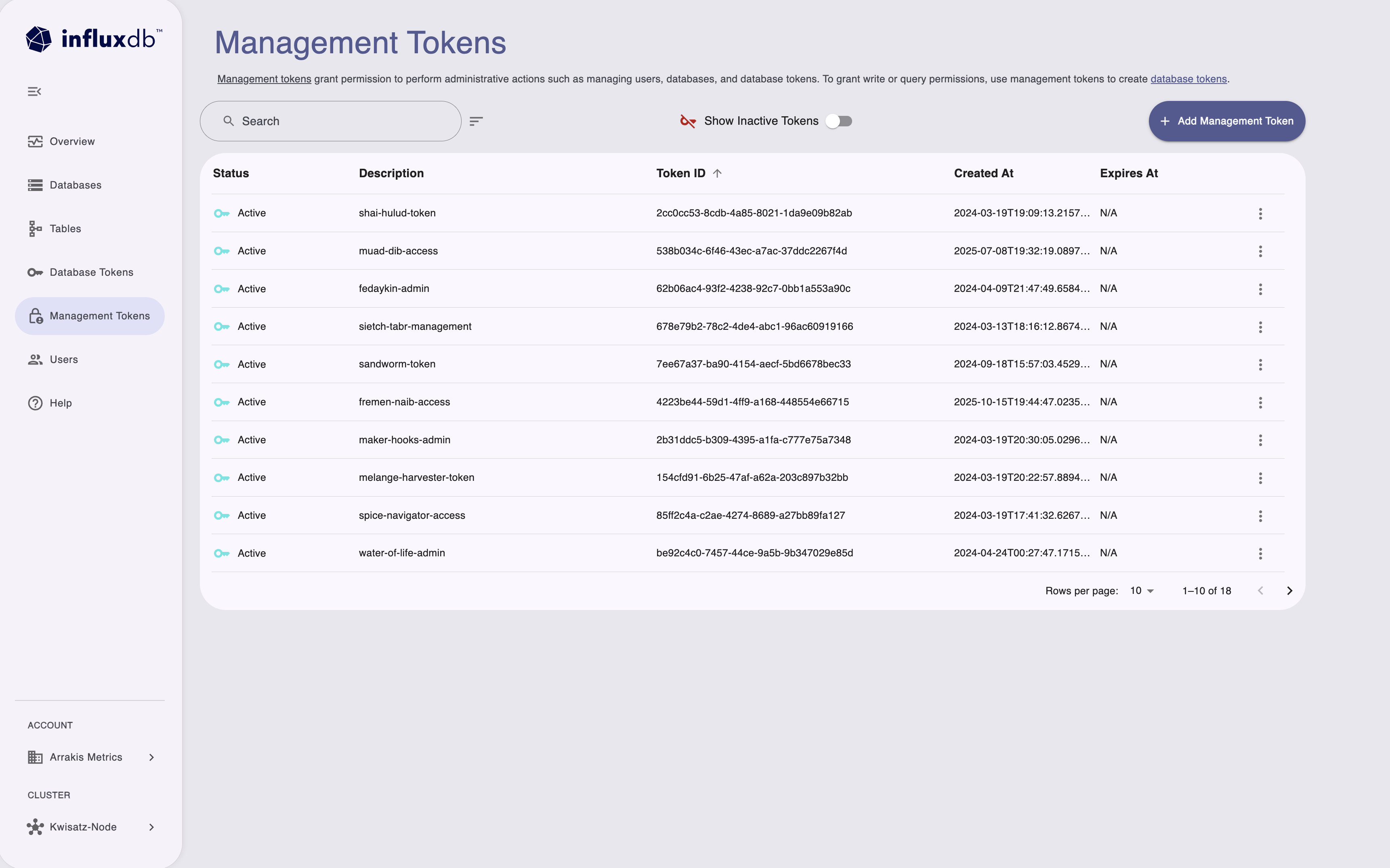
Use the Management Tokens page to manage tokens for account-level administrative operations:
- Create and manage management tokens for administrative tasks.
- View token status, descriptions, and creation dates.
- Manage permissions for users, databases, and database tokens.
- Toggle display of inactive tokens.
Management tokens grant permission to perform administrative actions such as managing users, databases, and database tokens.
The Management Tokens portal displays the following information about each token:
- Status
- Description
- Token ID
- Created date
- Expiration date
You can Search tokens by description or ID to filter the list and use the sort button and column headers to sort the list.
If you haven’t already, download and install the
influxctlCLI.Run
influxctl management listwith the following:- Optional: Output format
influxctl management list --format jsonManagement token strings are not retrievable
The actual management token string is not printed and is only returned when creating the token.
Revoked tokens are included in output
Revoked tokens still appear when listing management tokens, but they are no longer valid for any operations.
Output formats
The influxctl management list command supports two output formats: table and json.
By default, the command outputs the list of tokens formatted as a table.
For easier programmatic access to the command output, include --format json
with your command to format the token list as JSON.
Example output
+--------------------------------------+-------------------------------+-----------+----------------------+----------------------+----------------------+
| ID                                   | DESCRIPTION                   | PREFIX    | CREATED AT           | EXPIRES AT           | REVOKED AT           |
+--------------------------------------+-------------------------------+-----------+----------------------+----------------------+----------------------+
| 000x0000-000x-0000-X0x0-X0X00000x000 | Client1 token                 | M.V1.+5Jk | 2024-03-12T19:58:47Z | 1970-01-01T00:00:00Z | 2024-03-12T20:03:29Z |
| 000x000X-Xx0X-0000-0x0X-000xX000xx00 | Client2 token                 | M.V1.ynmf | 2024-03-12T20:04:42Z | 1970-01-01T00:00:00Z | 2024-03-12T20:08:27Z |
| 00XXxXxx-000X-000X-x0Xx-00000xx00x00 | Client3 token                 | M.V1.Eij4 | 2024-03-12T20:05:59Z | 1970-01-01T00:00:00Z | 2024-03-12T20:08:27Z |
[
{
"id": "000x0000-000x-0000-X0x0-X0X00000x000",
"account_id": "0x0x0x00-0Xx0-00x0-x0X0-00x00XX0Xx0X",
"token_prefix": "M.V1.+5Jk",
"revoked_at": {
"seconds": 1710273809,
"nanos": 948178000
},
"created_at": {
"seconds": 1710273527,
"nanos": 622095000
},
"description": "Client1 token",
"created_by": "X0x0xxx0-0XXx-000x-00x0-0X000Xx00000"
},
{
"id": "00XXxXxx-000X-000X-x0Xx-00000xx00x00",
"account_id": "0x0x0x00-0Xx0-00x0-x0X0-00x00XX0Xx0X",
"token_prefix": "M.V1.ynmf",
"revoked_at": {
"seconds": 1710274107,
"nanos": 467542000
},
"created_at": {
"seconds": 1710273882,
"nanos": 819785000
},
"description": "Client2 token",
"created_by": "X0x0xxx0-0XXx-000x-00x0-0X000Xx00000"
},
{
"id": "000x000X-Xx0X-0000-0x0X-000xX000xx00",
"account_id": "0x0x0x00-0Xx0-00x0-x0X0-00x00XX0Xx0X",
"token_prefix": "M.V1.nAHw",
"expires_at": {
"seconds": 1719491696
},
"revoked_at": {
"seconds": 1710274650,
"nanos": 63389000
},
"created_at": {
"seconds": 1710274420,
"nanos": 436126000
},
"description": "Client3 token",
"created_by": "X0x0xxx0-0XXx-000x-00x0-0X000Xx00000"
}
]Was this page helpful?
Thank you for your feedback!
Support and feedback
Thank you for being part of our community! We welcome and encourage your feedback and bug reports for InfluxDB Cloud Dedicated and this documentation. To find support, use the following resources:
Customers with an annual or support contract can contact InfluxData Support.