---
title: Create a management token
description: Use the Admin UI or the influxctl management create command to manually create a management token.
url: https://docs.influxdata.com/influxdb3/cloud-dedicated/admin/tokens/management/create/
estimated_tokens: 1522
product: InfluxDB Cloud Dedicated
version: cloud-dedicated
---
# Create a management token
Use the Admin UI or the [`influxctl management create` command](/influxdb3/cloud-dedicated/reference/cli/influxctl/management/create) to manually create a management token.
By default, management tokens are short-lived tokens issued by an OAuth2 identity provider that grant a specific user administrative access to your InfluxDB Cloud Dedicated cluster. However, for automation purposes, you can manually create management tokens that authenticate directly with your InfluxDB cluster and do not require human interaction with your identity provider.
#### For automation use cases only
The tools outlined below are meant for automation use cases and should not be used to circumvent your identity provider. **Take great care when manually creating and using management tokens**.
InfluxDB Cloud Dedicated requires that at least one user associated with your cluster and authorized through your OAuth2 identity provider to manually create a management token.
**Admin UI:**
The InfluxDB Cloud Dedicated administrative UI includes a portal for creating and managing management tokens.
1. To access the InfluxDB Cloud Dedicated Admin UI, visit the following URL in your browser:
[https://console.influxdata.com](https://console.influxdata.com)
2. Use the credentials provided by InfluxData to log into the Admin UI. If you don’t have login credentials, [contact InfluxData support](https://support.influxdata.com).
3. Click the **Management Tokens** button in the upper right corner of the Account Management portal.
4. In the Management Tokens portal, click the **New Management Token** button. The **Create Management Token** dialog displays.
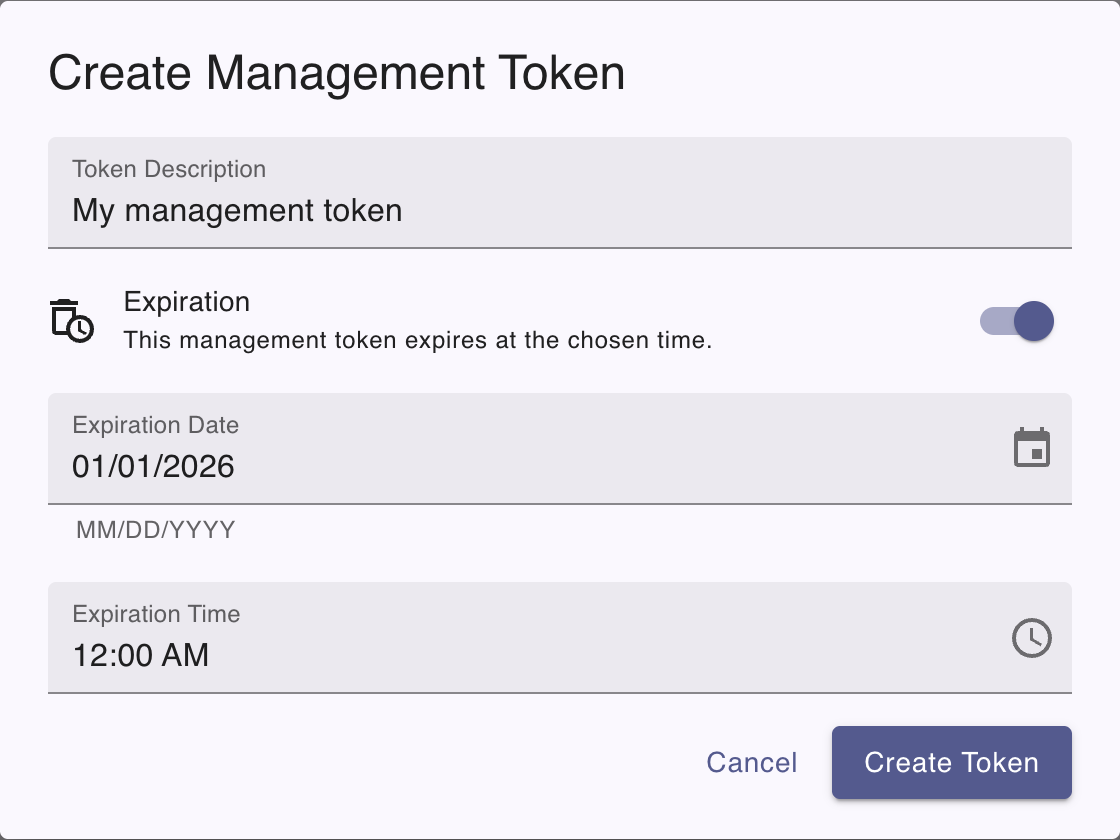
5. You can optionally set the following fields:
- **Expiration date**: Set an expiration date for the token
- **Expiration time**: Set an expiration time for the token
- **Description**: Enter a description for the token
If an expiration isn’t set, the token does not expire until revoked.
6. Click the **Create Token** button. The dialog displays the **Token secret** string and the description you provided.
**influxctl:**
1. If you haven’t already, [download and install the `influxctl` CLI](/influxdb3/cloud-dedicated/reference/cli/influxctl/#download-and-install-influxctl).
2. Use the [`influxctl management create` command](/influxdb3/cloud-dedicated/reference/cli/influxctl/management/create/) to manually create a management token. Provide the following:
- *Optional*: the `--expires-at` flag with an RFC3339 date string that defines the token expiration date and time–for example, `2026-05-13T00:00:00Z`. If an expiration isn’t set, the token does not expire until revoked.
- *Optional*: the `--description` flag with a description for the management token in double quotes `""`.
```sh
influxctl management create \
--expires-at RFC3339_EXPIRATION \
--description "TOKEN_DESCRIPTION"
```
Replace the following:
- `RFC3339_EXPIRATION`: An RFC3339 date string to expire the token at–for example, `2026-05-13T00:00:00Z`.
- `TOKEN_DESCRIPTION`: Management token description.
Once created, the command returns the management token string.
#### Store secure tokens in a secret store
Management token strings are returned *only* on token creation. We recommend storing database tokens in a **secure secret store**. For example, see how to \[authenticate Telegraf using tokens in your OS secret store\](https://github.com/influxdata/> telegraf/tree/master/plugins/secretstores/os).
#### Related
- [Use a management token](/influxdb3/cloud-dedicated/admin/tokens/management/#use-a-management-token)
- [influxctl management create](/influxdb3/cloud-dedicated/reference/cli/influxctl/management/create/)