Documentation

Create a management token

Use the Admin UI or the influxctl management create command to manually create a management token.

By default, management tokens are short-lived tokens issued by an OAuth2 identity provider that grant a specific user administrative access to your InfluxDB Cloud Dedicated cluster. However, for automation purposes, you can manually create management tokens that authenticate directly with your InfluxDB cluster and do not require human interaction with your identity provider.

For automation use cases only

The tools outlined below are meant for automation use cases and should not be used to circumvent your identity provider. Take great care when manually creating and using management tokens.

InfluxDB Cloud Dedicated requires that at least one user associated with your cluster and authorized through your OAuth2 identity provider to manually create a management token.

The InfluxDB Cloud Dedicated administrative UI includes a portal for creating and managing management tokens.

  1. To access the InfluxDB Cloud Dedicated Admin UI, visit the following URL in your browser:

    https://console.influxdata.com
    
  2. Use the credentials provided by InfluxData to log into the Admin UI. If you don’t have login credentials, contact InfluxData support.

  3. Click the Management Tokens button in the upper right corner of the Account Management portal.

  4. In the Management Tokens portal, click the New Management Token button. The Create Management Token dialog displays.
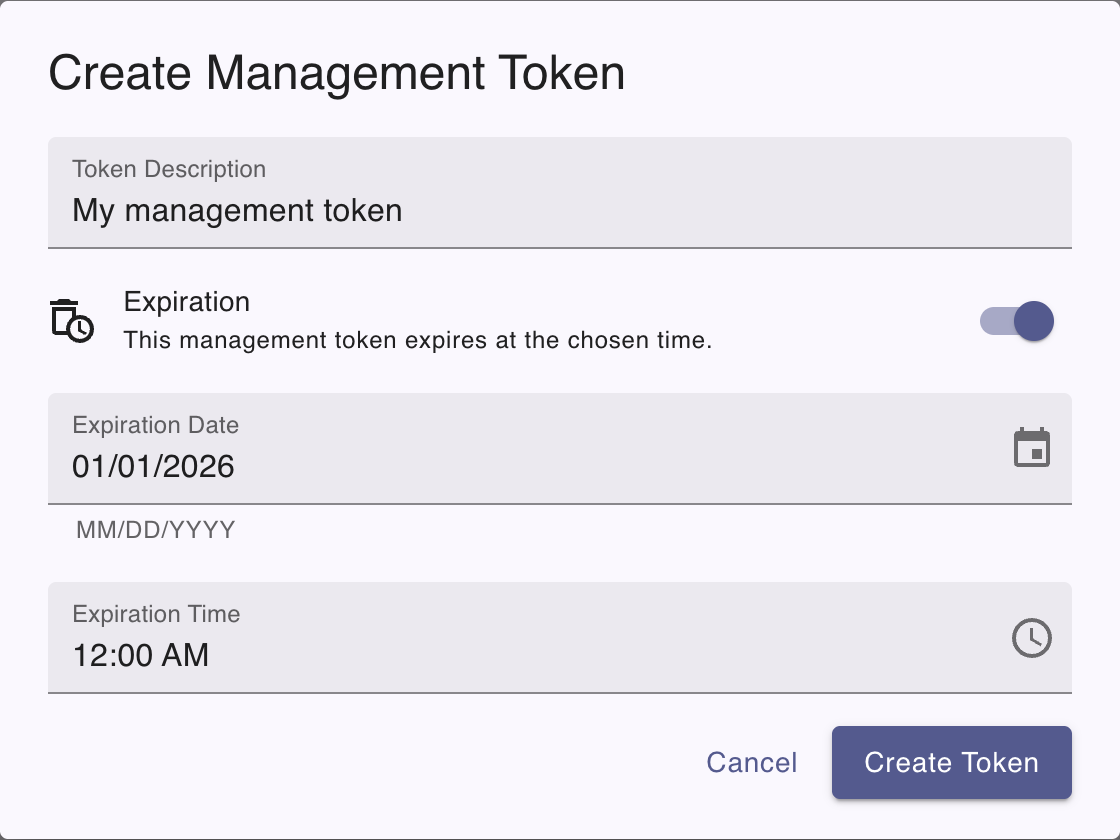
    Create management token dialog
  5. You can optionally set the following fields:

    • Expiration date: Set an expiration date for the token
    • Expiration time: Set an expiration time for the token
    • Description: Enter a description for the token

    If an expiration isn’t set, the token does not expire until revoked.

  6. Click the Create Token button. The dialog displays the Token secret string and the description you provided.

  1. If you haven’t already, download and install the influxctl CLI.

  2. Use the influxctl management create command to manually create a management token. Provide the following:

    • Optional: the --expires-at flag with an RFC3339 date string that defines the token expiration date and time–for example, <span class="current-date nowrap" offset="1" trim-time="false">2026-07-03T00:00:00Z</span>. If an expiration isn’t set, the token does not expire until revoked.
    • Optional: the --description flag with a description for the management token in double quotes "".
influxctl management create \
  --expires-at 
RFC3339_EXPIRATION
\
--description "
TOKEN_DESCRIPTION
"

Replace the following:

  • RFC3339_EXPIRATION: An RFC3339 date string to expire the token at–for example, <span class="current-date nowrap" offset="1" trim-time="false">2026-07-03T00:00:00Z</span>.
  • TOKEN_DESCRIPTION: Management token description.

Once created, the command returns the management token string.

Store secure tokens in a secret store

Management token strings are returned only on token creation. We recommend storing database tokens in a secure secret store. For example, see how to [authenticate Telegraf using tokens in your OS secret store](https://github.com/influxdata/> telegraf/tree/master/plugins/secretstores/os).


Was this page helpful?

Thank you for your feedback!


InfluxDB OSS 2.9.0: API tokens are hashed by default

Stronger token security in InfluxDB OSS 2.9.0 — tokens are hashed on disk by default. Existing tokens are hashed on first startup and can’t be recovered afterward. Capture any plaintext tokens you still need before you upgrade.

View InfluxDB OSS 2.9.0 release notes

Hashed tokens authenticate exactly like unhashed tokens — clients and integrations keep working.

Also new in 2.9.0:

  • Configurable backup compression
  • Restore support for backups containing hashed tokens
  • Tighter Edge Data Replication queue validation
  • Flux upgrade
  • Compaction reliability improvements

Key enhancements in Explorer 1.9

Explorer 1.9 is now available with InfluxQL support, an AI-assisted Flux to SQL converter (beta), and new live sample data simulators.

View Explorer 1.9 release notes

Explorer 1.9 includes new features and improvements that make it easier to query, visualize, and manage data.

Highlights:

  • Flux to SQL converter (beta): Convert Flux queries to SQL with an AI-assisted converter.
  • InfluxQL support: Query data with InfluxQL in the Data Explorer and dashboards, and save and load InfluxQL queries.
  • InfluxQL visualizations: Render line and bar charts from InfluxQL results with per-tag series grouping.
  • Query error history: Review a history of query errors in the query tool.
  • Live sample data simulators: Generate continuous live sample data with new bird data and signal generator simulators.

For more details, see Explorer 1.9 release notes

InfluxDB 3.10 is now available

InfluxDB 3 Core 3.10 adds an automatic catalog format upgrade, a configurable query-concurrency limit, and processing engine improvements.

Key updates in InfluxDB 3 Core 3.10:

  • Catalog format upgrade: the on-disk catalog automatically upgrades from format v2 to v3 on first 3.10 startup. Migration is one-way—back up your catalog before upgrading.
  • --max-concurrent-queries: limit concurrent queries (adjustable at runtime).
  • GET /ready endpoint for readiness probes.
  • Processing engine: cross-database queries and trigger lockdown flags.

For more information, see the InfluxDB 3 Core release notes.

InfluxDB 3.10 is now available

InfluxDB 3 Enterprise 3.10 adds automated backup and restore, row-level deletions, and user management, with an automatic catalog format upgrade and performance preview improvements.

Key updates in InfluxDB 3 Enterprise 3.10:

  • Catalog format upgrade: the on-disk catalog automatically upgrades from format v2 to v3 on first 3.10 startup. Migration is one-way—back up your catalog before upgrading.
  • Automated backup and restore (beta)
  • Row-level deletions
  • User management (authentication and RBAC) — preview
  • Performance preview improvements

Backup and restore, row-level deletions, and the performance preview require the Enterprise storage engine upgrade (opt-in beta). Beta and preview features are subject to breaking changes and aren’t recommended for production use.

For more information, see the InfluxDB 3 Enterprise release notes

Telegraf Enterprise is now generally available

Telegraf Enterprise is now generally available, along with Telegraf Controller v1.0.

Telegraf Enterprise combines Telegraf Controller, a centralized management console for Telegraf, with official support from InfluxData. Manage configurations, monitor fleet health, and operate tens of thousands of Telegraf agents from a single system.

InfluxDB Docker latest tag changing to InfluxDB 3 Core

On September 15, 2026, the latest tag for InfluxDB Docker images will point to InfluxDB 3 Core. To avoid unexpected upgrades, use specific version tags in your Docker deployments.

If using Docker to install and run InfluxDB, the latest tag will point to InfluxDB 3 Core. To avoid unexpected upgrades, use specific version tags in your Docker deployments. For example, if using Docker to run InfluxDB v2, replace the latest version tag with a specific version tag in your Docker pull command–for example:

docker pull influxdb:2