
Use LibreDB Studio with InfluxDB OSS
This page documents an earlier version of InfluxDB OSS. InfluxDB 3 Core is the latest stable version.
API token hashing is enabled by default in InfluxDB OSS 2.9.0
Stronger token security: tokens are stored as hashes on disk, so a copy of the database file doesn’t expose usable tokens. Existing tokens are hashed on first startup and the original strings can’t be recovered afterward — capture any plaintext tokens you still need before you upgrade.
For more information, see Token hashing.
Use LibreDB Studio, an open source (MIT) web-based database IDE, to browse the buckets in InfluxDB OSS v2, run InfluxQL queries, and chart the results. LibreDB Studio queries InfluxDB through the InfluxDB 1.x compatibility API and reads each bucket through its DBRP mapping.
LibreDB Studio is read-only on InfluxDB.
It runs only SELECT, SHOW, and EXPLAIN statements and refuses any other statement before it reaches InfluxDB.
It doesn’t run Flux.
The examples on this page use the get-started bucket and the sample home sensor data from
Get started writing data.
Create a read-only token
LibreDB Studio needs an API token with read access to the buckets you want to query.
To create a token that can only read the get-started bucket,
use the influx auth create command:
influx auth create \
  --org ORG_NAME \
  --read-bucket BUCKET_ID \
  --description "LibreDB Studio read-only"
Replace the following:
ORG_NAME: your organization nameBUCKET_ID: the ID of the bucket to read. To find it, runinflux bucket list --name get-started.
Copy the token from the command output.
Start LibreDB Studio
Run the LibreDB Studio Docker image:
docker run --name libredb-studio -p 3000:3000 ghcr.io/libredb/libredb-studio:latestOn first start, LibreDB Studio prints the admin email and a generated password to the container log.
To view them, run docker logs libredb-studio.
- Open
http://localhost:3000. - Sign in with those credentials.
The host name you enter in the next section must resolve from inside the LibreDB Studio container,
where localhost is the container itself:
- If InfluxDB runs in a Docker container, start LibreDB Studio on the same Docker network
(
docker run --network NETWORK_NAME ...) and use the InfluxDB container name as the host. - If InfluxDB runs directly on a Linux host, start LibreDB Studio with
--network hostinstead of-p 3000:3000and uselocalhostas the host.
Connect to InfluxDB
Use the InfluxQL database name from the bucket’s database and retention policy (DBRP) mapping.
List DBRP mappings to find the database name and retention policy for the bucket you want to query.
For the get-started bucket from Get started writing data,
the virtual mapping uses get-started as the database name and autogen as the default retention policy.
A bucket named db/rp instead maps to database db and retention policy rp.
Explicit DBRP mappings can override virtual mappings, so verify the mapping before connecting.
In the LibreDB Studio sidebar, click + to add a connection.
Select InfluxDB (InfluxQL).
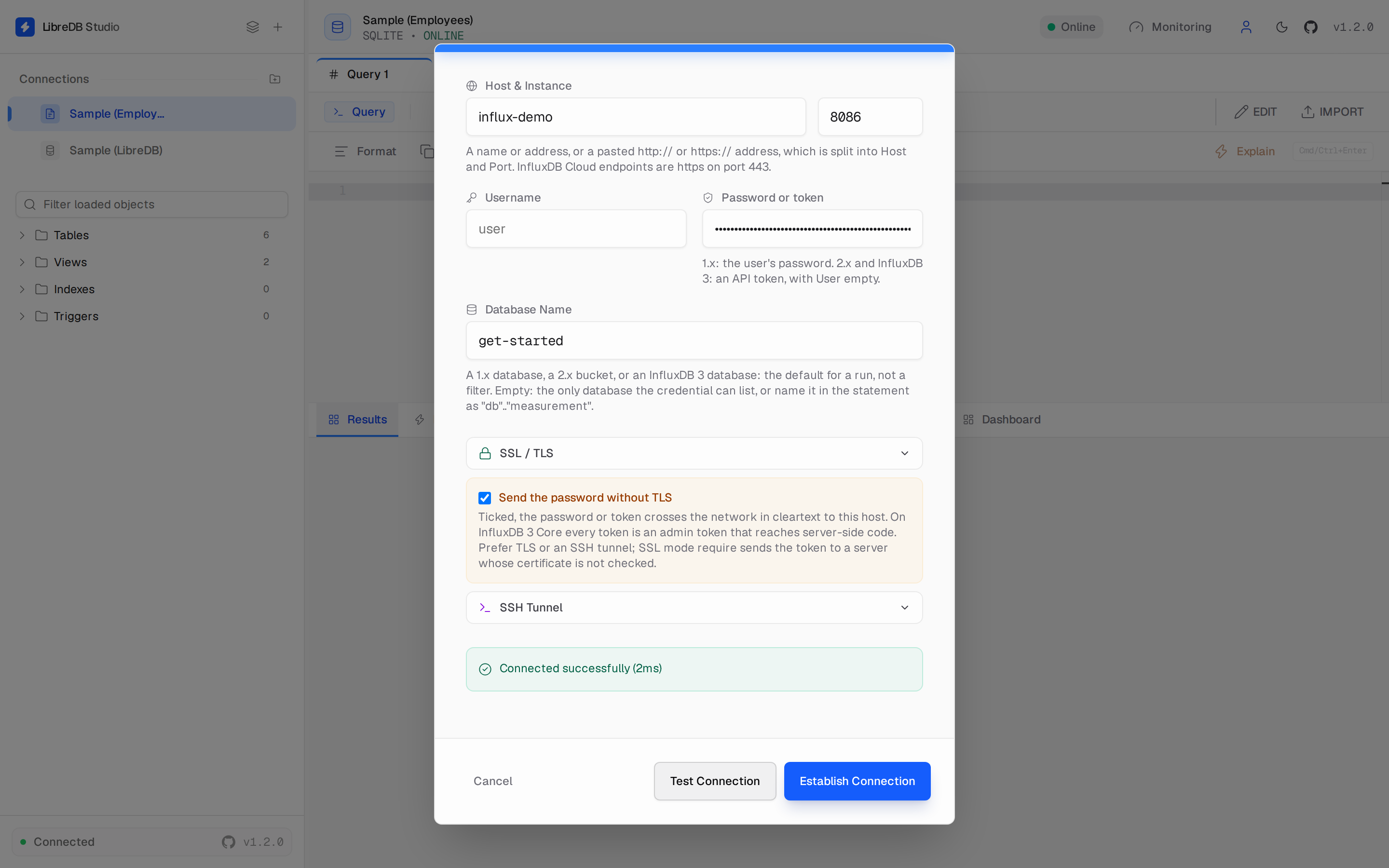
Enter the following:
- Host: the InfluxDB host name, for example
localhost - Port:
8086 - Username: leave empty
- Password or token: the read-only token you created
- Database Name: the mapped InfluxQL database name, for example
get-startedwhen using the virtual mapping
- Host: the InfluxDB host name, for example
If the host isn’t
localhostand InfluxDB doesn’t use TLS, LibreDB Studio refuses to send the token in cleartext. Configure SSL / TLS, use an SSH Tunnel, or select Send the password without TLS to accept that risk.Click Test Connection.
Click Establish Connection.
Query data
The sidebar lists the bucket and its measurements.
Click a measurement to open a query tab with a starter SELECT statement.
- Enter an InfluxQL query.
- Click Run.
For example, the following query returns the hourly mean temperature and maximum carbon monoxide reading in the kitchen from the sample data:
SELECT mean("temp") AS "temp", max("co") AS "co"
FROM "home"
WHERE "room" = 'Kitchen'
  AND time >= '2022-01-01T08:00:00Z' AND time <= '2022-01-01T20:00:00Z'
GROUP BY time(1h)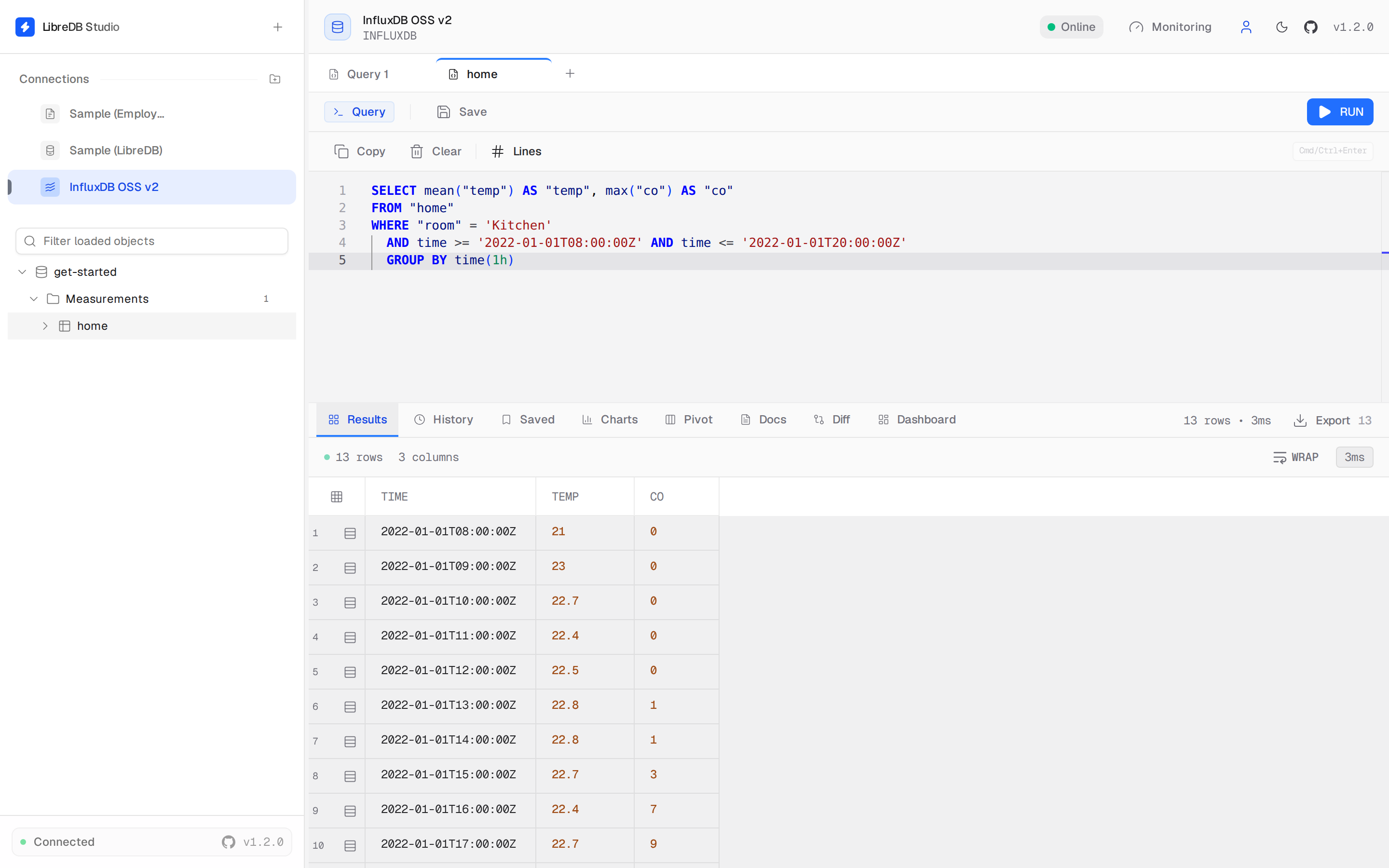
To query another mapped database using its default retention policy,
use "DATABASE".."MEASUREMENT" in the FROM clause.
To query a non-default retention policy, use "DATABASE"."RETENTION_POLICY"."MEASUREMENT".
Replace DATABASE and RETENTION_POLICY with the names from the bucket’s
DBRP mapping,
and replace MEASUREMENT with the measurement name.
Your token must have read access to the mapped bucket.
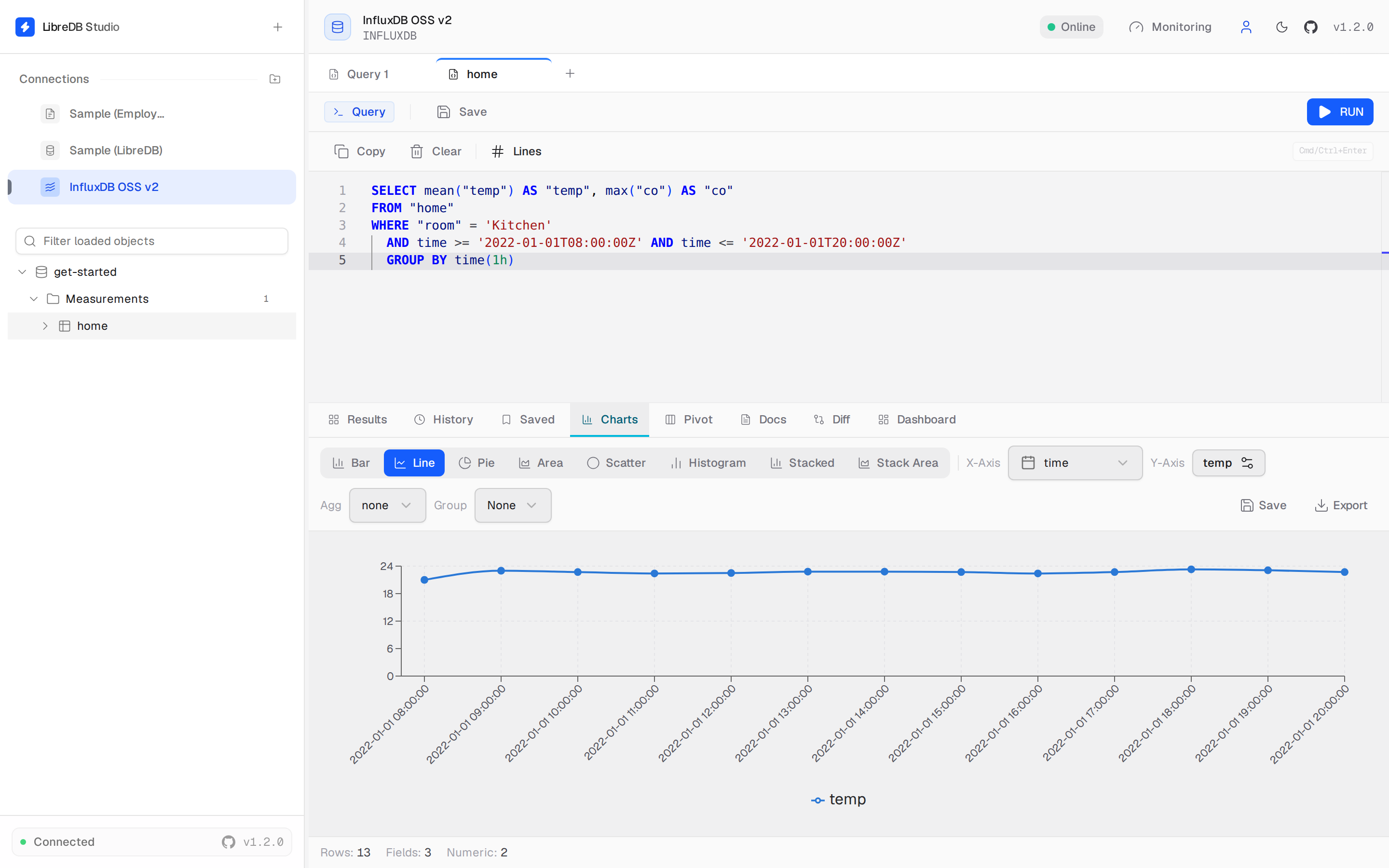
Chart query results
- Run a query.
- Select the Charts tab.
- Select a chart type.
- Set X-Axis to
time. - Set Y-Axis to a field.
Was this page helpful?
Thank you for your feedback!
Support and feedback
Thank you for being part of our community! We welcome and encourage your feedback and bug reports for InfluxDB OSS v2 and this documentation. To find support, use the following resources:
Customers with an annual or support contract can contact InfluxData Support.