Documentation

Control a dashboard

This page documents an earlier version of InfluxDB OSS. InfluxDB 3 Core is the latest stable version.

API token hashing is enabled by default in InfluxDB OSS 2.9.0

Stronger token security: tokens are stored as hashes on disk, so a copy of the database file doesn’t expose usable tokens. Existing tokens are hashed on first startup and the original strings can’t be recovered afterward — capture any plaintext tokens you still need before you upgrade.

For more information, see Token hashing.

Control at the dashboard level

Use dashboard controls in the upper left to update your dashboard.

Add a cell

Click Add Cell to open the Data Explorer and configure a new cell for your dashboard.

For details on using the Data Explorer, see Explore metrics.

Add a note

  1. Click Add Note to add a note cell to your dashboard.
  2. Enter your note in Markdown in the left pane. A preview appears in the right pane.
  3. Enable the Show note when query returns no data option to show the note only when the query displays no data.
  4. Click Save.

Select timezone

Click the timezone dropdown to select a timezone to use for the dashboard. Select either the local time (default) or UTC.
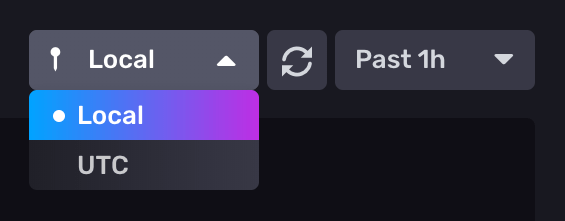
Select timezone

Manually refresh dashboard

Click the refresh button () to manually refresh the dashboard’s data.

Manually refresh a single dashboard cell

  1. Click the on the dashboard cell you want to refresh.
  2. Click Refresh.

Select time range

  1. Select from the time range options in the dropdown menu.

    Select time range
  2. Select Custom Time Range to enter a custom time range with precision up to nanoseconds. The default time range is 5 minutes.

The custom time range uses the selected timezone (local time or UTC).

Add variables

Click Variables to display variables available for your dashboard. For details, see Use and manage variables

Presentation mode

Click the fullscreen icon () to enter presentation mode. Presentation mode allows you to view [a dashboard] in full screen, hiding the left and top navigation menus so only the cells appear. This mode might be helpful, for example, for stationary screens dedicated to monitoring visualizations.

Toggle dark mode and light mode

Click the moon or sun icons to toggle your dashboard between dark mode and light mode.

Dark & light mode

Was this page helpful?

Thank you for your feedback!


InfluxDB OSS 2.9.0: API tokens are hashed by default

Stronger token security in InfluxDB OSS 2.9.0 — tokens are hashed on disk by default. Existing tokens are hashed on first startup and can’t be recovered afterward. Capture any plaintext tokens you still need before you upgrade.

View InfluxDB OSS 2.9.0 release notes

Hashed tokens authenticate exactly like unhashed tokens — clients and integrations keep working.

Also new in 2.9.0:

  • Configurable backup compression
  • Restore support for backups containing hashed tokens
  • Tighter Edge Data Replication queue validation
  • Flux upgrade
  • Compaction reliability improvements

Key enhancements in Explorer 1.9

Explorer 1.9 is now available with InfluxQL support, an AI-assisted Flux to SQL converter (beta), and new live sample data simulators.

View Explorer 1.9 release notes

Explorer 1.9 includes new features and improvements that make it easier to query, visualize, and manage data.

Highlights:

  • Flux to SQL converter (beta): Convert Flux queries to SQL with an AI-assisted converter.
  • InfluxQL support: Query data with InfluxQL in the Data Explorer and dashboards, and save and load InfluxQL queries.
  • InfluxQL visualizations: Render line and bar charts from InfluxQL results with per-tag series grouping.
  • Query error history: Review a history of query errors in the query tool.
  • Live sample data simulators: Generate continuous live sample data with new bird data and signal generator simulators.

For more details, see Explorer 1.9 release notes

InfluxDB 3.10 is now available

InfluxDB 3 Core 3.10 adds an automatic catalog format upgrade, a configurable query-concurrency limit, and processing engine improvements.

Key updates in InfluxDB 3 Core 3.10:

  • Catalog format upgrade: the on-disk catalog automatically upgrades from format v2 to v3 on first 3.10 startup. Migration is one-way—back up your catalog before upgrading.
  • --max-concurrent-queries: limit concurrent queries (adjustable at runtime).
  • GET /ready endpoint for readiness probes.
  • Processing engine: cross-database queries and trigger lockdown flags.

For more information, see the InfluxDB 3 Core release notes.

InfluxDB 3.10 is now available

InfluxDB 3 Enterprise 3.10 adds automated backup and restore, row-level deletions, and user management, with an automatic catalog format upgrade and performance preview improvements.

Key updates in InfluxDB 3 Enterprise 3.10:

  • Catalog format upgrade: the on-disk catalog automatically upgrades from format v2 to v3 on first 3.10 startup. Migration is one-way—back up your catalog before upgrading.
  • Automated backup and restore (beta)
  • Row-level deletions
  • User management (authentication and RBAC) — preview
  • Performance preview improvements

Backup and restore, row-level deletions, and the performance preview require the Enterprise storage engine upgrade (opt-in beta). Beta and preview features are subject to breaking changes and aren’t recommended for production use.

For more information, see the InfluxDB 3 Enterprise release notes

Telegraf Enterprise is now generally available

Telegraf Enterprise is now generally available, along with Telegraf Controller v1.0.

Telegraf Enterprise combines Telegraf Controller, a centralized management console for Telegraf, with official support from InfluxData. Manage configurations, monitor fleet health, and operate tens of thousands of Telegraf agents from a single system.

InfluxDB Docker latest tag changing to InfluxDB 3 Core

On September 15, 2026, the latest tag for InfluxDB Docker images will point to InfluxDB 3 Core. To avoid unexpected upgrades, use specific version tags in your Docker deployments.

If using Docker to install and run InfluxDB, the latest tag will point to InfluxDB 3 Core. To avoid unexpected upgrades, use specific version tags in your Docker deployments. For example, if using Docker to run InfluxDB v2, replace the latest version tag with a specific version tag in your Docker pull command–for example:

docker pull influxdb:2